Snapchat Parental Controls: A 3-Layer Security Guide (Native vs. Device vs. AirDroid)
Disappearing messages on Snapchat are often a source of anxiety for concerned parents, as it makes it hard to know what their kids are doing on the Internet. With Snapchat parental controls, you can effectively mitigate these Snapchat risks and navigate their online communication without making them feel suspicious.
The real challenge is not about breaching privacy, but finding a balanced way to navigate these digital boundaries in a fast-paced world. Therefore, having a clear reference is crucial to provide a supportive safety net without breaking family trust.
In this guide, we will discuss three layers of cybersecurity in depth, starting with native parental controls for the app and ending with device guidance. Furthermore, we will explore an additional safety net as a proactive option for you.
The Parents' Dilemma: Should You Actually Use Snapchat Controls?
The main question is not just about the technological understanding of should you let your child has Snapchat, but how these monitoring tools can help nurture a good relationship with your child. Guiding them through the digital era requires a communication approach that prioritizes empathy and openness.
Deciding to use built-in safeguards through Family Center means you have to balance two crucial things simultaneously. You need to respect teens' privacy needs while fulfilling the responsibility for their cyber safety using Snapchat parental controls.
The decision should be based on an objective evaluation of their digital literacy. This is where integrating a comprehensive tool such as AirDroid Parental Controls bridges the gap between native limits and true guardian responsibility.
The Decision Matrix
Learning how to use Snapchat parental controls and when to provide them with space is the key to developing the independence of your child. This strategy should be modified according to the dynamics and emotional readiness of your family.
- ✅ Use Controls If:
- The child is under 13: In compliance with COPPA, kids under 13 should not be on the app, but if they are, extra guidance through built-in safety features is necessary as "training wheels", given the vulnerability of their developing brain.
- History of risky behavior: Navigating through Snapchat parental controls is a mandatory step if the child has previously faced issues such as cyberbullying, sextortion, or contact with strangers.
- First-time users: Treat this initial phase as a training period, with safety settings enabled to provide guidance, then give them space once they demonstrate digital literacy.
- Signs of distress: Checking in through Snapchat parental controls becomes a reasonable action if teens start showing behavioral changes, such as anxiety, sleep loss, or being secretive.
- 🚫 Skip Controls If:
- They are an older teen (16+): Interventions that are too rigid often backfire, pushing children to create secondary 'spam' accounts or use a secondary device.
- Trust has been established: If the child proactively tells you about weird DMs, they have already practiced the healthy judgment you instilled in them.
- Privacy is the priority: Respecting a child's cyber-space boundaries is often more effective at strengthening emotional bonds because it is their only sanctuary.
Layer 1: Native App Controls (Snapchat Family Center)
Snapchat Family Center is an official approach, through these built-in safeguards, is designed to be a transparent collaboration space with your teen. This method aims to foster mutual respect and minimize the impression of secret inspections.
Understanding how these native monitoring features work helps you discuss safety boundaries without breaching your teen's privacy. This is an ideal first step to supportively navigate their daily online life.
| Features | Visibility Scope | Operational Guardrails |
|---|---|---|
| Social Mapping | Displays new friend additions and active contact partners from the past 7 days (not the entire friend list). | Cannot view private chat text or media attachments. |
| Interaction Logs | Logs active conversation partners over a rolling 7-day window. | No metadata on message frequency or timestamps. |
| Group Dynamics | Exposes all active participants within your teen's group chats. | Cannot intercept or block specific group members. |
| Feed Filtration | Flags and restricts sensitive content on Stories and Spotlight feeds. | Does not filter external web search or browser links. |
| AI & Mapping | Allows restriction of "My AI" and reviews the teen's current Snap Map location-sharing settings. | Evasion possible if the child disables device GPS. |
🚨The Blind Spots (The Limitations):
While helpful, these native safety features have several technical limitations to keep in mind. You must be aware of these guidance gaps:
- Zero System-Level Control: Family Center cannot enforce hard app blocks, screen time down-times, or restrict new app installations on the device.
- Siloed Protection: This security ecosystem applies only within the app and does not extend to your child's activities on other platforms(WhatsApp, Instagram, Discord).
- Revocable Authority Because setup requires explicit consent, teens can unilaterally revoke parental access at any moment, creating an instant blind spot.
Layer 2: Device-Level Controls (Family Link & Bark)
Family Link (Android only)
Family Link is suitable for parents who want to establish digital hygiene before implementing app-specific monitoring. This facility is designed as an initial foundation to gently guide teens toward taking responsibility for their devices.
Its primary role is not to inspect internal conversations, but to balance online entertainment with real life. Through this system's guidance, children will understand the importance of managing screen time healthily.
| Features | Visibility Scope | Operational Guardrails |
|---|---|---|
| App Activity Metrics | Logs daily and weekly aggregate time spent across all installed applications. | Cannot track specific user actions or view screens inside the apps. |
| Screen Time Curfews | Enforces hard daily usage quotas and automatic lock schedules (Bedtime). | Minors may alter device system clocks or abuse emergency call overlays to delay locks, though continuous background sync mitigates this. |
| Gatekeeping Downloads | Blocks all Google Play Store installations pending explicit remote parental approval. | Ineffective against sideloaded applications via web browsers or APKs. |
| Geolocation Tracking | Provides real-time device tracking and geofencing alerts via integrated GPS. | Fails if the device loses cellular connection or location services are toggled off. |
🚨The Blind Spots (The Limitations):
This system has blind spots because it does not penetrate internal app security. Here are the unreachable areas:
- Zero Social Visibility:: Family Link cannot view contact lists, incoming friend requests, or active conversation metadata within private networks like Snapchat.
- The Age 13 Hard Stop: Upon turning 13, legal regulations allow the child to unilaterally opt out of parental supervision, dismantling all restrictions.
- Limited on iOS devices: It provides comprehensive control over a child's Android device, but cannot support child profiles on iOS hardware.
Bark (Android & iOS)
Bark is an alert-style app that allows parents to monitor their children's online safety by scanning text messages, email, and social media for red flags. It encourages open dialogue by sending warnings only when dangerous behavior, such as bullying or adult material, appears.
| Features | Visibility Scope | Operational Guardrails |
|---|---|---|
| Multi-Platform Auditing | Scans text messages, emails, and 30+ social networks for high-risk lexicon. | Cannot guarantee 100% detection of evolving internet slang or coded text. |
| Contextual Risk Alerts | Extracts and surfaces specific conversational snippets that trigger risk filters. | Parents remain blind to the broader everyday context surrounding the alert. |
| Anomaly Detection | Automatically flags instances of cyberbullying, adult material, and self-harm indicators. | High rates of false positives require manual parental sorting and verification. |
🚨The Blind Spots (The Limitations):
Despite its benefits, this alert-based system has several functional gaps that parents should carefully consider:
- Incomplete Conversation Context: You only see content that specifically triggers an alert, limiting your ability to fully understand your child's everyday interactions.
- Inconsistent iOS Tracking: iOS protection still limits deep text access compared to Android.
Layer 3: Proactive App Safeguards (AirDroid)
Recent cybersecurity data from All About Cookies reveals that an overwhelming 96% of parents now actively protect their children's digital footprint across messaging and social platforms. However, when native ecosystem restrictions inevitably fall short against bypass loops, deploying a dedicated third-party layer like AirDroid Parental Control bridges the gap, transforming standard oversight into a proactive crisis-prevention tool.
As the new school year or extracurricular sports seasons bring new risks, such as post-baseball group chats, this tool powerfully complements standard built-in safeguards. By revealing the full picture of your child's online life, it helps you design a better communication strategy to keep them safe.
| Capability | Visibility Scope | Operational Guardrails |
|---|---|---|
| Keywords detection | Scan 14 + hot social media and send real-time alerts to parents. | It protects 14 mainstream apps only and fails to detect lesser-known ones. |
| Notification Mirroring | Syncs incoming notifications. | Prior authorization is required. |
| Screen Mirroring | Remote screen mirroring to provide immediate visual context of emergency on-screen interactions. | Prior authorization is required. |
| Location tracking & Geofencing | Blends real-time GPS positioning with automated arrival/departure boundary alerts. | Fails if the device loses cellular connection or location services are toggled off. |
| Inappropriate image detection | Can detect inappropriate photos stored on a child's phone and alert parents. | Only detect images already stored on the phone. |


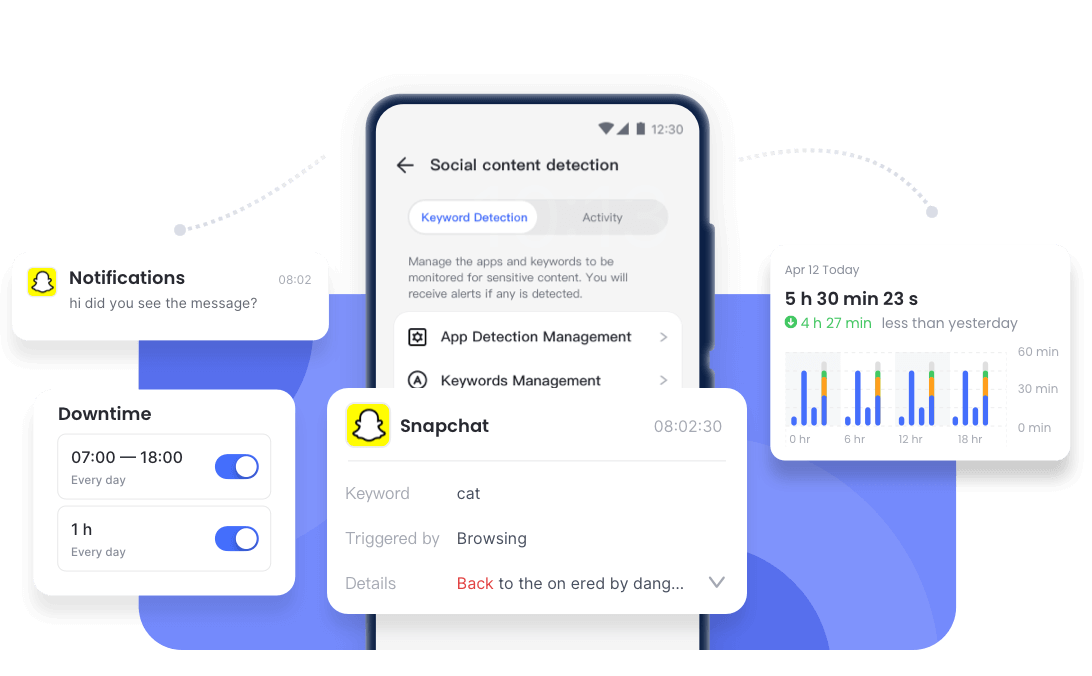
🚨The Blind Spots (The Limitations):
This third-party instrument still has essential limitations to be aware of in practice. Its use cannot replace the main pillars of parenting:
- Not an Official Tool: It is not a replacement for the app's official teen safeguards built on transparent collaboration.
- Requires Human Connection: It cannot completely substitute for open communication and real-world family emotional bonds.
Side-by-Side Comparison Table
| Features | Snapchat Family Center | Google Family Link | Bark Platform | AirDroid Parental Control |
|---|---|---|---|---|
| Visible to Teen? | Yes Requires teen's consent to link profiles. | Yes Shows permanent icon in notifications. | Yes Setup process cannot be fully hidden. | Optional Can run openly or silently in background. |
| Understand Chat Content? | No Only shows contact names from last 7 days. | No Zero access to internal text transmissions. | Partial Reveals snippets only when AI triggers alert. | Yes Syncs notifications and allows live screen view. |
| Manage Time Boundaries? | No Cannot restrict screen time or app use. | Yes Enforces daily limits, bedtime locks, and app blocks. | Partial Blocks scheduled internet access instead of single apps. | Yes Custom app-level schedules and time limits. |
| Capture Disappearing Chats? | No Vanished messages disappear from parent dashboard instantly. | No Cannot capture or analyze internal app data. | Limited Captures text details when trigger keywords. | Limited Captures text details when trigger keywords. |
| Navigate Friends List? | Yes Shows full friend list and new group members. | No No visibility into internal app networks. | No Only alerts if a contact triggers risk flags. | Yes Only use Screen Mirroring in an emergency. |
| Location Awareness? | Partial Relies entirely on teen sharing Snap Map. | Yes Native hardware GPS tracking for high stability. | No Lacks real-time tracking and automated geofences. | Yes Provides live GPS tracking with instant geofencing. |
| Primary Focus | Social circle transparency. | Digital habit hygiene. | Risk pattern screening. | Proactive emergency prevention. |
Best Setup by Family Situation
Determining the most effective approach to digital guidance requires evaluating your child's maturity and communication skills. By assessing these factors, you can apply safety configurations that match your family's unique digital environment.
- The Early Learner (Age 13): Native app safeguards serve as essential "training wheels" for establishing initial digital boundaries. According to a landmark tech trajectory study by the Pew Research Center, nearly 60% of teens actively engage with the platform, making early parameters critical for long-term digital literacy.
- The Rebellious Teen/Sudden Risk: If you notice sudden behavioral changes, complementing built-in limitations with a proactive tool like AirDroid provides the real-life context needed to navigate emergencies.
- The Responsible Young Adult: When older teens consistently demonstrate healthy judgment, easing up on restrictions is a wise step. Maintaining open, real-world discussions is significantly more effective at guiding mature teens.
In conclusion, the native platform features are an excellent starting point for building family agreements. However, if you need broader visibility across the device, a proactive second layer like AirDroid Parental Control can help fill the gaps of those security features.
The Risks of Over-Guiding
Applying overly restrictive monitoring rules without understanding why teens use Snapchat—such as their desire for fleeting, peer-to-peer interactions—often triggers adverse psychological effects.
This disconnect drives children "underground" to secretly find loopholes like secondary 'spam' accounts. By leveraging a comprehensive but discreet layer such as AirDroid, guardians can meet their safety responsibilities without causing this friction.
Additionally, you should openly discuss the reasons behind using these tools to maintain ethical boundaries while guiding your child. Explain that privacy is earned and respected, but cyber safety is their absolute right.
Healthy parenting is not about creating a total surveillance state within your household. These various guidance instruments are merely supporting tools, as the strongest defense foundation is always rooted in warm family communication.
A Better Approach: The "Trust-Tech" Hybrid
Navigating a child's daily digital life can never be solved by relying solely on advanced monitoring software. The success of parenting is deeply rooted in routine communication where you are present as an empathetic discussion partner.
Once a comfortable communication space is established, the next crucial step is to invite your child to establish a Snapchat family digital agreement together so they feel involved. Through these shared guidelines, it becomes much easier to shape the child's internal compass when navigating confusing online situations.
Ultimately, proportionally combining emotional trust with tools like AirDroid is the key to a successful guidance ecosystem. Ideally, these security tools should only function as an external layer, while the strongest pillar remains your warm bond with them.
If the fluid, high-risk nature of temporary chatting platforms still feels too vulnerable for your child's age, you can also consider steering them toward a dedicated safe messaging app for kids designed specifically with baseline child-safety guardrails built into the architecture.
FAQ
List of Sources
- Snapchat Risks, Safety & Parental Controls
- Snapchat Risks & Dangers for Kids (https://www.airdroid.com/social-media/snapchat-risks-and-dangers-for-kids/)
- AirDroid Parental Control Homepage (https://www.airdroid.com/parental-control/)
- Snapchat Parental Controls Guide (https://www.airdroid.com/parental-control/snapchat-parental-controls/)
- Is Your Child Actually Ready for Snapchat? (https://www.airdroid.com/social-media/is-your-child-actually-ready-for-snapchat/)
- Snapchat Family Center Deep Dive (https://www.airdroid.com/social-media/snapchat-family-center/)
- Why Do Teens Use Snapchat? (https://www.airdroid.com/social-media/why-do-teens-use-snapchat/)
- Parental Control Apps, Reviews & Downloads
- Google Family Link Review (https://www.airdroid.com/parental-insights/google-family-link-review/)
- Bark App Review (https://www.airdroid.com/parental-insights/bark-review/)
- AirDroid Kids (Google Play Store) (https://play.google.com/store/apps/details?id=com.sand.airdroidkidp)
- AirDroid Parental Control (Apple App Store) (https://apps.apple.com/app/parental-control-app-airdroid/id1525339567)
- Teen Social Media Use & Behavior Studies
- Research on Teens Using Secret Secondary Accounts (Oxford Academic) (https://academic.oup.com/jcmc/article/27/4/zmac009/6649192?login=false)
- Data Survey on Parents Tracking Their Children (All About Cookies) (https://allaboutcookies.org/how-many-parents-track-their-children)
- Teens, Social Media and Technology Survey (Pew Research Center) (https://www.pewresearch.org/internet/2023/12/11/teens-social-media-and-technology-2023/)











Leave a Reply.