AirDroid Parental Control
24/7 Kids' Guardian via App & Web
- 👀Live surroundings and location tracking
- 🔞Content Monitoring and App/Web Blocking
- ⚠Instant alerts for online risks and geofences
- ⌛Screen time control and monitor

Life360 vs Family360: A Practical Comparison Based on Real Usage
As children become more independent and spend more time outside the home, the most commonly mentioned tracking child location tools for maintaining parents’ peace of mind are Life360 and Family360(Family Nest).
However, knowing their names alone isn’t enough. You need to dive deeper into the Life360 vs Family360 comparison to figure out which one is actually better for keeping your child safe—not just tracking their location.
To find the honest answer, we conducted real-world testing using two devices (iOS & Android) to compare these apps based on their functionality, accuracy, and privacy standards. This review shows exactly how they perform and introduces a more comprehensive solution for long-term parental use.
Life360 vs Family360 Review at a glance
If you’re in a rush to decide, here is a quick breakdown.
- Choose Life360 if you want precise real-time location, accurate driving reports, and a smoother experience without constant refreshing.
- Choose Family360(Family Nest) if you want a very affordable subscription and a simpler, more privacy-focused tool
| Features | Life360 | Family360 | Winner |
|---|---|---|---|
| Google Play Rating | 4.5⭐/2M reviews | 4.6⭐/27k reviews | Life360 |
| Location Accuracy | High accuracy with instant updates | Basic tracking purposes, slightly inconsistent | Life360 |
| Location History | Reliable & Smooth | Requires manual refreshing occasionally | Life360 |
| Real-Time Alerts | Reliable with occasional delays | Sometimes sensitive | Life360 |
| Driving Insight Accuracy | Detailed metrics, but detect inaccurate phone usage | Basic route recording, but inaccurate route recording | Life360 |
| Emergency Features | SOS button & crash detection & Roadside Assistance &Emergency Dispatch | SOS & Siri shortcuts & Speed alerts | Family360 |
| Battery Consumption | 9% drain/24h | 37% drain/24h | Life360 |
| Ease of Use | User-friendly, but has pop-up ads | Clean, user-friendly navigation | Family360 |
| Pricing | $14.99/mo | $5.99/mo | Family360 |
Parents need to remember that location tracking alone is insufficient; neither of these is a complete parental control tool because they can’t manage screen time and prevent kids from cyberbullying/explicit/self-harm content.
What are Life360 and Family360 Designed for?
Life360’s Core Purpose
Life360, compatible with both Android and iOS devices, is widely considered the standard because our hands-on tests confirmed that its real-time tracking is pretty accurate with almost no lag.
It focuses heavily on driving safety and location tracking, making it the more reliable choice in the Life360 vs Family360 comparison for parents seeking a smooth experience. However, the user experience is slightly spoiled by occasional delays in real-time alerts and inaccurate driving insights.
Pros:
- Highly accurate tracking
- Battery consumption is friendly (only 9%)
- Smooth history updates
Cons:
- Slightly expensive
- Distracting pop-up ads
- Occasionally delayed real-time alerts
Family360’s (Family Nest) Core Purpose
Family360, compatible with both Android and iOS, is a budget-friendly alternative offering essential tracking features at a lower price. However, our hands-on tests found minor stability-related quirks: the app sometimes has jumping location markers and higher-than-average battery usage.
Pros:
- Flexible emergency messaging
- Includes traffic & direction info
- Affordable pricing
Cons:
- Occasional location fluctuations
- Alerts are a bit sensitive occasionally
- Drains battery fast (37%)
- Needs frequent refreshing
In this Life360 vs Family360 comparison, remember that both apps are designed only to track physical location, so neither tool can help you see what is actually happening in real time and protect your child from the invisible digital risks hiding on their screens.
Life360 vs Family360 Core Function Comparison
To help you decide, we break down exactly how these apps perform side by side.
1. Location Accuracy
We really appreciate Life360’s real-time tracking because our hands-on tests showed high accuracy, automatic updates, and no significant lag. While the geofencing feature detects arrivals and departures quite well (occasionally with delays), the free version unfortunately limits you to saving only two locations.
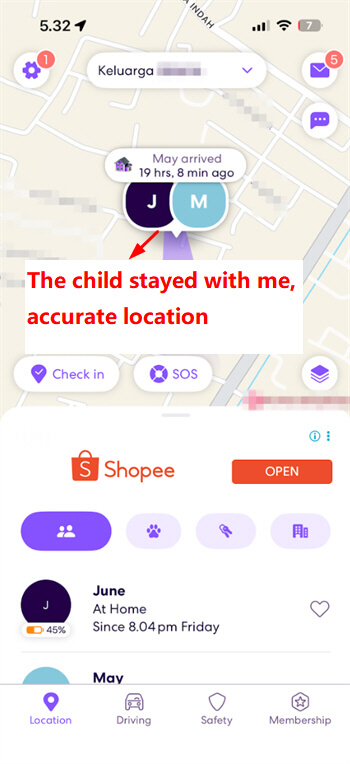
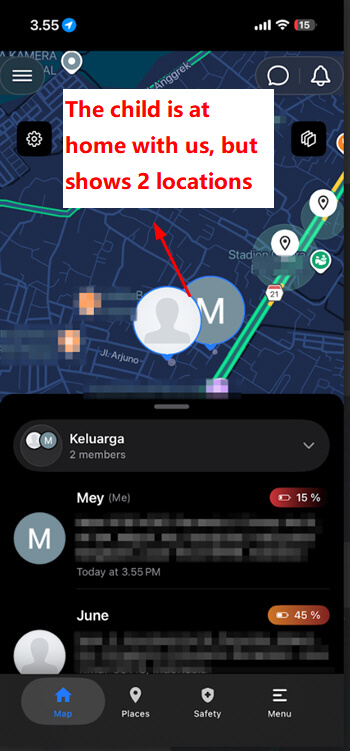
In our side-by-side comparison of Life360 and Family360, we observed that Family360 occasionally displayed inconsistent location tracking—with the marker shifting unexpectedly to random spots, even when the child was physically at home with us. Geofencing functionality presents a basic function, which occasionally did not always recognize our saved locations reliably.
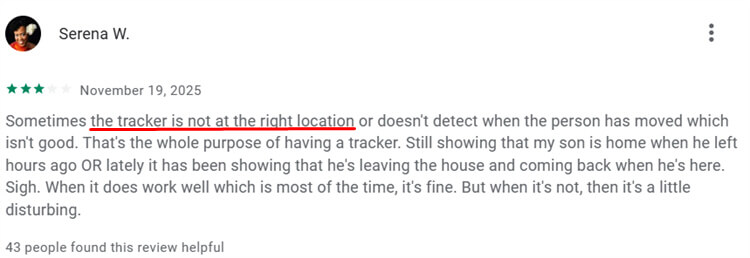
We aren’t alone in this; many other users also reported that Family360’s location often misses the actual position.
However, parents need to remember that simply knowing a child’s location doesn’t guarantee their total safety. For instance, your child could be at home but accessing inappropriate websites, or at school, yet being bullied by peers.
Parental control tools like AirDroid Parental Control can not only track location but also promptly check to see if your child has encountered bullying/explicit/self-harm content. The app will send real-time alerts so that parents can intervene easily.
2. Location History
Just like its tracking, Life360’s location history is very satisfying because the data updates automatically without requiring constant refreshes. During our testing, almost every route was recorded accurately and visualized well in the app with moving trip recording.
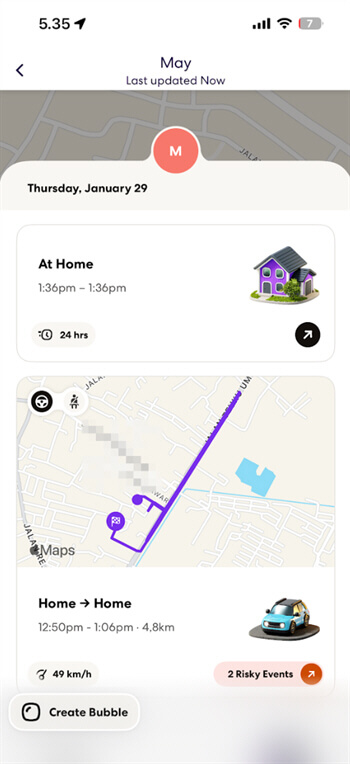
Family360 does come with a set of useful features, though we noticed that it occasionally logs trip records that do not align with actual movements, the cause of which remains unclear. For instance, there was an anomalous 10-second trip marked from 3:55 PM to 3:55 PM, along with several other similar entries.
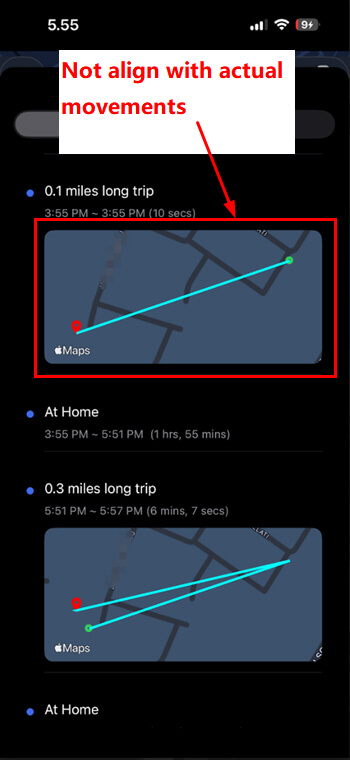
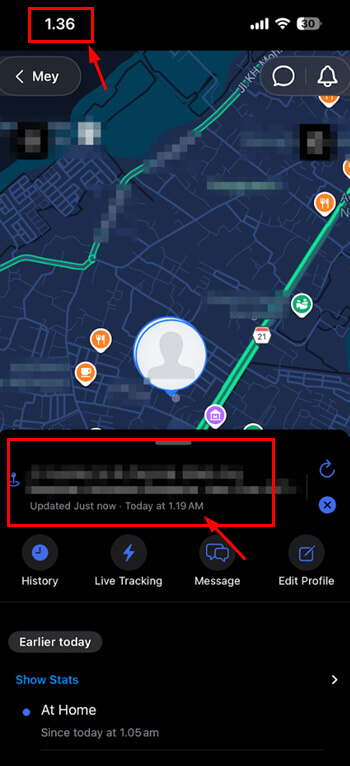
In addition, our overall experience was impacted by notable data sync delays, which required us to refresh or restart the app repeatedly. These aspects emerged as points to consider in our Life360 vs Family360 comparison.
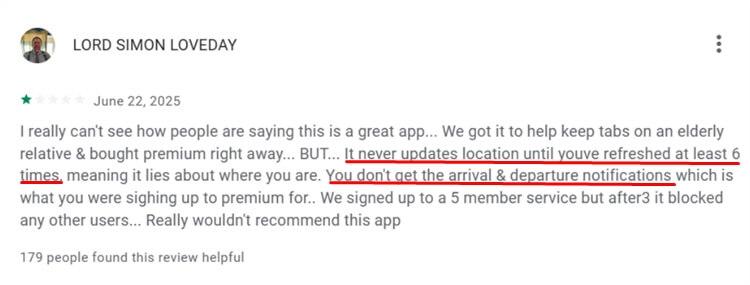
Users on Google Play also complained about this point.
Broadly speaking, both apps can provide informative daily logs for parents to review. However, Life360 feels much smoother and instant, whereas Family360 requires extra effort just to verify that the historical data is valid.
3. Real-Time Alerts
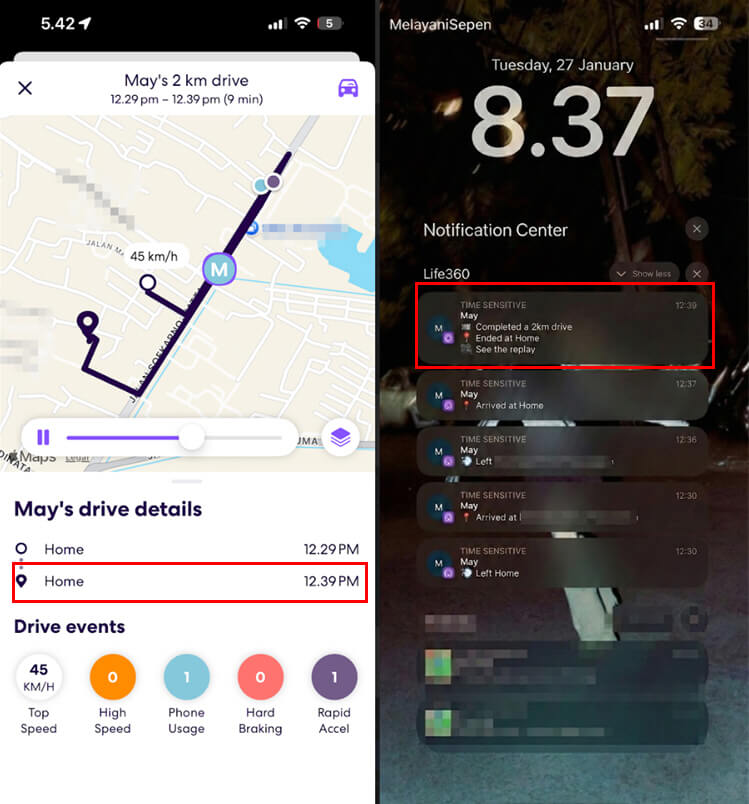
Based on our hands-on testing, Life360 notifications are consistent. For example, we received an alert at 12:30 PM—a minute after we had already left the house at 12:29 PM.
On the other hand, Family360’s alert system has some room for refinement in terms of usability and sensitivity calibration. We noticed it would send multiple notifications simply when driving past a saved location, while occasionally failing to alert us when we actually stopped at another preset spot.
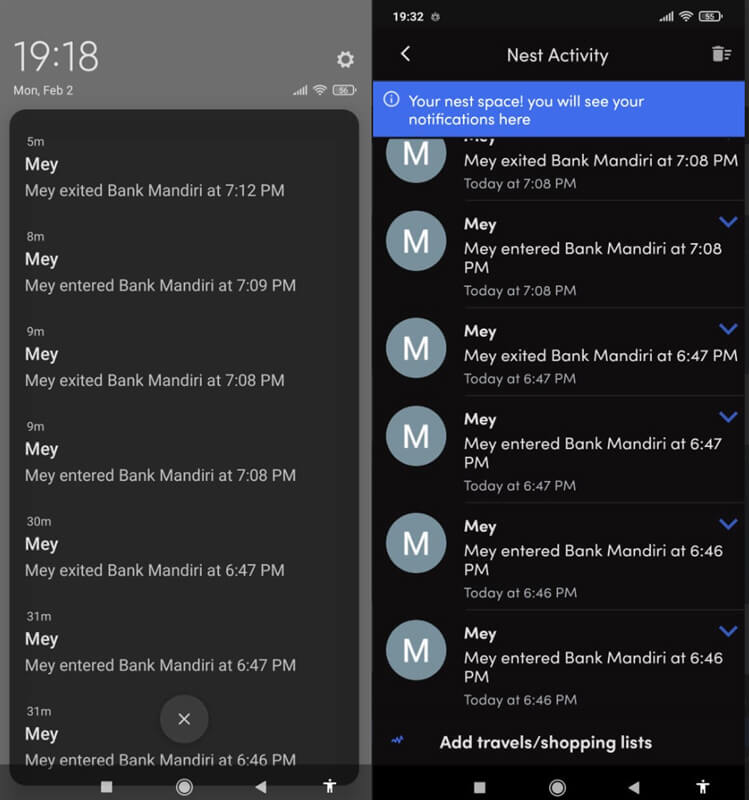
Both apps have good potential, but Life360 stands out with far smoother and more user-friendly real-time alerts. Notifications are delivered promptly without delays, and the alert logic aligns well with real-world usage scenarios, making the whole experience intuitive and hassle-free.
However, relying solely on alerts keeps parents passive since they can’t see the actual situation during an emergency. This is where tools like AirDroid Parental Control fill the gap, allowing you to listen to surroundings and view the environment directly through the remote camera and one-way audio.
4. Driving Insight Accuracy
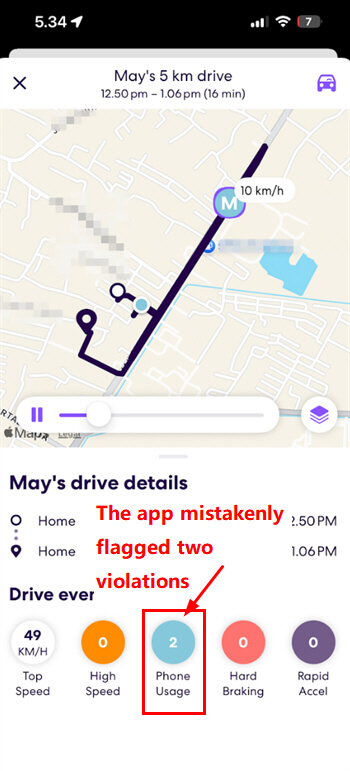
When reviewing driving reports in Life360, we found the starting-point accuracy was slightly off, failing to track the moment we left home; instead, it jumped to a different starting location. We also noticed inaccuracies in phone-usage detection: the app mistakenly flagged two violations, even though we had taken the phone out when our vehicle had completely stopped.
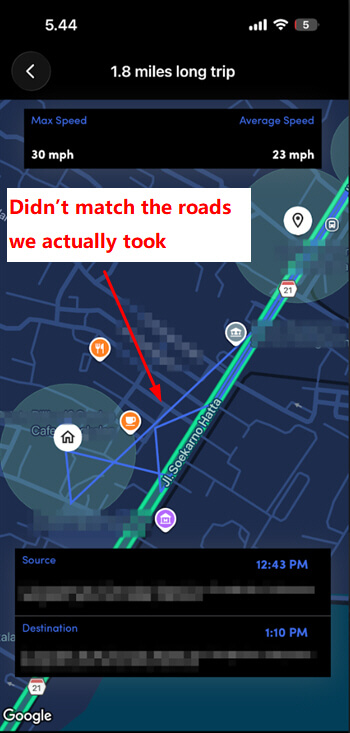
As for Family360, the driving insight feature is unfortunately not as complete or detailed as Life360’s. When directly comparing Life360 vs Family360, we found its recorded routes were messy (the lines aren’t on actual roads) and often didn’t match the roads we actually took.
Overall, both apps provide a helpful basic overview of family driving activities, but technical limitations mean neither is 100% reliable just yet. In this Life360 vs Family360 competition, both still have significant work to do to improve sensor sensitivity and better reflect reality.
5. Emergency Features
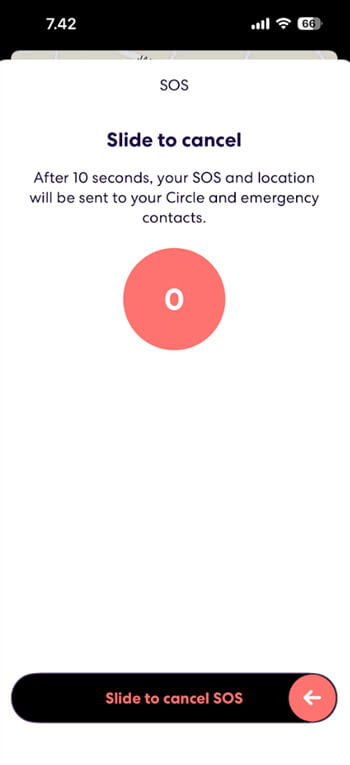
Life360 has an SOS feature that sends notifications after a 10-second countdown begins. However, we didn’t get any alerts or pop-up notifications when the countdown ended. Additionally, its crash detection feature sometimes experiences significant delays during real-world incidents. This delay is a significant note to consider when evaluating reliability in the Life360 vs Family360 comparison.
Family360 feels more versatile, allowing children to use Siri shortcuts without even opening the app and send custom messages. Although it lacks automatic crash detection, it offers a “Watch over Me” mode for proactive monitoring of risky trips. Most impressively, during our tests, all emergency alerts on Family360 arrived in real time with no delay.
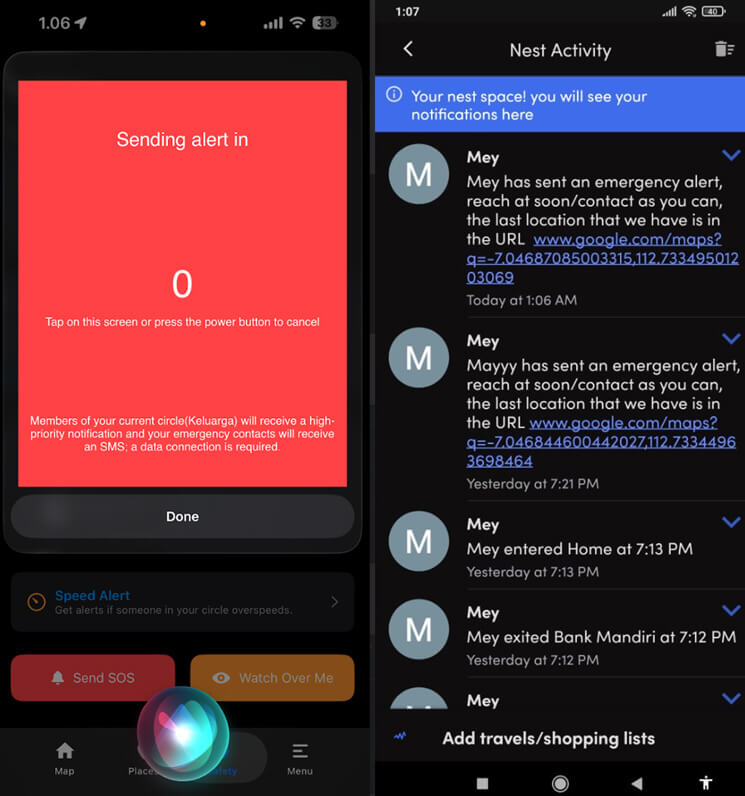
While both apps provide essential safety tools, Life360 struggles with delays in crash detection notifications, which can be risky. On the other hand, Family360 delivers more consistent performance with its instant alerts, though some features are limited to iOS users. Ultimately, the Life360 vs Family360 choice here depends on whether you prioritize automatic crash detection or faster communication.
6. Battery Consumption
On the testing day, Life360 proved efficient by consuming only 9% of the battery, showing it can maintain tracking without overburdening the child’s phone. It also sends a helpful automatic warning if the battery drops below 10%, ensuring they charge up before running out of battery.
On the other hand, when evaluating efficiency in our Life360 vs Family360 comparison, we observed that Family360 had a relatively higher battery consumption rate, registering 37% in our tests—a figure that stands out as notable.
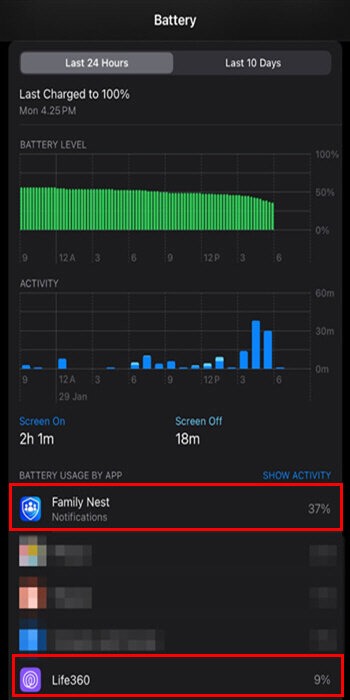
Additionally, while Family360 does display battery percentage, we noticed occasional minor discrepancies between the displayed reading and the actual battery level, such as showing 25% when the device was actually at 23%.
Technically, both apps successfully track location all day, but power management is crucial to prevent the tracker from draining the phone’s battery. In the Life360 vs Family360 competition, efficient battery usage is vital to ensure the device stays on for other needs.
7. Ease of Use
Life360 has a user-friendly interface, but this smooth experience is unfortunately often interrupted by intrusive pop-up ads that block the map during critical moments.
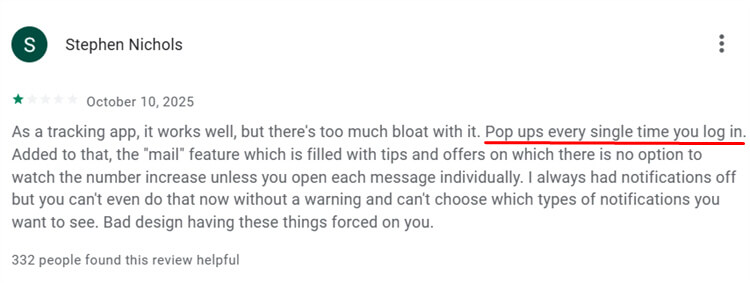
Meanwhile, Family360 emerges as a strong competitor in the Life360 vs Family360 duel by offering a much “cleaner” ad-free interface that lets parents access core features immediately without confusion.
Broadly speaking, both apps are designed to be easy to understand, but the presence of ads in one of them is a significant downside. This distraction-free visual comfort distinguishes the user experience between Life360 vs Family360 for daily use requiring quick responses.
8. Pricing Comparison
| Plan Type | Life360 | Family360 |
|---|---|---|
| Free Plan | Basic tracking & alerts | Basic tracking |
| Premium Plan | $14.99/month or $149.99/year (Gold) | $5.99/month or $39.99/year |
Overall, while both apps provide a one-for-all subscription, the price difference is a major factor for families on a tight budget. However, since these subscriptions only cover physical tracking, you might find better value in a solution like AirDroid Parental Control, go with $9.99/mo for premium that secures both real-world and digital safety for a similar investment.
9. Privacy Policies
| Aspects | Life360 | Family360 |
|---|---|---|
| Data Encryption | Encrypted (Transit & At Rest) | No specific protocols listed |
| Third-Party Sharing | Yes (Ads & Monetization) | Yes (Ads, Cookies & Transfers) |
| User Control | In-app “Privacy Choices” menu | Manual email request |
| Data Retention | Duration of account use | As long as necessary |
- Life360 has transparent security standards (256-bit encryption) and convenient in-app privacy options, but it openly utilizes data to make a profit and advertise.
- Family360 does not provide detailed security information, uses a manual (hard) method (email) to control site access, and has ambiguity about the use of third-party data.
Blind Spots Beyond Location Services – Are They Sufficient for Child Safety?
While seeing a location dot brings relief, trackers completely miss the invisible digital dangers happening on the screen, even when your child is physically safe at home.
Only the Location is Visible, but No One Knows What’s Happening
We often think tracking movement is the solution, but these apps strictly limit their features to simple GPS coordinates. In the Life360 vs Family360 comparison, neither app can show you which specific apps your child is using, or whether they contain explicit images or bullying content.
This limitation means you can’t identify inappropriate content or dangerous strangers. It’s frustrating that, even with the best tracker in this Life360 vs Family360 battle, you’re still unable to intervene in advance to prevent potential problems hidden on their phone.
Real-World Issues Children Can Avoid or Turn Off Location Services
We discovered that tech-savvy kids can easily render even the best trackers useless in seconds by using simple phone settings or clever tricks to hide their actual location.
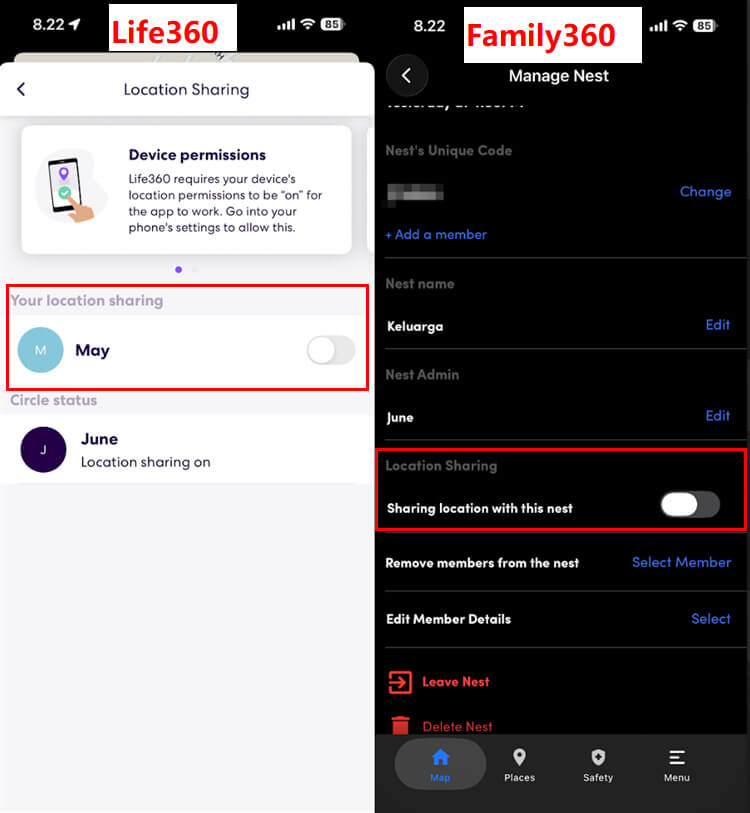
1Turn Off Location Services/Enable Power Saving Mode
Smart children can effortlessly bypass tracking by turning off location services or turning on “Low Power Mode,” a major weakness in the Life360 vs Family360 comparison, since neither app prevents children from cutting the signal without parents’ permission or confirmation.
2Use a Backup Device
A classic method involves leaving the tracked phone at a “safe” location, such as home, while sneaking out with a secondary device, fooling the app into reporting that they’re even when they’re miles away.
3Functions Fail after System Permissions are Restricted
Children can quietly revoke location permissions in their settings. Since neither app in the Life360 vs Family360 comparison can override these system settings, tracking simply stops, and parents assume it’s a technical glitch.
A More Comprehensive Solution – AirDroid Parental Control
If you feel that seeing a simple dot on a map isn’t enough protection, you’re absolutely right. A more comprehensive tool, such as AirDroid Parental Control, can truly fill this safety gap.
It’s important to keep in mind that the fact that you know where your child is doesn’t necessarily mean that they’re safe. In this comparison of Life360 vs Family360, neither app can inform you if your child is watching explicit content at home or is being bullied at school.
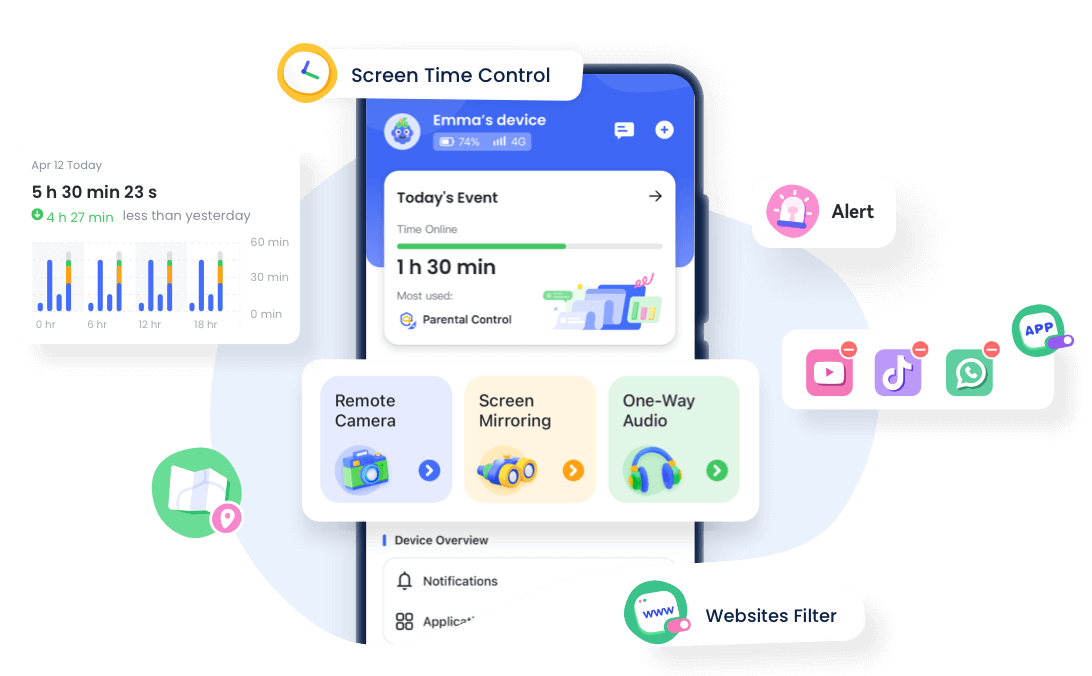
AirDroid effectively fills this gap by ensuring safety in both online and offline environments. Unlike the strictly location-focused tools, this app allows you to actively manage behavior and intervene promptly when problems arise.
Why is AirDroid more suitable for parents?
To truly fix the location blind spots we noticed in the Life360 vs Family360 comparison, AirDroid steps up as the much smarter choice for modern families.
- Real-time location + historical trajectory: It covers the basics perfectly by offering precise geofencing alerts and a detailed 30-day history so you never miss a movement.
- App usage report: You can easily check if your child stays up late on screen time and see exactly how long they spend using a particular app.
- Inappropriate content blocking: This feature allows you to proactively block access to harmful websites or specific apps to keep their digital environment clean.
- Abnormal behavior alerts: Since social media can expose children to content that encourages self-harm, you will get real-time notifications if the app detects dangerous content or bullying across 14 major platforms.
- More difficult for children to bypass: This tool uses 256-bit session encryption to effectively prevent them from bypassing the tracking.




AirDroid Parental Control vs Life360 vs Family360(Family Nest)
| Features | AirDroid | Life360 | Family360 |
|---|---|---|---|
| Positioning Accuracy |  | | |
| Real-World Security | Physical safety and online threats | Physical location only | Physical location only |
| Screen Time Management | |  | |
| Abnormal Behavior Alerts | | | |
| See What’s Happening in Real Time | | | |
| Bypassing Difficulty | High | Low | Low |
| Compatibility | Android & iOS & Web | Android & iOS | Android & iOS |
How to Choose based on Family Situation?
If your primary aim is to know everyone’s location without needing in-depth tracking, a regular GPS tracker will be a good option. In this comparison of Life360 vs Family360, both apps are suitable for simple daily check-ins to ensure that children reach school or home safely.
However, if your primary concern is the physical safety of children and their exposure to threats on the Internet, such as bullying, screen addiction, etc., you will require a more complex tool such as AirDroid Parental Control. This device bridges the most important safety gap by allowing you to actively control screen time and block harmful content.
In conclusion, it all depends on the level of protection you feel your family needs, given your lifestyle. Although both Life360 and Family360 are excellent for basic location tracking, AirDroid offers the complete peace of mind that covers both their physical and digital well-being.
















Leave a Reply.