AirDroid Parental Control
24/7 Kids' Guardian via App & Web
- 👀Live surroundings and location tracking
- 🔞Content Monitoring and App/Web Blocking
- ⚠Instant alerts for online risks and geofences
- ⌛Screen time control and monitor
How to Find Someone on TikTok Without Their Username (7 Easy & Friendly Ways)
Have you ever watched a funny TikTok on your FYP, refreshed the page by accident, and instantly lost the creator before seeing their username? It happens all the time.
The good news is that you can still find someone on TikTok without knowing their exact username. TikTok offers several built-in ways to rediscover accounts using names, hashtags, watch history, mutuals, and other clues.
Below are the easiest methods that actually work.
- Quick Answer for Finding Someone on TikTok Without Their Username
- Main Methods That Work Best
- Check Your Watch History
- Search by Real Name or Keywords
- Search by Hashtags or Video Topics
- Use Google to Search TikTok Profiles
- Other Useful Ways
- Extra Tips to Find Someone on TikTok Without Their Username
- Why You Still Can't Find Someone on TikTok
Quick Answer: Can You Find Someone on TikTok Without Their Username?
Yes. You can often find a TikTok account using:
- Contacts
- Real names
- Hashtags
- Mutual followers
- Watch history
- Suggested accounts
- Google search
Here's a quick comparison:
| Method | Best For |
|---|---|
| Sync contacts | Finding friends you know personally |
| Search by name | When you know part of their identity |
| Mutual followers | Finding someone in your social circle |
| Suggested accounts | Discovering related creators |
| Hashtags/content | Finding videos you remember |
| Google search | When TikTok search fails |
| Watch history | Refinding recently watched videos |
Main Methods That Work Best
1Check Your Watch History
If you recently watched the creator's video, this is usually the fastest method.
Go to: Profile → Menu (☰) → Watch History
For some versions of TikTok that are not the latest, the method is: Profile → Menu (☰) → Settings and privacy → Activity Center → Watch History
You can also check:
- Liked videos
- Comment history
- Saved videos
The steps below were tested using the latest TikTok app version.
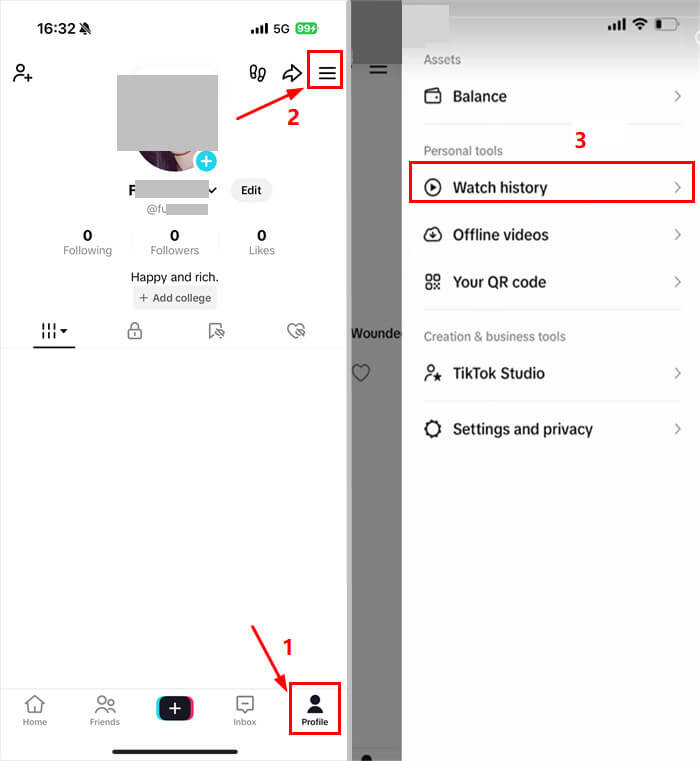
A lot of "lost" TikTok accounts are already sitting in your activity history.
2Search by Real Name or Keywords
TikTok search works even without exact usernames.
Try searching:
- Real names
- Nicknames
- Schools or Cities
- Hobbies or Video topics
Examples:
- "Chicago fitness coach"
- "soft makeup tutorial"
- "Pony Korea"
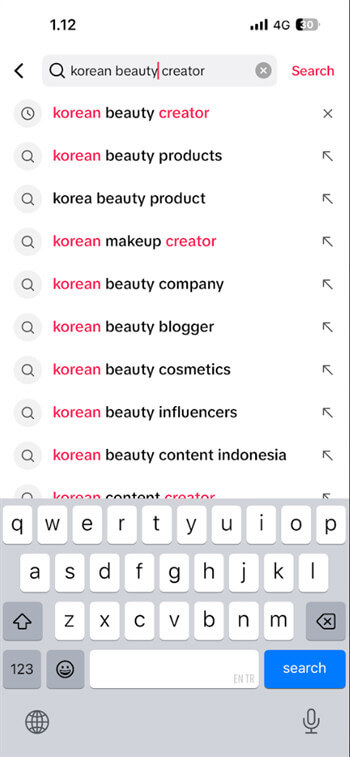
After searching, switch to the Users tab for better results.
3Search by Hashtags or Video Topics
If you remember the content but not the creator, search related hashtags or phrases.
Examples:
- #BookTok or #GymTok
- #dailymakeup
- "US skincare routine"
TikTok often groups similar creators together, so scrolling related videos may help you rediscover the original account.
4Use Google to Search TikTok Profiles
Sometimes Google works better than TikTok search.
Use this format: site:tiktok.com "keyword"
Example: site:tiktok.com "makeup creator"
This works well for:
- Public creators
- Viral videos
- Influencers and Niche accounts
Other Useful Ways to Find Someone on TikTok Without Their Username
5Sync Your Contacts
If the person is in your phone contacts, TikTok may already recommend their account.
Steps: Open TikTok → Go to Profile → Tap Menu (☰) → Select Find Friends → Turn on Sync Contacts
We tested this method to sync phone contacts using the latest TikTok mobile app.
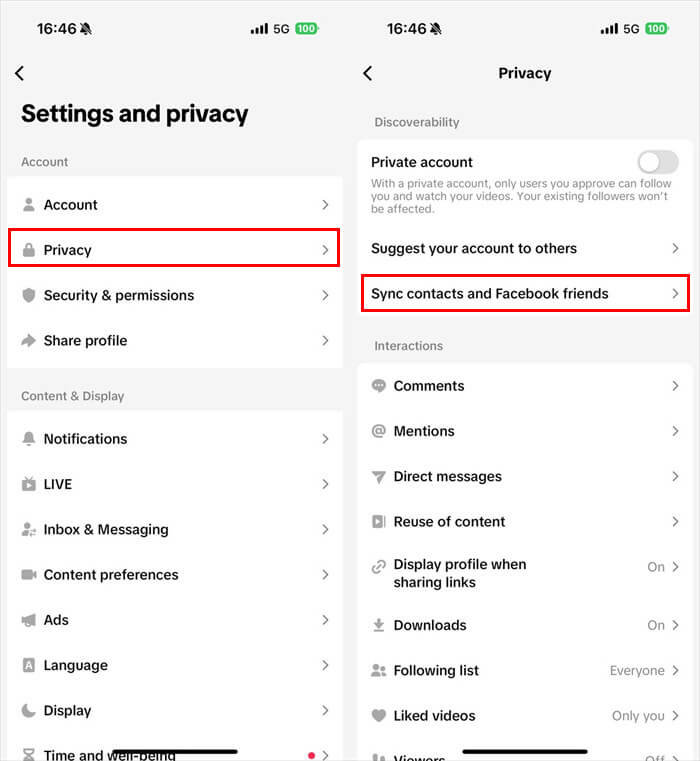
You can also sync Facebook friends from the same page.
6Check Mutual Followers
Mutual friends can make searching much easier.
Try:
- Checking a friend's Following list
- Browsing their Followers
- Looking at Suggested Accounts
TikTok often recommends people connected to the same social circle.
7Browse Suggested Accounts
TikTok constantly recommends creators based on watch habits, shared interests, mutual followers, and similar content.
You'll usually see suggestions:
- Under creator bios
- On the Following page
- After watching related videos
This works especially well for beauty, gaming, fitness, and lifestyle creators.
Extra Tips to Find Someone on TikTok Without Their Username
Some public creators reuse the same profile photos across TikTok, Instagram, YouTube, or Pinterest. If regular TikTok search is not helping, visual search tools may sometimes help you reconnect with their accounts.
You can try tools like:
- Google Lens
- TinEye
- AI-powered visual search tools
Simply upload a screenshot from a public video or profile photo. Some tools can surface visually similar creator profiles across platforms.
This method worked while we were using TikTok images on AI-powered tools.
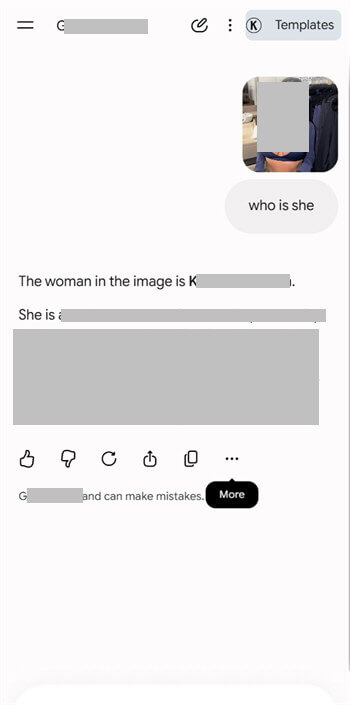
This works best for:
- Influencers
- Public personalities
- Cross-platform content creators
Avoid using these tools to bypass private profiles or invade someone's privacy.
Look for Small Clues in the Video
Tiny details can sometimes help you track down the creator.
Look for things like:
- Brand names or Clothing text
- Room decor or Product packaging
- Captions or Location hints
Then turn those details into TikTok search keywords.
For example:
- "pink gaming room creator"
- "matcha cafe vlog LA"
- "rare skincare shelf setup"
Why You Still Can't Find Someone on TikTok
Sometimes the account simply will not appear.
Common reasons include:
- The profile is private
- Discoverability is turned off
- The username changed recently
- The account was deleted or removed by TikTok
In some cases, TikTok also limits how widely accounts appear in recommendations.
Stay Safe While Searching on TikTok
While trying to reconnect with creators online, it's still important to respect privacy boundaries and stay aware of social media activity.
Avoid trying to bypass:
- Private accounts
- Visibility settings
- Blocked profiles
The goal should be reconnecting with public content or people you already know.
Parents who worry about TikTok safety and want more visibility into social media activity can also use tools like AirDroid Parental Control to monitor screen time and app usage more safely.

FAQ










Leave a Reply.