AirDroid Mobile Tracker
- Track mobile in real-time and check routes history
- Set geofence zones and get instant alerts.
- Remotely see, hear & record phone surroundings
Choosing the Right Mobile Tracker: A Scenario-Based Guide for Modern Parenting
The debate surrounding mobile trackers is ongoing, a daily struggle between children's privacy and parental anxieties. On Reddit, a parent's plea for help resonated widely:
"My 14-year-old stepdaughter wants to walk three blocks home by herself. I'm incredibly anxious, even though I know she's ready, I just can't shake the feeling. I'm considering putting a GPS tracker on her, or having her share her location with me the whole way home… Am I a 'helicopter parent'? How do you balance this fear with your child's need for independence?"——From a real post: r/Parenting.
To help you find the perfect balance, this guide skips the dry technical details and focuses on real-life parenting scenarios. Whether you want initial protection for a school-aged child or an invisible safety net for a teenager, we'll help you choose the most suitable protection.
Expert Insights: 3 Golden Rules for Smart Tracking
In early 2026, the American Academy of Pediatrics (AAP) released a landmark policy shifting the focus from "screen limits" to "digital well-being."
1Use Tracking to Support Independence, Not Replace It
The biggest mistake is using a tracker to "micromanage" a child's route. The AAP's Center of Excellence emphasizes that children need "Age-Appropriate Independence" to build self-reliance.
- Expert Advice: Use the tracker as a safety protection. It should be there to catch them if they get lost or enter an unsafe area, but you should avoid calling or texting them every time they take a different turn.
- The Goal: Let the technology provide the safety net. As the educator advises, you should allow them to miss the direction, miss the bus, and go to the destination alone. Give your child the space they need to solve small problems on their own first.
2Prioritize Transparency Family Safety Rules
Trust is a two-way street. According to the American Psychological Association, intrusive monitoring can undermine trust and increase secrecy in adolescents. Secretly tracking children reduces the quality of communication, and encourages children to develop cover-ups and defiance, ultimately damaging family relationships.
- Expert Advice: Before installing any app, sit down and create a Family Plan. Frame the conversation around the "5 Cs of Media" (child, content, calm, crowding out, and communication).
- The Agreement: Clearly define that the tracker is for physical safety (accidents/emergencies) and not for "social spying." Many US experts now recommend Mutual Sharing, where children can also see their parents' location, making it a family-wide safety agreement rather than a one-way surveillance.
3Rely on "Smart Alerts" Instead of "Map-Staring"
Constantly checking a GPS map is a behavior experts call "Map-Staring," which fuels parental anxiety and can lead to "helicopter parenting."
- The Goal: Use a tracker as a "digital safety rope" to grant Age-Appropriate Independence.
- Expert Advice: Utilize Geofencing (Safe Zones). Set up automatic alerts for "School," "Home," and "Practice." This shifts your role from an active monitor to a passive protector.
- The Benefit: This "no news is good news" approach respects your child's daily privacy and protects your own mental well-being. It ensures technology stays in the background, allowing for more "present" family time when you are together.
Now that we've covered the above guidelines, let's take a closer look at mobile trackers designed to protect children's safety.
Quick Guide to Finding the Right Mobile Tracker
✅Best for Simple Real-Time Location Sharing: Google Maps.
✅Best for Continuous Family Location Tracking: Life360.
✅Best for Basic Location Tracking for Kids: Google Family Link.
✅Best for Comprehensive Child and Travel Safety: AirDroid Parental Control.
✅Best for Device Recovery Tracking: Google Find My Device, Apple Find My, Samsung SmartThings Find.
Scenario A: The Daily Commute & School Safety (Best for Proactive Protection)
Every parent knows that heart-sinking feeling: your child is 15 minutes late coming home from school, and they aren't answering their phone, which making parent have a bee in their bonnet.
In 2026, a simple "dot on a map" can help you calm your nerves.
1.Find Each Other Fast: Google Maps
🏃♀️The Moment: You're meeting your child at a massive, multi-exit subway station or a crowded new park. They are lost, spinning in circles, and can't describe their surroundings.
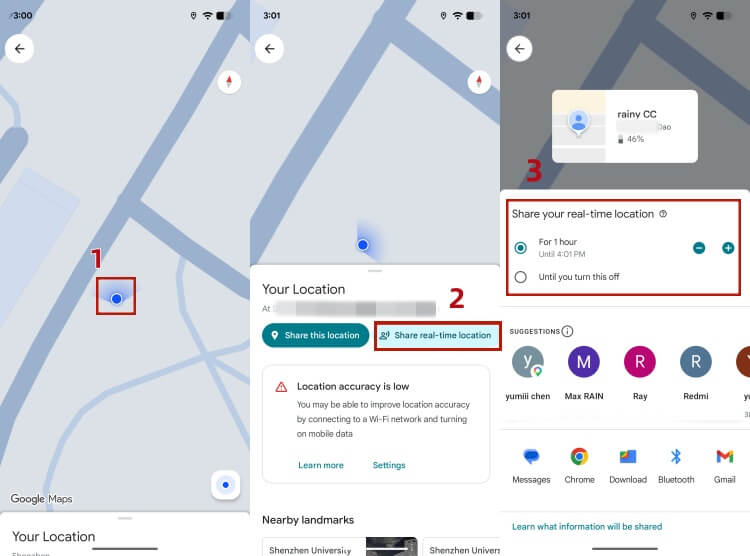
In this case, you can choose Google Maps to share a real-time location. It's perfect for a quick, "Share for 1 Hour" session. You can see the blue dot move against highly detailed street views.
Parents can let kids stand in one spot by pressing the "Share this location" option on Google Maps, which is a one-time share. And you can also tap "Share real-time location", adjust the sharing duration: it can be "1 hour" or "Until you turn it off" (permanent sharing).
Pros
- Real-time location sharing
- No extra app to install
- Free and easy to use
Cons
- A child can stop sharing at any second
- A passive, manual tool
- No geofencing alerts and location history
2.Safe Arrival Alerts: Life360
💻The Moment: It's 8:15 a.m. You're in an important meeting. All you need is a silent ping to confirm they've walked through the school gates or reached their destination — not having to constantly check a dot on the map.
Life360 is an excellent choice for tracking your kids' locations, especially for large families with multiple children. Notably, according to Life360's official information, one Circle can support up to 99 family members.
It provides powerful location tracking and geofencing alerts for family members, along with SOS emergency alerts, driving reports, the ability to monitor driving routes, average speed, and phone usage habits. All these features make it the perfect "peace of mind" tool for the everyday rhythms of family life.
Pros
- Passive geofencing alerts without opening the app frequently
- Excellent for families with multiple members who want to see each other on one map
- Includes crash detection and speed monitoring
Cons
- Basic functionality is limited and some features require subscription
- Children can easily turn off location tracking
- The app contains pop-up ads
3.Basic Arrival Alerts: Google Family Link
🛋️The Moment: It's after school, and you just want to know if they made it home safely — without calling or checking their phone over and over again.
Google Family Link is a free and basic tool for Android devices. Beyond screen time management, the app also offers location tracking and geofencing features.
Parents can set up location-based alerts to get notified when their child arrives at or leaves specific places like home or school. This gives you a simple way to stay informed without constantly checking their live location.
However, the feature is relatively basic and without location history. What's more, kids over 13 can disable Family Link by themselves.
Pros
- Free and easy to use
Cons
- No location history
- iOS devices are not supported for child users
- Youth aged 13 and above can remove supervision
4. Comprehensive Child and Travel Safety: AirDroid Parental Control
🔐 The Moment: Your teen has started commuting or travelling more independently. You want to know that they arrived safely and be informed about potential travel risks, without constantly checking their location or interrupting their day.
AirDroid Parental Control combines location, travel, emergency, and digital safety tools in one family-focused solution. With transparent communication and appropriate device permissions, parents can receive useful safety information while still giving children age-appropriate independence and personal space.
AirDroid also includes Driving Safety for families with teens who drive or travel independently. Parents and teens can review trip information together, identify potential risks, and discuss safer travel habits. These insights are designed to support constructive family conversations rather than constant or intrusive supervision.
Key Safety Features:
- Location Safety: View real-time location, review up to 30 days of route history, and receive geofence alerts.
- Driving Safety: Review trip details, receive real-time speeding alerts, check hard-braking and rapid-acceleration events after each trip, and access SOS alerts and daily or weekly summaries.
- Emergency Support: Use safety tools appropriately when a child cannot be reached or may need help.
- Digital Wellbeing: Support healthy screen habits and age-appropriate online safety.
AirDroid helps families stay informed without requiring parents to constantly watch a map. Its safety information can be used as a starting point for calm, supportive conversations while children gradually gain more independence.




Pros
- Combines location, driving, emergency, and digital safety.
- Supports age-appropriate independence and family communication.
- Provides automatic alerts without constant map checking.
Cons
- Some emergency support features are limited to Android.
- A subscription is required after the three-day free trial.
Privacy and Responsible Use: AirDroid should be used by parents or legal guardians to support a child's safety, with transparent communication and age-appropriate boundaries. Families should agree on which features are enabled, why they are needed, and when safety information may be reviewed. It should not be used for secret tracking or unnecessary surveillance.
Scenario B: Emergency Search & Device Recovery (Best for Loss Prevention)
In Scenario A, we discussed how to protect your child's daily commute—ensuring they stay on the right path and away from distractions. But what happens when the very bridge between you and your child—their smartphone—suddenly disappears?
Whether it was left on a school bus, dropped in a park, or stolen, a missing phone means a total loss of communication. In this 'Golden Hour' of anxiety, these hardware-level trackers shift from being daily monitors to becoming your powerful helper to restore that vital connection.
This is how you can quickly locate the device:
1. Google Find My Device: The Android Safety Hub
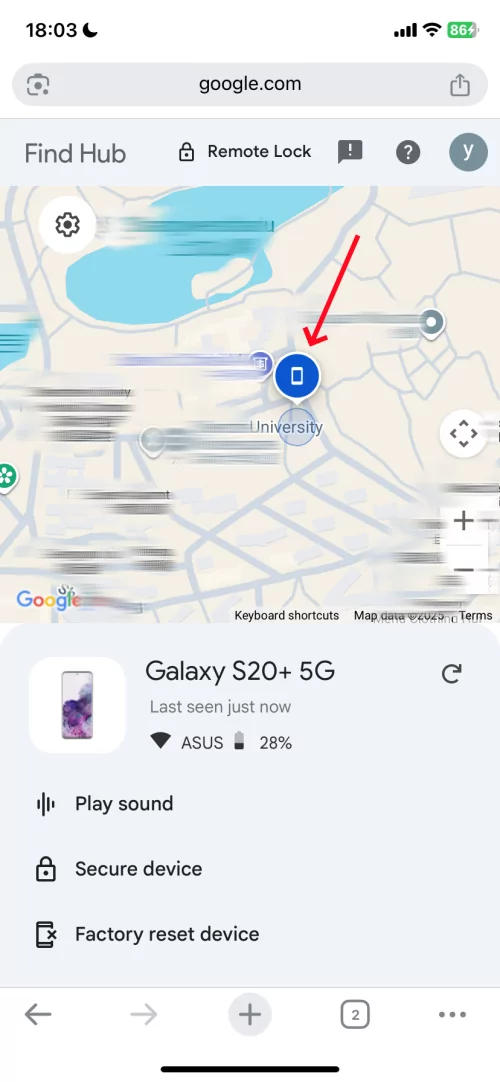
Google Find My Device(Find Hub) is one of the best ways to track Android phones and tablets. It is used in almost every Android device, preferably on Android version 5.0 or above.
For a frantic parent, the 'Remote Ring' is a lifesaver. Even if your child left their phone on silent in a messy bedroom or a friend's house, you can force it to scream, ending the 'why aren't they picking up' panic instantly.
Access: You can access Google Find My Device via google.com/android/find or you can access it using the Google Find My Device app from the Play Store.
Pros
- Free and compatible with almost all Android phones
- Remote ring even if your phone is on silent
Cons
- Need Google account and password to log in
- Location refresh rate is far slower than that of third-party professional software in real time
2. Apple Find My: Tracking Even When the Battery Dies
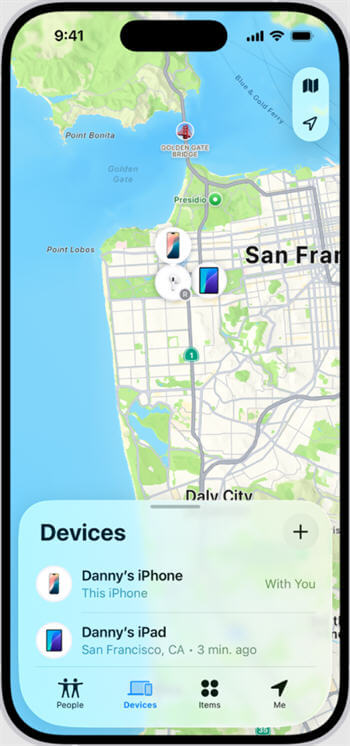
Apple Find My iPhone or iCloud is one of the most powerful online mobile trackers for iOS users. It is specifically made for iPhone, iPad, Mac, Apple Watch, and all the gadgets of Apple.
The 24-hour Bluetooth backup is the ultimate safety net. It ensures that even if your teen's phone dies after a long day, you still have a window of time to trace their last location, ensuring they aren't stranded without a way to be found.
Access: You can access the Apple Find My app through icloud.com/find if you are using a browser or Find My App on your iPhone or on any iOS device.
Pros
- Real-time location tracking
- The lost mode option can lock the Device and display a message
- Availability of the remote ring
- Even after the battery is completely depleted, it can still emit a weak Bluetooth signal for up to 24 hours
Cons
- It needs an Apple ID to log in
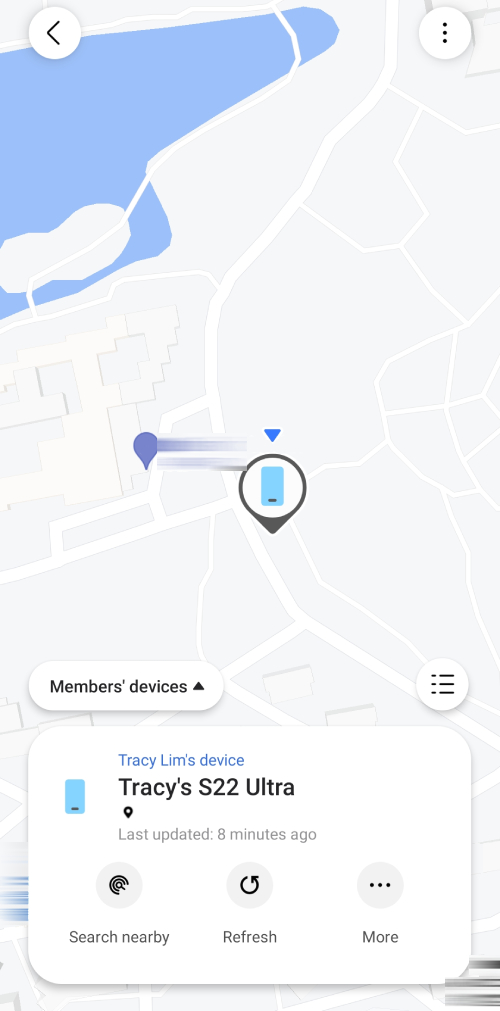
3. Samsung SmartThings Find: The Offline Search Expert
If you own a Samsung phone, then you have your own online tracker. Samsung Galaxy smartphones and tablets have the Samsung Find My Mobile app that you can use to find and track your phone.
Samsung's 7-day location path is a 'detective tool' for parents. If a phone is lost, you can retrace your child's movements throughout the afternoon to pinpoint exactly where the connection was severed.
Access: You can access Samsung Find My Phone through findmymobile.samsung.com using a browser or the Samsung Find My Mobile App.
Pros
- Extremely low battery tracking
- Can display the device's location path over the past 7 days
- Even if your phone has no mobile data or Wi-Fi, its location will be encrypted and uploaded as long as there are other Samsung phones nearby
Cons
- Focus on lost items
- Only available for Samsung Phones
- You must be logged in before losing the Device
Conclusion
While a mobile tracker can indeed give parents a greater sense of safety, we still encourage open and honest communication with children and the use of such apps with mutual consent.
As children grow older, parents should gradually grant them more autonomy and personal space. Location protection strategies should also be adjusted based on their age and individual circumstances.
Ultimately, the best approach is to match the tool to your child's age and level of independence—the most suitable location tracking tool will always depend on your family's unique needs.










Leave a Reply.