AirDroid Parental Control
24/7 Kids' Guardian via App & Web
- 👀Live surroundings and location tracking
- 🔞Content Monitoring and App/Web Blocking
- ⚠Instant alerts for online risks and geofences
- ⌛Screen time control and monitor

Life360 vs Find My: Which is More Reliable (Real-World Tested)?
Life360 and Find My are common tracking tools, but they have different design goals for family safety and privacy. To understand these differences, we conducted hands-on tests using two iOS devices to give you a practical perspective on the Life360 vs Find My comparison.
We provide a comprehensive guide to help you decide which tool fits your specific needs in this ongoing Life360 vs Find My debate. While both work for basic sharing, parents concerned about real-world and digital safety will find that neither Life360 nor Find My is enough.
Life360 vs Find My: Quick Comparison
1. Life360 vs. Find My
| Features | Life360 | Find My | Winner |
|---|---|---|---|
| Primary Function | Cross-platform family safety & driving reports & crash detection | iOS location sharing & device tracking | Life360 |
| Location | High accuracy, paid location history | High precision, no location history | Life360 |
| Real-Time Alert | Reliable, with occasional slight delays | Accurate | Tie |
| Geofencing | Saved Places (2 free, unlimited paid) | Limited (single “Arrive/Leave” trigger) | Life360 |
| Online Safety | Identity Theft Protection (Platinum plan) | Built-in Anti-Stalking & Privacy (free) | Find My |
| Battery Consumption | High drain (14% daily) | Very low drain (1% daily) | Find My |
| Ease of Use | Intuitive, dedicated group map | Minimalist, pre-installed, silent operation | Tie |
| Pricing | $7.99-$24.99/mo for more complete features | Free | Find My |
| Customer Service | Dedicated in-app support & tickets | General Apple Support (no specific channel) | Life360 |
2. Life360 and Find My Pros and Cons
Life360 is best for families with mixed phone operating systems (Android/iPhone) who need detailed safety reports and driving monitoring.
Pros:
- Works on both Android and iPhone
- Includes driving safety reports
- Dedicated in-app support
Cons:
- Drains battery quickly
- Slight delay in alerts
- Advanced features require a subscription
Find My is best for families who are entirely in the iOS ecosystem and want a free, simple tracking solution.
Pros:
- Completely free to use
- Very low battery usage
- No installation needed
Cons:
- No location history
- Works on iOS devices only
- Limited geofencing options
Life360 vs Find My: Key Differences
To help you decide which tool best fits your family, we have broken down the crucial differences between these two platforms.
1. Location Tracking Accuracy and History
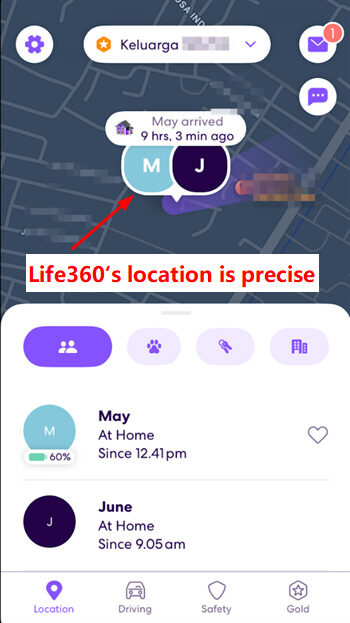
The location-tracking feature of Life360 is precise and reliable for tracking your child’s movements in real time. We feel at ease since the updates of the location are fast, and therefore, we’re aware of their location without much delay. The bad news is that the location history feature isn’t free, and you need to purchase a premium plan to fully use it.
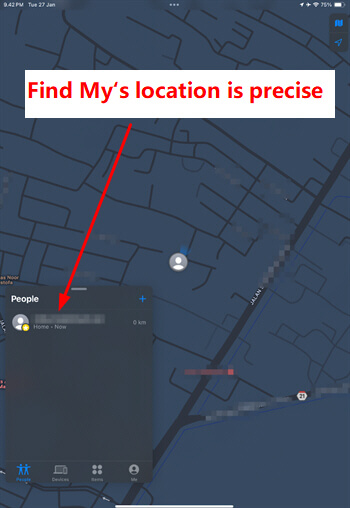
Similarly, location tracking on Find My is very precise and works seamlessly between Apple devices. We can easily see the child’s current position through a simple yet very clear map display. The biggest downside is that this app doesn’t offer a location history feature, so we can’t see where our child has been previously.
Actually, both apps are equally good at tracking children’s locations for their safety, but there is one limitation when comparing Life360 vs Find My. Even though we know their location, we, as parents, still can’t visually see what is happening around them at a risky moment. We only get location data on a map, without knowing whether their surroundings are truly safe.
As a comparison in this Life360 vs Find My topic, the AirDroid Parental Control app offers a more powerful solution. This app allows us to use a remote camera and one-way audio to directly see and hear the situation around the child in an extreme situation. This way, we can check their safety in real life (offline safety) instead of just guessing from a map.
2. Real-Time Alert
Life360’s notification feature is designed to help parents track their child’s movements automatically without the need for constant phone checks. In terms of functionality, the app’s notification feature is generally reliable for daily child monitoring.
During real-world accuracy testing across common scenarios (school runs, after-school activities, weekend outings), it consistently delivers arrival/departure alerts to keep parents updated on key movements.
Occasional minor drawbacks include rare non-instant alerts when a child leaves or returns to predefined locations (e.g., home, school), with isolated delays of 30 seconds to 1 minute—infrequent issues that don’t significantly impact core usability, though worth noting for parents needing ultra-real-time updates.
For example, the driving report indicated the child left home at 12:29 PM, while the alert on the parent’s phone appeared at 12:30 PM, a one-minute lag.
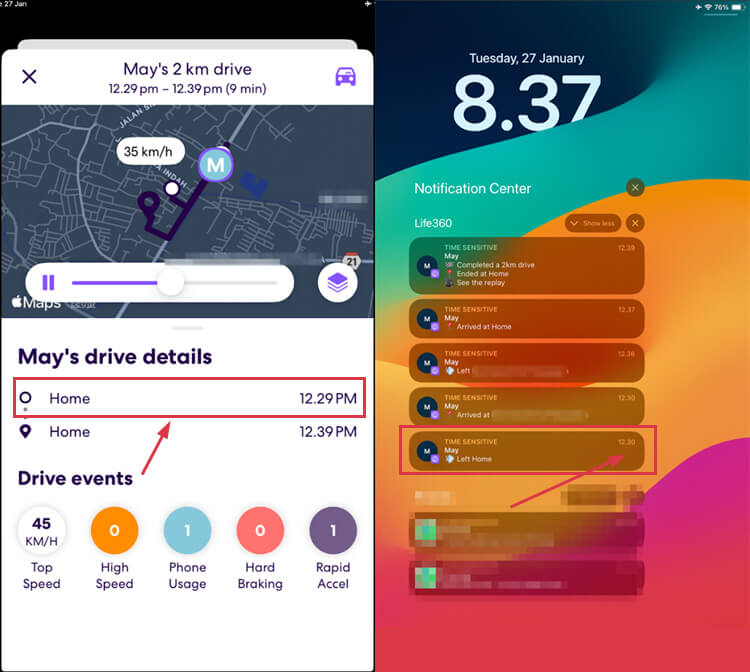
Regarding the real-time alert feature in Find My, its ability to detect location changes is accurate. When we left home at 12:29 PM to trigger an arrive/leave alert, the notification popped up at 12:29 PM.
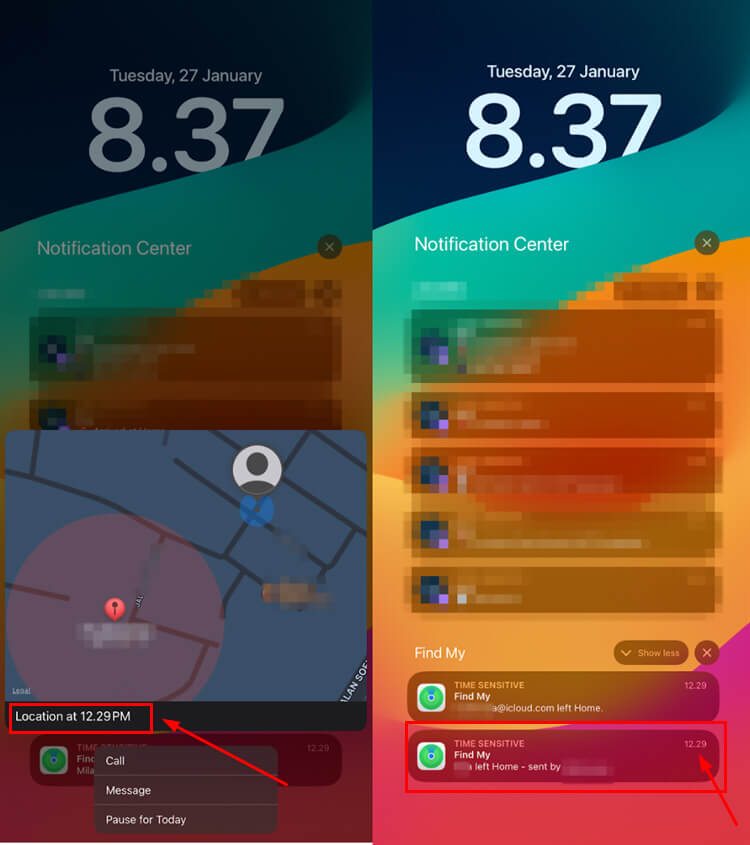
Thus, in this comparison of Life360 and Find My, the two apps are neck and neck when it comes to real-time alert performance. While Life360 may experience minor delays on extremely rare occasions, this is largely determined by the network conditions and device status at the time, and it is by no means a critical issue.
3. Geofencing
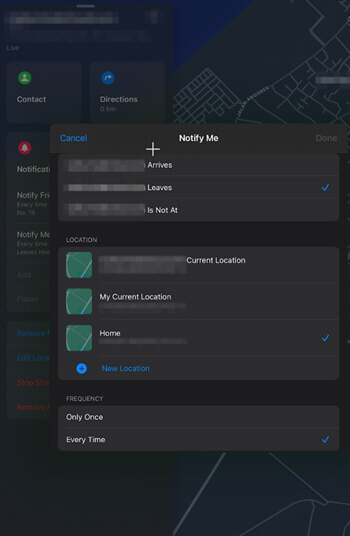
Life360’s Geofencing feature is reliable for monitoring your child’s routine. We can create “Places” by selecting a location on the map, naming it, and enabling automatic notifications for arrivals and departures.
Unfortunately, for free account users, this advanced feature has a quota limitation. We’re only allowed to save a maximum of two locations. Meanwhile, Find My allows multiple location alerts to be set for the same person simultaneously.
4. Online Safety
With Life360, the digital safety features sound very promising, offering Data Breach Alerts and Identity Theft Protection. Apple’s Find My ecosystem takes a different approach, with built-in features such as Anti-Stalking and a strict Activation Lock.
5. Battery Consumption
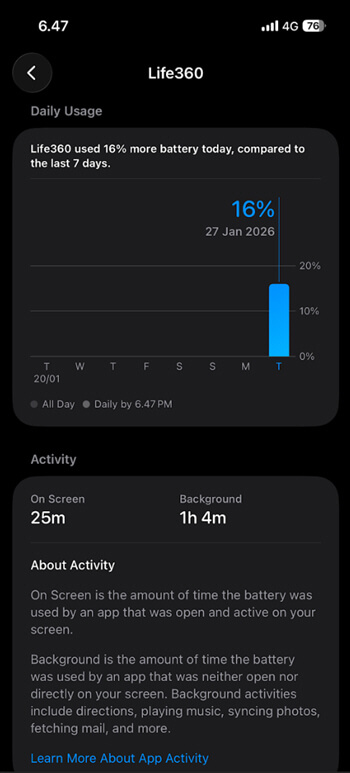
Life360 claims to use only about 10% of the battery. However, our real-world testing showed a 16% drain.
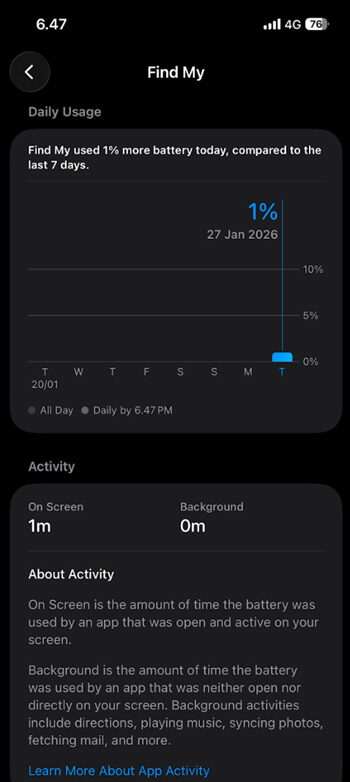
In contrast, Find My proved very efficient, consuming only 1% of the battery during the test.
6. User Interface and Ease of Use
Life360’s interface feels very intuitive with a clean design, allowing you to easily invite family members into a “Circle” with a simple code. Once connected, essential features like the real-time map are immediately visible on the front page without digging through hidden menus.
Meanwhile, Find My offers incredible ease of use as a pre-installed app that operates quietly with a minimalist focus on the map. This privacy-preserving integration becomes a distinct added value when comparing usage comfort between Life360 vs Find My.
Visually, both apps are easy to navigate, but it’s important to remember that their main function is limited strictly to offline physical security. So, in terms of user interface in Life360 vs Find My comparison, the choice comes down to whether you prefer dedicated group features or the simplicity of a native app. Even so, parents must realize that this navigational ease doesn’t yet include protection for their child’s online activity.
7. Pricing
Life360 has a convenient subscription system that includes the whole family under one bill, and the Gold plan is an essential investment for parents of teen drivers. This is because we can choose the exact level of safety features, such as roadside assistance, that fits our specific budget.
Silver-$7.99/mo
- 7 days Location History
- 5 Place Alerts
- Family Driving Summary
- Crash Detection
Gold-$14.99/mo
- 30 days of Location History
- Unlimited Place Alerts
- Crash Detection + Emergency Dispatch
- 24/7 Roadside Assistance
- Individual Driver Reports
Platinum-$24.99/mo
- 50 Miles Free towing
- $1M Stolen Funds Reimbursement
- Disaster Response
- Medical Assistance
- Travel Support
In contrast to Life360, Find My is free but only available on the iOS ecosystem. This compatibility issue is one of the most important factors in the Life360 vs Find My comparison, particularly for families with a mix of Android and iOS devices.
Overall, Life360 is a full-fledged cross-platform safety tool, but it requires a monthly subscription, while Find My is highly affordable and well-integrated, provided everyone in the family has an Apple device. Life360 vs Find My is a decision based on whether you’re interested in these extra protection features or want to use a totally free tracker service.
8.Customer Service
Life360 provides a comprehensive in-app help center and a specific ticket submission system for resolving technical issues. The existence of this dedicated support channel is an added value in the Life360 vs Find My comparison, particularly for users who need targeted assistance.
On the other hand, customer service for Find My integrates with Apple Support, so there is no dedicated channel for this app. This difference is quite noticeable when comparing Life360 vs Find My, as Apple users must rely on broader system guides rather than app-specific service.
Are Life360 and Find My Enough for Parents?
Beyond just tracking location, many parents worry about social media addiction, but a simple map pin can’t reveal those digital habits. In this comparison of Life360 vs Find My, we found that both apps completely lack the features needed to monitor screen time or identify these behavioral issues.
There is also the constant risk of exposure to inappropriate content, yet neither platform offers any form of content filtering. The bottom line is that Life360 and Find My are essentially location-sharing tools, not parental control tools, so they can’t protect your child’s online life.
The Best Alternative to Life360 and Find My
We tend to think that knowing your child’s location is enough, but a child can be physically safe at home and still be exposed to explicit content on social media, such as TikTok. This points to a serious risk in comparing Life360 vs Find My: neither app can identify these online threats.
Likewise, a map can tell your child they’re at school and safe, but it can’t tell whether they’re talking to dangerous strangers on apps such as Snapchat. Therefore, in comparing Life360 vs Find My, parents should understand that these apps only track physical location and don’t monitor online activity.
To avoid these hidden risks, AirDroid Parental Control enables parents to track screen activity and receive notifications about potentially dangerous activity. This helps you intervene at an early age before minor issues are blown out of proportion.
1. Why Need AirDroid Parental Control?
For parents who feel the features in the Life360 vs Find My comparison are too limited, AirDroid offers a much more complete safety solution.
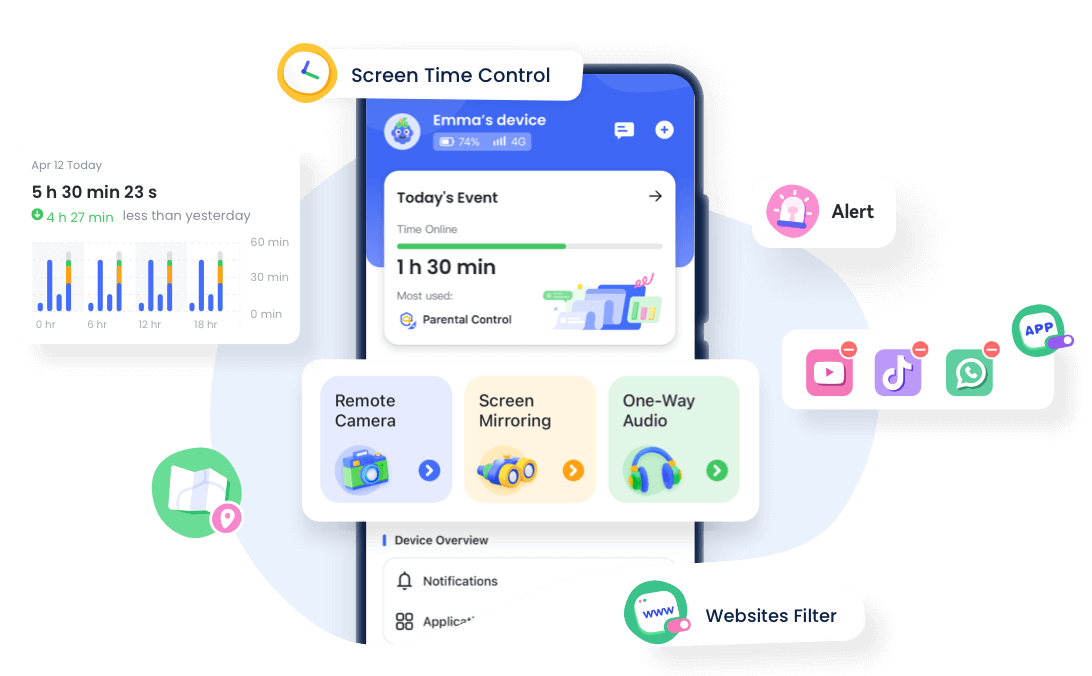
- Protection for real-world safety: It ensures safety not just through location tracking and geofencing, but also through SOS alerts, a remote camera, and one-way audio to check real-world safety in extreme situations.
- Screen time management: This feature allows you to easily set daily limits and schedule downtime to prevent digital addiction and encourage healthy habits.
- Social Media Monitor: It can monitor content and chats to protect children from online dangers such as cyberbullying and potential predators.
- Usage Report: This app delivers a comprehensive overview report that helps parents quickly find out if their kids have been overusing devices at night.




2. AirDroid Parental Control vs Life360 vs Find My
| Capability | AirDroid Parental Control | Life360 | Find My |
|---|---|---|---|
| Location Tracking |  | | |
| Geofencing | | | |
| Screen Monitoring | |  | |
| Social Media Insights | | | |
| Digital Wellbeing | | | |
Which One Should You Choose?
Whatever tool you choose, keep in mind that it will never substitute the trust and open communication that you have created with your children. Technology isn’t just a tool for strict surveillance; it’s a support system for your parenting.
If your family uses only Apple devices and you simply need to keep track of them, Find My is the most rational option since it’s free and doesn’t drain battery. This is the obvious winner in the Life360 vs Find My debate for parents who don’t want any additional downloads and want a simple, integrated solution.
On the other hand, Life360 is the better choice if your family has both Android and iOS devices, as it’s cross-platform and offers more comprehensive driving reports. When comparing Life360 and Find My, Life360 is superior for families that need specific group features and are willing to pay the subscription fee.
However, if you need to track location, phone use habits, and online security at the same time, AirDroid Parental Control is the only tool that fills the gap. This option is most suitable for those parents who need a more active safety practice, which encompasses both the physical and the cyber worlds.











Leave a Reply.