AirDroid Parental Control
24/7 Kids' Guardian via App & Web
- 👀Live surroundings and location tracking
- 🔞Content Monitoring and App/Web Blocking
- ⚠Instant alerts for online risks and geofences
- ⌛Screen time control and monitor

Kaspersky Safe Kids Review: All You Need to Know
Kaspersky Safe Kids is a parental control tool to keep track of children's activity on digital devices and block harmful content. Today, let's walk into the world of Kaspersky Safe Kids.
Despite the ban in the United States, Kaspersky can still be used in countries like Canada where it is not banned. Still, the mere existence of the ban could make you think twice about using the app.
In order to test whecher it's functions are well-performing, we use Samsung to conduct a series of hands-on tests on Kaspersky Safe Kid’s features, trying to provide an objective and honest review.
What Is Kaspersky Safe Kids
Kaspersky Safe Kids is an excellent choice for families with young children seeking basic, budget-friendly parental control tools—especially ideal if you already use Kaspersky’s security ecosystem.
It is a simple, non-intrusive monitoring tool rather than advanced social media tracking or real-time content analysis. And can support major platforms including Android, iOS, Windows, macOS, and Linux makes it suitable for families using multiple devices.
However, families with teenagers, heavy social media usage, or a need for deeper behavior insights may find its functionality somewhat limited.
Pros
- Web filtering can't be bypassed when using a VPN
- Provide safe search on Yahoo, Google, YouTube, and Bing
- Affordable
- Supports different devices
Cons
- Limited features for iOS
- Limited social media monitoring
- No location history data
| Features | Score | Explanation |
|---|---|---|
| Websites Filters | ★★★★☆ | Solid |
| App Control | ★★★★☆ | Effective, kids can ask permission |
| Schedules Screen Time | ★★★★☆ | Lock the child’s screen once time is up |
| Monitors Social Media | ★☆☆☆☆ | Only Facebook & VK |
| Location | ★★☆☆☆ | Unstable, no location history |
| Daily Reports | ★★★☆☆ | Accurate, but load slowly |
What Does Kaspersky Safe Kids Do
Here's a breakdown of the features of Kaspersky Safe Kids so you can evaluate if it is right for you and your family.
1Websites Filters
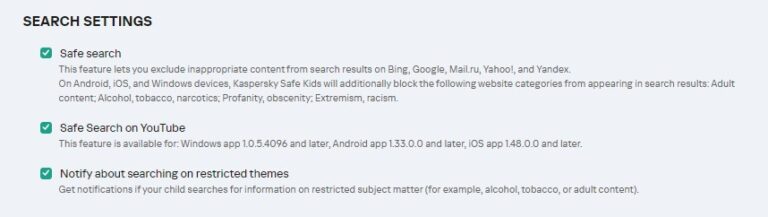
Kaspersky Safe Kids has web and app filtering features that allow you to limit the content your kids can access. If you activate Kaspersky on your kid's device, the Safe Search will be enabled, and some harmful website categories will be filtered by default. Moreover, with the YouTube Safe Search option, you can allow your child to use this app without having to worry about inappropriate searches.
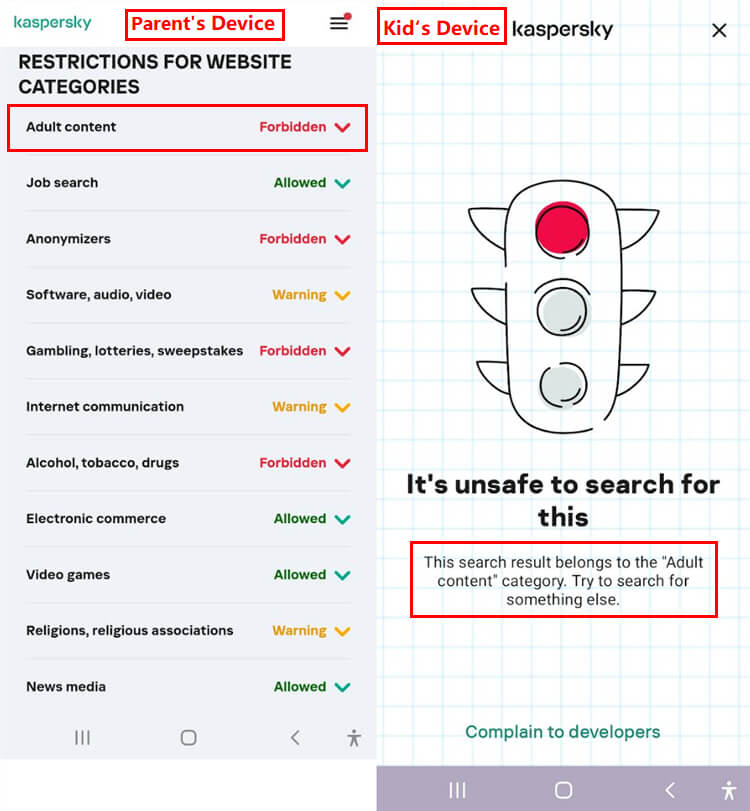
In the web filtering feature, you are provided with 14 different categories, such as adult content, video games, anonymizers, religious associations, and violence. Each category can be marked as "Allowed/Forbidden/Warning":
- Allowed - Allows your kid to access this website category freely
- Forbidden - Makes the content inaccessible on your kid's device
- Warning - Proceeds with a pop-up warning message if your child visits this category, but your child can still visit the warning category by tapping "Go there anyway"
Additionally, you can mark a specific website as blocked for your child by adding it to the "exclusion" option. It provides reliable services on web browsers like Chrome for mobile and Chrome, Firefox, Safari, Edge, and Yandex for desktop. However, it does not filter content in the Incognito mode of Chrome. Besides, this web filtering function doesn't work if your kid's using an iOS device.
We banned Adult content, and use kid's device to search adult content several times on Chrome, Firefox, and Edge. Surprising find out that Web Filter works amazingly. It will show a notification and prevent kids from forbidden content.
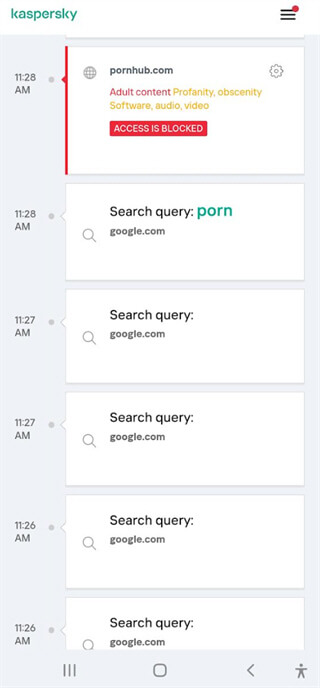
What's more, parents can conveniently view all their kids’ search queries and complete web browsing history directly on their own parent-side devices, with no need for extra operations on the child’s device.
2App Control
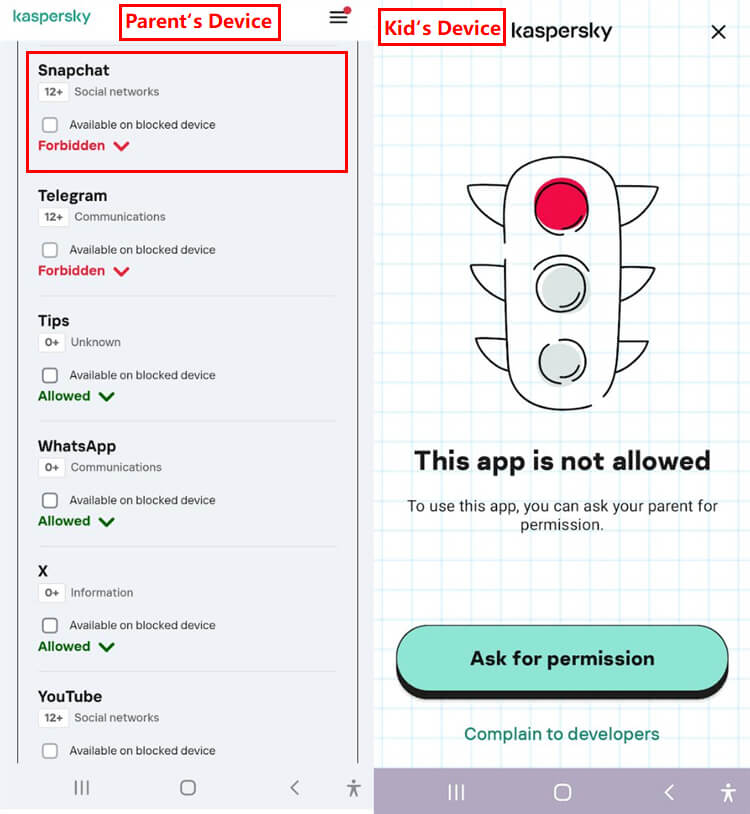
Similarly, you can choose to filter specific apps or apps of a specific category. It sorts all apps by 17 categories, like browsers, communication, email, entertainment, and more. If your kid's phone is running iOS 1.38 or later, you can even block apps based on age ratings.
For managing specific apps, Kaspersky Safe Kids gives you 3 free options: Allowed, Restricted, and Forbidden.
- Allowed - Allows your kid to access apps you set
- Restricted - Specifies how many hours a day your child can use this application
- Forbidden - Restricts apps that you don't wish your child to use
We blocked several apps on the kid's devices, and tried to access them at different periods. To be honest, App block also works smoothly. Once blocked, kids can't access them, and they have the right to ask for permission if they didn't reach an agreement. When kids press the Ask for Permission Button, it shows instantly on parents' device almost without any delay.
3Schedules Screen Time
Managing screen time is important to create a balance between study and leisure. Therefore, Kaspersky provides an option to not only monitor the usage of the device but also block the device as a whole. What is even more interesting is that Kaspersky Safe Kids is flexible enough to set a time limit of your choice. You can schedule intervals of the set time limit and even select the days you are setting the time limit for.
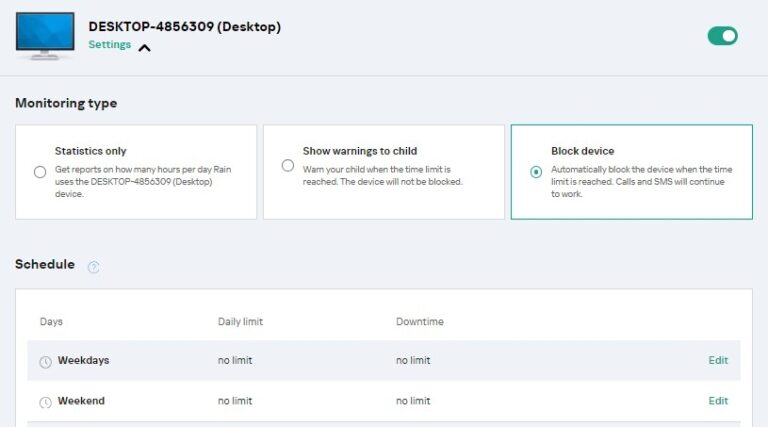
After setting the time, it enables you to monitor statistics of using the device only, set a warning, or entirely lock access to the device once the set time is over. Of course, your kids can ask for more time and be granted permission by you.
But please note that this feature is only for premium parents and doesn't allow you to block the iOS device.
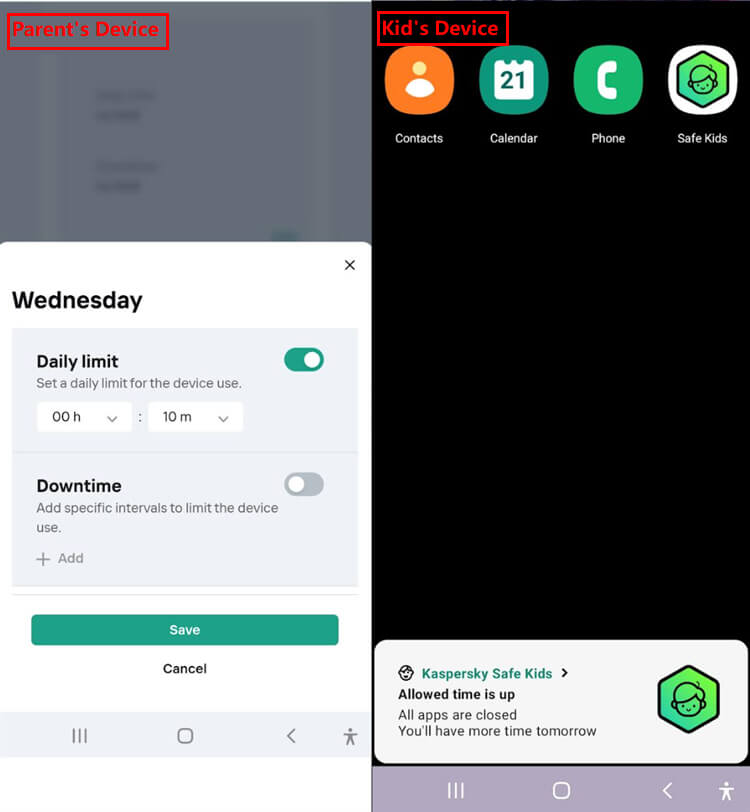
We’ve set up screen time restrictions across several customizable time periods, and the system responds very well to lock the child’s device screen the moment time is up. As shown in the screenshot below, once the screen time is exhausted, a prompt will pop up on the child’s device, and only 4 apps remain: Contacts, Calendar, Phone, and the Kaspersky Kids.
4Monitors Social Media
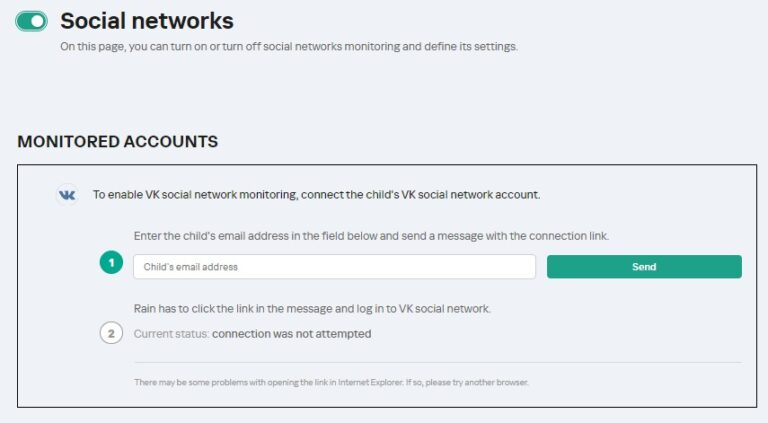
Kaspersky Safe Kids' social media monitoring feature could be improved if possible. You can only monitor Facebook and VK(a popular Russian app). In my test, there is no option to let me monitor my kid's Facebook. What's more, most of the time, only two apps are not enough to ensure our kids' online safety.
By contrast, parental control tools like AirDroid Parental Control, which lets you monitor 14+ mainstream social media channels with real-time alerts. Its AI-driven assistant can help you cover all your concerned risky keywords, helping parents be aware of potential danger and intervene before it happens.
To set up the monitoring on Kaspersky Safe Kids, a link will be sent to your child's email that they used to log in with the social media app. Once they have accepted it, Safe Kids will be able to keep track of their new friends, posts, and much more.
Children tend to be a bit mischievous sometimes and disable the monitoring function. You will be informed about this through notifications. So, if you are a Russian or your child also wants a Facebook account or to watch YouTube videos, you can just use Kaspersky to keep them safe online.
5Allows GPS Tracking and Geo-fencing
You can know the current location of your child by choosing Kaspersky's "Where is my child" option. It allows you to pinpoint a location and know the time when those coordinates were obtained last.
Next, you can set up the Geo-fencing option, and the minimum geo-fencing zone is 0.5 miles. This option can help you set up allowed locations for your child. For instance, you can select their school, dance class, or playground as their allowed location. If they are outside the limited geographical area, you will receive a notification from the app. In this way, you can send your child to school and its vicinity without any stress.
Although its location tracking feature and geofencing tool give you peace of mind, you are not able to view where they've been in the past hours or days.
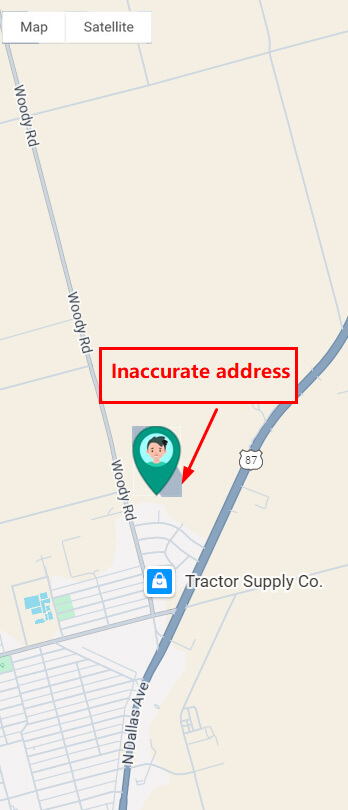
Unfortunately, the location tracking is spotty. I use the parent device to check the kids' location, and it turns out not to be accurate.
6Provides Detailed Daily Reports
Lastly, Kaspersky Safe Kids provides you with detailed reports of your child's app and web activity. You can monitor the apps and the screen time they use, the websites they visit and search, and even any warnings they have declined.
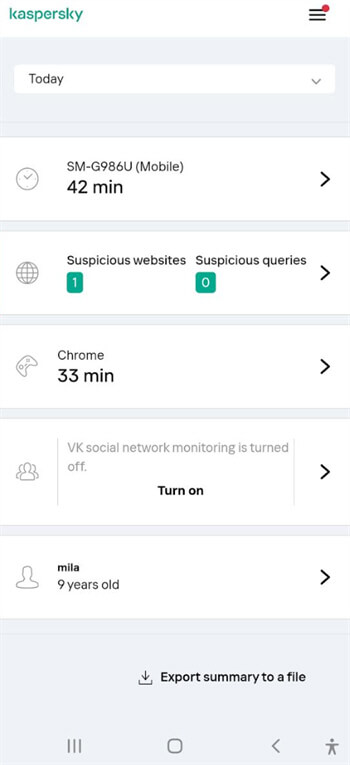
It provides a detailed report of your child’s device usage activity, so you can effortlessly find out whether your kid is spending too much time on apps late at night. We used Chrome for 33 minutes, and it displayed accurately on the activity report page. However, each tab loaded slowly, and the UI design could be improved.
Unlike Kaspersky Safe Kids, AirDroid Parental Control has a more user-friendly interface and high speed, which is more straightforward and easier to use.
7Installation & Setup
To use Kaspersky, you need to set it up on both your and your child's devices. The following are the steps for setting up Kaspersky Safe Kids on mobile:
For Parents Device:
- 1.Go to App Store or Play Store and search for Kaspersky Safe Kids.
- 2.On clicking the download option, the installation process will start.
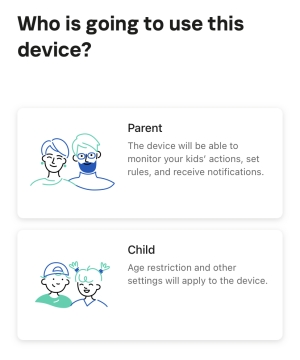
- 3.After opening Kaspersky Safe Kids, please choose "Parent".
- 4.Make an account by providing your email.
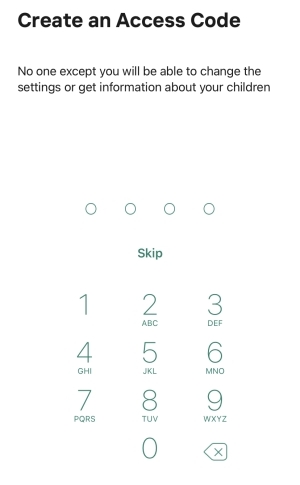
- 5.Next, it will ask you to create a PIN code to prevent your child from changing parental controls.
- 6.Now, tap "Set up child's device" and select the type of your child's device.
For Kids Device:
- 1.Download the Kaspersky Safe Kids app on your child's phone.
- 2.Launch it and select "Child".
- 3.Then, sign in with your own account and give all necessary permissions.
Note: Your child can uninstall Kaspersky Safe Kids on his or her iOS devices without PIN protection.
After setup, parents can open Safe Kids and enter the PIN to monitor how their kid uses the device.
8Ease of Use
The system delivered consistent performance throughout the whole test period, especially the quick reflection of notifications leaves an impressive impression.
To summarize, Kaspersky Safe Kids is an excellent choice for managing screen time, filtering websites and blocking apps. What’s more, it comes at an affordable price, and its installation and setup are incredibly straightforward even for first-time users.
However, it is banned in the US, which may lead to inconveniences with subscription purchases and local customer support. Additionally, its limited social media monitoring capabilities and inconsistent location tracking performance make it a less ideal fit for many families’ needs.
Is Kaspersky Safe Kids the Right Choice for You?
When looking for parental control software for your family, a key question is: Is Kaspersky Safe Kids right for you and your child? The answer depends on your family's digital usage habits, monitoring needs, and budget.
Overall, Kaspersky Safe Kids is suitable for families who want to set healthy digital boundaries for their children without overly complex monitoring features. It balances basic monitoring functionality with ease of use, making it a practical choice for entry-level parental controls.
When is it a suitable option?
- Non-US users: Unfortunately, US users need to use some technical means to change their IP address to use this software, which can be inconvenient.
- Families with young children and familiar with the Kaspersky system: For children in elementary school or younger, parents are often concerned about access to inappropriate content, controlling screen time, and managing app usage. Kaspersky Safe Kids performs robustly in these areas.
- Limited Budget: Compared to some advanced monitoring tools, Kaspersky's subscription price is more affordable, and its basic tools are sufficient for most families' needs.
When is it not a suitable option?
While its basic features are solid, you might need to consider more advanced alternatives in the following situations:
- Limited availability in the United States: Due to restrictions, Kaspersky Safe Kids may result in difficulties with purchasing subscriptions, accessing local support, or ensuring long-term service stability for U.S.-based families.
- Need risk alerts on social media: If you want to know whether your child's interactions with strangers or encounters explicit/cyberbullying/self-harm content on platforms like TikTok, Snapchat, and Instagram in real time, Kaspersky Safe Kids doesn't offer comprehensive social media monitoring.
- Need advanced reporting: Its activity reports are relatively simple and lack professional analysis.
Best Alternative to Kaspersky
While Kaspersky Safe Kids is a useful and pocket-friendly app, it still comes with some limitations, such as no location history, limited social media monitoring, and more. Therefore, the AirDroid Parental Control program can serve as an efficient alternative.
AirDroid Parental Control is a comprehensive parental control tool designed to safeguard kids’ online and offline safety. Beyond screen time management, app/web filter, SMS monitoring, tracks activity across more than 14 mainstream social media platforms. Parents receive real-time alerts the moment risky keywords are detected on their child’s device, enabling quick intervention.
More importantly, AirDroid can help check the real-world surroundings around children when parents can't get a response from kids for a long time and are fearing their safety.




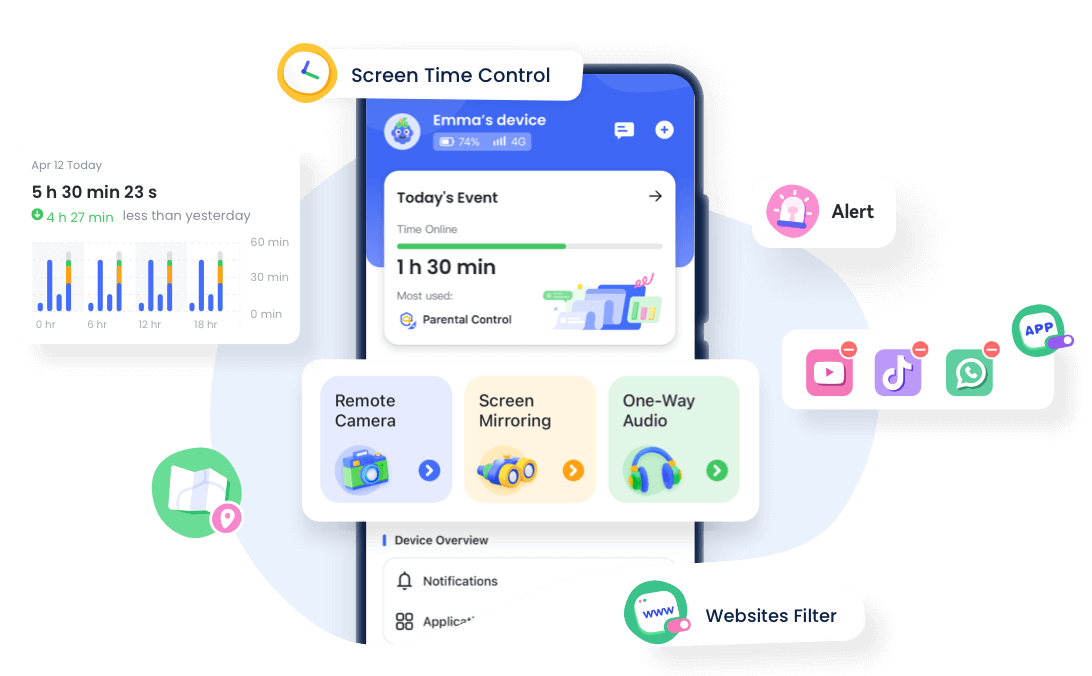
Why Choose AirDroid Parental Control? [Side-by-side comparison]
| Features | Kaspersky Safe Kids | AirDroid Parental Control |
|---|---|---|
| App Limits & Web Filtering |  | |
| Social Media Monitoring | Only Facebook & VK | 14+ trending social media |
| Location | Unstable, no location history | Solid, 30-day location history |
| Sync apps notification |  | |
| Screen mirroring | | |
| Remote Camera | | |
| Sound around Child | | |
| Compatibility | Windows, macOS, Android, iOS | iOS, Android, Web |
In Short
With Kaspersky Safe Kids, you can filter all the inappropriate websites, search results, and apps from your child's device, monitor their online activities, track their location, and manage their screen time. While the app works with high efficiency, its functions are still limited to some extent, especially when your child uses an iOS device. For example, Safe Kids offers inaccurate and not updated locations; it doesn't allow you to check the places your child has been; it only lets you view 2 social networks, etc.
Therefore, AirDroid can serve as a better alternative as it has functions like location history tracking, multiple social apps monitoring, and checking kids' real-world safety in addition to those same facilities as offered by Kaspersky Safe Kids.















Leave a Reply.