Yes, but it's limited. Telegram's old "People Nearby" feature is no longer a reliable way to find local groups. The Verge and The Guardian reported that Telegram dropped People Nearby and replaced it with a business-focused alternative. Thankfully, you can still use Telegram's built-in search function to discover groups by your city or your neighborhood.
How to Find Telegram Groups Even without an Invite
"I'm a roofer and I wanna find roofing groups in Telegram, but can't quite understand this app... where do I find and how do I join them?" --From r/Telegram.
No doubt, Telegram is the home not only for individual chat but also for group chats. Whether you're into tech, travel, language learning, fitness, or memes, there's probably a Telegram group out there for it.
However, the only challenge with these groups is that finding them is not always as easy as it sounds. So, if you have any group in mind to join but don't know how to find it on Telegram, check these tested methods out!
👉Quick Answer
- You can find Telegram groups through Telegram's built-in search, invite links, forums or social media posts, search engines, and third-party directory sites.
- According to Telegram's official FAQ, groups are built for communities and can support up to 200,000 members, while channels are mainly used to broadcast messages to unlimited audiences. This is why checking whether a result shows “members” or “subscribers” matters before joining.
- Telegram's FAQ also explains that public groups can be joined by anyone, while private groups usually require an invite link. So in-app search works best for public groups or groups with searchable names.
- Directory sites, forum posts, and search results are discovery paths, not Telegram-verified recommendations. Before joining, check the group rules, recent messages, admin activity, and whether the link source looks trustworthy.
4 Ways to Find Telegram Groups
1Use the Telegram Built-in Search Function
Similar to other social media platforms, Telegram also has a built-in search tab that can be used for locating conversations or finding new users, groups, and channels. According to Telegram's official FAQ, public groups can be joined by anyone, and users can also be found by username.
That is why Telegram's built-in search works best when the group is public, has a searchable name, or is connected to a topic people commonly search for. Here's how to search for groups on Telegram:
- Step 1.Open Telegram either on mobile phone or your PC.
- Step 2.Locate the "search" tab, which is usually at the top.
- Step 3.Type your preferred group name, like "Football group."
- Step 4.Then, you'll see a list of results showing related groups and channels.
- Step 5.After that, select your desired one.
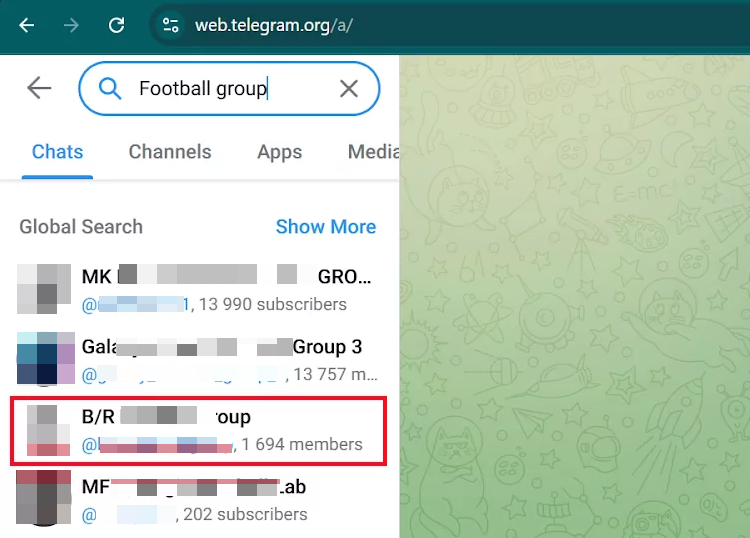
If you see "members" in the results, it means it's a group. If it says "subscribers," that's a channel.
Telegram's FAQ describes groups as spaces for communities, while channels are mainly used to broadcast messages to audiences. For regular users, the practical difference is simple: groups are for discussion, while channels are mainly for one-way updates. Telegram's Core API documentation also distinguishes basic groups, supergroups, gigagroups, and channels at a technical level.
Kindly note that this method only works for public groups. You have to know the group name before it can work effectively.
2Explore Telegram Group Directory Websites
If you think the search function isn't showing any useful results, you can try some Telegram group directory websites. Most of the Telegram groups on these sites are often submitted by the Telegram group owner.
With these sites, you have plenty of options to choose from because they usually contain numerous Telegram groups across diverse genres. Popular examples of these sites include:
- Tdirectory: If you need to find relevant Telegram groups by keywords, this service is your pick.
- Tgdr: This tool classifies existing Telegram groups. So, you can use it to find specialized communities based on your interests.
- Combot: This website is best for multi-language users, because it hosts and sorts a huge number of groups in different languages.

While we strive to provide accurate and up-to-date content, we do not guarantee the reliability and safety of any external websites. So, please exercise caution when visiting third-party websites.
These directory websites are not Telegram-owned or Telegram-verified sources. Use them as discovery tools rather than official recommendations, and check the group name, description, rules, admin activity, recent messages, and whether the chat is filled with spam or suspicious links before joining.
3Find Groups from Forum and Social Media
People often share Telegram group links across social media platforms, forums, and online communities.
The advantage of this approach is that you get recommendations from real people. This may also help you find invite links to private Telegram groups when admins or members have shared those links publicly.
Telegram's Privacy Policy explains that public chats are accessible to everyone and that publicly available account information may include screen names, profile pictures, and usernames. Because of that, group links and messages shared in public forums or communities should be treated as public information and checked carefully before you join or participate.
To find Telegram group links, please follow:
Step 1. Go to Relevant Communities
First, decide what you're interested in, then look for popular community platforms that match that interest. For example,
Reddit: Reddit has countless subreddits for different interests. If you like movies, try go to r/movies.
Facebook groups: Facebook owns a "Groups" section hosting various groups, such as "Netflix Movies Must Watch" or "ADHD Parents Support Group." Members in these groups often share related Telegram groups.
Step 2. Search with Keywords
Once you're in a relevant community or forum, use the built-in search to look for older posts.
Type keywords into the search bar, for example: "Telegram," "TG group," "group link," or the topic you want, like "movies" or "football." The more specific, the better.

You'll often find posts from other users that include invite links or people sharing group info in the comments.
Step 3. Post to Ask Group Links
If searching doesn't turn up what you need, post and ask for recommendations.
Before posting, make the post title clear, for example: "Help: Any recommended photography Telegram groups?" or "Looking for TG groups for learning Python—anyone can share?"
Then, briefly explain what you need and why in the body —this makes people more likely to respond with helpful suggestions.
Step 4. Find Group Links in Comments
When you find a thread, don't just read the main post—carefully look for the comments. Valuable links and info are often hidden in the replies.
Before clicking any link, always check the source and be cautious to avoid malicious links.
4Leverage Your Search Engines
Many search engines like Google can also help you locate Telegram groups. With search engines, you can find pages where public group links or publicly shared private-group invite links appear in social media posts, blog posts, news, YouTube channels, and directory sites.
Search engines can surface invite links that other people have already posted publicly, but that does not mean the group is safe, official, or still active. Treat search results as a starting point, then check the group rules, recent messages, admins, and link behavior inside Telegram before participating.
To use this method, all you have to do is:
- Step 1.Open any of your favorite search engines
- Step 2.In the search bar, type the name of the Telegram group you're looking for, such as "top Telegram promotion group."
- Step 3.Then, select any blog or social post to get the exact Telegram group links and join.
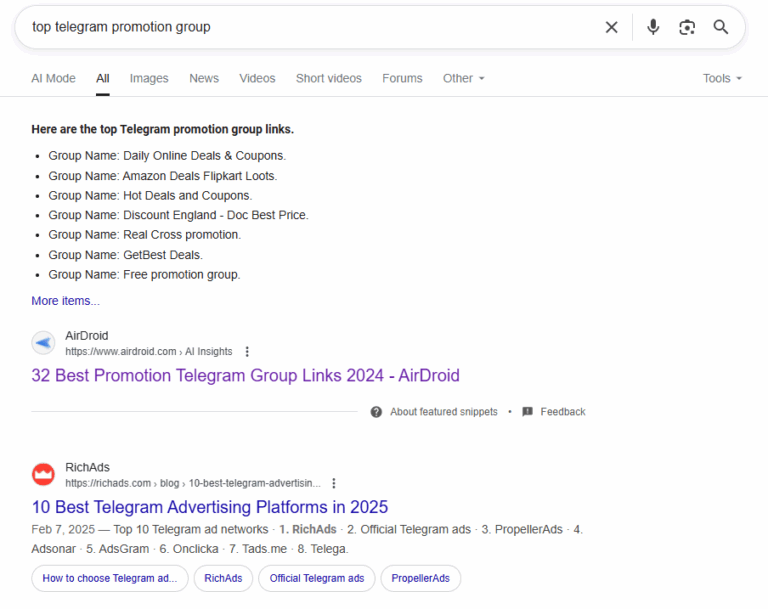
Read Also: 32 Best Promotion Telegram Group Links
How to Choose the Right Telegram Group
Pick a Group that Matches Your Interests
Think about what you actually want from a group. For example, if you're into programming, look for coding-related groups. If you're learning a new language, try joining a language-learning group.
Check How Big and Active the Group Is
The size and activity level of a group are also key factors.
- Too quiet = might be dead.
- Too spammy = probably low quality.
So, consider how active the group is and pick one that fits your schedule and preferences.
Peek at the Chat
After joining a group, scroll through recent messages. You'll quickly see if members are friendly, helpful, or just posting random links. If it feels respectful and on-topic, you've likely found a good fit.
Safety Tips When Joining Telegram Groups
As Telegram groups often contain random people, it is important to always keep safety in mind when joining one. That said, here are some safety tips when joining Telegram groups:
A 2024 research paper, DarkGram: A Large-Scale Analysis of Cybercriminal Activity Channels on Telegram, analyzed high-risk Telegram cybercriminal activity channels and found compromised credentials, malware, phishing links, and social engineering scams. This does not mean every Telegram group is unsafe, but it explains why users should check links, group quality, and admin behavior before joining.
Avoid Engaging in Spam or Scam Groups
When joining a Telegram group, always beware of a spam or scam group. I know you may be wondering how someone can identify a fraudulent and spam group. Well, to do that is not far-fetched. All you need to do is look out for:
- Groups that promote unrealistic offers or "Get rich quick"
- Groups where they share suspicious external links.
- Groups flooded with random ads
- Groups where the admin uses anonymous account
- Groups with thousands of members without any real chat
- .......
AP News reported FTC data showing a sharp rise in task-based job scams, where victims are approached through digital messages and promised easy earnings before being asked to pay money. This supports why Telegram groups promoting “easy money,” “paid tasks,” product boosting, crypto returns, or get-rich-quick offers should be treated carefully.
So, always stay vigilant and aware of the signs, so you can avoid falling into their traps and being a victim.
Check Group Rules
Normally, a legitimate and safe Telegram group will have rules guiding its members, so they can know the group's purpose and better understand what behaviour is allowed or prohibited. Additionally, by reading and following the rules, you can avoid receiving warnings or even being banned from the group.
If a group doesn't have any rules, it can easily become a breeding ground for spam and scam content.
Hide Your Phone Number and Profile Photos
When joining a group, nothing is more important than protecting your privacy. So, it is best to hide your phone number and profile photos (especially your selfie) on any public Telegram group you join.
Telegram's Privacy Policy explains that screen names, profile pictures, and usernames can be public account data, and that content posted in public groups and channels is accessible to everyone. This supports why users should review their phone number, username, profile photo, and bio before joining large or public groups.
When you do that, you keep the two sensitive pieces of information far away from criminals who may want to use them for malicious activities. Follow the steps below to hide your phone number and profile photos on the Telegram group:
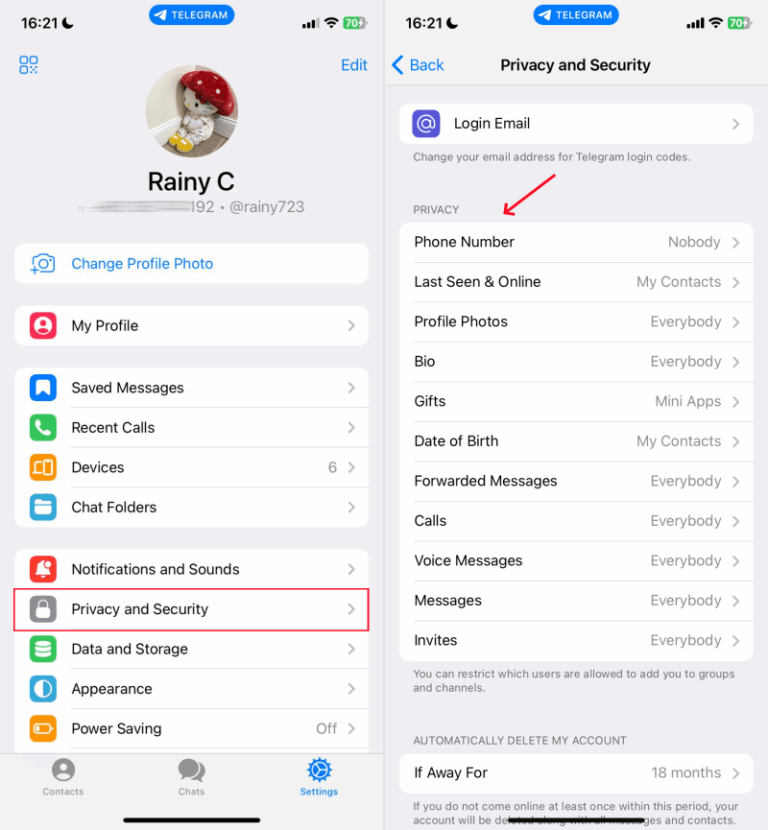
- Step 1.Open Telegram and go to "Settings."
- Step 2.Select "Privacy and Security."
- Step 3.Under "Phone Number" and "Profile Photos."
- Step 4.Pick "Nobody" as the audience.
Mute or Leave the Group
If, after you join a group, you discover that the group is no longer safe for you. The best thing to do at that point is to leave the group. Once you leave the group, Telegram will terminate all relationships between you and the group.
To leave the Telegram group, access the group info first and then tap on "Leave."
Surely, if you feel like not leaving the group or you think the group notifications are disturbing, you can simply mute them. Doing this will prevent you from getting notified when there are new messages.
To mute the Telegram group, just long-press the group in your chat list and tap the bell icon.
Keep Your Kids Safe on Telegram Groups
While Telegram groups are fantastic for connecting with like-minded people, it can also expose your kids to potential risks.
Telegram groups can include strangers, bots, forwarded links, and public messages. Telegram's Privacy Policy notes that bot developers may receive certain public account data and interaction data when users interact with bots. This is especially important for families because children may not always recognize whether a group link, bot, or private message is trustworthy.
As a parent, it's essential to ensure that your children are navigating Telegram groups safely. So, how can you protect your kids from inappropriate content, unwanted interactions, or harmful links while they explore Telegram groups?
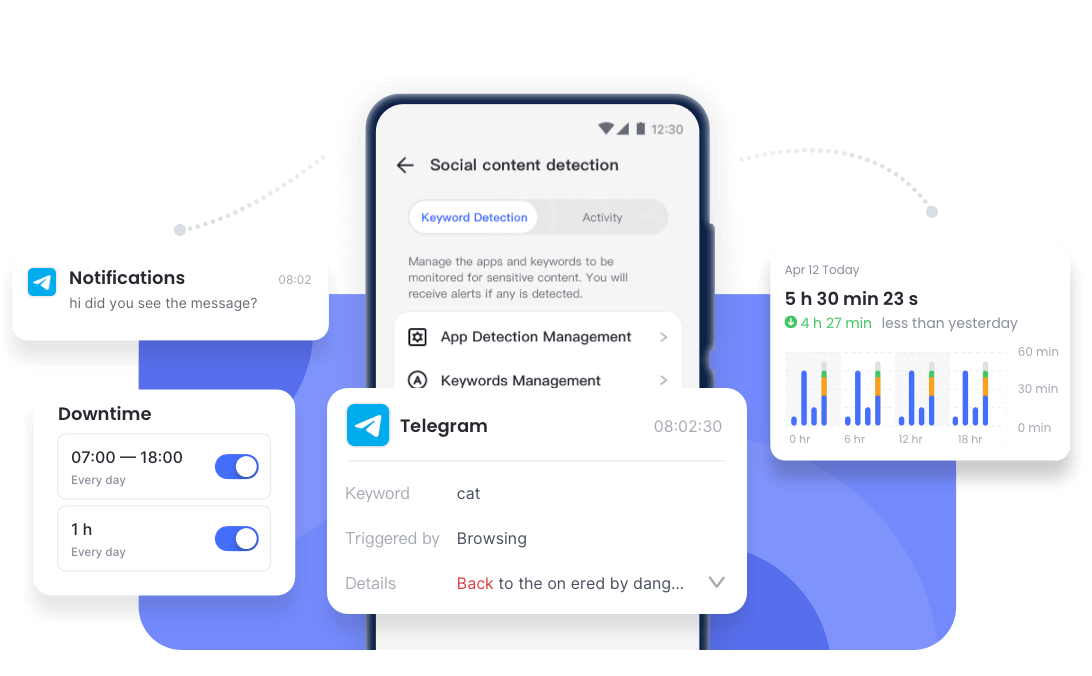
Consider tools like AirDroid Parental Control! It uses AI to identify risks by keywords, giving you the power to intervene immediately and keep your child safe on Telegram.
How AirDroid Helps:
- Get AI alerts for keywords related to violence, sexting, or drugs in their Telegram chats & searches.
- Set daily or weekly time limits for Telegram.
- See which Telegram groups your child joins, so you can spot red flags instantly.
FAQs About Telegram Groups
Can I find local groups on Telegram?
Can people see what Telegram group you're in?
No. Unless you're in the same group on Telegram, they can't know what group you're in on the platform. However, if they are in the same public group, they may be able to see the public profile information and messages you share there. Telegram's Privacy Policy also notes that public chats are accessible to everyone.
How to share Telegram group links?
- Step 1.On Telegram, open the group you want to share its link.
- Step 2.Tap the group name at the top to open its info page.
- Step 3.Here, you'll see a shareable link if any.
- Step 4.Copy it and you can share it.
Note: This is only applicable to a public group you're a member of. For a private group, you have to be an admin before you can share the link.
Conclusion
Finding a Telegram group should no longer be a hassle after reading this post. You can find Telegram groups by using the in-app global search feature, browsing online group directories, getting recommendations from communities, or directly searching on Google.
However, once you've found a group to join, never take your safety for granted. Always ensure your phone number or profile picture is hidden. If possible, avoid joining any Telegram group with scammy or spammy potential.
List of Sources
- Telegram Groups, Channels, and Discovery
- Telegram FAQ – Groups and Channels (https://telegram.org/faq)
- Telegram Core API – Channels, Supergroups, Gigagroups and Basic Groups (https://core.telegram.org/api/channel)
- Telegram Privacy, Public Chats, and Bots
- Telegram Privacy Policy – Public Chats, Account Data, and Bot Messages (https://telegram.org/privacy)
- Telegram Safety Risks and Scam Context
- DarkGram – A Large-Scale Analysis of Cybercriminal Activity Channels on Telegram (https://arxiv.org/abs/2409.14596)
- AP News – Job Scams Are on the Rise and More People Are Falling for Them (https://apnews.com/article/bfbbf95e12513c595fe3da998dcffad3)
- Recent Telegram Feature Changes
- The Verge – Telegram Disables 'Misused' Features as CEO Faces Criminal Charges (https://www.theverge.com/2024/9/6/24237526/telegram-pavel-durov-telegraph-location-features-moderation)
- The Guardian – Telegram to Drop 'People Nearby' Feature and Improve Moderation (https://www.theguardian.com/technology/article/2024/sep/06/telegram-to-drop-people-nearby-feature-and-improve-moderation)










Leave a Reply.