How IT Teams Improve SLA Compliance with Automated Audit Trails
-
Part 1: Why Device Alerts Alone Are Not Enough for SLA Compliance
-
Part 2: What Does SLA Compliance Require in Device Operations
-
Part 3: How AI-Driven Alert Workflows Build Complete Incident Records
-
Part 4: How AirDroid Business Helps Build Automated Audit Trails for Device Operations
-
Part 5: Key Benefits of Automated SLA Audit Trails for IT Teams
-
Part 6: Conclusion
As enterprises increasingly rely on large-scale device deployments, IT teams are facing growing challenges in maintaining service reliability and meeting SLA commitments. Device issues such as offline devices, application failures, or connectivity problems can directly impact business operations — but resolving an incident is only part of the challenge.
The bigger question is: Can organizations prove how an incident was detected, handled, and resolved?
Traditional device monitoring tools typically provide alerts and basic event information, but they often lack the complete context needed for SLA compliance. As a result, IT teams may resolve issues quickly but still struggle to provide clear evidence during SLA reviews or operational audits.
According to Gartner, AI-driven automation is becoming an important approach for improving IT incident management by helping organizations streamline response processes and reduce the impact of operational disruptions. By combining device alerts with AI-powered workflows, enterprises can move beyond simple notifications and create automated audit trails that document every step of the incident lifecycle.
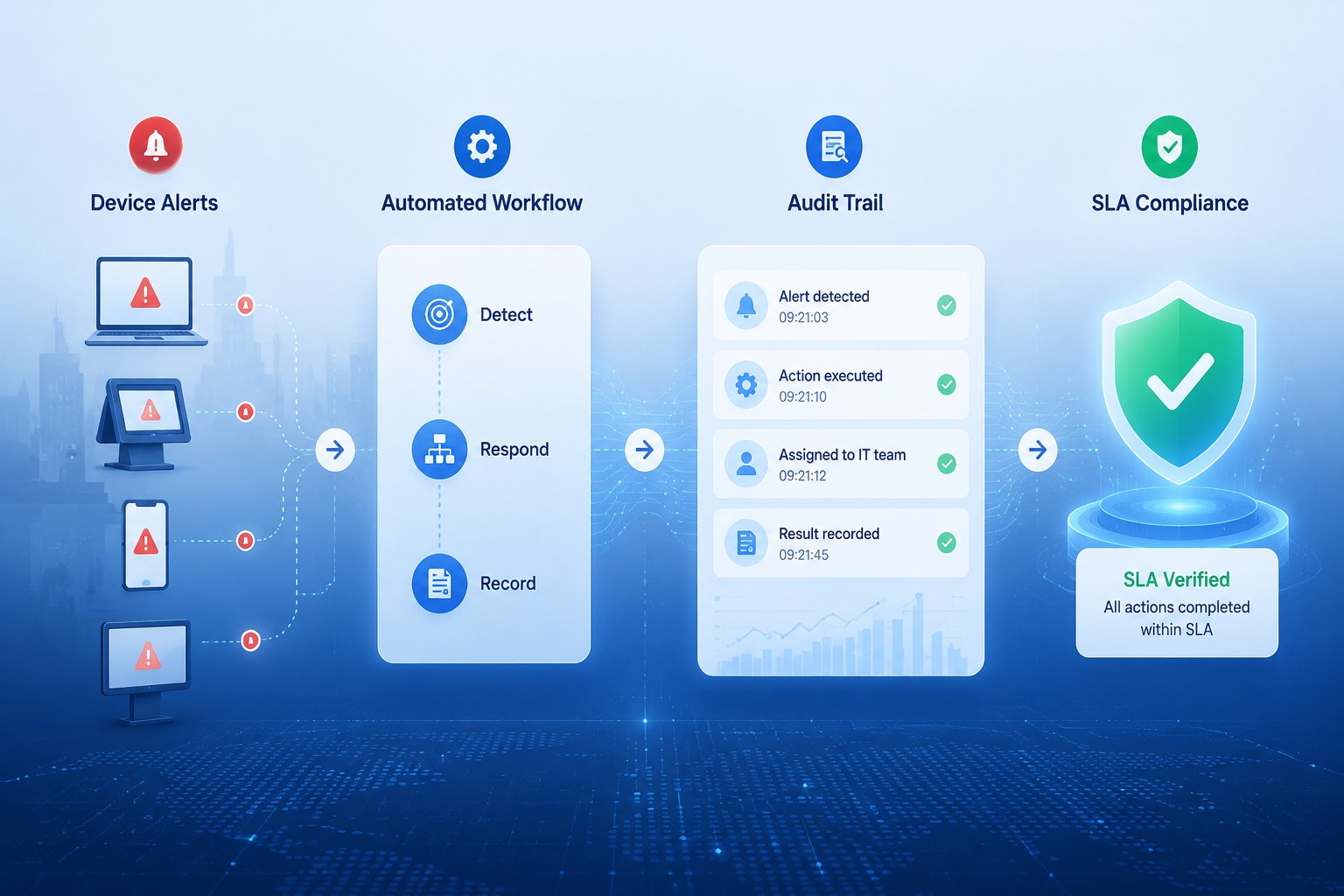
This article explores how device alert workflows help IT teams improve SLA compliance by transforming device events into structured, traceable incident records.
Why Device Alerts Alone Are Not Enough for SLA Compliance
Modern device management platforms enable faster issue detection, but identifying an incident is only the first step toward SLA compliance. Alerts show what happened, not how effectively it was resolved. For large-scale deployments, building clear evidence of incident handling remains a challenge.
Alerts Show Problems, But Not the Complete Incident Story
Traditional device alerts are designed to notify IT teams when predefined conditions are met, such as: a device goes offline, an application stops responding, or a network connection fails. These alerts are valuable because they help teams identify issues quickly. However, they usually only capture the initial event: “A device became unavailable at 10:03 AM.”
For SLA compliance, this information is not enough. IT teams also need to understand what happened after the alert was triggered:
- How severe was the impact?
- Who was responsible for handling the issue?
- What troubleshooting steps were performed?
- How long did the resolution take?
- Was the service restored within the agreed SLA?
Without this additional context, an alert remains only a notification rather than a complete incident record.
Manual Incident Tracking Creates Visibility Gaps
In many organizations, device incident handling still depends heavily on manual processes. A typical workflow may look like this:
Device Alert Triggered → IT Engineer Receives Notification → Engineer Investigates and Fixes Issue → Incident Details Are Manually Documented
While this approach may work for small environments, it becomes increasingly difficult to manage as device fleets grow. Manual tracking creates several challenges:
1. Incomplete incident records
During troubleshooting, engineers may perform multiple actions, such as: restarting a device remotely, updating configurations, or checking network connectivity. However, these steps are not always fully documented. As a result, important operational knowledge may be lost after the incident is resolved.
2. Inconsistent documentation
Different teams may record incidents in different formats, making it difficult to build standardized reports or compare operational performance.
3. Limited accountability
Without a clear record of ownership and actions, organizations may struggle to determine:
- Who responded to the incident
- When the response started
- Whether the correct procedure was followed
For SLA management, the resolution itself is only part of the story. The process behind the resolution is equally important.
SLA Reviews Become Time-Consuming and Reactive
When organizations need to review SLA performance, they often have to manually collect information from multiple sources, such as: device monitoring systems, ticketing platforms, or email conversations.
This fragmented approach makes incident analysis time-consuming. Instead of viewing a complete incident timeline, IT teams must piece together key details such as alert times, response actions, troubleshooting steps, and recovery results.
Instead of having a clear incident timeline, teams spend valuable time reconstructing past events. More importantly, this reactive approach limits the ability to improve future operations. Without structured incident data, organizations cannot easily identify:
- Which devices fail most frequently
- Which issues cause the longest downtime
- Where response processes can be optimized
To achieve continuous improvement and stronger SLA compliance, enterprises need to move beyond isolated alerts and create a connected, auditable record of every device incident.
Automate Device Incident Response with Intelligent Workflows
Reduce manual intervention by connecting device alerts with automated actions, notifications, and response processes. Learn how workflow automation can help IT teams handle incidents faster and more consistently.
What Does SLA Compliance Require in Device Operations
Resolving device incidents quickly is important, but SLA compliance requires more than simply restoring affected devices. For enterprise IT teams, compliance depends on having a reliable way to measure, verify, and demonstrate every stage of incident handling.
1. A Complete Incident Timeline
An SLA-compliant device operation requires a complete timeline that tracks every important stage of an incident. Instead of viewing an alert as a single event, organizations should treat it as part of a larger operational workflow:
1. Detection: When did the issue occur?
The system should record alert trigger time, device status at the time of failure, type and severity of the issue. This establishes the starting point for measuring response time.
2. Analysis and Assignment: How was the incident prioritized?
Not every device issue has the same business impact. A complete incident record should include:
- Device importance
- Location or department affected
- Incident severity
- Assigned owner or response team
For example, an offline device in a critical retail location may require faster escalation than a low-priority device used for internal operations.
3. Response and Resolution: What actions were performed?
SLA compliance depends not only on response speed but also on response quality. Organizations need visibility into:
- Actions executed
- Teams involved
- Remote troubleshooting steps
- Escalation processes
This helps verify whether incidents were handled according to operational standards.
4. Verification: Was the issue actually resolved?
A device becoming online again does not always mean the incident is fully resolved. A complete workflow should verify:
- Device connectivity restored
- Application status recovered
- Required policies remain compliant
- No immediate recurrence occurs
This final verification step ensures that resolution metrics reflect actual service restoration rather than temporary recovery.
2. Essential Elements of an SLA-Ready Audit Trail
To support SLA compliance, every device incident should generate a structured audit trail containing key operational information.
| Record Element | Example | Why It Matters |
|---|---|---|
| Detection Time | Device went offline at 10:03 AM | Establishes the incident start time |
| Device Context | Device ID, location, group, status | Shows the scope and impact of the issue |
| Incident Details | Offline alert, app failure, policy violation | Defines what happened |
| Severity Level | Critical, high, medium | Determines response priority |
| Assigned Owner | IT administrator or support team | Creates accountability |
| Response Actions | Remote reboot, configuration update, escalation | Shows how the issue was handled |
| Resolution Time | Device restored at 10:18 AM | Measures recovery performance |
| Final Status | Resolved, escalated, or pending | Supports SLA reporting |
Together, these records transform a simple device alert into a complete operational history.
3. From Incident Records to an SLA Evidence Chain
When detection data, response actions, and resolution outcomes are connected within a single workflow, organizations create what can be described as an SLA evidence chain — a complete and traceable record of how an incident was managed.
An SLA evidence chain is not just a collection of logs. It connects different operational events into a meaningful timeline:
Device Alert → Incident Context → Response Decision → Remediation Action → Recovery Verification → SLA Performance Record
With this level of visibility, IT teams can move from: “We believe the issue was handled within SLA.” to: “Here is the complete record showing when the issue occurred, how it was handled, and why the SLA target was achieved.”
This shift is especially important for organizations managing large device fleets, where operational transparency, accountability, and audit readiness directly impact service reliability.
How AI-Driven Alert Workflows Build Complete Incident Records
While complete incident records are essential for SLA compliance, maintaining them manually is difficult — especially for organizations managing thousands of enterprise devices across multiple locations.
AI-powered alert workflows provide a more efficient approach by helping organizations turn device alerts into structured, traceable incident records. In the following sections, we’ll explore how automated workflows improve incident visibility, response efficiency, and SLA compliance.
1. Automate Incident Routing and Response Actions
Ensuring the right response happens quickly is a major challenge. Traditional alert handling often depends on manual steps:
Alert Received → Engineer Reviews Issue → Finds Responsible Team → Decides Next Action → Updates Incident Record
This process introduces delays and increases the risk of inconsistent responses. AI-powered alert workflows can automate these steps by:
- Classifying incident severity
- Assigning incidents to the appropriate team
- Triggering predefined response procedures
- Escalating critical issues when necessary
- Requesting human approval for sensitive actions
For example, a device that remains offline beyond a defined threshold can automatically trigger a workflow:
Device Offline Alert → I Evaluates Severity → Check Device Context → Notify Responsible Team → Execute Approved Remediation Action → Record Workflow Result
This creates a standardized response process while ensuring every step is tracked.
2. Record Every Decision, Action, and Result
One of the biggest challenges in traditional incident management is that the final outcome is often recorded, but the process behind it is not.
An incident ticket may show: “Device restored.” But it may not explain:
- When the issue was detected
- Why a specific action was selected
- Who performed the action
- Whether the remediation was successful
AI-powered workflows solve this by automatically recording the complete incident history. A typical audit-ready record may include:
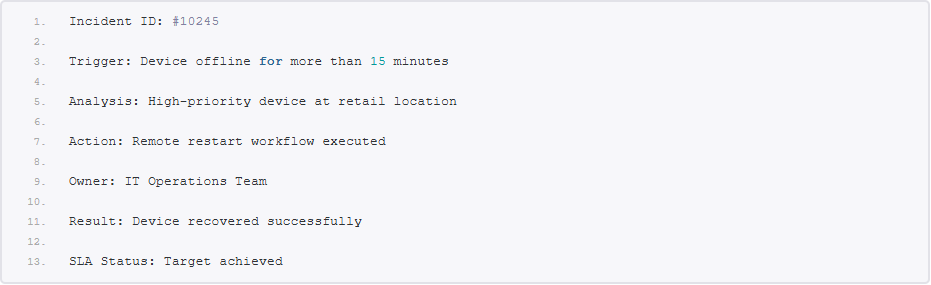
This creates a transparent connection between the original alert and the final resolution. Instead of relying on manual documentation, organizations gain a consistent and reliable audit trail for every incident.
3. Transform Device Alerts into Auditable Incident Workflows
The value of AI-powered alert workflows is not simply faster response. The greater impact is the ability to create a continuous operational record.
By connecting device events, AI-based analysis, automated actions, human decisions and resolution results, organizations can build a complete incident lifecycle that supports SLA compliance.
The process changes from:
Alert received → Issue fixed → Manual documentation
to:
Alert detected → Context analyzed → Workflow executed → Actions recorded → Resolution verified → Audit trail generated
This approach enables IT teams to manage device operations with greater transparency and confidence. Every incident becomes measurable, traceable, and ready for SLA review.
How AirDroid Business Helps Build Automated Audit Trails for Device Operations
Managing SLA compliance across distributed devices requires more than detecting issues. IT teams need a way to automatically understand alerts, trigger the right responses, and maintain a complete record of every operational event.
AirDroid Business helps organizations move from reactive device monitoring to more intelligent device operations through AI-powered alert workflows. By connecting device alerts with automated response processes and activity records, teams can create a more traceable incident management workflow — from the moment an issue is detected to the final resolution.
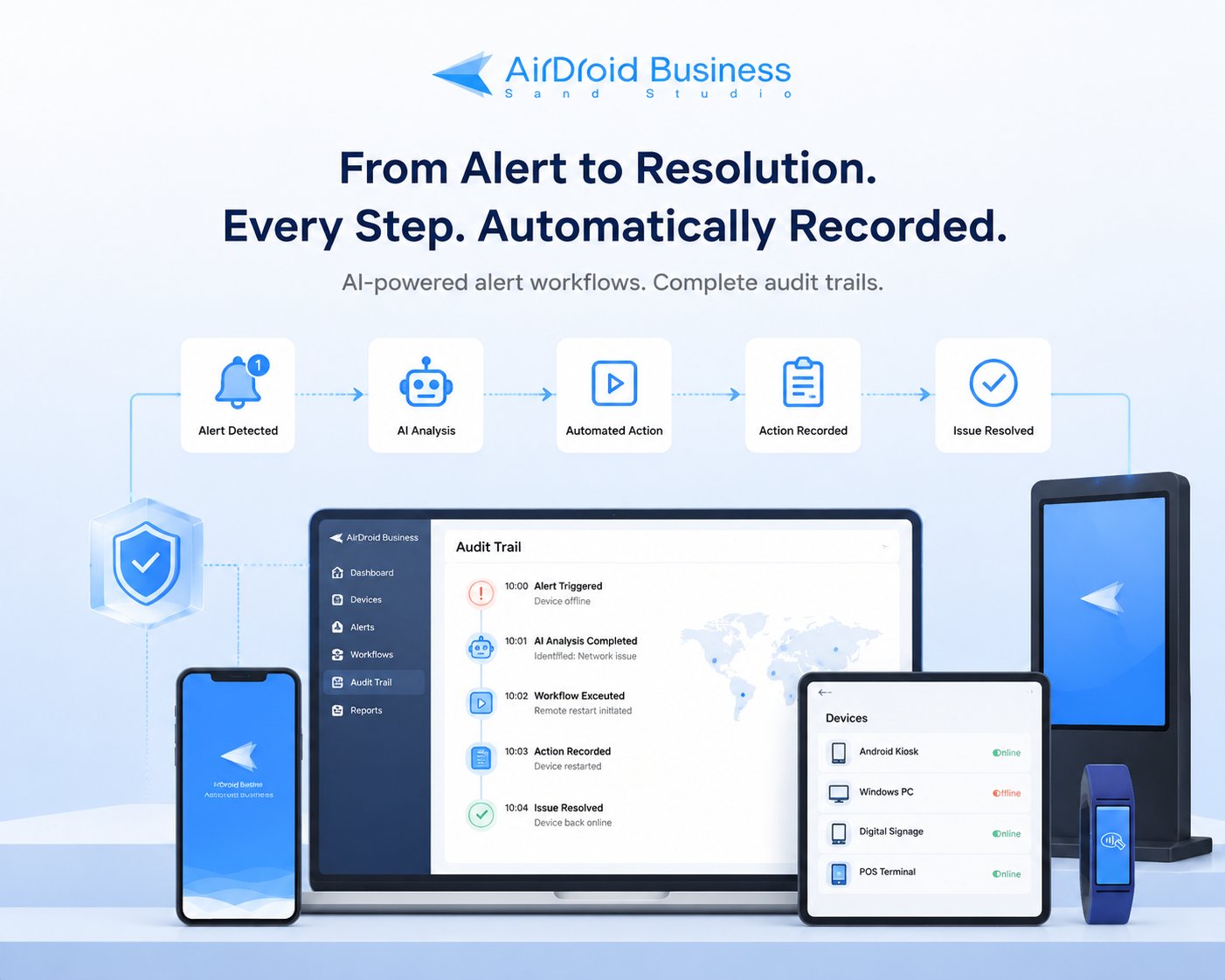
1. Turn Device Alerts into Context-Aware Workflows
Traditional alerts often provide only a simple notification: “Device offline detected.” However, resolving incidents efficiently requires understanding the context behind each event.
With AI workflows, AirDroid Business helps IT teams transform device alerts into actionable workflows by combining alert conditions with device information and predefined operational rules.
When an issue occurs, teams can:
- Identify affected devices and their operational status
- Understand the severity and potential impact
- Trigger the appropriate workflow based on predefined conditions
- Route incidents to the right teams or actions
Instead of manually reviewing every notification, IT teams can establish standardized response processes that reduce delays and improve consistency.
2. Automate Incident Response and Remediation Actions
Once an alert is identified, the next challenge is taking action quickly. AirDroid Business enables teams to configure workflows that automatically respond to specific device events. These workflows can help reduce manual intervention by triggering predefined actions, such as:
- Sending notifications to responsible teams
- Performing remote device actions
- Applying predefined configurations
- Escalating incidents when additional attention is required
For example:
Device Offline Alert → AI-Powered Workflow Evaluates Event → Identify Device Context & Response Path → Trigger Automated Action → Record Execution Result
By automating repetitive response steps, IT teams can shorten response cycles while ensuring incidents are handled through consistent procedures.
3. Create Automated Audit Trails Through Recorded Actions
For SLA compliance, automation alone is not enough. Organizations also need visibility into what happened during each incident. AirDroid Business helps maintain operational traceability by recording important device management activities and workflow outcomes, including:
- Alert triggers
- Response actions
- Remote operations
- Administrative activities
- Resolution status
With this automated audit trail, IT teams can review incidents based on actual operational data instead of manually reconstructing events from scattered sources.
4. Support SLA Compliance with Smarter Device Operations
By combining AI-powered alert workflows, automated response actions, and activity records, AirDroid Business helps organizations build a more transparent approach to device operations.
For enterprises managing large-scale device deployments, this means:
- Faster incident response
- More consistent remediation processes
- Better operational visibility
- Easier SLA performance reviews
Rather than treating alerts as isolated notifications, organizations can turn device events into structured workflows with measurable outcomes.
Build More Transparent Device Operations with AirDroid Business
Discover how AirDroid Business helps IT teams automate device monitoring, streamline incident response, and maintain clearer operational records across distributed device environments.
Key Benefits of Automated SLA Audit Trails for IT Teams
Automated audit trails provide more than incident records. For IT teams managing large-scale device environments, they bring several operational benefits that improve SLA management, streamline incident handling, and support continuous improvement.
1. Improve SLA Transparency and Accountability
One of the biggest challenges in device operations is proving that incidents were handled according to agreed service levels. Automated audit trails provide a complete record of each incident.
With a structured incident history, IT teams no longer need to rely on manual explanations or scattered records. They can quickly review the complete timeline of an event and demonstrate whether SLA targets were achieved.
This level of transparency helps improve accountability across teams and supports clearer communication with customers, stakeholders, and internal departments.
2. Reduce Manual Reporting and Incident Review Efforts
Traditional SLA reporting often requires teams to manually collect information from multiple sources, such as monitoring platforms, ticketing systems, and communication records.
Automated audit trails simplify this process by continuously capturing relevant incident data as events occur. Instead of spending hours reconstructing past incidents, IT teams can access organized records that are ready for analysis and reporting.
This allows teams to spend less time on administrative tasks and more time improving device reliability and operational efficiency.
3. Enable Continuous Improvement in Device Operations
Incident records are not only useful for SLA reviews, they also provide valuable insights for improving future operations.
By analyzing historical incident data, organizations can identify recurring device issues, inefficient response processes, and opportunities for optimization.
Over time, automated audit trails help IT teams move from reactive troubleshooting to proactive device management, enabling more reliable operations across large-scale device environments.
Conclusion
SLA compliance is no longer only about resolving device issues quickly — it is about having clear visibility into how incidents are detected, handled, and resolved.
By combining AI-powered alert workflows with automated audit trails, organizations can transform device alerts into structured, traceable incident records. This enables IT teams to improve operational transparency, reduce manual reporting efforts, and build more reliable device management processes across distributed environments.
With the right workflow automation in place, every device incident can become a measurable and actionable part of continuous IT improvement.
Improve SLA Compliance Across Your Device Fleet
Gain better visibility into device incidents, improve operational accountability, and build a more reliable management process for enterprise devices with AirDroid Business.











Leave a Reply.