How to Automate POS Alert Management Across Retail Stores
A POS terminal stops responding during the lunch rush. A self-checkout kiosk exits kiosk mode unexpectedly. Several receipt printers go offline after a software update. None of these issues are unusual in a retail environment, which can disrupt checkout, the customer experience, and overall store operations.
To maintain store uptime, most retailers rely on Mobile Device Management (MDM) platforms to monitor POS terminals, self-checkout kiosks, handheld scanners, receipt printers, and other connected devices. MDM solutions can detect device anomalies, trigger alerts, and perform predefined remediation actions, such as restarting an application or rebooting a device.
But detection is only the beginning.
As retail device fleets grow, IT teams may face an overwhelming volume of alerts, increasing reliance on manual monitoring, unclear ownership, slow response times, and fragmented incident tracking.
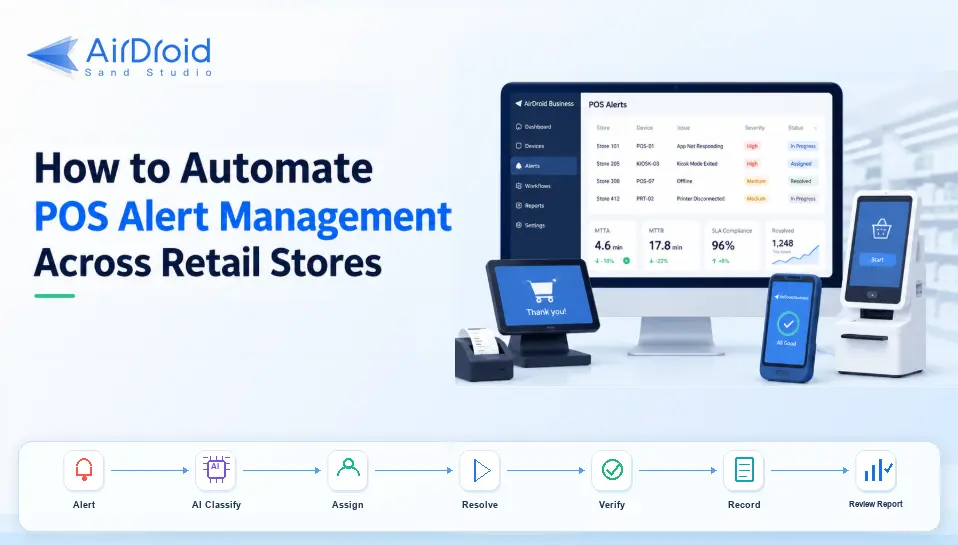
According to Zebra’s 18th Annual Global Shopper Study, 89% of retail associates believe AI will help them become more productive, while 87% of retail leaders believe Gen AI will have a significant impact on retail operations, reflecting the industry's broader shift toward intelligent automation and connected workflows.
To addresses these operational challenges and meets retailer's automation requirements, AirDroid Business brings device management and AI-powered workflow orchestration together, transforming isolated alerts into a closed-loop retail incident workflow:
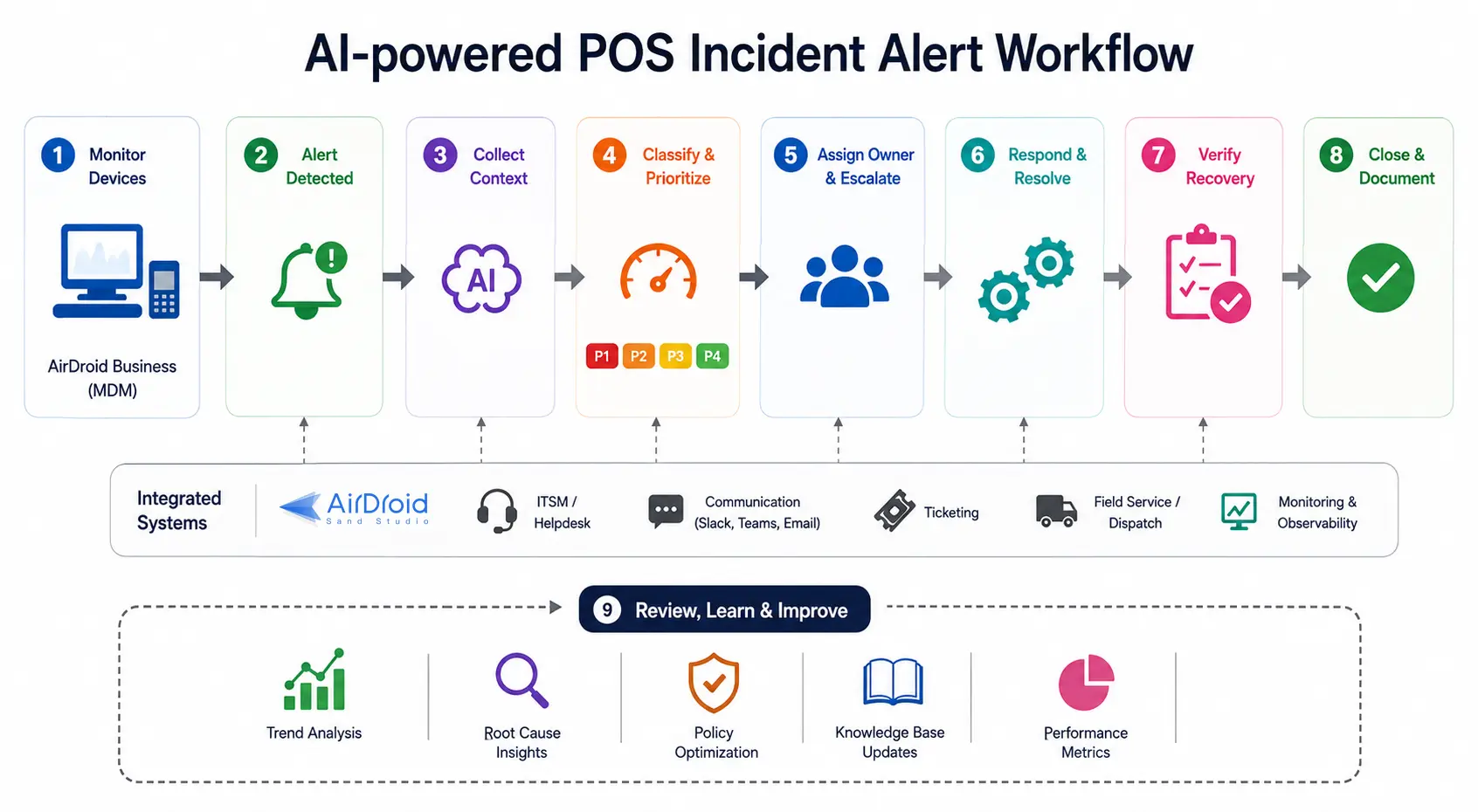
Instead of simply notifying IT teams when a POS device goes offline, the workflow can evaluate the incident's operational impact, assign it to the appropriate owner, coordinate safe remediation, verify that checkout operations have fully recovered, document the entire incident, and generate operational insights for continuous improvement.
In the following sections, we'll walk through how to build an AI-powered incident workflow for POS terminals, self-checkout kiosks, handheld devices, receipt printers, and other retail endpoints.
- Part 1 : Define Monitoring Rules and Alert Conditions
- Part 2 : Route Every Alert to a Clear Owner
- Part 3 : Prioritize Incidents and Reduce Alert Noise
- Part 4 : Orchestrate the Response: Decide What Happens Next
- Part 5 : Connect Alerts to the Systems Retail Teams Already Use
- Part 6 : Verify Recovery Before Closing the Incident
- Part 7 : Automatically Record What Happened
- Part 8 : Schedule Alert Review and Improve the Workflow
- Part 9 : Final Words
Part 1 : Define Monitoring Rules and Alert Conditions
An intelligent retail incident workflow starts with a clear device monitoring baseline.
First of all, it is necessary for retailers to determine which device conditions should be monitored, which events are important enough to become alerts, and what actions should be executed when device anomaly occurs.
For example, the following content could be monitored:
- Device offline duration
- Battery capacity
- Internet connectivity
- POS application status
- Barcode scanners or receipt printers connectivity
- Storage conditions
- Kiosk mode status
Next, establish thresholds when an alert should be triggered, for example:
- No device heartbeat received for 5 minutes
- Network disconnected for 5 consecutive minutes
- Kiosk Mode exits unexpectedly
- POS application is not running or becomes unresponsive for 2 minutes
- Battery level remains below 20% for more than 10 minutes
When the alert is triggered, execute the self-healing actions, for example:
- Restart POS application
- Reboot device
- Clear application cache
- Reset device
Monitoring rules, alert thresholds, and self-healing actions should be tailored to the retailer's operational requirements.
Part 2 : Route Every Alert to a Clear Owner
Most MDM platforms can route alerts to predefined users or administrator groups, ensuring that someone is notified when an issue occurs.
However, effective POS device management requires more than simply delivering notifications. Retailers should establish routing rules that automatically assign incidents based on business context.
The rule documentation could include the following fields:
| event_type | scope | primary_owner_role | escalation_owner_role |
|---|---|---|---|
| NetworkOffline | store | Store Ops | Regional IT Lead |
| AppCrash | device | IT Ops On-call | POS Vendor Support |
| KioskExit | device | IT Ops On-call | Regional IT Lead |
| MultiPOSOffline | store | Regional IT Lead | HQ Incident Manager |
Once these rules are configured in AirDroid Business, it’s available to trigger a workflow with LLMs or agents evaluating the business context and route the incident to the appropriate owner.
Part 3 : Prioritize Incidents and Reduce Alert Noise
Treating every alert as a high-priority incident can quickly overwhelm IT teams. A handheld scanner temporarily losing network connectivity should not receive the same priority as multiple POS terminals becoming unavailable during Black Friday.
To ensure valuable engineering resources are focused where they have the greatest business impact, retailers should define clear incident classification policies and alert management policies.
1Incident Classification Policies
Start by classifying incidents based on their impact on store operations rather than device status alone. For example:
| Severity | Business Hours | Payment Blocked | Affected Scope | Device Role | Affected Device Ratio / Count | Backup Device Available | Example |
|---|---|---|---|---|---|---|---|
| P1 | Yes | Yes | Store / Region | Primary POS or Self-Checkout | Ratio ≥ 30% or ≥ 2 critical devices in the same store | Either | Multiple critical checkout devices are unavailable during business hours, directly impacting customer transactions. |
| P1 | Yes | Yes | Device | Primary POS | 1 device | No | The only primary POS terminal is unavailable during business hours, and no backup device is available. |
| P2 | Yes | No / Unknown | Device / Store | Primary POS or Self-Checkout | ≥ 1 device | Yes | A critical checkout device is experiencing issues, but backup devices are available, allowing transactions to continue with reduced checkout capacity. |
| P3 | No | Any | Device | Any | 1 device | Either | A single device experiences an issue outside business hours and can be handled through the normal support queue. |
| P3 | Any | No | Device | Handheld Device or Secondary POS | 1 device | Either | A non-payment-critical device experiences an issue that does not affect customer transactions. |
2Alert Management Policies
To reduce alert fatigue and ensure IT teams focus on business-critical incidents, a retail incident response workflow should include three alert management policies:
- Alert aggregation: Combine related alerts from the same device, store, or region into a single incident.
- Alert suppression: Suppress duplicate notifications for the same unresolved issue within a defined time window, preventing support teams from being repeatedly notified while the incident is already being addressed.
- Smart escalation: Escalate an incident only if predefined response-time targets or recovery conditions are not met.
| Condition | Action |
|---|---|
| severity = P1 | Escalate immediately (or require manager approval before escalation, depending on company policy). |
| severity = P2 AND time_since_first_seen > SLA_response | Escalate to the next support level if the response SLA has been exceeded. |
| An automated remediation action has been executed AND status = Not Recovered AND the recovery timeout has been exceeded | Escalate for manual investigation or on-site support. |
By combining severity classification, alert aggregation, alert suppression, and smart escalation, retailers can reduce alert fatigue while ensuring business-critical incidents receive immediate attention.
Turn device alerts into prioritized, owner-assigned incident workflows that reduce alert fatigue and speed up retail response.
Part 4 : Orchestrate the Response: Decide What Happens Next
Traditionally, once an alert is triggered, the predefined remediation action is executed automatically. However, in some cases, it may fail to address the root cause or even interrupt ongoing store operations.
This is where AI-powered AirDroid Business extends the workflow from executing predefined actions to orchestrating a more intelligent, context-aware incident response.
1Upload Rules to Knowledge Base
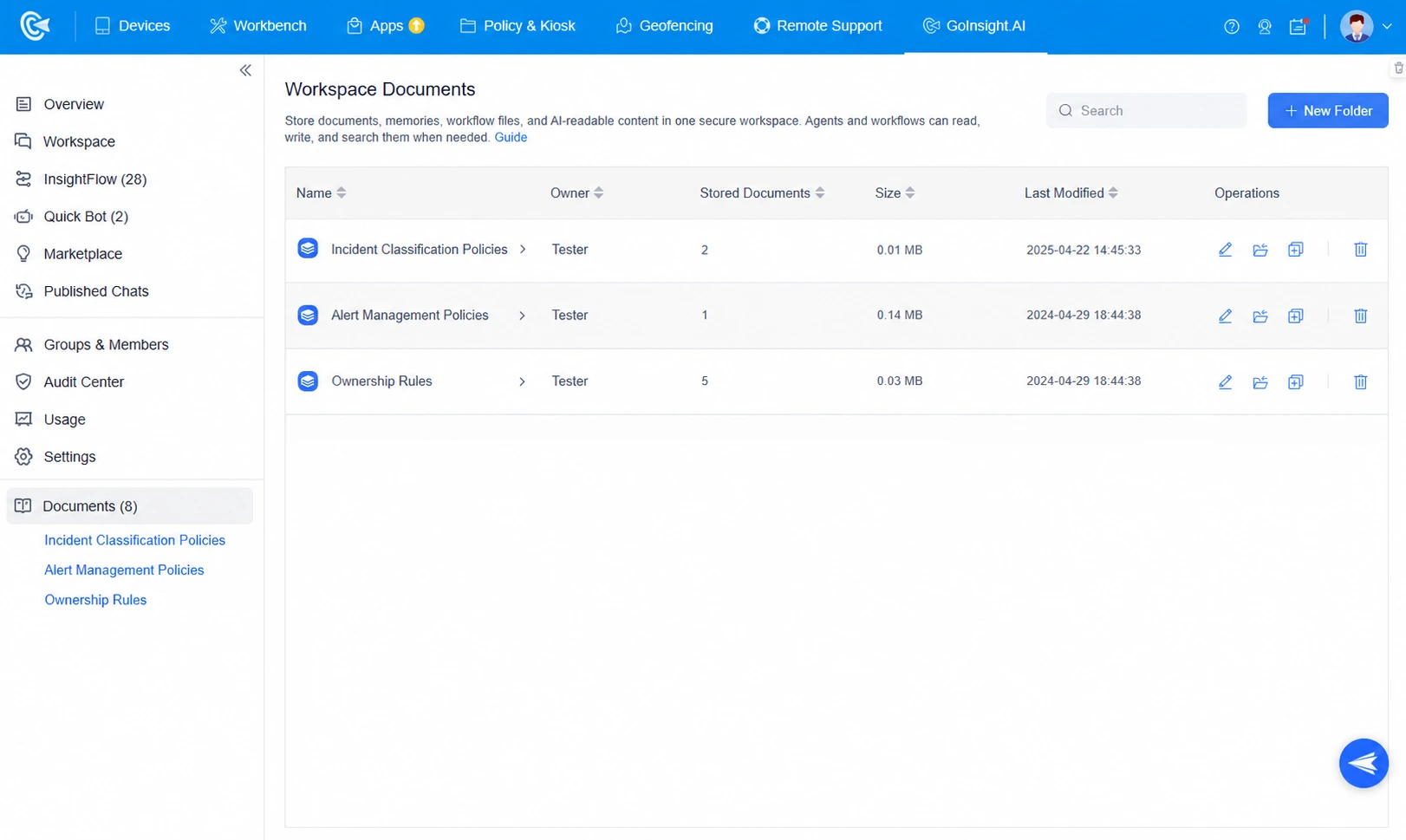
Begin by uploading the operational documents created in the previous steps, including incident classification policies, alert management policies, and ownership rules, to Workspace Documents in AirDroid Business. Then, add a Knowledge Retrieval node to the workflow so the AI can reference these documents during decision-making.
This ensures the orchestration logic can always reference the latest policy, and updating the policy becomes “edit the document,” not “recreate the workflow.”
2Gather Incident Context
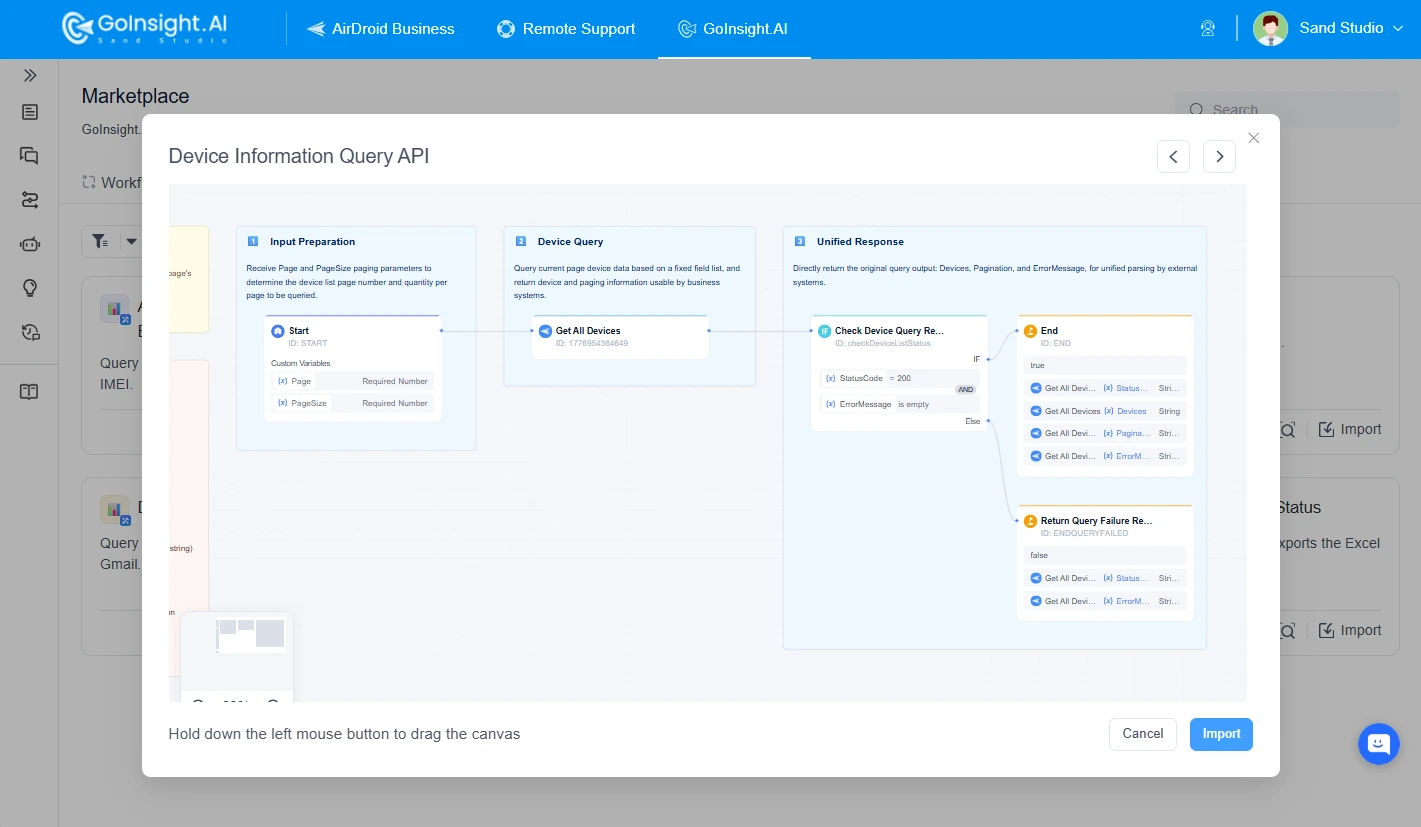
Next, build a Service Flow or an Interactive Flow to query the AirDroid Business API and automatically retrieve relevant incident information, including the store or site location, device ID, offline duration, device history, recent configuration changes, and any related previous incidents.
3Generate a Standardized Action Plan
With both POS device details and the retrieved incident rules, add an LLM node to assess the incident severity, to intelligently push the alert, identify the responsible owner and recommend the next steps for resolution.
Since AI-generated recommendations may not always align with business requirements, it is recommended to incorporate human-in-the-loop approval nodes for critical incidents or high-risk operations.
Part 5 : Connect Alerts to the Systems Retail Teams Already Use
If an alert remains within the MDM console, retail teams often have to manually transfer information between ticketing platforms, communication tools, and operational systems. This fragmented process slows response times and makes incidents difficult to track.
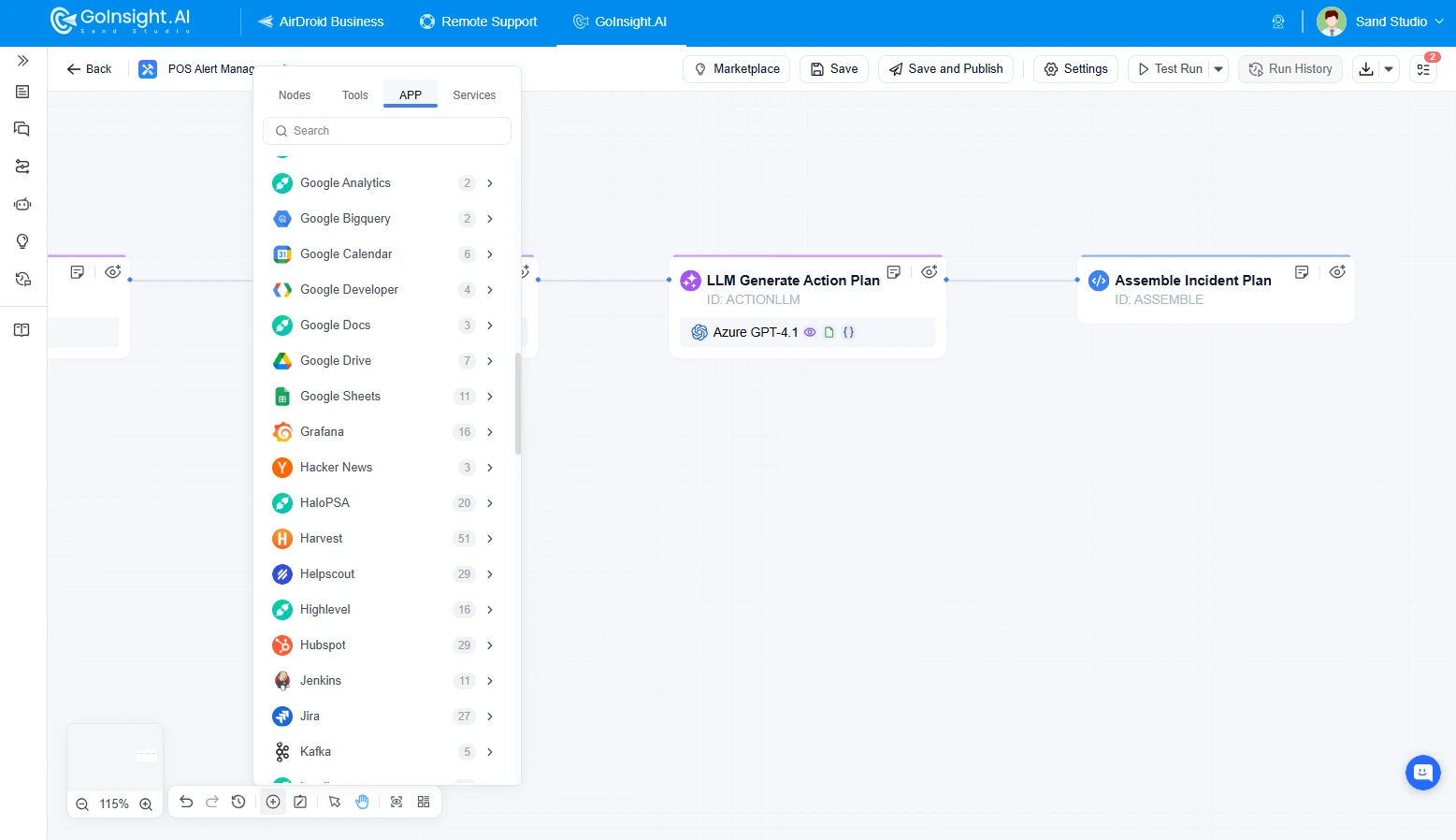
AirDroid Business extends alert management beyond simple notifications by integrating the internal tools retailers already rely on, such as ticketing systems, instant messaging platforms, email, spreadsheets, and CRM or asset management systems.
Once an action plan is generated, the workflow can automatically distribute the incident summary, recommended actions, and ownership information to the appropriate systems and stakeholders.
As a result, tickets can be created, notifications can be sent to the responsible teams, and incident records can be updated automatically, a structured, trackable resolution workflow is created.
Part 6 : Verify Recovery Before Closing the Incident
Sometimes, the IT team temporarily restores the device and closes the incident ticket, but the POS device becomes unavailable again shortly afterward.
Therefore, it is recommended to incorporate an automated recovery verification step into the workflow.
After a predefined waiting period, such as 30 minutes, the workflow automatically verifies key indicators, including device connectivity, heartbeat, POS application status, and Kiosk Mode status, against predefined recovery criteria.
If all recovery verifications pass, the incident is automatically marked as Recovered, and the corresponding ticket is updated to Resolved or Closed.
Coordinate safe remediation, verify device recovery, and keep incident tickets synchronized from detection through closure.
Part 7 : Automatically Record What Happened
Instead of scattering information across alerts, emails, chat messages, and ticket comments, creating a workflow to automatically document what happened and consolidate these records into a complete incident history would no longer require the IT team to manually compile reports.
For example, the workflow can continuously capture key events throughout the incident lifecycle, such as:
- When and where the incident occurred
- The affected store, device, and device type
- The detected issue and assigned severity
- The incident owner and escalation history
- Remediation actions taken and their outcomes
- Human approvals or interventions
- Recovery verification results
- Resolution time and ticket status
This provides valuable data for compliance, SLA reporting, root-cause analysis, and post-incident reviews.
Part 8 : Schedule Alert Review and Improve the Workflow
While individual incidents are automatically recorded throughout the workflow, the real value comes from reviewing operational performance over time.
On a weekly or monthly basis, retailers can schedule the workflow to aggregate incident data across all stores and use AI to generate a standardized operational review report. Instead of manually collecting data from multiple systems, the workflow automatically analyzes historical incident records and summarizes key operational insights.
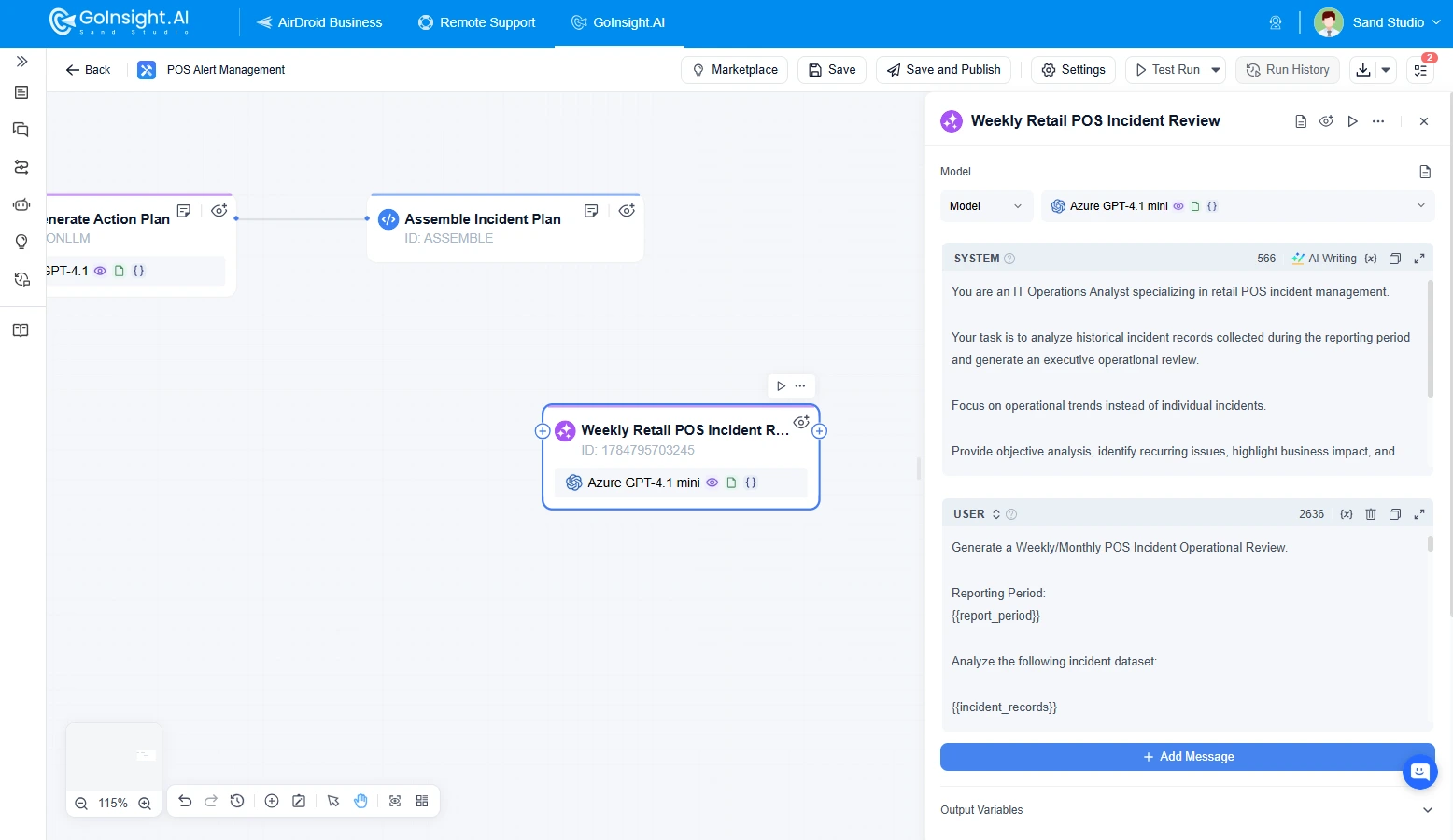
The report can include metrics and trends such as:
- POS uptime by store or region
- MTTA, MTTR, and SLA performance
- Top stores or device types with recurring incidents
- Incident severity distribution
- Automated remediation success rate
- Escalation frequency and human intervention rate
- Common root-cause categories and recommended improvements
The completed report can be automatically shared with IT management, retail operations teams, or cross-functional stakeholders through email, collaboration platforms, or the organization's knowledge base, providing a consistent foundation for weekly or monthly operational review meetings.
By regularly reviewing incident trends rather than individual events, retailers can continuously refine monitoring rules, ownership policies, escalation paths, and remediation workflows. This creates a continuous improvement cycle where operational insights are fed back into the workflow, making future incident response faster, more consistent, and more effective.
Part 9 : Final Words
Modern retail operations depend on more than simply detecting device issues.
Whether you're looking to reduce checkout downtime and improve store uptime or replacing manual alert handling with an automated incident response workflow, AirDroid Business provides the tools to help retail IT teams standardize operations, reduce manual effort, and maintain a consistent customer experience across every store.
Explore AirDroid Business to learn how AI-powered retail incident workflows can help your organization automate POS incident response, improve operational resilience, and keep checkout systems running when customers need them most.
Automate POS incident prioritization, owner routing, remediation, recovery verification, documentation, and operational review across every retail store.











Leave a Reply.