Digital Signage Uptime Optimization: From Alert-Centric MDM to AI-Powered Incident Operations
Digital signage vendors and enterprises relied on MDM platforms for monitoring device status, and generating automated alerts based on kiosk conditions and predefined policies.
However, a digital signage screen goes offline. An alert is triggered. Someone receives a notification. Then what happens?
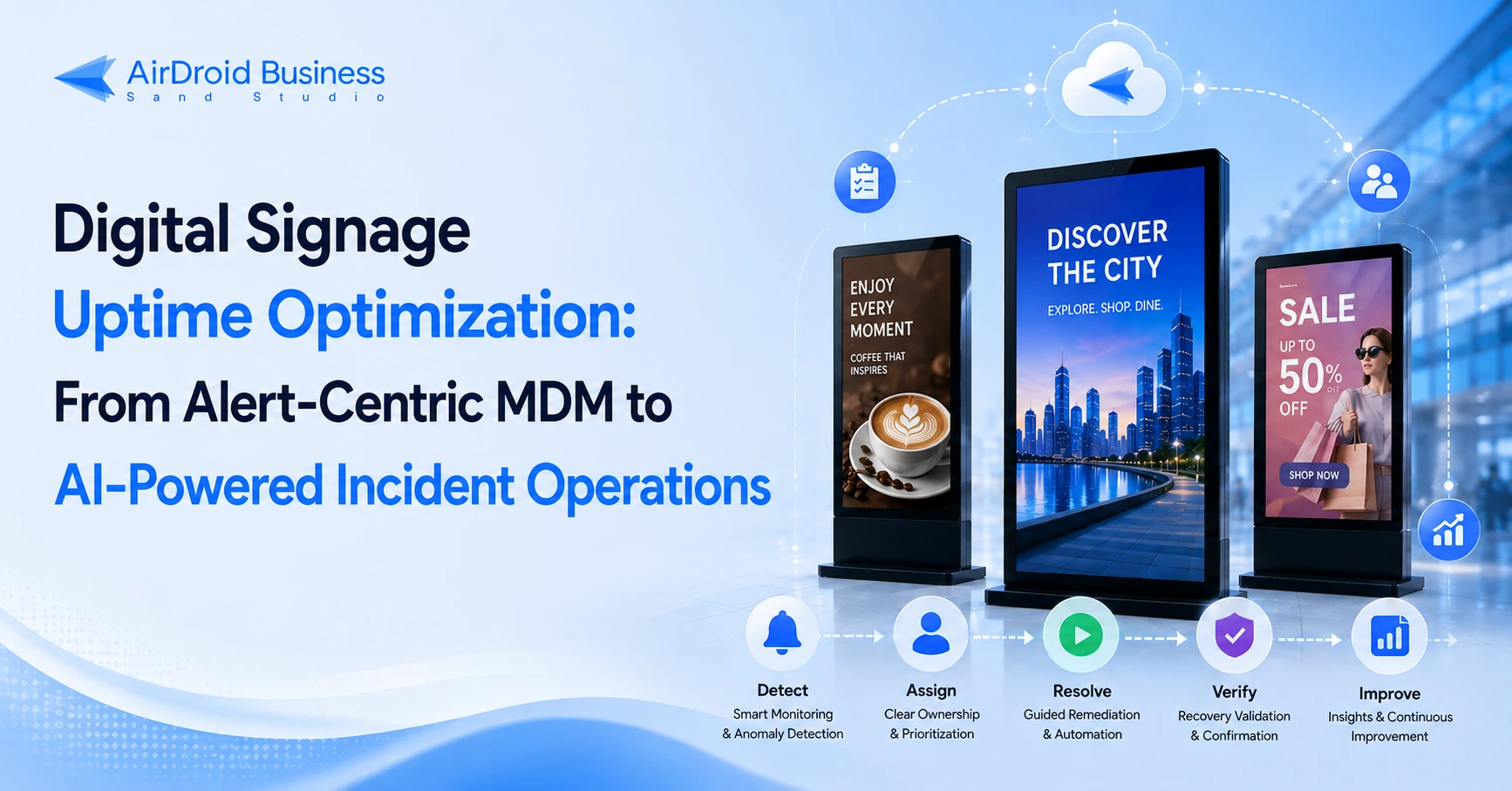
For digital signage teams managing large device fleets, detecting an offline device is only the first step. The real operational challenges begin after the alert is triggered:
- Alert Overload: Too many repeated notifications make it difficult to identify critical incidents and reduce alert fatigue.
- Chaotic Incident Response: Unclear ownership and escalation processes delay troubleshooting and extend digital signage downtime.
- Recurring Failures: Without structured follow-up and root-cause analysis, the same problems keep coming back.
Digital signage uptime optimization is therefore not simply about detecting offline devices. It requires a closed-loop process that connects detection, response, recovery, and continuous improvement.
- Part 1 :Alert-Centric MDM vs. Context-Aware AirDroid Business Solution
- Part 2 :AI-driven AirDroid Business Workflow
- Part 3 :How to Design Alerts, Escalations, Closure, and Reviews for Digital Signage
- Part 4 : Implementation Checklist
- Part 5 : 2-Week Proof of Value Plan
- Part 6 : FAQ
- Part 7 : Conclusion
Part 1 : Alert-Centric MDM vs. Context-Aware AirDroid Business Solution
Traditional MDM provides the foundation for digital signage device management. It can monitor device status, detect offline events, and execute predefined actions.
This article will show how AI-driven AirDroid Business upgrades traditional alert-centric MDM into a business context-aware workflow with cross-system collaboration, automated incident response, and AI-generated SLA review reporting.
| Operational Capability | Alert-Centric MDM | AI-Powered AirDroid Business Solution |
|---|---|---|
| Incident Detection | Uses predefined rules to monitor device status, Kiosk Mode, connectivity, applications, and other conditions. | Uses the same monitoring signals and rules, then adds contextual analysis to help choose the appropriate workflow. |
| Incident Prioritization | Triggers alerts when predefined conditions are met. | Considers business hours, device importance, store location, and business impact to help pick priority. |
| Device Recovery | Executes preconfigured actions such as remote reboot, app restart, or device lock/unlock. | Recommends which remediation should be attempted and whether further action or escalation is required if recovery fails. |
| Incident Ownership | Teams manually determine who should handle the alert. | Routes the incident to the appropriate owner based on organizational and operational context. |
| Escalation | Relies on manual follow-up or basic escalation rules. | Applies SLA-based escalation workflows when an incident is not acknowledged or resolved within the defined timeframe. |
| Incident Tracking | Alerts and follow-up activities may remain separated across different systems. | Connects alerts with tickets, communication workflows, status updates, and incident records. |
In practice, the difference becomes clear when a customer-facing screen goes offline during business hours. A traditional MDM workflow may send an alert and execute a predefined recovery action. AirDroid Business AI-powered uptime workflow can add business context, identify the appropriate owner, suggest the incident priority, coordinate the response, verify recovery, and escalate the issue if the device remains offline.
AirDroid Business - Digital Signage Uptime Optimization Solution
AirDroid Business combines device management, workflow automation, and AI-assisted capabilities to build a business context-aware solution with cross-system collaboration, automated incident response, and AI-generated SLA review reporting.
Part 2 : AI-driven AirDroid Business Workflow
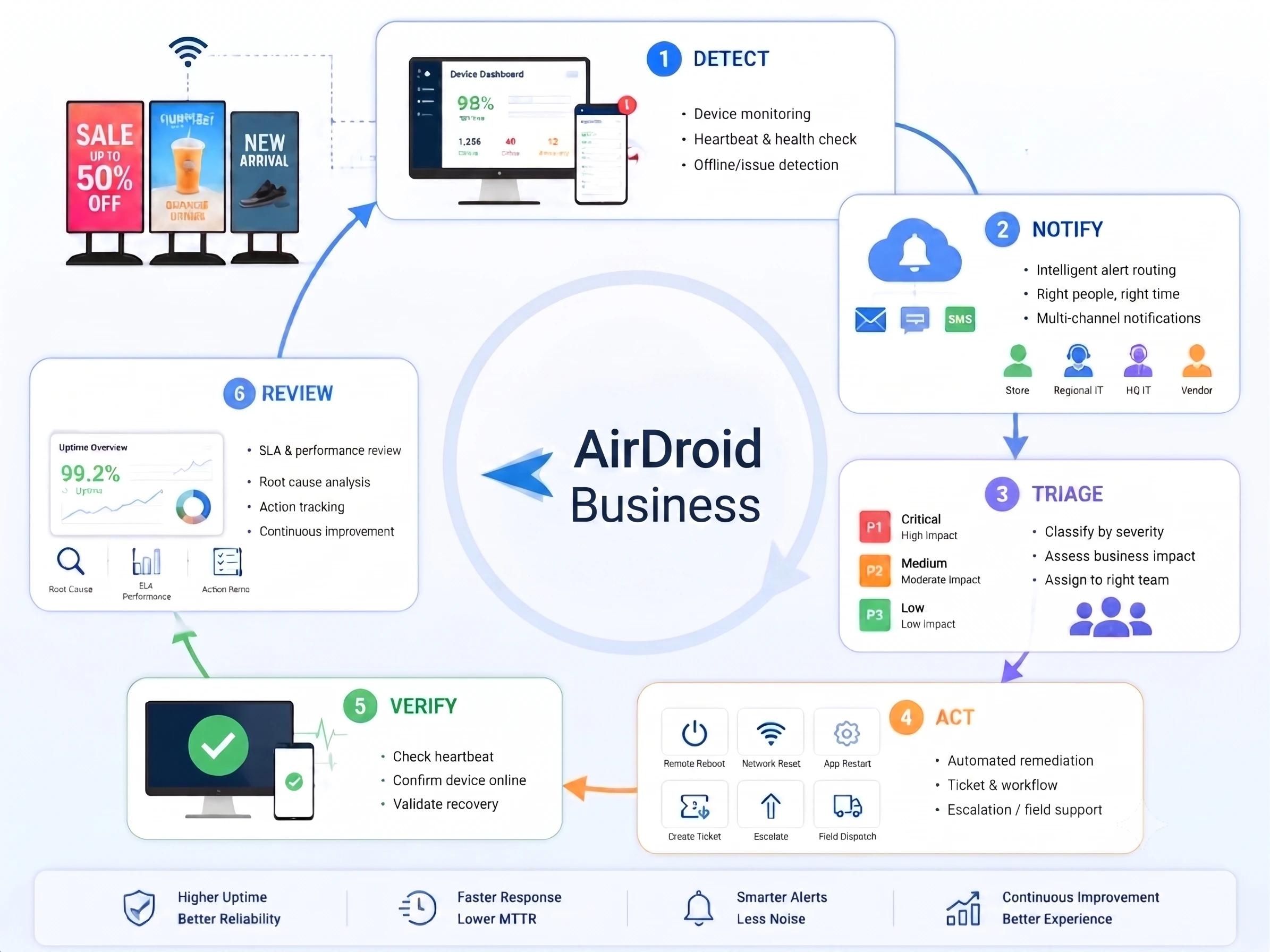
AI-powered AirDroid Business transforms digital signage alert management from a simple “detect and alert” model into a coordinated uptime workflow. Instead of stopping after an incident is detected and an alert is generated, the process connects detection with notification, triage, action, recovery verification, and operational review.
The workflow below shows how an offline screen event can move from detection to resolution and continuous improvement, helping teams respond faster, reduce alert fatigue, and improve digital signage reliability over time.
Part 3 : How to Design Alerts, Escalations, Closure, and Reviews for Digital Signage
The previous section introduced the automated incident response workflow for digital signage operations. The next step is translating that workflow into practical alert rules. This section uses device offline incidents as an example to demonstrate how to build a closed-loop process that improves digital signage uptime.
1Detect
Both traditional MDM platforms and the AI-powered AirDroid Business solution begin with one fundamental step: establishing a clear monitoring baseline.
1Identify What Should Be Monitored
A promotional display may stop sending heartbeat signals for different reasons, so it's important to monitor more than just connectivity. A digital signage device may stop functioning because of:
- Network connectivity
- Device heartbeat
- Player application status
- Storage utilization
- CPU or memory usage
- Device temperature
Understanding the root cause of an incident helps determine the appropriate monitoring rules and alert types.
2Define Detection Thresholds
Next, decide when an abnormal condition should trigger an alert. Detection thresholds should reflect business priorities and operational requirements.
For example:
- How long can a device lose network connectivity before an alert is generated?
- How long can the player application remain unavailable?
- Should different device groups have different thresholds based on business hours or criticality?
3Reduce Alert Noise Before It Scales
Deliver fewer, higher-quality alerts that enable teams to respond faster without being overwhelmed by unnecessary notifications.
- Alert aggregation: Consolidate multiple alerts from the same store, region, or device group into a single event.
- Alert throttling: Limit repeated notifications within a defined time window.
- Severity-based routing: Escalate only incidents with real business impact, such as customer-facing displays during operating hours.
2Respond
Once the digital signage device has been detected offline for 10 minutes, the next priority is to determine how serious it is, who should respond, and how quickly action is required. A clear escalation process helps IT teams prioritize business-critical incidents while preventing less urgent issues from consuming unnecessary resources.
1Severity Classification Rules
P1 — Critical: A critical device is offline for more than 10 minutes during business hours, or a device supporting a critical store or business event becomes unavailable, the initial response should be within 10–15 minutes
P2 — Medium: A standard device is offline during business hours, or a device becomes unavailable outside business hours without an immediate customer impact. It should be processed within 2–4 hours
P3 — Low: Intermittent offline status/instability would be reviewed within the same day or week.
2Example Escalation Matrix
If a device offline is not acknowledged within the expected response time or remains unresolved beyond its SLA, the workflow should automatically escalate it to the next responsible owner.
| Priority | Initial Owner | Escalation Owner | Response Target | Channel |
|---|---|---|---|---|
| P1 | Store Operations | Regional IT Lead | 10-15 minutes | SMS / Chat / Email |
| P2 | IT Operations | Vendor Support | 2-4 hours | Ticket / Email |
| P3 | Monitoring Team | Engineering | Same day or scheduled review | Dashboard |
3Incident Closure Workflow
In many organizations, alerts, emails, and service tickets are managed across separate systems. As a result, teams may need to manually transfer information, update multiple platforms, and track incident progress through fragmented communication channels.
Today, it’s available to build a workflow to connect AirDroid Business with LLMs, your existing operational systems, such as ERP, CRM, service management, and email platforms. In this case, the tedious manual work could be cut down while AI helps you to make decisions.
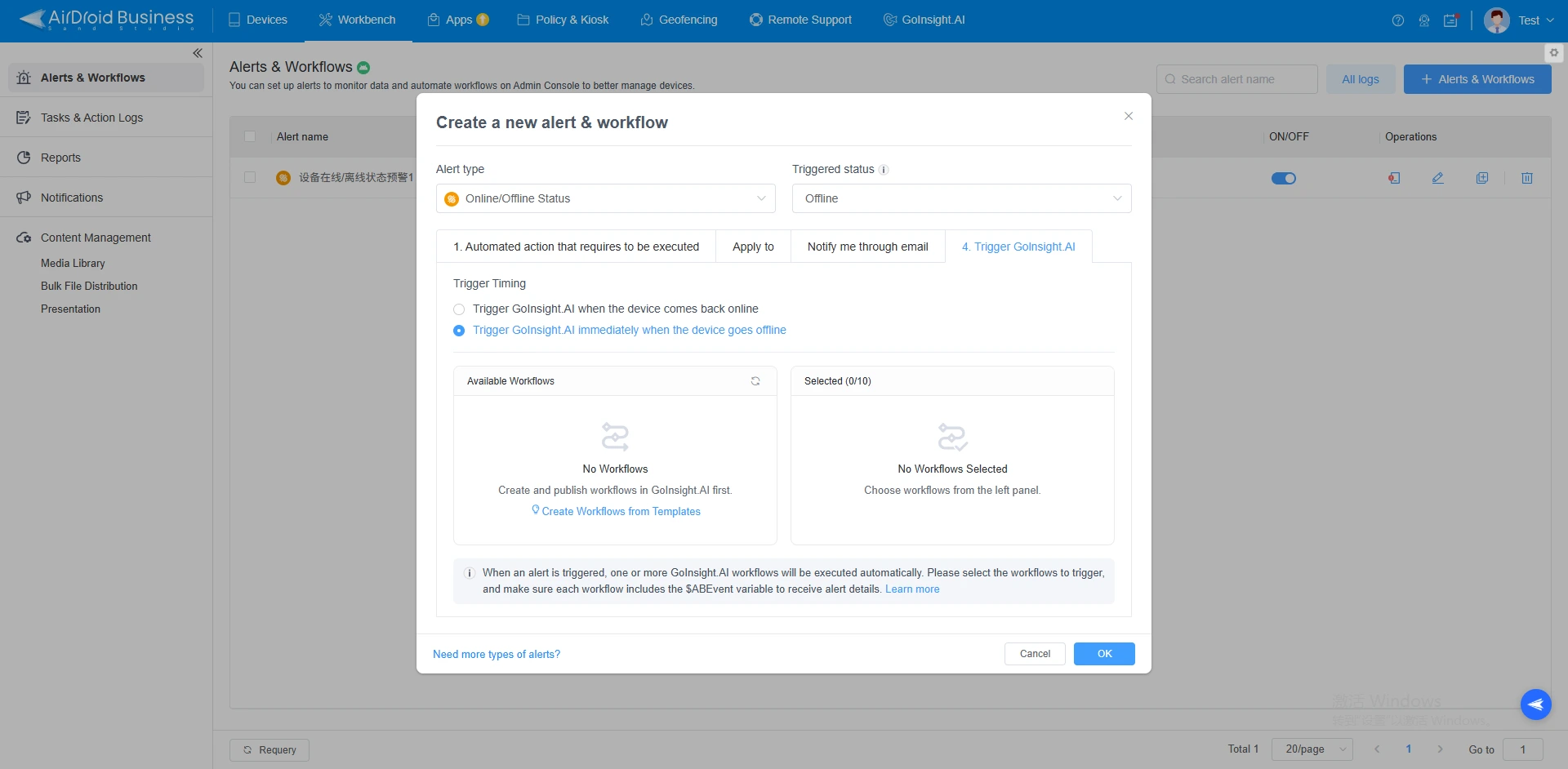
- Automated Ticket Creation
- Capture Incident Context
- Automatically Update Status
After the display offline incident is classified, the workflow can automatically create a ticket in your internal system. This is where digital signage automation can reduce manual data entry, clarifies ownership and accountability, speeds up response tracking, and provides better visibility into unresolved incidents.
To support faster troubleshooting, the incident record should automatically include relevant information such as the store or site location, device ID, offline duration, device history, recent configuration changes, and any previous related incidents. Providing this context at the beginning of the workflow helps teams investigate issues more efficiently without repeatedly switching between different systems.
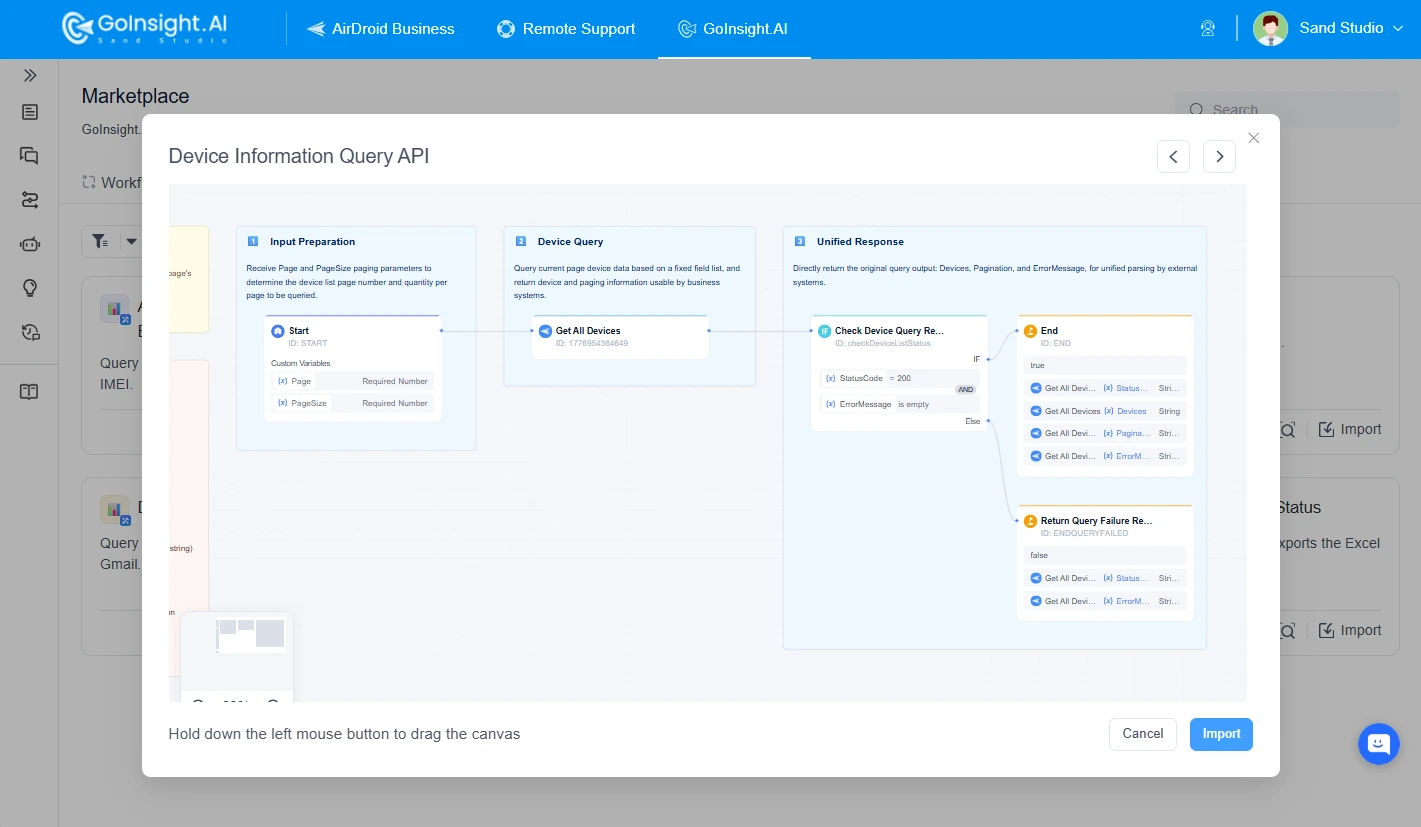
As the incident progresses, its status should be updated automatically or through connected workflows. A typical lifecycle includes:
Investigating → In Progress → Recovered → Requires On-Site Visit → Closed
This creates a consistent record of what happened, what actions were taken, and whether the device was successfully recovered. AirDroid Business provides a more complete closed-loop incident response process instead of a simple alert notification.
4Review
Consider that the device has gone offline three times in the past month.
Each individual incident may have been resolved through a remote reboot. However, the repeated pattern suggests that the real problem may be related to the network, power supply, player application, or device hardware.
With AI-powered AirDroid Business, digital signage teams can use LLM capabilities to automatically generate SLA review reports and follow-up actions by analyzing your operational data.
1Recommended Weekly SLA Review Structure
- Uptime overview (by region/store/device group)
- MTTA / MTTR distribution (by priority)
- Top offline stores / device groups (ranked)
- Root-cause breakdown (network / power / app / device hardware)
- Action items for this week (owner + due date)
A practical review should examine:
This ensures that insights from the review are translated into concrete improvements.
2Automate Report Generation and Delivery
AI-powered workflows can help analyze reports and identify patterns that may be difficult to detect manually. Reports can be generated on a schedule and delivered to stakeholders through email or other operational channels.
For on-demand analysis, operators can also use `@` to call the workflow and request the latest uptime report within the Workspace. This allows teams to access current operational insights without manually compiling data from multiple systems.
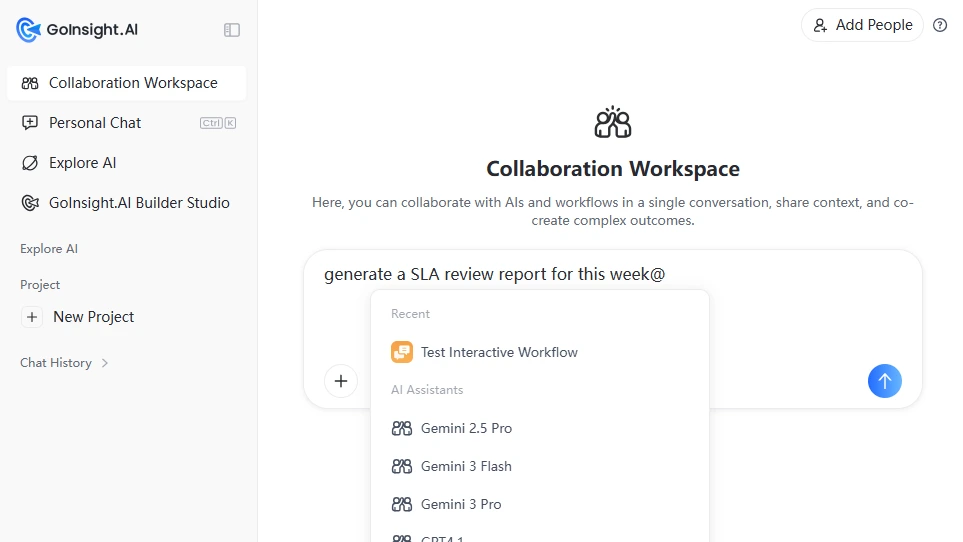
To support long-term analysis, reports could also be archived in a knowledge base. Over time, this creates an uptime performance record, recurring incidents, root causes, and corrective actions, supporting ongoing audits, trend analysis, and continuous digital signage uptime optimization.
AirDroid Business - Incident Closure Workflow for Digital Signage
AirDroid Business enables IT teams to connect digital signage device management platform with their business system, automatically creating tickets, capturing incident details, keeping processing statuses up to date, and intelligently generating review reports.
Part 4 : Implementation Checklist
To help you implement the AI-driven workflow, we also provide a simple checklist for reference.
1Roles and Responsibilities
| Status | Role | Owner / Participants | Responsibilities |
|---|---|---|---|
| ☐ | Business Owner | Retail Ops Lead / Signage Ops Manager | Define severity rules (P1/P2/P3), escalation matrix, and review methodology. |
| ☐ | Builder | IT Admin / Automation Engineer | Configure AirDroid Business monitoring baseline, set up workflows, integrations, credentials. |
| ☐ | Operator | Store staff, field personnel, or on-call teams | Execute first response steps, verify recovery, record outcomes |
2Data Sources and Access
| Satus | Data Category | Typical Data | Operational Purpose |
|---|---|---|---|
| ☐ | Device & Monitoring Data | Device status, offline events, heartbeat signals, network connectivity, application status, device health, and device history | Detect incidents, assess device conditions, and trigger remediation workflows |
| ☐ | Operational Systems | Ticketing, service management, ERP, CRM, and email platforms | Create tickets, assign owners, track incident status, manage escalations, and record resolution outcomes |
| ☐ | Organizational & Business Context | Store and regional hierarchies, device groups, business hours, device criticality, responsibility chains, and escalation contacts | Figure out business impact, route incidents to the right owners, and apply appropriate SLA rules |
Part 5 : 2-Week Proof of Value Plan
A focused two-week PoV can begin with one high-impact use case, such as a critical customer-facing screen going offline during business hours.
| Status | Timeline | Objective | Key Activities | Deliverables |
|---|---|---|---|---|
| ☐ | Day 0–1 | Align on the Use Case and Operating Model |
| One-page PoV plan with the selected use case, rules, roles, and baseline metrics. |
| ☐ | Week 1 | Establish the Workflow |
| A functioning incident response workflow operating in a limited production environment. |
| ☐ | Week 2 | Close the Loop with Tracking and Review |
| Traceable incident records and one completed weekly uptime/SLA review report. |
| ☐ | Day 14 | Evaluate Results and Plan Expansion |
| PoV review summary with performance findings, improvement actions, and an expansion roadmap. |
1Recommended PoV Success Criteria
At the end of the PoV, the organization should be able to demonstrate the performance by:
| Metric | Purpose |
|---|---|
| MTTA | Measures how quickly incidents are acknowledged. |
| MTTR | Measures how quickly incidents are resolved. |
| Repeat Offline Incidents | Identifies whether recurring failures are decreasing. |
| Alert Volume | Measures whether alert noise and alert fatigue are being reduced. |
| SLA Compliance | Shows whether incidents are handled within defined response targets. |
| Action Item Completion | Measures whether review findings lead to completed improvements. |
Part 6 : FAQs
Part 7 : Conclusion
Digital signage uptime optimization is not about generating more alerts. It is about ensuring that every important incident leads to the right action, clear ownership, verified recovery, and meaningful follow-up.
AirDroid Business provides the foundation for digital signage device management and remote monitoring. With AI-powered workflow, teams can extend this foundation from simple device alerts to coordinated incident response, automated remediation, SLA-based escalation, and continuous improvement.
Start exploring how AI-powered uptime operations can improve the reliability of your digital signage fleet!
AirDroid Business - Design AI-powered Incident Response Workflow
Explore AI-driven AirDroid Business to extend your digital signage operations with coordinated incident response, automated remediation, SLA-based escalation, and continuous improvement.











Leave a Reply.