AirDroid Mobile Tracker
- Track iPhone live location from Android and vice versa
- Check routes history and stay peace of mind
- Set geofence zones and get instant alerts
How to Track an iPhone from Android: 3 Easy Ways (2026)
Yes, you can find your iPhone from an Android phone. Whether you lost your own iPhone or want to check a family member's location, there are several ways to do it depending on your situation.
This guide explains how to find an iPhone using Android, including iCloud Find Devices, Google Maps location sharing, and cross-platform parental control apps.
Quick Answer: Can You Find My iPhone from Android?
| Situation | Can you track iPhone from Android? |
|---|---|
| 📱Your own lost iPhone | Yes, through iCloud Find Devices |
| 👨👩👧Family member's iPhone | Yes, if location sharing is enabled |
| 👶Child's iPhone | Yes, with parental control apps |
| 🔒Without permission | No |
Method 1: Use Apple's Find My via iCloud
If you lost your iPhone and only have an Android phone nearby, you can still use Apple's Find My service through iCloud. This method allows you to locate your own iPhone, play a sound, enable Lost Mode, or erase the device remotely.
How to Find Your iPhone from an Android Phone
- Step 1.Open a browser on your Android phone.
- Step 2.Go to Apple's Find Devices website through iCloud.
- Step 3.Sign in with the Apple Account linked to your lost iPhone.
- Step 4.Select your iPhone from the device list to view its location.
Once connected, you can check your iPhone's current or last available location and use available recovery options.
Limitations of Using iCloud Find Devices
This method only works for finding your own iPhone. You cannot use iCloud Find Devices to track someone else's iPhone unless they have shared their location with you through Apple's Find My network.
If you want to locate a family member's iPhone from an Android phone, you will need another method, such as location sharing or a cross-platform parental control app like AirDroid Parental Control.
Method 2: Use Google Maps Location Sharing to Find an iPhone from Android
If you want to find an iPhone from an Android phone, Google Maps location sharing is another simple option. Unlike Apple's Find My, this method does not require an Apple Account. However, the iPhone user must share their location with you first.
How to Share an iPhone Location with an Android Phone
- Step 1.Open the Google Maps app on the iPhone.
- Step 2.Tap the profile picture and select Location sharing.
- Step 3.Choose how long to share the location and select the Google Account of the Android user.
- Step 4.Open Google Maps on your Android phone and view the shared iPhone location.
Limitations of Google Maps Location Sharing
Google Maps cannot locate an iPhone automatically. The iPhone owner must manually enable location sharing before their location can be viewed.
If the location has not been shared, the phone is offline, or location services are disabled, Google Maps may not show the current location.
Method 3: Use a Cross-Platform Parental Control App
For families using different phone systems, finding an iPhone from Android can be challenging. A common situation is that parents use Android phones while their children use iPhones. In this case, a cross-platform parental control appcan help families stay connected and support children's digital safety.
AirDroid Parental Control is designed for families who need Android-to-iPhone compatibility. It allows Android parents to check an iPhone child's location and create safer digital habits without requiring both devices to use the same operating system.
How AirDroid Helps Android Parents Manage an iPhone Child's Device
- Real-time Location: View the child's current location from an Android phone.
- Location History: Check previous 30-days location activity.
- Geofence Alerts: Set safe zones and receive alerts when the child enters or leaves important places, such as school or home.
- Screen Time Management: Help children build healthier digital habits by setting appropriate screen time schedules.


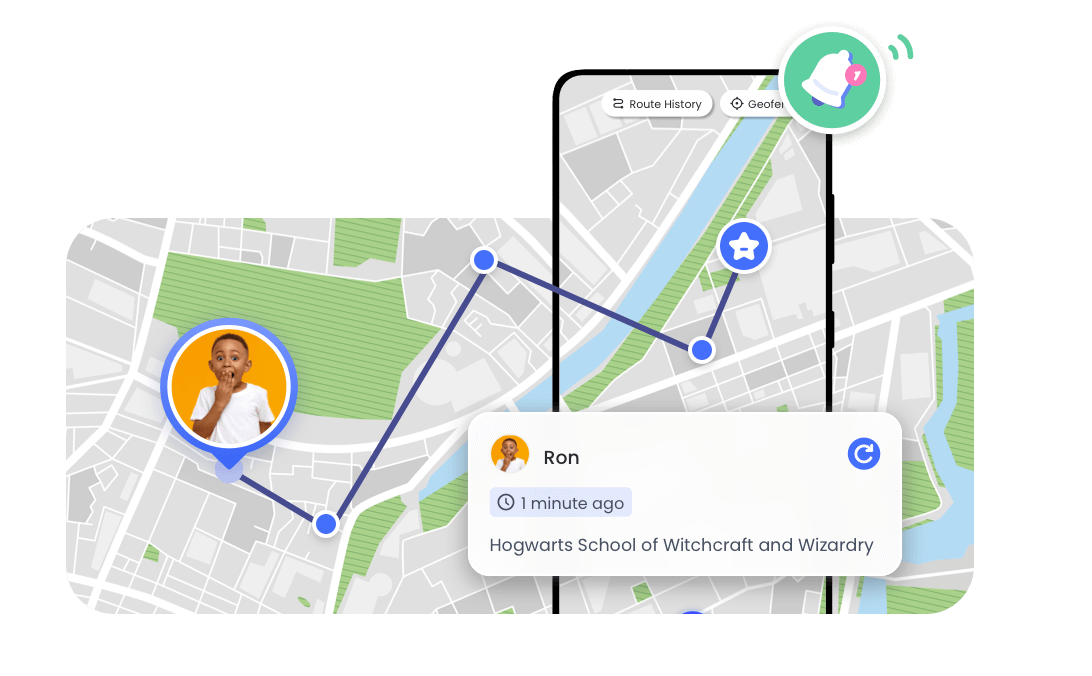
Unlike simple location-sharing tools, cross-platform parental control apps provide additional family safety features that help parents guide their children's smartphone use across different devices.
Why Choose a Cross-Platform Solution?
Apple's built-in tools work best within the Apple ecosystem. However, many families do not use the same type of device. A cross-platform solution makes it easier for Android parents and iPhone children to stay connected while supporting healthy technology habits.
With tools like location sharing, safety alerts, and digital wellbeing features, parents can stay informed and provide guidance without needing to constantly check their child's phone.
Which Is the Right Method for You?
Choosing the right method for tracking an iPhone from an Android device depends on various factors like the situation at hand, your requirements, and the level of preparedness.
To track a lost iPhone from an Android device, use the iCloud web version's "Find My iPhone" feature. Log in with your Apple ID in an Android browser to see the real-time location.
If you and a family member or friend use different devices (iPhone and Android) and want to track each other's location, use Google Maps' real-time location sharing. It's best for the iPhone user to add Google Maps to "Always Allowed" to keep the location updated.
To track your child's iPhone location from your Android device, AirDroid Parental Control & Family Locator is ideal. You can see their real-time location and set up safe zones. If they leave these areas, you'll receive alerts.
You can also follow this comparison to help you decide:
| Method | Best For | Location Sharing Required | Limitation |
|---|---|---|---|
| iCloud Find Devices | Lost iPhone | Yes | Only your device |
| Google Maps | Family sharing | Yes | Requires sharing |
| AirDroid Parental Control | Parents managing different devices | Yes | Requires app setup |
FAQ






Leave a Reply.