Is YouTube Bad for Kids? Risks, YouTube Kids Safety & Parent Tips
Is YouTube bad for kids? Not inherently. It can support learning and creativity, but poorly matched or unsupervised use may expose children to unsuitable content, prolonged viewing, commercial influence, misinformation, and interactive risks. The likely impact depends on the child's age, maturity, viewing pattern, and family guidance.
A 2025 Pew Research Center survey found that YouTube remained the platform U.S. teens used most widely and most often, with roughly three-quarters reporting daily use. This does not prove harm, but it makes realistic safety habits important.
Quick Answer: Is YouTube Bad for Kids?
A science video watched with a parent is different from hours of autoplay, unreviewed Shorts, or participation in public comments and livestreams.
| Area | Potential Value | What Parents Should Watch |
|---|---|---|
| Content | Educational explanations, tutorials, creative ideas, and hobby discovery | Age suitability, misleading claims, disturbing themes, and sensational titles |
| Viewing habits | Planned entertainment and shared family viewing | Autoplay, repeated Shorts, late-night use, and difficulty stopping |
| Commercial content | Learning how media and advertising work | Sponsorships, product placement, influencer marketing, and unrealistic expectations |
| Interaction | Participation in age-appropriate communities for older users | Comments, scams, unsafe contact, livestreams, and sharing personal information |
Parents can reduce risk by choosing an age-appropriate experience, disabling continuous viewing, setting limits, and staying involved.
Why Is YouTube Bad for Kids? 6 Risks Parents Should Know
YouTube presents several distinct risks, but none proves that all viewing produces the same outcome.
1Exposure to Inappropriate or Misleading Content
Children may encounter violent themes, adult topics, unsafe pranks, misinformation, or behavior beyond their maturity level. A child-friendly title or thumbnail does not reveal everything later in a video.
Automated filters reduce some exposure but cannot reflect every family's standards. Preview unfamiliar creators and teach children to seek help when content feels unsafe.
2Autoplay and Recommendations Can Encourage Prolonged Viewing
Autoplay, personalized recommendations, and an ongoing Shorts feed reduce natural stopping points, making it easier for viewing to extend into homework, play, meals, or bedtime.
Recommendations do not inevitably lead every child to harmful content. Turning off autoplay and agreeing on a stopping time can restore clearer boundaries.
3Excessive Viewing May Interfere with Sleep and Daily Routines
Long or late viewing sessions can take time away from sleep, movement, schoolwork, and family interaction. A 2026 umbrella review indexed by the U.S. National Library of Medicine examined 84 reviews on media use and sleep. It found generally unfavorable associations, but also emphasized that much of the evidence came from lower-quality, cross-sectional studies and that evidence strength varied widely.
This does not prove that YouTube causes a child's sleep problem; timing, routines, and individual differences matter. The CDC's current sleep guidance says children ages 6 to 12 generally need 9 to 12 hours of sleep, while teens ages 13 to 18 need 8 to 10 hours. Repeated late-night viewing or missed sleep may signal that rules need adjustment.
4Fast-Paced Videos May Make Transitions More Difficult
Some children become frustrated when an engaging video ends or they must move to a quieter task. Responses vary, and current evidence does not justify saying that YouTube universally damages attention spans or brain development.
Choose a final video, give an advance reminder, and adjust any format or viewing pattern that repeatedly causes conflict.
5Advertising and Influencer Culture Can Blur Commercial Messages
Sponsorships, product placement, affiliate links, unboxing videos, and creator promotions can appear inside entertainment. The U.S. Federal Trade Commission has warned that blended advertising can be difficult for children to identify and evaluate, especially when it comes from a trusted influencer.
Ask who benefits from a purchase, whether the creator was paid, and whether the result shown is typical.
6Comments, Livestreams, and Online Interaction Add Risks
Comments, livestreams, uploads, and replies can introduce cyberbullying, scams, unwanted contact, pressure to share images, and privacy risks.
The FBI's child online-safety guidance recommends regular conversations, private settings, limits on personal information, and recognizing suspicious requests. Set clear rules about school details, location, photos, links, money requests, and private chats.
Is YouTube Good for Kids? Potential Benefits to Consider
With careful selection, YouTube can help children visualize ideas, explore interests, and learn practical skills.
1Educational Videos and Skill Development
High-quality videos can supplement learning in subjects such as science, languages, art, coding, and practical problem-solving by making ideas easier to see and revisit.
UNESCO's work on technology in education says technology can support learning while noting evidence gaps. Videos work best alongside reading, discussion, teaching, practice, and hands-on experience.
2Creativity, Hobbies, and Shared Interests
Children can discover new hobbies. Strengthen the value by watching together and turning ideas into offline practice.
3When YouTube Use Is More Appropriate
YouTube is easier to manage when content fits the child's maturity, viewing does not displace sleep or responsibilities, and the child can stop at the agreed time. Ask what they watch, how long they watch, and whether they can discuss what they encounter.
Is YouTube Kids Safe? What Parents Should Know
YouTube Kids provides a more child-focused environment and useful parental controls, but it cannot guarantee that every available video will suit every child.
1How YouTube Kids Filters Content
Google says YouTube Kids combines automated filtering, user feedback, and human review, but its official content guide states that no algorithm is perfect. Parents can block or report videos, turn off Search, or use Approved content only for handpicked videos, channels, and collections.
2What Are the Limitations of YouTube Kids?
A video may pass platform filters but still conflict with family values, frighten a sensitive child, encourage purchases, or offer little value. Recommendations do not reflect a parent's complete understanding of the child.
A Reddit discussion among fathers includes complaints about repetitive or low-value recommendations. These anecdotes do not establish prevalence or prove that YouTube Kids is universally unsafe.
3YouTube Kids vs. Regular YouTube
| Feature | YouTube Kids | Regular YouTube |
|---|---|---|
| Primary audience | Younger children | General audiences, including teenagers and adults |
| Content selection | Child-focused filtering with selectable content levels | A much broader range of content |
| Parent-approved content | Approved content only can restrict viewing to selections made by the parent | Controls depend on account type, supervision, age, and region |
| Search | Parents can turn Search off | Depends on the account and available supervision settings |
| Interaction | A simplified child-focused experience | May include comments, uploads, livestreams, and other interactive features |
| Safety limit | Reduces some exposure risks but cannot eliminate them | Requires age-appropriate settings, media literacy, and active family guidance |
Note: Product settings can change by device, account, country, and app version. Verify the current options in the family's own account.
4Who Should Use YouTube Kids?
YouTube Kids may be a better starting point for younger children. Approved content only suits families that want to select every available channel or video, while eligible older children may be ready for a supervised YouTube account.
How to Make YouTube Safe for Kids
No setting makes YouTube risk-free. The goal is to reduce avoidable exposure, create predictable boundaries, and keep communication open.
1Choose the Right YouTube Experience
Choose YouTube Kids, Approved content only, or a supervised account according to the child's maturity and revisit the choice as viewing habits change.
2Turn On the Available YouTube Controls
- Select an appropriate content level. Choose Preschool, Younger, Older, or Approved content only according to the options available in the account.
- Turn off Search when needed. This narrows discovery but does not guarantee that every available video will meet family expectations.
- Disable autoplay. Restore a natural stopping point instead of immediately beginning another recommended video.
- Review history thoughtfully. Use unfamiliar activity to begin a conversation, not as automatic proof of wrongdoing.
- Block or report unsuitable content. Explain the decision so the child learns safer choices.
3Set Clear Screen-Time and Viewing Rules
Agree on when and where YouTube can be used. Rather than treating one time limit as medically correct for every child, consider sleep, activity, responsibilities, relationships, and whether the child can stop without repeated conflict.
4Review Viewing Habits and Talk About Content
Ask what the child likes, learned, or found uncomfortable and whether a creator was selling something. Use history to start discussion, not only to punish.
5Use AirDroid Parental Control for Consistent Family Rules
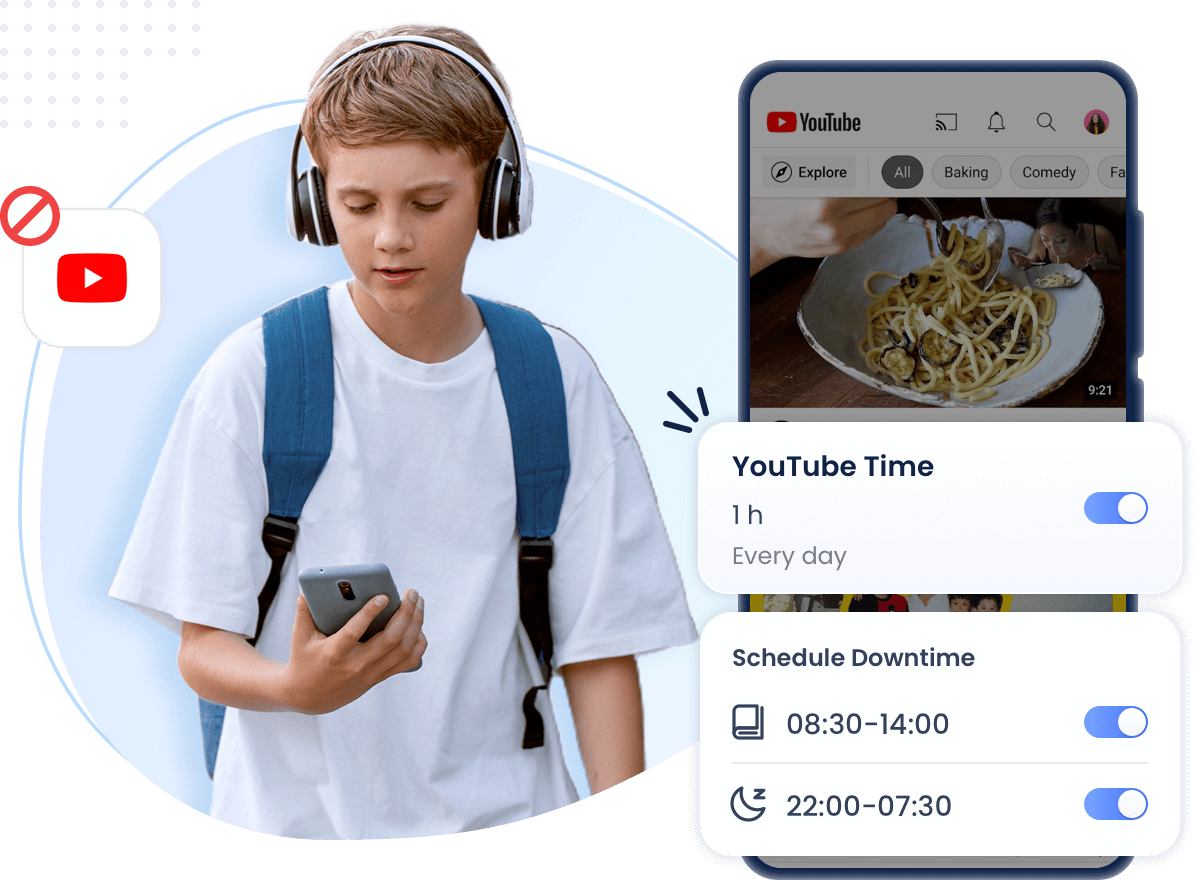
For families that want more structure, AirDroid Parental Control's screen-time tools can set supported app limits, shared limits, Downtime, and app blocks. Website Restrictions can address supported browser access separately.
- App limits. Set a separate allowance for YouTube or a shared allowance across selected entertainment apps.
- Downtime. Make YouTube unavailable during agreed homework, meal, family, or bedtime periods.
- App blocking. Restrict the YouTube app when a temporary or longer boundary is needed.
- Website restrictions. Manage youtube.com separately where supported because blocking the app alone does not necessarily block browser viewing.


Features differ between Android and iOS. AirDroid cannot identify or block every unsuitable video. Its iOS YouTube Detection information describes selected linked-account activity and title or description keyword alerts, not complete watch history, notification syncing, or real-time screen mirroring.
Use rules and safety signals transparently, explain why they are enabled, and review them as the child develops. They support family decisions but do not replace appropriate content choices or trust.
6Create a Family Media Plan
Write down shared rules for devices, meals, homework, bedtime, and asking for help. The American Academy of Pediatrics provides a customizable Family Media Plan.
How to Make YouTube Safe for Teens
Teenagers need room to build media judgment and participate in decisions about reasonable oversight.
1Set Up a Supervised Teen Account When Appropriate
Google's supervised teen account documentation says teens and parents can agree to link their accounts. Parents can see selected channel activity and set digital well-being tools such as Take a Break, Bedtime reminders, and a Shorts scrolling limit. Availability and eligibility can vary by age, account, and region.
Explain what supervision reveals, involve the teen in setup, and review it over time.
2Set Boundaries for Shorts and Late-Night Viewing
Agree on a reasonable Shorts allowance and a device stopping time before bed. Focus on whether viewing is crowding out sleep and responsibilities rather than treating all recreational viewing as harmful.
3Teach Teens to Evaluate Claims and Interactions
Teach teens to check creators, evidence, exaggerated titles, and health or financial claims. They should also know how to block and report accounts, recognize scams, and seek help when someone requests money, personal information, private contact, or images.
4Respect Privacy While Maintaining Reasonable Oversight
Avoid secret or curiosity-driven monitoring. Explain the concern, use the least intrusive suitable control, and increase responsibility as safer habits develop. An alert may lack context and should begin a conversation, not establish guilt.
Frequently Asked Questions











Leave a Reply.