Can You Get Notifications When Your Child Is Online on WhatsApp?
As a parent, you might want to know when your kid goes online on WhatsApp to make sure they're reachable whenever needed. Or it's about knowing when something might be off, whether it's late-night chatting (a Reddit parent concerned) or potential scams or stranger risks.
That's why the idea of getting WhatsApp online notifications sounds helpful. But does WhatsApp notify you when your child is online? Or are there any safer ways to understand your child's WhatsApp online activity?

Does WhatsApp Notify You When Someone is Online?
No, WhatsApp does not notify users when a contact comes online. That means, officially, you have to check the app manually to see if your child is online.
Instead of real-time online alerts, WhatsApp offers two online status indicators:
- Online (shows when your child is currently using the app)
- Last Seen (the timestamp of when they were last active)
If WhatsApp doesn't support this feature, you might wonder:
"Why do so many WhatsApp online notification apps claim they can notify you when someone is online?"
Because parents and other users clearly want this feature, third-party developers go for it. But the catch is that most of these tools are not always reliable or safe. We'll break that down in the next section.
Ways to Get WhatsApp Online Notifications: Are They Safe?
Short answer:
No. These tools violate WhatsApp's Terms of Service, and using them could get your account banned or expose privacy leaks.
Since WhatsApp doesn't offer an alert when someone is online, you've likely heard of two types of third-party solutions: WhatsApp online notification apps and modified versions of WhatsApp like GB WhatsApp.
But before you try either way to get notified when someone is online on WhatsApp, it's essential to know their real risks one by one:
1WhatsApp Online Notification Apps
There are many free WhatsApp online notification apps that claim they can notify you when your child comes online or goes offline on WhatsApp, such as ChatWatch, WaTracker, etc.
These tools are not free to use. Typically, they work by linking to your WhatsApp account and continuously checking your child's online status.
⚠️However, this violates WhatsApp's Terms of Service, which explicitly prohibit collecting user information through automated means. This puts your WhatsApp account at risk.
This isn't theoretical. ChatWatch was reported for privacy issues. And it has been removed from both App Store and Play Store.
2Modified Versions of WhatsApp
Some guides recommend using modified versions of WhatsApp like GB WhatsApp or WhatsApp Plus, which include built-in online alert features. We'd strongly advise against this.
WhatsApp guidelines regulate avoiding the use of unofficial clients; otherwise, you'll get permanent account bans once WhatsApp detects it.
Users across Reddit have also reported losing access to their WhatsApp accounts after using these tools.

We tested this firsthand. After installing GB WhatsApp and attempting to log in with a real account, WhatsApp detected it and prevented me from logging in (the following is the screenshot). That means it is of no avail.
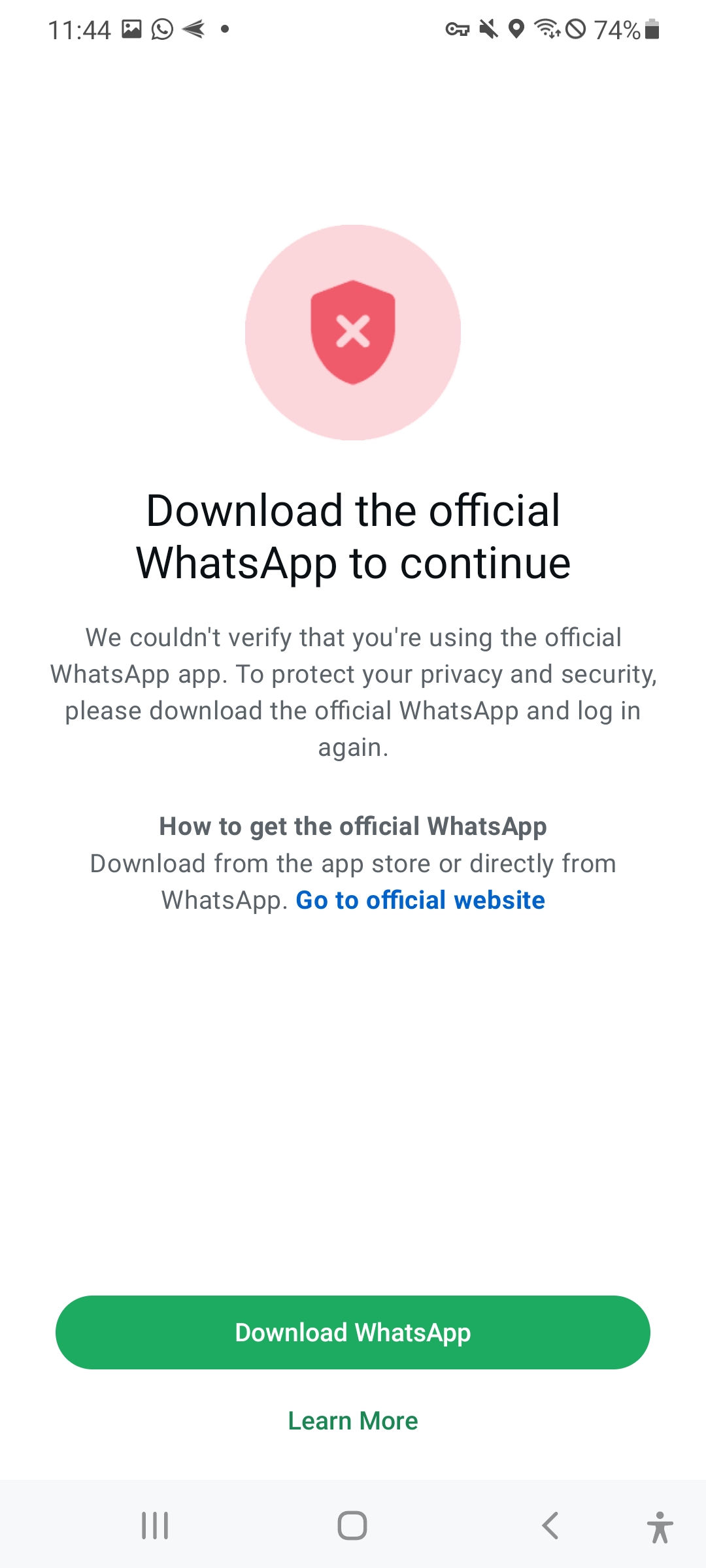
GBWhatsApp interface when log in
Safer Alternative Ways to Check When Your Child Is Online
Since most tracker tools come with heavy risks, what actually works and is safe?
Here are the most practical options for parents to check when your child is online.
To understand what parents truly need, we turn to data from Common Sense Media. Its report shows that major teens said they woke up to a notification (54%) or to check social media (51%) during the night.
For parents, the real question isn't just "Are they online?" It's: "Are they sacrificing sleep for chats?" "What are they doing online?"
Alternative 1: Check Their Online or Last Seen Status
Best for: Parents who want to know if their kids are on WhatsApp late at night or are available to reply right now.
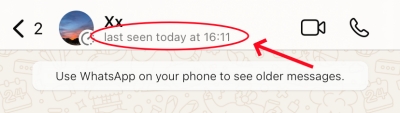
When you open a chat with your child, you can see their status directly under their name at the top of the screen. If they're actively using WhatsApp, it will show "Online." If not, it shows when they were last seen — for example, "Last seen today at 9:43 PM."
Limitations: If your child hides their online status and last seen timestamp in WhatsApp privacy settings, you'll see nothing.
Alternative 2: Check Read Receipts
Best for: Parents worried their child is ignoring them.
Some parents want WhatsApp online notifications because they saw messages were delivered but got no reply. This time, read receipts can help.
In WhatsApp, two grey ticks appear when you send a message to show that it was received. When the ticks turn blue, it indicates that the recipient has viewed the message and is online right now.
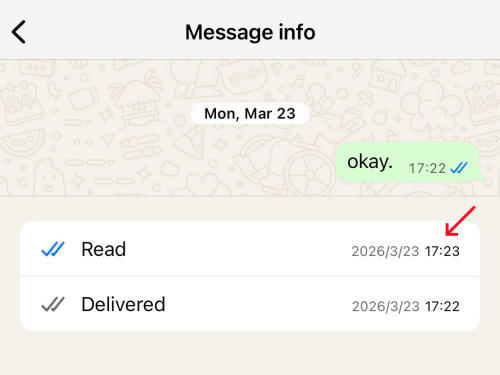
And by tapping the message info, you can see the exact timestamp of when it was read, which gives you a clear clue to your child's online time.
Limitations: Your child can disable read receipts in WhatsApp's privacy settings, in which case this method fails.
Alternative 3: Typing Indicators
Best for: Parents who want to confirm their child is reachable right now, especially when you've sent a message and are waiting for a response.
If you want to know whether your child is actively on WhatsApp right now, typing indicators can also give you a real-time signal.
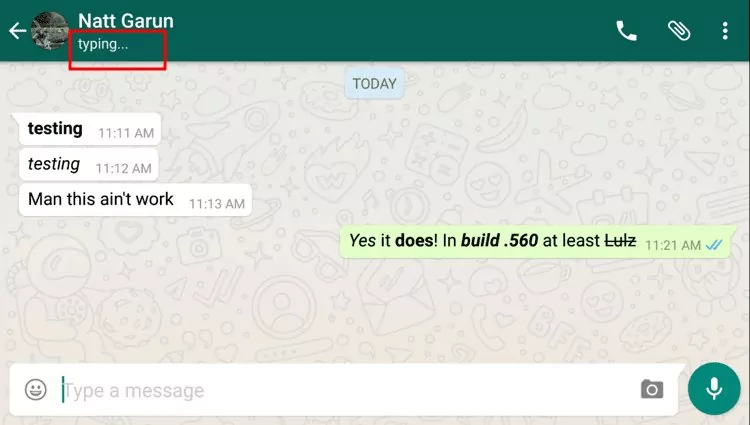
When your child is typing a reply to you, you'll see "typing..." appear under their name at the top of the chat screen.
Limitations: This only appears when your child is actively typing a message to you.
Alternative 4: AirDroid Parental Control
Best for: Parents who want ongoing visibility into their child's WhatsApp habits, including if they use WhatsApp late at night, if they talk about inappropriate things, etc.
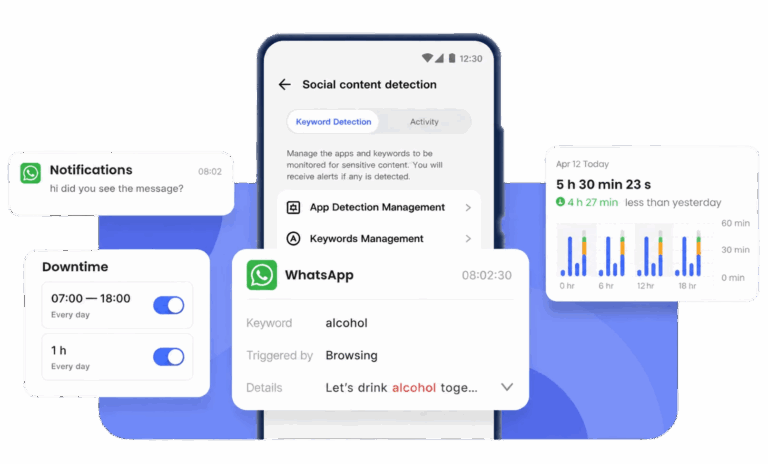
Parental control apps like AirDroid give you a more complete picture of your child's WhatsApp activity without the account risks that come with status tracker tools. Using it, you can:
- Know when your child is online or last uses WhatsApp (approximately)
- Understand how long they use WhatsApp daily and weekly
- Stay informed about kids' online interactions by syncing notifications
- Set specific keyword detection and get alerts for risky conversations
Limitations: AirDroid requires installing a companion app (AirDroid Kids) on your child's device with their knowledge. Some features may require a subscription fee.
Final Thoughts
Experts agree: don't track in the dark — talk openly. Let your child know you want to know when they are active and why.
And when it comes to methods to get notifications when someone is online on WhatsApp, always stick to what's legitimate and built-in. Unofficial modified apps like GB WhatsApp and online notification apps aren't worth the risk.










Leave a Reply.