AirDroid Parental Control
24/7 Kids' Guardian via App & Web
- 👀Live surroundings and location tracking
- 🔞Content Monitoring and App/Web Blocking
- ⚠Instant alerts for online risks and geofences
- ⌛Screen time control and monitor

How to Delete WhatsApp Messages for Everyone after Long Time
Ever sent a message on WhatsApp you regretted or accidentally sent to the wrong person? Wishing that you could undo it? It is not just you - a project found that 7 out of 8 users delete messages for this very reason.
That's where WhatsApp's "Delete for Everyone" feature comes in handy. However, there is a limitation: it is only valid for a short time. Then, how can you delete a message if you want it long after sending it?
Understanding WhatsApp "Delete for Everyone"
The "Delete for Everyone" option allows you to remove messages from both your chat and the recipient's, whether in a single or group chat.
Still, the thing is that there is a limited time: you only have two days to use the "Delete for Everyone" feature after sending a message. Once that time is up, the option to delete for everyone disappears, and you can only remove the message for yourself.
More Details about WhatsApp Delete for Everyone:
- Only sent messages can be deleted for everyone.
- Group admins can delete a member's messages for everyone.
- The recipient can see the message saying, "This message was deleted."
- If someone quotes your message in their reply, it will remain even if you delete it (the original message you sent) for everyone.
How to Delete WhatsApp Messages for Everyone after Long Time
Though WhatsApp's "Delete for Everyone" feature is only available for up to 48 hours, there are inventive ways to extend the time limit and delete messages from both sides. Here are two of the commonly used methods:
1Use Airplane Mode and Change the Date
Several Reddit users disclosed a clever hack that involves adjusting the time on your phone to trick WhatsApp into believing it is still within the two-day period. Here's how to delete WhatsApp messages for everyone after a long time:
- Step 1.In WhatsApp, locate the message you want to delete and remember the date.
- Step 2.Next, turn on the Airplane Mode on your phone.
- Step 3.Go to the "Settings" app and search for "Date & Time."
- Step 4.Change the date manually to a day or two that comes after the sending of the message.
- Step 5.Back to WhatsApp. Long-press the message and then choose "Delete for Everyone."
- Step 6.After this, turn off Airplane mode and reset your phone's date and time.
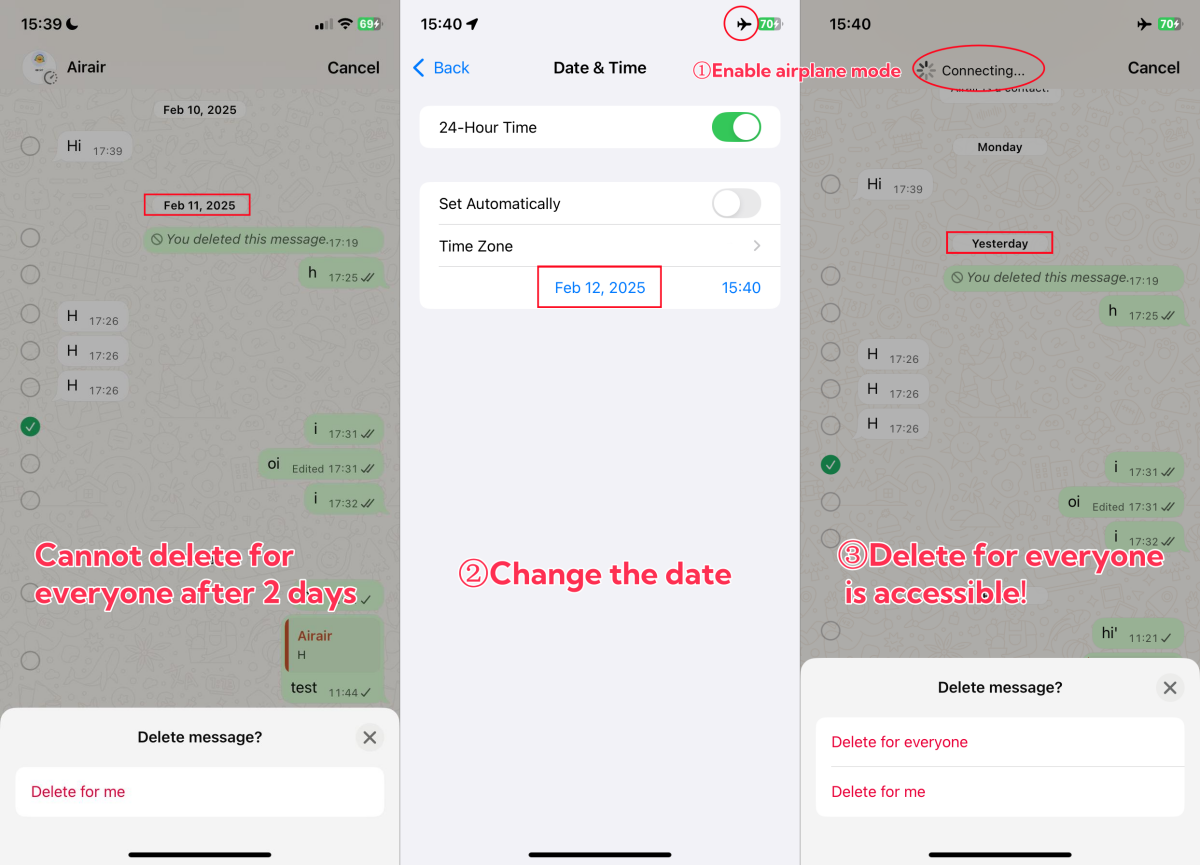
👀Need help? Watch the video tutorial to see exactly how it's done!
2Enable Disappearing Messages [Next Step & Alternative]
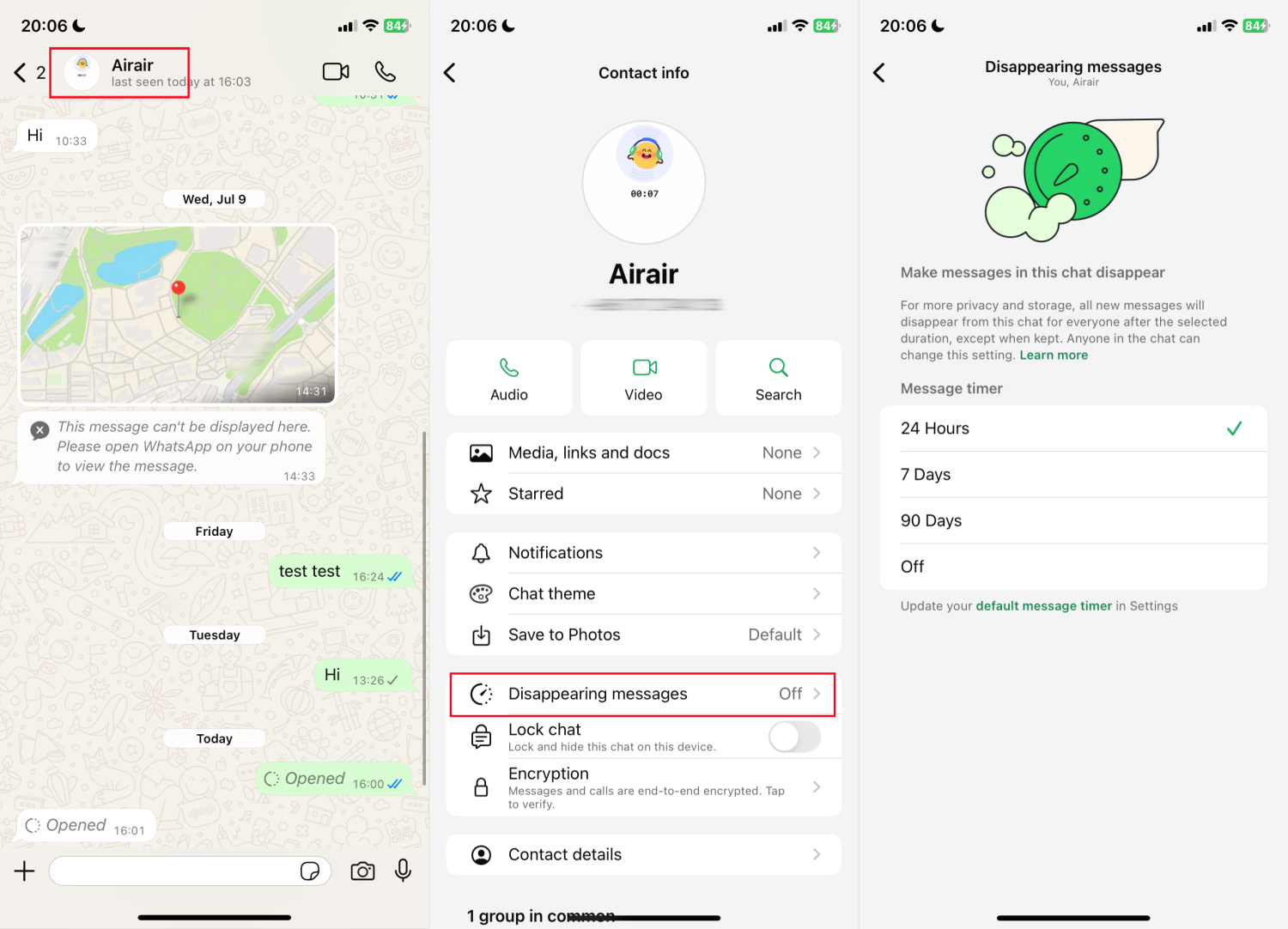
Disappearing messages can be a great alternative to avoid future troubles if you often send wrong messages. With this function, messages can be removed from both sides automatically after the time you specified — for example, 24 hours, 7 days, or 90 days. To use it:
- Step 1.Launch WhatsApp and access the chat you want to control.
- Step 2.At the top, tap the name of the contact or group.
- Step 3.Tap on "Disappearing Messages."
- Step 4.Pick a length of self-destruct time for the messages.
Why Can't I Delete Messages for Everyone
When the "Delete for Everyone" option is not visible or working as intended, this is because:
Time Limit Has Expired
The primary cause of this issue is the time limit for deleting the message that has already expired (48 hours). The removal option is no longer available, and it is only possible to delete the message on your end.
Fixes:
- Be sure to take swift action within the time frame.
- If the time is missed, you can use methods like Airplane Mode and date change, as described earlier, as a workaround.
Message Type Limits
If you select a received message to delete, WhatsApp only gives you the option to delete it for yourself. In a group chat, only group admins can delete a group member's message for everyone.
Fixes:
- Locate your sent messages to enable and use "Delete for Everyone."
- Otherwise, be a group admin and you can delete other members' messages.
Older WhatsApp Version
If you or the recipient is using an outdated version, most features, including the "delete for everyone" request, may not be effective as expected.
Fixes:
- Ensure both parties upgrade WhatsApp to the latest version.
Is WhatsApp Delete for Everyone Safe?
Not always. Though the messages get removed from the chat windows that both users can see, there's still a chance they can be saved, especially on iPhones.
For example, if the recipient who is using an iPhone turned on "media auto-save," the photo or video you choose to "delete for everyone" is still in their phone gallery. This puts users' privacy at high risk.
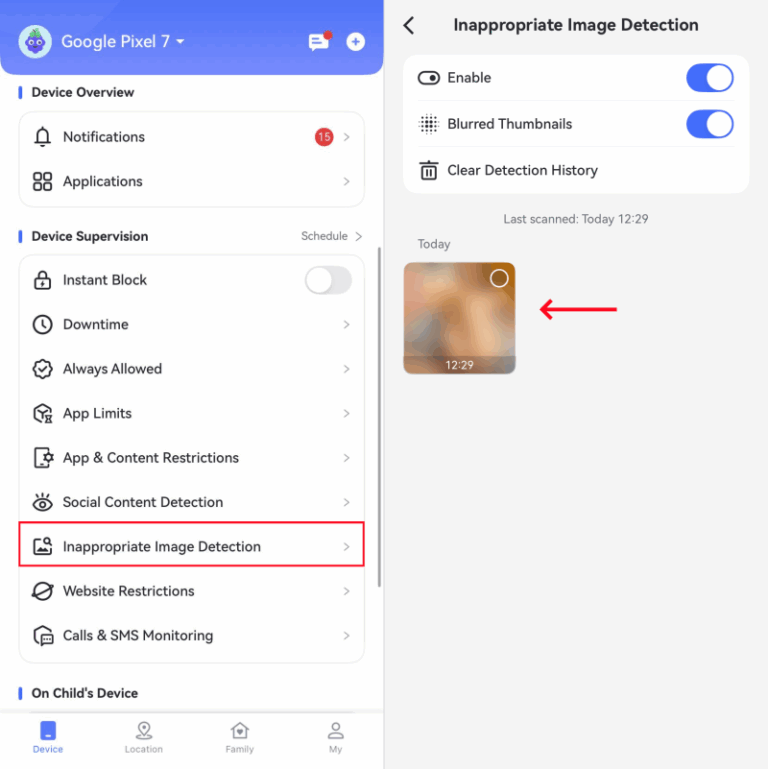
Given the potential privacy risks associated with this feature, especially when it comes to media auto-saving on iPhones, it's important for parents to take extra steps to protect their children's online privacy.
A reliable parental control app like AirDroid can help monitor what media content is being saved and send AI alerts when inappropriate photos are detected in your child's Photos or Gallery app.
FAQs about Deleting WhatsApp Messages
Conclusion
Now that you know, Delete for Everyone is a feature that only works within 48 hours. Therefore, it is crucial to be prompt.
To delete WhatsApp messages for everyone after 2 days, try to turn off the network and then change your device's date to the day you originally sent the message.











Leave a Reply.