How to View WhatsApp Call History: Personal Recovery & Parental Safety Guide
How to view WhatsApp call history (even if deleted)? Whether you're checking your own calls, recovering lost logs, or keeping tabs on your child's safety, this guide shows you exactly what's possible—and what isn't.
Part 1. Quick Answer: 3 Ways to View WhatsApp Call History
You can view WhatsApp call history directly in the app, recover deleted calls only via backups, and monitor new activity using notification syncing tools (Android only).
| Method | Time | Best For | Success Rate |
|---|---|---|---|
| Method 1: Built-in Check | 30 seconds | Viewing current calls | 100% |
| Method 2: Backup Restore | 15-60 minutes | Recovering your own deleted calls | 85-95%* |
| Method 3: Notification Sync | 7 min setup | Parents monitoring child's new activity(Android only) | Real-time alerts |
Part 2. How to Check Your Own WhatsApp Call History
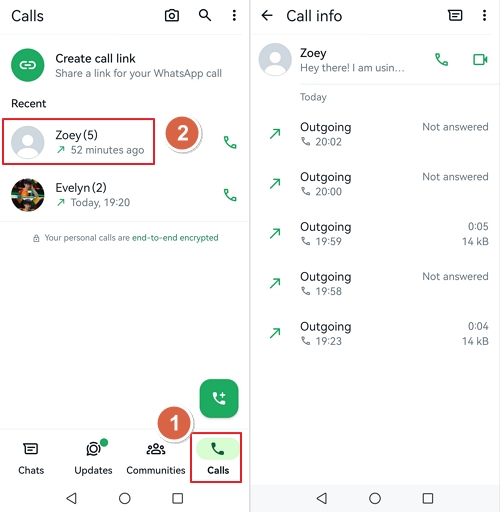
The simplest way to view WhatsApp call history is directly in the app:
- Step 1. Open WhatsApp on your device.
- Step 2. Tap the "Calls" tab (bottom on iPhone, top on Android.)
- Step 3. Review incoming, outgoing, and missed calls with timestamps.
- Step 4. Tap any call to see duration and contact details.
What Information Is Available?
| Information | Available? | Notes |
|---|---|---|
| Contact name/number | Yes | Only if saved in contacts |
| Call date & time | Yes | Exact timestamp |
| Call duration | Yes | Tap call for details |
| Audio vs Video | Yes | Different icons |
| Deleted calls | No | Permanently removed |
| Call content/recording | No | Encryption prevents this |
Part 3. How to Recover Deleted WhatsApp Calls
Before You Start: Critical Checklist
- ☐ Was backup enabled BEFORE the calls were deleted?
- ☐ Do you know which backup service was used (Google Drive/iCloud)?
- ☐ Can you access the backup account?
- ☐ Is the device available for 15-30 minutes?
If NO to any above → Recovery is unlikely. Skip to Part 4 for monitoring options.
Recovery Method Comparison
| Method | Success Rate | Cost | Time |
|---|---|---|---|
| Google Drive Restore (Android) | 85-95% | Free | 30-60 min |
| iCloud Restore (iPhone) | 80-90% | Free | 30-60 min |
| Local Backup (Android) | 70-80% | Free | 20-30 min |
| Dr.Fone Recovery | 40-60% | $79.95/mo | 30-60 min |
Method 1: Restore from Google Drive (Android)
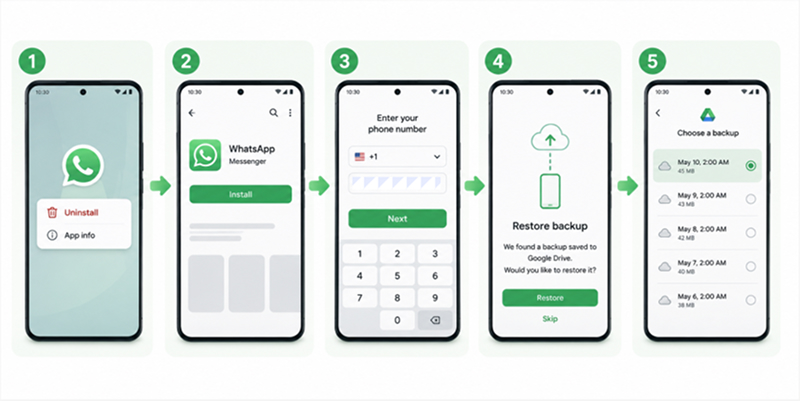
- Step 1. Uninstall WhatsApp from the device.
- Step 2. Reinstall from Google Play Store.
- Step 3. Verify phone number.
- Step 4. When prompted, tap "Restore" from Google Drive.
- Step 5. Select backup date (before deletion occurred.)
Method 2: Restore from iCloud (iPhone)
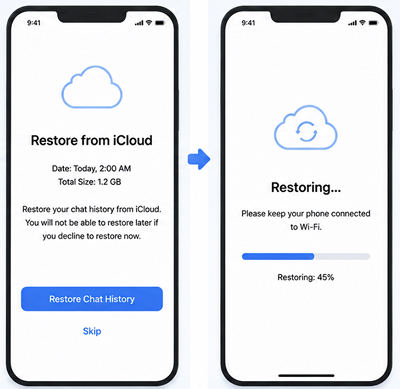
- Step 1. Check: Settings > [Name] > iCloud > Manage Storage > Backups.
- Step 2. Erase device: Settings > General > Transfer or Reset iPhone > Erase All Content.
- Step 3. Set up iPhone > Restore from iCloud Backup.
- Step 4. Reinstall WhatsApp and verify number.
Method 3: Local Database (Android Advanced)
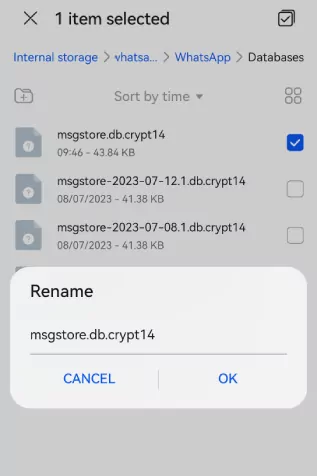
- Step 1. File manager > Internal Storage > WhatsApp > Databases.
- Step 2. Find: msgstore-YYYY-MM-DD.1.db.crypt14.
- Step 3. Rename to: msgstore.db.crypt14.
- Step 4. Uninstall and reinstall WhatsApp.
Part 4. A Parent's Guide: When Your Child Deletes Their WhatsApp Calls
Your 13-year-old just spent 45 minutes on a WhatsApp call at 11:47 PM. You only know because you happened to walk past their room. The next morning, you check their phone—the call log is empty. They deleted it.
If your heart is racing right now, you're not alone.
The Hidden Crisis: What the Data Shows
Research paints a sobering picture of what teens face online—and how often they hide it from parents:
| Statistic | Reality | Source |
|---|---|---|
| 58% of teens | Have experienced cyberbullying (up from 33.6% in 2016) | ICANotes, 2024 |
| 1 in 5 children | have experienced unwanted sexual contact online | WeProtect Global Alliance, 2023 |
| 46% of teens | Say they are online "almost constantly" (up from 24% a decade ago) | Pew Research Center, 2024 |
| 89% rise | Increase in online grooming crimes since 2017 | NSPCC UK, 2024 |
Case Study: When Deleted Calls Reveal a Bigger Problem
Note: The following is a composite case study based on real incidents reported by child safety organizations. Names and specific details have been changed to protect privacy.
Sarah, a mother of 14-year-old Emma, noticed her daughter was unusually tired during school days. One night at 11:30 PM, Sarah heard Emma laughing on a call. The next morning, Emma's WhatsApp call log was completely empty.
Using the methods in this guide, Sarah discovered:
- 47 calls between 11 PM - 2 AM over a 2-week period
- All to an unsaved number with no profile picture
- Calls lasted 15-45 minutes each
- Further investigation revealed the caller was a 19-year-old from a nearby town
Sarah caught it in time. The number was blocked, school counselors were notified, and Emma received guidance about online grooming.
Sources: NSPCC Grooming Report 2024, WeProtect Global Threat Assessment 2023
🚩 Warning Signs to Watch For
- 🚩 Pattern to watch: Unsaved number + Late night calls (10 PM - 6 AM) + Long duration (30+ minute.s)
Risk: Grooming, inappropriate relationship - 🚩 Pattern to watch: Contact with no profile picture + Asks to keep conversations secre.
Risk: Predator using fake identity - 🚩 Pattern to watch: Regular deletion pattern + Phone always hidden + New "friends" you've never heard of.
Risk: Systematic hiding of concerning activity
How to Detect Deleted Calls
The most reliable method: Check if WhatsApp calls appear in iPhone Recents (via CallKit), but not in WhatsApp's own call log. This indicates selective deletion.
- 1. Open iPhone Phone app (not WhatsApp.)
- 2. Tap Recents tab.
- 3. Look for calls with WhatsApp icon.
- 4. If WhatsApp calls appear here but not in WhatsApp call log, your child is deleting selectively.
How to Talk to Your Child
When Monitoring Makes Sense
Consider parental control tools when:
- Child refuses to discuss concerning activity
- Pattern of deleted calls + secretive behavior continues
- Suspected grooming or predator contact
- Child under 13 with unsupervised device
AirDroid: What We Actually Do
If you've had the conversation and still have concerns, AirDroid Whatsapp Tracker can help—but we want to be completely transparent about our capabilities and limitations.
| What AirDroid CAN Do | What AirDroid CANNOT Do |
|---|---|
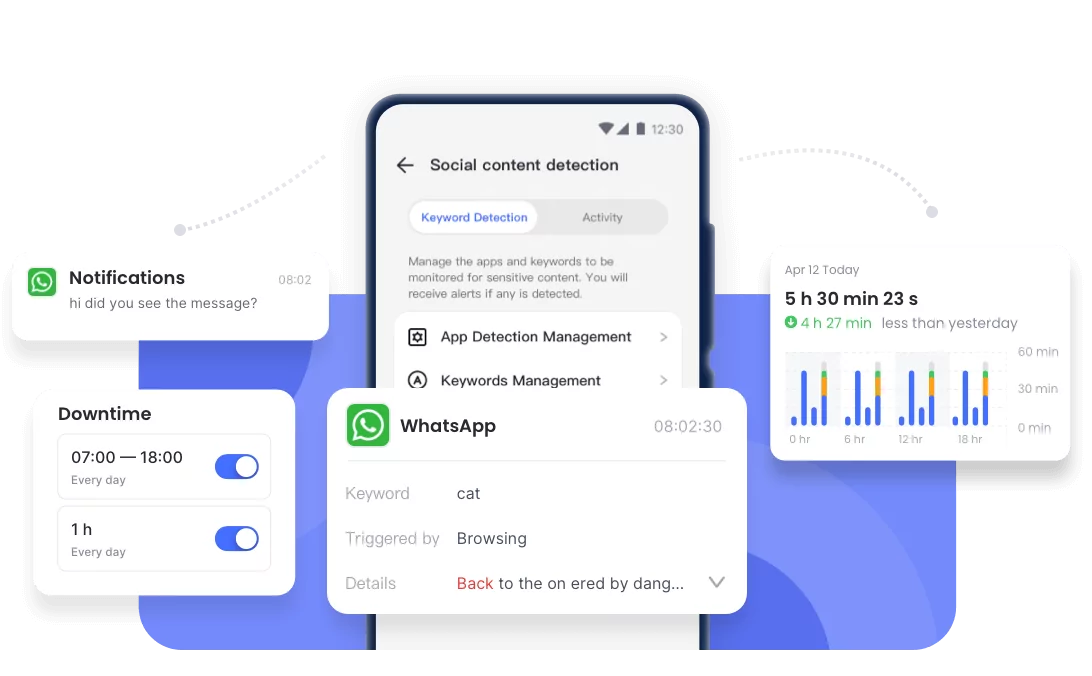
| Sync WhatsApp notifications (caller, time) | Read message content (encryption) |
| Show incoming call alerts in real-time | Record calls (technically impossible) |
| Keyword alerts for concerning content | See deleted calls retroactively |
| Screen mirroring for verification | Bypass WhatsApp encryption |


🚨 What to Do Right Now (Quick Action Plan)
- Step 1: Check WhatsApp call log + Phone Recents.
- Step 2: Review Screen Time / Digital Wellbeing.
- Step 3: Look for unknown or unsaved numbers.
- Step 4: Have a calm conversation with your child.
- Step 5: Set monitoring or boundaries if needed.
Part 5. FAQs & Legal Considerations
Generally yes for minors under parental care, but laws vary:
| Region | General Guidance |
|---|---|
| United States | Parents can generally monitor minor children's devices |
| European Union | GDPR allows parental monitoring for children under 16 |
| UK | Parents have authority to monitor children's online activity |
| Other regions | Check local laws—varies significantly |
WhatsApp doesn't offer native export for call logs. Options:
- Take screenshots of important calls
- Manually log calls in a spreadsheet
- Use backup restore to view historical data (temporary)
Conclusion: Choose the Right Method for Your Situation
| Your Situation | Recommended Method |
|---|---|
| Just need to check current calls | Built-in method (Part 2) |
| Recover deleted calls | Backup restore (Part 3) |
| Parent monitoring child (Android) | AirDroid notification sync (Part 4) |
| Parent monitoring child (iOS) | iPhone Screen Time limits + periodic device checks + open communication |
Remember: WhatsApp call history can tell you who, when, and how long—but not what was discussed. For parents, combine monitoring with open communication for the best results.
Sources & References
- Pew Research Center - "Teens, Social Media and Technology 2024" — Source
- NSPCC UK - "Online Grooming Crimes Rise" (2024) — Source
- WeProtect Global Alliance - "Global Threat Assessment 2023" — Source
- ICANotes - "Effects of Cyberbullying on Children's Mental Health" (2024) — Source
- WorldMetrics - "Cyberbullying Statistics 2024" — Source
- Ditch the Label - "Annual Bullying Survey 2024" — Source
- Common Sense Media - "The Common Sense Census: Media Use by Tweens and Teens, 2024" — Source
- Exploding Topics - "Teen Screen Time Statistics 2024-2025" — Source
- Internet Matters - "Children's Online Safety Statistics 2024" — Source
Case studies are composites based on real incidents reported by child safety organizations. Names and specific details have been changed to protect privacy.










Leave a Reply.