Can Parents See Snapchat Conversation History? What Actually Works
It is publicly recognized that Snapchat is built around one idea: disappearing messages.
For teens, that's the appeal. For parents, it's the problem, especially when sexting or the sending of nudes has become a common behavior on Snapchat.
Since there's little to no evidence left when something goes wrong, it's natural to worry about who your child is talking to or what they might be sharing.
So, is there a way to get Snapchat message history?
Yes, but it depends on the following:
- Whether the messages were saved. If your child or the person they're talking to saved a message in the chat, it stays visible.
- Whether your child chose "Never delete" for chats. Snapchat offers a "Delete chats" setting that can be set to "Never." If your child has this enabled, the conversation history is kept on their device.
- Whether you have access to their device and their consent. In most cases, Snapchat messages can only be viewed on your child's device. Without access and your child's permission, there's no possibility of checking their conversation history.
How to see your child's Snapchat conversation history?
Before You Start:
Start with an open conversation. Explain your concerns and let your child know why you need to check their conversations.
This step shouldn't be skipped, which not only builds trust but also makes it more likely that your child will come to you if something goes wrong.
Method 1: Check Saved Messages on Their Device
After talking with your child, the next step is to check what's still visible in their chats. And we highly suggest going through this together with your child.
What you can see:
- Messages that were manually saved by either party.
- Conversations where the "Delete Chats" setting is set to "Never."
How to check:
- Step 1.Open Snapchat on your child's device and go to "Chats."
- Step 3.Open individual conversations. Look for any saved messages (shown in a gray background) or check if the full conversation history is still there.
Method 2: Check Their Photo Library
Since messages may disappear, your child may save received Snaps or screenshots directly to their device. As such, checking your child’s photo library can help you find content that they shared or received on Snapchat.
What you can see:
- Any Snaps or screenshots your child chose to save.
How to check:
- Step 1.Open the Photos (iPhone) or Gallery (Android) app on your child’s device.
- Step 2.Look for images or videos saved from Snapchat.
- Step 3.Or review the "Screenshots" folder to see if some conversations have been captured there.
Method 3: Use a Parental Monitoring App
Picture this: a stranger starts chatting with your teen on Snapchat. At first, it seems harmless, but over time, he begins asking for personal photos or encouraging them to self-harm. By the time you check the device, the messages are already gone.
Hence, for parents who want to stay informed of what's happening as it happens, rather than figuring things out later, a Snapchat parental monitoring app deserves a try.
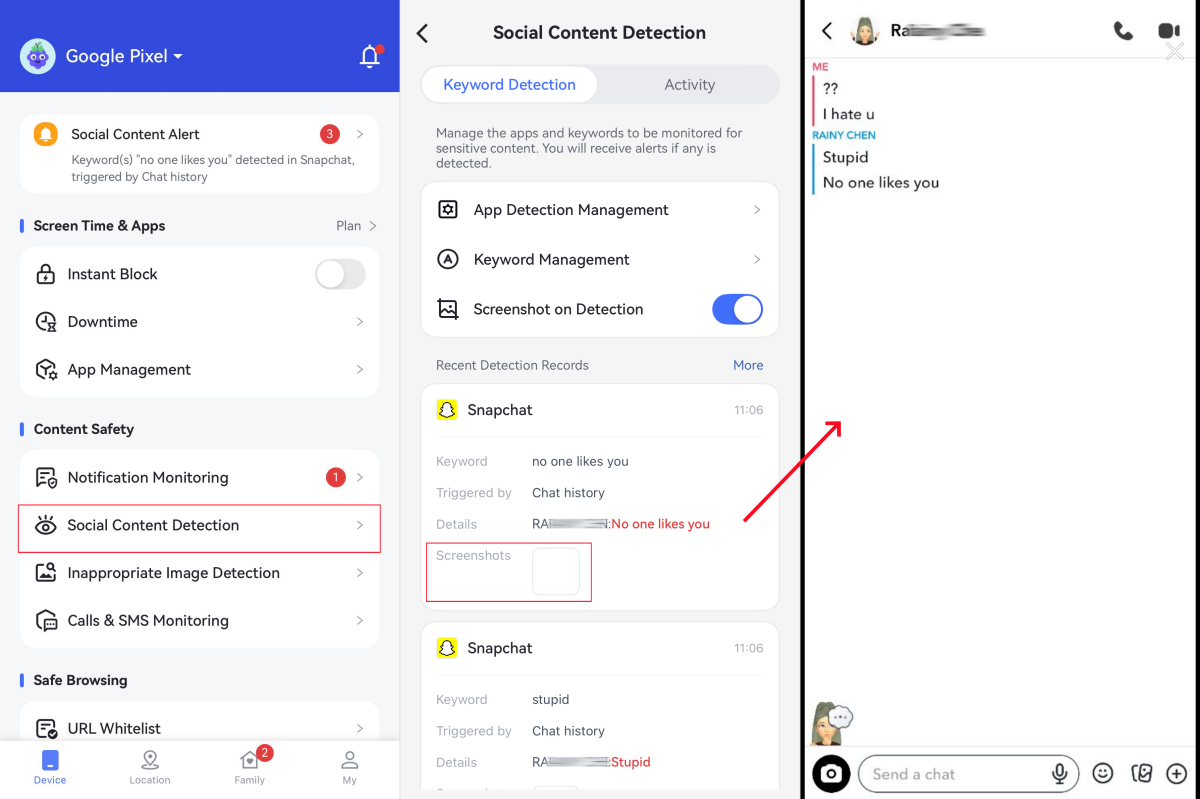
Unlike the above methods, it automatically takes screenshots of risky Snapchat messages as they happen, such as things related to cyberbullying, sexting, self-harm, etc.
What you can see:
- Potentially risky Snapchat conversations based on flagged keywords.
- Screenshots of detected suspicious activity.
What you can't see:
- Past messages before the app was installed.
How to get started:
- Step 1.Download AirDroid Parental Control on your device.
- Step 2.Follow the on-screen prompts to connect your child's Android phone.
- Step 3.Tap on "Social Content Detection" and enable it for "Snapchat." And add keywords based on your concerns.
- Step 4.After that, you can immediately receive alerts and review flagged messages from Snapchat.


What doesn't work for parents?
When trying to check your child’s Snapchat conversations, some common methods may seem helpful, but don't actually work. For example:
❌ Snapchat Family Center
Snapchat's own parental tool sounds more capable than it is. But it is only a safety tool. It won't show you any message content. What it can do is:
- See who your child's friends list on Snapchat.
- See who they've been chatting with in the last 7 days.
- Restrict sensitive content or Snapchat AI.
- Report accounts directly to Snapchat's safety team.
- Adjust key account settings (privacy, birthday, location, etc.)
❌ Recovering deleted Snapchat messages
Once messages disappear, they're usually gone forever, unless your child saved a copy of that conversation through screenshots or exported the data before the messages disappear.
Though many third-party apps and services claim to recover deleted Snapchat messages, most don't work and can pose a risk of data loss.
Additionally, Snapchat doesn't offer a way to retrieve deleted conversations.
❌ Requesting Snapchat data
Snapchat allows users to request a download of their account data, but it only contains messages that were manually saved. That is, it doesn't include disappeared or deleted messages.
It also requires waiting for the data to be sent to your child's account-linked email, making it impractical for most parents.
Beyond checking chats: keep your child safe on Snapchat
Keeping your child safe on Snapchat isn't just about tracking messages; it's more about setting boundaries and building trust, where you can reduce risks in the first place.
1. Explain Snapchat's real risks
Many teens don't fully understand risks like sextortion, cyberbullying, etc., especially when conversations seem harmless at first.
So, have honest conversations about how strangers may build trust before asking for something inappropriate.
If it is possible, bring up real-life examples to help your teens better understand.
2. Set up Snapchat Family Center
Even though it can't show you the message content, it gives you visibility into who your child is in contact with and allows you to report concerning accounts directly.
To learn more about Snapchat's Family Center features and set it up, watch the video below or visit the official document.
3. Teach your child how to protect themselves
This is the most important part. As a parent, you can't always be there to see what's happening in real time. But you can teach your child the skills to handle problems on their own.
The checklist below covers five essential skills. Go through it together. Let your child practice each one (such as saving a message as evidence, finding the report button, etc.).
Final words
If you've read it this far, you already know the truth: there's no magic button to see every Snapchat message your child sends or receives.
The app was built to make conversations disappear, and even Snapchat won't show you full content of chats.
Though checking saved messages, reviewing their camera roll, and using a parental control app can play some messages back, we still encourage you to talk with your child about what's happening on Snapchat.
Because the goal was never to read their messages. It's to ensure they are safe.










Leave a Reply.