To know if someone read your WhatsApp message, the read receipts come to help. When the blue check marks appear next to your message, it indicates that the recipient has read and viewed your message.
How to Know If Someone Is Reading My WhatsApp Messages from Another Device
Before we begin
Sometimes, your child's WhatsApp chats are out of sight. Stay informed and involved in their digital world with the right tool.
Explore AirDroid Parental Control to ensure their safety on WhatsApp, gain insights into their WhatsApp usage, online activities & notifications.

Before we begin
Sometimes, your child's WhatsApp chats are out of sight. Stay informed and involved in their digital world with the right tool.
Explore AirDroid Parental Control to ensure their safety on WhatsApp, gain insights into their WhatsApp usage, online activities & notifications.
A TikTok video shared by a Kenyan woman went viral in May 2024, in which she narrated that her boyfriend had secretly linked her WhatsApp to his laptop and read her messages without her knowledge.
This incident undoubtedly rings the alarm bell. And we can't help but wonder: can someone see my WhatsApp messages from another phone?
The answer is definitely yes. With ways, such as WhatsApp linked devices or snooping apps, others can read your WhatsApp messages without your phone.
So, in the next few minutes, we'll explore signs that someone is reading your WhatsApp messages from another device and tips to prevent this unauthorized access.
How to Know If Someone Is Reading My WhatsApp Messages from Another Device
Now that you know others can read or access your WhatsApp messages from another device. Here are some obvious signs of this unauthorized access. Let's have a quick look!
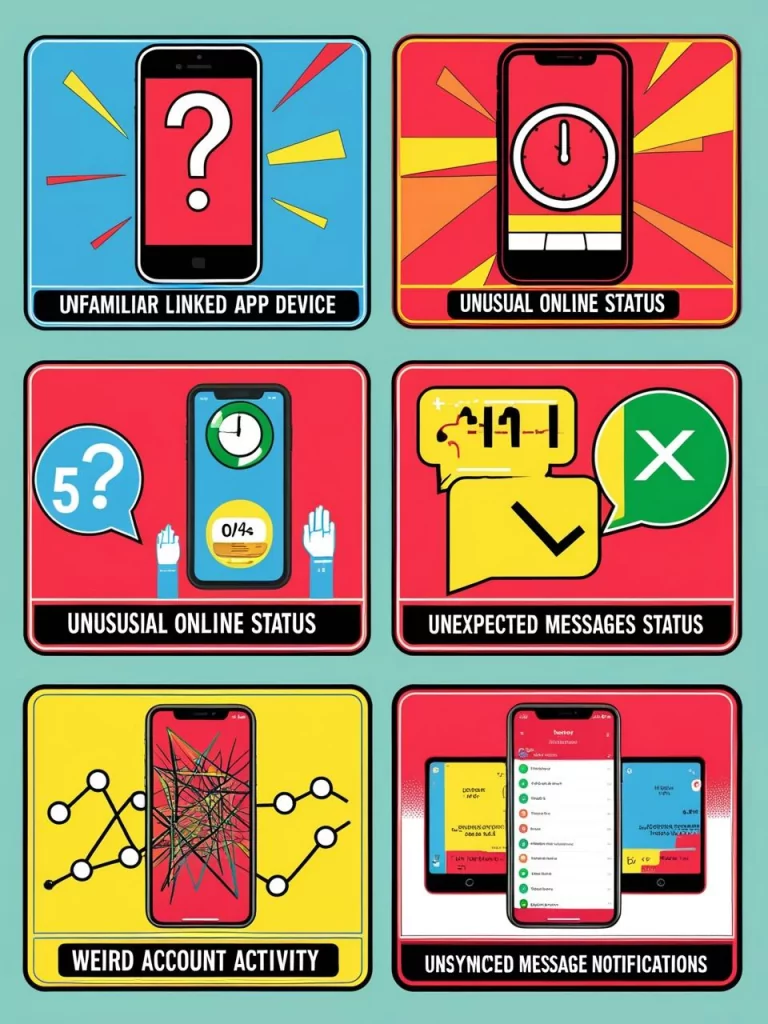
1Unfamiliar Linked Device:
WhatsApp allows users to link up to four additional devices to their primary phone. According to WhatsApp's official documentation, you can review all linked devices in Settings > Linked Devices and log out any unrecognized device.
As the Kenya woman shared in TikTok, her boyfriend checked her messages from another device by linking her WhatsApp to his device. So, to confirm if someone is reading your WhatsApp message from another device, please go to WhatsApp Settings > Linked devices. If there is an unknown device connected to your WhatsApp, remove it to stop unauthorized access.
2Unusual Online or Last Seen Status:
WhatsApp Web mirrors your conversations on a computer browser. If you notice the "WhatsApp Web is currently active" notification but you haven't activated it yourself, someone else might have scanned your QR code. Because there is no way to check our own online status, you have to set up another WhatsApp account or request your contacts to have a check.
3Unexpected Messages Status:
If you find your unread messages become read, then it possibly shows someone checked your WhatsApp messages.
4Weird Account Activity:
Hackers may modify your account's personal information, particularly your phone number because WhatsApp login relies on the SMS code provided by the phone number. Therefore, remember and look for changes in settings, phone number, name, gender, birthday, and conversations.
Kaspersky's security research shows that attackers often change account details like phone numbers to maintain persistent access, making it critical to monitor your profile information regularly.
5Unsynced Notifications:
Can't receive notifications for incoming messages on your end? This probably occurs when someone else is reading your messages from another device.
How to Stop Someone from Reading Your WhatsApp Messages from Another Device
Have you confirmed that your WhatsApp is hacked and someone is accessing your messages from another device? Don't fret. We gonna share the steps you can take to safeguard your WhatsApp account and keep your WhatsApp messages private.
Log out of Unknown Device
Whenever you use WhatsApp on a new device or someone links your WhatsApp to their device, log out as soon as possible. You can log out of the companion devices on your WhatsApp. To do so:
- Step 1.Go to WhatsApp in-app Settings and select "Linked devices."
- Step 2.Look for the unfamiliar device and tap on it.
- Step 3.Then, you can log out.
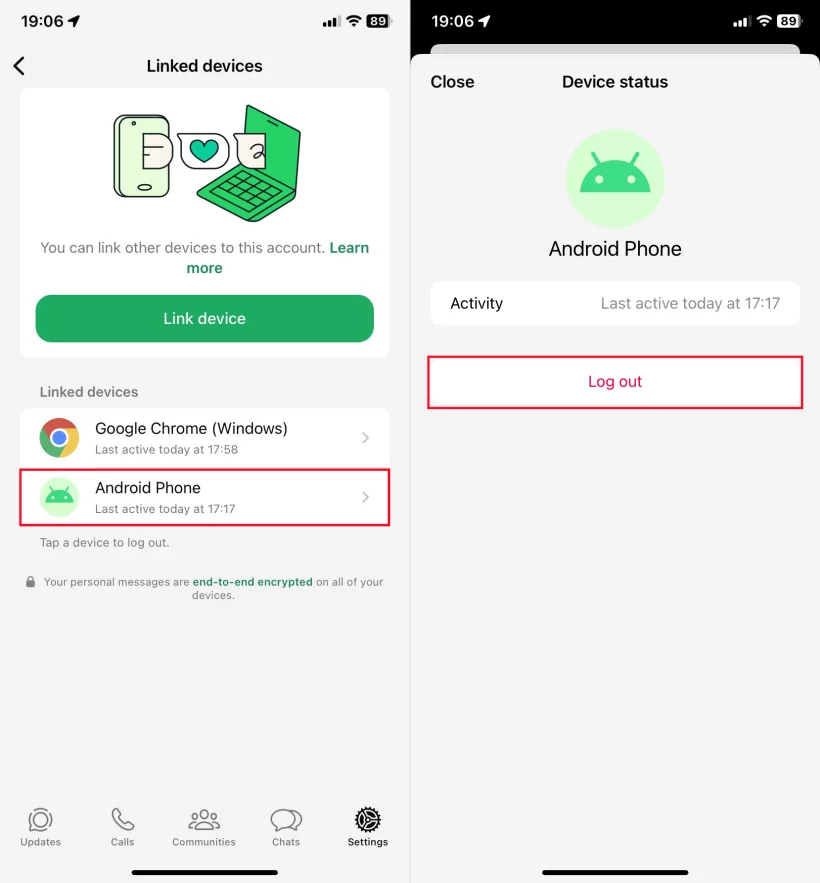
Additionally, we recommend that you regularly review the list of your WhatsApp linked devices to secure your account.
Enable Two-Step Verification
WhatsApp two-step verification creates a unique 6-digit PIN for account protection. When enabled, anyone attempting to verify your phone number on WhatsApp must enter the six-digit PIN you created. To enable it, go to WhatsApp Settings > Account > Two-step verification.
Doing so makes it much harder for unauthorized access by account hacking, as others would need both the OTP and the second factor (6-digital PIN you set) to access your WhatsApp account.
Here's how to enable 2FA on WhatsApp with screenshots:
- Step 1.On WhatsApp "Settings," select "Account" > "Two-step verification."
- Step 2.Tap "Turn on" and create a 6-digit two-step verification PIN.
- Step 3.Provide an email address or skip it for the PIN recovery.
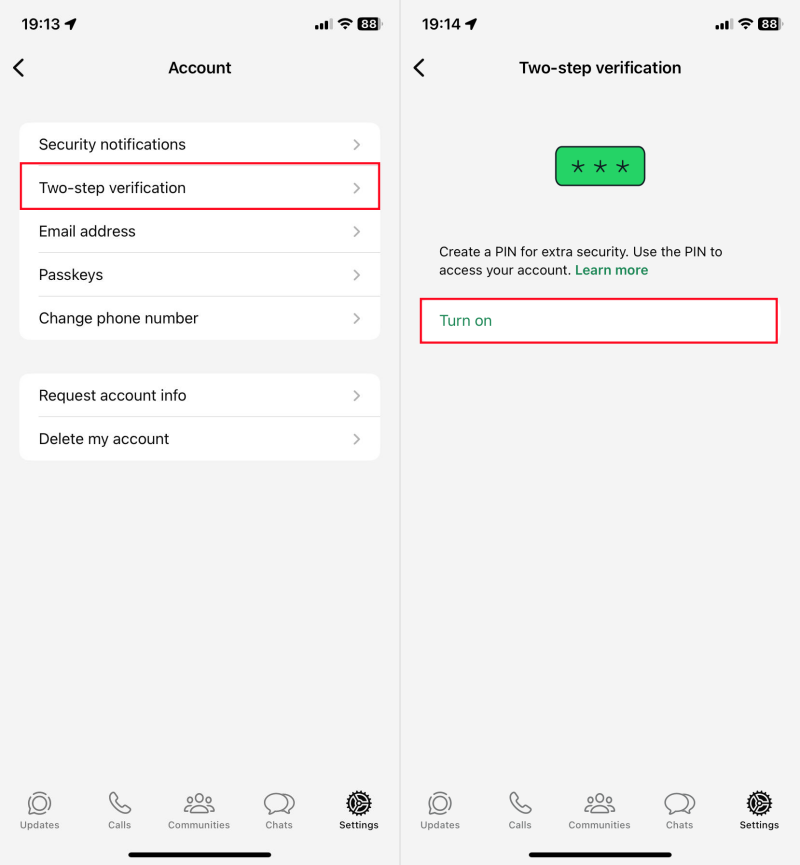
The two-step verification is not required if someone tries to link your WhatsApp to another device.
Uninstall the WhatsApp Snooping App
Sometimes, your parents, employers, or partners may install a WhatsApp snooping app on your device to read your WhatsApp messages from another device. If you suspect this, go through the full list of installed apps on your phone from the Settings app.
The WhatsApp snooping apps often come with names like spy, monitor, parental control, etc. When you notice an app with these names, delete it from your device to prevent unauthorized access.
Send Disappearing Messages
WhatsApp allows users to set messages to disappear after 24 hours, 7 days, or 90 days, adding another layer of privacy to sensitive conversations. You can enable this in individual chat settings.
That said, once disappearing messages are enabled, it is difficult for someone to access your past chat history. This helps protect against data breaches and reduces the risk of sensitive information being accessed by unauthorized individuals.
Learn More: How to Turn On Disappearing Messages on WhatsApp
Activate Security Code Changes Notifications
The WhatsApp Security Code is a code used to ensure secure and encrypted communication between users. And the security code is unique for each chat.
When it changes, it means one of the users reinstalled WhatsApp, switched phones, or added or removed the linked devices. That is, subscribing to the security code changes notification helps you find if someone else links your WhatsApp. To activate this feature:
- Step 1.Go to WhatsApp "Settings" > "Account" > "Security notifications."
- Step 2.Turn on "Show security notifications on this phone or computer."
Regularly Update the App
Keeping the WhatsApp app updated can fix the security patches and reduce the security vulnerabilities.
WhatsApp's ongoing legal battle against spyware maker NSO Group highlights the importance of regular updates, as the company continuously patches vulnerabilities that could be exploited for unauthorized access.
FAQs about WhatsApp Messages
How to know if someone read your WhatsApp message?
How to check my WhatsApp messages from another phone?
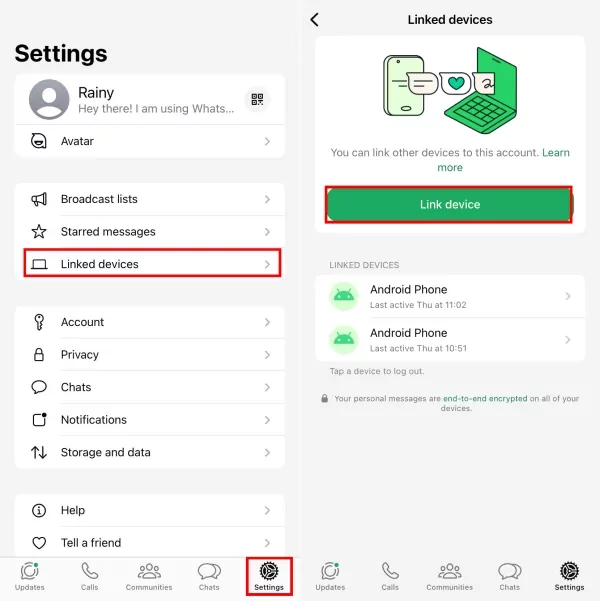
To check your own WhatsApp messages from another phone, utilizing the "Linked Device" feature is the quickest way. Here's how to link WhatsApp to another phone:
- 1. Open the WhatsApp app on your primary device and tap "Linked devices" from the settings menu.
- 2. Select "Link device", and scan the QR code displayed on another phone's WhatsApp login page.
How to check another WhatsApp account in my phone?
In 2023, WhatsApp allows Android users to add two accounts in one phone. Now, switch to another WhatsApp account with the steps below:
- 1. Go to WhatsApp Settings by tapping the three vertical dots.
- 2. Tap the arrow button next to your profile.
- 3. Now, you can switch to another WhatsApp account if you have added the account.
List of Sources
- Introduction - TikTok Viral Case
- Tuko.co.ke - Kenyan Woman Narrates Boyfriend Sneakily Linked Her WhatsApp to His Laptop (https://www.tuko.co.ke/people/549105-kenyan-woman-narrates-boyfriend-sneakily-linked-whatsapp-laptop-alisoma-chats-zote/ )
- How to Know If Someone Is Reading My WhatsApp Messages from Another Device
- WhatsApp Help Center - About Linked Devices (https://faq.whatsapp.com/1317564962315842/ )
- WhatsApp Help Center - About WhatsApp Web/Desktop (https://faq.whatsapp.com/378279804439436/ )
- Kaspersky - WhatsApp Security Tips (https://www.kaspersky.com/resource-center/preemptive-safety/whatsapp-security-tips )
- How to Stop Someone from Reading Your WhatsApp Messages from Another Device
- WhatsApp Help Center - Security Code Change Notification (https://faq.whatsapp.com/1520500115478482/ )
- Security Week - NSO Ordered to Stop Hacking WhatsApp (https://www.securityweek.com/nso-ordered-to-stop-hacking-whatsapp-but-damages-cut-to-4-million/ )










Leave a Reply.