AirDroid Parental Control
24/7 Kids' Guardian via App & Web
- 👀Live surroundings and location tracking
- 🔞Content Monitoring and App/Web Blocking
- ⚠Instant alerts for online risks and geofences
- ⌛Screen time control and monitor

Kidslox Review - Will It Keep Your Kids Safe?
Are you a parent who is looking for a parental control app? Then, have you heard of Kidslox Parental Control? It has left multiple other parental control apps behind with its "Telescope" feature. Want to explore this parental control app more? Let's delve into this Kidslox review!
Quick Check: Is Kidslox Right for You?
Kidslox is a good fit if your main goal is managing screen time and apps. It gives parents strong control over when kids can use their phones, how long they can stay on, and even lets you reward extra time for chores. Kids can also request more screen time through the app, which helps keep rules clear and fair.
It also works well for basic app management. You can block whole app categories or specific apps, control app downloads, and prevent kids from uninstalling apps without permission. Location tracking is included too, allowing parents to see where their child is and set up simple geofences.
Kidslox is more focused on limits than monitoring. It does not monitor phone calls, text messages, or social media activity. While the app can take screenshots to give parents a general idea of what kids are doing on their devices, it doesn't offer detailed insight into conversations or online interactions.
| Overall Rating | ⭐⭐⭐ | Compatible Devices | Android, iOS, Web |
| Pricing | $4.29/month for Basic Plan $6.79/month for Family Plan |
| Free Trial | 3 Days |
| Features | ✔ Telescope ✔ Nudity Photo Scanner ✔ App Blocking ...(And More) |
| Pros & Cons | 👍One-click to lock your child's device 👎Cannot keep your child's monthly activities ....(And More) |
Short on time? Go to our final verdict >>>>>
Key Features of Kidslox
Screen Time & App Control
Screen Time Limits
Parents can set device usage limits per day, such as 2 hours on weekdays and 3 hours on weekends. Once rules are set, the phone stays locked during restricted times, which gives parents confidence that limits actually work. The scheduling system is clear and easy to manage, making it useful for daily routines like school, bedtime, or family time.
Some parents may want more flexibility. For example, apps like AirDroid Parental Control allow different rules for different time periods. This makes it easier to allow learning apps during homework hours while blocking games or social media until later.
Instant Lock
Kidslox also includes a Lock feature, which lets parents lock a device instantly at any time, no matter the schedule. If a child needs more screen time, they can send a request, and parents can decide whether to approve it. In addition, Kidslox supports reward-based screen time, allowing parents to give extra time when children complete chores or responsibilities. This turns screen time into a motivation tool rather than just a restriction. This is really motivating for my kids!
Block Apps
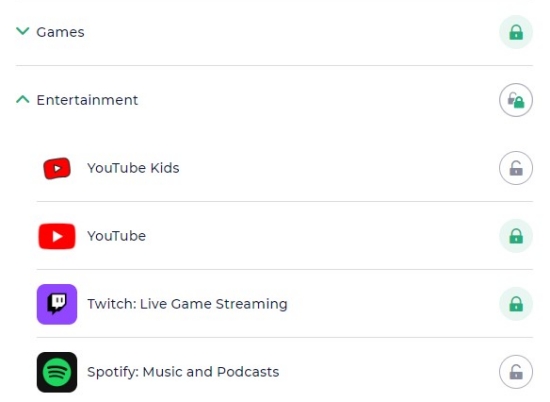
Kidslox makes it pretty simple to keep kids away from apps you don't want them using. As a parent, you can decide which apps are allowed and which ones should stay blocked. Kidslox also allows you to block new app installations from the App Store and Google Play.
Apps are already sorted into categories like games, entertainment, and social media, so you can block a whole group at once instead of going app by app. If there's just one app causing problems, you can block that too. It's a straightforward way to cut down on distractions without overthinking the settings.
Content Monitoring & Web Safety
Web Filter
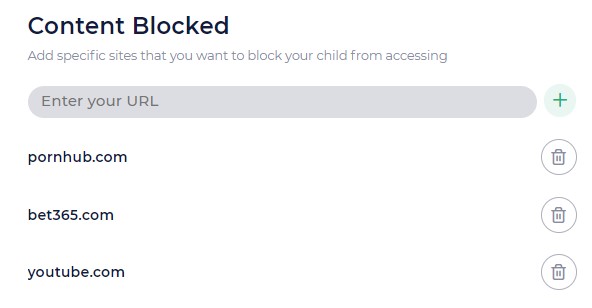
Kidslox uses a web filter to help keep kids away from unsafe or adult content online. Once it's set up, the filter runs automatically and blocks a large number of risky websites, which can be reassuring for parents who don't want to manage every detail. You can either block specific URLs or restrict the internet access of your child's phone. The big drawback of it is you cannot block websites by types.
In practice, the web filter offers limited customization. Parents are not given detailed control over filtering categories, and options for adjusting what is allowed or blocked are fairly basic. This can lead to situations where some acceptable websites are blocked, while certain online activities may still be accessible through apps or games.
App & Web Activity
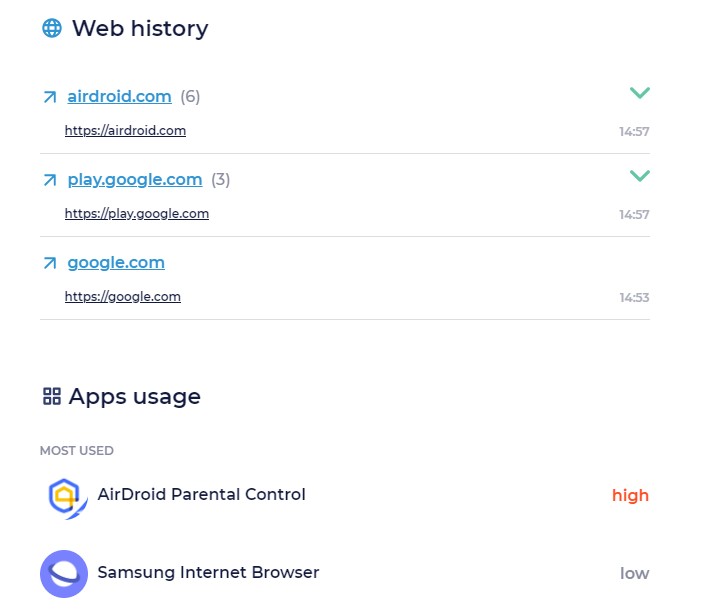
Kidslox allows you to know your child's app usage and visited URLs. But pay attention that you are not able to the amount of the time each app has been used. You can also find out YouTube videos your child watched.
Nudity Photo Scanner
Kidslox's nudity photo scanner will search for images in the kids' gallery and screenshots by Kidslox. When there are nude or restricted ones, this app will send an alert to the parent's phone.
During testing, the feature worked quietly in the background and provided alerts when it detected questionable images. This can be helpful for parents who want an extra layer of protection, especially as children begin using messaging apps or saving images from the internet.
However, the scanner mainly acts as a detection tool rather than a full prevention system. It alerts parents after images are identified, but does not always stop images from being saved or shared in advance. Overall, it serves as a useful awareness feature, though parents looking for more proactive controls may want additional safeguards.
Telescope
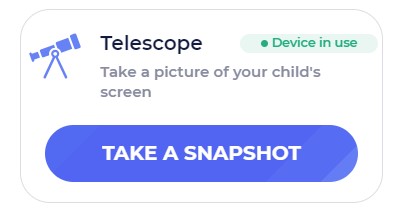
The Kidslox's Telescope feature captures the screen of your kid's phone automatically or manually. With this, you can keep track of your child's activities and the applications they're currently using.
However, when I tried it, I found the connection delays. Most of the time, I received the screenshots after more than 5 minutes.
Location Tracking
Using the Kidslox family tracker, you can see your kids' current location and a timeline of the recently visited places for the last 7 day. If you worry about your child's safety, you are allowed to set up the go-to geofencing zones for your kids. You can immediately be notified if your kid enters or leaves a zone.
Pros & Cons
With multiple features available, are you overwhelming? Here, I conclude its pros and cons:
Pros
- One-click to lock your child's device
- Block apps with groups
- Enable YouTube Restricted Mode for your child remotely
- Capture screenshots of your child's device
- Reward screen time if your child completes tasks
- Track YouTube & TikTok watching history
Cons
- Cannot keep your child's monthly activities
- Cannot see how much time your child spends on each app
- Cannot block websites by types or categories
- Cannot monitor SMS & calls
- No social media protection
Final Verdict and Best Alternative
Some advanced Kidslox features include device locking, screen capturing, nudity photo scanning, and screen time rewarding make it stands out from the rest of the parental control apps. So, if you're a parent who focus on these aspects, Kidslox is your go-to choice.
But if you want to protect your child on social media, block website categories, or keep an eye on your child's calls and messages, we recommend its alternative - AirDroid Parental Control.
Why AirDroid Parental Control?
- Detailed Comparison


- Google Play Store Rating4.74.3
- Pricing$5.00 / month(billed annually)$4.69 / month(billed annually)
- Free trial7 days free trial3 days free trial
- Monitor Calls & Messages


- Screen Time
- Block Websites & AppsRead More
 AirDroid can filter 31 web categories on Android and 29 categories on iOS, ensuring a safer browsing experience across devices.Kidslox doesn't show categories by default. It says it can block 5 million sites. You can't choose categories by yourself.
 - Detect Social Content
- Sync App Notifications
- Remote Camera


- Live Location
- Listen to Surroundings
- Screen MonitoringRead MoreAirDroid allows you to have access to your kids' live screen remotely. You can check what your kid is watching at any time.Kidslox only supports telescope, which you can get a screenshot of your kid's screen every 5 minutes.
- Family Chat











Leave a Reply.