AirDroid Parental Control
24/7 Kids' Guardian via App & Web
- 👀Live surroundings and location tracking
- 🔞Content Monitoring and App/Web Blocking
- ⚠Instant alerts for online risks and geofences
- ⌛Screen time control and monitor

Is Twitch Safe for Kids? A Clear Answer for Parents
Live-streaming platforms such as Twitch are growing fast and becoming more popular than traditional TV. This trend makes many parents ask an important question: is Twitch safe for kids?
The answer depends entirely on how you monitor your child, and you should also treat this app like a social network with real people, not just a video-streaming platform.
Quick Verdict for Parents
If you need a quick answer to “Is Twitch safe for kids?”, then it’s not recommended for those under 13 due to age restrictions for Twitch, while teens between 13 and 17 may use the platform with strict parental supervision. They first need to understand privacy risks; otherwise, the platform isn’t safe without active monitoring tools.
What is Twitch, and Why Kids are Attracted to It
To answer the question of whether Twitch is safe for kids, parents should first understand how the platform actually works.
What is Twitch?
Twitch is a live-streaming platform that allows creators to broadcast themselves playing video games or chatting in real time. Everything is live and unedited. This makes the content feel authentic and unpredictable, which keeps viewers glued to the screen.
The best parts for kids are live interaction and social connection. They can interact with a famous streamer in the chat and get a shout-out. But because it’s live, the content can change instantly from fun to toxic, which is why parents are often concerned about Twitch's safety.
Popular Categories Kids Watch
The “Just Chatting” category is extremely popular, featuring streamers who just hang out and talk to their viewers. Besides chatting, gaming is still the main attraction. Kids flock to watch gameplay in Minecraft and Roblox. They enjoy learning new tricks from pros, but they stay for the community and the excitement of live events.
Main Safety Risks on Twitch for Kids
To understand the risk, parents should know what content their child may encounter on Twitch. Your child will likely see live games, hear unfiltered talk—including profanity or offensive language—and have their chatroom filled with strangers.
You can use settings to filter out profanity in the text chat, block private messages from strangers, and choose who they follow. Still, live streams are unpredictable, and you can’t control everything, especially when a streamer suddenly turns toxic and shouts bad words.
1. Unfiltered Live Chat
Twitch’s chat box is usually very active, especially for famous streamers. This means thousands of messages fly by quickly, and moderators can’t delete every bad message instantly. As a result, your child will likely see profanity or hate speech before it’s even deleted.
Many users trick safety filters by using symbols or numbers to say offensive words, usually triggering other viewers to do the same. Seeing this, a kid under 10 often mimics these words just to fit in, while a teenager might join the harassment to gain attention from the crowd.
2. Adult Streamers and Mature Topics
Twitch is mostly for adults, so many streamers talk about mature topics, such as gambling, and use bad language. Kids will also see categories like “Hot Tubs” that show people in swimwear, which makes the Twitch for kids experience unsafe.
Even if you choose a safe channel, streamers often “raid” viewers to other channels at the end of a broadcast. This can instantly take your child to an R-rated stream. A 10-year-old might feel confused or uncomfortable by such sexualized content, while a 14-year-old is often curious and may secretly search for more of it.
3. Over-Reliance on Streamers
Some live streamers frequently use foul language and explode in anger when they make a mistake. This sets a very poor example because kids naturally look up to them and want to act just like them.
This quickly creates negative habits in your child’s daily life. Kids tend to copy the screaming just because they think it’s funny. On the other hand, Teenagers might adopt this toxic aggression permanently, treating their real-life problems with the same rage they see on screen.
4. Long, Unstructured Screen Time
Twitch streams can easily last for hours or even days without a single break. Unlike a TV show that finishes quickly, a live stream keeps going, making it very hard for a child to find a good time to stop.
Since interesting moments happen randomly, kids will experience FOMO (Fear Of Missing Out). They usually throw tantrums when forced to stop watching, while teens frequently lose sleep by secretly watching streams on their phones, making parents doubt whether Twitch is safe for kids.
5. Private Messages and Grooming
The “Whispers” feature allows strangers to chat privately with your child. Pedophiles use this feature to groom victims. They usually spot vulnerable kids in the public chat first, then use private messages to build a fake friendship.
After gaining trust, they usually push kids to move to other apps to hide from parents. A 9-year-old will easily get tricked by free gifts here, while a 15-year-old can be manipulated into thinking they’re in a serious romantic relationship.
6. Spending Pressure and Scams
Twitch is built to make money, so it sometimes pressures kids to spend cash just to get a shout-out from a streamer. They use their parents’ credit cards without knowing the real cost, while teenagers may spend their entire allowance on donations just to show off.
Scammers also lurk in the chat, posting fake links for “free items” to steal data. Naive kids easily fall for this scam, putting their security at risk.
Twitch Parental Controls — What They Can and Can’t Do
Twitch offers helpful tools to protect your child within the app, but these settings can’t stop every danger from the outside.
What Twitch Can Do
The platform allows you to set up safeguards, such as blocking private messages, to support strict age restrictions for Twitch. It also uses smart tools for proactive detection to quickly find and remove harmful content. These features help create a safer space.
What Twitch Can’t Do
Unfortunately, the app doesn’t have built-in screen time management. It can’t automatically block off-platform communication attempts either, allowing strangers to share links to outside apps like Discord. Once the chat moves to other platforms, Twitch can no longer protect your child.
How Parents Can Control Twitch Safety beyond Built-In Settings
Since Twitch Parental Controls have limits, AirDroid Parental Control steps in to offer the extra protection parents need. It's all-in-1 protection for your kids' online and offline safety.
- Screen Mirroring
You use this to watch your child’s phone screen live for emergencies. This allows you to see exactly how they interact with unknown streamers in real-time when you're fearing for kids’ safety and don’t get a response for a long time.
Predators usually act in secret, but Sync App Notifications will alert your phone immediately if a private message arrives late at night.
- App Time Limits & Downtime
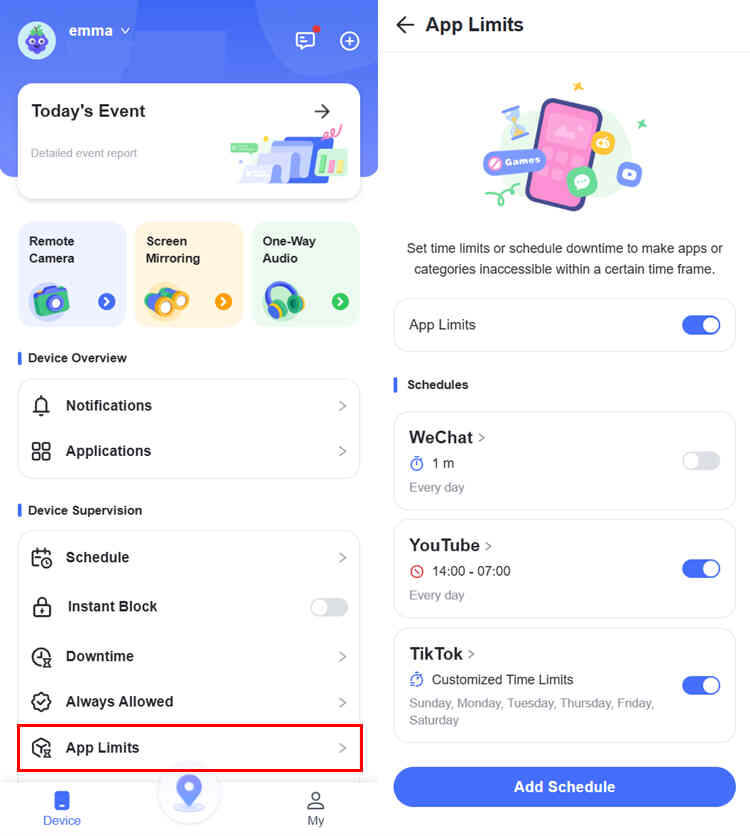
To stop addiction, you can set strict daily time limits that lock the app automatically to protect schoolwork. You can also use Downtime schedules to block the app at night.
- Monitor 14 Social Platforms
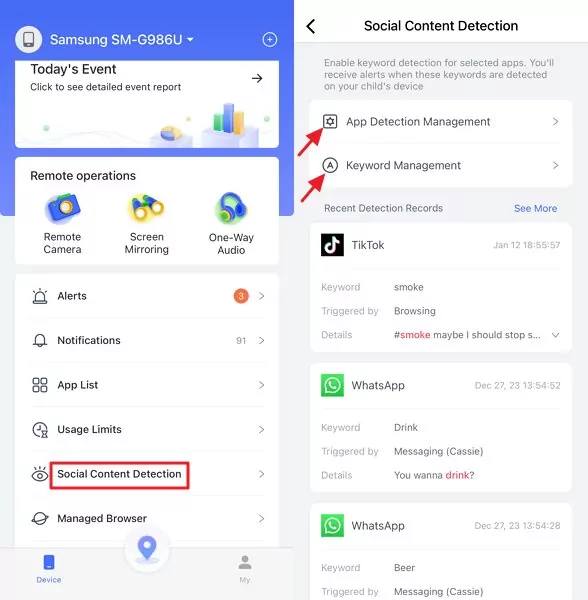
Safety doesn’t stop on Twitch because Airdroid also detects keywords across 14 other social platforms. Even if a conversation moves from a public stream to a private chat on another platform, this app can still scan for dangerous keywords and alert you if words like “meet up” or “address” appear.




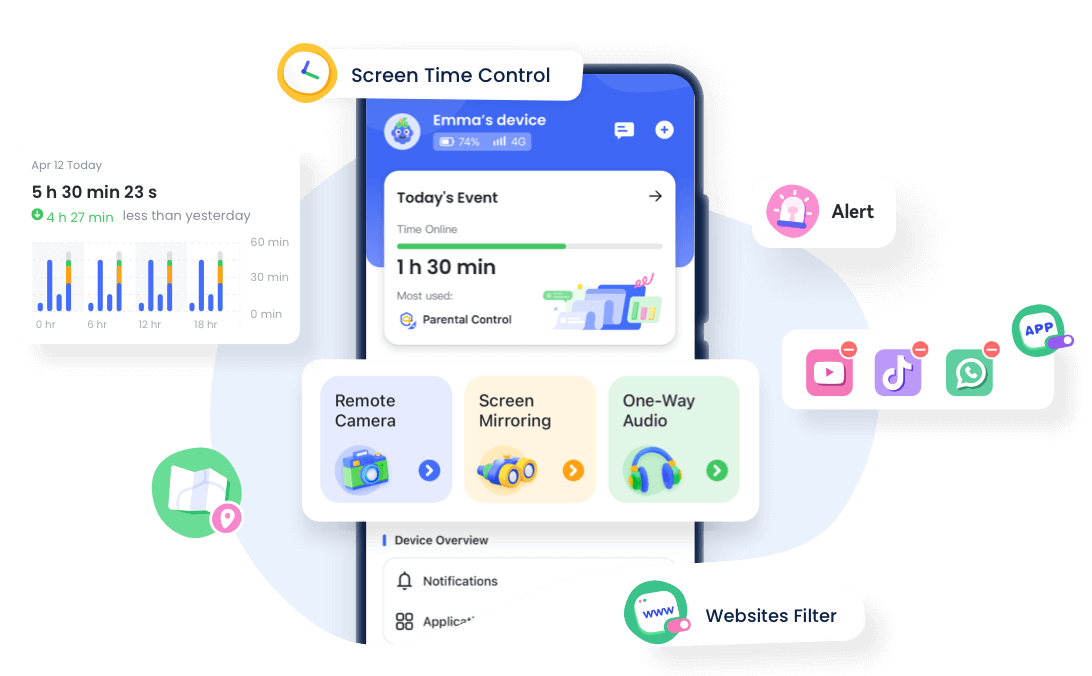
By combining these advanced features with open communication about their online behavior, you can maximize your child’s safety while keeping them mentally and physically healthy.
How to Set Up a Safer Twitch Experience (Step-by-Step)
As parents, you should have open communication with your child about risks they may face on Twitch—such as harassment from strangers, donation scams, and streamer impersonations. Then, work together with them to set up supervision rules you both agree on.
Safety Settings Parents Should Enable on Twitch
Start by turning on every setting in the Chat Filters menu to protect your child from unwanted language and profanity.
- Step 1. Go to any stream.
- Step 2. Click the Chat Settings icon.
- Step 3. Select Chat Filters.
- Step 4. Turn every toggle on.
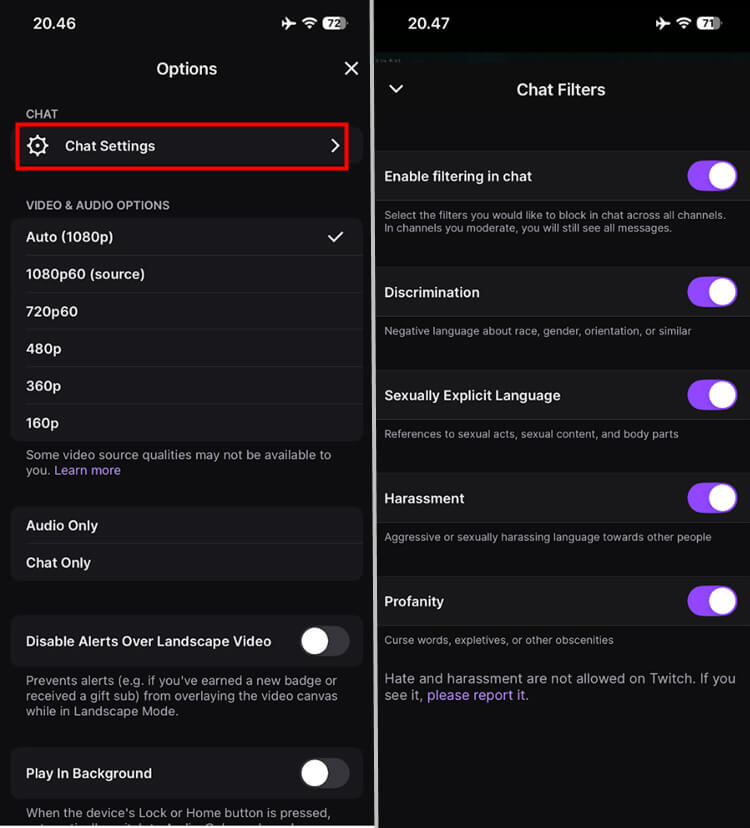
Next, use Content Display Preferences to hide specific mature labels—such as gambling or sexual themes—from search results.
- Step 1. Go to your Profile.
- Step 2. Tap Settings.
- Step 3. Select Content Preferences, then turn everything on.
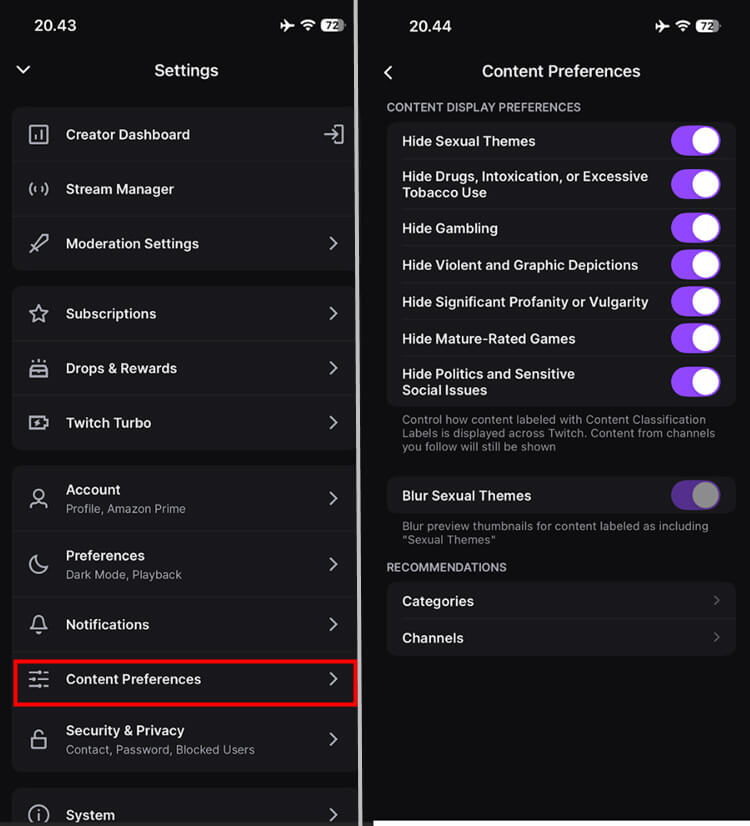
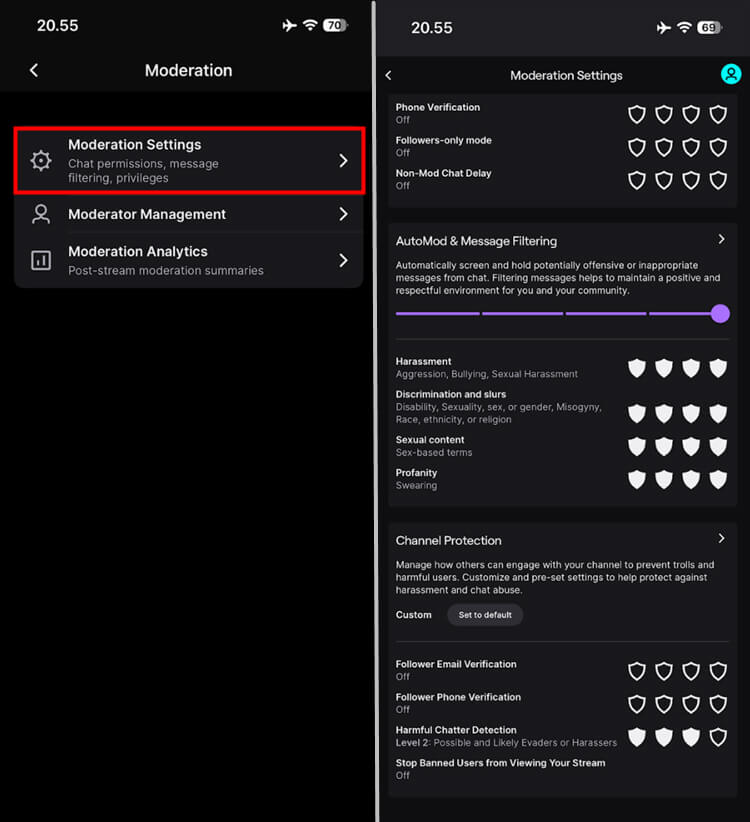
Finally, if your child streams, set up Stream Moderation tools, such as AutoMod, to stop harassment and keep the chat positive.
- Step 1. Go to your Creator Dashboard.
- Step 2. Click the Profile Icon in the top-left corner.
- Step 3. Tap Settings.
- Step 4. Select Moderation Settings.
- Step 5. Then set the overall level (Level 1 is light, Level 4 is very strict).
External Protection with AirDroid Parental Controls
AirDroid Parental Control helps parents set schedules that encourage a healthy screen time habit. Its social media monitoring helps prevent your child from being lured by strangers on Twitch to other platforms for scams, sexual solicitation, or self-harm inducement. You will also be alerted instantly once risky keywords are detected.
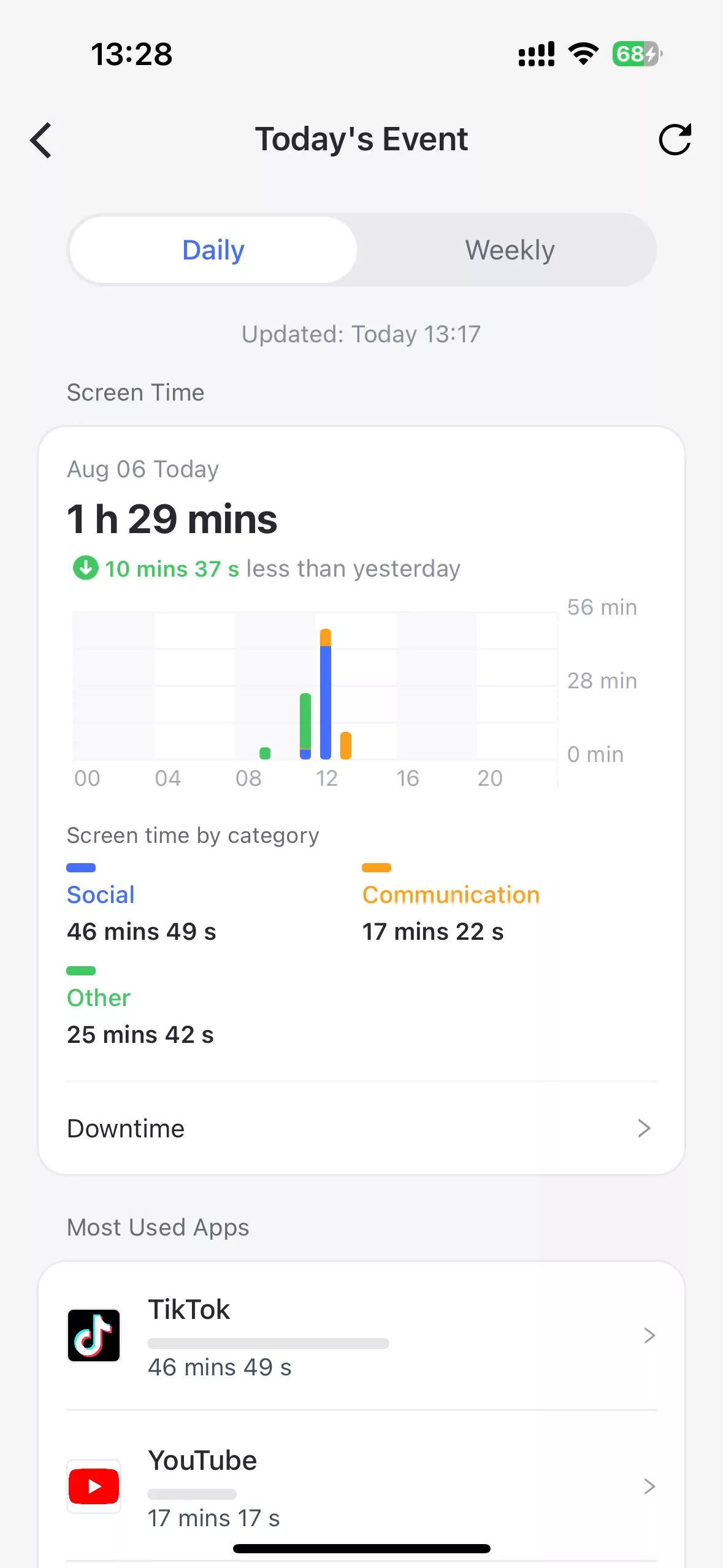
- Step 1. Open AirDroid Parental Control, tap top button, use Today's Event to see how much time kids spend on apps.
- Step 2. Go to App Limits, you can custom specific time for selected apps, preventing late-night overuse.
- Step 3. Social Content Detection can find the risks in real time. You can add your concerns and Ai assitant will help you create a list of related keywords.
Final Verdict for Parents
Twitch is primarily an adult platform, meaning it’s not kid-safe by design despite allowing younger users to join. Twitch Parental Controls alone aren’t enough to block every danger because the content happens live. To stay in control, parents can use tools like AirDroid Parental Control to add a strong safety layer.















Leave a Reply.