Is DramaBox Safe for Kids? The Real Cost of "One More Episode"
DramaBox turns soap-opera plots into one-minute vertical episodes, and users are binge-watching them on the bus, at lunch, and under the covers at night. Beyond this addictive design, its dramas and coin-based purchases also raise concerns for parents.
So Is DramaBox Safe for Kids? Here's The Short Answer
- DramaBox is a short-drama streaming app not built for young users. The App Store shows it is 18+, and Google Play rates it as Teen.
- Its inappropriate themes, various content types, binge-watching experience, and in-app purchases raise several concerns.
- The bigger problem is that DramaBox doesn't give parents much to work with: no real age verification, content filter, or parent controls.
💡Worried about these issues? Here's a quick reference to match each risk with its fix.
What Is DramaBox and Its Age Rating?
DramaBox is a short-drama streaming app and is growing fast on the back of vertical short dramas: revenge plots, werewolf and vampire romance, billionaire, etc.
Each series has dozens of episodes of about one to two minutes. Typically, the first several episodes of most series are free, and the rest unlock with coins, ads, or a subscription.
DramaBox's age rating is where things get confusing because it varies by platform. Here are the details:
- Official document: 13+
- App Store: 18+
- Play Store: Teen
Age ratings checked on November 13, 2026, in the United States. They may also vary by region and change over time, so check the listing on your child's device. Additionally, this age rating describes the DramaBox app, not the DramaBox Lite app.
Binge-Watching: Your Kids Can't Stop Watching DramaBox
The short drama format is built for addiction. Unlike traditional TV shows, episodes are short enough that "just one more" always feels harmless. Plus, nearly every episode ends on a cliffhanger, such as an unexpected twist, leaving viewers eager to find out what happens next.
I've felt this myself. On one weekend morning, I woke up, scrolled TikTok, and came across a short-drama clip that pulled me in but ended right at the key moment. So I went looking for the next. If it works on me, it's even harder for a teenager to put the phone down.
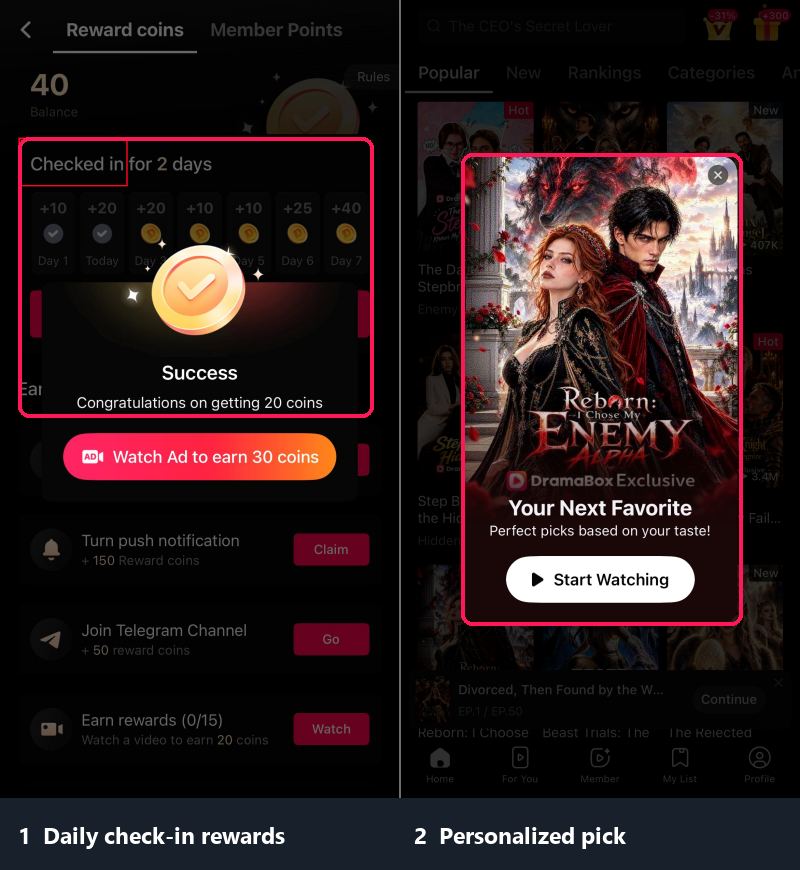
Additionally, DramaBox has a daily check-in reward system, which encourages teens to open the app every day. Once they're in, the app recommends dramas, and when one matches a genre they like, "one more episode" turns into several.
How Can Parents Limit DramaBox Screen Time?
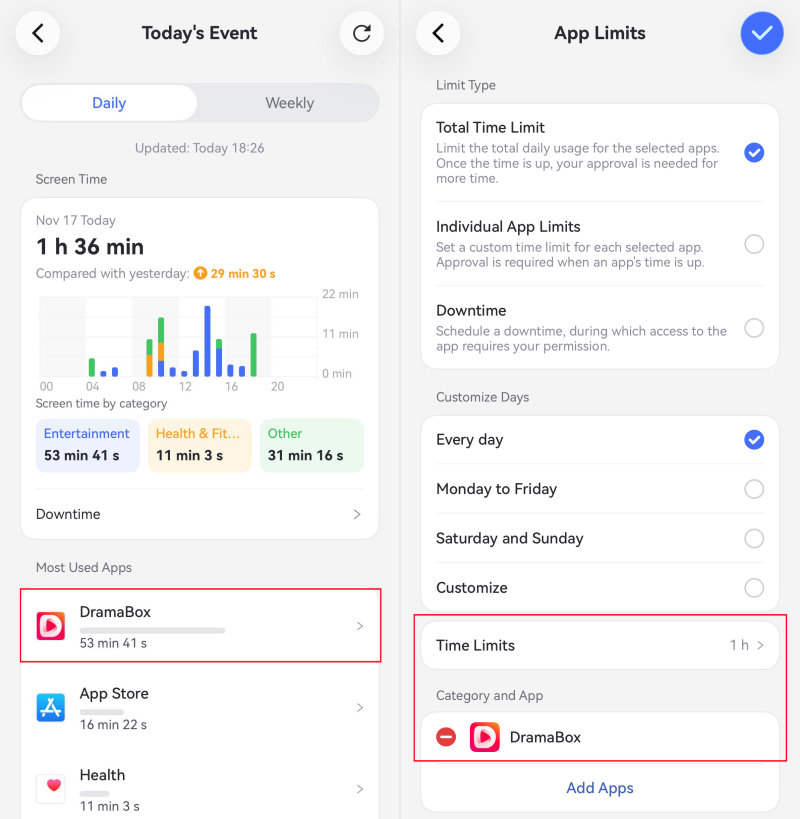
A limit on the app works better than asking your child to self-regulate mid-cliffhanger. One study of over 10,000 early adolescents found that parental limit-setting is associated with less problematic screen use.
Surely, we still suggest agreeing on a stopping time before setting any limit. Then set a daily time limit on their device or add a downtime schedule so a cliffhanger doesn't turn into hours of episodes:
- Set a daily time limit for DramaBox specifically using Screen Time on iPhone, Family Link on Android, or AirDroid Parental Control on either.
- Add a downtime or bedtime schedule so the app is unavailable at night.
- Review the usage report weekly to see how often DramaBox is opened and how long it's used. That helps you know if watching micro-drama is becoming a habit.
Inappropriate Short Dramas: From Billionaire Romance to Revenge
Many DramaBox dramas are cheesy or revolve around dramatic twists, such as a cold billionaire falling in love with the poor heroine or a betrayed woman getting a second chance at life and seeking revenge.
Additionally, DramaBox's catalog currently includes a growing number of AI-generated dramas. A lot of users complained about the thin plots, stilted dubbing, and repetitive storylines on Reddit.
Some even include sexual innuendo, violence, or unhealthy relationships that are not suitable for children. Here are some common drama themes parents should watch for:
| Theme | Why it needs attention |
|---|---|
| Billionaire Romance / Contract Marriage | These stories romanticize controlling behavior, financial dependence, or unequal relationships, which can affect teens' worldviews. |
| Toxic Relationship / Affairs | These stories feature affairs, student-teacher relationships, love triangles, etc., which may expose teens to sexual themes and toxic relationship dynamics. |
| Revenge / Underdog Comeback | Plots run on humiliation, betrayal, and payback. For teens, such stories may normalize revenge while encouraging the belief that money and status matter most. |
| Werewolf / Vampire / Alpha Male | Possessiveness, dominance, supernatural and suggestive scenes may appear. |
How to Protect Kids from Inappropriate DramaBox Stories?
Block DramaBox for Younger Kids
If your child is under 13, the simplest fix is to keep the app off their phone. You can use the official app store's age limits to prevent age-inappropriate app downloads. Here's how:
- Android: Go to Play Store Settings > Family > Content restrictions > Parental controls. Set a PIN, choose Apps & games, and pick an age lower than DramaBox's age rating.
- iPhone: Open Settings > Screen Time > Content & Privacy Restrictions > App Store, Media, Web & Games > Apps, and choose a lower rating below DramaBox's App Store rating.
- Also, you can choose to block DramaBox with a third-party app such as AirDroid Parental Control, which can stop them from opening the app and website.
Review Shows and Set Content Boundaries
Check the titles in your teen's DramaBox Watch History, then preview their descriptions and episodes yourself. This helps you spot if your teen is consuming problematic short dramas and start conversations about what themes they should avoid.
If the app's local age rating exceeds your child's age, or unsuitable titles keep appearing, block access to DramaBox as a whole.
DramaBox Coins & Subscriptions: How Kids Spend Money Without Noticing
Short-drama apps often use the same monetization model, and DramaBox is no exception: watch a few episodes for free, then pay with coins episode by episode or purchase a subscription.
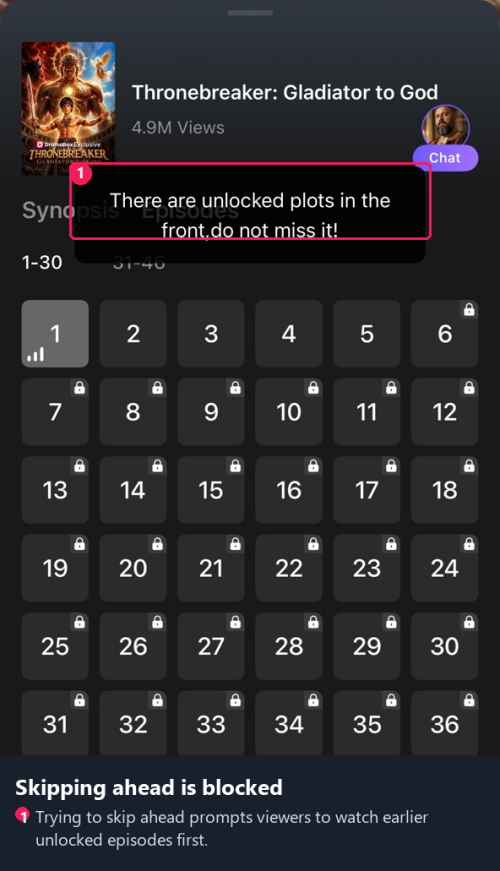
Also, episodes always cut off at dramatic, suspenseful moments. For teens who get hooked on a storyline, they're easily tempted to spend money just to unlock the next episode and find out what happens.
On DramaBox, one episode costs 50 coins, which may sound like nothing. The problem is how many episodes there are, and every episode must be unlocked in sequence. That's to say, a 50-plus episode series may leave your teens buying coins for about $25 to finish it.
* We verified that $24.99 equals 2,500 coins on the DramaBox iPhone app, in November 2026.
Though they can earn free coins via daily check-ins, watching ads, or other tasks, earning enough coins takes days. Also, these ads redirect to mobile games or competing short drama platforms, trapping kids in a continuous binge cycle.
Besides virtual coins, DramaBox also has a membership, which unlocks unlimited episodes, downloads, an ad-free experience, etc. Since one-tap payment through Apple or Google Play removes friction, your teen may rack up charges without authorization.
Its weekly plan starts at $8.99 per week for the first three weeks, then renews at $12.99 per week; an annual plan costs $119.99.
How to Prevent Unexpected Spending on DramaBox?
Cancel DramaBox Subscriptions If Any
If your teen has subscribed to DramaBox, cancel it before the next renewal to prevent charges from racking up. Here's how to cancel DramaBox subscriptions through the account used to pay for it:
- iPhone: Open App Store > profile > Subscriptions > DramaBox > Cancel Subscription.
- Android: Open Google Play > profile > Payments & subscriptions > Subscriptions > DramaBox > Cancel subscription.
Require Approval Before New Purchases
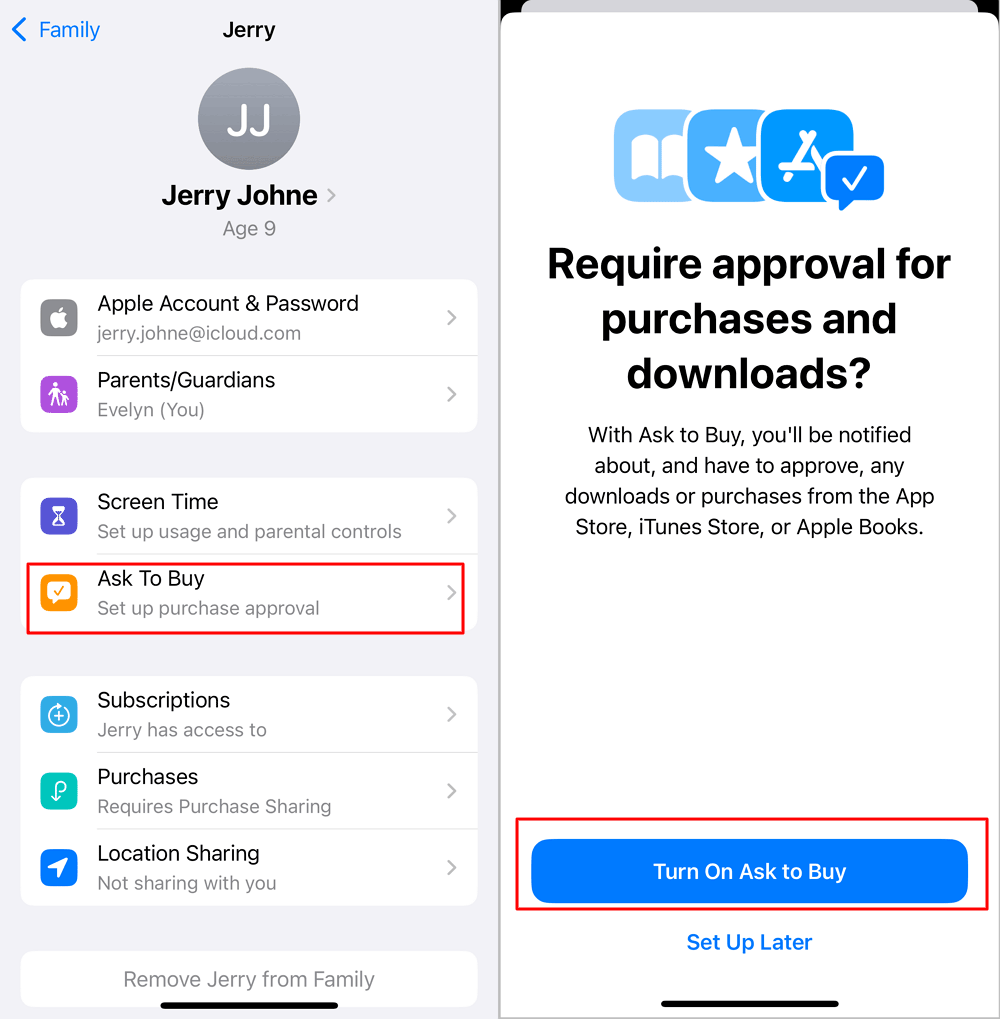
On Android and iPhone, the built-in parental controls (Family Link and Screen Time) include an option to require approval for in-app purchases.
- Android: Open Family Link > Controls > Google Play > Require Approval For > All Content. This includes in-app purchases, coins, and downloads.
- iPhone: Go to Settings > Family > your child's profile > turn on Ask to Buy.
Restrict In-App Purchases (for iPhone)
If your child uses an iPhone, Apple Screen Time also lets linked parents turn off in-app purchases separately, helping prevent unauthorized purchases. Here's how:
Head to Screen Time Settings > your child's profile > Content & Privacy Restrictions > iTunes & App Store Purchases > In-app Purchases > Don't Allow.
DramaBox Has No Kids Mode: What Can Parents Do?
This is the core problem. DramaBox does not offer a kids' profile or any parental control settings. Not only that, it doesn't offer an option to let users manage content preferences or filter sensitive content.
This means parents cannot rely on DramaBox itself. So the teen protections have to come from outside the app.
What Can Parents Do Instead?
Here's a checklist to keep kids safe on DramaBox:
FAQs about DramaBox












Leave a Reply.