AI-Driven MDM Automation: Intelligent Device Operations at Scale
Managing hundreds or thousands of Android devices is no longer only a device administration task. For organizations operating POS terminals, kiosks, digital signage players, logistics tablets, and frontline devices, it is an ongoing operational process.
Traditional mobile device management automation can execute predefined tasks. It can send a notification, generate a report, apply a configuration, or initiate a supported device operation. The harder problem is deciding what should happen when the same device condition has different meanings across locations, device roles, and business situations.
AI-driven MDM automation adds an intelligence and orchestration layer to device management. It helps IT teams interpret device context, coordinate multi-step workflows, summarize incidents, and route issues to the appropriate automated or human-controlled response.
The goal is not to remove administrators from every decision. It is to reduce repetitive investigation, standardize common operational processes, and keep disruptive actions governed by permissions, confirmation, and audit records.
- 1: What Is AI-Driven MDM Automation?
- 2: Why Traditional MDM Automation Is Not Enough
- 3: How AI-Driven MDM Automation Works
- 4: Core Capabilities for Intelligent Device Operations
- 5: AI-Driven MDM Automation Use Cases
- 6: Rule-Based vs. AI-Driven MDM Automation
- 7: How AirDroid Business and GoInsight.AI Work Together
- 8: Security, Approval, and Governance
- 9: How to Get Started with AI-Driven MDM Automation
- 10: Frequently Asked Questions
- 11: From Device Management to Intelligent Device Operations
Part 1: What Is AI-Driven MDM Automation?
AI-driven MDM automation combines device management data, automation workflows, and AI-assisted analysis to help IT teams manage recurring device operations at scale.
In a traditional workflow, a predefined trigger leads to a predefined action. In an AI-assisted workflow, device and event context can also be organized, summarized, or evaluated before the workflow selects or recommends the next configured path.
Depending on product capabilities and workflow configuration, AI-driven MDM automation may support:
- Querying and summarizing device status.
- Identifying affected devices and organizing them by group, role, location, or condition.
- Coordinating multi-step investigation and response workflows.
- Generating readable incident summaries from device and workflow information.
- Routing recurring or high-risk incidents for administrator review.
- Initiating supported and approved device operations.
- Recording workflow outputs, failures, and follow-up requirements.
- Reusing workflow templates across repeated device operations.
MDM automation is the broader product and operational category. Event-driven automation and alert automation are two mechanisms within that category.
To understand how device state changes start workflows, read What Is Event-Driven Automation in MDM? For a focused guide to alert-triggered response processes, see our MDM Alert Automation guide.
Part 2: Why Traditional MDM Automation Is Not Enough
Rule-based automation remains useful. Predictable tasks should often follow predictable rules. However, a single trigger-to-action rule may not be enough for operational incidents involving business-critical devices.
| Traditional limitation | Operational impact |
|---|---|
| Static trigger-to-action rules | The same response may run even when device role, location, or severity differs. |
| Single-step execution | A device action may run without collecting enough information about the underlying issue. |
| Fragmented device information | Administrators still search dashboards, logs, reports, and emails to understand what happened. |
| Limited escalation logic | Recurring failures and critical devices may require different response paths. |
| Technical output without a narrative | Logs record activity, but teams may still need to build an incident timeline manually. |
| Incomplete outcome review | A triggered action does not always show whether the operational issue was resolved. |
For example, an application status alert on a test tablet should not necessarily receive the same response as the same alert on a production POS terminal during business hours. Context changes the operational meaning of the signal.
Traditional automation executes predefined steps. AI-driven automation helps teams interpret context and coordinate the appropriate predefined process.
Transform your operations with AI-driven workflows. AirDroid Business offers intelligent device management for modern enterprises.
Part 3: How AI-Driven MDM Automation Works
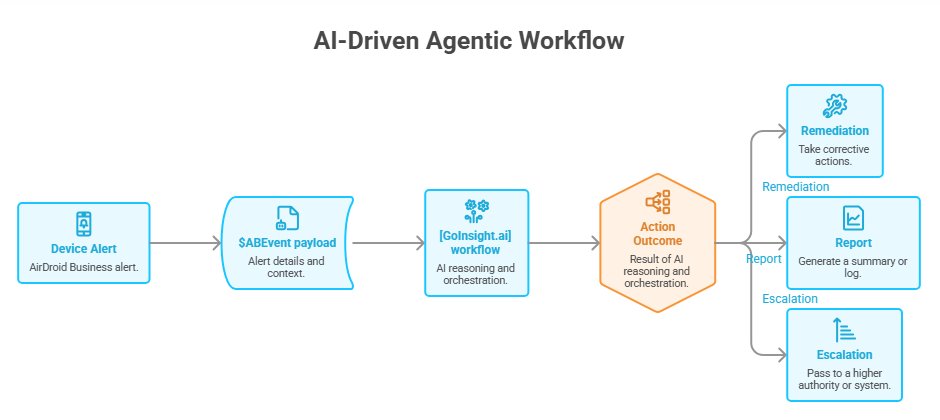
A practical AI-driven device operations model can be organized into six stages:
Detect → Add Context → Analyze → Orchestrate → Act or Escalate → Verify and Summarize
1Detect a device condition
AirDroid Business monitors supported device conditions such as connectivity, battery, storage, application status, Kiosk status, network usage, location, and management state. A device condition, alert, scheduled task, or administrator request can provide the starting signal for a workflow.
Event-driven automation is only one possible trigger model. Routine inspection and reporting workflows may instead run on a schedule, while other workflows may begin when an administrator submits a request.
2Add device and operational context
The workflow may need more than the name of the alert. Relevant context can include:
- Device ID, name, model, and group.
- Device role and business location.
- Production or test status.
- Online status and last online time.
- Battery, storage, network, application, or Kiosk information.
- Business hours or maintenance windows.
- Recent alerts and operation history.
- Administrator permissions and approval requirements.
Context helps prevent a workflow from treating every device and every occurrence as identical.
3Use AI-assisted analysis
AI can help organize device information, summarize an incident, identify repeated patterns, or suggest an appropriate configured workflow. It should assist the decision process rather than invent unsupported device actions or bypass administrative controls.
4Orchestrate the workflow
A workflow defines what happens next. It may query additional device data, apply conditions, branch by severity, generate a report, notify a team, call an approved integration, prepare a device operation, or route the incident for manual review.
5Act or escalate
Low-risk steps such as reports, notifications, and data exports may be suitable for automatic execution. Operations that can interrupt users, remove data, or change a critical configuration should follow stronger controls.
When the issue is repeated, uncertain, high-risk, or associated with a critical device, the workflow should escalate rather than repeatedly attempting the same operation.
6Verify and summarize
A complete workflow should record the trigger, devices involved, workflow path, generated output, execution result, failure reason, and remaining follow-up. AI-assisted summaries can turn these records into a more readable incident narrative for shift handoffs or support review.
Part 4: Core Capabilities for Intelligent Device Operations
1Context-aware device triage
Instead of reviewing every device manually, IT teams can use device context to identify affected endpoints, organize them by operational importance, and determine which workflow should handle the issue.
2Multi-step workflow orchestration
Many device incidents require more than one action. A workflow may collect information, apply conditions, notify a team, prepare an operation, wait for a result, and escalate when the expected outcome is not achieved.
3Incident summaries
Device events, workflow results, and operation records can be difficult to interpret during an active support shift. A structured summary can explain what happened, which devices were affected, what process ran, and whether further review is needed.
4Intelligent escalation
Not every issue should be automatically remediated. Escalation logic can route incidents based on recurrence, device role, severity, business time, operation risk, or workflow failure.
5Reusable workflow templates
Common device operations can be packaged as reusable templates. This allows teams to standardize processes across regions and device groups without rebuilding the same workflow each time.
6External workflow integration
Depending on configured integrations, workflow information may be sent to email, collaboration, spreadsheet, reporting, or service management tools. Integration availability and executable actions should be confirmed for the relevant product release and workspace configuration.
Part 5: AI-Driven MDM Automation Use Cases
1Device anomaly response
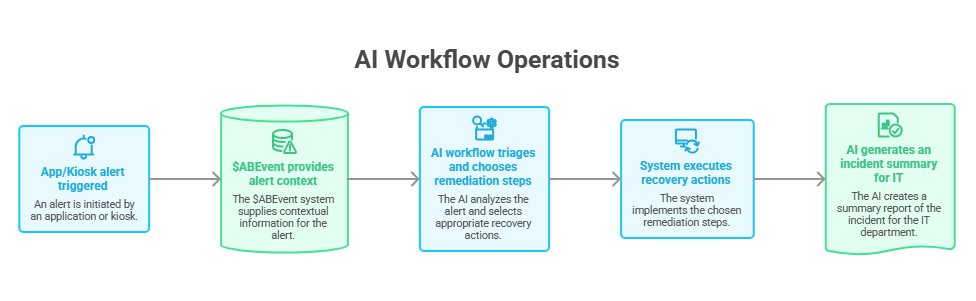
When a device goes offline, reports abnormal resource usage, or stops operating as expected, a workflow can collect context, notify the responsible team, generate a report, and route the issue for investigation or a supported recovery process.
2Kiosk and business application recovery
A Kiosk or business application status change can affect a customer-facing endpoint even when the Android device remains online. A safe-first workflow may inspect device and application status, attempt a supported low-risk step, verify the result, and escalate repeated failures.
3Routine device inspection
Scheduled workflows can generate daily health checks, battery summaries, storage reports, inventory snapshots, or application status inspections. These workflows are driven by time rather than device events, but they remain an important part of MDM automation.
4Remote troubleshooting
A troubleshooting workflow can gather device status, recent activity, application information, and operation results before an administrator starts a remote action. This reduces manual lookup work and creates a more consistent diagnostic process.
5Compliance and policy management
Workflows can help identify devices outside an expected policy or configuration state, generate a review list, notify security or IT teams, and prepare an approved follow-up process. High-impact compliance actions should remain permission-based and auditable.
6Business-critical device health monitoring
Retail, logistics, healthcare, hospitality, and unattended device environments may need to confirm that endpoints are online, sufficiently charged, adequately provisioned, and running the required application before operations begin.
Part 6: Rule-Based vs. AI-Driven MDM Automation
| Dimension | Rule-Based MDM Automation | AI-Driven MDM Automation |
|---|---|---|
| Decision logic | Fixed conditions and predefined actions | Uses context to assist routing, summarization, or selection among configured paths |
| Workflow depth | Often one trigger and one action | Can coordinate multiple investigation, action, verification, and escalation steps |
| Device context | Limited to fields used by the rule | Can organize broader device and operational context |
| Incident output | Technical logs, alerts, or emails | Can produce structured summaries and recommended follow-up |
| Exception handling | Usually requires manual intervention | Can route failures and recurring conditions to defined escalation paths |
| Administrator role | Configures rules and handles exceptions | Defines guardrails, approves high-impact actions, and reviews outcomes |
AI-driven automation does not eliminate rules. It combines predefined rules and workflow logic with AI-assisted interpretation. The workflow still needs defined inputs, supported actions, failure handling, permissions, and an accountable owner.
Part 7: How AirDroid Business and GoInsight.AI Work Together
AirDroid Business provides the device management layer. It helps administrators enroll and organize Android devices, monitor supported conditions, configure alerts, review device context, apply policies, manage Kiosk environments, and initiate supported remote operations.
GoInsight.AI provides a workflow and AI-assisted orchestration layer. Depending on the workflow, available variables, permissions, and integrations, it can help query information, apply conditions, generate reports or summaries, route issues, and coordinate follow-up processes.
A simplified product model is:
- AirDroid Business: device management, monitoring, alerts, policies, and supported operations.
- Device or event context: information that describes what happened and which endpoint is involved.
- GoInsight.AI Workflow: configured logic, AI-assisted analysis, reporting, routing, and orchestration.
- Administrator controls: permissions, confirmation, exception review, and governance.
The exact event variables, integrations, device actions, and approval mechanisms available may vary by plan, product release, device capability, and workflow configuration.
Part 8: Security, Approval, and Governance
AI workflows should be governed like production operational systems. Automation that can affect business-critical devices needs clear ownership, defined scope, and reviewable results.
1Start with low-risk workflows
Begin with device queries, notifications, reports, summaries, exports, and inspection workflows. These processes reduce manual work without immediately changing device state.
2Require confirmation for high-impact actions
Actions such as clearing application data, rebooting production endpoints, switching critical configurations, locking devices, factory resetting, or unenrolling devices should follow appropriate permission and approval requirements.
3Set retry and escalation limits
A recovery workflow should not create reboot loops, repeated notifications, or uncontrolled remediation attempts. Define retry counts, cooldown periods, escalation thresholds, and manual stopping conditions.
4Apply least-privilege access
Workflow connections and administrators should receive only the permissions required for the intended task. Device scope should be limited by group, role, location, or environment where appropriate.
5Monitor workflow outcomes
Review success, failure, skipped steps, repeated device incidents, false positives, approval activity, and workflow changes. A workflow should remain observable after it is deployed.
6Keep an audit trail
Teams should be able to determine what triggered the workflow, what information it used, which path ran, who approved high-impact actions, and what result was recorded.
Part 9: How to Get Started with AI-Driven MDM Automation
A practical rollout does not need to begin with fully automated remediation. Start with one repetitive, well-understood device operation.
- Select one operational problem. Examples include low storage, offline devices, Kiosk status, low battery, or application failures.
- Define the trigger. Decide whether the workflow starts from an event, an alert rule, a schedule, or an administrator request.
- Identify required context. List the device, group, status, history, business time, and risk information needed for a decision.
- Design a safe workflow. Separate automatic reporting and notification from actions that require approval.
- Define verification. Decide how the workflow will confirm success, failure, or the need for escalation.
- Test with a limited scope. Use test devices or a non-critical group before production deployment.
- Review and improve. Monitor outcomes and convert stable processes into reusable templates.
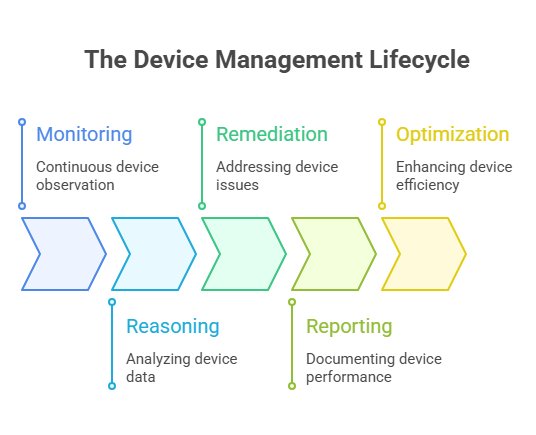
Over time, organizations can expand from monitoring and reporting to more advanced orchestration, controlled recovery, incident summaries, and intelligent escalation. The appropriate level of automation depends on device criticality, workflow confidence, and governance requirements.
Part 11: From Device Management to Intelligent Device Operations
MDM automation becomes more valuable when it connects monitoring with context, workflows, controlled actions, verification, and clear operational records.
AI can reduce the time administrators spend collecting device information and interpreting fragmented output. Workflow orchestration can standardize common processes. Incident summaries and escalation rules can help teams understand what happened and what still requires attention.
The result is not automation without control. It is a more structured approach to device operations: one that combines AI-assisted analysis with predefined workflows, supported device management capabilities, and administrator governance.
AirDroid Business and GoInsight.AI can help organizations move from repetitive device administration toward more intelligent, scalable, and reviewable Android device operations.
FAQs











Leave a Reply.