AirDroid Parental Control
All-in-One Tool for Real-World Child Safety
- 📍Real-time location & route history
- 🔍Live surroundings check
- 🔔Geofence alerts on daily routes
- 🆘One-tap SOS with ambient audio
How to Use Location History to Improve Child Safety
Every parent understands the importance of a child's safety, and when there is a change of schedule or time runs late, the parent's anxiety is heightened. A child's route history provides a way for parents to monitor a child's movements and keep track of their locations without requiring real-time location monitoring.
Instead of having to pull up the maps and monitor a child, parents can analyze movement history to gain insight about their locations, behaviors, and safety.
What Is Location History?
Location history keeps track of all the places a device has visited. It does not capture movement second by second. Instead, it saves past places, routes, and times. Parents can use this data to analyze daily behaviors and identify patterns over time.
Many smartphones come with built-in location history features. On iPhones, it records location history via the Find My app and system location settings. On Android, it records location history via Google location history.
This method works to understand patterns instead of being intrusive with its constant tracking.
Location History vs Real-Time Tracking
The comparison below outlines the basic differences. So, you can quickly identify which option meets your daily safety requirements.
| Feature | Location History | Real-Time Tracking |
|---|---|---|
| Purpose | Review past movement | Watch live movement |
| Stress level | Low | High |
| Battery use | Minimal | Higher |
| Best for | Routines and trends | Emergencies |
| Privacy impact | More respectful | Can feel invasive |
| Parental effort | Occasional checks | Frequent checking |
| Child trust | Easier to maintain | Can cause tension |
Both options are valuable, but location history is often better for everyday safety.
How to Use Location History to Improve Child Safety
When parents use location history the right way, they can stay stress free, and stay informed. Here are some steps explaining how they can use location history to sustain daily engagement, recognize changes early, and enhance the safety of children, while maintaining trust.
Turn On Location History First
The most important part of this process is enabling location history. When location history is turned on, parents will be able to check previous trips, understand patterns, and use safety features without needing to check live tracking all the time.
- Step 1. Open Settings
- Step 2. Tap Privacy & Security
- Step 3. Select Location Services
- Step 4. Turn on Location Services
- Step 5. Open Find My
- Step 6. Turn on location sharing with your Apple ID or family group
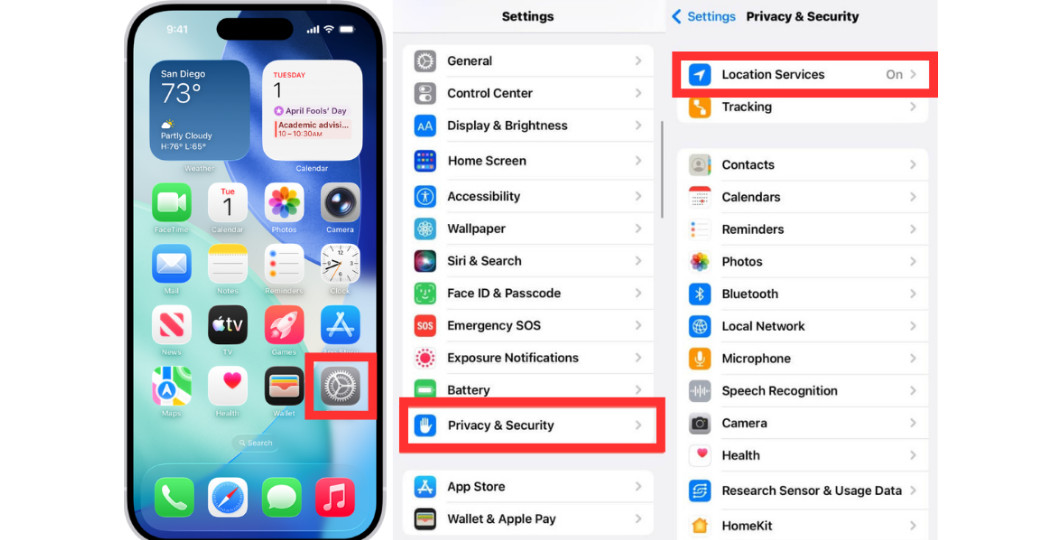
With this, you will be able to see past locations and shared locations of your child whenever you want.
- Step 1. Open Google Maps
- Step 2. Tap On Profile Picture
- Step 3. Go to Location Sharing
- Step 4. Turn On Your Location Sharing
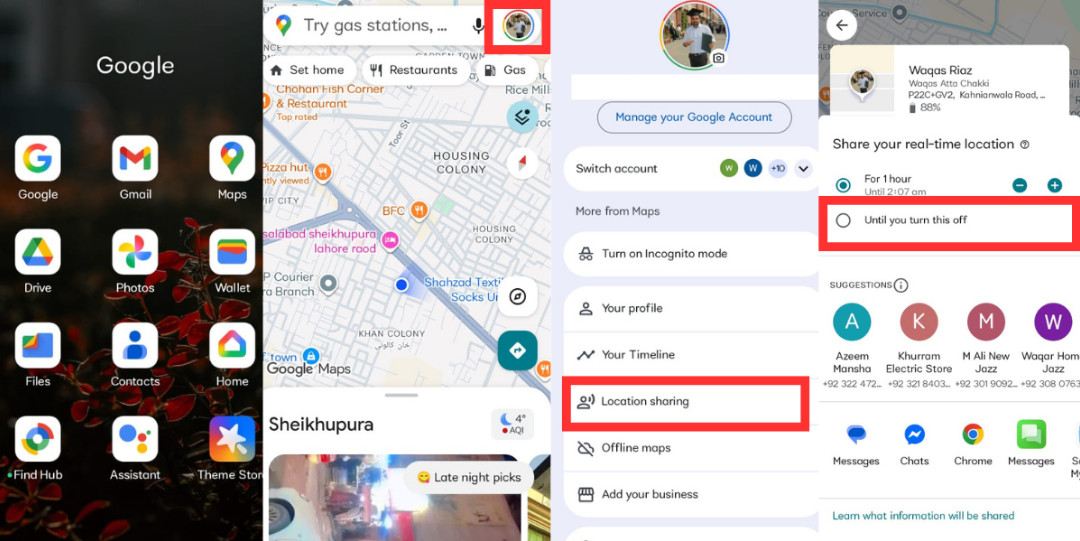
Note: For little ones, you can make a Google account for them to use together. For teens, sharing from personal Gmail is appropriate to respect autonomy.
Review Your Child's Daily Routes
Looking at a child's daily routes allows you to understand their daily routines. Each day, you can see their history to learn where they go, what routes they take, where they stop, and how long they stay at their stops. You can compile this information and easily see where your child goes on a daily basis. If something seems wrong, you can ask the right questions and respond thoughtfully instead of worrying.
Spot Unusual Route or Time Changes
Location history is useful when something unusual happens, for instance:
- A longer stop than usual
- A different route taken home
- A later arrival time
If a kid is late from school, the history can show if they stopped at a safe place or if they took a different bus. This allows you to call, wait, or take action.
Use Location History Instead of Constant Live Tracking
Tracking a child at all times can be stressful. With location history, you can stay informed without being intrusive. You can contribute to a calm everyday life and foster trust by minimizing your checks. Parents feel more at ease with this tracking method, especially when a child is not home at the expected time.
Bonus: Get Instant Alerts If Your Child Take Unusual Routes
"I don't want to check all the time. I just want to know when something goes wrong." Most parents feel this way. While location history tracks daily routines, opening maps every single day can be difficult and build stress. Parents have to manage other responsibilities at work and in life. Knowing about routine changes and getting smart safety tools are beneficial, as they help locate the child and alert parents only when routines change or something unexpected happens.
AirDroid Parental Control is an innovative solution that helps parents stay aware without requiring constant monitoring. It promotes trust and safer routines through location insights, alerts, and remote features. With AirDroid Parental Control, parents get the information they need while balancing work and parenting.
Key Features
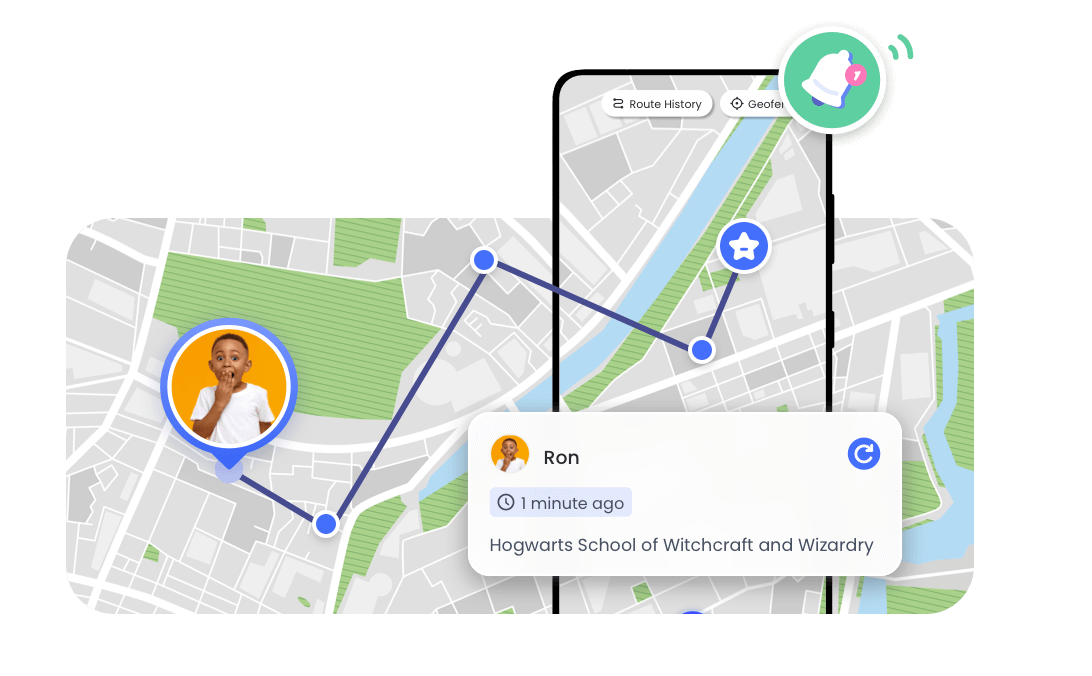
- Route History Timeline: Parents can see where their children travelled, including stops and turns, and can have access to location data for the last 30 days.
- Geofencing Alerts: Parents can set safe zones and be notified if their children cross those boundaries.
- Watch and Listen to Surroundings: Access the kid's device camera and microphone, if you're worried, to confirm safety from a distance.
- Real-time Location: See daily routines and location changes to identify potential risk areas and promote safer decisions.
Why Location History Matters for Child Safety
Location history is beneficial because it provides context. Rather than reacting with fear, parents respond with more information. With time, it helps you:
- Understand daily habits
- Spot risks early
- Reduce panic during delays
- Support independence safely
When parents use tracking history, children feel more trusted. This leads to improved communication and fewer conflicts.
Privacy & Trust: Using Location History Responsibly
Safety tools should help, not feel like spying. That's why it's important to explain why you check location history, instead of looking at it for no clear reason. Let your child know what to expect, and tell older kids when alerts are turned on.
Some good family rules might be:
- Only use location history for safety
- Don't check their location every single day unless there's a reason
- As trust grows, turn off or limit certain features
- Sit down and go through the settings together
When tracking is used responsibly, it builds trust and confidence for both parents and kids.
Conclusion
Location history can be helpful when it's used the right way. It lets parents worry less while still knowing where their kids are. Over time, it helps parents understand daily routines and notice when something feels off. With smart alerts, location history can notify parents early without the need for constant checking.
FAQs















Leave a Reply.