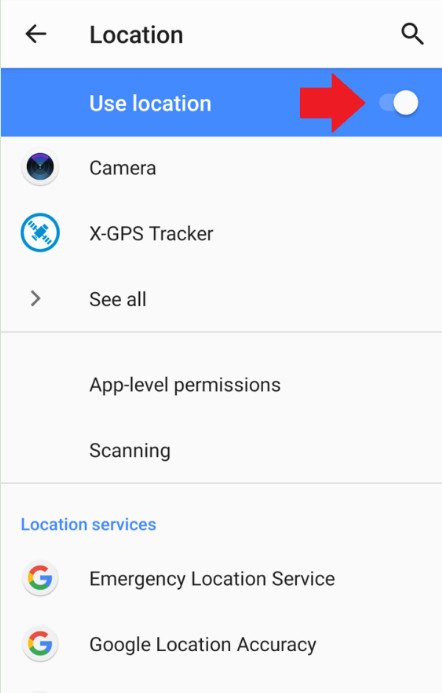
- Open "Settings > Security & Privacy > Location" and enable the "Use Location" option.
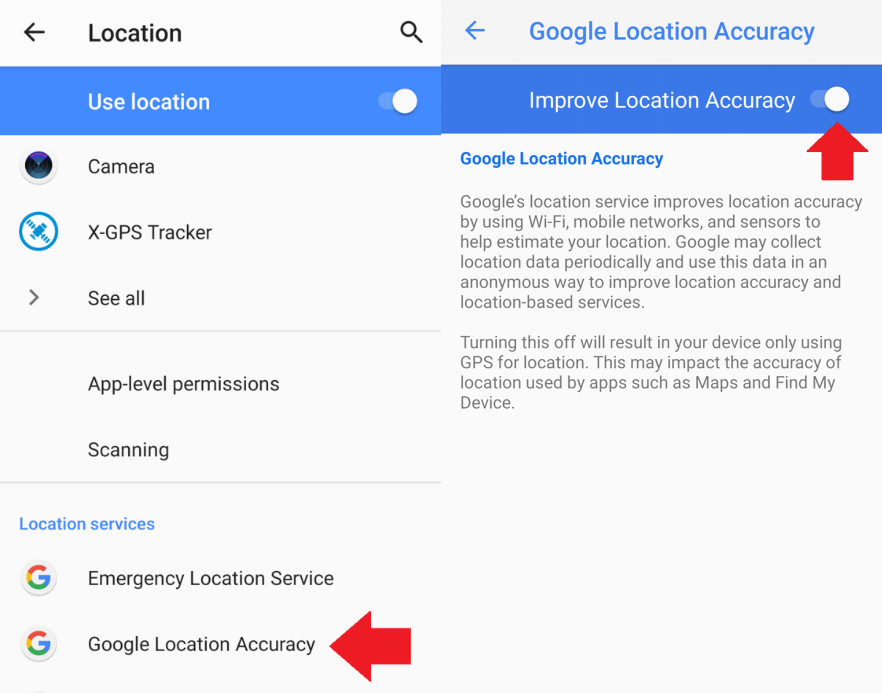
- Now tap on "Google Location Accuracy" and turn the toggle on for "Improve Location Accuracy."
All-in-One Tool for Real-World Child Safety
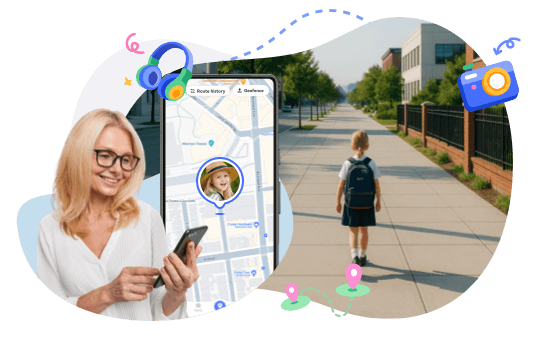
When a child not home on time or a kid late from school, most parents immediately try to locate child. You check the map, look at their route, and wait for the dot to move. But when the GPS not updating or the location seems off, it only adds to the worry.
Accurate child tracking helps parents see where their child is, understand their usual route, and notice any route deviation early.
In this guide, we will tell you how to improve GPS accuracy on your devices to track your child route effectively.
Many cases of GPS not updating, wrong locations, or delayed tracking happen because location features are turned off or limited.
Here are some basic solutions to improve how accurately you can locate your child and monitor their route:
The high-accuracy mode in devices uses GPS, Wi-Fi, and mobile networks together to give an exact location.
Here's how to do it on Android and iPhone:
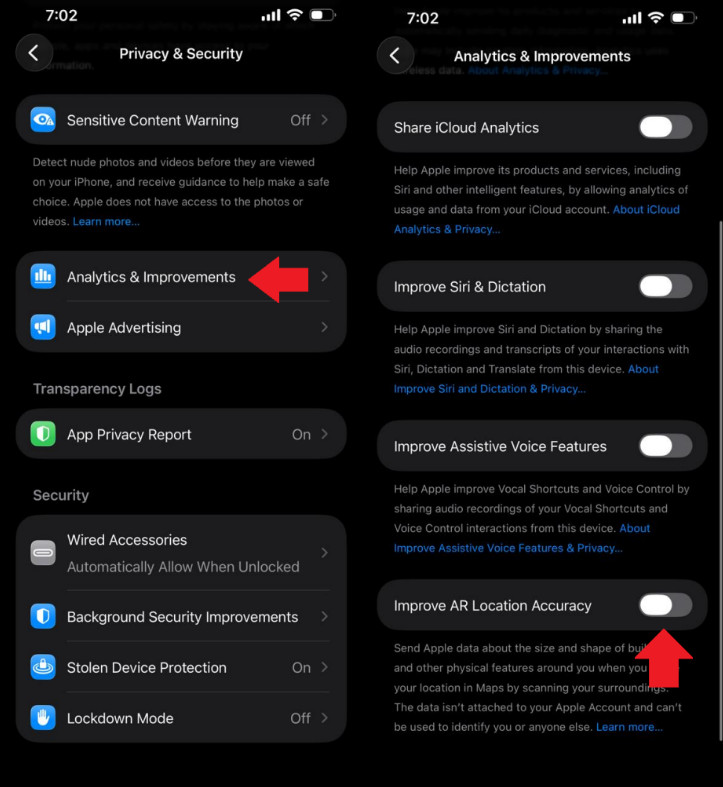
For additional accuracy, you can also enable the precise location for apps. Here's how:
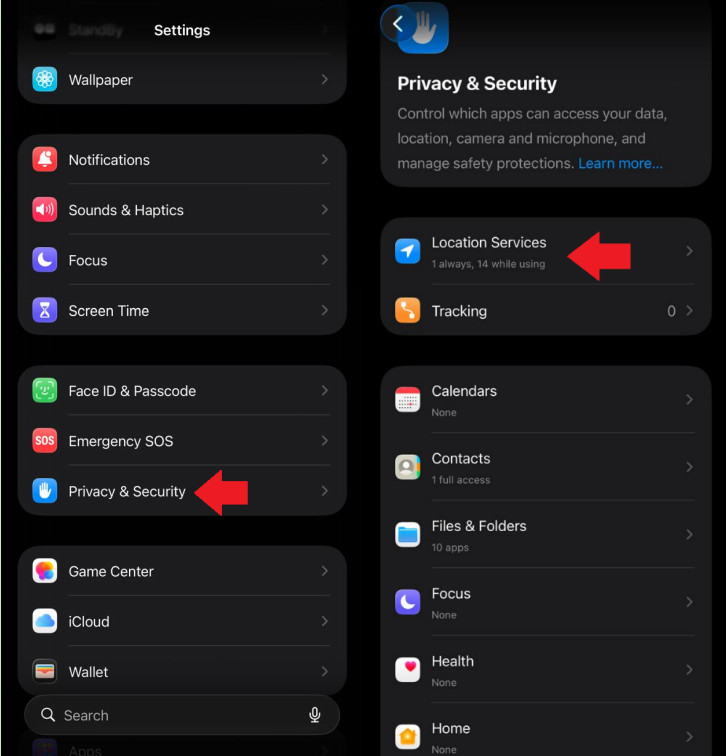
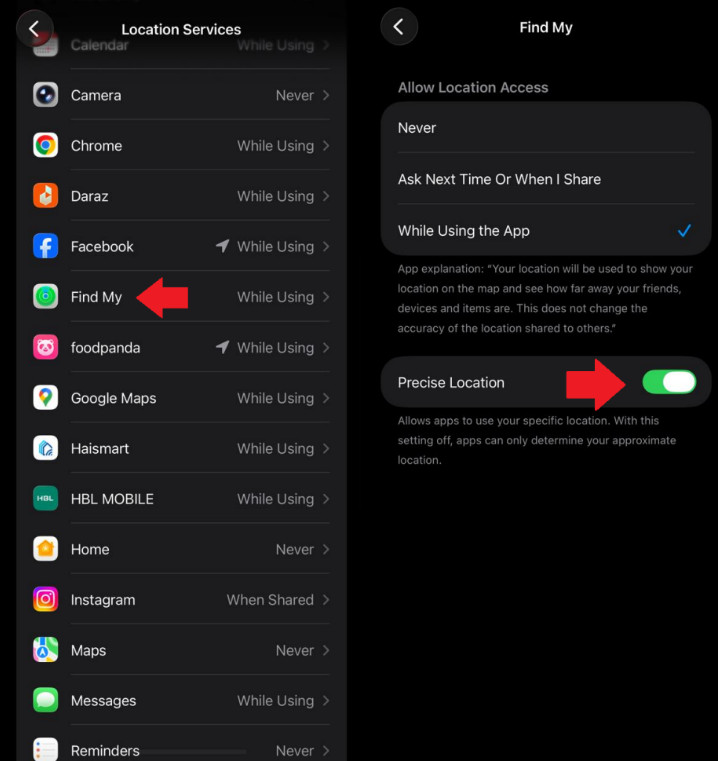
If an app is not allowed to access location in the background, tracking may stop when the phone is locked or the app isn't open. Therefore, it's important to keep the location access to "Always."
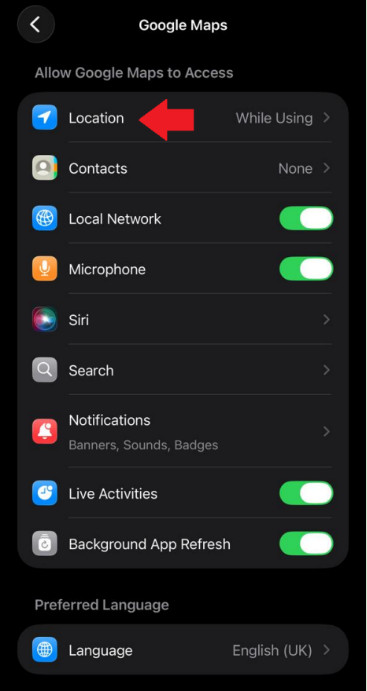
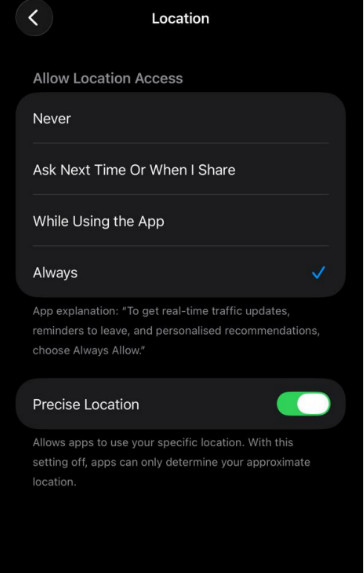
Without "Always" access, updates may pause, making it look like your child is not moving or that the GPS not updating when they actually are.
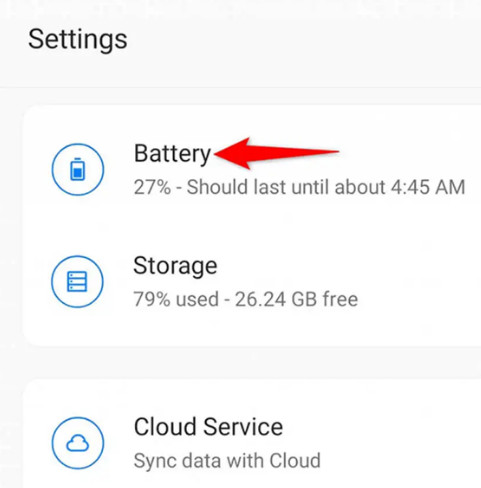
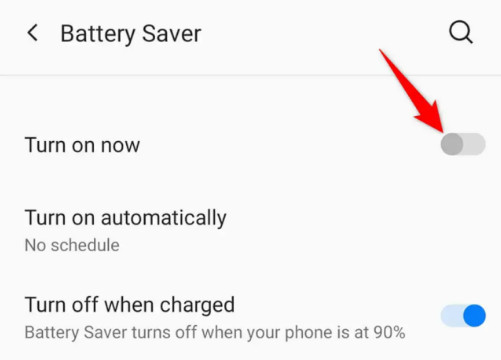
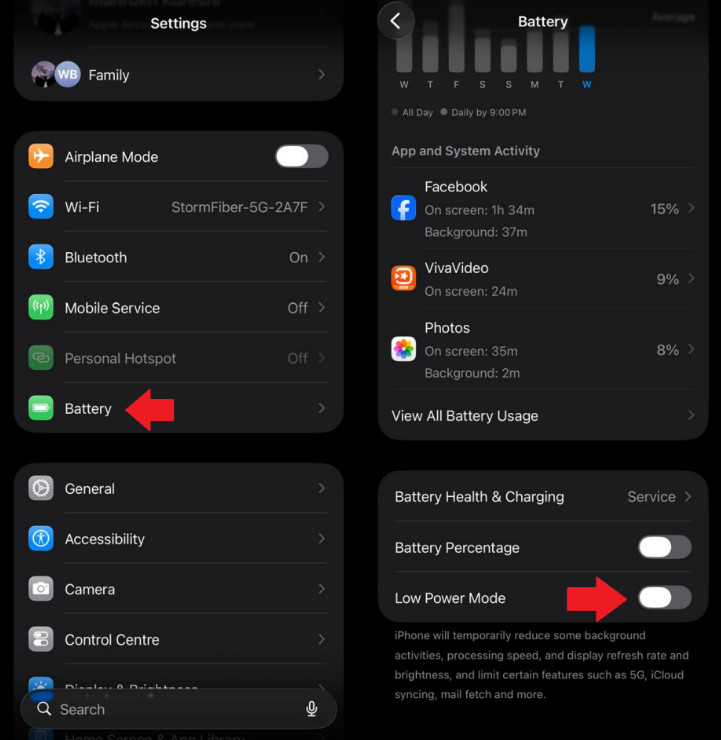
Battery-saving features often restrict GPS to save power. This can delay updates or freeze the location. You can disable this feature to improve GPS accuracy.
If the map shows your child facing the wrong direction or drifting off their actual route, the phone's compass may need calibration.
This can be done in 2 ways:
Even when not connected to a network, phones can detect nearby Wi-Fi routers and Bluetooth devices to refine location. GPS alone can struggle indoors, in dense areas, or near tall buildings. Wi-Fi and Bluetooth scanning give the phone extra reference points, making it easier to locate your child accurately, especially when they are inside schools, malls, or apartments.
Even with the right phone settings, GPS is not always perfect. Real-world surroundings can interfere with signals and cause delays or wrong locations. This is often why a parent sees that their child not home yet, the GPS not updating, or route deviation.
Understanding these factors can keep you from panicking:
GPS works best in open spaces. When your child enters a school building, shopping mall, apartment, or an area with tall buildings, satellite signals can weaken or bounce.
Due to this:
Subways, basements, tunnels, and even school parking areas can block GPS completely. Moving environments like buses, vans, or cars can also cause temporary delays.
As a result, you will notice:
Phones placed inside bags with metal objects, power banks, or magnets can interfere with sensors. This may affect direction, accuracy, or cause the phone to misread its surroundings.
This can cause the location to:
When GPS is affected by buildings, movement, or indoor spaces, AirDroid Parental Control helps parents stay informed. Instead of relying only on live maps, it offers tools that confirm safety even when location data isn't perfect.
Location History: You can review where your child has been throughout the day. You can check the 30-day history.
Geofencing (Safe Zones): You can set virtual boundaries for places like home or school. You'll get alerts when your child enters or leaves.
Check Surroundings: If a location looks unclear, this feature lets you see what's around your child's camera, giving real-world context instead of guessing from the map.
When GPS route drift happens, it can quietly turn a normal, safe day into something that looks worrying to a parent. A simple walk home from school might suddenly appear messy on the map, with zigzags, short stops, or strange detours that never actually happened. Even though the child followed their usual routine, the inaccurate route can make it seem like something unexpected or unsafe is going on.
For parents, location tracking is often about reassurance. They check the map to confirm their child is on the way home, staying in familiar areas, and moving as expected. When GPS data drifts, that reassurance disappears. A child who is perfectly fine can look lost, delayed, or stuck in one place. If the child doesn't answer the phone right away, those small inaccuracies can quickly grow into real anxiety.
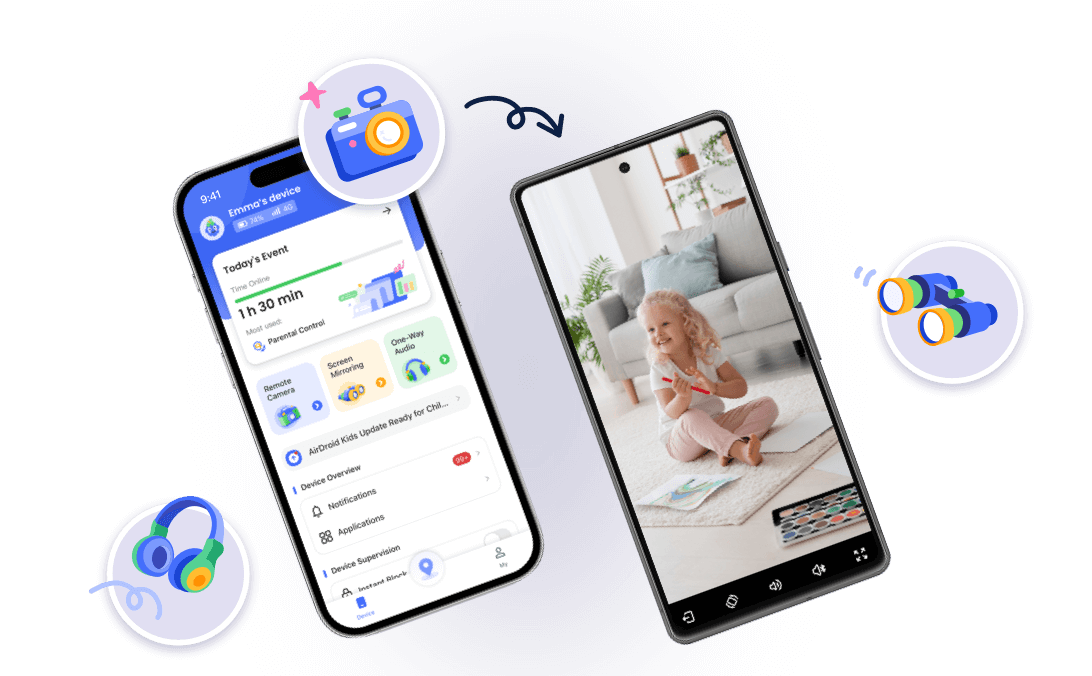
AirDroid Parental Control's Watch Surroundings feature helps fill that gap. Instead of relying only on a map that may be slightly off, parents can remotely check the surrounding environment through the child's device. Hearing background sounds or seeing what's around the phone can quickly confirm whether a child is walking home, waiting for a bus, or safely inside a familiar place. That real-world context often matters more than a perfect GPS line.


GPS tracking is a powerful tool for child tracking, but it isn't perfect. Settings, surroundings, and signal limits can all affect accuracy and cause delays, route drift, or GPS not updating. By adjusting device settings, understanding environmental factors, and using smarter tools like AirDroid Parental Control, parents can stay informed without constant worry. The goal isn't just to track a location; it's to feel confident that your child is safe.













Leave a Reply.