- Under 13
- 13–15
- 16+
AirDroid Parental Control for WhatsApp
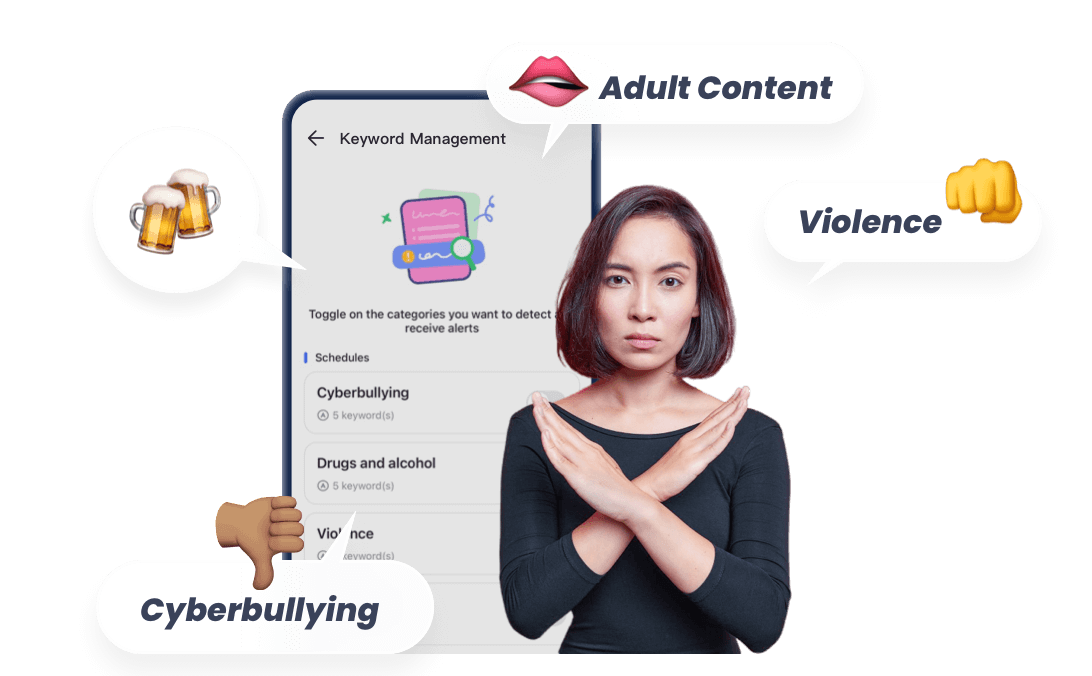
- 🔞AI-powered content filter for WhatsApp and send instant alerts
- ⚠ Sync WhatsApp notifications and schedule WhatsApp usage
- 👀Monitor live WhatsApp activities in special cases
WhatsApp Parental Controls (Android & iPhone)
Not every family needs the same level of control over WhatsApp. The right approach depends on your child’s age, their online habits, and the device they’re using.
30-Second Check: What Kind of WhatsApp Management Does Your Family Need?
Before jumping into settings or apps, take 30 seconds to answer these quick questions. Your answers will help you decide what kind of WhatsApp management actually fits your situation.
Question 1 — How old is your child?
Question 2 — What worries you most right now?
- Strangers contacting your child
- Inappropriate group chats or bullying
- Late-night scrolling or screen addiction
- The possibility of meeting someone offline
Question 3 — What device does your child use?
- Android
- iPhone
Once you have your answers, most families fall into one of three common paths:
A. The Younger Starter
Your child is just beginning to use messaging apps. Start with WhatsApp’s built-in privacy settings and basic screen-time limits to establish healthy habits early.
B. The Teen Risk Stage
Your child is more active online, and risks like group chat pressure, unknown contacts, or late-night usage become more common. Families in this stage usually benefit from risk alerts, clear digital rules, and an emergency response plan.
C. The “Workaround Expert” Stage
Some teens quickly learn how to bypass simple limits. In these cases, families often need stronger monitoring stability and clearer family tech rules, sometimes paired with advanced options like DNS filtering or SafeSearch protections.
WhatsApp Parental Controls: What’s Built In—and What’s Missing
WhatsApp includes several privacy and safety settings that families should absolutely use. They can reduce unwanted contact and limit exposure to certain risks. However, it’s important for parents to understand what these built-in tools can do—and where they stop.
What WhatsApp Can Do
1 Control Who Can Add Your Child to Groups
WhatsApp allows users to limit who can add them to group chats, which helps reduce random group invitations.
Common pitfall:
Even with this setting enabled, someone who can’t add your child directly can still send a private invitation link to join a group.
2Adjust Privacy Settings (Profile Photo, Status, Last Seen)
These controls limit what others can see about your child’s activity and profile.
Common pitfall:
If your child accepts contact requests from strangers, those people may still gain access to some profile information.
3Block or Report Contacts
Blocking prevents a person from messaging your child, while reporting flags suspicious activity to WhatsApp.
Common pitfall:
Blocking only works after the person has contacted your child—it doesn’t prevent initial messages.
4 Enable Two-Step Verification
Two-step verification adds a PIN code requirement when registering the WhatsApp account on a new device.
Common pitfall:
If your child forgets the PIN and recovery email wasn’t added, account recovery can become difficult.
5Disable Automatic Media Downloads
Turning off automatic downloads prevents photos or videos from instantly saving to the phone.
Common pitfall:
Media can still be downloaded manually once a message is opened.
What WhatsApp Cannot Do
Even with all of these settings in place, WhatsApp was not designed as a parental control system. That means there are some important limitations parents should understand.
1No Alerts for High-Risk Conversations
WhatsApp does not notify parents if conversations involve potentially dangerous topics such as:
- bullying or harassment
- self-harm discussions
- sextortion or blackmail
- plans to meet someone offline
2No Dedicated Parent Dashboard
WhatsApp does not provide a central dashboard where parents can monitor activity, set rules, or receive alerts about usage.
3Parents Cannot Directly Read Chats
Because WhatsApp uses end-to-end encryption, message content is designed to remain private between the sender and receiver.
4Disappearing Messages and Deleted Messages May Not Be Recoverable
If disappearing messages are enabled—or a message is deleted—it may be difficult or impossible to recover that content later.
Understanding these limits helps parents make a more informed decision about whether built-in settings are enough—or if additional safety layers might be needed.
Most Common WhatsApp Risks for Teens (and Early Warning Signs)
For most families, the goal isn’t to monitor every message—it’s to notice patterns early and respond before small issues turn into bigger problems.
Below are six common risks that show up in teen messaging environments, along with behavior-based warning signs parents often notice first.
1 Inappropriate Group Chats & Peer Pressure
What it is:
Large group chats can quickly drift into inappropriate jokes, explicit media, or pressure to participate in behavior a teen isn’t comfortable with.
Early warning signs:
- Your child suddenly becomes secretive about certain group chats
- Notifications spike late at night or during school hours
- They seem anxious or defensive when group conversations are mentioned
What parents can do:
Start with a conversation about group chat boundaries—for example, leaving chats that share explicit content. Pair that with privacy settings that limit who can add your child to groups, and set reasonable night-time screen limits.
When to upgrade protection:
If group chats regularly involve harmful content or pressure, families may want tools that flag risky interactions or enforce device downtime.
2 Cyberbullying or Public Shaming
What it is:
Bullying can happen privately in direct messages or publicly through group chats where screenshots, rumors, or embarrassing content spread quickly.
Early warning signs:
- Your child suddenly avoids checking messages or appears stressed after reading them
- They withdraw from friends or activities they used to enjoy
- They repeatedly delete conversations or leave group chats
What parents can do:
Create a family rule that no one has to face online bullying alone. Encourage your child to block and report abusive contacts and remind them that leaving a toxic chat is okay.
When to upgrade protection:
If bullying becomes persistent or escalates, tools that store activity history or send alerts about harmful behavior patterns can help families intervene earlier.
3 Strangers or Predators Initiating Contact
What it is:
Teens may receive messages from people they don’t know—sometimes posing as peers but eventually steering conversations toward private topics or meeting in person.
Early warning signs:
- Your child starts chatting with someone they “just met online”
- They become unusually protective of their phone when certain messages arrive
- They mention new friends but can’t clearly explain how they met
What parents can do:
Discuss the importance of never sharing personal information or agreeing to meet someone alone. Review privacy settings together and encourage teens to only communicate with verified contacts they know offline.
When to upgrade protection:
If unknown contacts repeatedly appear or a conversation involves plans to meet offline, families may want tools that support contact monitoring, location awareness, or emergency SOS features.
4 Sextortion or Financial Scams
What it is:
Scammers sometimes trick teens into sharing private images or personal information, then threaten to expose it unless money is sent. These scams have been reported in several regions, including parts of Latin America and Southeast Asia.
Early warning signs:
- Sudden panic or urgency about messages from someone they don’t want to talk about
- Requests for money, gift cards, or payment apps
- Your child quickly changing privacy settings or deleting conversations
What parents can do:
Explain that anyone asking for money, personal photos, or secrecy online is a red flag. Encourage your child to come to you immediately if something feels wrong—without fear of punishment.
When to upgrade protection:
If suspicious financial requests or extortion threats appear, consider tools that capture evidence, provide alerts, or support rapid parental intervention.
5. Exposure to Self-Harm or Depression-Related Content
What it is:
In some online circles, teens may encounter discussions that normalize self-harm, hopelessness, or unhealthy coping behaviors.
Early warning signs:
- A noticeable shift in mood after messaging sessions
- Frequent late-night messaging combined with emotional withdrawal
- References to negative or hopeless topics that weren’t present before
What parents can do:
Focus first on open conversations about mental health and reassure your child that they can talk about difficult feelings safely. Encourage them to mute or leave conversations that feel emotionally harmful.
When to upgrade protection:
If concerning emotional patterns continue, families may want monitoring tools that flag conversations related to mental health risks and provide early alerts.
6. Disappearing Messages and the “Information Gap”
What it is:
WhatsApp’s disappearing messages and deletion features can make conversations vanish quickly, which sometimes hides problems until they’ve already escalated.
Early warning signs:
- Your child frequently enables disappearing messages in chats
- Conversations are regularly deleted before parents can review them together
- They become defensive about message history
What parents can do:
Talk openly about why transparency builds trust. Families can set expectations around which conversations should remain visible and when disappearing messages are appropriate.
When to upgrade protection:
If message deletion becomes a pattern that hides risky behavior, families may want tools that provide alerts, backups, or activity signals before content disappears.
The key takeaway for parents: most online problems show small signals first. Paying attention to those early patterns—and responding with calm communication—often makes the biggest difference in keeping teens safe online.
A Safer WhatsApp Setup in 15 Minutes (No Extra App)
Before considering any third-party tools, it’s worth knowing that a few simple settings inside WhatsApp can significantly improve safety. These changes take about 15 minutes and create a solid baseline for most families.
Think of this as a “minimum safety checklist”—a starting point that every parent can implement.
You can even print this list and review it together with your child.
WhatsApp Family Safety Checklist
1Turn Off Automatic Media Downloads
This prevents images or videos from automatically saving to the phone.
Steps:
- Step 1. Open Settings → Storage and Data
- Step 2. Find Media Auto-Download
- Step 3. Turn off downloads for photos, videos, and documents
Why it matters:
It reduces the chance that inappropriate images are automatically saved to the device.
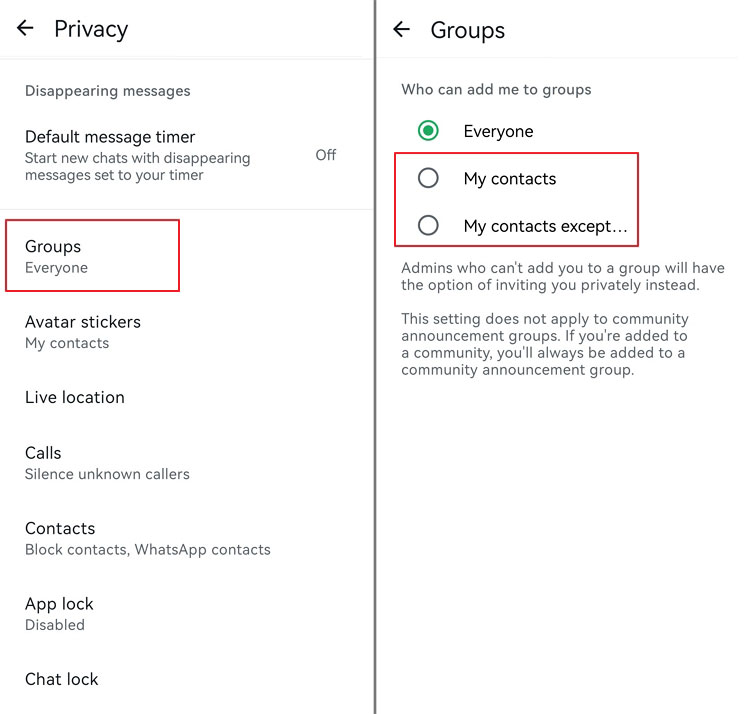
2Limit Who Can Add Your Child to Groups
Large group chats are where many problems start.
Steps:
- Step 1. Go to Settings → Privacy → Groups
- Step 2. Select My Contacts or My Contacts Except…
Why it matters:
This prevents strangers from directly adding your child to random group chats.
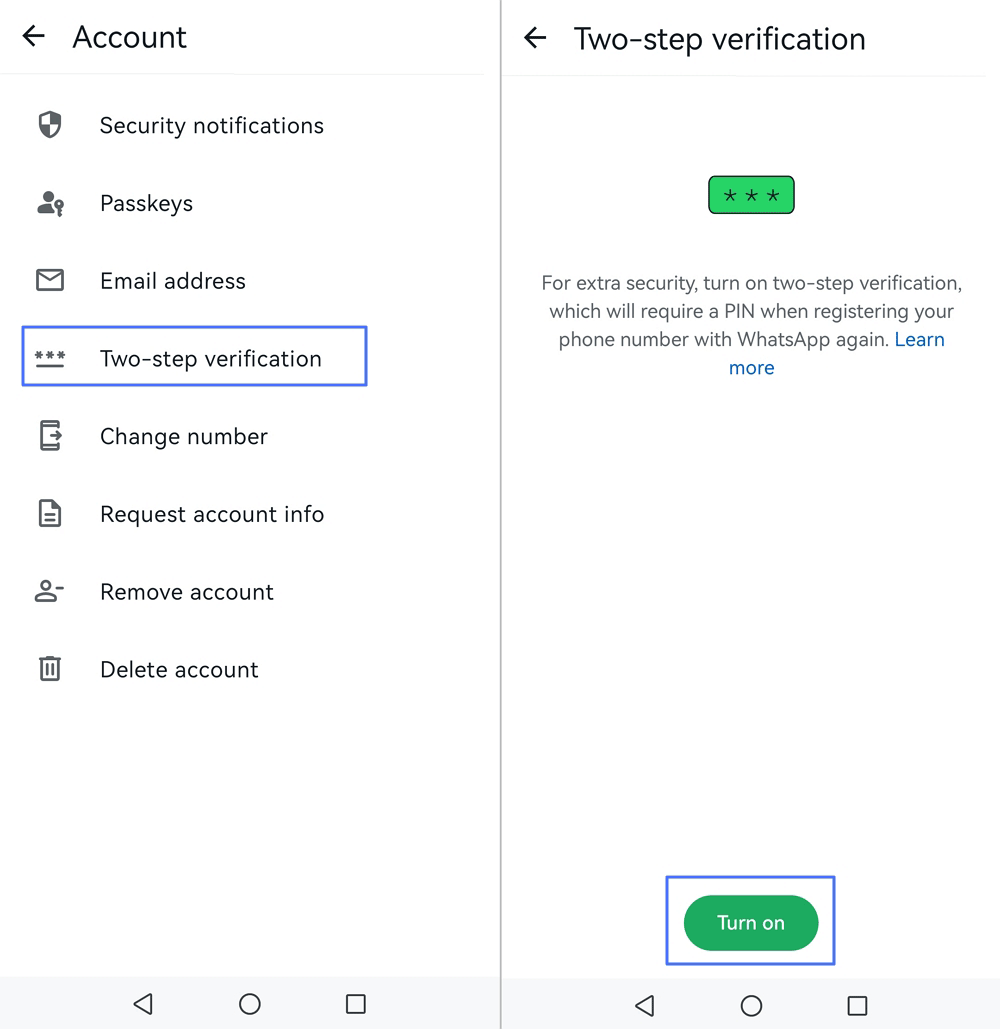
3Enable Two-Step Verification
This adds an extra security layer if someone tries to access the account.
Steps:
- Step 1. Open Settings → Account → Two-step verification
- Step 2. Tap Turn on and create a 6-digit PIN
Why it matters:
It protects the account if someone attempts to register the number on another device.
4Review Privacy Settings Together
Adjust who can see activity information like profile photos or status updates.
Steps:
- Step 1. Go to Settings → Privacy
- Step 2. Review Last Seen & Online, Profile Photo, About, and Status
- Step 3. Set them to My Contacts where appropriate
Why it matters:
It reduces how much personal information strangers can see.
2 Family Rules That Make the Biggest Difference
Technology settings help—but family expectations matter even more. Many parents find it helpful to set a few simple messaging rules.
Here are a few examples families often use:
- 1.No private chats with strangers
- You might say:
- "If someone you don't know messages you, don't reply—show it to me first."
- 2.Screenshot first, explain later
- You might say:
- "If anyone sends something uncomfortable or threatening, take a screenshot and tell me. You won't get in trouble."
- 3.No meeting online contacts offlines
- You might say:
- "Even if someone seems friendly online, we don't meet them in person unless a parent is involved."
- 4.Nighttime boundaries
- You might say:
- "Phones rest at night so everyone can sleep. Messages can wait until morning."
These steps won’t solve every possible issue—but they create a healthy baseline of privacy, awareness, and family communication.
For many families, this simple setup is enough to reduce the most common WhatsApp risks before considering more advanced tools or monitoring options.
When Built-in Settings Aren’t Enough: Add Alerts, Rules, and a Safety Backup
For many families, WhatsApp’s built-in privacy settings are a good start. But as teens become more active online—or when risks begin to appear—parents sometimes need a second layer of support.
Think of this layer less as “monitoring everything” and more as three practical safety goals:
- Spot potential problems early
- Set clear digital boundaries
- Have a way to confirm safety when something feels wrong
Tools like AirDroid Parental Control are often used to provide that extra layer.
1 Early Signals: Alerts That Help Parents Notice Risk Patterns
Sometimes the biggest challenge for parents isn’t a specific message—it’s not knowing when something unusual is happening.
Some monitoring tools help by surfacing early signals.
Notification Sync (Android)
On Android devices, notification syncing can mirror WhatsApp notifications to the parent’s device.
This doesn’t decrypt WhatsApp chats, but it can help parents notice unusual patterns, such as:
- unknown contacts appearing repeatedly
- suspicious message previews
- sudden spikes in late-night messaging
Keyword Alerts (primarily Android)
Parents can create alerts for certain high-risk terms related to topics like:
- self-harm
- threats or extortion
- requests to meet in person
- sharing personal information (addresses, phone numbers)
If a notification includes those keywords, parents can receive an alert.
Activity Reports
Some tools also provide simple activity summaries, such as:
- daily app usage
- unusual nighttime activity
- spikes in messaging behavior
These reports don’t reveal every message—but they can help parents notice patterns worth discussing.
Important boundary:
These features do not break WhatsApp’s end-to-end encryption. They rely on notification permissions and device behavior, which means alerts may occasionally miss messages or appear incomplete.
2 Clear Rules: Reducing Night-Time Risks and Screen Overuse
Another common concern for parents is late-night messaging or excessive screen time.
Parental control tools can help reinforce family rules through simple device limits.
Downtime (Sleep Hours)
Parents can schedule hours when messaging apps are unavailable, helping teens disconnect at night.
App Limits
Daily usage limits can be set for apps like WhatsApp, encouraging healthier messaging habits.
Focus Mode
During homework or study time, certain apps can be temporarily paused to reduce distractions.
Used together, these tools help create consistent digital boundaries—something many teens actually appreciate once expectations are clear.
3 Quick Confirmation: When Parents Need to Check What’s Happening
Sometimes a situation simply needs quick clarification.
For example, a parent may receive a concerning alert or notice unusual behavior. In those moments, the goal isn’t surveillance—it’s confirming that a child is safe.
Some tools provide options such as:
Screen Mirroring (Android devices)
Parents can temporarily view their child’s device screen to understand what’s happening in real time.
Remote Camera or One-Way Audio
In certain situations—and only when families have clearly agreed on these rules—parents can activate the phone’s camera or microphone to confirm a child’s environment.
These features should always be used with transparent family communication and clear expectations.
4 Real-World Backup: Location and Emergency Support
Online concerns sometimes connect to real-world situations—especially when teens are traveling, meeting friends, or navigating new environments.
Some parental safety tools provide offline safety support, including:
Live Location Sharing
Parents can view the child’s real-time location if needed.
Geofencing
Families can create location zones (such as school or home) and receive notifications when a child enters or leaves them.
Arrival Alerts
Parents can be notified when their child reaches a destination safely.
SOS Emergency Button
In urgent situations, a child can trigger an SOS alert that shares their location and surrounding audio with parents.
These tools are designed for true emergencies, giving families a way to respond quickly if something goes wrong.
Used thoughtfully, these features can help parents move beyond simple restrictions toward something more practical: early awareness, clear rules, and reliable backup when it matters most.
WhatsApp Parental Controls on Android vs iPhone
One of the biggest sources of confusion for parents is device differences. The same parental control feature can work very differently depending on whether your child uses Android or iPhone.
The table below helps clarify what’s realistically possible on each platform, so families can choose tools and expectations that match their device.
| Feature | Android Devices | iPhone Devices |
|---|---|---|
| WhatsApp Notification Sync / Risk Alerts | Stronger support. Some parental control apps can mirror notifications and trigger keyword alerts from message previews. | Limited. iOS privacy rules restrict notification monitoring, so alerts may be less detailed or unavailable. |
| Screen time limits | Available through parental control apps and Android’s Digital Wellbeing settings. | Available through Apple’s Screen Time feature or family sharing settings. |
| Remote confirmation tools (e.g., screen mirroring) | Supported on many Android devices with parental control tools. | Not available due to Apple’s security restrictions. |
| Location tracking / arrival alerts | Supported through many parental safety apps. | Also supported through apps or Apple’s Find My features. |
| Setup complexity | Usually simpler to configure for monitoring features. | May require additional setup steps (such as Screen Time permissions, family sharing, or supervision profiles), depending on the level of control desired. |
The key takeaway: both platforms offer useful safety tools, but Android generally allows deeper parental control features, while iOS focuses more on privacy and built-in family settings.
Understanding these differences ahead of time can prevent frustration and help families choose the approach that works best for their devices.
If You Suspect a High-Risk WhatsApp Situation (Do This First)
Most WhatsApp interactions are harmless—but occasionally parents may notice signs of a situation that needs quick attention.
When that happens, the goal is calm, practical action, not panic.
Below are three common scenarios and the first steps families can take.
A. Suspected Scam or Sextortion
If someone is demanding money, threatening to share private images, or pressuring your child to send personal content, act quickly.
First steps:
- 1.Stop communication immediately
- Encourage your child not to respond further to the person.
- 2.Preserve evidence
- Take screenshots of messages, usernames, and payment requests before anything is deleted.
- 3.Secure the account
- Check WhatsApp → Settings → Linked Devices to ensure no unknown devices are connected.
- Enable Two-Step Verification if it’s not already active.
- 4.Seek help if needed
- Depending on your region, report the incident through appropriate online safety or cybercrime resources.
The most important message for teens: they won’t be in trouble for asking for help.
B. Suspected Bullying or Self-Harm Conversations
If your child appears distressed after messaging or mentions harmful topics, start with supportive communication.
Helpful steps:
- 1.Open the conversation calmly
- Try something like: “I noticed you seemed upset after checking your messages. Want to talk about what happened?”
- 2.Encourage healthy boundaries
- Help your child mute, leave, or block harmful conversations if needed.
- 3.Document patterns if necessary
- Screenshots or saved conversations can help if school staff or counselors need to be involved.
- 4.Seek professional support if concerns continue
- If a teen shows ongoing signs of emotional distress, reaching out to school counselors or licensed professionals can provide additional support.
(This article does not provide medical advice; families should consult qualified professionals when mental health concerns arise.)
C. Suspected Pressure to Meet Someone Offline
If messages suggest your child may be meeting someone they met online, it’s important to slow the situation down.
Immediate actions:
- 1.Confirm your child’s location and plans
- Ask clear questions about who they’re meeting and where.
- 2.Use location sharing if available
- Real-time location tools can help confirm your child’s whereabouts.
- 3.Encourage public-place rules
- Teens should never meet online contacts alone or in private locations.
- 4.Use emergency tools if necessary
- If a child feels unsafe, an SOS feature or emergency contact can provide rapid support.
Situations like these are stressful—but in many cases, early awareness and calm communication make the biggest difference.
The goal isn’t perfect control of every message.
It’s making sure your child knows they always have a safe place to turn when something online feels wrong.
Frequently Asked Questions About WhatsApp Parental Controls
Parents often have similar questions when trying to make WhatsApp safer for their kids. Below are answers to some of the most common concerns families search for.
1 Does WhatsApp Have Parental Controls?
WhatsApp does not offer a dedicated parental control dashboard. However, it does include several built-in privacy and security settings that families can use together with clear household rules.
Examples include:
- Privacy settings to control who can see profile information
- Group invitation controls to limit who can add a user to chats
- Blocking and reporting tools
- Two-step verification to secure the account
- Media auto-download controls to reduce unwanted images
These tools help improve safety, but they don’t provide monitoring, alerts, or centralized parental oversight.
2 Can Parents Read WhatsApp Messages?
In most cases, no.
WhatsApp uses end-to-end encryption, which means messages are designed to be readable only by the sender and receiver.
This means:
- Parents cannot directly decrypt chats through WhatsApp itself.
- Monitoring tools generally do not break encryption.
Some parental control tools may show message notifications or activity signals (depending on device permissions), but they typically do not reveal full encrypted conversations.
The most reliable approach is still open communication and family rules about messaging behavior.
3 How Can I Tell If Someone Accessed WhatsApp From Another Device?
WhatsApp allows accounts to be connected to additional devices through its Linked Devices feature.
To check this:
- Step 1. Open WhatsApp → Settings
- Step 2. Tap Linked Devices
- Step 3. Review the list of connected devices
If you see a device you don’t recognize, you can log it out immediately from this screen.
It’s also a good idea to enable Two-Step Verification, which adds an extra layer of protection if someone tries to register the account elsewhere.
4 What If My Child Deletes WhatsApp Messages?
Once a message is deleted—especially if disappearing messages are enabled—it may not be recoverable.
Because of this, the focus should be on prevention and early awareness, rather than relying on message recovery later.
Helpful practices include:
- Encourage teens to screenshot concerning messages before deleting them
- Keep important conversations documented if bullying or threats occur
- Use cloud backups where appropriate (while understanding they may not capture everything)
If a serious issue arises, preserving evidence quickly can help when reporting incidents to schools, platforms, or local authorities.
5 What Is the Best WhatsApp Parental Control App for Android or iPhone?
The right tool depends heavily on which device your child uses, because Android and iOS allow different levels of parental control access.
Here’s a simplified comparison:
| Feature | Android Parental Control Tools | iPhone Parental Control Tools |
|---|---|---|
| Notification monitoring | Often supported | Limited due to iOS restrictions |
| Keyword risk alerts | Often supported | Rare or unavailable |
| Screen time controls | Available through apps or system tools | Available through Apple Screen Time |
| Screen mirroring / remote confirmation | Possible on many Android devices | Not supported |
| Location tracking | Supported | Supported |
| Setup complexity | Usually straightforward | May require Family Sharing or supervision settings |
Many families using Android devices choose tools such as AirDroid Parental Control for its broader monitoring and alert features.
For iPhone users, Apple’s Screen Time and Family Sharing features are often used as a starting point, sometimes combined with third-party safety apps for location tracking or usage reports.
The best solution is the one that balances privacy, safety, and clear family expectations.











Leave a Reply.