AirDroid Parental Control
24/7 Kids' Guardian via App & Web
- 👀Live surroundings and location tracking
- 🔞Content Monitoring and App/Web Blocking
- ⚠Instant alerts for online risks and geofences
- ⌛Screen time control and monitor

Telegram Archive Chat Explained: What Parents Should Know
If your teen's active Telegram chats seem to suddenly disappear overnight from their main chat list, it hasn't necessarily been deleted. It may simply have been moved using the Archive Chat feature. So don’t fret too quickly.
The Archive feature enables users to move chats out of the main chat list, reducing clutter. But then, smart kids may use it to hide risky conversations from plain sight.
Therefore, understanding this feature is key to digital safety. This article will explain the true purpose of Archive Chat, how children might use it, and how parents can stay vigilant.
What is Archive Chat on Telegram?
Telegram’s Archive Chat is a built-in digital storage folder that lets users move active chats off the main chat list for organization without deleting them.
Three Core Features of Archive Chat
- Hidden from Plain Sight: Archived chats cannot be seen on the main chat list but remain accessible by a hidden swipe-down gesture.
- Chats Stay Fully Active: All messages remain fully active, and they will pop out to the chat list when new messages arrive (muted chats will stay archived forever).
- Cross-Device Sync: Once a chat is archived on a phone, it is also archived on the desktop and tablet apps.
Archived Chats’ Differences with Deleted Chats and Secret Chats:
Telegram Archived chats are essentially different from deleted chats and secret chats. The table below highlights the key differences you should be aware of.
| Archive Chat | Delete Chat | Secret Chat | |
|---|---|---|---|
| Content Status | Hidden but accessible | Gone forever | Encrypted |
| Purpose | Organizational/Hiding | Permanent removal | Maximum Security |
| Visibility | In Hidden Folder | Removed | Main List (Lock Icon) |
Step-by-Step: How to Archive/Unarchive on Mobile & Desktop
As mentioned, it is essential to know how Telegram's Archive function operates. Here is how you can archive (or unarchive or even find archived chats) on each device. Guess what, in just a few taps or clicks.
1. On Mobile (Android & iOS)
To Archive a Chat: Swipe left(Android/iOS) or long-press(Android) the chat and tap Archive.
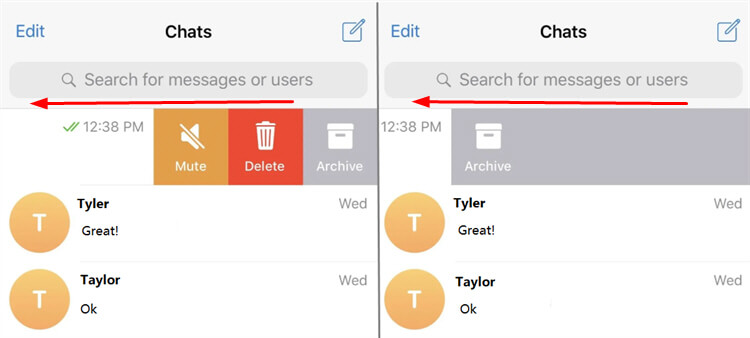
Tips for multiple chats:
- Android: Long-press one chat, select others, then tap the Archive icon.
- iOS: Tap Edit in the top-right corner, select chats, then tap Archive at the bottom.
To Unarchive a Chat: Scroll to the top of the chat list, find Archived Chats (pull down if it’s hidden) > then tap to open > Swipe left on the chat.
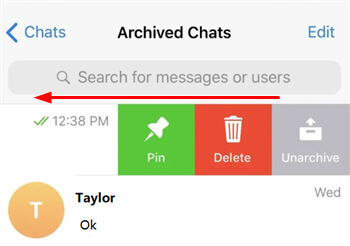
2. On PC (Windows/Mac)
To Archive a Chat: Open Telegram Desktop > Right-click any chat in the list > Choose Archive (or select multiple chats with Ctrl (Windows) / Cmd (Mac) + click).
To Unarchive a Chat: Open Archived Chats from the sidebar (top or bottom, depending on your layout) > Right-click the chat > Select Unarchive.
3. Auto-Archive New Chats
Telegram also offers an “Archive and Mute” feature that automatically archives and silences messages from people who are not in your contacts.
- Step 1. Open Settings in Telegram.
- Step 2. Go to Privacy and Security.
- Step 3. Find Archive and Mute.
- Step 4. Enable New Chats from Unknown Users.
Can Archived Chats Be Hidden from Parents?
Yes, Telegram’s archived chats are designed to be easily hidden from parents—and that’s precisely the point of this feature. It’s no wonder kids gravitate toward it when they want to keep conversations private. Here’s how it works:
- Not Visible on Main Screen: Archived chats vanish entirely from the main list. A quick glance at the app won’t reveal them—risky conversations stay invisible.
- Muted Notifications: Kids archive and mute chats. Muting stops them from popping back up, letting kids get messages from strangers silently, with zero alerts.
- Groups & Stranger Risk: Worst of all, kids hide groups with strangers sharing harmful content. These toxic chats stay hidden—parents may never know until it’s too late.
The question then is, what should the parent do to prevent this?
Parent Safety Toolkit (When Kids Use Archive to Hide)
Telegram actually comes with privacy settings. But it lacks built-in control features or visibility into chats. That means you cannot in any way remotely lock settings or see the folders that are hidden without having physical access to your child's device.
AirDroid Parental Control is built to meet this exact need, offering a robust solution that addresses potential risks from Telegram’s archived chats and provides families with essential oversight capabilities.
AirDroid provides specialized tools to mitigate the risks associated with Telegram's hidden folders and encrypted nature. Here is how these features protect your child:
- Monitor Social Content: It scans incoming Telegram messages for flagged keywords. If your child receives dating, scams, or sexual themes content, you’ll receive an immediate alert so that you can intervene before harm occurs.
Inappropriate Image Detection: Gets real-time alerts for inappropriate visuals on your child's Telegram, letting you address harmful image content the moment it appears. - App Activity Report: Parents receive detailed time usage on Telegram and other apps daily or weekly. This data helps identify concerning usage patterns or sudden spikes in secretive app activity that may warrant a conversation.




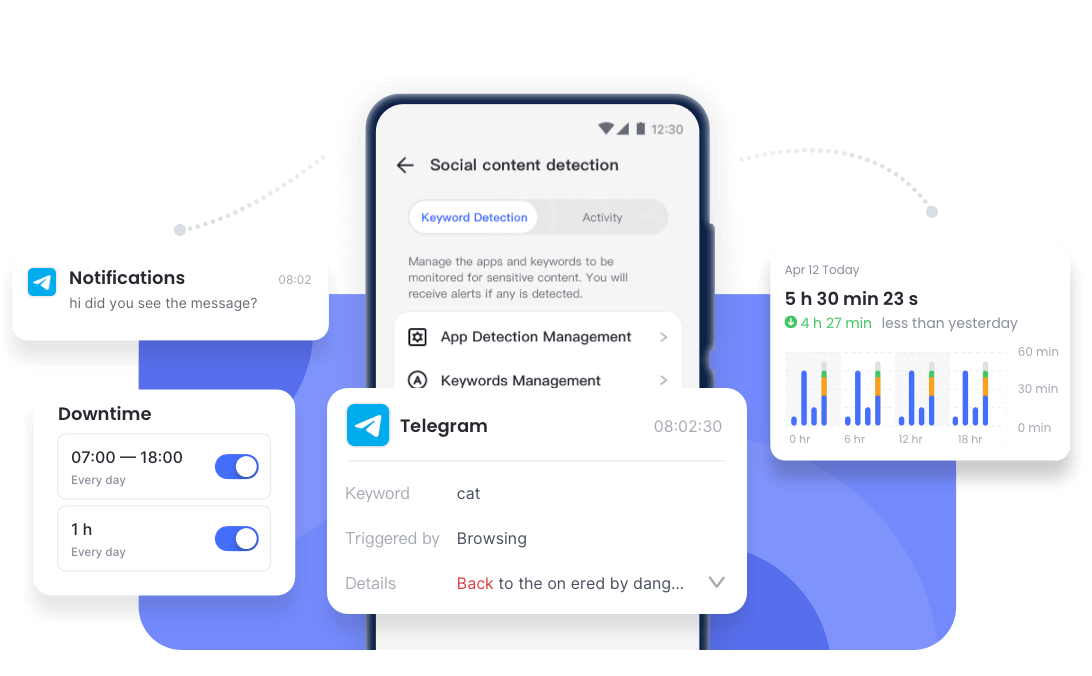
AirDroid’s safety goes beyond screen monitoring. When online interactions pose real-world risks, it helps parents protect kids without straining their bond. For instance, parents can track kid’s live location and use one-way audio and remote camera access to check their child’s surroundings instantly in high-risk situations.
Parenting Tip: Don’t use AirDroid on your kid’s device behind their back. You should rather discuss digital rules with them first and explain that using AirDroid is a collaborative way to ensure their safety.
Final Remarks
If you are a parent who wants your child to use Telegram more safely, AirDroid Parental Control offers comprehensive yet easy assistance. While Telegram's archive feature makes hiding activity easy, it doesn’t mean you should be in the dark.
Evidently, through open communication and advanced monitoring tools, you can adequately protect your child from hidden risks. Therefore, while using these, set clear boundaries, and use technology to ensure their digital world remains a safe space.
What happens if I archive a chat on Telegram?

The chat moves from your main list into a secondary inbox. It stays saved and fully accessible, but is tucked away to keep your screen organized.
Will archived chats show notifications to others?
No, notifications are private. Alerts can only be seen by the one holding the phone. In case a chat isn't muted, it will simply go back to the main list.
Can archived chats never show notifications?
Yes. If you mute a chat before archiving it, it stays hidden in the folder forever, receiving new messages silently without ever alerting the user or moving.
Can I know if someone archives my chats?
No, there is no notification or indicator. Archiving is a private organizational tool, so the person on the other end will never know you’ve hidden them.












Real-time Protection
4.6


Leave a Reply.