AirDroid Parental Control
24/7 Kids' Guardian via App & Web
- 👀Live surroundings and location tracking
- 🔞Content Monitoring and App/Web Blocking
- ⚠Instant alerts for online risks and geofences
- ⌛Screen time control and monitor

Top Qustodio Alternative Apps Parents Can Trust
Many parents eventually look for other options after experiencing various technical issues when using Qustodio. This instability problem often makes daily supervision ineffective and troublesome. That is why finding a more reliable Qustodio alternative is very important for children’s digital safety.
Based on real testing experience, this article offers recommendations for more stable, budget-friendly apps. To ensure the accuracy of this review, we conducted direct testing using three different devices at once. One Samsung phone focused on offline security tests, one iOS device on online activity, and the other iOS device served as the main monitor. We summarized the comparison so you can easily find the Qustodio alternative that best suits your family’s needs.
Why You’re Looking for a Qustodio Alternative
When we tested this app, we encountered several technical issues, such as GPS data delays and inconsistent blocking features. This stability issue makes real-time monitoring inaccurate, which certainly causes some inconvenience for child safety. Because of this unresponsive performance, it’s natural to start looking for a Qustodio alternative that is more reliable.
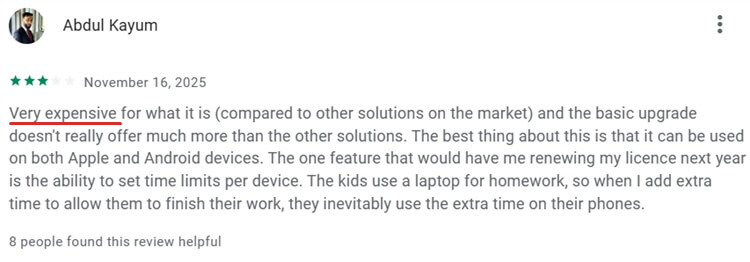
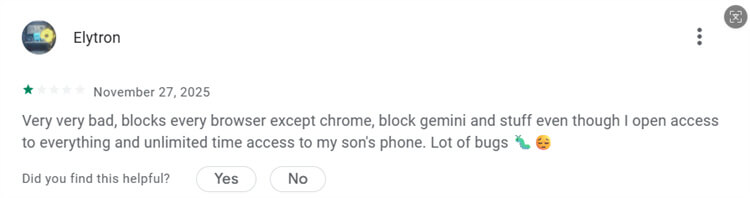
Many users on Google Play also complain about security loopholes that children can easily bypass, as well as frequent system glitches. Given its somewhat high price tag and less-than-comprehensive protection, the need to switch to a Qustodio alternative has become all the more pressing, making it essential to opt for a replacement that delivers robust security features and seamless, interruption-free performance.
1. Expensive
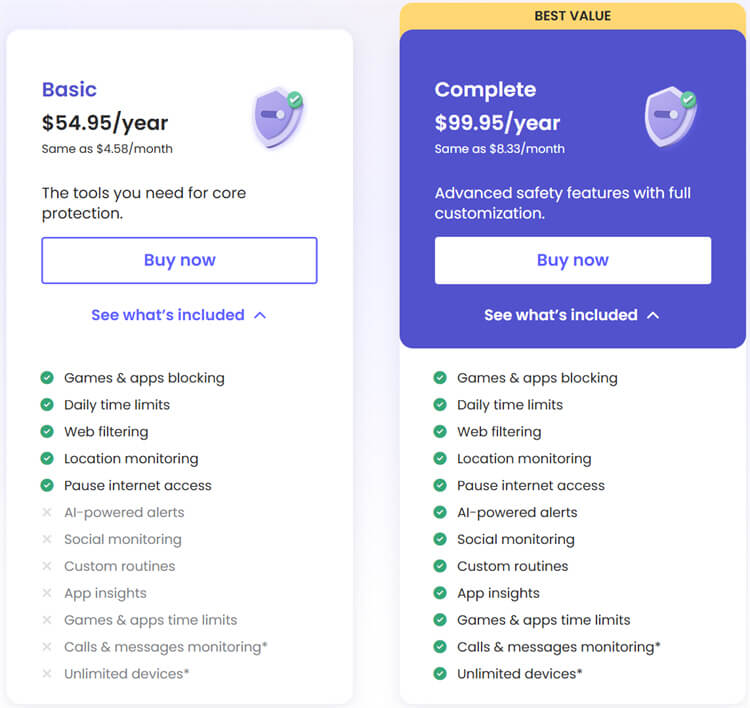
Qustodio provides two annual plan options: Basic for $54.95 and Complete for $99.95. Compared to the average subscription cost of other Qustodio alternatives, the price of this Complete plan feels premium, but it’s highly recommended because its features are far more comprehensive for protecting digital safety. On the other hand, the Basic plan feels very limited, covering only 5 features, and the monthly cost difference with the Complete option is very small (around $3.33).
However, you must know that a higher subscription fee doesn’t necessarily mean the app will be stable and free of interruptions. Parents didn’t only complain about the price; they’re also disappointed because technical problems keep happening regularly, leading them to consider a Qustodio alternative. This shows that spending a high cost doesn’t necessarily get a smooth, problem-free user experience.
Overall, the main strength of this app lies in its broad, very capable feature coverage, which effectively meets family needs. Unfortunately, that advantage is overshadowed by weaknesses, including a slightly high price that isn’t balanced by consistent system performance. As a result, paid users still often face technical obstacles that should no longer be a problem at that price level.
2. Delayed, Inaccurate GPS
Qustodio’s location-tracking feature lets you see your child’s location in real time and view a history of the places they have visited. This feature may be adequate to protect family safety for parents who don’t yet see the need to look for a Qustodio alternative. Unfortunately, this feature’s performance isn’t entirely accurate, and the data doesn’t always update on time in real-world scenarios.
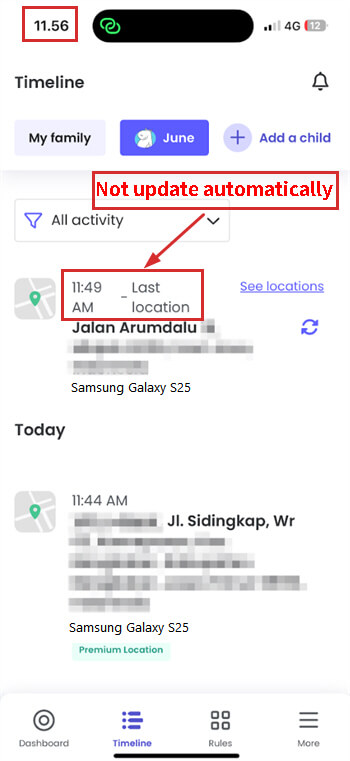
When we conducted direct testing, we found technical issues related to this location accuracy problem. In the test scenario, we left home at 11:37 AM and arrived at the destination at 11:45 AM. In the early stage of this trip, the app indeed recorded the movement quite well in its tracking history.
The problem showed up at 11:49 AM, when the app recorded that we had already arrived home, even though we were still at the destination. Inaccurate double-recordings like this are what often make parents start looking for a Qustodio alternative. The fact that we only truly returned home at 11:56 AM shows that the app’s location detection system is not always working.
Besides the accuracy issue, there was a significant delay in the child’s last location report, which was very frustrating. At 11:56 AM, we reopened the app at 11:56 AM, but the location information wasn’t updated automatically and still showed the last location status at 11:49 AM. Since the location status wasn’t automatically updated, we had to manually refresh it to view the status, which wasn’t very convenient.
The main strength of this app is its trip history visualization, which is neat, but its GPS response is very unfortunate. If compared with several Qustodio alternatives that are more responsive, this data delay problem clearly becomes a significant drawback. The biggest risk is that parents can’t ensure their child’s safety in real time because the location information they receive is often delayed.

3. Unstable Block Feature
This blocking feature helps you filter which apps are safe for children to access and which should be limited for their digital safety. With this setting, parents should have full control to limit distractions, allowing children to focus more on their main activities.
In the first stage of testing, we tried to block access to the Discord app to see how responsive the security system is. The result was quite satisfying: the Discord app on the child’s device couldn’t be accessed at all after the app was added to the blocking list. The child’s phone screen displayed a continuous loading indicator, indicating that the Qustodio-side blocking succeeded in cutting off login access to that app.
Next, we tested blocking the Chrome browser on two devices, both running Samsung and iOS under monitoring. On the Samsung device, the Qustodio security system worked very well, with Chrome immediately locking down completely when we tried to open it. A clear notification appeared on the screen stating that access to that app has been blocked, so the child can’t use it to surf the internet.
We also noticed something confusing when we tried to open Chrome on the iOS device: the blocking didn’t work even though the device status was being monitored. As shown in the images below, browsing activity in Chrome iOS continued to run smoothly and was recorded in the activity report, even though the browser was already on the blocked app list. This inconsistency is what often makes users feel uncertain and leads them to compare its performance with other Qustodio alternatives.
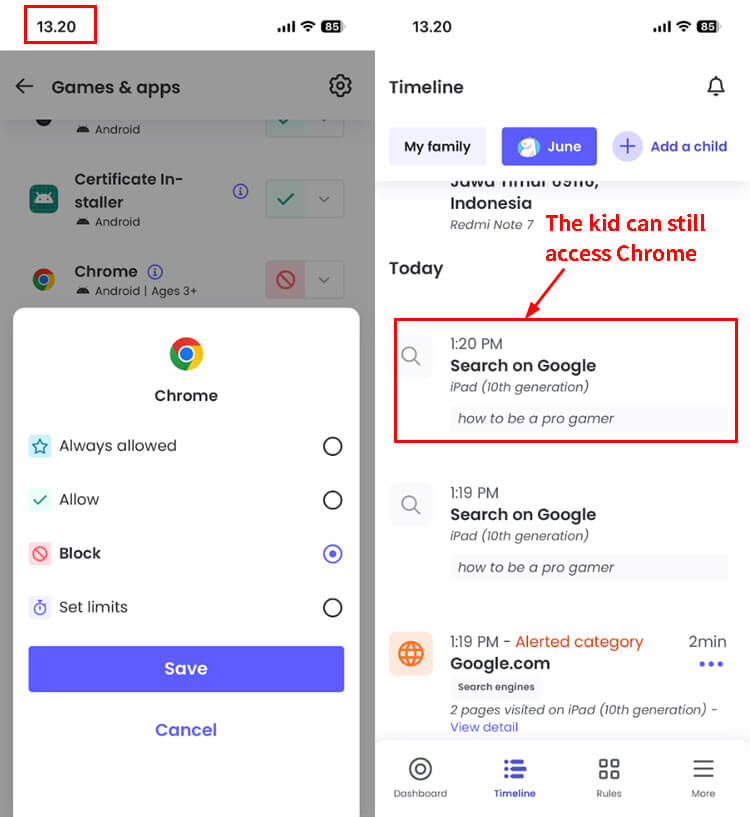
Overall, Qustodio has quite detailed monitoring capabilities for detecting which apps the child opens. However, its blocking feature proved unstable and inconsistent across all device types, especially on the iOS ecosystem, which remained penetrable. This instability problem turns out not to be an isolated case, as many other users in the Google Play Store also report similar complaints, leading them to look for a Qustodio alternative.
4. Kids Can Bypass Qustodio More Easily than Expected
Qustodio is designed to help you filter out negative content and set screen time limits so digital habits remain healthy and productive. However, this app’s defense system turns out not to be as strong as imagined and has security problems that are quite easy to utilize. This is often what makes parents consider a Qustodio alternative that offers stronger protection.
The first way to break through this limit is very simple: delete the account, deactivate device protection, then uninstall the app completely. Although this step is effective in removing all limits, the risk is very high because that action is too conspicuous and will definitely be noticed by parents. This deletion activity usually triggers a system notification or leaves a trace as missing data in the app’s daily activity report.
Unlike the first method, the second method, using VPN services such as PureVPN, is far smoother and harder to detect. In our testing, the Chrome app on Samsung that had been previously blocked was fully accessible again when the VPN was activated. Even more worrying, browsing activity done in Chrome while using that VPN wasn’t recorded at all in the child’s activity report.
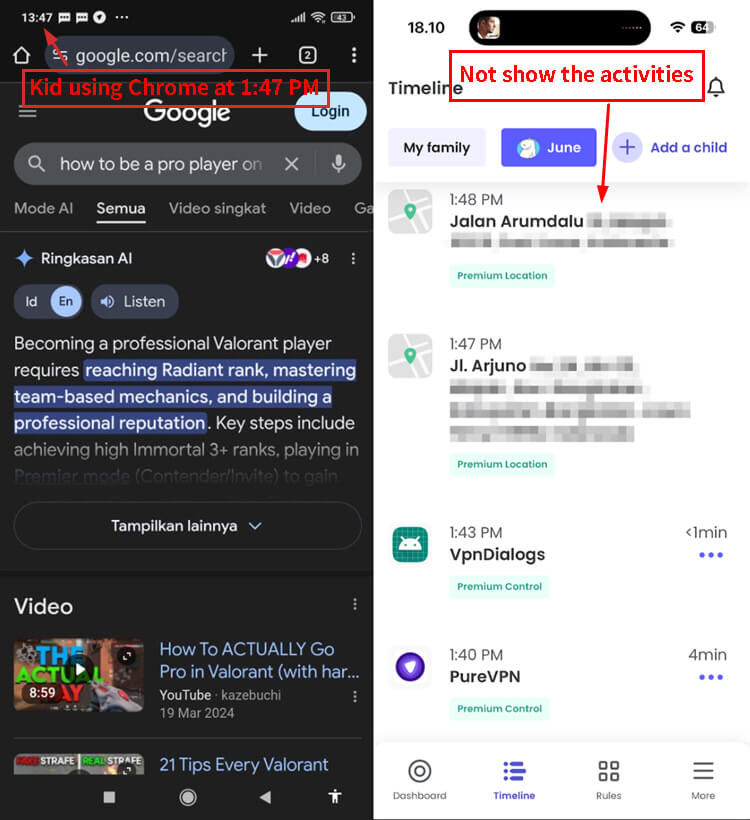
Qustodio indeed has good basic monitoring features, but its weakness lies in how easily its system can be tricked by children. If the child is clever and resourceful, they can easily learn this trick through YouTube tutorials or Reddit forum discussions. Therefore, considering a Qustodio alternative that has anti-VPN protection might be necessary to handle children who are increasingly tech-savvy.
Qustodio Alternatives
To ensure you receive the optimal digital protection, we have compared the performance of several monitoring apps in depth. The following table is designed to help you see the key feature differences and determine which Qustodio alternative best protects your children’s safety.
1. Compare Table
Features | AirDroid Parental Control | Qustodio | Family link | Aura |
|---|---|---|---|---|
Position accuracy |
|
|
|
|
App/Web Block takes effect |
|
|
|
|
Check Real-World Safety |
|
|
|
|
Social Media Monitor |
|
|
|
|
Real-Time Alert |
|
|
|
|
Screen Mirroring for Emergency |
|
|
|
|
Bypassing Difficulty |
|
|
|
|
Annual, Full Features | $59.99 | $99.95 | Free | $120 |


2. AirDroid Parental Control
AirDroid Parental Control is a more complete monitoring tool because it not only monitors online activity but also keeps children safe in the real world (offline). If you’re looking for a Qustodio alternative with broader, more responsive features, this app is well worth trying.
Its main difference from Qustodio lies in its more advanced social media monitoring capabilities, real-time notifications, and stronger device control. These features make parents calmer because the system closes loopholes that allow children to trick the rules.




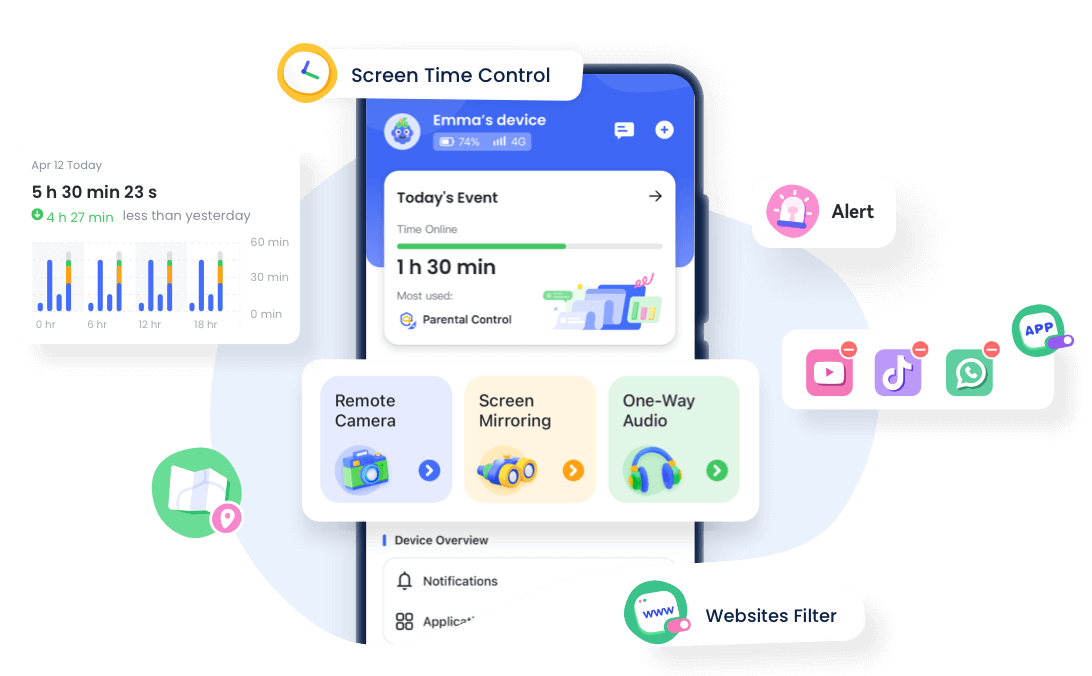
Key Features:
- Screen Time Management: You can easily set child phone hours so their digital and physical activities remain balanced. This feature helps parents limit screen duration so children remain focused and productive.
- Remote Operation & Real-World Safety: Check the child’s surroundings directly via a remote camera and one-way audio. Additionally, there is an SOS button that children can press anytime when they need emergency help.
- Social Media Monitor: A smart AI assistant will help you monitor over 14 social media apps. This proactive monitoring is essential to prevent cyberbullying and filter toxic content that your child might accidentally encounter.
Why It’s the Better Qustodio Alternative?
- Cost-effectiveness: With the same subscription price($59.99), you get features that are far more complete, making it the best-value Qustodio alternative.
- Offline Safety: Not just online safety, this app also protects children in the real world with features like higher-frequency location updates, 30-day historical tracking, SOS, geofencing, remote camera, and one-way audio.
- App-level Blocking: App and website blocking work instantly, without delay, so it closes the gap that allows children to steal access.
- Anti-uninstall Mechanism: Its encryption system—256-bit encryption—makes this app very hard to force delete or trick, ensuring parental rules keep running.
- Real-time Alerts: Parents will receive instant notifications when danger is detected (inappropriate keywords), making AirDroid a reliable Qustodio alternative for early prevention.
3. Google Family Link
Google Family Link is an official, free app from Google that lets you monitor your children’s digital activity. This basic management tool is most suitable for children under 13 years old. If you’re looking for a Qustodio alternative that is free of subscription costs, this is the main option worth considering.
Unfortunately, its social media monitoring features are rather limited, and supervision can be turned off by children when they turn 13. However, its integration with Android is very smooth, so its performance is far more stable than third-party apps. This app becomes a practical Qustodio alternative for parents who just want to try simple digital supervision.
Key Features:
- Free Screen Time Management: You can limit daily usage time and lock devices remotely so the child’s rest time isn’t disturbed.
- Google Play Management: Every new app download requires parental approval, so you can filter safe content and manage access permissions.
- Basic Location Tracking: Real-time location tracking is available to monitor the child’s current position, but it doesn’t record previous locations.
- Account-Level Control: Supervision is via an integrated Google account, with a note that children can choose to stop being watched when they turn 13.
Why It’s the Better Qustodio Alternative?
- Free to Use: There is no subscription fee at all, making it the most economical Qustodio alternative for families.
- Easy to Operate: Its interface is very user-friendly and easy to understand, even for parents who aren’t very tech-savvy.
- System-Level Integration: Because of native Android support, this app runs very stably and rarely experiences technical interruptions compared to other apps.
4. Aura
Aura combines parental control features with cybersecurity protection and identity theft prevention in one package. Unlike ordinary apps, Aura keeps all family members safe from various online crime threats. If you need a Qustodio alternative that also protects your personal data, this is the best choice.
This app is more than just a screen time limiter because its main focus is maintaining your family’s digital privacy thoroughly. Its security features are far more extensive than those of traditional parenting apps, which usually only monitor children’s device activity. This complete solution is very suitable for parents who prioritize total data security in this all-digital era.
Key Features:
- Screen Time Management (Basic Level): You can set daily time limits, pause internet access, and give bonus time, although the features are simpler compared to other specialized apps.
- Online Activity & Content Oversight: Parents can monitor internet browsing history, block inappropriate websites, and activate protection from phishing sites.
- Identity Theft Protection: This system proactively monitors the security of children’s and parents’ identities and sends warnings for suspicious activity involving personal data.
- Cybersecurity Tools: Comprehensive security tools are available, including a VPN for safe internet access, a password manager, and data leak monitoring.
- Family Protection Plans: One subscription can protect multiple family members at once, with a focus on shared digital security rather than just individual device control.
Why It’s the Better Qustodio Alternative?
- Stronger Identity & Financial Protection: This protection provides advanced-level security against family financial assets and personal identity that exceeds the standards of ordinary monitoring apps.
- Covers Identity Theft & Data Misuse, which Qustodio Doesn’t Offer: As a superior Qustodio alternative, this feature detects identity theft and data misuse, which Qustodio doesn’t cover.
- All-in-One Digital Safety Platform: This platform offers convenience by bringing together all your family’s digital security needs into a single integrated app.
- Cybersecurity & Privacy Protection: You get double benefits in the form of effective parental controls as well as cyber and privacy protection that guards sensitive child data.
Final Thoughts
Qustodio does have a good scheduling feature; however, it’s unfortunate that it tends to fail at critical moments. The main problem isn’t that it lacks features; it's the system's stability, which is sometimes unreliable when it’s needed most. That is why switching to a Qustodio alternative is often necessary for uninterrupted supervision.
On the other hand, AirDroid performs very well as a Qustodio alternative, offering complete protection in both the cyber and real worlds. Its ability to monitor social media and child locations proved more responsive than its competitors’. Therefore, this app becomes the most balanced recommendation for you who want maximum performance.
If you’re looking for a free, stable Qustodio alternative—especially for children under 13, the most suitable solution is Google Family Link. Its features are rather basic, but it integrates well with Android, so it hardly experiences any technical interruptions. This makes it the most practical and cost-effective Qustodio alternative for beginner parents.
Meanwhile, Aura proposes another strategy that combines parental controls and cybersecurity protection. It’s primarily concerned with the privacy and identity of all family members, rather than screen time. If you care about sensitive data protection, this app is the Qustodio alternative that you should consider.
The final decision is now in your hands; just adjust it to what your family needs most.











Leave a Reply.