AirDroid Parental Control
24/7 Kids' Guardian via App & Web
- 👀Live surroundings and location tracking
- 🔞Content Monitoring and App/Web Blocking
- ⚠Instant alerts for online risks and geofences
- ⌛Screen time control and monitor

I Tried OurPact: Pros, Cons, and The Installation Nightmare
OurPact is often recommended as a screen time control app for families. To see how well it actually works, I installed and tested it myself.
While it does offer useful features, there are frustrating limitations that OurPact doesn't tell you...Now, this article walks through all the information you need before getting started with OurPact. Let's begin!
TL;DR
If you're in a hurry, here is my quick verdict based on one week of hands-on testing. (I tested OurPact using the parental dashboard on a Google Pixel, with my child's iPhone 14.)
| Best For |
|
| Editor's Rating | ⭐⭐⭐ |
| Pros |
|
| Cons |
|
Hands-On Experience
The Setup = The Nightmare
To be honest, setting up OurPact on my child's iPhone 14 is not as easy as installing an app.
While most parental control apps just ask you to install an app or a profile on your child's device, OurPact requires a much heavier lifting process:
First, you must have a computer and install the OurPact Connect app on it.
Secondly, a USB cable is required to connect your computer and your child's device. And honestly, this made me annoyed because I tried five or six times before it finally worked.
Features Performance
Before diving into the detailed breakdown, here's how OurPact's main features performed during my testing:
| Features | Rating | My Quick Take |
| Screen Time Allowance | 2.5 | Great concept, but a hassle to use |
| View & Alerts | 3 | Helpful screenshots, but not real-time keyword alerts |
| App Management | 4 | Works flawlessly |
| Location Tracking | 5 | Excellent separate entry/exit geofencing alerts5 |
| Web Filter | 3 | Basic but functional |
Anti-Bypass Test
After testing, I found OurPact is one of the most tamper-proof parental control apps I've ever used. Here's how I test:
When I chose "Delete App," though OurPact Jr is deleted from my child's iPhone, the supervision is still there.
I also tried to remove OurPact's profile from my child's iPhone 14 Settings; there is no way to remove the management.
Features Deep Dive
1Screen Time Allowance
This is OurPact's superpower, which functions like a daily digital bank account for your child.
You can set how much time is available each day, such as 2 hours. And when you enable it, all apps will vanish from their device. To access and use them, your child must press the "Play" button in the OurPact Jr app, which also starts a timer.
Once the daily time runs out, the device is blocked again until the next day or until you grant extra time.
This mechanism can be quite confusing for beginners, which is why many parents in the Play Store said it struggling to use it.
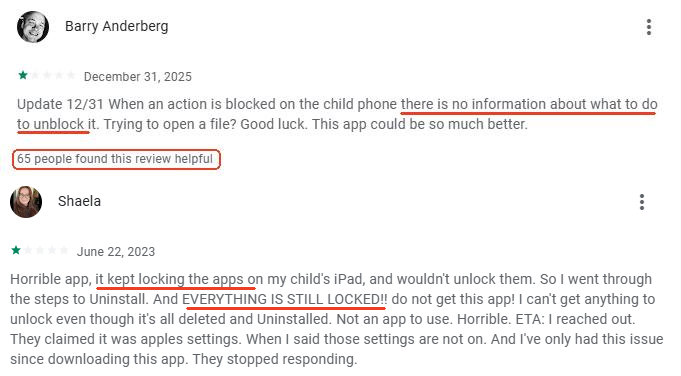
In my opinion, this feature is helpful for teaching time management because it shifts the responsibility onto the child.
But, I found the mechanism is incredibly clunky on my child's iPhone.
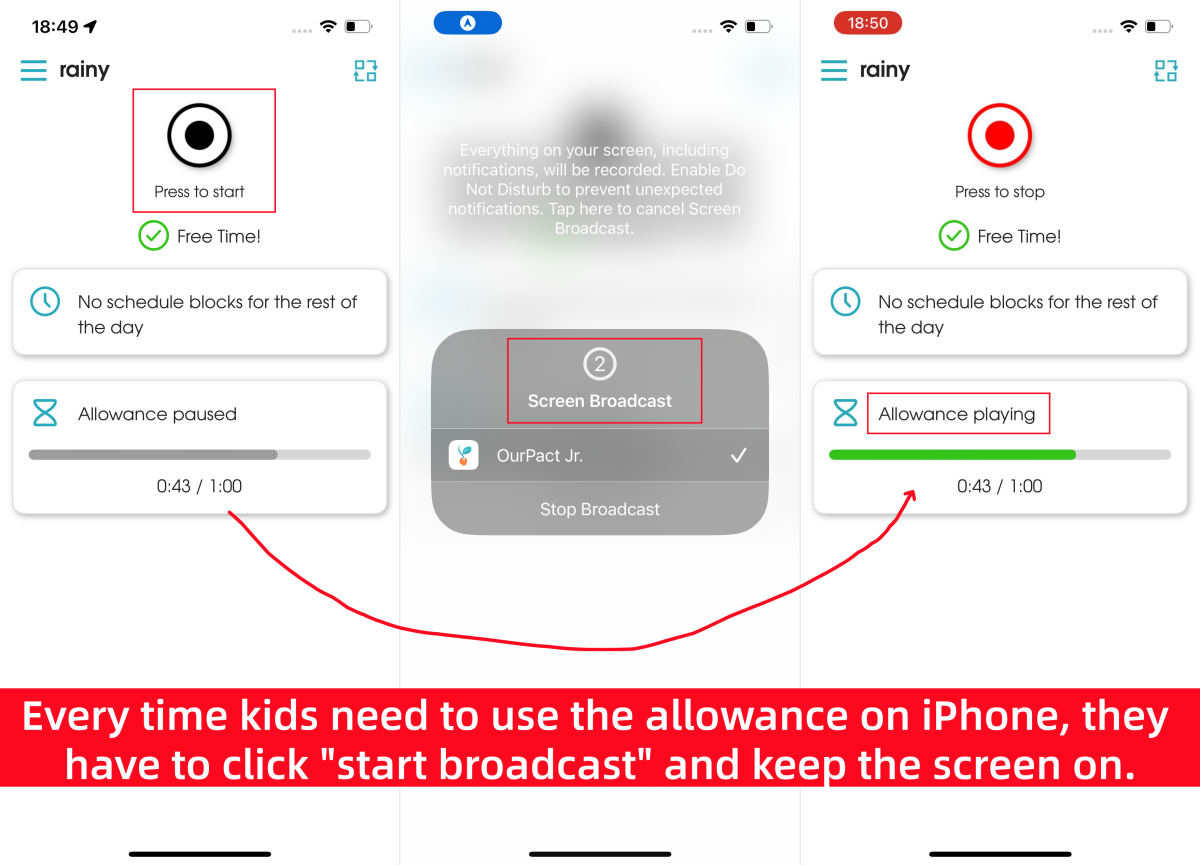
As the screenshots show, to "play" and use the allowance, the screen must keep on, since "Play" runs through the control center's "Start Broadcast" button. Once the screen turns off, apps disappear again, making it both overwhelming to use and battery draining.
2View & Alerts
OurPact allows you to monitor your child's screen activity through its screenshot capture function. There are 2 options available:
- Periodic View - automatically captures screenshots of your child's phone at set intervals
- View Now - captures real-time screenshots
And all screenshots are categorized and saved in the in-app gallery for up to two weeks. In addition to taking screenshots, OurPact scans them for risky keywords like "porn" or "bully." You can also create custom keywords to receive alerts when those terms appear in captured screen activities.
But here is the main catch: OurPact does not monitor these keywords in real-time. Instead, it takes the screenshot first, and then reads the context inside that.
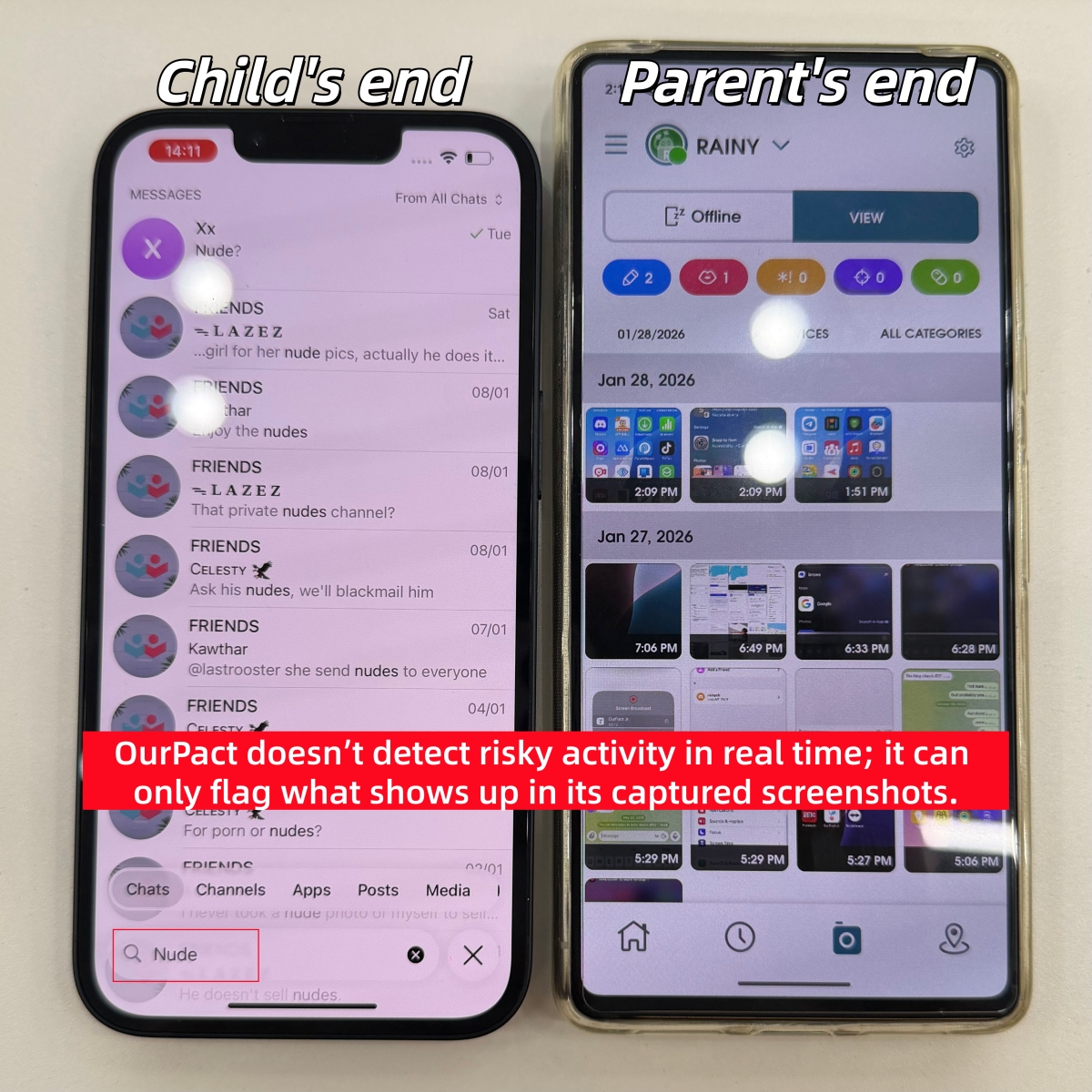
As a parent, I kept thinking: what if my child searches for or receives something risky online between two periodic screenshots? In that case, OurPact and I would never know it happened.
So, I prefer the AirDroid app, which detects risky keywords directly within social apps and alerts me instantly, with a screen capture at the same time.
3App Management & Schedule
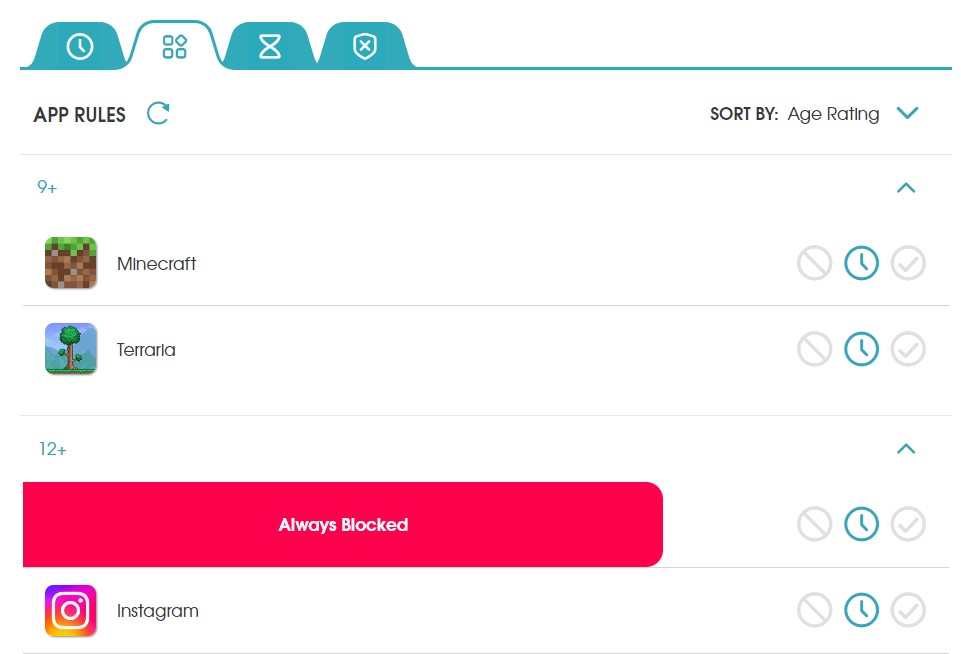
This is also called App Rules in OurPact. It lets you fully block or allow specific apps with one click.
Also, you can set a "Schedule" to decide when your child cannot use which apps. This works like "Downtime." For instance, I usually block games, social media, and messaging apps during school hours (from 9 am to 3 pm.)
By default, almost all apps are set to "Blocked by Schedule" except Settings, Phone, and OurPact Jr. As such, these apps vanished from my child's iPhone until they started playing "Allowance."
4Location Tracking
With the live GPS feature, you can keep track of your child's whereabouts as long as their phone is with them. Also, it keeps tracking your child's location history for up to 30 days.
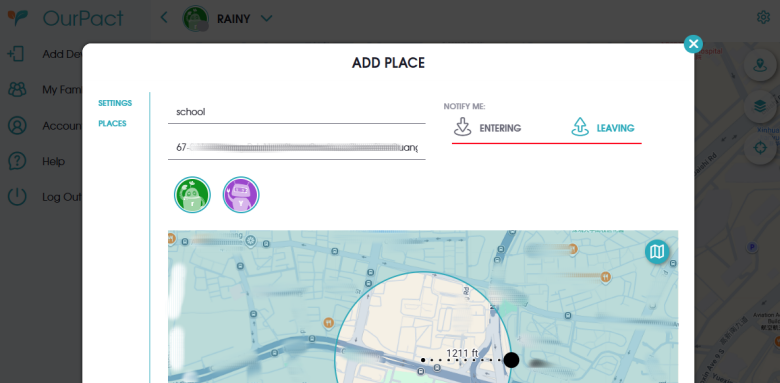
What surprised me is that it allows me to create geofencing zones separately for entering or leaving a location. This is outstanding, since many parental control apps bundle entry and exit alerts together.
5Web Filter
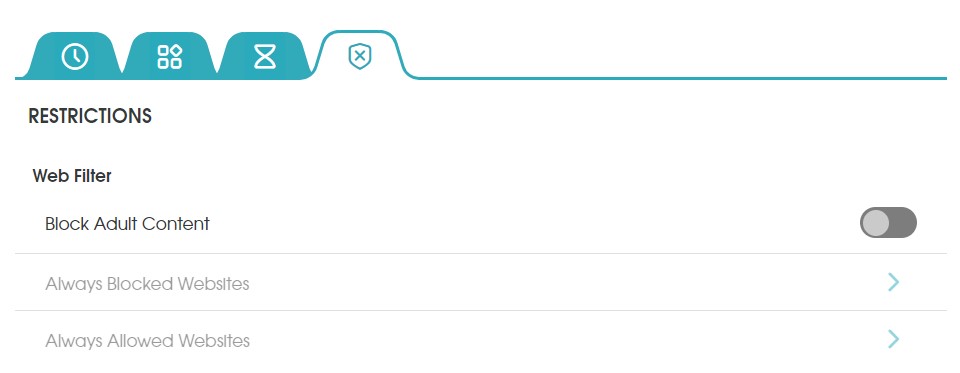
Web filtering is a standard feature in many parental control apps, and OurPact is no exception. In OurPact, you can block adult-related websites with one click or add certain URLs or domains for blocking.
I tested it and found that it effectively blocks websites on Chrome and Safari browsers on my child's iPhone 14. Even so, I would be glad if OurPact could improve by including more filter categories, such as Violence, Gambling, Illegal Content, etc.
What's Missing on OurPact?
Although OurPact comes with advanced screen time control features, it seems that it lacks some basic functions that we parents really need, such as:
- Activity Reports
- OurPact doesn't provide detailed reports about your child's app activity and web browsing history.
- Real-time Content Alerts
- Though OurPact can flag concerning keywords, it doesn't alert you instantly if your child searches for "suicide" or receives a sext. Instead, alerts are only triggered after a screenshot is captured and reviewed.
- Call Blocking
- OurPact doesn't support blocking phone numbers or communications for a child.
- App Level Time Limits
- OurPact screen time allowance is device-wide; you can't easily limit usage for individual apps.
If These Gaps Matter, You May Need a Better Alternative💡
Personally, these gaps and missing features were hard to ignore. That's why I found tools like AirDroid Parental Control is a more well-rounded option. Then, why do I switch to AirDroid?
It gives me clearer insights into my child's screen usage, notifies me when risky keywords appear inside several social apps, and offers more flexible controls like:




- Activity reports


- Content monitor

- Call block
- App time limits
- TikTok & YouTube history


How Much Does OurPact Cost? Is It Worth It?
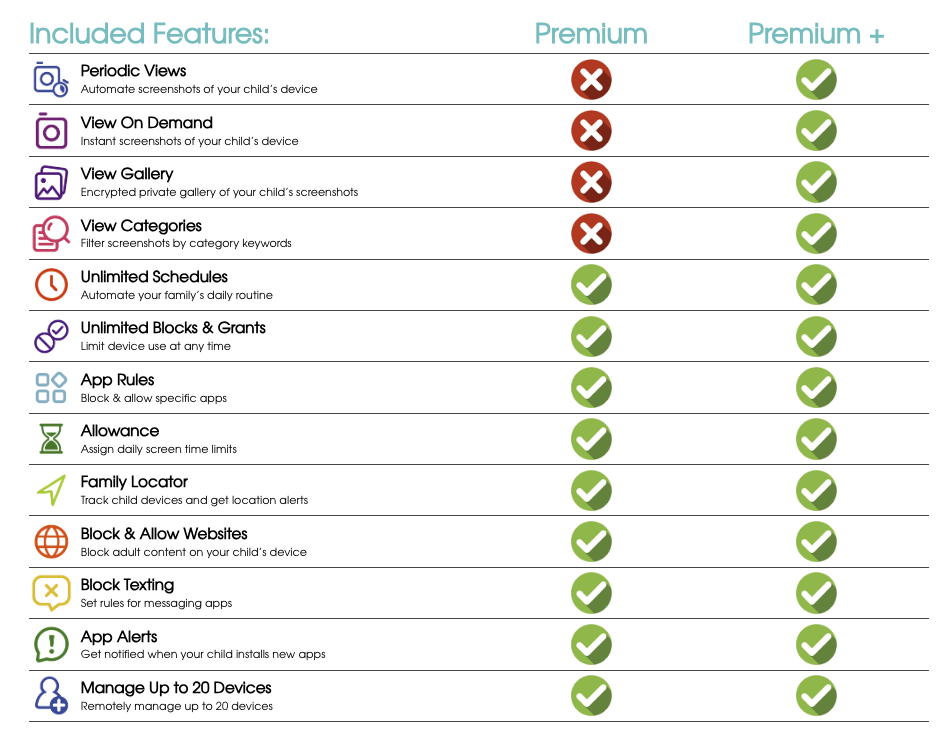
Though OurPact can be used for free, you can only manage one child's device, get five manual blocks per month and one block schedule. For advanced features, a subscription is required.
Since it offers a tiered pricing structure, here is the simple breakdown of what you actually get for your money:
So, Is OurPact Worth the Money?
This depends on what you need.
✅ Worth it if:
- You mainly want basic screen time schedules.
- Your child is younger, and you're fine with simple limits.
❌ Less worth it if:
- Your main concern is online safety, like cyberbullying, sexual content, etc.
- You want to know how your child used their device.
- You just want a simple setup or easy-to-use app.
FAQs About OurPact Parental Control











Leave a Reply.