AirDroid Parental Control
24/7 Kids' Guardian via App & Web
- 👀Live surroundings and location tracking
- 🔞Content Monitoring and App/Web Blocking
- ⚠Instant alerts for online risks and geofences
- ⌛Screen time control and monitor

Life360 Review: A Guide to Its Features and Limitations
Life360 is a decent option for monitoring your child's physical safety. Unfortunately, its features may feel inadequate for parents who also need complete control over their children's digital activities. In this Life360 review, we will discuss whether this app is the right solution for your child's security needs.
To ensure the accuracy of this review, we conducted a hands-on test using a Samsung phone as the primary device. This testing involved three devices: two Android devices (one with an admin account) and one iOS device. We used this method to provide an honest, relevant review tailored to your family's needs.
Quick Verdict for Parents
Overall, our Life360 review concluded that the app offers a very user-friendly UI, making it easy for parents to navigate the location-tracking features without any confusion.
Life360 is an adequate solution for parents wanting peace of mind about their children's physical safety without having to struggle with complex technology. For daily use, we found this app to be a perfect fit for parents who want to ensure their children arrive at school or home safely through simple, automatic notifications.
However, we highlighted several shortcomings in this Life360 review. First, notifications often experience delays or don't appear at all. Second, this app lacks features to supervise digital content or social media, such as limiting screen time or blocking harmful content. Third, the location sharing function can be disabled by your child directly, without the need for parental permission or password verification—preferred for families who balance safety monitoring with a certain level of trust and autonomy for their kids.
Life360 Rating Overview:
| Features | Score | Explanation |
|---|---|---|
| Location | ★★★★☆ | Accurate, but slight delay |
| Communication | ★★★★☆ | Effective, limited on free version |
| Safety & Emergency | ★★★★☆ | SOS button, but crash detection lacks precision |
| Installation & Setup | ★★★★★ | Fast and hassle-free |
| Pricing & Subscription | ★★★★☆ | Economical, covering the whole family under one plan |
| Difficulty of Bypassing | ★★☆☆☆ | Weak |
| Digital Supervision | ★☆☆☆☆ | None |
Pros:
- Intuitive UI
- Responsive SOS features
- Detailed family driving reports
- One subscription for all
Cons:
- No digital supervision
- Easy to bypass
- Free plan limitations
- Inconsistent and delayed notifications
Life360 Key Features Evaluation
1. Location
In this Life360 app review, we found that the app offers a versatile tracking ecosystem. Not only can you monitor your child's location in real time, but you can also track pets with PetFinder and items with Tiles. This allows you to oversee both family members and assets conveniently on a single interactive map.
However, inconsistent notifications are a major drawback. While the child's location coordinates on the map are mainly accurate, our hands-on testing highlighted missing and delayed notifications. The app often fails to notify you immediately when your child leaves or returns home.
We clearly observed this inconsistency during two separate test trips to verify the app's performance. During the first test, the app failed to send an alert when the child left home at 5:40 PM. The alert finally arrived twenty minutes late, along with the return notification at 6:03 PM.
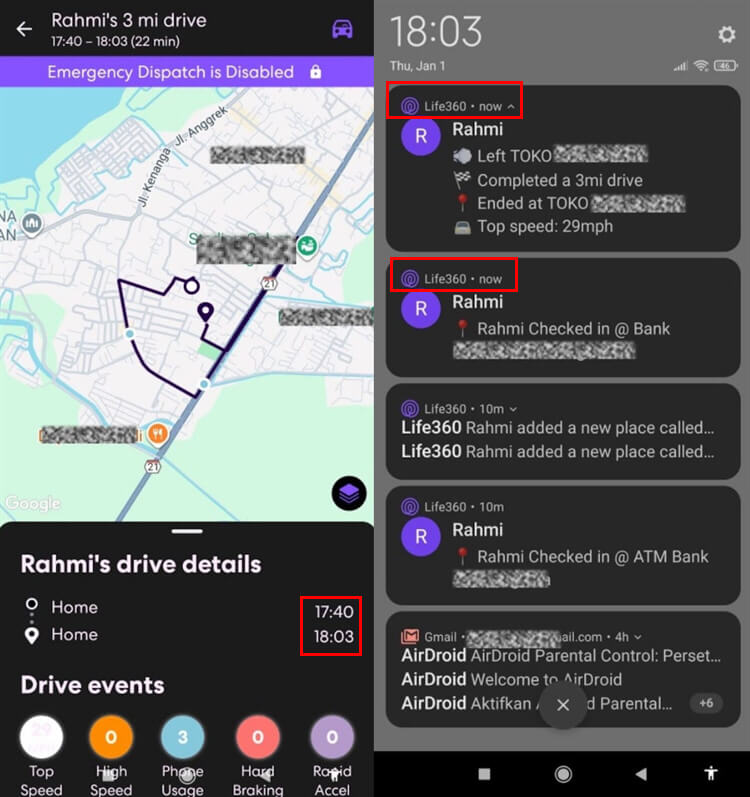
Similarly, we encountered the same, though shorter, issue during the second one as well. The driving report showed the child left home at 2.19 PM, but the parent received the alert two minutes later at 2.21 PM. Additionally, the app also failed to send an alert when the child returned home at 2.27 PM.
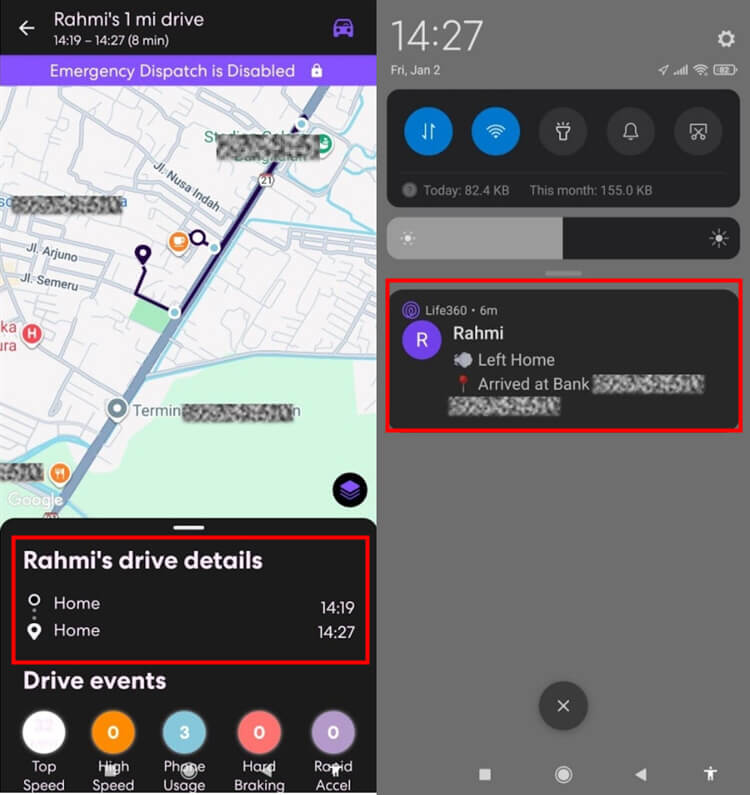
These delayed and missing notifications are indeed confusing, as you don't receive automatic confirmation of your child's location. After further investigation, we discovered that other users on the Google Play Store reported a similar complaint:
Here's the user's feedback on Google Play:
"At least 9/10 times, it doesn't say my wife has left work. Still at work, still at work, and suddenly, a notification said that she’s home. Mobile data’s on, location, everything."
In addition to standard tracking, Life360 offers the Bubble feature, which lets children mask their exact location with a general radius for temporary privacy. You don't need to worry about safety, however, as the Bubble automatically "bursts" to reveal its precise location if an SOS is triggered or a crash is detected. You retain complete control to turn this option on or off.
To summarize our Life360 review of the location features, while the app is flexible for families, our testing confirms that automatic notifications aren't always reliable. The delays and missing alerts we experienced are critical considerations if you require strict real-time monitoring.
2. Communication
In this Life360 review, we found that the app simplifies family communication with smart features such as Check-in and Place Alerts. Place Alerts automatically sends notifications when your child enters or exits a saved favorite location, such as school or home. However, keep in mind that free users are limited to saving up to two locations for this automatic notification feature.
Another handy feature is Battery Monitoring, which displays your child's phone battery percentage in real time. The app will send you an automatic alert if your child's phone battery drops below 10%. This is very helpful in reducing parental anxiety, as it allows you to know the real reason why your child is unreachable.
To respond to urgent situations without typing, both you and your child can use the Quick Notes feature to send short messages via an icon. When we tried it, we tapped a single button to send the "charge your phone" message, which immediately appeared on the child's phone screen. This is a handy solution when your child might be busy and doesn't have time to respond to regular text messages.
Overall, the communication features we discussed in this Life360 review offer an efficient way to monitor your child without having to call constantly. This combination of location notifications and battery alerts is very effective at providing parents with peace of mind. However, the location-saving limitation in the free version may require adjustment for families with high mobility.
3. Safety & Emergency
The SOS Alert is a key feature designed for emergencies. Our testing found it simple to use, as it requires just a button press to start a 10-second countdown before sending an alert. We confirmed the notification arrived instantly and accurately once the countdown finished.
Next, the Crash Detection feature detects severe vehicle impacts and sends an automatic notification. However, a key finding in our Life360 review was that this feature sometimes experiences delays in sending signals during real-life incidents. Other users also experience this.
Here's the user's feedback on Google Play:
"Crash detection notified us about 20 minutes after my husband had an accident which was a big delay but still sent an alert to the whole family."
Additionally, you can monitor Driving Reports to track routes, average speed, and phone usage habits while driving. These reports are very detailed and record risky driving behaviors, such as sudden braking or the use of a device while driving. The system is designed to ignore phone usage when the vehicle stops.
Unfortunately, our testing for this Life360 app review revealed slight inaccuracies in phone usage detection. The app incorrectly recorded six phone usage violations on both of our trips, claiming we were on the phone while driving. In fact, during both trips, we were in it when the vehicle completely stopped at specific spots.
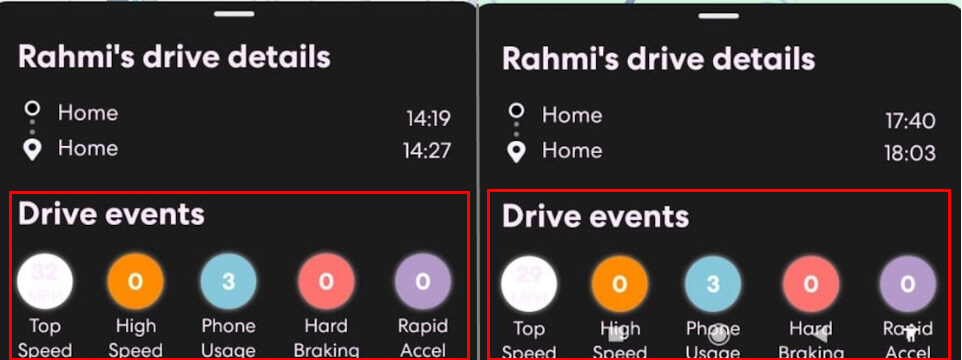
Life360 offers solid protection with its responsive SOS button and automatic crash detection. However, be aware that phone usage reports can sometimes be inaccurate, just as we experienced. It's best to use this report for relaxed discussions about safety with your child, not as proof for disciplining them.
4. Installation & Setup
We really appreciated its easy installation process, designed to be parent-friendly. Getting started is very simple: download the Life360 app from Play Store or App Store onto your and your child's phones, then create an account and choose a plan.
Once installed, the system operates within a "Circle," a private group specifically for your family. Simply send your child an invitation code, and once they enter it, you and your child will connect on the same map. The setup process within the app itself is so straightforward that you can complete it quickly.
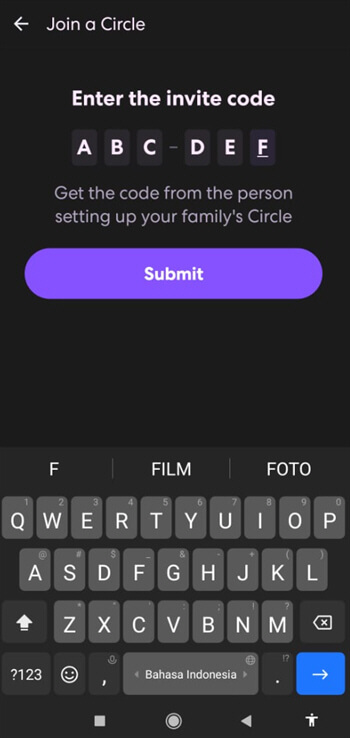
However, a crucial point we found in this Life360 review was the system permission settings on each phone. For optimal tracking, you must change location access permissions to "Always On" or "Always Allow" on your child's device. Many technical issues occur not because the app is faulty, but because users often skip this system setup step.
Overall, the installation and setup process is very intuitive and quick, using only an invitation code to connect family members. It's also important to remember that this setup depends heavily on the access permissions you grant. So, make sure that you manually check your child's phone settings to ensure the app runs smoothly in the background.
5. Pricing & Subscriptions
The most convenient feature is the "One Subscription for All" system, which covers every family member on a single bill. Currently, there are three paid plans available to match your safety needs, in addition to the free option.
Here are the plan details and estimated prices:
- Silver ($7.99/month): This economical option extends location history to seven days, provides five slots for place alerts and family driving summary, and more.
- Gold ($14.99/month): Often recommended in Life360 reviews, this plan includes a 30-day history, unlimited place alerts, 24/7 roadside assistance, individual driving reports, etc.
- Platinum ($24.99/month): This comprehensive plan includes all Gold features plus additional protection, including identity theft insurance, emergency medical assistance, and travel support.
Through this Life360 review, the free option is sufficient if you only need to check your child's location occasionally, though it's limited to two days of history and two place alerts. However, if your child has started driving their own vehicle, upgrading to the Gold plan is a much more crucial safety investment to access the roadside assistance features.
6. Difficulty of Bypassing
A common question parents ask is whether children can deceive this app—and in this security-focused Life360 review, the answer is unfortunately yes, as the app’s fairly standard protection system relies heavily on the child’s cooperation to maintain an active Internet connection, and can only operate if the app is installed, relevant authorizations are granted, and location sharing is agreed to.
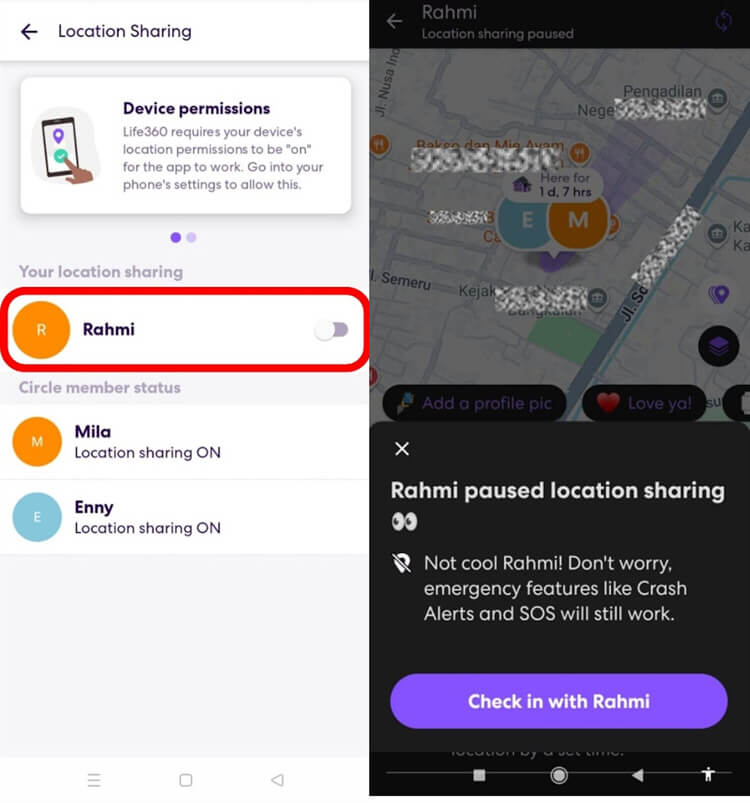
Children can easily turn off tracking through simple methods. Disabling location sharing or enabling battery saver mode will automatically sever the connection to the server, so their location stops updating on your map. Children with more technical knowledge can also search for various methods on the Internet to prevent Life360 from tracking their location.
The main vulnerability is the lack of a parental password lock for settings. Unlike AirDroid Parental Control, which requires password verification to unlink a device, Life360 allows children to turn off tracking on their own without permission.
To wrap up this segment of the Life360 review focused on security aspects, it’s important to note that this app isn’t fully tamper-proof. Designed primarily as a family coordination tool built on mutual trust, it falls short for users seeking strict, all-encompassing supervision — especially when compared to dedicated parental control applications.
7. Ease of Use
In terms of the UI, Life360 is very user-friendly, with a clean, easy-to-understand design. We rate the setup process as very quick because you simply share an invitation code to connect the whole family into one "Circle." Once connected, you can immediately access the real-time location map and other essential features from the main dashboard without complicated steps.
However, it's important to note that this app mainly focuses on physical safety, not digital supervision. It lacks features to supervise digital content and social media. This is a key limitation to consider in our Life360 app review if your primary goal is digital monitoring.
In conclusion, Life360 excels at physical tracking but fails to monitor your child's phone usage. It tells you your child's location, but can't track what they're watching or accessing on their device. You can't rely on it to control screen time or filter content.
Is Life360 the Right Choice for You?
After breaking down the details in this Life360 review, the final decision depends on your parenting style and your family's specific needs. This app is not a one-stop solution for every problem. It's a reliable tool for physical safety, but it has clear limits in the digital space.
1. When is it the right choice?
Life360 is a good investment if your family fits the following profile:
- Real-time tracking helps busy families manage child pickups without the hassle of making calls.
- Crash detection and driving reports give extra peace of mind for parents with new drivers.
- One subscription fee for the whole family makes this a very budget-friendly solution.
- This app works best when used with trust to protect your child's safety, not to control your child.
2. When is it not the right choice?
On the other hand, based on our Life360 review, you should look for other options if you face these situations:
- This app won't help here because it lacks screen time limits or app blocking.
- Life360 can't protect kids from adult content or cyberbullying, as it has no web filters or message monitoring.
- It's not effective for supervising kids who break rules because turning off the tracking is too easy.
- The frequent notification delays will be a big issue if you need truly instant updates.
To wrap up this Life360 review, this app is great for physical safety, but leaves a significant gap in digital safety. What’s more, it can be more outstanding if it could check offline safety. Unlike AirDroid Parental Control, which offers an SOS function, remote camera access to view your child’s surroundings, and one-way audio listening for extreme situations. If you need online and offline full protection, you need a more comprehensive solution like this.
Best Alternative to Life360 – AirDroid Parental Control
As discussed in our previous Life360 review, this app is excellent for tracking your child's physical location. However, it has a major blind spot: it offers very little visibility into your child's digital life. You know where they are, but not what they are seeing on their screen.
Without proper digital monitoring, you miss hidden risks like:
- Dangerous chats with strangers
- Signs of cyberbullying/self-harm
- Accidental exposure to explicit content or gambling
AirDroid Parental Control steps in to fill this gap. If our Life360 review suggests you need more protection than just a map, AirDroid is the perfect add-on solution.




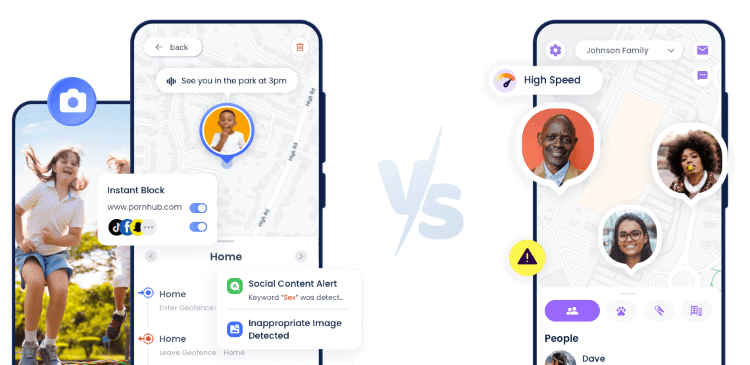
Why Parents Choose AirDroid Parental Control?
- It tracks activity across more than 14 popular platforms, so you can understand your child's online social circle.
- The Content Monitoring feature detects harmful content in messages or photos and sends you instant alerts.
- Screen time management helps establish a healthy schedule for children’s digital lives.
- Parents can activate the SOS function and see/hear surrounding around child in real-time through their phone's camera and microphone for emergencies.
AirDroid vs. Life360: Overview
To help you decide, we compared these two apps:
| Features | Life360 | AirDroid Parental Control |
|---|---|---|
| Location Tracking |  | |
| Communication | | |
| Safety & Emergency | SOS, Crash Detection, Driving Reports | SOS, Remote Camera, One-Way Audio |
| Screen Time Management |  | Apps Usage Report, Downtime, Instant Block |
| Alerts for Risky Content | | |
| App Limits & Web Filtering | | |
| Content Monitoring | | 14+ Social Media & SMS |
| Sync App Notifications | | |
| View Live Screen for Emergency | | |
| Starting price | 14.99/month | 9.99/month |
Conclusion
To conclude the overall Life360 review, this app is the right choice for families focusing on location tracking and physical safety. It's very reliable for monitoring trips, but lacks digital supervision features. This allows for hidden risks like dangerous chats with strangers, signs of cyberbullying, accidental exposure to explicit content or gambling, device addiction, etc.
On the other hand, AirDroid Parental Control offers more comprehensive protection. It not only tracks location but also secures online behavior. Beyond screen time management, it helps prevent cyberbullying and blocks harmful content, which provides the digital security layer missing from this Life360 review.
No app is perfect for every situation. Parents should choose a tool based on their family's specific safety needs. Consider the points in this Life360 review to determine the best protection option for your children.















Leave a Reply.