AirDroid Parental Control
24/7 Kids' Guardian via App & Web
- 👀Live surroundings and location tracking
- 🔞Content Monitoring and App/Web Blocking
- ⚠Instant alerts for online risks and geofences
- ⌛Screen time control and monitor

A Complete FamilyTime App Review: Features, Limitations, and Real Testing Results
FamilyTime is adequate for basic monitoring and emergency response needs, though some core features, such as communication monitoring, internet filtering, and location synchronization, require further refinement.
Therefore, this FamilyTime App Review is expected to serve as an objective guide to help you carefully choose the right digital control tool for your children.
To present an accurate, honest FamilyTime App review, we directly tested the app’s features on two Android devices in daily-use scenarios. In addition to conducting independent functional testing, we will introduce a more powerful alternative for comprehensive, advanced parental supervision.
Quick Verdict for Parents
This app is quite practical to operate, offering an intuitive dashboard, highly reliable screen time scheduling, and responsive emergency safety features. This platform is a sufficient option for parents who prioritize operational practicality with basic digital monitoring needs.
However, the biggest limitation of this app lies in its location tracking, internet filtering, and communication monitoring, which did not operate as effectively as expected.
These functional delays and gaps suggest that this platform may be less ideal if your family wants highly precise, comprehensive device control.
FamilyTime Rating Overview
| Features | Score | Explanation |
|---|---|---|
| Social Media Monitoring | ★★★☆☆ | Functional, but limited chat visibility and no automatic alerts |
| Call & SMS Monitoring | ★★☆☆☆ | Sync issues, unable to record call logs and messages |
| Screen Time & App Limits | ★★★★★ | Operates smoothly with accurate scheduling execution |
| App/Web Blocking & Internet Filtering | ★★★☆☆ | Reliable app blocking, but search filtering requires further refinement |
| Location & Geofencing | ★★★☆☆ | Functional, but experiences occasional sync delays and inaccuracies |
| Safety Features | ★★★★★ | Highly responsive & real-time emergency alerts |
| Ease of Use | ★★★★☆ | Intuitive, but occasional network errors |
| Customer Service | ★★☆☆☆ | The support team is unable to resolve subscription cancellation issues |
Real Parent Experience — Pros & Cons
Pros:
- Intuitive, practical interface
- Real-time SOS and pick-up alerts
- Dependable screen time scheduling and app blocking
Cons:
- Limited social media chat monitoring requires manual checking
- Less accurate, delayed location tracking
- Less effective internet search filtering
FamilyTime Key Features Explained (Real Testing Results)
A detailed breakdown of core functionalities based on our hands-on FamilyTime App Review.
1.Social Media Monitoring
The Social Media Monitoring feature in this app is designed to help you monitor your child’s digital interactions across various communication platforms.
Through this menu, parents can view the contents of direct messages and chat conversations to ensure they communicate in a safer environment.
In this FamilyTime App Review, we tested the feature on WhatsApp, and it showed satisfactory initial results, as the app successfully provided access to read the chat history. However, the displayed list was actually quite limited, loading only about five to six of the most recent chat rooms, including active groups.
This limitation means messages from less familiar contacts may be missed if they are buried by the child’s busier group activities. Additionally, you must routinely check this menu manually because the system does not send automatic alerts, and sometimes you need to fully reload the app when the refresh button does not instantly display the latest messages.
Overall, this social media monitoring feature has an excellent foundation for understanding your child’s daily communication routine. Nevertheless, its effectiveness might be slightly hindered because you need to dedicate extra time and effort to check the chats manually.
By comparison, parental apps such as Airdroid Parental Control offer a more practical supervision solution. Its social media monitoring includes sending automatic, real-time alerts when detecting suspicious keywords, chats, content, or searches, so you can simply verify them directly through the Screen Mirroring and Notification Sync features without worrying about false alarms.
2.Call & SMS Monitoring
This feature is designed to help you centrally monitor your child’s cellular communication history. With this function, parents can easily view the list of incoming and outgoing calls along with text messages on the child’s device directly from the app dashboard.
In our testing, when trying to send a message and call the child’s device, this feature did not perform as effectively as we expected. The communication history was not recorded in the call logs or messages, even after we closed and reloaded the app.
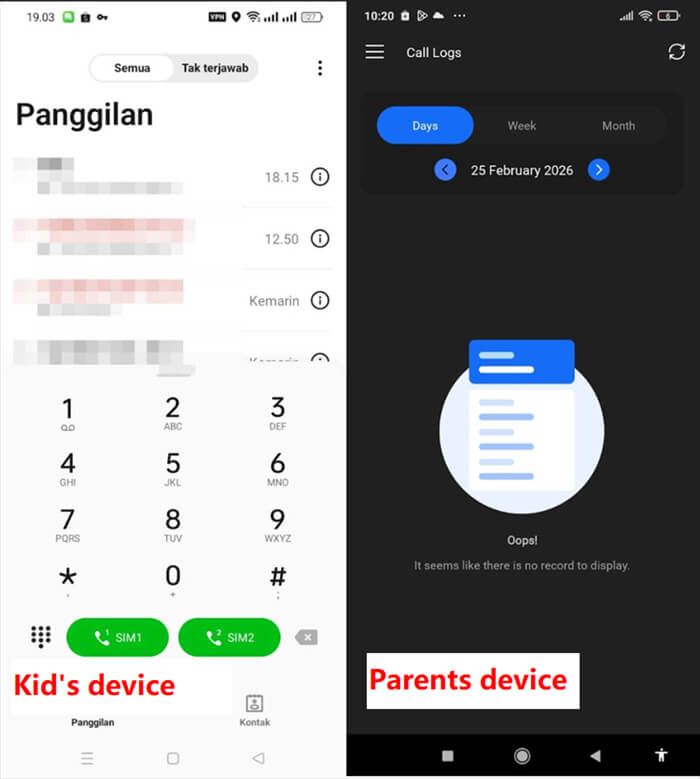
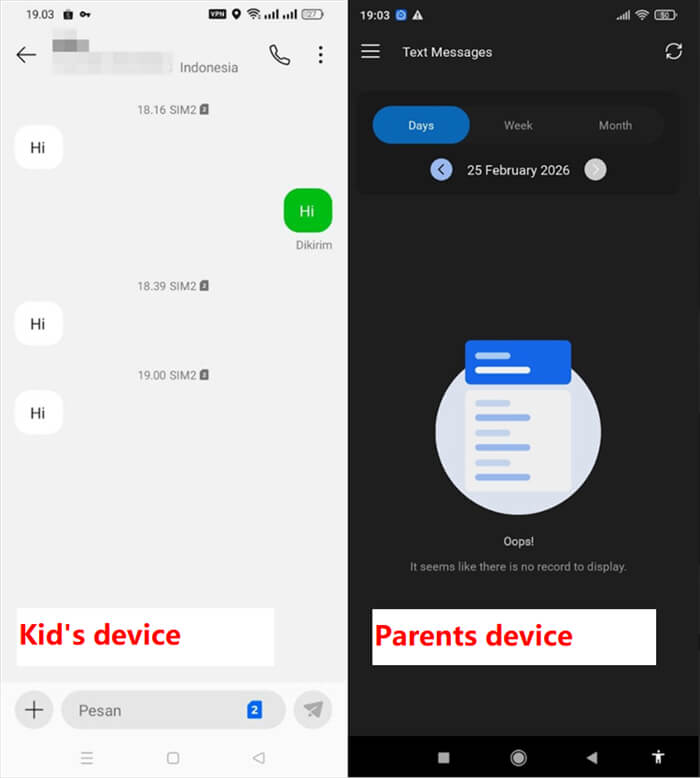
This issue makes parents potentially miss important communication history on the child’s device daily.
We also found notes from another user on the Google Play Store reporting that they faced a similar issue regarding message and call history records not appearing on their dashboard:
“Doesn’t work at all. The app would not sync any of my son's messages, call logs, internet, app usage. He was able to have very inappropriate conversations even with the app.”
Fundamentally, this communication supervision initiative offers an excellent protection concept to keep children away from suspicious contacts.
However, its Call & SMS recording functionality may still require some refinement so that its data synchronization can run more smoothly and accurately.
3.Screen Time & App Limits
The Screen Time limits feature is designed to help you organize your child’s daily device usage schedule more structurally.
Through this feature, parents can determine when children can explore the device and when they should rest, such as at bedtime, which is highly ideal for building healthy digital habits without constant manual monitoring.
During testing for this FamilyTime App Review, the time limit feature worked very well and responded accurately to the configured settings. For example, when we set the bedtime limit to 06:30 PM - 06:35 PM, the child’s screen displayed the bedtime warning right on time and blocked device access.
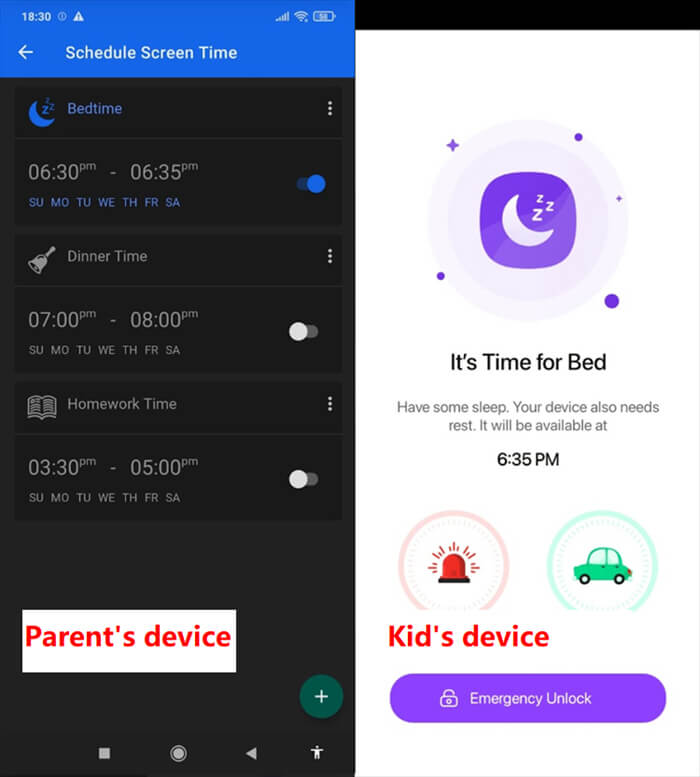
We also found consistent results when testing restrictions on specific apps to complete this FamilyTime App Review. We tried setting a usage time limit for the YouTube app to 5 minutes from 06:21 PM to 06:26 PM, and the system automatically closed the app smoothly without issues.
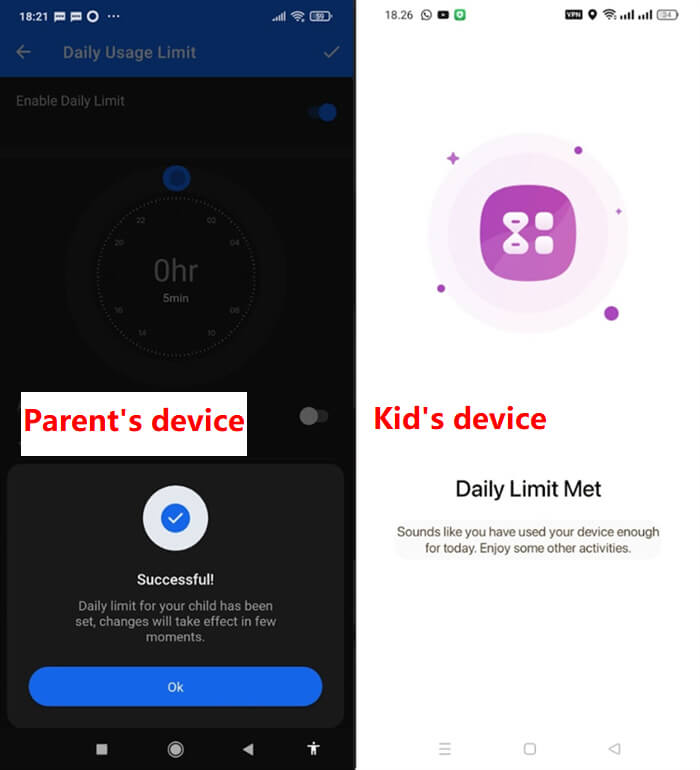
Overall, this time-limiting feature offers a very positive concept to support your child’s daily digital routine discipline. Based on these testing results, you can fully rely on this scheduling functionality to ensure the child obeys screen time limits effectively and automatically.
4.App/Web Blocking & Internet Filtering
This app-blocking feature is designed to help you filter the daily digital content accessible to your child. Through this function, parents can restrict access to specific apps/websites to prevent exposure to age-inappropriate materials, thus creating a safer, more guided internet environment for their mental development.
In our testing for this FamilyTime App Review, we tried blocking the YouTube app, and the result was quite satisfactory: access was successfully blocked on the child’s device.
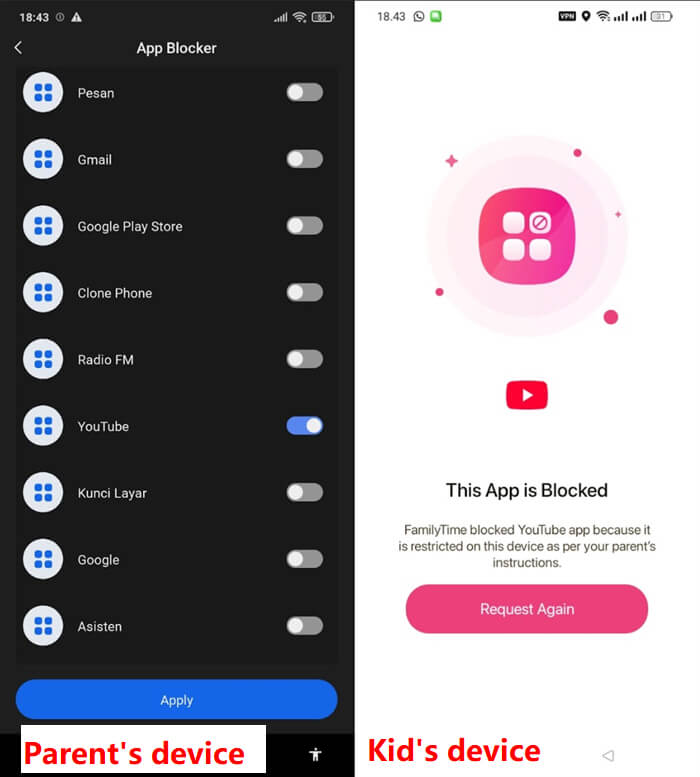
We also found consistent results when entering the YouTube URL into the website blocker list, where the link automatically became instantly inaccessible.
However, when we tested its Internet filtering feature, its performance did not work as effectively as we expected. Even though we had activated the internet filter covering four protection categories within the app, the child’s device still displayed some explicit search results when using the search engine.
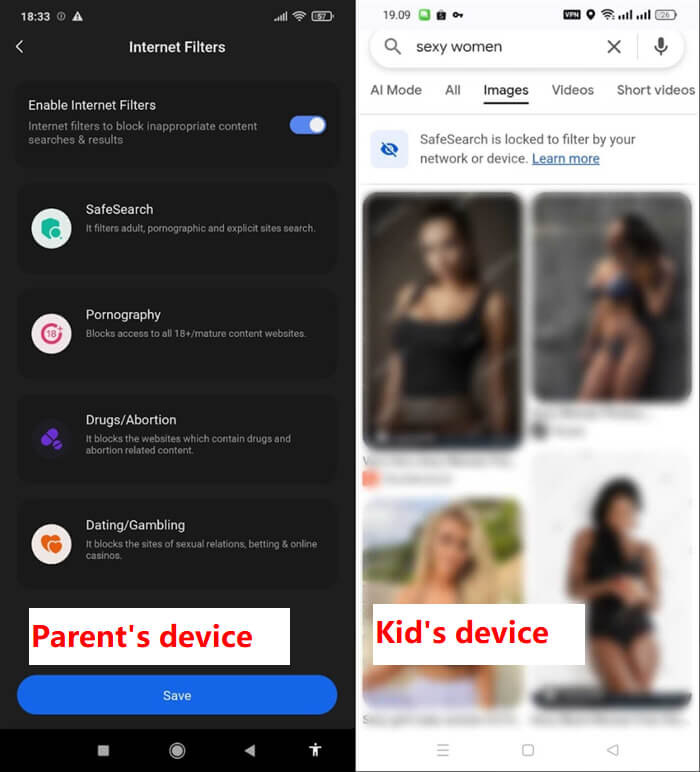
Overall, this blocking feature offers an excellent basic concept to protect children from inappropriate content in the cyber world.
Its ability to block specific apps and website links already operates reliably, though the effectiveness of its automatic Internet search filtering may still require a bit of improvement to make the child’s online protection even more effective.
5.Location Tracking & Geofencing
This location-tracking feature is designed to help you easily monitor your child’s real-time position on the map and supervise their daily movements 24/7.
Additionally, the geofencing functionality allows parents to mark key locations, such as home or school, to receive automatic notifications whenever the child enters or leaves these designated areas.
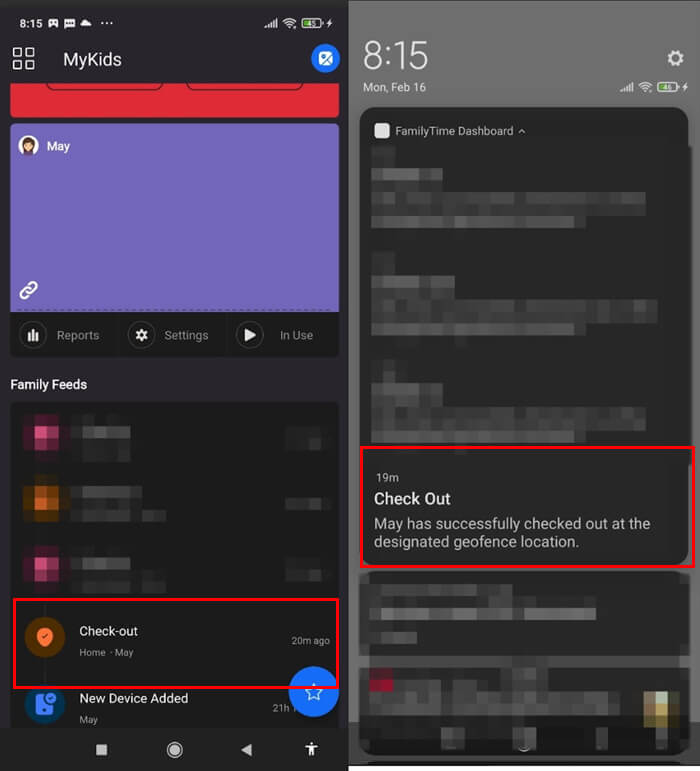
When we tested the geofencing feature, we found it to be quite functional—it successfully recorded the child’s entry and exit activities at saved locations.
However, the alert notifications sent to the parents’ devices sometimes experience a very slight delay, as shown in our testing where the app dashboard recorded the child leaving home at 07:55 AM, yet the alert only appeared on our device at 07:56 AM.
As for location tracking, the performance of this feature was sometimes not as effective as expected in certain situations.
For example, when the child was home with us, their device icon on the map temporarily shifted to another area for about one to two minutes before finally returning to the house area.
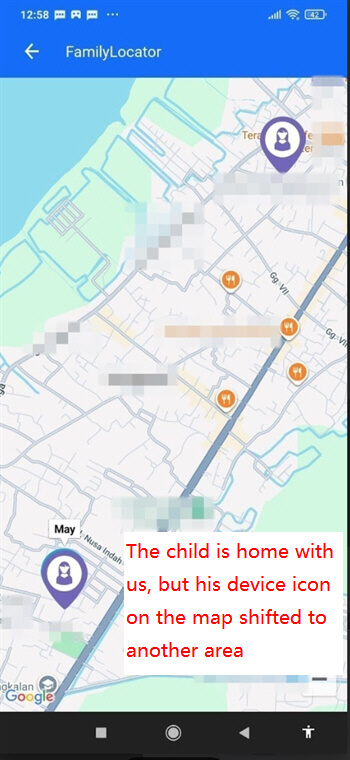
Additionally, there was another challenge when we tried to monitor the child who was not at home. We received an alert when the child left the saved location at 12:26 PM, but the icon remained stuck at the same location when we checked the Family Locator at 12:58 PM.
These two findings align with several user notes from the Google Play Store during our research. One user reported a similar yet distinct experience, indicating that some users might experience location synchronisation delays resembling our testing findings.
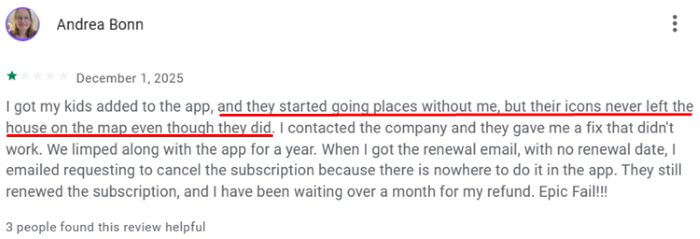
Fundamentally, this tracking functionality offers a solid concept that provides parents with peace of mind, as the ability to instantly monitor locations and travel history is a potential daily monitoring tool. However, you might need to adjust your expectations, as the system sometimes does not update the child’s location as quickly as desired.
It is worth mentioning that another parental control tool on the market, AirDroid Parental Control, boasts high-precision location tracking and up to 30 days of historical data.
Additionally, it supports safeguarding your child’s offline safety; when you’re worried about your child’s safety and can’t reach them, you can use it to check their surroundings and listen for sounds.
6.Safety
The safety features in this app are designed to provide you and your children with a sense of security when they are not home, with three main functions: Pick Me Up to request a ride, an SOS button for emergencies, and a Speed Limit to monitor vehicle speed limits.
These three supporting tools are certainly very crucial in helping parents respond to their child’s situations or needs more quickly and purposefully.
During testing, the performance of physical safety support features such as Pick Me Up and SOS was very effective, with their alerts sent to our device in real time and with no delay. This instant system response is highly important because it allows you, as a parent, to immediately provide first aid or arrange a pick-up in times of need.
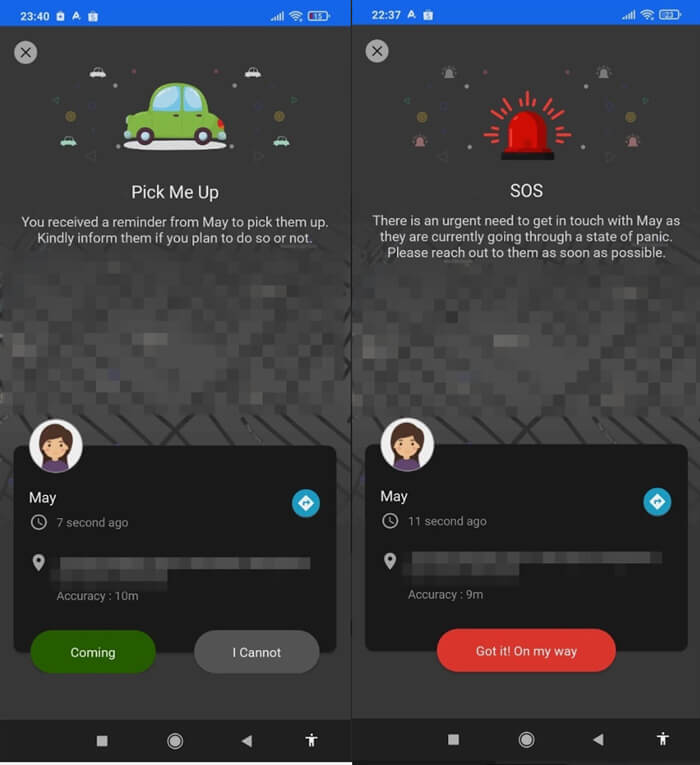
Meanwhile, the Speed Limit feature is highly practical because you only need to set the maximum speed to trigger the warning system.
However, during our testing, we drove reasonably without exceeding the set limit, so we did not have the opportunity to directly observe the effectiveness of its violation warning alerts—although conceptually, this speed monitoring remains a very useful addition for supervising children’s driving habits.
Overall, these safety features provide an additional layer of protection that is highly proactive and easy for families to use. The quick response to emergencies and the pick-up features are very convincing strengths that support your daily monitoring.
7.Ease of Use
Overall, this app features a fairly intuitive interface designed to be easily accessible by parents directly from the main dashboard, making it easier for you to manage your child’s digital habits.
The app also includes TimeBank or FunTime features that let children convert remaining minutes from their daily time limit into entertainment time.
However, during our testing, the navigation performance of this app sometimes did not run as effectively as expected due to the appearance of error messages related to the internet connection that kept asking us to reconnect to the network on both our device and the child’s despite using a stable internet connection.
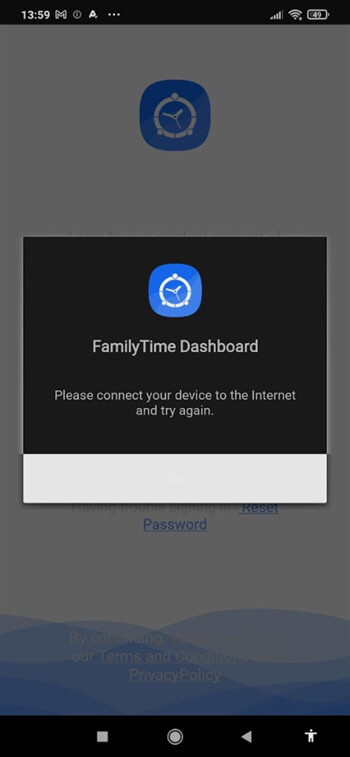
These errors might slightly affect the user experience, as you sometimes need to close and reload the app to rerun it.
In conclusion, this platform offers great operational ease with its user-friendly menu layout and easily manageable features, though your navigation experience may occasionally be slightly interrupted by network issues that trigger those error messages.
This app remains highly practical to operate daily, even though its internal response stability aspect still has room for further refinement.
8.Pricing
This app offers a highly flexible pricing structure to suit family needs, with three subscription options that are not tier-based, meaning all plans offer the exact same features. This ensures you, as a parent, can access all child-monitoring functions without worrying that important features will be locked.
The only difference among these three subscription options is the duration of the time commitment you choose, as the system is designed so that the longer the plan duration, the lower the subscription fee. Therefore, you can choose a monthly subscription for $13.99, a quarterly plan for $33.99, or an economical annual plan for $68.99.
Overall, this pricing system provides transparency and convenience for parents planning their child’s digital security budget, as you receive equivalent value across plans. This flexibility is also highly helpful, as you can try the app for a full month before deciding to make a long-term commitment.
9.Customer Service
Customer service is an important aspect to help you understand and maximize its various functions. This app provides a support team to assist users with technical issues and overall account management, helping parents maintain peace of mind when managing their family’s digital security.
However, we noted that some users face issues when interacting with the support team. Based on the experiences of several parents, the customer service assistance process for subscription cancellations sometimes does not run as effectively as expected, occasionally resulting in unplanned automatic renewal charges that require users to engage in further communication with the team.
Here’s user feedback on Google Play Store:
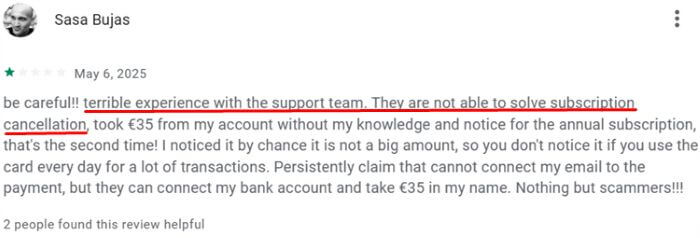
Overall, customer service is a valuable resource that supports the smooth operation of your child monitoring service. However, the support team’s efficiency in resolving administrative issues, especially the service termination process, still has room for improvement to make the user experience smoother.
Is FamilyTime the Right Choice for You?
The suitability of this app highly depends on your family’s digital monitoring priorities.
1.When is it the fit choice?
- Ideal for immediate emergency assistance with highly responsive physical safety features.
- Suitable for dependable daily scheduling with smooth screen time and app blocking.
- Appropriate for parents seeking practicality through an intuitive, straightforward interface.
2.When is it not the fit choice?
- Less suitable for automated social media monitoring, as it requires constant manual checking to protect the child.
- Less ideal for real-time location tracking that is free from occasional synchronization delays and inaccuracies.
- Not recommended for reliable call and SMS monitoring due to issues with syncing communication history.
If you are seeking safer, more comprehensive device control with strong social media monitoring and instant risk alerts, AirDroid Parental Control offers advanced, real-time supervision to thoroughly secure your child’s digital environment.
Best Alternative to FamilyTime – AirDroid Parental Control
Noted limitations in screen time scheduling accuracy and app/content blocking effectiveness within this FamilyTime App Review—this is where AirDroid Parental Control fills the gap, offering a highly stable, instantly active, and comprehensive protection system.
1.Why Parents Choose AirDroid Parental Control?
- Better Price: Only $5.00 per month with the annual plan, featuring more powerful and comprehensive protection features.
- Strong social media monitoring: This app monitors the child’s digital activities in depth across 14+ social media platforms.
- Instant alerts for risky online behaviour: Once harmful keywords are detected, it will send real-time alerts to parents.
- Stable location tracking: You will get a stable location-tracking feature, complete with precise geofencing and a child’s travel history for the past 30 days.
- Offline Safety: As additional physical protection, remote camera access and one-way audio features are available to check the sounds and environment around the child.




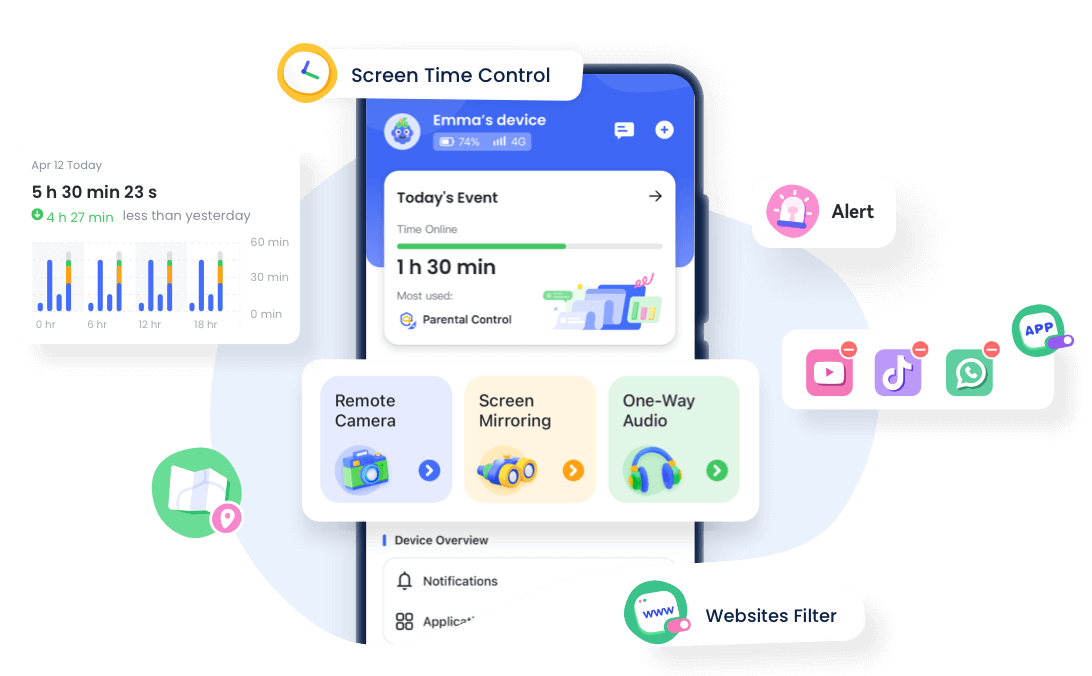
2.AirDroid Parental Control vs. FamilyTime
| Features | AirDroid Parental Control | FamilyTime |
|---|---|---|
| App Usage Tracking |  Advanced Advanced | Basic |
| Screen Time Control | | |
| Real-Time Screen Monitoring | |  |
| Notification Sync | | |
| Remote Operation | | |
| Social Media Monitoring | 14+ platforms |  Limited Limited |
| App Blocking & Content Filtering | | Require refinement |
| Location Tracking | | Occasional delays & inaccuracies |
| Pricing | $9.99/month | $13.99/month |
| Device Compatibility | Android & iOS | Android & iOS |
Final Verdict: Is FamilyTime Worth It?
Concluding this FamilyTime App Review, we give this platform a medium rating because it serves as an adequate tool for basic digital monitoring. This app is an ideal choice for parents who need highly responsive physical safety alerts, dependable screen time scheduling, and reliable app/website blocking within an intuitive interface.
However, some of its core functions still require further refinement, including call and SMS monitoring, internet search filtering, and location accuracy.
Therefore, if your family requires more precise, comprehensive device control, AirDroid Parental Control is a much better alternative, offering automated social media alerts and stable location tracking.















Leave a Reply.