AirDroid Parental Control
24/7 Kids' Guardian via App & Web
- 👀Live surroundings and location tracking
- 🔞Content Monitoring and App/Web Blocking
- ⚠Instant alerts for online risks and geofences
- ⌛Screen time control and monitor

Does WhatsApp Show Your Phone Number? Can You Hide It?
Due to growing concerns about privacy among people, many of you may wonder: "Does WhatsApp show my phone number?"
Being a popular messaging platform with a massive user base, WhatsApp requires your phone number for registration and service. Then, to what extent is your number visible to others? In this article, we'll tell you the answer.
Does WhatsApp Show Your Phone Number
Yes—WhatsApp will show your mobile number. Your phone number isn't just for login; it becomes your public account ID on the platform, visible to anyone you message or join a group with.
That exposure is bigger than most people think. Researchers at the University of Vienna found that WhatsApp's use of phone numbers as public identifiers allowed them to collect 3.5 billion registered numbers through basic enumeration. Phone numbers were never meant to be secret account IDs, but that's exactly how WhatsApp treats them.
The phone number associated with WhatsApp is utilized to:
- Verify your account and identity across devices.
- Retrieve your contacts list.
- Back up and sync your WhatsApp data and messages.
- Protect the conversation with E2E.
Who Can See Your WhatsApp Number?
Since your phone number is your identity on WhatsApp, it's automatically shared in various interactions. Here's who can see it so you can better understand and control your privacy:
1. Contacts who have your number
If a person saves your number in their device and uses WhatsApp, besides being able to see your profile, they can add you to their WhatsApp contacts or send you a direct message.
2. People you message
If you initiate a chat with a person on WhatsApp, your number will be visible to that person even if he doesn't have your number before.
3. Group members
Additionally, when you become a member of a WhatsApp group, all the people from the group can see your number even if they do not save your number (and vice versa). And it's not just the number that's visible. the same study found that 44% of U.S. accounts had publicly visible profile photos attached to those numbers, and 33% showed public "about" text. In countries like India and Brazil, over 60% of accounts had profile photos exposed to anyone who had their number. The same situation applies to strangers who can be members of the public or large community groups.
How Do You Find Out Your WhatsApp Number?
Now that we've covered whether your number is visible to others, you might need to check what number is actually tied to your WhatsApp account — especially if you're using dual-SIM. Well, just perform the following easy steps:
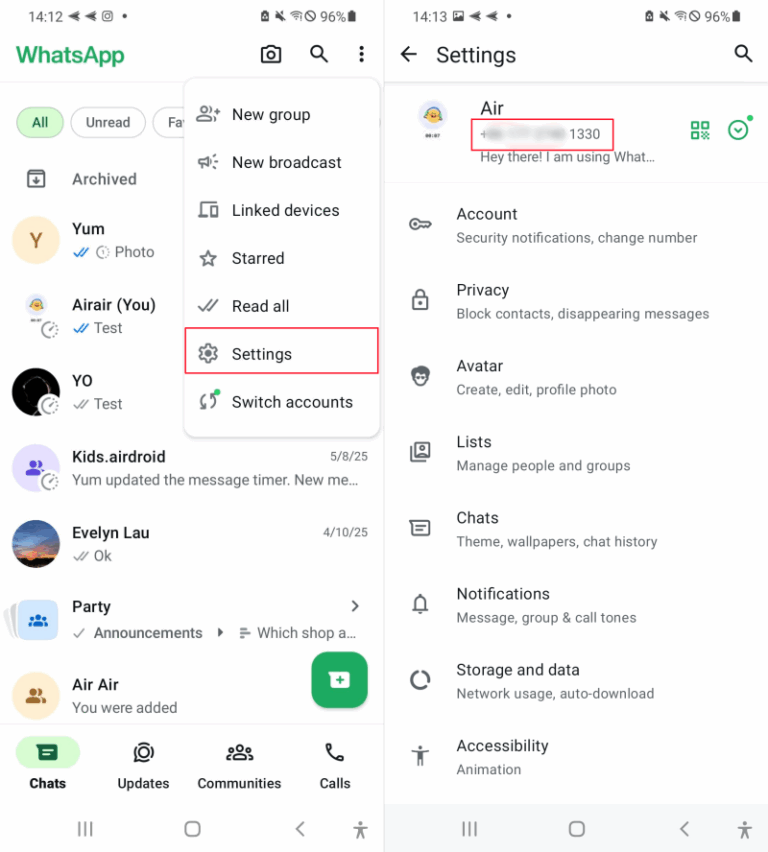
- Step 1. Launch the WhatsApp app on your mobile phone.
- Step 2. Head to WhatsApp Settings. For Android users, please tap on the three-dot menu and choose Settings.
- Step 3. Click your profile at the top.
- Step 4. Then, your WhatsApp phone number will be shown right below the profile information.
Can You Hide Your WhatsApp Phone Number?
NO! WhatsApp certainly does not enable users to hide their phone numbers. Privacy guides confirm there's no workaround. The YourBusinessNumber guide puts it simply: you can't hide your phone number on WhatsApp. It stays visible in your profile and to everyone in any chat or group you join.
The phone number is essential for communication on this messaging app. This is why it remains visible to the people you converse with, not only in one-to-one chats but also in groups.
There are, however, alternative ways to keep your real phone number confidential from others on WhatsApp.
Alternative 1: Use WhatsApp without Phone Number
You can register for WhatsApp using a secondary or virtual number. This helps protect your actual number while still allowing you to use the app.
To get a secure virtual number for WhatsApp, we recommend using the virtual number service - Google Voice, provided by Google.
- Step 1. Visit voice.google.com and sign in with your Google account. Choose a Google Voice number by entering a city or area code.
- Step 2. Connect your real US number to get the virtual number.
- Step 3. Launch WhatsApp and log in with your Google Voice number.
- Step 4. You will get the WhatsApp verification code via SMS on the Google Voice website or in the app.
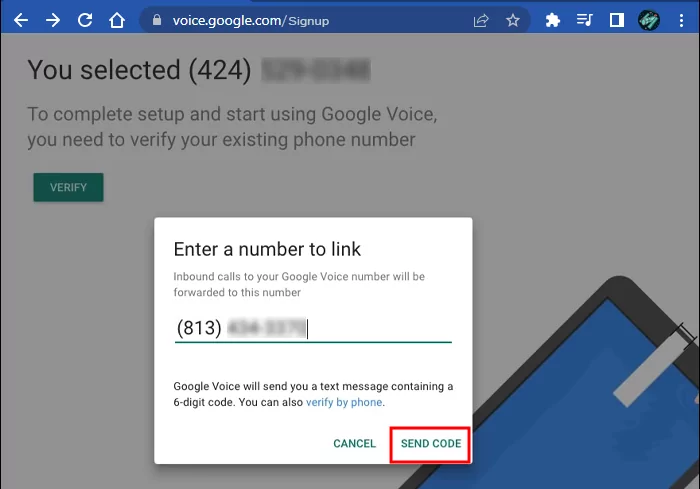
In this way, only your Google Voice number will be presented to your WhatsApp contacts instead of the actual phone number, which will be kept private.
Alternative 2: Change Your Real Phone Number
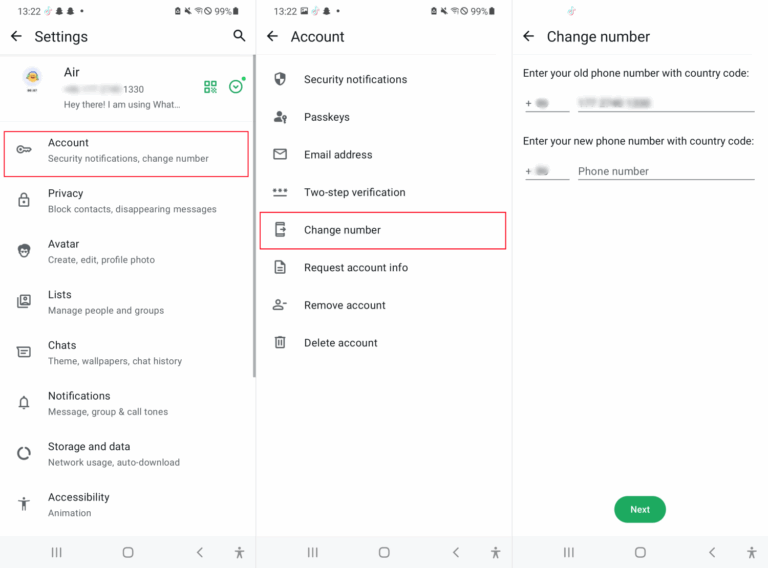
You can also go to the app settings to change your current number. Instead of using your real phone number, consider linking a secondary or landline number to your WhatsApp account for privacy.
- Step 1. Open the WhatsApp app and go to "Settings."
- Step 2. Select "Account > Change Number." And then enter the new number.
- Step 3. Lastly, WhatsApp will prompt to verify the new number with an SMS or call.
If you can't access this option, it could be that you're using WhatsApp on the linked device. So, switch to the primary device to continue.
FAQs about WhatsApp Phone Number
If I block someone, can they still see my number on WhatsApp?
Yes. When you block someone, it doesn't erase your number from their contact list or chat history. Blocking cuts off future messages and calls, but it doesn't wipe your number from their phone. SmallUsefulTips notes that a blocked contact can still see your number if it's saved in their address book, just like any other contact they have stored.
How can I stop spam messages on WhatsApp?
As long as spammers have your phone number, they can send messages to you. Spam is more than a nuisance—it can lead to account theft. An NCESC security warning explains that scammers who get hold of your number can impersonate you or intercept SMS security codes, potentially breaking into financial and social media accounts. That's why turning on "Block unknown account messages" in Settings > Privacy > Advanced is worth doing.
Is my WhatsApp number the same as my phone number?
Yes. Generally, WhatsApp uses your mobile phone number that you used for registration as your account ID.
Can I use the same number for two WhatsApp accounts?
No. The WhatsApp policy clearly states that each phone number can only be associated with one account.
Conclusion
WhatsApp not only displays your phone number but also lacks any feature to hide it. You need to provide your phone number before using WhatsApp, which will be visible to anyone you talk to or if you are part of a common group.
Yes, this could potentially be seen as a privacy issue. So, to protect yourself from spam or being found by people you know, try registering with a Google Voice number, using a secondary SIM, or changing your current number.
List of Sources
- Does WhatsApp Show Your Phone Number
- Wired - A Simple WhatsApp Security Flaw Exposed 3.5 Billion Phone Numbers (https://www.wired.com/story/a-simple-whatsapp-security-flaw-exposed-billions-phone-numbers/)
- Who Can See Your WhatsApp Number?
- Wired - A Simple WhatsApp Security Flaw Exposed 3.5 Billion Phone Numbers (https://www.wired.com/story/a-simple-whatsapp-security-flaw-exposed-billions-phone-numbers/)
- Can You Hide Your WhatsApp Phone Number?
- YourBusinessNumber - Can You Hide Your Phone Number On WhatsApp? (https://www.yourbusinessnumber.com/en-US/blog/can-you-hide-your-phone-number-on-whatsapp)
- FAQs about WhatsApp Phone Number
- SmallUsefulTips - The Uninvited Guest: Can Strangers Message You on WhatsApp? (https://smallusefultips.com/can-strangers-message-you-on-whatsapp/)
- NCESC - Is it safe to give WhatsApp number to strangers? (https://www.ncesc.com/geographic-faq/is-it-safe-to-give-whatsapp-number-to-strangers/)










Leave a Reply.