AirDroid Parental Control
All-in-One Safety Solution for Kids
- ⌛Up to 30 days location history
- 🔞14 + popular social media content monitoring
- 👀Live surroundings and screen mirroring
- ⚠Instant alerts for online risks and geofences
Covenant Eyes Review 2026: How It Works and What Parents Should Know
For parents concerned about their children’s online safety, finding a reliable filtering/anti-pornography tool has always been a top priority. Many of them are drawn to Covenant Eyes for its high ratings but remain unsure whether the app effectively safeguards children or meets their family’s specific needs. This Covenant Eyes review focuses on the real issue: Does the app truly protect children, or is it strictly designed for a specific group?
To answer this and ensure accuracy, we tested the app on two iOS devices: one iPad acting as an Ally (guardian) and one iPhone as the monitored child’s device. Based on this real-world scenario, this Covenant Eyes review will break down its technical limitations and compare it with other solutions that may be better suited to protecting your children.
Quick Verdict for Parents
Based on this Covenant Eyes review, the app is excellent for adults seeking self-improvement, but it’s not really adequate for parents who want to protect their kids' digital safety. It can be utilized on mature teens who voluntarily agree to accountability and want to build trust. However, it’s not suitable for stopping rebellious children because it lacks the tools to physically block apps or limit device usage.
One weakness highlighted in this review of Covenant Eyes is that most monitoring focuses on web browsers and sometimes fails to detect explicit content in privately used social media apps. It doesn’t have the usual safety measures—screen time limits, app blocking, and location tracking—either. Additionally, the high monthly price and complex setup process make it less practical than other comprehensive parental control options.
Pros:
- Encourages trust and open conversation
- Includes high-quality educational mini-courses
- Privacy-friendly blurred screenshot reporting
Cons:
- Lacks screen time and app blocking features
- Major blind spots in social media apps
- An expensive monthly plan with a time-consuming cancellation
Covenant Eyes Features Overview:
| Features | Score | Explanation |
|---|---|---|
| Screen Accountability | ★★★☆☆ | Slight delay in alerts, a detection blind spot exists |
| Porn Blocking | ★★★☆☆ | Web-only blocking with no in-app filtering capabilities |
| Family Engagement & Growth | ★★★★★ | Excellent educational resources and transparency tools for trust-building |
| Price | ★★☆☆☆ | High monthly cost and a difficult manual cancellation process |
| Ease of Use | ★★★☆☆ | Complex setup, high battery drain, and frequent VPN connectivity issues |
What Is Covenant Eyes & How It Works
Covenant Eyes is an internet accountability software aimed at managing digital temptations, but it emphasizes creating accountability rather than blocking sites. The app captures random screenshots and uses advanced AI to identify any explicit content.
What parents need to know is that this isn’t a typical parental control app for controlling kids. It’s actually more of a self-management tool that targets adults who want to improve and build better digital habits. With this, the system depends on self-honesty rather than strict controls or heavy restrictions.
Covenant Eyes Key Features
This section breaks down the app’s core capabilities, analyzing how effectively its accountability, blocking, and educational tools work to protect your family.
1. Screen Accountability
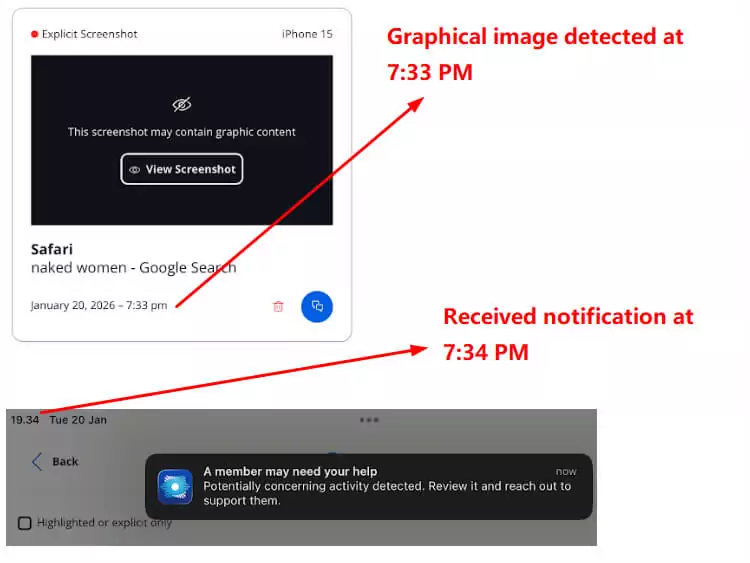
One key aspect analyzed in this Covenant Eyes review is Screen Accountability. This feature works by taking random screenshots of the child’s browser. Once captured, AI analyzes the content and instantly blurs it to ensure privacy before sending it to the server. The guardian/ally then receives this blurred report via the Activity Feed for review.
To ensure an honest Covenant Eyes review, we put the claim regarding “instant alerts to explicit screenshots” to the test. Unfortunately, the testing results showed a slight delay. Notifications appeared a few seconds after scrolling through sensitive search results on Google (almost a minute).
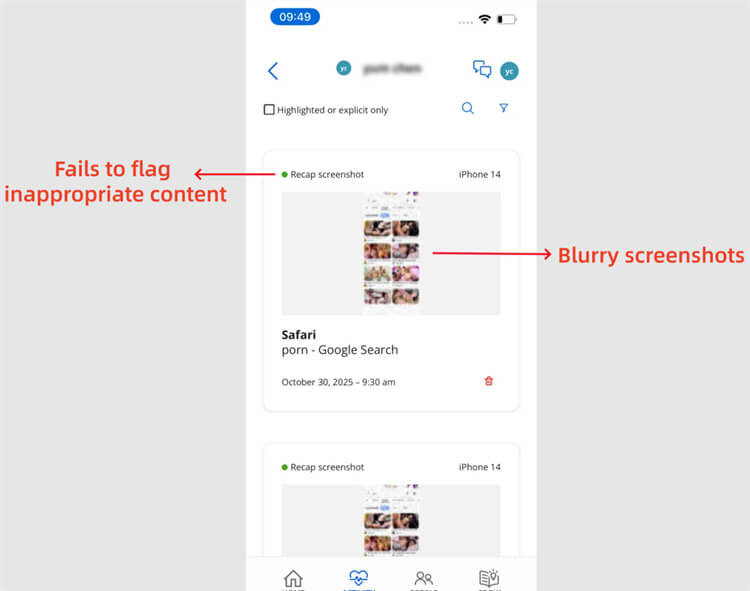
What's more, it fails to flag inappropriate content occasionally, and all the automatic screenshots (even the flagged ones) are blurry and cannot be zoomed in. On the one hand, it protects privacy boundaries for relationships; on the other hand, this makes it hard for parents to verify the actual content accessed. Consequently, it is an important factor for families to consider before using this app.
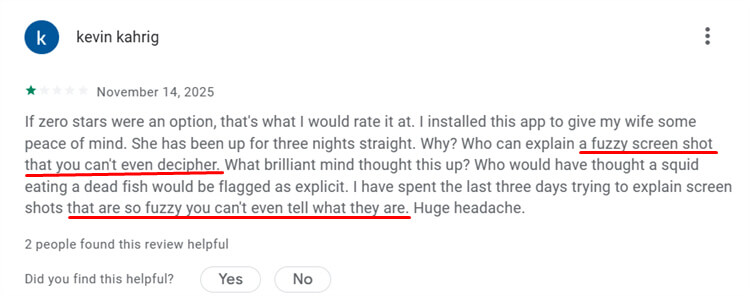
It's worth noting that this feature may have some false positives. Some users have complained that these blurry, incorrect screenshots have caused conflicts in their family relationships.
Covenant Eyes review also uncovered a few confusing contents in the system. Pop-up notifications appear to trigger only for hardcore pornography (explicit screenshots), while other suspicious activities are silently listed in the activity feed. This forces parents to constantly check the feed manually. It’s a crucial detail because it implies the automated system isn’t always reliable for full protection.
Though it can detect most of inappropriate content, the alarming finding in the Covenant Eyes review involved a detection loophole. When we tested the keyword “18+ movies” in the short video section on Google, an explicit, disturbing GIF slipped through censorship completely. The system failed to detect or record this activity, and it can be improved if possible.
2. Porn Blocking
To evaluate the effectiveness of this feature, we tested the blocking mechanism to see exactly what it filters and where it falls short.
Types of Content Covenant Eyes Can Effectively Block
According to Covenant Eyes' official documentation, its content filtering mechanism is primarily based on website domain blocking and custom blacklists. This was verified in actual testing. After enabling the Strong Blocking protection level and adding an adult website to the custom website list, the system was able to completely block access to that domain, performing as described in the official "website-level filtering."

On iOS devices, Covenant Eyes' filtering effectiveness depends on specific system configurations. The official documentation explicitly states that due to iOS system limitations, Safari needs to be used as the primary browser, combined with Apple Screen Time restrictions, to achieve more stable filtering. Therefore, during setup, the app suggests restricting or removing other third-party browsers (such as Chrome and Firefox) to prevent bypassing the filtering rules. While this design improves filtering reliability, it reduces the flexibility of children's device use to some extent.
Compared to iOS, Covenant Eyes' blocking capabilities are relatively stronger on Android devices. In actual use, when children access adult websites through a browser, Covenant Eyes effectively prevents the page from loading and displays a blocking warning page. This is generally more stable on Android than on iOS because the system allows for deeper network traffic control and doesn't rely entirely on a single browser environment.
Types of Content Covenant Eyes Cannot Effectively Block
From the perspective of its official functional boundaries, a significant limitation of Covenant Eyes is that its filtering capabilities are primarily focused on the browser level. If children install and use other browsers without strict restrictions, they may indeed bypass the filtering mechanisms based on Safari and system configurations. This is not a vulnerability, but an objective result of the permission restrictions on the iOS platform.
Furthermore, Covenant Eyes does not offer complete device management functionality. According to official documentation, the app does not support screen time management, app-level blocking, or app usage restrictions. This means that when inappropriate content is accessed through an installed app (not a browser), Covenant Eyes cannot proactively block it.
This issue is particularly evident in social media scenarios. Because Covenant Eyes' filtering logic relies on website domains rather than app-internal content recognition, search results, images, or videos within social media apps are not within its blocking scope. In testing, when searching for adult keywords through the X (formerly Twitter) app, the relevant content was not filtered or blocked, consistent with the official statement that it "cannot filter in-app content."

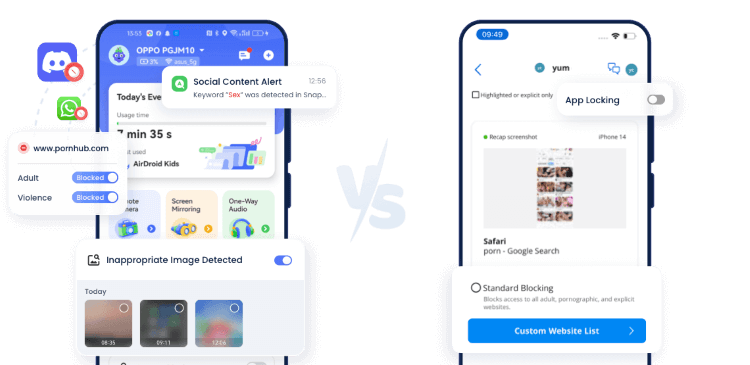
While a parental control tool, AirDroid Parental Control, can monitor over 14 social media platforms. It can easily set X parental control and will alert parents once detect risky keywords.
3. Family Engagement & Growth
In addition to technical monitoring, the app offers several resources to foster open communication and provide educational support for families.
Activity Feed & Check-ins
This feature serves as a solid transparency bridge between accountability partners. The Activity Feed is appreciated for recording daily digital footprints, while the Check-ins feature sends periodic reports. This mechanism is very helpful for triggering open conversations about healthy device use habits, rather than simply functioning as a tool for spying on the child.
Learning & Mini Courses
A valuable addition found during this Covenant Eyes review is the educational material library. The mini-courses provided are informative enough to equip parents with essential knowledge about digital safety for families. These materials aren’t only technical but also touch on psychological aspects, which are considered very important for the child’s character development.
Community Connection
Besides the technical features mentioned in this Covenant Eyes review, the app actively tries to build a supportive ecosystem. The Community Connection feature allows engagement with other parents who share a similar vision. This provides positive moral support, creating a sense that families aren’t fighting alone in building healthy digital habits for the child.
4. Pricing
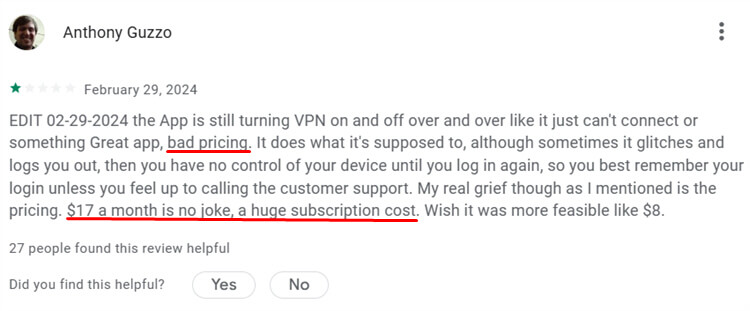
In terms of value for money, the price is slightly high considering the features offered. At $19.99 plus tax per month, the package options are very limited, with only two choices available. Considering this app “only” functions as a screen monitor without screen time limits for the child, the subscription cost feels less competitive for parents seeking a comprehensive solution.
Another aspect of this Covenant Eyes review that proves time-consuming is the service cancellation mechanism. Unlike most modern apps that allow direct cancellation in account settings, many users complained that this service requires them to contact customer service manually by email or phone. The process becomes inefficient and time-consuming because users must go through so much trouble just to stop monthly billing.
5. Installation & Setup
When we installed the app for this Covenant Eyes review, the process wasn’t really hard to understand, but it took much longer than we expected. The steps aren’t as simple as “download and use,” because dedicated time is needed to ensure each stage is completed correctly. The initial verification and installation process is quite lengthy and wordy compared to similar apps.
The most crucial and slightly demanding part of this Covenant Eyes review is the configuration stage, which ensures the app works effectively on the child’s iOS device. Many manual settings must be adjusted according to the Victory Shield installation guide to ensure the system isn’t easily broken. If just one step is missed, monitoring effectiveness can decrease drastically, so this setup process demands high precision.
6. Ease of Use
Covenant Eyes excels at Screen Accountability with its intuitive, real-time monitoring features that foster transparency without overstepping privacy boundaries. Its robust porn-blocking capabilities stand out, boasting a constantly updated filter that effectively blocks explicit content across all devices and browsing platforms.
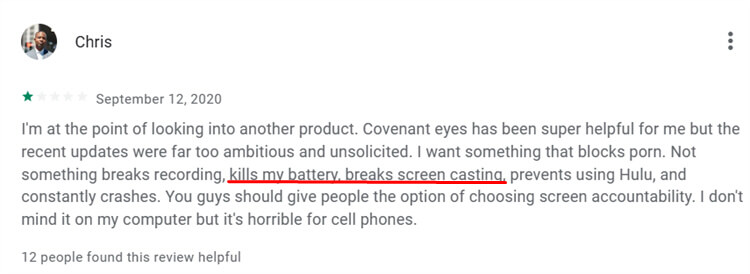
However, our daily experience with the app is occasionally disrupted because it relies on a VPN every time, and it can’t be turned off. VPN must remain active for filtering to run on the child’s phone; connectivity issues often occur, such as sudden disconnections or slow speeds. This issue can hinder the child’s browsing experience, which should ideally be smooth.
Furthermore, the impact on device performance noted in this Covenant Eyes review is very noticeable, especially regarding battery consumption, which becomes much more wasteful than usual. In terms of functionality, we also found that the alert system often experiences delays, resulting in real-time monitoring of the child being frequently missed. Plus, the unbinding function sometimes doesn’t respond well, making the long-term experience feel less reliable.
Is Covenant Eyes Worth It?
Determining whether Covenant Eyes is the right choice depends entirely on your specific needs and who will be using it.
1. Covenant Eyes Works Well for Families When:
Adult self-management & withdrawal needs: This app is a strong choice for adults who genuinely want to change their habits. Features like Community Connection and the educational library create a supportive ecosystem. It focuses on moral support and self-improvement rather than just blocking content, which is ideal for voluntary recovery.
Families that accept accountability mechanisms: If the goal is to build trust rather than police behavior, this tool fits well. The Activity Feed and Check-ins serve as a “transparency bridge.” This setup encourages open conversations about healthy digital choices instead of creating a strict surveillance dynamic.
2. Covenant Eyes Does NOT Work Well When:
Children/teenagers lacking self-accountability: The system relies heavily on the user playing by the rules. The filter, as mentioned in the Covenant Eyes review, has loopholes, including the single-browser requirement. A child can easily evade the monitoring if they install another browser, such as Chrome, without any supervision.
Children who have experienced insults/threats/cyberbullying/self-harm tendencies: There are serious blind spots in the app regarding in-app content. Since 46% of teens have experienced cyberbullying—mostly on social platforms—the app’s inability to identify activity within these apps is a major risk. This makes it unreliable in detecting instant threats like cyberbullying or emotional distress.
Families requiring features such as apps, screen time, and location services: Covenant Eyes isn’t really a parental control app; it’s a monitoring one. It doesn’t have key management features such as screen time limits, app blocking, and location tracking.
These limitations create significant gaps in a child’s safety. This is also why many parents are looking for alternatives to Covenant Eyes that offer broader protection.
Best Covenant Eyes Alternative for Parents – AirDroid Parental Control
AirDroid Parental Control emphasizes a different design goal compared to Covenant Eyes. It effectively blocks pornographic websites while also providing greater online and offline security. This ensures that the protection covers the entire device, not just the web browser.
Key Advantages of AirDroid Parental Control:
- Detailed Usage Reports: Pornography exists not only on websites but also in apps. AirDroid’s reports show exactly which apps children are addicted to. This allows parents to further examine the details of those apps that browser filters might miss.
- Screen time management: Unlike Covenant Eyes, AirDroid offers direct control over screen time. Parents can set daily limits and schedule downtime. This ensures that the child’s device use remains balanced and healthy.
- Social media monitor: This feature addresses the blind spot of in-app content. AirDroid allows parents to effectively monitor social media activity. This helps prevent cyberbullying and harmful interactions that occur outside the web browser.
- Check real-world safety: Safety extends beyond the screen. AirDroid includes physical safety tools, such as Live Location and Geofencing, to track the child. It also offers Remote Camera and One-Way Audio, so parents can check the immediate surroundings in real time.




Covenant Eyes vs AirDroid Parental Control:
| Features | Covenant Eyes | AirDroid Parental Control |
|---|---|---|
| Screen time management |  |  |
| Porn Blocking | (Browser Only) | (Comprehensive, both Browser & Apps) |
| App blocking | | |
| Social Media Monitoring | | |
| Live Location | | |
| Sync apps notification | | |
| Screen mirroring | | |
| Remote Camera | | |
| Sound around the child | | |
Final Verdict: Which One Should You Choose?
If you’re an adult wanting accountability and oversight, choose Covenant Eyes. This is the best app to use when trying to improve yourself. It offers an enabling environment through educational information and transparency reports, specifically designed to help individuals develop healthy digital habits with a trusted guardian.
However, if you’re a parent looking to minimize your child’s exposure to inappropriate content, you should choose AirDroid Parental Control. As highlighted in this Covenant Eyes review, parents often require complete features such as app blocking and screen time management. AirDroid provides these essential tools, offering a much stronger safety net for families to monitor their children’s online and offline activities.











Leave a Reply.