- Blocks harmful images before kids see them
- Prevents sexting using camera control
- Stops exposure instead of sending alerts
AirDroid Parental Control
24/7 Kids' Guardian via App & Web
- 👀Live surroundings and location tracking
- 🔞Content Monitoring and App/Web Blocking
- ⚠Instant alerts for online risks and geofences
- ⌛Screen time control and monitor

Canopy VS Bark: Which One Is Better for Family Safety?
Keeping kids safe online has become harder as children spend more time on phones, tablets, and social media apps. Parents want to protect their kids from harmful content, online risks, and unsafe interactions, but they also want to respect their privacy.
Canopy and Bark are two well-known parental control apps that approach family safety in different ways. Canopy focuses more on blocking harmful images and preventing sexting, while Bark focuses on monitoring messages and social media activity.
This guide compares Canopy vs Bark in detail, explains their strengths and weaknesses, and helps families choose the right app.
Part 1. Quick Verdict: Canopy vs Bark
Canopy and Bark both help protect children online, but each focuses on different risks.
Canopy is most effective at blocking harmful images and preventing sectioning. Proactively block nudity and semi-naked images before the child can view or send them. Parents who are concerned about visual content tend to prefer Canopy.
Bark focuses on monitoring communication and social media behavior. Scan messages, emails, photos, and more than 30 social platforms to find hazardous signals. Parents will receive warnings if Bark suspects the risk, instead of showing everything.
Who Should Choose Canopy?
- Are most worried about explicit images:
- If your main worry is your child accidentally or intentionally seeing pornographic or sexually explicit images online, Canopy is a strong choice. It blocks inappropriate visuals before they even appear on the screen.
- Want prevention, not alerts after the fact:
- Canopy is designed to stop harmful content in real time, rather than notifying you after your child has already seen it. This makes it suitable for parents who prefer proactive protection over monitoring and reports.
- Have a child at risk of sexting or sharing inappropriate photos:
- With real-time image detection, forced image removal, and camera protection on Android, Canopy helps reduce the risk of sexting and inappropriate photo sharing at the source.
- Want protection for the whole family, not just kids:
- Canopy also supports adult content filtering and accountability partners, making it a good option for families looking for shared digital boundaries.
Who Should Choose Bark?
- Are worried about their child's social and emotional signals:
- If you want alerts about potential self-harm, bullying, or emotional distress based on messages and social activity, Bark's AI-powered monitoring is designed to catch those patterns and notify you.
- Care most about texts, chats, and social media activity:
- If your primary concern is what your child is saying and who they're talking to, including messages, group chats, DMs, and interactions on platforms like Instagram, Snapchat, TikTok, or WhatsApp. Bark focuses on monitoring conversations and behaviors across those channels.
- Have kids active on multiple social platforms:
- If your child uses a wide range of social apps and you want a single tool to keep an eye on most of their message-based interactions, Bark's coverage of social networks and communication apps may fit your needs.
- Prefer alerts instead of full access:
- Bark emphasizes notifying parents about activity after it occurs, with reports and alerts that help you understand the context and decide how to respond.
Canopy Features Overview
Canopy provides parents with a powerful tool to block harmful content, especially images. Focus on prevention rather than monitoring conversations.
1. Image Content Blocking (Core Strength)
Canopy uses AI to scan images on websites and apps in real time. Block nudity or partial nudity before the image appears. This feature works effectively on web search and browser-based platforms.
If an image looks inappropriate, it is blocked before it appears on the screen. This means children won't accidentally see explicit pictures, even when browsing normal websites or using everyday apps. Parents don't need to rely on keywords or wait for alerts after something has already happened.
This image-first protection is Canopy's biggest strength and one of the main reasons parents choose it. Some apps make it very difficult for any third-party filter to filter inside them, so if there's inappropriate content on that app, you can use Canopy to actually cut that app off from the internet and make sure your family's safe.
2. Forced Inappropriate Image Removal
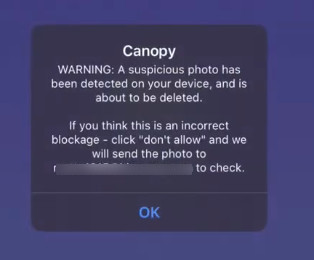
Canopy uses AI to scan images in the gallery in real time. If a potentially inappropriate photo is detected in the gallery, Canopy blocks it immediately, so your child cannot view or share it.
The image is then sent to the parent for review. You can check the photo from your own device and decide whether to allow it or delete it. If you choose to delete it, Canopy forces the image to be removed from your child's device, giving parents direct control instead of just alerts.

3. Camera Protection
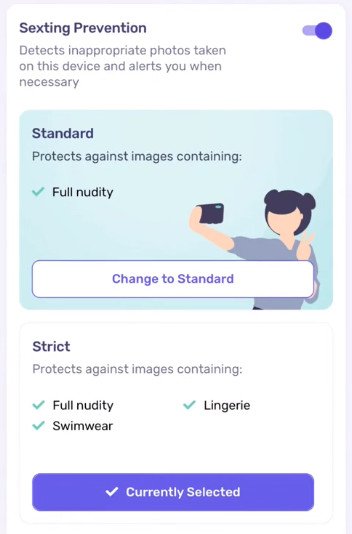
Canopy also prevents children from taking inappropriate photos with the camera, which helps reduce sexting risks at the source. When your child takes an inappropriate image, it locks the image. The child must delete the image or send it to a guardian to obtain approval. This system allows children to think before sharing dangerous photos. Parents can also choose the sensitivity level, only the nude can be blocked, swimsuit and lingerie can be blocked, etc.
4. Internet Blocking & Downtime
Some apps and websites are hard to filter, even for parental control tools. Canopy lets parents block an app's internet access completely, so the app can stay on the device but can't load content, send messages, or show anything online. It's useful when you don't trust what's inside an app but don't want to delete it right away.
In addition, Canopy allows you to create daily or weekly rules for device downtime, like during dinner, homework, or bedtime. By combining internet blocking and scheduled routines, parents can help children develop healthier screen habits while staying safe online.
5. Location Tracking & Geofencing (Basic Support)
Canopy lets parents see their child's real-time location on a map, so you always know where they are.
You can also set up geofences, which are virtual boundaries around important places like home, school, or a friend's house. If your child enters or leaves these areas, Canopy can send you an alert.
This feature helps parents keep track of their child's movements and get peace of mind, even if they are not constantly checking their phone.
6. App Removal Protection
Kids cannot remove apps from their Android devices without parental permission. This means your parental control settings and safety tools stay in place, even if your child tries to remove them. On iOS, similar app removal protection is possible, but it requires a more complex setup and takes extra time.
This feature helps parents keep control over important apps and ensures their safety settings can't be easily bypassed.
7. Adult Protection & Accountability Features
Canopy isn't just for kids. It also helps adults stay safe from explicit content online. You can set up an accountability partner who can monitor your activity and help you stay on track.
This makes Canopy a tool for the whole family, not just children, providing extra support for anyone who wants to reduce exposure to inappropriate content.
Pros
- Blocks explicit images before they appear
- Forced image removal & camera protection
- App removal protection
- Privacy focused
- Adult protection & accountability
Cons
- No message or social media monitoring
- No per-app screen time limits
- Unreliable sexting prevention
- No route history
- Limited iOS features
Bark Features Overview
Bark takes a different approach. It monitors behavior and alerts parents when problems appear.
Read more: Bark Comprehensive Review in 2026 (Tested)
1. Social Media Monitoring (Core Strength)
Bark monitors more than 30 social media platforms. It can track a child's activity on popular social media platforms like Instagram, Snapchat, TikTok, and Facebook.
It looks for potentially risky behavior, such as bullying, self-harm, drugs, and sexual content, and sends alerts to parents if something concerning is detected.
This feature helps parents stay aware of what their child is seeing, even across multiple social apps.
2. Message Monitoring
Bark monitors text messages, emails, and attachments. Supports iMessage, Google Messages, Gmail, Outlook, etc. The app only displays the content if the problem is detected. Parents cannot see the full text of the conversation.
This feature helps parents stay informed about their child's conversations without reading every message themselves, giving peace of mind while respecting some privacy.
3. Web & App Filtering
Bark blocks websites and apps by routing traffic through a secure VPN. Parents can block categories like social media, streaming, shopping, or AI tools. It cannot block offline apps like downloaded games or video players.
4. Screen Time Controls
Bark allows parents to pause the internet and create schedules. Parents can block access during school hours or bedtime. Bark does not track how long a child uses each app and does not support strict app time limits.
5. Location Tracking & Geofencing (Secondary Feature)
Bark tracks location in real time and keeps a 7-day history. Parents can see their child's real-time location on a map, so they always know where they are. But it needs a child to click check-ins.
You can also create geofences, which are virtual boundaries around places like home, school, or a friend's house. If your child enters or leaves these areas, Bark can send an alert. The feature works well, but updates every few minutes, not instantly.
Pros
- Strong social media and message monitoring
- Supports unlimited devices
- App removal protection
- Alerts focus on serious risks
- Encourages trust and privacy
Cons
- No full access to chats or browsing history
- No per-app time limits
- Easy to bypass with unsupported browsersn
- iOS monitoring works only on home Wi-Fi
- No money-back guarantee
Canopy VS Bark: Which One Is More Cost-Effective?
Choosing the right parental control app also means thinking about cost and value. In this section, we compare Canopy and Bark pricing, free trials, and what each plan gives families for their money.
Canopy Price and Free Trial
- Starts at $7.99/month for 3 devices
- Higher plans for 5 or 10 devices
- 7-day free trial
- Discounts available on yearly plans
Canopy charges based on the number of devices.
Bark Price and Free Trial
- Starts at $5.00/month
- Supports unlimited devices
- 7-day free trial
- No refund policy
Bark offers better value for large families.
Canopy and Bark's Value Comparison
- Small families with young kids may find Canopy worth the price
- Families with many devices save more with Bark
- Teens and social media users benefit more from Bark
- Image-focused protection favors Canopy
Canopy VS Bark: Which One Is Better?
Now that we have compared key features, let's decide which app works better. This section shows what each app does best, where each app falls short, and which one parents may prefer overall.
What Canopy Does Best
What Bark Does Best
- Monitors social media behavior
- Encourages parent-child conversations
- Supports unlimited devices
What Both Canopy and Bark Fall Short
- Lack real-time message and keyword tracking
- Not Enough Real-World Safety Features
- Neither app offers full app-level time limits
- Both apps have bypass risks on certain devices
Best Alternative for Full Family Safety
While Canopy and Bark focus mainly on digital safety—blocking images or monitoring messages—many parents also worry about real-world safety. Kids don't just face risks online; they may get lost, take a wrong route home, or run into unexpected situations after school or during activities.
A full-family safety solution should combine digital protection with real-life awareness, giving parents peace of mind whether their child is online, at school, or on the way home.
AirDroid Parental Control is designed with this balance in mind, helping families protect both online and offline safety with one easy-to-use tool.
1. Real-Time Location & Emergency Safety Checks
Location tracking matters most when a child does not respond. Both Canopy and Bark show location, but it feels limited in urgent moments. With AirDroid, parents can also watch and listen to the surroundings near their child. It helps parents understand what is happening instead of guessing. So parents act faster when safety matters.
2. App Monitoring With Custom Keyword Alerts
AirDroid monitors 14 popular apps, including TikTok, WhatsApp, Instagram, YouTube, Facebook, Snapchat, and others. It also lets parents add custom keywords. So if your child uses coded words, you can easily monitor them. This helps parents catch problems early, before they grow.
3. Flexible and Child-Friendly Screen Time Control
Screen time rules work better when kids can communicate. AirDroid allows children to request extra screen time directly inside the app. For example, a child can ask for 30 more minutes to finish chatting or homework.




Final Recommendation: Which App Is Right for Your Family?
- Choose Canopy if…
- Your main concern is blocking explicit images and sexting content. Canopy is great at stopping inappropriate photos before your child sees them and gives you control over image sharing and camera use, especially on Android devices.
- Choose Bark if…
- You want detailed monitoring of messages, emails, and social media activity. Bark is best for catching bullying, harassment, or risky conversations and alerting parents when something concerning appears.
- Choose AirDroid if…
- You want a full-family solution that covers both digital safety and real-world protection. AirDroid offers real-time location tracking, route alerts, device status checks, screen time management, and app control, making it ideal for parents who care about where their child is, what they’re doing, and how they use their devices.
Final Thoughts
There is no single parental control app suitable for all families. Canopy focuses on image safety. Bark focuses on alerts and communication. AirDroid provides a wide range of protection for families seeking deeper control and real-time safety tools. Choose an app that fits your child's age, habits, and your own parenting style.













Real-time Protection
4.6


Leave a Reply.