AirDroid Parental Control
24/7 Kids' Guardian via App & Web
- 👀Live surroundings and location tracking
- 🔞Content Monitoring and App/Web Blocking
- ⚠Instant alerts for online risks and geofences
- ⌛Screen time control and monitor

Aura vs Bark: Which Parental Control Tool is Right for Your Family?
When it comes to ensuring your child’s online safety among the best family tracking apps, two prominent names come up—Aura and Bark. Both offer parental control features, but their focuses are quite different. Aura is primarily built around family digital security and identity protection, while Bark specializes in AI-driven content risk monitoring for teenagers.
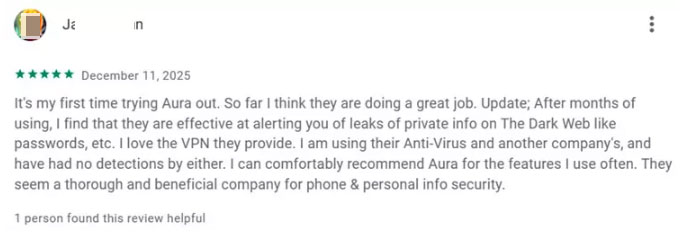
In this comparison, we’ll explore which app is the best fit for your family, based on a hands-on test of a Samsung device, reviews from Google Play users & long-term user feedback, and the most important features.
Aura Parental Controls vs. Bark review at a Glance
Choose Bark if you want monitor kids’ social media potential risk.
Choose Aura if you want basic parental control and kids’ digital security.
| Aura | Bark | Winner | |
|---|---|---|---|
| Google Play Rating | 4.5 | 4.2 | Aura |
| Content Monitor | Limited | Extensive (includes social media, texts) | Bark |
| Website/App Blocking | Solid | Solid | Tie |
| Real-Time Alerts | Triggers to keep online accounts safe | Alerts cover 29 teen-related danger categories | Tie |
| Location | None | Accurate, not real-time location, geofencing check-in requests | Bark |
| Screen time Limit | Customizable | Customizable | Tie |
| Online safety | Full-family digital security on antivirus software, VPN, scam call, and text protection | None | Aura |
| Pricing | $32/month | $14/month | Bark |
What Are Aura and Bark Designed For?
1. Aura Parental Control
Aura is designed for parents who want an all-in-one security suiteprotects adults, kids, and elderly family members from online risks.
It excels at protection on identity theft, data breaches, and online scams, while keeping an eye on their kids' screen time.
The platform features full 3-bureau credit monitoring, instant one-click credit lock and real-time financial transaction alerts for round-the-clock financial security. What’s more, it now leverages advanced AI technology to provide intelligent protection against spam calls and unwanted messages, upgrading its all-around defense capabilities for the whole family.
Compatibility: iOS, macOS, Android, Windows
Pros:
- Comprehensive protection on identity theft and online scams
- Device protection alongside basic parental controls
- Advanced security features on VPN, dark web, and phishing
Cons:
- No location tracking
- The family plan is slightly expensive
- Parental control features are basic
- Without text messages or social media monitoring
- Currently only available to families in the United States
2. Bark Parental Control
Bark, on the other hand, is aimed at parents who need a social media and content monitoring tool to help detect risks like cyberbullying, inappropriate content, and online predators.
It will alert parents when risky keywords are detected, so that parents can intervene easily. The AI-driven technology is preset, which means you can have hands-off monitoring. But the downside is you can’t customize specific keywords, which may cause some inconvenience when you have the need.
What’s more, it also provides screen time management, location tracking, route history, geofencing and SOS button.
Compatibility: iOS, Android, Chromebook, Amazon Fire
Pros:
- Unlimited devices
- Pre-built AI model supports hand-off monitoring
- Strong content monitoring on texts, emails, and 30+ social media platforms
- Real-time alerts on cyberbullying/self-harm/explicit content, etc.
Cons:
- Features are limited on iOS
- Only available to the United States, Australia, Guam, and South Africa
Both Aura and Bark have unique strengths depending on family needs. Though apps can alert parents when certain risks are detected, they don’t provide real-time context, to help parents see and decide in real time.
Aura vs Bark: Features Overview
1. Content Monitor
Aura vs Bark: what can they monitor:
| Aura | Bark | |
|---|---|---|
| Social media monitoring |  Over 30 apps Over 30 apps |  |
| Text message monitoring | | |
| Email monitoring | | |
| Internet search monitoring | | |
| Photos and videos | | |
| Slang & Emojis | | |
| Gaming monitoring | Gaming Activity Report, and flag risky voice and text chat | |
| Identity & Fraud | | |
Aura
Compared with Bark, Aura’s monitoring ability mainly focuses on Identity & Fraud and game protection. Aura’s parental monitoring capabilities center on delivering activity reports that focus closely on your child’s online behavior, while compiling a clear, concise summary of notable behavioral changes or suspicious online activities that may warrant parental attention.
Parents need to analyze how much time kids spend on apps to make a conclusion whether they have healthy screen time and behavior. It's so good that it promotes trust in the relationship, but parents can't intervene easily when risk occurs.
It excels in game safety, including cyberbullying & predator alerts, in-game voice & text monitoring, and a weekly gaming activity report.
Bark
Bark has better parental monitoring ability. And it is so good that parents can’t view all messages and chat on the device, only when Bark detects the keywords, which is for kids' privacy.
The app scans for critical risks, including violence, suicidal ideation, cyberbullying, online predators, dangerous language, and even slang. Once threats are detected, it will send immediate alerts via email, text message, or in-app, along with a snippet of the conversation to parents.
Also, it can detect on the browser, providing the link your child visited. You can click it and go through the page or videos that your child browsed.
In our hands-on testing, Bark’s social media monitoring worked well in identifying potential risks.
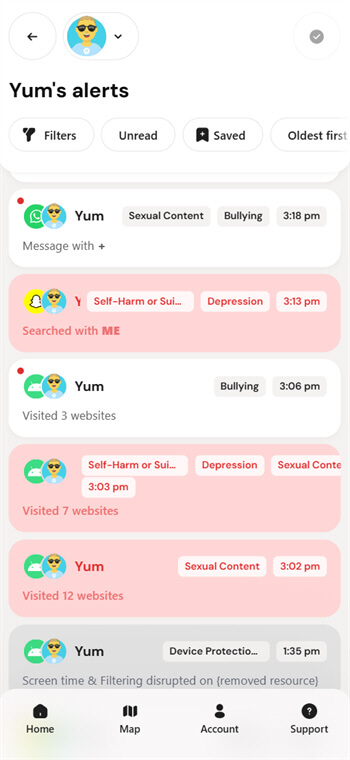
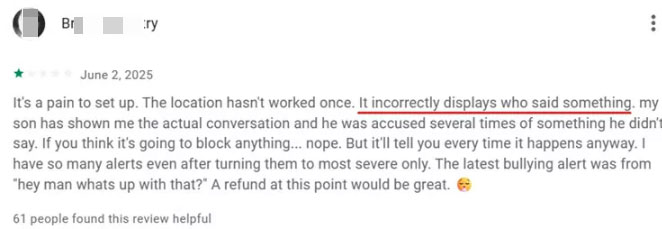
However, it’s important to note that sometimes Bark’s algorithms incorrectly flagged content due to the pre-built AI-driven mode. Users also complain about this point on Google Play.
2. Website/App Blocking
Aura
Aura enables users to block specific apps and websites with ease. If you find it tedious to block apps one by one, the platform also supports category-based content blocking covering high-risk categories like gambling, chat forums, dating services and explicit material. What’s more, Aura can filter out intrusive pop-up ads and banners, letting you browse your favorite sites without annoying distractions.
We used Aura’s blocking features to block apps and sites, and they performed reliably across the board.
Bark
Bark can directly block websites and apps that you don’t want your children view. When you access app blocking, it has already categorized the apps into different directories, making it easy for you to find the app you want to block. Also, if you feel it’s a hassle to block websites one by one, it allows users to turn on Safe Search to work on Google, Bing, and DuckDuckGo.
Bark can also block network access. Parents can turn Unidentifiable traffic feature on, including sites and apps like VPNs, peer-to-peer networks, and private gaming platforms.
We implemented blocking for multiple websites and apps on the child’s device, and the blocking feature delivered excellent and reliable results.
Both apps offer content filtering to block unwanted apps and websites, and there is little difference between their functionality in this regard.
3. Real-Time Alerts
Aura
Aura triggers to keep your online accounts safe. These alerts let you know whether your account details or passwords were exposed, especially after a data breach.
Types of Aura Activity Alerts:
- Dark Web Monitoring Alerts
- Personal Info & SSN Monitoring
- Identity Verification Monitoring
- Home Title Monitoring
- Criminal and Court Records Monitoring
- Financial Transaction Monitoring
- Bank Account Monitoring
- Credit Monitoring (3 Bureaus)
We tested Aura’s alert system to verify its ability to detect potential risks to children’s personal information security, and pleasantly, it performed exactly as advertised.
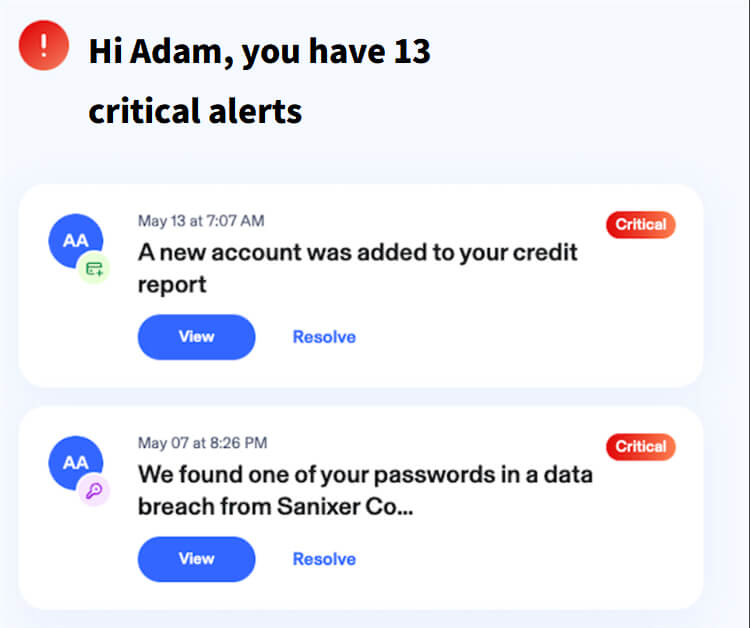
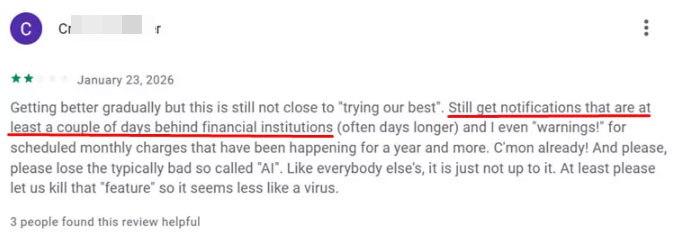
That said, some reviews on Google Play have complained about occasional notification delays of several days. In our experience, there are numerous interfering factors during data processing, and such delays tend to vary by device model and configuration.
Bark
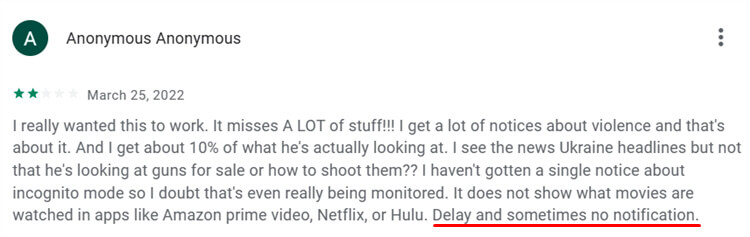
Bark can alert parents to over 29 different types of dangers when risky behaviors are detected on a kid’s device. However, we have noticed that quite a few users complained about Bark’s delayed notifications or even without alerts.
In order to verify whether delayed alerts exist, we tested on several apps and browsers, trying to provide an objective result. At first, it works well, but as the number of times increases, it occasionally delays alerts.
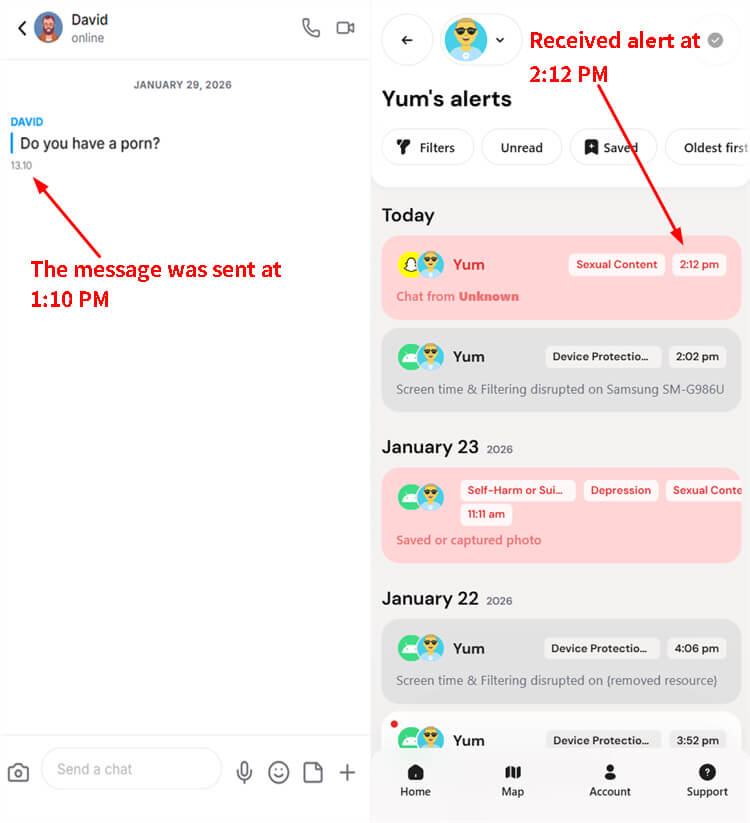
Users also complained about delayed alerts or even the lack of any notifications, and such occasional notification delays can still occur depending on the individual device and usage scenarios.
Both Aura and Bark can alert parents, but they can’t help them see what’s happening in real time through vague alerts. While another tool like AirDroid Parental Control, can offer such support by utilizing screen mirroring if kids fail to respond to urgent messages or show signs of being exposed to risky online content.
4. Location and Genfencing
Aura
Aura currently lacks location-tracking functionality for monitoring kids’ real-world movements—and this is a key area with significant room for improvement. After all, the ability to check a child’s whereabouts when they’re away from school is an essential need for parents, as it delivers invaluable peace of mind and a much-needed sense of security in their daily lives.
Bark
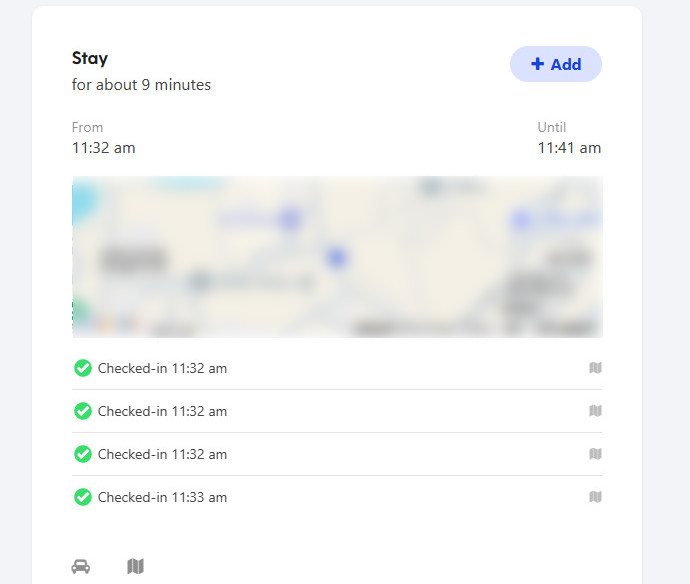
Bark’s location tracking is accurate, and geofencing will alert parents when kids arrive or leave the area. However, the location isn’t live. If you want to know your child's location, Bark will send a location check-in request to their device. The child must tap the request for their location to be shared with you, so you won't get updates automatically.
5. Screen Time Limit
Both Aura and Bark can create custom daily schedules, set app and website time limits, or pause the internet.
Aura
Aura offers four different time limit configuration options through its flexible time management feature.
- Daily Limits – Set a maximum number of hours your child can be online each day.
- App Limits – Limit how long your child can use individual apps. Website Limits – Set time limits for specific websites.
- Category Limits – Control time spent in categories like social media, music, or online shopping.
Bark
Bark lets you manage kids’ screen time on their device by different options.
- Daily routine – Solid rule includes bedtime, school time, free time, any other time through a week.
- Customize existing rules or routines – Tailor daily screen time, adjust app and website access limits, and tweak internet pause triggers to align perfectly with your family’s unique schedule, kids’ age-specific needs, and daily real-life commitments.
We put the time limit features of both apps to the test, and both delivered strong performance—they automatically locked the device as soon as the set time is up, striking a healthy balance between kids’ digital activities and real-life experiences.
6. Online safety
Aura
Beyond kid safety, Aura online safety delivers all-round protection for the whole family, including identity theft protection with $5M identity theft insurance coverage per adult, 3-bureau credit monitoring, financial fraud alerts, and military-grade data encryption. It also blocks spam calls, filters phishing sites via a built-in VPN, and secures personal information by removing it from data brokers.
Bark
Unlike Aura’s all-in-one suite, Bark’s core functionality is focused on detecting risky content, cyberbullying, and potential online threats across your child’s social media, texts, and emails—with no provisions for identity theft protection, credit monitoring, or financial fraud alerts for adults. It also lacks a built-in VPN for phishing site filtering, spam call blocking capabilities, or data broker removal tools to safeguard personal information beyond your child’s online activity.
7. Pricing and Value
Aura Parental Controls plans:
- Free trial: 14 days (card required)
- Money-back guarantee: 60-day money-back guarantee on all annual plans.
Aura has 4 versions of plans, and only Aura Parental Controls and Aura Ultimate Family is suitable for parents.
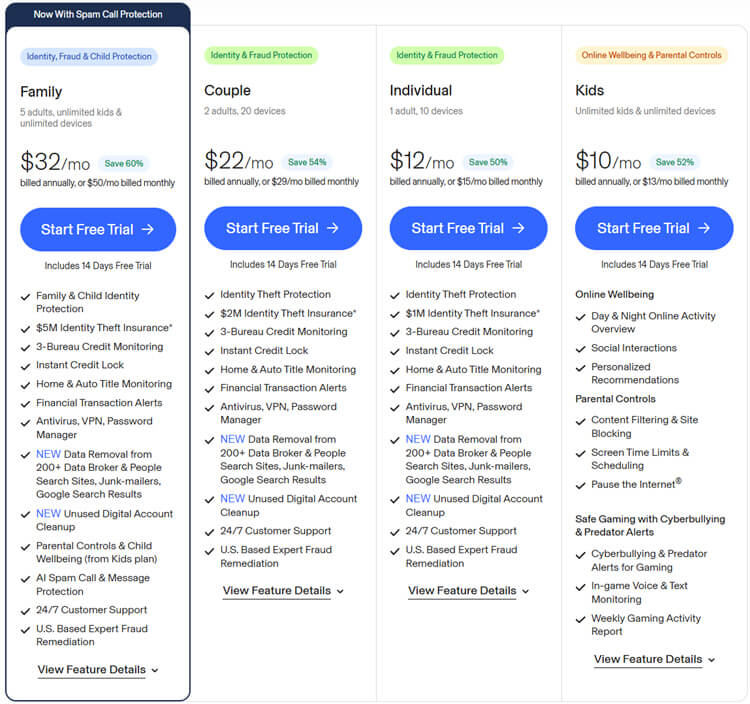
Aura Kids plan:
- $10/month
- Unlimited kids & unlimited devices
- Day & Night online activity overview, social interactions
- Parental control on content filtering & site blocking, screen time management, pause the Internet
- Safe gaming with cyberbullying & predator alerts, and weekly gaming activity report
Aura Family plan:
- $32/month
- 5 adults, unlimited kids & unlimited devices
- Cover all features in the Aura Kids plan
- Child SSN monitoring a 3-Bureau credit freeze for children
- Adults' identity monitoring, financial fraud protection, and identity theft insurance
Bark plan:
- Free trial: 7 days (card required)
- Bark Premium: $5/month + tax ,$14/month or $99/year
- Money-back guarantee: Bark doesn't mention it on its official website.
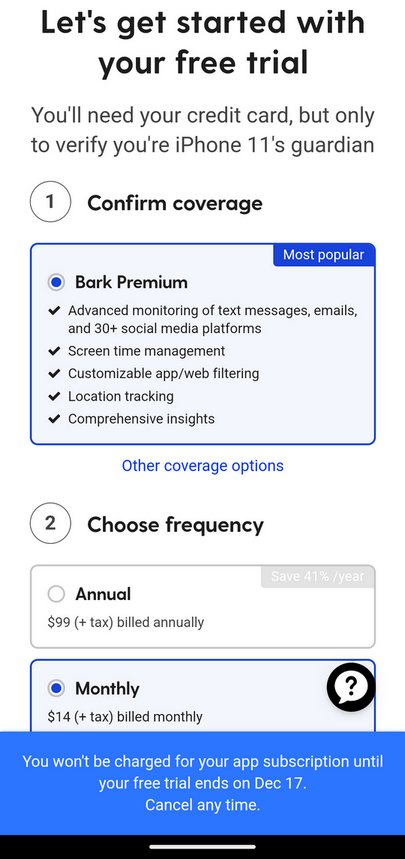
Bark Jr Plan:
- $5 + tax per month or $49 + tax annually (USD)
- Manage screen time schedules
- Block the internet of apps and sites
- Use our location tracking features
- Cover unlimited children & unlimited devices
- Trust their family's data is secure
- Get unlimited support
Bark Premium Plan:
- $14 + tax per month or $99 + tax annually (USD)
- Bark Premium includes everything in Bark Jr
- Alerts that go beyond keywords to catch real concerns, like bullying, self-harm, and online predators
- Coverage across texts, email, and many social media platforms
Aura costs around $32 per month, offering robust security features and parental control. On the other hand, Bark is priced at $14 per month but mostly focuses on parental control, especially social media monitoring.
Top alternative - AirDroid Parental Control
Both Aura and Bark are excellent choices for families seeking automated safety alerts, yet neither delivers a comprehensive, real-time overview of activity on your child’s device.
A key limitation is their inability to clarify the context behind a child’s unresponsive messages: after sending a risk alert, the only options are to wait and review subsequent reports, making for a notably passive parenting approach.
This is where AirDroid Parental Control steps in to fill the gap—standing out for its unrivaled situational clarity that the other two lack.
Why AirDroid Parental Control Stands Out?
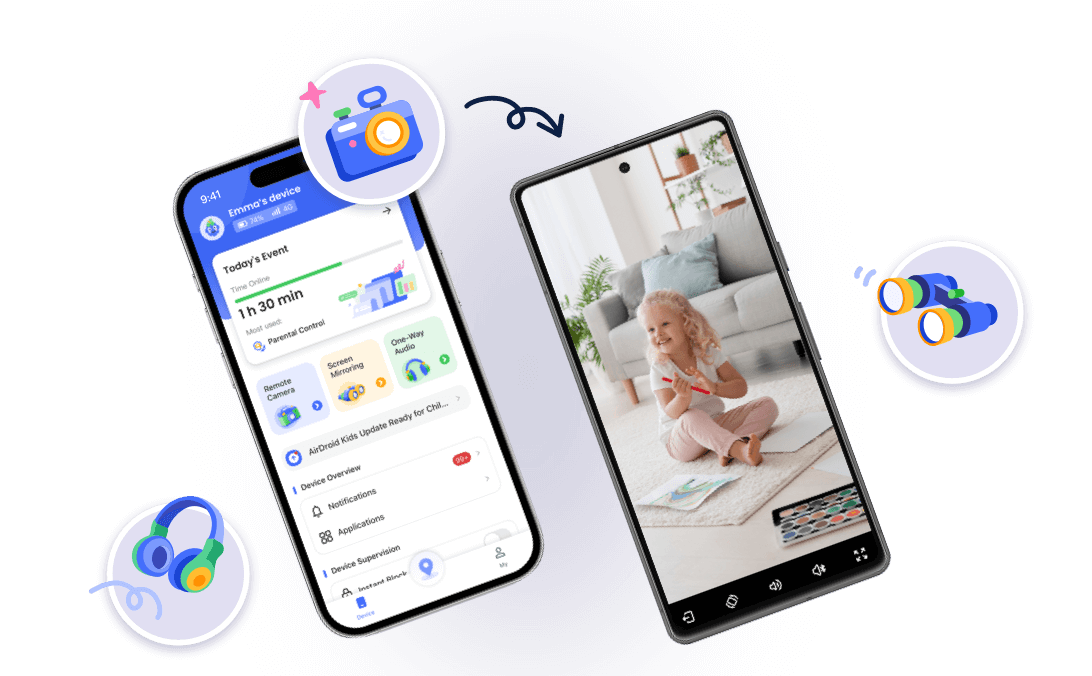
- Real-time screen & surroundings visibility: Beyond flagging risky keywords with alerts, AirDroid offers screen mirroring and real-time notification sync, letting parents see exactly what their child is doing when they go unresponsive for an extended period.
- Social media monitoring & inappropriate image detection: Monitors 14+ top social media platforms for risky online behavior and automatically detects inappropriate images.
- Parental control, not algorithmic oversight: Features like remote camera access and one-way audio can help parents see/listen to kids’ surroundings when they may be in danger, put decision-making firmly in parents’ hands, not AI systems.




AirDroid vs Aura vs Bark Comparison:
| AirDroid Parental Control | Aura | Bark | |
|---|---|---|---|
| See what’s happening in real time | | | |
| Alerts + ability to verify | | |  Alerts only Alerts only |
| Parent decides when to step in | | | Limited |
| Best for hands-off monitoring | Depends on parents' needs | | |
| Best for situational clarity | | | |
Best Use Cases: Which App Fits Your Family?
The best fit parental control tool is based on the family’s needs.
- Choose Aura if you need overall digital security and identity protection alongside basic parental controls.
- Choose Bark if you’re most concerned with social media and content monitoring.
- Choose AirDroid if you want to safeguard kids’ online and offline safety and the ability to actively intervene when necessary.
Note that no parental control tool can fully replace an open and honest relationship with your child about the online risks and threats. Talking to kids regularly about online safety is very important.











Leave a Reply.