Predictive Device Monitoring for MDM: Not Just Earlier Alerts
Picture this: a retail chain's IT team gets a call that three kiosks went dark during the Saturday afternoon rush. Pulling the device logs afterward, they find the trouble wasn't sudden. For days, battery capacity had been draining faster than usual, storage had been climbing steadily, and one app had been crashing every few hours. None of it triggered an alert, because none of it crossed a threshold.
This is common. Most MDM and UEM alerting today is threshold-based: a rule fires once a value crosses a line someone set in advance.
Setting that line earlier catches trouble sooner. It still isn't prediction, and the difference matters more than it sounds. So what does it actually take for a monitoring system to earn that word, rather than just moving the same threshold earlier?
What Is Predictive Device Monitoring?
Predictive device monitoring is the practice of using a device's historical data, usage trends, and multiple status signals together to estimate the likelihood of a future problem, rather than reacting to a condition that has already occurred.
That's a narrower definition than most vendors use. Real-time status checks, is the device online right now, is the battery above 20%, aren't predictive; they describe the present. Predictive monitoring looks backward across days or weeks of behavior to say something about what's coming. It needs three ingredients:
- A history of device behavior to compare against
- A way to spot when current behavior deviates from that history
- Enough signal correlation to turn a deviation into a risk estimate
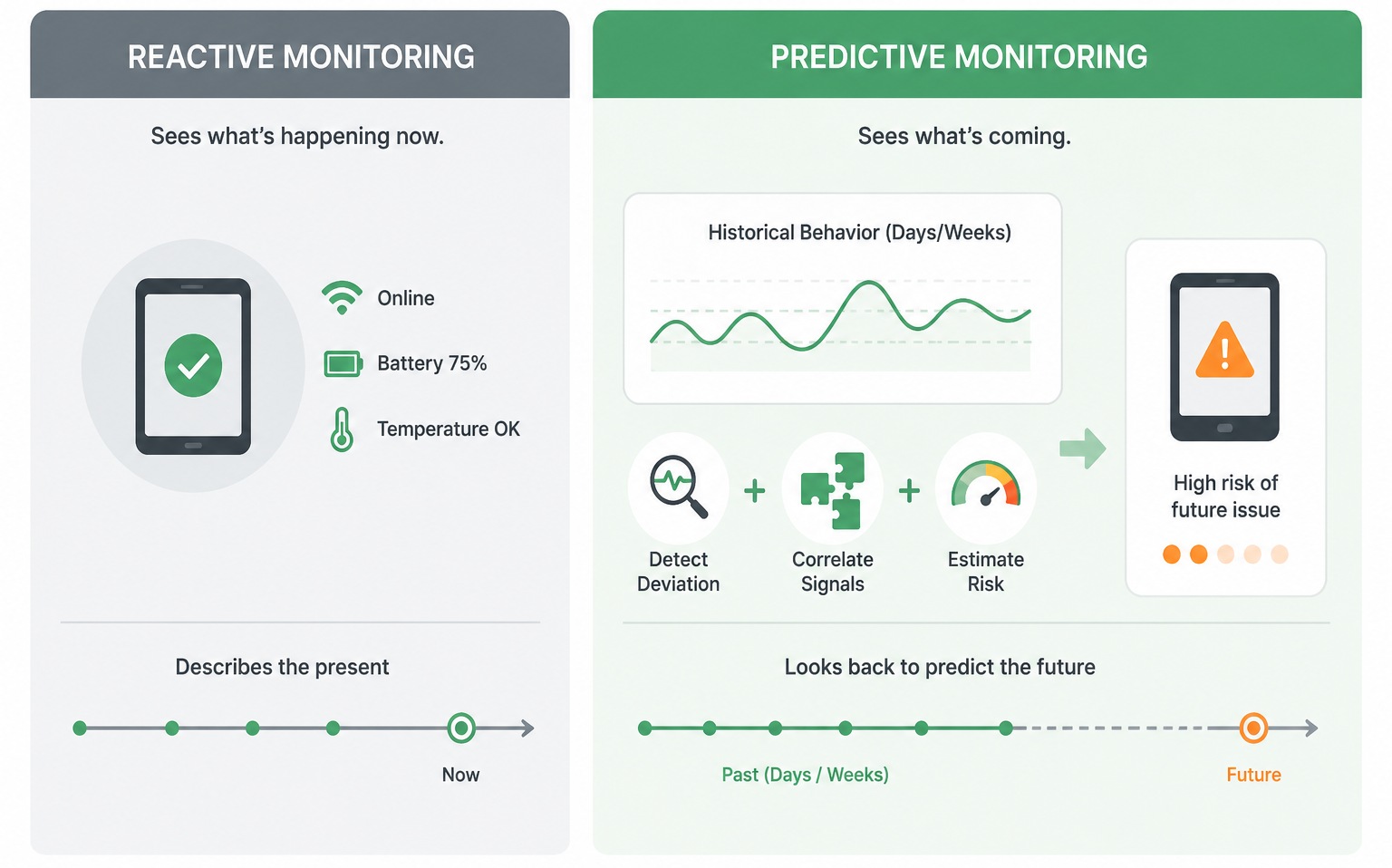
Miss any one of those and you're back to monitoring the present, just with a fancier label on it.
Why Earlier Alerts Aren't the Same as Prediction
Say a device's battery typically starts affecting operations around 20% capacity. A team sets an alert there. That's reactive monitoring: the device is already close to a problem by the time anyone hears about it. Move the threshold up to 30%, and the team hears about it earlier. That's proactive monitoring. It buys time to swap the device or investigate before the battery becomes disruptive. But it's still a single fixed threshold. Nothing about it involves prediction. It's the same rule, applied earlier.
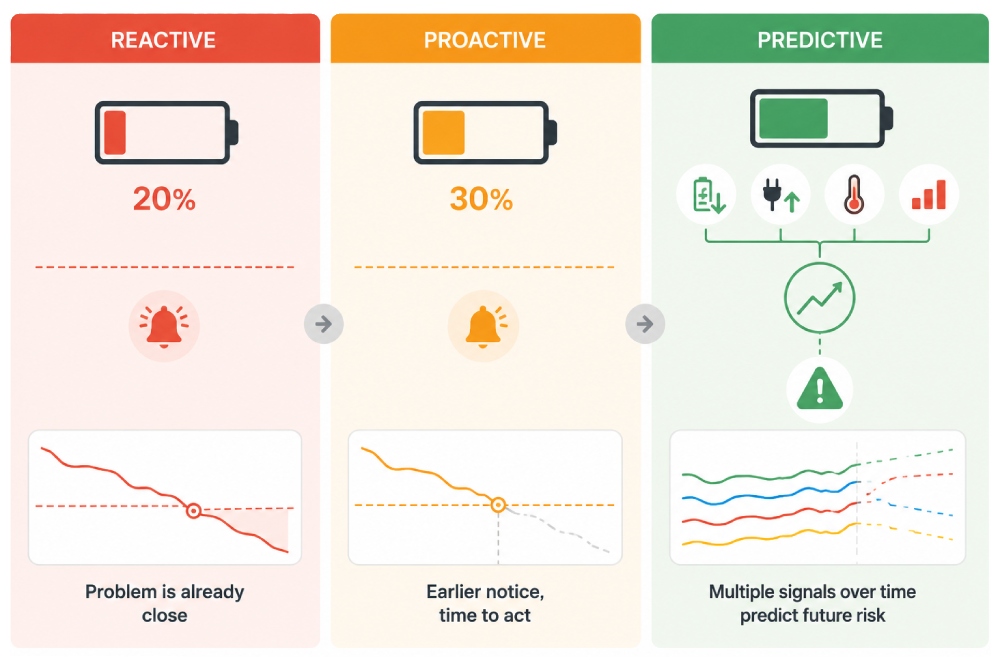
Anomaly detection is a step further. Instead of comparing a value to a fixed number, it compares current behavior to that specific device's own normal pattern. A device that typically loses 20% of its charge per shift and suddenly starts losing 50% is worth flagging, even though it hasn't crossed any threshold at all. This requires an established baseline per device and the ability to notice deviation from it. Most MDM platforms, AirDroid Business included, don't build this in today; a scheduled inspection checked against a fixed standard still counts as threshold monitoring, not anomaly detection, no matter how often it runs.
Predictive monitoring goes one step further still: correlating several signals over time to estimate the probability of a future issue. Battery capacity trending down, charging frequency trending up, temperature running abnormally high, and app crashes increasing, taken together, might indicate elevated risk of failure in the coming days, even though none of those signals individually has crossed a threshold. This is where machine learning actually enters the picture, and where most vendor claims of "predictive" monitoring quietly become marketing rather than engineering.
Level | Trigger logic | Example | Actually predictive? |
|---|---|---|---|
| Reactive monitoring | Fixed threshold, already low | Battery alert at 20% | No |
| Proactive monitoring | Fixed threshold, set earlier | Battery alert at 30% | No, still a threshold |
| Anomaly detection | Deviation from the device's own baseline | Daily drain jumps from 20% to 50% | Not yet, flags deviation, not risk |
| Predictive monitoring | Multiple correlated signals over time | Capacity down + charging up + temperature up + crashes up | Yes, estimates future risk |
Four distinct capabilities, frequently sold as one. A vendor offering the first (reactive alerts with a slightly earlier threshold) and calling it "predictive" isn't lying exactly. It just isn't describing what most IT teams mean when they hear the word.
What Early Warning Signs Look Like in Retail, Logistics, and Field Service
The specific signals worth watching depend heavily on how a device is actually used, not just what category it falls into.
Device type | Signals worth tracking | Threshold alerts available today |
|---|---|---|
| Retail kiosk | Intermittent offline events, app crashes, storage growth from cached data | Online/Offline Status, Insufficient Storage, App Running Status |
| Logistics handheld | Battery degradation from all-shift use, connectivity drops by warehouse zone | Battery Capacity, Battery Temperature, Device Cellular Data Usage |
| Field service tablet | Gradual performance decline, app instability during sync | App Running Status, Foreground App Status, Battery Capacity |
• Retail kiosks run for extended hours with minimal human oversight, often on the same physical unit for years. The signals that matter here are intermittent offline events (a kiosk that drops connection for 30 seconds and reconnects looks fine on a status check but is often an early sign of failing hardware), gradual app performance degradation from cached transaction and session data piling up over weeks, and storage climbing steadily from logs and receipts that never get cleared.
• Logistics handhelds take a different kind of abuse: constant scanning, all-shift use, warehouse environments with spotty connectivity. Battery degradation shows up faster here than in almost any other device category, since these units rarely get a full charge cycle during a shift. Connectivity drop patterns tied to specific zones of a warehouse floor are also worth tracking. A handheld that reliably loses signal near the loading dock isn't a device problem at all; it's a coverage problem the device happens to be reporting.
• Field service tablets sit somewhere in between: less constant use than a handheld, more environmental variability than a kiosk. Gradual performance decline over weeks, apps taking longer to launch, sync taking longer to complete, tends to surface before outright failure. Application instability during the offline-to-online sync that happens at the end of a job is another pattern worth watching, since it often means a data conflict is accumulating rather than resolving cleanly.
None of these signals is exotic. What makes them useful is tracking them as trends across a device's history rather than checking them once and moving on, and right now, the tracking most MDM platforms offer is still the threshold column on the right, not the trend column on the left.
What It Takes to Move Beyond Threshold Alerts
For a team currently running on threshold alerts alone, moving toward anomaly detection or true prediction isn't a settings change. It takes three things:
- A real history of device behavior, not just current status. That means logging metrics over weeks or months, not checking them once a day and discarding the reading.
- A baseline for what normal looks like, per-device or at least per-device-type. A kiosk running 24 hours a day has a completely different normal than a tablet used four hours a shift.
- The ability to correlate multiple signals rather than watching them independently. A single rising metric is noise more often than not. Several metrics moving together, in a pattern that's shown up before, is where a real risk signal starts to look different from normal variation.
Getting to true predictive monitoring takes time, data, and the right infrastructure. Most organizations get there by strengthening what they already have, not by bolting on a prediction model from day one.
Where AirDroid Business Fits in This Path Today
AirDroid Business supports the first two stages of this progression directly, and connects them into a working loop rather than three disconnected features.
Device monitoring gives visibility into battery, storage, connectivity, and app status across a fleet, the raw data any of the later stages would need. Configurable alerts let teams set thresholds earlier than the failure point, moving from reactive to proactive without waiting for a device to actually go down. That coverage today includes:
- Battery Capacity and Battery Temperature
- Insufficient Storage
- App Running Status and Foreground App Status
- Device Cellular Data Usage
Automation Templates cover the routine side of this: prebuilt templates for scheduled checks across offline devices or kiosks, exports, and report delivery, the kind of recurring inspection that catches issues a one-off status check would miss, though still against a fixed standard, not a device's own history. And alert-triggered automated workflows carry a detected signal into an actual response: notifying the right person, pulling device information, or logging the event, so a risk doesn't sit in a dashboard unread.
Ask Copilot adds a layer on top for teams who want a quick answer without digging through any of this: which devices are offline right now, or what a specific device's battery health looks like today.
Turn Threshold Alerts into a Proactive Monitoring Loop
See device health, storage, and connectivity trends before they become downtime. AirDroid Business lets IT teams set earlier alerts and connect them to automated workflows, so a risk signal turns into action instead of sitting in a dashboard.
Start With What You Already Have
If your team is running threshold alerts today, the highest-value next step usually isn't chasing a predictive model. It's tightening the thresholds you already have, connecting them to a workflow that actually does something when they fire, and building the habit of reviewing device history instead of just current status.
Explore AirDroid Business's device monitoring and alert features to see what a proactive setup looks like with your existing fleet, before deciding whether a fuller predictive layer is worth building toward.











Leave a Reply.