Kiosk App Crashes: How to Prevent Device Downtime Automatically
-
Part 1: Why Kiosk App Crashes Are Hard to Manage at Scale
-
Part 2: How to Prevent Kiosk App Crashes From Turning Into Downtime
-
Part 3: How AI Helps Investigate Repeated Kiosk App Failures
-
Part 4: Build a Self-Healing Kiosk Operations Workflow
-
Part 5: AirDroid Business for Automated Kiosk Management
-
Part 6: Best Practices for Automated Kiosk App Recovery
Kiosk devices are designed to operate continuously with little or no human supervision. But when a kiosk app crashes, freezes, or unexpectedly leaves the foreground, the entire device can become unavailable—even if the device itself remains online. For businesses managing hundreds or thousands of kiosks, relying on users or on-site staff to report these failures can quickly turn a minor app issue into prolonged downtime.
The goal, however, isn't to prevent every app crash from happening. It is to prevent a crash from becoming a service interruption. This requires more than simply restarting an app manually. IT teams need a way to detect abnormal kiosk states, trigger automated recovery, verify that the device has recovered, and escalate persistent issues when necessary.
With device monitoring, automated workflows, and AI-assisted operations, kiosk management can move from reactive troubleshooting to a more proactive, self-healing approach.
Why Kiosk App Crashes Are Hard to Manage at Scale
A single kiosk app crash may seem like a minor technical issue. But when kiosks are deployed across stores, restaurants, hospitals, transportation hubs, or other unattended environments, even a small failure can quickly become an operational problem. Several factors make kiosk app crashes particularly difficult to manage at scale.
Kiosks Often Operate Without Anyone Nearby
Unlike employee devices, kiosks are often designed to operate without dedicated staff monitoring them. When an app crashes or becomes unresponsive, there may be no one nearby to notice the problem immediately.
A customer may simply walk away from a non-functional kiosk, while the device remains unavailable until someone reports it or a technician visits the site. The longer the failure goes unnoticed, the greater the potential downtime.
A Crash Is Not Always an Offline Device
One of the challenges of kiosk monitoring is that device connectivity does not necessarily indicate application health. A kiosk can remain online and responsive to an MDM platform while its designated app has crashed, stopped running, or left the foreground.
This means simply monitoring whether devices are online is not enough. IT teams also need visibility into whether the kiosk is still operating in its expected state.
Manual Recovery Doesn't Scale
When only a few kiosks are involved, an administrator might remotely access a device, restart the app, and confirm that it is working again. But repeating this process across hundreds or thousands of devices is inefficient and difficult to maintain.
More importantly, manual intervention creates delays at every step: someone must notice the issue, investigate it, take action, and verify the result. For large kiosk fleets, a scalable approach requires these routine responses to happen automatically whenever possible.
How to Prevent Kiosk App Crashes From Turning Into Downtime
A kiosk app crash does not have to become prolonged downtime. The key is to build an automated response loop that can detect abnormal states, initiate recovery, confirm the result, and escalate issues that cannot be resolved automatically.
A practical approach is:
Detect → Recover → Verify → Escalate
1. Detect When the Kiosk App Stops Running
The first step is to detect abnormal kiosk states before users or on-site staff have to report them. Monitoring only device connectivity is not enough. A kiosk can remain online while its designated app has stopped running or left the foreground.
For reliable kiosk monitoring, IT teams should consider signals such as:
- Kiosk status
- Foreground app status
- Device availability
- Network connectivity
- Other relevant device conditions
The earlier an abnormal state is detected, the shorter the potential downtime. By configuring alerts around these conditions, IT teams can turn device status changes into actionable incidents rather than waiting for manual reports.
2. Trigger an Automated Recovery Workflow
Detecting a kiosk failure is only the first step. If an alert simply sends a notification to IT, someone still needs to manually investigate and respond.
A more scalable approach is:
Kiosk app stops running → Alert triggered → Workflow starts → Recovery action → Incident recorded → IT notified if necessary
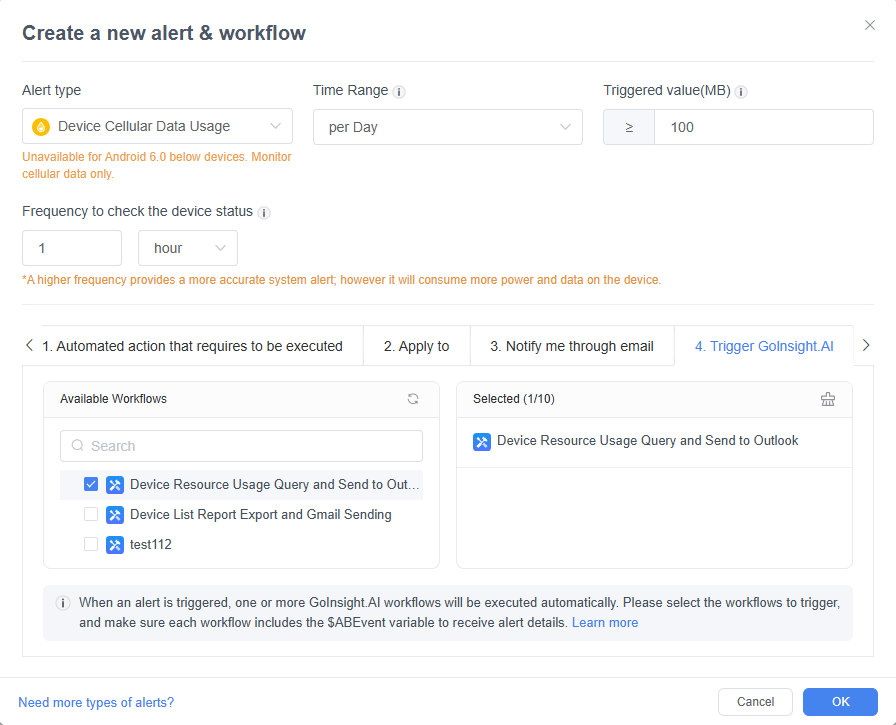
With AirDroid Business, an alert can be connected to a configured workflow that automatically handles the next steps when a defined device condition occurs. Instead of simply telling IT that something went wrong, the system can turn the alert into an automated response.
This is the difference between alerting and action: alerts provide visibility, while workflows help reduce the time and effort required to respond.
Turn Kiosk Alerts Into Automated Actions
Don’t let a kiosk failure end with an alert. Connect device alerts to automated workflows to trigger the right response, record incidents, and notify your team when human intervention is needed.
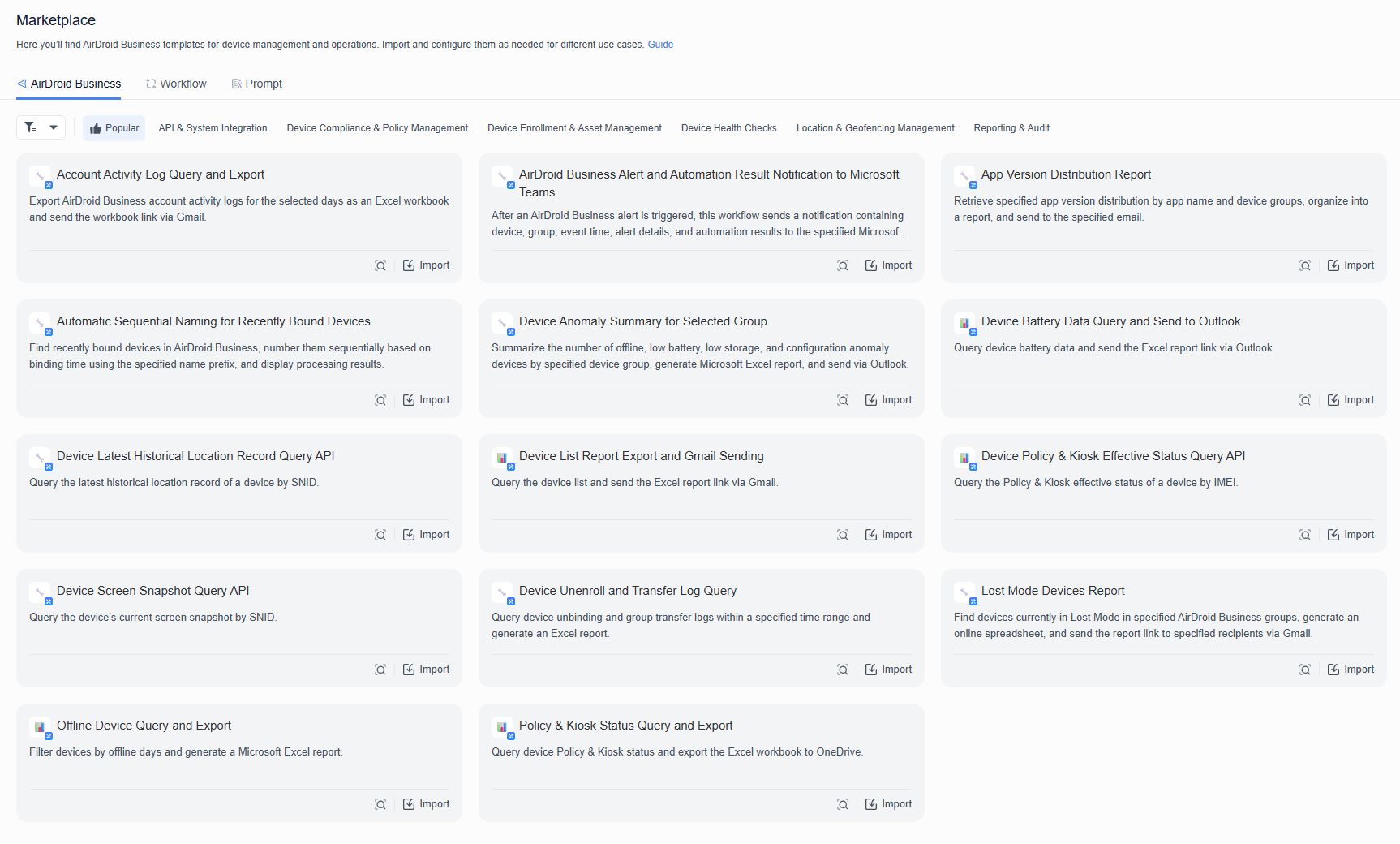
3. Use Reusable Automation Templates for Common Kiosk Failures
Building a recovery workflow from scratch for every kiosk deployment can quickly become repetitive, especially when managing large device fleets. IT teams should be able to reuse proven response processes instead of rebuilding the same automation every time.
For example, a kiosk recovery workflow could be structured around:
Trigger:
Kiosk app enters an abnormal state
Actions:
- Initiate the appropriate recovery action
- Record the event
- Notify the responsible team
Escalation:
Notify IT if the issue persists.
Reusable templates make it easier to standardize how common kiosk incidents are handled across different devices, locations, and deployments.
4. Verify That the Kiosk Has Recovered
Sending a recovery command does not necessarily mean the kiosk has recovered. The device may still be unresponsive, the app may fail to return to the foreground, or the same abnormal state may occur again.
After a recovery action, verify:
- Is the kiosk app running again?
- Is it back in the foreground?
- Is the device responsive?
- Has the abnormal state cleared?
This creates a more reliable recovery loop:
Detect → Recover → Verify
Verification also provides an important signal for the next step. If the kiosk has recovered, normal operation can resume. If it has not, the incident should move into escalation rather than being treated as resolved.
5. Escalate Persistent Failures Instead of Repeating the Same Action
Automatic recovery is most effective when it handles routine failures without creating a cycle of repeated actions. If a kiosk repeatedly crashes and restarts, continuously applying the same recovery action may only hide a deeper issue.
A better escalation model is:
First failure → Automated recovery
Repeated failure → Log + notify
Persistent failure → Escalate to IT
This allows automation to handle predictable incidents while keeping human intervention available for exceptions. Persistent failures can then be investigated for recurring patterns, device-specific problems, or other underlying causes—setting the stage for AI-assisted investigation and more intelligent device operations.
How AI Helps Investigate Repeated Kiosk App Failures
Automation can handle predictable kiosk failures, but repeated or complex incidents often require a closer look. When the same kiosk continues to experience app interruptions, IT teams need to understand what is happening across their device fleet—not just restart the affected device again.
This is where AI can complement automated recovery. Instead of replacing existing monitoring and workflows, AI can help IT teams query device data, identify patterns, and investigate exceptions more efficiently.
1. Query Real Device Data Without Manual Filtering
When a kiosk issue occurs repeatedly, finding the relevant devices and incident records manually can take time. An AI assistant can provide a more direct way to explore operational data.
For example, IT teams can ask:
“Which kiosks experienced app-related incidents this week?”
or:
“Which devices have had repeated abnormal states in the past seven days?”
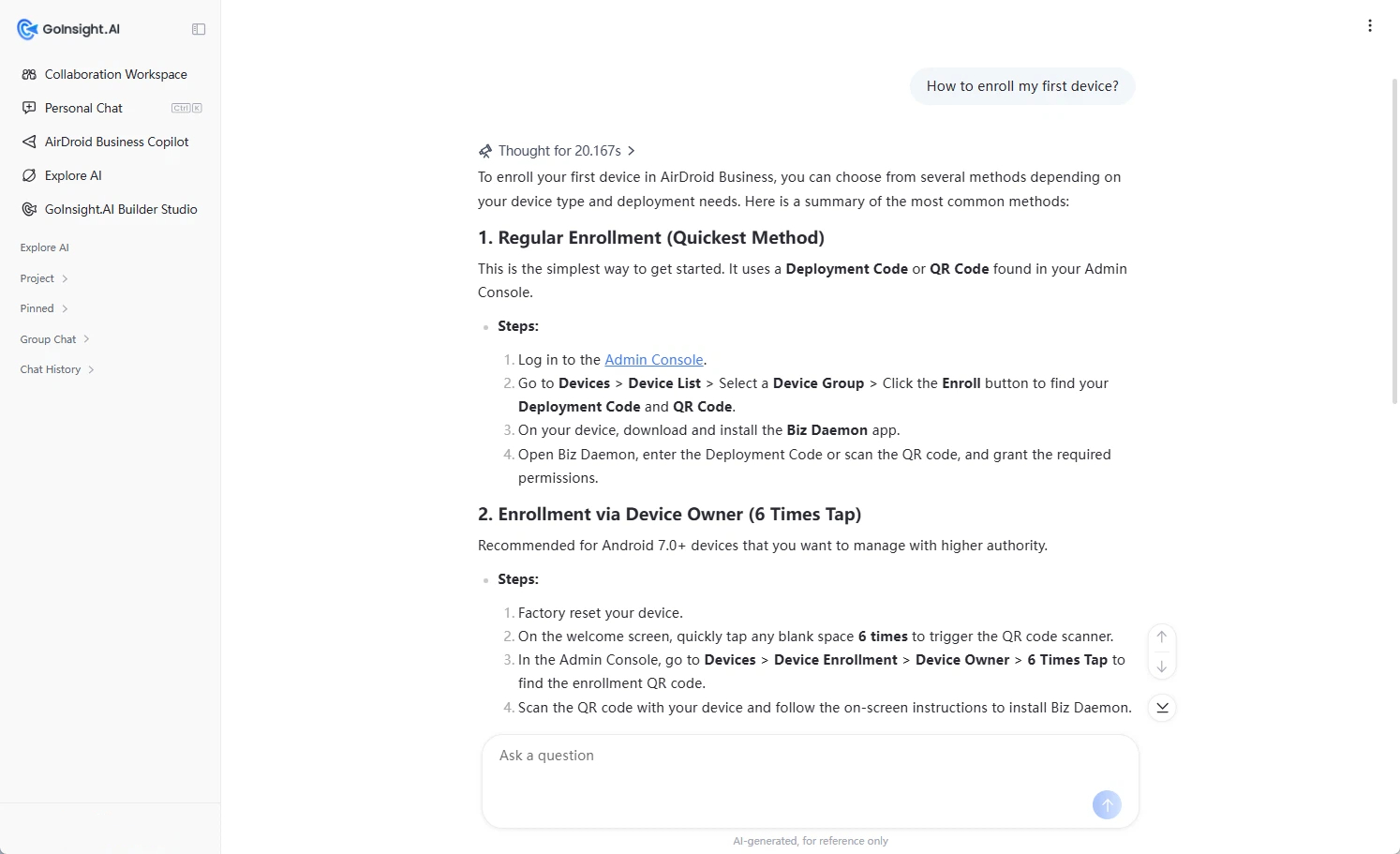
With AirDroid Business Copilot, users can query and analyze real device data through natural language rather than manually filtering through large amounts of device information. This makes it easier to move from an individual incident to a broader view of kiosk health.
2. Identify Patterns Behind Recurring Failures
A single crash may be an isolated incident. Repeated failures, however, can indicate a larger problem.
AI-assisted analysis can help IT teams look for patterns across affected devices, such as:
- Devices experiencing repeated interruptions
- Specific devices with unusually high incident frequency
- Recurring issues within a particular deployment or time period
- Similar abnormal conditions across multiple devices
Instead of treating every crash as a separate ticket, IT teams can use these patterns to determine where deeper investigation is needed and prioritize the devices that require attention.
3. Check Kiosk Operations Against SOPs
Recovery is not always just about fixing the immediate problem. IT teams may also need to verify whether devices are being handled according to established operating procedures.
For example, Copilot can help with questions such as:
“Check whether these kiosks followed our recovery SOP.”
or:
“Which devices have not completed the required recovery steps?”
This turns AI from a simple question-answering tool into an operational assistant that can help inspect device conditions and processes against predefined standards.
Ultimately, the roles of automation and AI are complementary: automation handles routine responses, while AI helps IT teams investigate recurring failures and manage exceptions. This combination makes it possible to move beyond simply recovering individual kiosks toward continuously improving the reliability of the entire kiosk fleet.
Build a Self-Healing Kiosk Operations Workflow
Once detection, automated recovery, verification, and AI-assisted investigation are connected, kiosk management can move beyond one-off fixes toward a more proactive operating model. The goal is not to eliminate every failure, but to ensure that common issues are handled automatically while persistent problems are surfaced for human attention.
A self-healing kiosk workflow can follow this process:
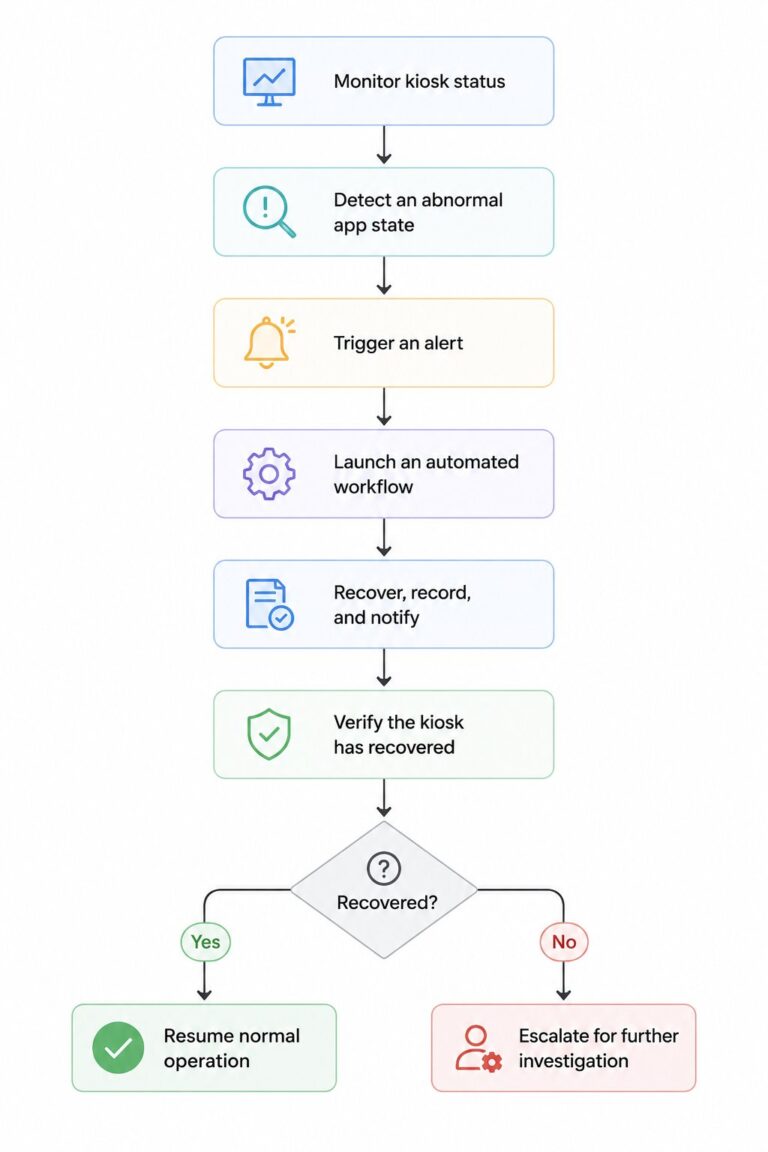
For recurring failures, AI can then help IT teams analyze real device data, identify patterns, and check whether established recovery procedures are being followed.
From Reactive Support to Automated Operations
This approach changes how kiosk incidents are handled. Instead of relying on a support team to discover and respond to every failure manually, routine incidents can move through a predefined recovery process automatically.
For example, a single app interruption may be resolved without human intervention. If the same device repeatedly encounters the issue, the workflow can escalate it instead of endlessly repeating the same action. IT can then use AI-assisted analysis to investigate why the problem keeps occurring.
The result is a continuous operational loop:
Detect → Automate → Verify → Escalate → Analyze
This model helps reduce unnecessary manual intervention while giving IT teams better visibility into the kiosk fleet and a more consistent way to respond to failures.
AirDroid Business for Automated Kiosk Management
Managing kiosk failures at scale requires more than keeping devices locked into kiosk mode. IT teams need a way to detect abnormal conditions, automate routine responses, and investigate issues that require deeper attention. AirDroid Business brings these capabilities together to support a more proactive approach to kiosk management.
1. Automated Response
AirDroid Business can connect device alerts with workflows, allowing teams to automatically respond when a kiosk enters an abnormal state. Instead of simply notifying IT about a problem, a configured workflow can handle predefined response steps, record the incident, and notify the responsible team when further attention is required.
2. Reusable Automation
Common kiosk incidents often follow the same response pattern. Automation templates allow IT teams to reuse predefined workflows rather than building each process from scratch. Teams can select a suitable template, import it into their GoInsight account, configure the required settings, and publish it for use across their operations.
3. AI-Assisted Operations
When failures persist or require further investigation, AirDroid Business Copilot can help teams work with real device data using natural language. IT teams can query device information, analyze recurring failures, inspect operations against SOPs, and perform controlled lightweight operations when appropriate.
Together, these capabilities help IT teams move from manually reacting to kiosk failures to continuously monitoring devices, automatically responding to routine incidents, and intelligently investigating problems that require human attention.
Build a More Resilient Kiosk Fleet with AirDroid Business
Monitor kiosk health, automate responses to abnormal device states, and use AI-assisted insights to investigate recurring issues—all from a centralized device management platform.
Best Practices for Automated Kiosk App Recovery
Automating kiosk recovery can reduce downtime and manual intervention, but automation works best when it is designed as a controlled recovery process rather than a simple restart mechanism. The following practices can help IT teams build a more reliable approach to kiosk app recovery.
Monitor App State, Not Just Device Connectivity
A device being online does not necessarily mean the kiosk is functioning properly. Monitor application and kiosk status alongside device availability and connectivity so that failures can be detected even when the device itself remains reachable.
Define Recovery Actions Before Incidents Happen
Decide in advance what should happen when a kiosk enters an abnormal state. Predefined workflows allow common incidents to be handled consistently without waiting for an administrator to determine the next action manually.
Use Escalation Rules for Repeated Failures
Automation should have clear boundaries. If the same kiosk repeatedly enters an abnormal state, avoid running the same recovery action indefinitely. Set conditions that trigger notifications or escalation so persistent problems receive human attention.
Keep an Audit Trail of Recovery Actions
Record when an abnormal state was detected, what automated actions were triggered, and whether the kiosk recovered successfully. A consistent record helps IT teams understand incident history and provides useful context when investigating recurring failures.
Test Recovery Workflows Before Large-Scale Deployment
A workflow that works in one environment may not behave the same way across every kiosk configuration. Test recovery workflows on representative devices before deploying them broadly, and verify both the recovery action and the escalation path.
Analyze Recurring Failures to Improve Reliability
Automation should not only resolve individual incidents—it should also help teams identify recurring problems. Review devices with frequent failures, look for common patterns, and investigate persistent issues instead of repeatedly applying the same recovery action.
The goal is to create a recovery process that is automatic when it can be, controlled when it needs to be, and visible enough for IT teams to intervene when necessary.
Conclusion
Kiosk app crashes are difficult to eliminate completely, but they do not have to result in prolonged downtime. With the right approach, IT teams can detect abnormal app states early, trigger automated recovery, verify whether the kiosk has recovered, and escalate persistent failures when human intervention is needed.
The key is to move beyond Detect → Restart → Done and build a continuous operational loop:
Detect → Recover → Verify → Escalate → Analyze
By combining device monitoring, automated workflows, reusable automation templates, and AI-assisted operations, businesses can reduce manual intervention while gaining greater visibility into the health of their kiosk fleet. The result is a more resilient kiosk environment where routine failures can resolve themselves and recurring issues receive the attention they require.











Leave a Reply.