Logistics Device Monitoring: What to Monitor and How to Respond
Logistics monitoring typically means tracking vehicles, cargo, and containers. That is one layer. There is another layer. It consists of the managed endpoints that execute warehouse and delivery work: handheld scanners, driver tablets, PDAs, vehicle-mounted computers, and fixed kiosks.
These endpoints focus on executing the work itself, not on tracking shipments or cargo conditions. But when one goes offline, runs low on storage, or drops out of its expected state, the task that depends on it stalls. The cargo may be fine, but the workflow is not.
This piece focuses on that second layer. Vehicle telemetry and shipment condition monitoring are separate disciplines with their own tools. Here, logistics device monitoring refers to the devices that support warehouse and delivery operations. What should an IT team actually watch on them, and what should happen when something looks off?
- 1 : What Logistics Device Monitoring Actually Covers
- 2 : Why Device Monitoring Gets Harder at Logistics Scale
- 3 : From Device Signals to Operational Context
- 4 : When Should a Device Signal Trigger Automation?
- 5 : Build a Device Monitoring Loop
- 6 : Three Logistics Device Monitoring Scenarios
- 7 : Logistics Device Monitoring Checklist
1What Logistics Device Monitoring Actually Covers
Monitoring layer | Typical objects | Typical signals |
|---|---|---|
| Physical asset or shipment | Vehicles, cargo, containers, equipment | Location, movement, temperature, condition |
| Operational device | Handhelds, tablets, PDAs, kiosks | Availability, battery, connectivity, app state |
Availability and connectivity
Online/offline status, cellular data usage, and SIM card state answer one question: can this device be reached when the workflow needs it? A device that's powered on but unreachable might as well be off.
Device health
Battery capacity, battery charge status, battery temperature, and storage answer a different question: can the device keep operating through the rest of its shift or route? A handheld with a healthy signal but a battery that won't survive the afternoon is still a problem, just one that hasn't shown up yet.
App and operating state
App running status, foreground app status, Kiosk status, and screen lock answer a third question: is the device still in the state its role requires? A kiosk that's exited its locked configuration, or a handheld where the scanning app has silently stopped running, can look perfectly healthy on every other metric and still be unable to do its job.
2Why Device Monitoring Gets Harder at Logistics Scale
The problem isn't that more devices produce more alerts, though they do. It's that the same signal means different things depending on the device's role, how long the condition has lasted, and what else is happening alongside it.
Signal | Why the meaning changes | Example |
|---|---|---|
| Low battery | Depends on the device's role and power expectations | 15% battery on a warehouse handheld may mean it won't last the next scanning shift. The same reading on a fixed kiosk that should be continuously plugged in suggests a charging issue, not a battery problem. |
| Offline | Depends on duration | A device offline for 30 seconds and a device offline for 30 minutes are not the same event, even though both trip the same alert. |
| Multiple signals together | Depends on what else is happening alongside it | Offline combined with a SIM change is a different situation than offline alone. Storage issues combined with an app that has stopped running usually means more than either signal on its own. |
Four questions tend to do most of the work when a signal comes in:
- What type of device is this?
- How long has the condition lasted?
- What else changed around the same time?
- Does deciding what to do here actually require someone's judgment?
Monitoring gives a team signals. The harder part is turning those signals into something usable, which means giving them context.
3From Device Signals to Operational Context
Traditional MDM already gives IT teams the foundation for device monitoring. In AirDroid Business, teams can monitor device availability, battery status, connectivity, storage, app status, Kiosk status, and other device conditions from a centralized console. Alerts can also surface conditions that need attention.
That solves the visibility problem. The harder question is what to make of the signal once it appears.
A single alert rarely provides the whole picture:
- Is the device currently being used?
- How long has the condition lasted?
- Are other device signals pointing to the same issue?
- Does the condition actually affect the device's assigned role?
This is where AI-enhanced MDM can reduce the investigation work. Instead of manually moving between device lists, groups, and status screens, IT teams can use natural-language queries to retrieve and compare the information they need.
For example, with Copilot in AirDroid Business, an IT administrator can ask:
"Which devices currently have low battery and abnormal app status?"
The answer can bring together the affected device, its Group, battery level, and the reported device state, giving the administrator a more useful starting point for investigation.
The difference is less about collecting more data and more about reducing the work required to turn existing device data into usable context.
Traditional MDM | AI-enhanced MDM |
|---|---|
| Monitor device status from a central console | Query device conditions in natural language |
| Review alerts and device data | Combine relevant device information when investigating a condition |
| Manually cross-reference devices, groups, and signals | Get a more focused view of the devices and conditions being asked about |
| IT interprets the situation | AI helps surface the current context; IT still decides what it means operationally |
One boundary matters: this is still current-state investigation, not prediction. Knowing that a device is at 9% battery and currently offline helps IT understand what is happening now. It does not predict what that device will do next week.
4When Should a Device Signal Trigger Automation?
Understanding a condition and deciding that it should always trigger the same response are two different steps.
AirDroid Business can already turn defined device conditions into alerts and workflows. The important question is therefore not "Can this signal be automated?", but "Has the response been defined clearly enough to automate?"
Condition | Recommended response |
|---|---|
| New or unclear | Investigate |
| Repeated, but depends on context | Human review |
| Specific and repeatable | Automate |
Take SIM Card Removal on a delivery device.
If the team has already established that a SIM removal on this device type should always trigger a notification to the fleet manager and create a record of the event, an alert-triggered workflow can handle that response automatically.
The workflow is not deciding that SIM removal is a problem. The team made that decision first. The workflow simply makes the agreed response consistent.
That distinction becomes especially important for logistics devices, where the same signal can have different meanings depending on the device's role, location, and current operating context.
Automate the Response, Not the Judgment
A useful rule is:
If IT still needs to decide what the signal means, don't automate the decision. If the team has already defined a clear, repeatable response, automate the execution.
This keeps AI and automation in different roles:
- AI helps investigate: What is happening, and which devices are affected?
- IT makes the judgment: Does this condition require intervention?
- Automation executes: If the response is already defined, can the system carry it out consistently?
5Build a Device Monitoring Loop
With traditional MDM and AI-enhanced capabilities working together, device monitoring can become a repeatable operational loop:
Monitor → Understand → Prioritize → Act → Record
Step | What it looks like in practice |
|---|---|
| Monitor | AirDroid Business collects device status and surfaces relevant alerts across managed endpoints. |
| Understand | IT reviews the condition; Ask Copilot can help retrieve and compare relevant device information. |
| Prioritize | The team determines whether the condition affects the device's operational role and how urgently it needs attention. |
| Act | IT handles the issue manually, or an alert-triggered workflow executes a predefined response. |
| Record | The response leaves enough context to understand what happened and trace the condition if it recurs. |
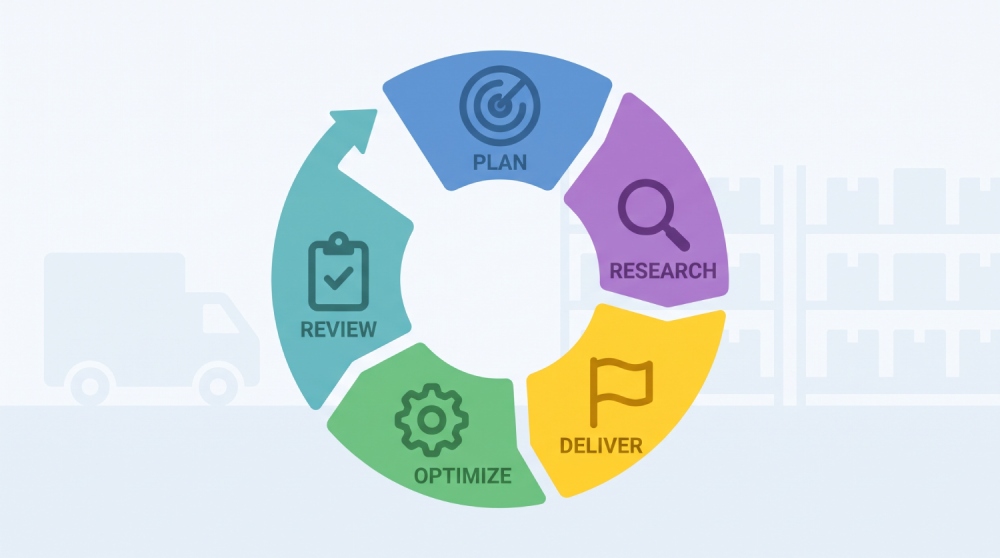
The important point is that AI does not replace the monitoring system, and automation does not replace human judgment.
Traditional MDM provides the visibility and control layer. AI makes investigation more efficient. Automation makes defined responses more consistent.
The goal isn't to automate every decision. It's to make the path from a device signal to the right response faster, more consistent, and traceable.
Turn Device Signals into a Complete Monitoring Loop
Battery alerts, offline events, app crashes — on their own, they're just noise. AirDroid Business helps logistics teams turn device signals into operational context, so you know what's happening, whether it matters, and what to do next.
6Three Logistics Device Monitoring Scenarios
Warehouse handhelds: when storage starts affecting scanning
Insufficient Storage paired with App Running Status dropping out is worth watching together, since a handheld with plenty of storage but a stalled scanning app is functionally down, and a handheld with a running app but no storage left is about to be. The real question isn't whether the device shows healthy on a general check. It's whether it can still complete its assigned scanning task. Automate the response only once the team has already defined what "affected" means for this combination on this device type.
Delivery tablets: when a device becomes unreachable
Offline status combined with a SIM state change is a different situation than offline alone. A brief connectivity gap near a known dead zone doesn't need the same response as a tablet that's been dark for an hour on an active route. The questions worth asking before doing anything: how long has it been offline, has a SIM event happened alongside it, and is this device currently assigned to a live delivery? Only some of those answers point toward automation. The rest point toward a phone call.
Vehicle and dock kiosks: when the device leaves its expected state
These are meant to run one locked configuration continuously, so Kiosk status combined with Screen Lock catches a device that's unexpectedly exited its setup. The point isn't reintroducing what Kiosk Mode does. It's asking whether this specific state change is an expected configuration event or an operational exception that needs a person to look at it before deciding whether a workflow should ever fire on it automatically.
Note: the monitoring and AI-assisted investigation covered here deal with current device state. They do not constitute predictive monitoring. Predictive capabilities typically require historical baselines, trend analysis, and risk modeling, which we cover separately in Predictive Device Monitoring for MDM. This article stays within what is observable and actionable right now.
7Logistics Device Monitoring Checklist
This checklist distills the key points into a practical self-assessment for IT teams managing logistics devices.
- Are we monitoring the device signals that can affect warehouse and delivery workflows, not just the ones that were easiest to set up?
- Can IT investigate a device condition quickly, or does someone have to check multiple screens by hand?
- Can related signals be viewed together when one signal alone doesn't explain what's happening?
- Do we know which conditions need human judgment before any response gets automated?
- Are the responses we've automated ones the team already defined, or is a workflow guessing at judgment calls?
- Does each response leave enough of a record to trace the same issue if it comes back?
- Can we tell the difference between knowing what's happening now and predicting what happens next?
A "yes" to all seven questions means your monitoring setup covers the core loop. A "no" to any of them points to a gap worth addressing, not necessarily immediately, but worth knowing about.
8Final Words
Logistics device monitoring means tracking battery levels, connectivity, and app status across hundreds of devices in warehouses, vehicles, and docks. Those signals alone do not keep operations running. If battery readings are collected without knowing which devices are on active routes, they are just numbers. If offline alerts are generated without a consistent way to investigate, each incident starts from zero. If automated responses are configured without a clear definition of what a problem looks like for each device type, they create more work, not less.
Only when signals connect to context, context to action, and action to record does monitoring become something a team can count on. That is what turns device data into operational continuity.











Leave a Reply.