Streaming Tips

  • Top StreamEast Alternatives for 2026: Watch Sports Live
  • Best Free and Paid CrackStreams Alternatives in 2026
  • LG TV No Sound? 6 Easy Fixes That Actually Work (2026)
  • Why Is My TCL TV Screen Black? Troubleshooting Tips for 2026
  • 10 Popular Anime on Netflix [Deserved]
sider-adv-logo AirDroid Cast

● Screen Mirror on Android, iOS, Win, Mac, and TV;

● Remote Control Mobile from PC;

● Lightweight Web for Online Mirroring;

● Two-way Audio for Speaking and Listening;


Free Trial
Get Web Version

Why Does Spotify Keep Crashing? 2026 Ultimate Fix Guide

Elsa Updated on Feb 2, 2026 Filed to: Streaming Tips

Nothing kills the vibe faster than your music cutting out right before the best part of the song. If you are struggling with the frustration that Spotify keep crashing, you are not alone. Whether you are on Android, iOS, Windows, or macOS, app instability is a complex beast involving storage issues, system conflicts, and even buggy updates.

In this comprehensive guide, we will decode the technical reasons behind these crashes and provide a tiered solution matrix—from quick fixes to deep system optimizations—to get your playlists flowing smoothly again.

  • Part 1 :Understanding Why Spotify Keep Crashing
  • Part 2 :Phase 1: Quick Fixes for Immediate Relief
    • 1 :Force Stop and Clear Cache (The Right Way)
    • 2 :Change Your DNS Settings
  • Part 3 :Phase 2: The "Clean Reinstall" (Deep Fix)
  • Part 4 :Phase 3: Advanced Solutions for Power Users
    • 1 :Disable Hardware Acceleration (Desktop)
    • 2 :Android Version Rollback
    • 3 :Linux Command Line Parameters
  • Part 5 :Often Overlooked: Hardware and External Factors
  • Part 6 :FAQs

Understanding Why Spotify Keep Crashing

Spotify Keep Crashing

Spotify keep crashing issues are rarely random; they are usually symptoms of an underlying conflict between the app and your device's environment. Before we fix it, let's understand what’s happening under the hood.

1. The Battle for Storage and Memory

Your device's resources are finite. Spotify relies heavily on local caching to ensure smooth playback without constant buffering. However, when your device's free storage drops below the critical threshold (often under 500MB), Spotify fails to write new metadata or uncompress audio streams.

This I/O failure triggers a self-protection mechanism, causing the app to shut down immediately. Furthermore, data corruption in these cache files—caused by abrupt shutdowns or network glitches—can lead to "illegal access" errors in the Memory Management Unit (MMU), forcing the OS to kill the process.

2. Aggressive Operating System Intervention

Spotify crashing on Android or iOS is frequently caused by the OS trying to save battery.

  • Android: Systems like Samsung’s "Battery Guardian" often view Spotify’s background activity as a battery drain, forcibly suspending the synchronization process.

  • iOS: If "Background App Refresh" is disabled, data packet verification may time out, leading to a crash right after the splash screen.

3. Specific Content Triggers

Did you know that Spotify crashes when playing podcasts more often than music? Recent data indicates that the ad-injection modules in podcasts can trigger parsing errors. Additionally, huge playlists (nearing 10,000 songs) cause memory usage to grow exponentially—specifically at a complexity of O(n^2)—which can overwhelm older devices and cause Out of Memory (OOM) crashes.

Phase 1: Quick Fixes for Immediate Relief

Spotify app crash incidents can often be resolved with a "soft reset" of the application’s environment. Try these steps first before moving to complex solutions.

1. Force Stop and Clear Cache (The Right Way)

Simply swiping the app away doesn't clear the active instruction stack.

  • For Android: Go to Settings > Apps > Spotify. Tap Force Stop first. Then, go to Storage and select Clear Cache.
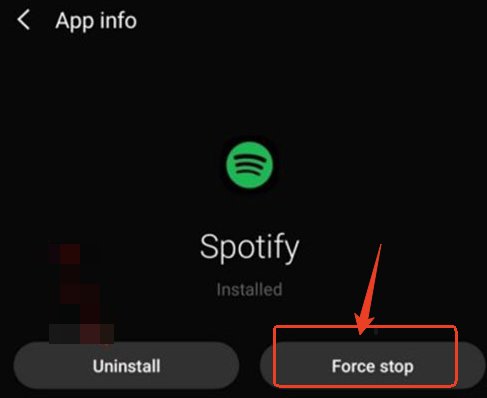
    spotify Force Stop

  • For iOS: You must offload or reinstall the app to fully clear the cache, or check if Spotify allows cache clearing within its internal settings menu.

Note : Clearing the cache will not delete your playlists, but it will remove temporary data. Clearing data (on Android) requires you to log in again and re-download offline content.

2. Change Your DNS Settings

Connection timeouts can mimic app crashes. If the app freezes and then closes, your ISP's default DNS might be the culprit. Reddit users have reported significant stability improvements by switching to Google DNS (8.8.8.8) or Cloudflare (1.1.1.1). This helps resolve the backend metadata faster, preventing the "hang and crash" loop.


Share Your Gameplay or Interesting Content with Friends & Family on Big Screen

Share your interesting content on a big TV screen is great and enjoyable. AirDroid Cast can help you cast the screen from PC/phone to TV, and you can watch together. Take a Look!

Try It Free

Phase 2: The "Clean Reinstall" (Deep Fix)

If Spotify keep crashing even after a cache clear, you need a Clean Reinstall. This is not a standard uninstall. Standard uninstalls leave behind corrupted preference files that haunt the new installation.

For Windows Users

  1. Step 1. Quit Spotify completely (check the System Tray).
  2. Step 2. Uninstall the app via Control Panel.
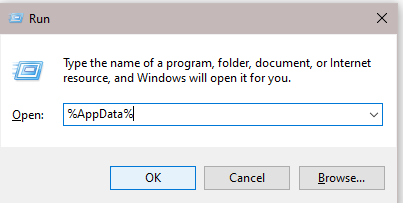
  3. Step 3. Open the "Run" command (Win + R) and type %AppData%.
  4. run command

  5. Step 4. Find the Spotify folder and delete it. This removes the prefs file and corrupted storage.
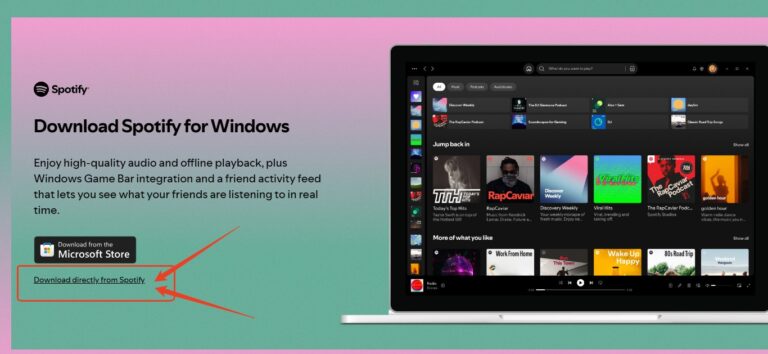
  6. Step 5. Crucial Step: Download the installer from Spotify's official website, not the Microsoft Store, to ensure better system call permissions.
  7. download directly from spotify

For Android Users

  1. Step 1. Uninstall the app.
  2. Step 2. Use a file manager to navigate to Internal Storage > Android > data.
  3. Step 3. Locate and delete the folder com.spotify.music or googleusercontent.com/spotify.com.
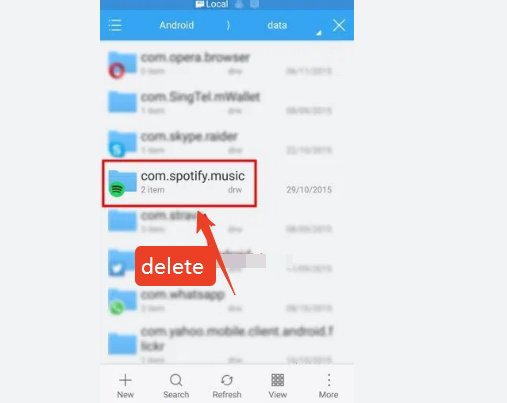
  4. delete data file

  5. Step 4. Reboot your device before reinstalling.

Phase 3: Advanced Solutions for Power Users

When the official methods fail, we turn to the community. Here are high-level fixes for persistent Spotify desktop crash and mobile loop issues.

1. Disable Hardware Acceleration (Desktop)

Modern Spotify uses hardware acceleration to render its UI. However, this conflicts frequently with older GPUs or specific drivers (DirectX/Vulkan).
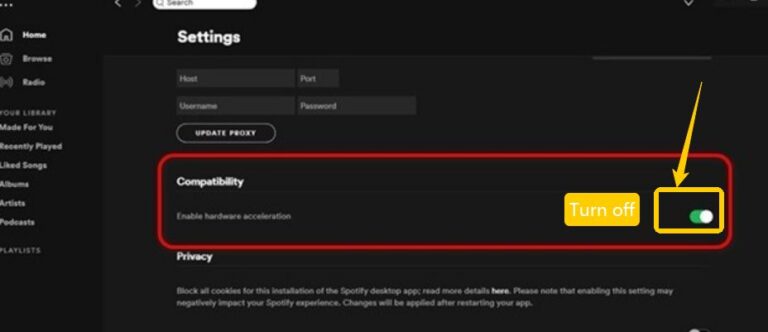
  • The Fix: If you can open the app briefly, go to Settings > Compatibility and toggle Hardware Acceleration to OFF.
  • turn off Hardware Acceleration

  • If you can't open the app: You may need to edit the prefs file manually to add app.hardware_acceleration=false.

2. Android Version Rollback

If the latest update is unstable, reverting to a "Golden Master" version is a proven strategy. Community consensus points to version v8.9.16.593 as highly stable.

  • How to do it: Uninstall the current version. Download the specific APK from a trusted repository (like APKMirror).

  • Warning: Ensure you verify the APK signature to avoid malware. Also, remember to leave the Beta program on the Google Play Store, as beta builds lack full production verification.

3. Linux Command Line Parameters

Linux users often face crashes due to the Chromium container's incompatibility with certain GPU drivers. Launching Spotify with specific flags can bypass this:

  • spotify --disable-gpu (Offloads UI rendering to CPU)

  • spotify --no-zygote (Fixes sandbox initialization failures)

Often Overlooked: Hardware and External Factors

Sometimes, Spotify keep crashing isn't about the software at all—it's about the environment it lives in.

The SD Card Trap

If you save music to an SD card on Android, physical degradation of the card can cause the app to hang indefinitely while trying to read a bad sector.

  • Test: Move your storage location back to "Internal Storage" in Spotify settings. If the crashes stop, your SD card is likely failing or has a corrupt file system.

Audio Driver Conflicts (Nahimic / Razer)

On Windows, audio enhancement software like Razer Synapse or Nahimic intercepts the audio stream to apply effects. If the sampling rate (e.g., 24-bit, 48000 Hz) mismatches what Spotify expects, the audio engine collapses.

  • Solution: Temporarily disable these "enhancements" or uninstall the audio drivers to rule them out.

pic cast pop 01

AirDroid Cast

  • Local & Remote Screen Casting(Your Game or Whole Screen)
  • Android,iOS,Windows,Mac,TV Screen Mirroring
  • Wireless & USB Connection
  • Total Control Android & iOS beyond Your Finger
  • Mirror Multiple Screen to PC simultaneously
Download NowSee Pricing

Part 6: FAQ: Spotify Crash Troubleshooting

Why does Spotify keep crashing when I lock my screen?
This is usually a battery optimization issue. Your phone "kills" the app to save power when the screen goes dark. Go to your battery settings and add Spotify to the "Unrestricted" or "Never Sleep" list.
Will a clean reinstall delete my playlists?
No, your playlists are saved on Spotify's servers. However, you will lose your downloaded (offline) songs and will need to re-download them after reinstalling.
Why does Spotify crash specifically when I open a playlist?
If the playlist is massive (near 10,000 songs), your device might run out of RAM trying to load the list. Try breaking it into smaller playlists.
I'm on Windows 11 and Spotify won't open at all. What now?
Check if you recently updated your graphics drivers. Try rolling back the driver or launching Spotify in "Compatibility Mode" for Windows 10.
Is it safe to download old Spotify APKs?
It carries risks. Only download from highly reputable sites like APKMirror. Avoid obscure "Mod" APK sites as they often contain malware.

Conclusion

Solving the Spotify keep crashing loop requires a systematic approach. Start with resource management (clearing cache/storage), move to environment isolation (clean reinstall), and finally apply technical overrides if necessary.

As we move towards 2026, with AI-driven playlists and heavier app integrations, maintaining a "clean" digital environment—with plenty of free space and minimal background interference—is your best defense against silence.

Share:
Click a star to vote
35 views
Elsa
Elsa
Elsa has worked on a number of iOS & Android solutions, she can always find her way around almost any application. She is an accomplished, skilled and versatile writer with more than 7 years of technical article writing experience.
You Might Also Like
3 Methods to Watch YouTube on Android Auto without Rooting
Elsa
Elsa
Nov 4, 2025
How to Cast Your Android/iPhone to TV without WiFi
Elsa
Elsa
Nov 26, 2025
How to Transfer Photos from Android to iPhone without Computer
Charudatta
Charudatta
Jan 15, 2025
how to use AirDroid discount code
How to Use AirDroid Discount Coupon Codes
How to Use AirDroid Discount Coupon Codes?
Elsa
Elsa
Jan 6, 2025
how to mirror android to roku
mirror android to roku
[3 Effective Ways] How to Mirror Android to Roku?
Elsa
Elsa
Mar 24, 2023
mirror and control iPad on PC
How to Mirror and Control PC on iPad [Updated 2024]
Elsa
Elsa
Jan 30, 2024
3 Methods to Watch YouTube on Android Auto without Rooting
Elsa
Elsa
Nov 4, 2025
How to Cast Your Android/iPhone to TV without WiFi
Elsa
Elsa
Nov 26, 2025
How to Transfer Photos from Android to iPhone without Computer
Charudatta
Charudatta
Jan 15, 2025
how to use AirDroid discount code
How to Use AirDroid Discount Coupon Codes
How to Use AirDroid Discount Coupon Codes?
Elsa
Elsa
Jan 6, 2025
how to mirror android to roku
mirror android to roku
[3 Effective Ways] How to Mirror Android to Roku?
Elsa
Elsa
Mar 24, 2023
mirror and control iPad on PC
How to Mirror and Control PC on iPad [Updated 2024]
Elsa
Elsa
Jan 30, 2024
Discussion

Leave a Reply. Cancel reply

Your email address will not be published. Required fields are marked*

Product-related questions?Contact Our Support Team to Get a Quick Solution>
Home > Streaming Tips > Why Does Spotify Keep Crashing? 2026 Ultimate Fix Guide
Airdroid cast logo
AirDroid Cast
Enjoy More on a Big Screen
Download
  • Universal support for all platforms
  • Connect in seconds with code or USB
  • Control your mobile from a PC
  • Lag-free casting with full audio
Try it Free