Streaming Tips

  • Top StreamEast Alternatives for 2026: Watch Sports Live
  • Best Free and Paid CrackStreams Alternatives in 2026
  • Why Is My TCL TV Screen Black? Troubleshooting Tips for 2026
  • 10 Popular Anime on Netflix [Deserved]
  • HBO Max Not Working? Fix with a Few Steps
sider-adv-logo AirDroid Cast

● Screen Mirror on Android, iOS, Win, Mac, and TV;

● Remote Control Mobile from PC;

● Lightweight Web for Online Mirroring;

● Two-way Audio for Speaking and Listening;


Free Trial
Get Web Version

LG TV No Sound? 6 Easy Fixes That Actually Work (2026)

Elsa Updated on Jan 22, 2026 Filed to: Streaming Tips

There’s that moment of anticipation as you power on your LG TV for a movie or show, only to be met with... silence. If you’re facing this frustrating situation, you’re not alone. LG TV sound problems are a common issue that can stem from a simple setting to a complex system error.

This guide will walk you through every step to diagnose and fix no audio on your LG television, saving you time and potentially a costly service call.

  • Part 1 :Essential First Checks
  • Part 2 :Why Your LG TV Has No Sound
  • Part 3 :Method 1: Hard Power Reset (Most Effective Fix)
  • Part 4 :Method 2: Use the Hidden AV Reset
  • Part 5 :Method 3: Run the Sound Self-Diagnosis
  • Part 6 :Method 4: Fixing HDMI ARC and Soundbar Issues
  • Part 7 :Method 5: App-Specific Fixes (Netflix/YouTube)
  • Part 8 :Method 6: Advanced Troubleshooting
  • Part 9 :Frequently Asked Questions (FAQ)
  • Part 10 :Conclusion

Start Here: The Essential First Checks

Before diving into complex solutions, always eliminate the simplest possibilities. Often, the fix for LG TV audio failure is straightforward.

  • Verify the Basics: Ensure the TV isn’t on mute. Use the physical volume buttons on your remote. Try different content sources (built-in apps like Netflix, an HDMI device, live TV) to see if the issue is universal or source-specific.

  • Inspect External Gear: If you use a soundbar, home theater, or headphones, confirm they are powered on, set to the correct input, and connected properly. Test the TV’s internal speakers to isolate where the problem lies.
Understanding Why Your LG TV Has No Sound

why lg tv no sound

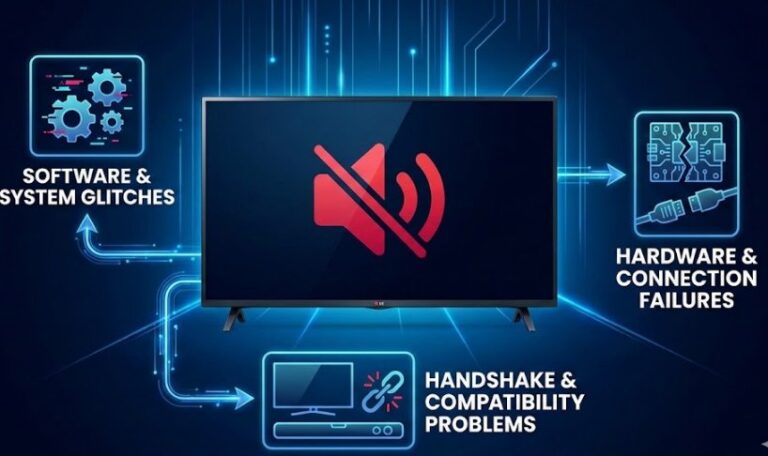
Effective troubleshooting for silent LG TVs requires a basic understanding of potential causes. Audio travels a complex path from the source to your speakers, and a break at any point causes failure.

1. Software & System Glitches

Modern LG TVs run the WebOS smart platform. LG TV audio issues after an update are frequent. Memory overload from too many apps, a crashed audio driver, or bugs in new firmware can mute your TV. Features like “Quick Start+” keep the TV in a low-power state instead of fully powering down, which can prevent the audio system from resetting and allow errors to accumulate.

2. Hardware & Connection Failures

This involves physical problems. LG TV sound not working with external speakers often points to HDMI ARC/eARC or optical (TOSLINK) issues. Loose cables, damaged ports (the optical port is notoriously fragile), or even aging internal components like capacitors on the mainboard can interrupt the signal.

3. Handshake & Compatibility Problems

When using external audio, a communication failure is common. Your TV and soundbar use protocols like HDMI-CEC (Simplink) and eARC to negotiate settings. If this “handshake” fails on startup, audio may not route correctly. Incorrect audio output format settings can also cause no sound from LG TV with soundbar.

Symptom PatternLikely Cause Category
No sound on all inputs and apps.System-wide software glitch or mainboard hardware failure.
Sound works on live TV but not on streaming apps (Netflix, YouTube).App-specific issue, cache corruption, or memory overflow.
Internal speakers work, but HDMI ARC/Soundbar has no audio.Handshake failure, incorrect TV settings, or faulty cable.
Sound disappeared immediately after a system update.Firmware bug or incompatible audio driver.

Share Your Gameplay & Videos with Friends & Family

Share your content on a big TV screen is great and enjoyable. AirDroid Cast can help you cast the screen from PC/phone to TV, and you can watch together. Take a Look!

Try It Free

Method 1: Hard Power Reset (Most Effective Fix)

If you search for "how to fix LG TV no sound," this is universally the first and most effective solution. However, simply turning the TV off with the remote is not enough because that puts the TV into standby mode, preserving the errors in the memory.
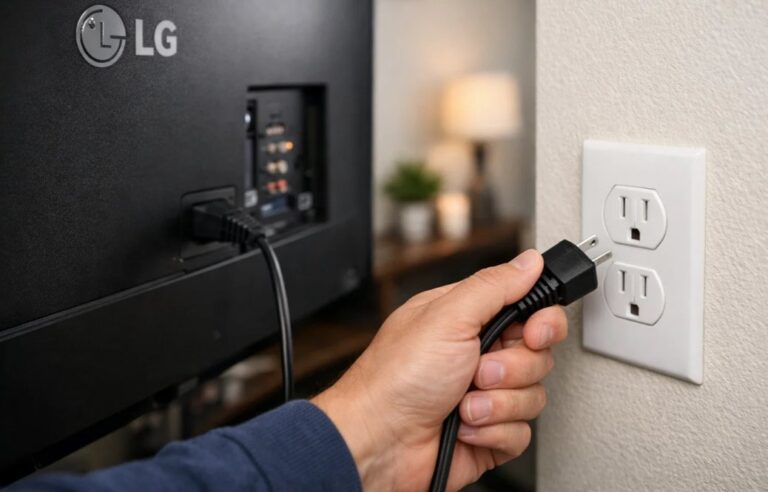
How to perform a proper Hard Reset:

  1. Step 1.Turn off the TV and unplug it directly from the wall outlet.
  2. unplug LG tv from the wall outlet

  3. Step 2.Wait for at least 60 seconds. This is crucial.
  4. Step 3.Physical Button Trick: While unplugged, find the physical power button on the TV (usually under the logo) and hold it down for 30 seconds. This drains any residual electricity from the capacitors on the main board, forcing a complete reload of the audio drivers.
  5. Step 4.Plug it back in and power on.

This process clears the "digital cobwebs" and resets the hardware state without erasing your apps.

Method 2: Use the Hidden AV Reset

Did you know your LG TV has a hidden menu specifically for fixing audio and video glitches? If a standard restart didn't fix the LG TV sound not working issue, this is your next best move. This is different from a factory reset; it only targets the AV settings.
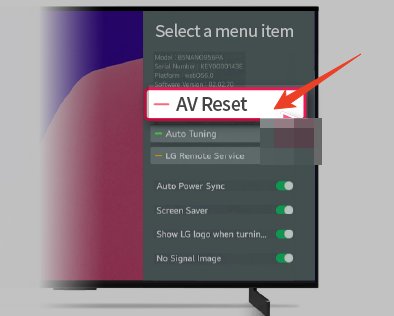
Steps to access the AV Reset:

  1. Step 1.Grab your LG remote.
  2. Step 2.Press the Mute button 3 times quickly.
  3. Step 3.A hidden menu should appear on the screen.
  4. Step 4.Select "AV Reset" and confirm.
  5. Hidden AV Reset

This resets the audio settings to their factory defaults, often clearing out corrupt configuration files that cause silence.

Method 3: Run the Sound Self-Diagnosis

To determine if you are facing a hardware failure (like a blown speaker) or a software glitch, LG provides a built-in diagnostic tool.

Navigating the menu (varies by WebOS version):

  • WebOS 22/24: Go to Settings > All Settings > Support > OLED Care > Device Self-Care > Sound Self-Diagnosis.
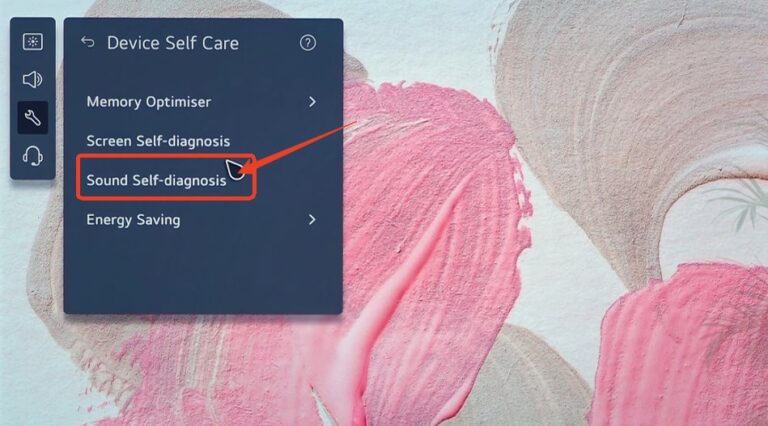
    Sound Self-Diagnosis

  • Older WebOS: Go to Settings > Sound > Sound Test.

If you hear the melody during this test, your hardware is fine. The issue lies in your settings or external connections. If you hear nothing, the internal speakers or the main board's audio IC might be physically damaged.

Method 4: Fixing HDMI ARC and Soundbar Issues

A massive portion of LG TV no sound complaints comes from users with external soundbars (Sonos, Samsung, Bose) connected via HDMI ARC or eARC. This is usually due to a failed "handshake" between devices.
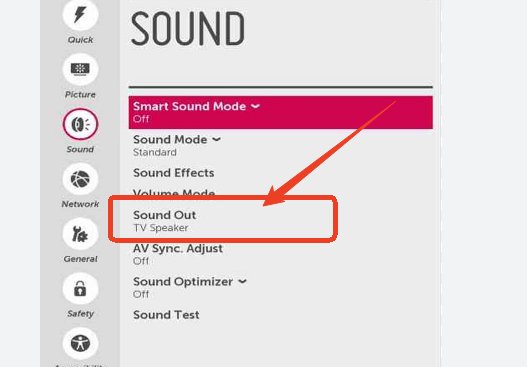
Optimize your HDMI settings:

  1. Step 1.Check the Port: Ensure your HDMI cable is plugged into the port labeled ARC or eARC (usually HDMI 2).
  2. Step 2.Digital Sound Out Settings: Navigate to Settings > Sound > Advanced Settings > Digital Sound Out. Then choose the appropriate option: switch to "Pass Through" for high-end soundbars; switch to "PCM" for older receivers or optical connections; avoid "Auto" if you experience silence.

Digital Sound Out

Note : Also, toggle the SIMPLINK (HDMI-CEC) option off and then on again to force the devices to re-establish their connection.

Method 5: App-Specific Fixes (Netflix/YouTube)

Is the sound working on regular TV channels but your LG TV has no sound on Netflix or YouTube? This is a classic symptom of "Memory Overflow." High-bandwidth apps can hog the system memory, causing the audio driver to be "killed" by the operating system to keep the video running.

The Fix:

  1. Step 1.Close Background Apps: Long-press the "Back" button to kill running apps.
  2. Step 2.Turn off Quick Start+: Go to Settings > General > Devices > TV Management and disable Quick Start+.
  3. Step 3.Reset App Cache: In some cases, reinstalling the specific app helps clear corrupt cache files.
pic cast pop 01

AirDroid Cast

  • Local & Remote Screen Casting(Your Game or Whole Screen)
  • Android,iOS,Windows,Mac,TV Screen Mirroring
  • Wireless & USB Connection
  • Total Control Android & iOS beyond Your Finger
  • Mirror Multiple Screen to PC simultaneously
Download NowSee Pricing

Method 6: Advanced Troubleshooting

For the tech-savvy users, there is a known workaround (Proven on Reddit & Forums) for stubborn software bugs, especially after a firmware update.
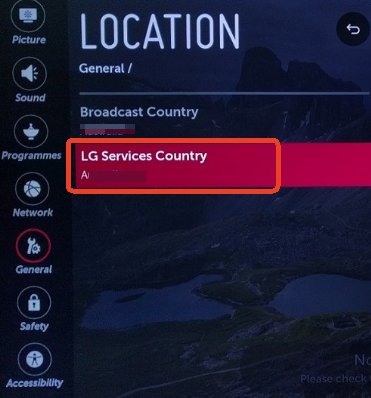
How to do it:

  1. Step 1.Go to Settings > General > System > Location.
  2. Step 2.Change your LG Services Country to a neighboring country (e.g., if you are in the UK, switch to Ireland; if in the US, try Canada or Mexico).
  3. LG Services Country

  4. Step 3.The TV will restart and reinstall legal agreements and core drivers.
  5. Step 4.Once the sound returns, you can switch back to your original region.

This forces a deep rewrite of the software drivers that a standard reset might miss.

Frequently Asked Questions (FAQ)

Q1: Why does my LG TV have picture but no sound?
A: This is typically a synchronization issue between the video and audio processing chips, or a handshake failure with an external device. A hard power cycle (unplugging for 60 seconds) usually fixes this.
Q2: My optical connection has no sound, what should I do?
A: First, check if the tiny plastic protective caps are removed from the cable tips. Second, change your TV's Digital Sound Out setting to PCM.
Q3: How do I reset the sound on my LG TV?
A: You can perform a specific "AV Reset" by pressing the Mute button on the remote 3 times quickly, or use the "Sound Self-Diagnosis" in the Support menu.
Q4: Why does the sound cut out on Netflix?
A: This is often due to the "Quick Start+" feature causing memory fragmentation. Disabling this feature and restarting the TV clears the memory and restores audio to streaming apps.
Q5: Is it better to use PCM or Auto for LG TV sound?
A: For external soundbars using eARC, Pass Through is best. For older equipment or if you are experiencing silence, PCM is the safest, most stable option. Avoid "Auto" if you are having issues.

Conclusion

Dealing with a silent LG TV is usually a solvable puzzle, not a sign of permanent failure. Most cases are resolved through logical software and settings resets. If you have tried every step in this guide—including the Hard Reset and AV Reset—and the Sound Diagnosis still produces silence, it may be time to contact LG Support for a motherboard replacement.

Share:
Click a star to vote
507 views
Elsa
Elsa
Elsa has worked on a number of iOS & Android solutions, she can always find her way around almost any application. She is an accomplished, skilled and versatile writer with more than 7 years of technical article writing experience.
You Might Also Like
3 Methods to Watch YouTube on Android Auto without Rooting
Elsa
Elsa
Nov 4, 2025
How to Cast Your Android/iPhone to TV without WiFi
Elsa
Elsa
Nov 26, 2025
How to Transfer Photos from Android to iPhone without Computer
Charudatta
Charudatta
Jan 15, 2025
how to use AirDroid discount code
How to Use AirDroid Discount Coupon Codes
How to Use AirDroid Discount Coupon Codes?
Elsa
Elsa
Jan 6, 2025
how to mirror android to roku
mirror android to roku
[3 Effective Ways] How to Mirror Android to Roku?
Elsa
Elsa
Mar 24, 2023
mirror and control iPad on PC
How to Mirror and Control PC on iPad [Updated 2024]
Elsa
Elsa
Jan 30, 2024
3 Methods to Watch YouTube on Android Auto without Rooting
Elsa
Elsa
Nov 4, 2025
How to Cast Your Android/iPhone to TV without WiFi
Elsa
Elsa
Nov 26, 2025
How to Transfer Photos from Android to iPhone without Computer
Charudatta
Charudatta
Jan 15, 2025
how to use AirDroid discount code
How to Use AirDroid Discount Coupon Codes
How to Use AirDroid Discount Coupon Codes?
Elsa
Elsa
Jan 6, 2025
how to mirror android to roku
mirror android to roku
[3 Effective Ways] How to Mirror Android to Roku?
Elsa
Elsa
Mar 24, 2023
mirror and control iPad on PC
How to Mirror and Control PC on iPad [Updated 2024]
Elsa
Elsa
Jan 30, 2024
Discussion

Leave a Reply. Cancel reply

Your email address will not be published. Required fields are marked*

Product-related questions?Contact Our Support Team to Get a Quick Solution>
Home > Streaming Tips > LG TV No Sound? 6 Easy Fixes That Actually Work (2026)
Airdroid cast logo
AirDroid Cast
Enjoy More on a Big Screen
Download
  • Universal support for all platforms
  • Connect in seconds with code or USB
  • Control your mobile from a PC
  • Lag-free casting with full audio
Try it Free