AirDroid Parental Control
All-in-One Tool for Real-World Child Safety
- 📍Real-time location & route history
- 🔍Live surroundings check
- 🔔Geofence alerts on daily routes
- 🆘One-tap SOS with ambient audio
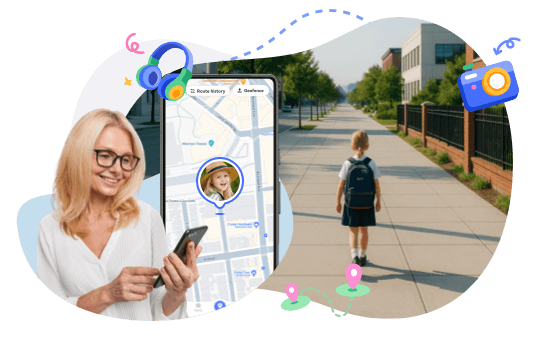
How to Check If Your Child’s Route Has Changed Today
Part 1. How to Check If Your Child's Route Has Changed Today
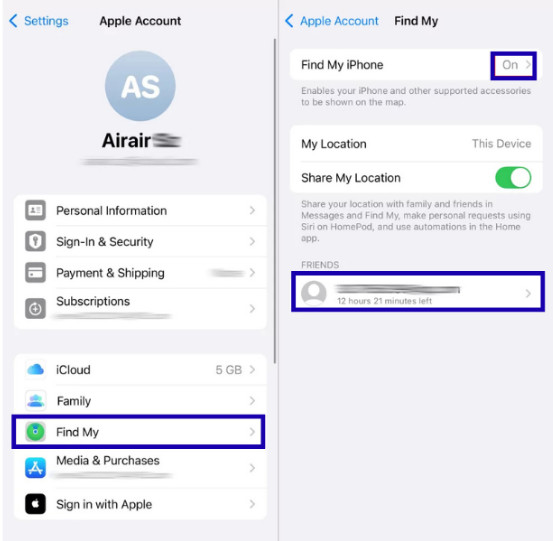
1. Method 1. Use Find My (Apple)
If you are using an iPhone and your kid also uses an iPhone, then you can simply use the Find My app. You can know the real-time location and recent movements of your child only if they have shared their location with you. Moreover, it also shows current movement as well as past location at specific moments with a full timeline.
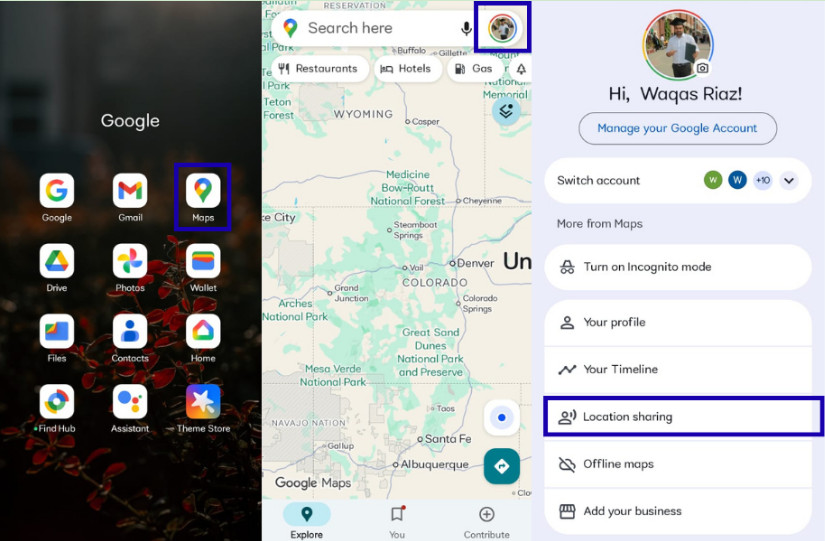
2. Method 2. Use Google Maps Timeline
In case your kid is using an Android phone, you can track them only if the location history is enabled in Google Maps, where you can view their daily movements through Google Timeline. Although you will need access to their Google account to know these movements.
3. Method 3. Use AirDroid Parental Control (Android)
When checking if your child's route has changed today, location data alone is not always enough. A sudden stop or unusual route can mean many things. Before you panic or keep calling your child, it helps to understand what's really happening.
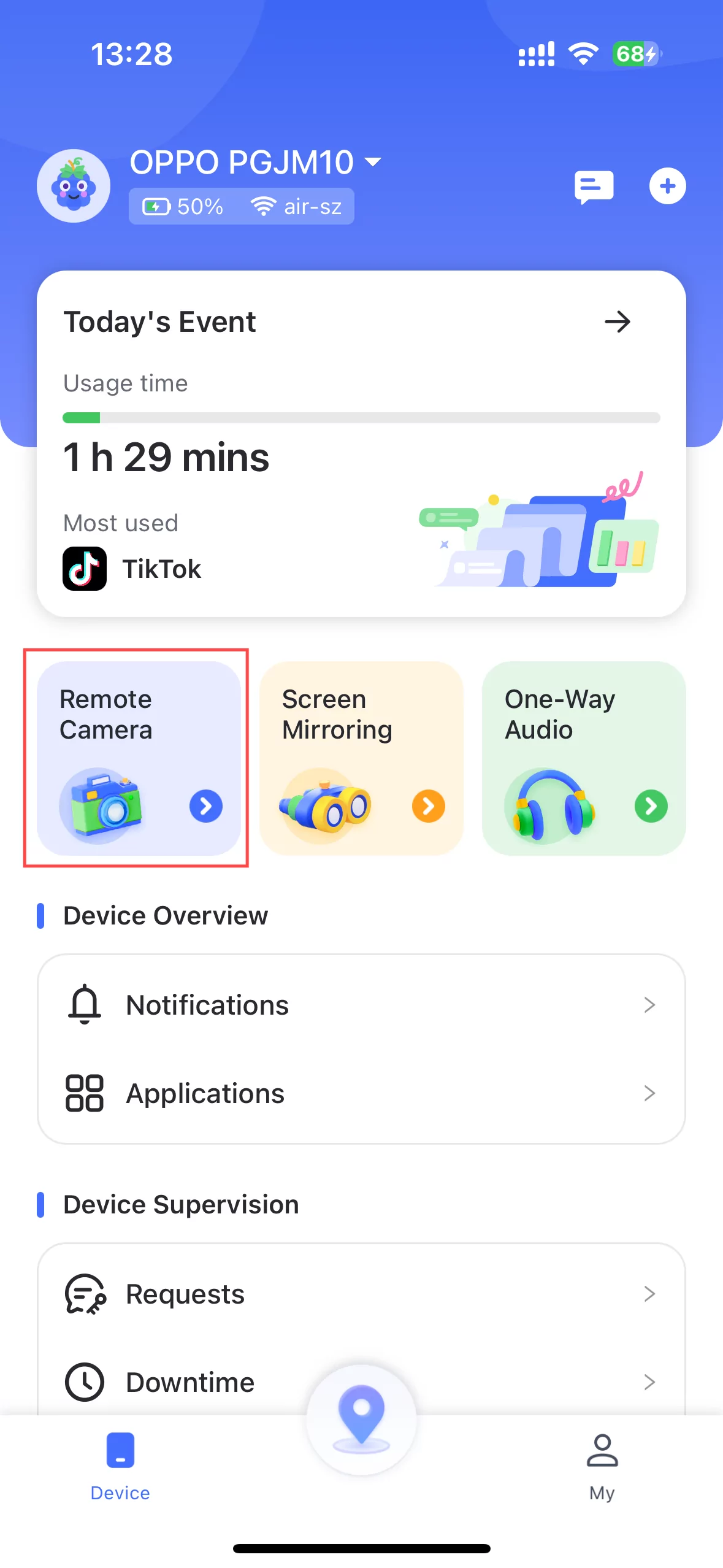
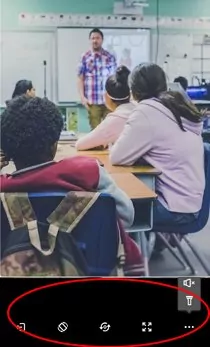
AirDroid Parental Control offers a Remotely See & Listen What's Happening feature that lets parents check the surroundings through the phone's camera and hear nearby sounds in real time. This helps you see if your child is in a safe, familiar place or facing a potential risk. It's a practical way to confirm safety and tell the difference between a normal detour and a real concern.
- Step 1. Click "Remote Camera" in the panel, and you can view the surroundings of your kid's phone.
- Step 2. You can also rotate the screen, switch the webcam, full screen, and even remotely open the flashlight.
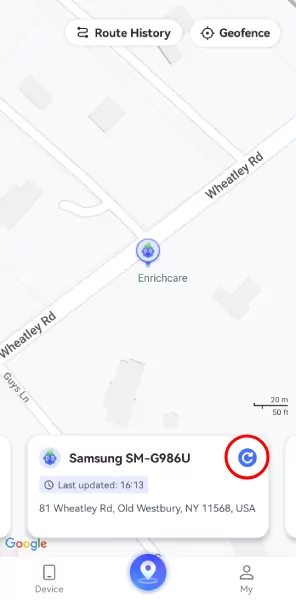
It also gives you a live location where you can see your child's current whereabouts in real time.
You can access their route history, where you can see a full timeline of where they have been over the past 30 days, including all their stops, their detours, and their travel speed.




Part 2. Why Route Changes Are Easy to Miss but Important
When a child is on their way home, there are still chances of risks, and this is exactly why route changes are subtle but very important.
- There is a chance they may head in the wrong direction.
- They can stop somewhere unexpected.
- They can move further away from home instead of closing.
There are parents who only react when their kids are late, but in such a situation, every minute matters. A route change can let you know what happened during the trip, not just the final arrival time.
By checking today's route, you can:
- See where they slowed down or paused.
- Identify unfamiliar stops.
- Compare today's path to their normal routine.
Now, when you have such information, it turns your anxiety into actionable insights, which helps you decide what to do next.
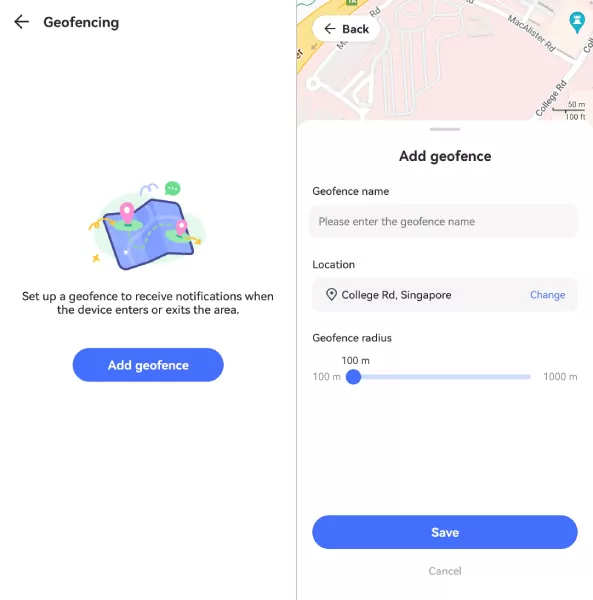
AirDroid's Route History and Geofencing are two of the best features that come in handy in such situations. Set safe zones (like school or home), and get instant alerts if your child enters or leaves those areas unexpectedly.
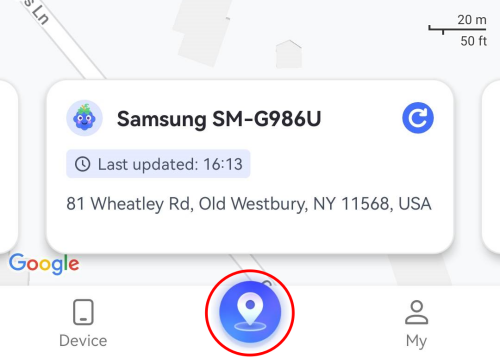
- Step 1. Click the "Location" button at the bottom of the dashboard.
- Step 2. You can see where your child is.
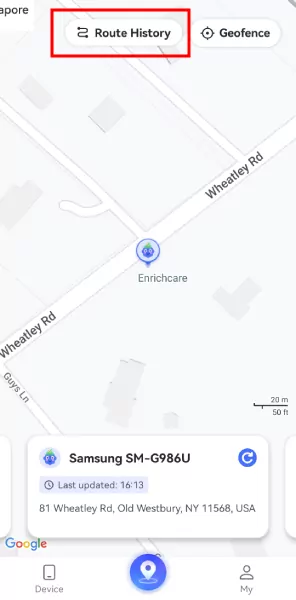
- Step 3. On the location section, tap "Route History" at the top. Then you will see where your child goes after school.
- Step 4. You can also tap the "Geofence" button to add school as the geofence. Then you will get notified when child arrive or leave the school.
Part 3. How to Tell Normal Route Changes from Unusual Ones
Not every route change is a problem. Kids don't always take the exact same way home every day. Sometimes they walk with friends, stop by a store, or take a shortcut. These small changes are usually normal. The real challenge for parents is knowing when a route change is harmless — and when it may be a warning sign.
Quick Check
| • Slightly different streets, but still heading home • A brief stop near school, a friend's house, or a familiar store • A one-time change that quickly returns to the usual pattern • Continuous movement with no long pauses | Normal Detours Usually Look Like This |
| • An entirely different path from their usual way home • Some long stops in an entirely unknown place • Travel time much longer than normal • Not answering your calls and messages • Likewise, if the same odd route is repeated again • Not explaining where they went | Unusual Route Changes Often Look Like This |
You don't need all these signs. Two or more together should prompt a calm, caring conversation.
If today's route looks very different from their normal pattern, it's always worth a quick, non-accusatory check-in: Hey, I saw your route looked a little different. Is everything okay?
Part 4. How to Use Stop Time to Spot Potential Risks
If your kids pause for a little time, then it is fine, but a long pause in an odd place will always need your attention.
1. Step 1. Look at Where the Stop Happened
Ask yourself: Where did they stop? (e.g., school, park, random street, empty lot) And how long did they stay?
A 20-minute stop at a friend's house is very different from a 45-minute stop in an industrial area.
2. Step 2. Watch for “Silent Stops”
Be more alert if all of these are true:
- They don't answer calls or texts.
- There's no movement for 30+ minutes.
- The stop is off their normal route.
This combination suggests something more than a casual detour and may require a follow-up.
AirDroid's Route History here in such a situation will give you the exact stop durations and locations, so you're not guessing; you're seeing facts.
Part 5. Real Reasons U.S. Kids Often Change Their Route Home
Now, understanding some of the common reasons will help you respond wisely without panicking but with perspective.
1. Walking Home with Friends
Many U.S. kids don't go straight home after school because they walk with friends. They may take a longer route to stay together, walk a friend home first, or stop to talk along the way. This is especially common in middle school and high school, when kids value social time more. Kids may:
- Take a longer scenic route to keep talking.
- Walk a friend home first.
- Change paths to stay in a group.
- Low risk but still worth knowing.
In most cases, this kind of route change is normal and harmless. The location may show small detours or short stops, but the places are usually familiar and close to school or home. Parents can look at how often this happens and how long the stop lasts. If it follows a regular pattern, it's usually not a safety concern. It's just a part of everyday school life.
2. School Activities End at Different Locations
Many school activities in the U.S. don't end at the main school building. Sports practice, debate club, or tutoring may finish at a gym, field, or another campus location. Because of this, your child's route home may look very different from usual.
After-school programs often happen in:
- Sports fields
- separate gyms or different buildings
- Nearby community centers
This type of route change is often normal, especially on activity days. The key signs to look for are timing and place. If the activity has a set schedule and the location matches where the activity usually happens, there is usually no reason to worry. However, if the route change doesn't match the activity time or ends in an unfamiliar area, it may be worth checking in.
3. Bus or Transportation Changes
Changes in bus or transportation plans are another common reason U.S. kids take a different route home. Your child may miss the school bus, ride a different bus with a friend, or get picked up by a parent or carpool at the last minute. Weather, schedule changes, or school events can also affect transportation.
In many U.S. districts:
- Buses run late or are rerouted due to traffic or construction.
- Kids miss their usual bus and catch a different one.
- They switch between walking, riding with a teammate, or getting a lift.
In these cases, the route may look completely different on the map, but it is often normal. Parents can check whether the timing makes sense and if the route still leads to a familiar place. If transportation changes happen often or without notice, it's helpful to talk with your child and set simple expectations for letting you know.
4. Running Errands for Family
Sometimes kids take a different route home because they are helping with family errands. They may stop by a grocery store, pharmacy, or convenience store on the way home, or walk to a nearby place to pick something up for a parent.
Teens often stop to:
- Pick up groceries
- Drop off library books
- Grab takeout for dinner
This kind of route change is usually short and happens in familiar areas close to home. The key thing to look at is duration. Errands often involve a brief stop and then the child continues toward home. If the stop lasts much longer than expected or leads to an unfamiliar location, parents may want to check in. Otherwise, these small detours are a normal part of daily family life.
5. Avoiding Bullies or Uncomfortable Situations
Sometimes kids change their route home to avoid bullies or situations that make them feel uncomfortable. This may include staying away from certain streets, taking a longer path, or walking through busier areas where they feel safer. These changes often don't happen every day, which is why they can look unusual on a map.
Some kids change routes to avoid:
- A classmate who harasses them
- A neighborhood they find unsafe
- A place where they had a negative experience
While the route change itself may be a smart choice by your child, it can also be a sign that something is bothering them. If you notice repeated detours around the same area or longer travel times, it's a good idea to talk with your child in a calm and supportive way. The goal is not to question their choices, but to understand what they're dealing with and help them feel safe.
Conclusion
When you know your kids' route has changed today, then it at least gives you some reasons to take some actions. Those detours can let you know their unusual stops, long silences, changes of routes, and much more.
With tools like AirDroid, you get clarity without confrontation. You see the facts, respond with empathy, and build trust while keeping your child safe in an unpredictable world.
Don't wait for them to be “late.” Start with the route.
FAQs about Your Child's Route Changed











Leave a Reply.