AirDroid Parental Control
All-in-One Safety Solution for Kids
- ⌛Up to 30 days location history
- 🔞14 + popular social media content monitoring
- 👀Live surroundings and screen mirroring
- ⚠strong protections for teens to bypass
Mobicip Review 2026: A Comprehensive, Real-World Evaluation for Parents
Parents of today are in great need of reliable parental control tools to protect their children from harmful digital life. Mobicip is one of the most commonly chosen parental control solutions, but still, there is a group of parents who do not trust it and wonder if it would be the right choice for their family.
We used the Google Pixel and did a very honest and effective review of Mobicip. Our team performed hands-on tests using our own devices and held in-depth internal discussions to make sure our conclusions are both objective and experience-based.
Mobicip Overview: Features, Pricing, and Pros & Cons
Mobicip is a parental control app that lets parents keep kids safe online, can easily monitor and manage their children's digital activities. Its key features include limiting screen time, filtering the internet, monitoring social media, tracking location, and more.
After our hands-on testing, we can make the final verdict that Mobicip is a great option for those cross-platform families to protect their children and monitor their device usage. But still, its features fall short on limited social media monitoring and no call or text monitoring.
Mobicip Quick overview:
| Price | (all billed annually) Lite: US $2.99/mo Standard: $4.99/mo Premium: $7.99/mo |
| Supported Device | iOS, Android, MacOS, Windows, Kindle, Chromebook |
| Device limit | 20 |
| Screen time management | ★★★★☆ (Flexible) |
| Location tracking | ★★★★☆ |
| Web filtering/blocking | ★★★☆☆ |
| App Limits | ★★★★☆ |
| Activity reports | ★★★★☆ |
| Social media monitoring | ★☆☆☆☆ (Only 2 apps) |
Pros:
- Supports multiple devices
- Excellent schedule features
- Real-time location and genfencing
Cons:
- Installation has limitations
- No call or text monitoring
- Limited social media monitor
Mobicip Review: Key Features Evaluation
1. Screen Time Management
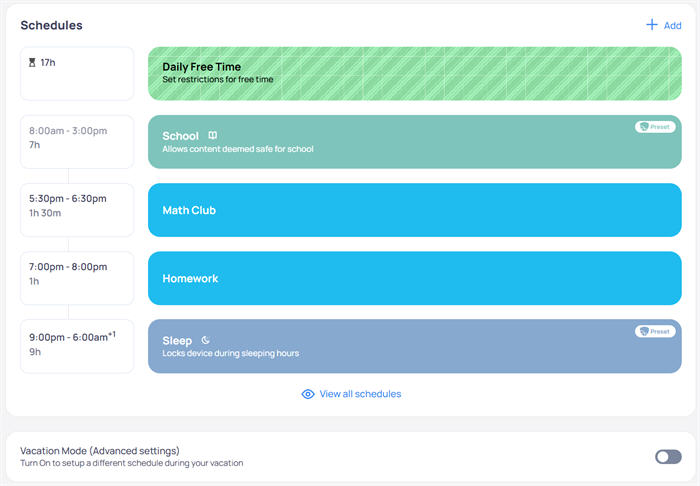
Mobicip’s screen time scheduling is intuitive and effective. Parents can create custom schedules for app use, set time limits, block apps, and filter websites. One of the standout features is the "Lock All Devices" button, which can pause screen time for all family devices at the same time.
Another useful feature is Vacation Mode, which allows parents to set different schedules during vacations. Once the child’s daily screen time limit is filled, they are automatically banned from using their device. But they can request more time, which will send you a notification until you approve or reject.
This time management feature is good. During our testing, we set 8 AM-3 PM as School time, and the phone was locked very quickly after the time expired.
2. Location Tracking
Mobicip offers real-time location updates and custom geofencing, which is a great service for parents who are concerned about their kids' safety. Also, users can share their live location with their family members.
In our actual testing, the positioning function was quite accurate. Also, parents can use “Mark a Place” to create geofences around specific areas and can receive instant alerts when their kids enter or leave predefined zones.
3. Web Filtering
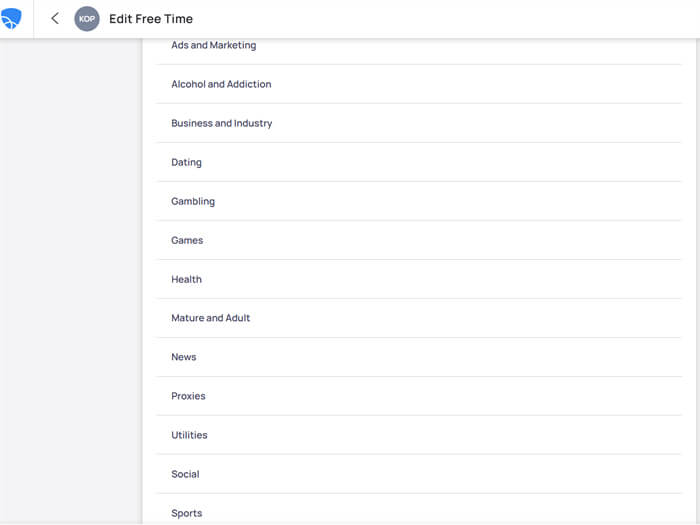
Mobicip’s AI-powered content filter can protect children online in real time. Parents set permission for website content by 16+ categories, including dating, entertainment, alcohol, addiction, games, mature and adult, shopping, and more.
The website filters content based on the child's age by default. Of course, you can also customize the filter to block content you don't want your child to see.
However, these lists are a bit too broad. For example, I don't quite understand what the "Utilities" category specifically refers to, nor do I understand the difference between the "Government and Society" and "News" categories. If Mobicip could add brief descriptions of the blocked content in each category, I believe parents would have a clearer understanding.
We tested several categories on Chrome, Edge, and Firefox, and the performance is solid overall. The web filter stands out—while it occasionally blocks safe sites by mistake, it effectively keeps out most inappropriate content. When the child tries to access a blocked site, they will see a message on their screen that shows the site is restricted. I appreciate that kids have a Request Access button to request access to the website.
Mobicip allows you to create custom filters by specifying keywords. This feature is great, but you need to come up with the keywords yourself, and your keywords may not be comprehensive enough.
It also allows you to disable parental controls on specific networks. This feature is unique; for example, you can choose to disable Mobicip when your child uses the school network to prevent them from being unable to complete assignments online due to partial restrictions. However, to make the network exception take effect, you need to contact the school teacher to obtain the target network's IP address or IP address range.
Overall, Mobicip's web filtering functionality works well, except for the occasional error that filters safe sites by mistake. If possible, I would appreciate a clearer explanation of the categorization of web page filtering.
Users’ feedback from Google Play:
Very useful and well developed application! Using for few years for kid devices! Though sometimes fliters safe sites by mistake.
4. App Limit
You can set restrictions on the total time spent on Social Media, Game, and Entertainment Apps. Kindly note, this feature is hidden under “Schedule”, and the setup is pretty easy. Just click Scheduling > Daily Free Time > App Limits.
We tested the game blocking feature, running several game apps on our child's device, ranging from shooting games to puzzle games, and Mobicip identified and blocked them all. However, the categorization of the web filtering feature is too general.
For example, if you choose to restrict the "Games" category but want your child to focus on educational games that are beneficial for their development, this becomes difficult to achieve. Once game blocking is selected, educational games are also blocked.
Additionally, it doesn't clearly specify which types of apps belong to the "Entertainment" category, or how it differs from "Social Media" and "Games." Adding some explanations under each category would be helpful.
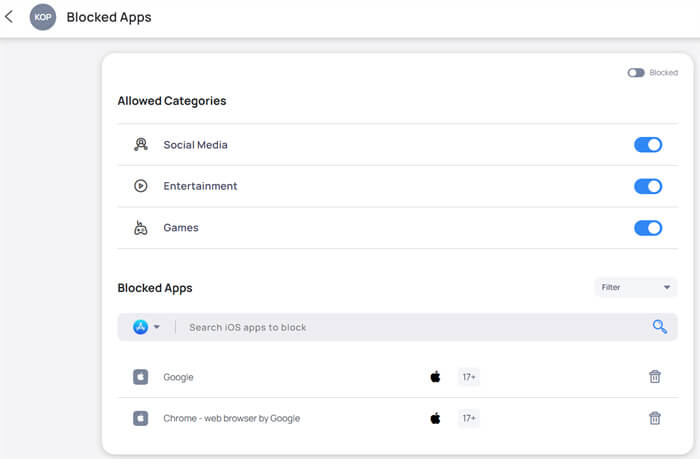
We also tested the block feature on a single application, setting a time limit for YouTube usage. Once the time limit is reached, Mobicip immediately restricts its use.
When the limit is reached, the apps on iOS devices will appear grayed out, and your child cannot access them. On Android devices, a message shows the app is blocked by a parent, and your child can request access, which you can approve or deny.
Please note that all apps rated 17+ in their respective app stores are blocked by default (and this feature cannot be turned off). This is very useful if you want to ensure your child is not exposed to age-inappropriate content.
In conclusion, this feature is well-performed. But it can be improved further if they add a description under the categories.
5. Web Blocking
Mobicip allows you to block apps and websites. One needs to pay attention to the fact that you can filter web content by adding specific sites to either a blacklist or a whitelist. Additionally, the "Whitelist Only Mode" lets you restrict access to only the websites you’ve explicitly approved.
Unfortunately, we tested the blacklist, and it did not work as expected. It has successfully blocked our access to blacklisted websites on several occasions, but failed a few times. For some unknown reasons, we can still access the sites that we have already added into blacklist. We have also seen complaints on Google Play.
Users’ feedback from Google Play:
I was happy when I found this app because there aren't many options for Chromebooks, but I'm becoming increasingly frustrated. It doesn't block the things I want it to block, but then randomly blocks things that I have given my son permission to use. Right now I have the YouTube app turned off in the settings, AND I manually entered YouTube into the blocked websites, but YouTube opens right up when I click on the app. It just doesn't work the way it's supposed to.
Bare bones, many features lacking when compared to free alternatives. Not able to whitelist individual applications.
6. Activity Reports and Alerts
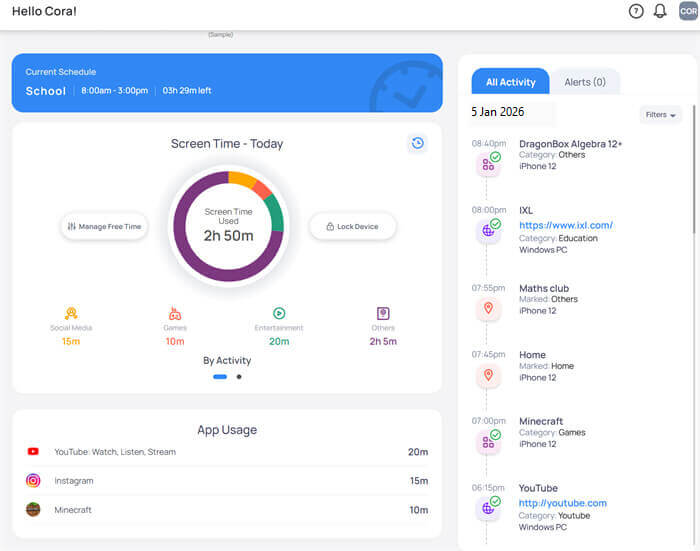
Provides a straightforward overview of your child’s device usage, including how much time they’ve spent on their device, which websites they’ve visited, what apps they’ve used, and more. During our testing, the data on the duration of children's use of the app, the websites they visited, and the frequency of app usage were all very accurate. As you can see below, we used 20 minutes on YouTube and 15 minutes on Instagram, and it shows exactly.
Comprehensive Reports:
- Browsing History: Detailed logs of all websites visited by the child, including timestamps and duration.
- App Usage: Information on which apps were used, for how long, and when.
- Screen Time: The total screen time spent for the day and the free time remaining.
Alerts and Notifications:
- Suspicious Activity Alerts: Notifications for potentially harmful or inappropriate content accessed by the child.
- Real-Time Notifications: Immediate alerts for specific activities or breaches of set rules.
7. Social Media Monitoring
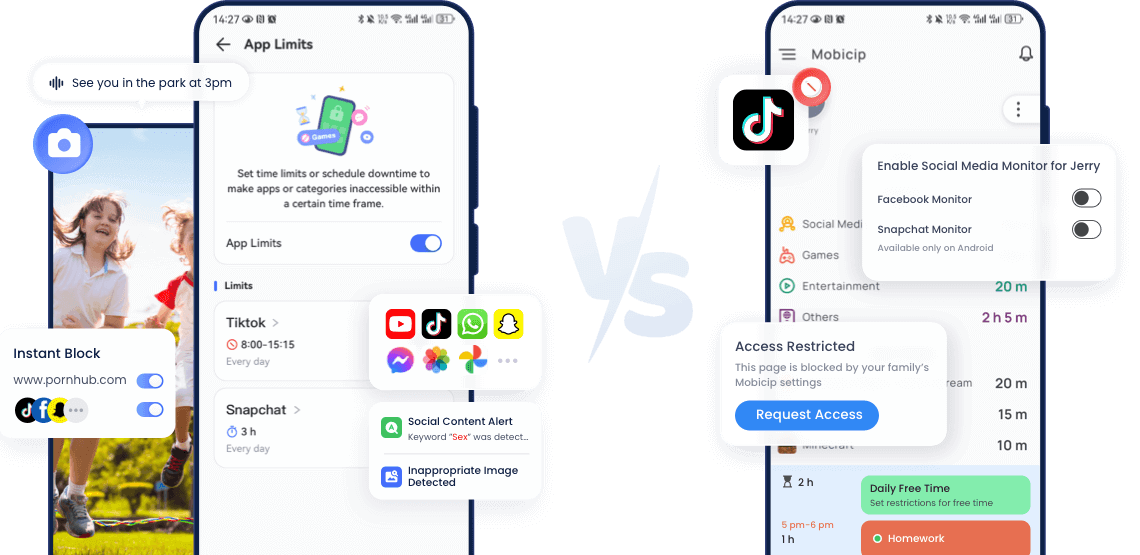
Mobicip is capable of monitoring social media interactions—specifically on Snapchat and Facebook—and will send alerts when suspicious activities are detected.
Our testing on Snapchat showed it effectively notifies parents of potential bullying.
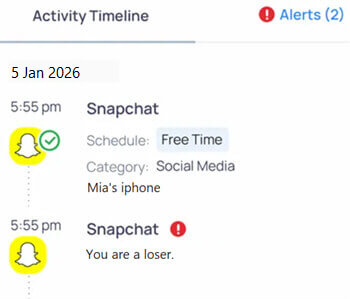
Unfortunately, this is a significant limitation: it does not support other widely used social media platforms such as TikTok or Instagram. For parents seeking comprehensive social media monitoring, this shortcoming could be a deal-breaker.
In contrast, AirDroid Parental Control monitors over 14 popular social media platforms. It offers Social Content Monitoring with customized keyword tracking for specific apps. AI-powered keyword assistant generates a comprehensive keyword list to filter unwanted content, sending parents instant alerts for bullying, gambling, sexual, or scam-related terms on their kids’ devices.
Overall, Mobicip has good features but significant limitations. If parents are more concerned about their children's social media safety, you might try AirDroid Parental Control.
8. Installation & initial setup
The entire installation guide is relatively comprehensive and contains a video tutorial in steps.
For Android users, make sure you’ve already created a Mobicip account, and ensure that Google Family Link is disabled on your child’s device.
For iOS users, before you begin, please make sure the following:
- Check if Apple Family Sharing is enabled.
- Check if your kid has an Apple child account and is logging into the device you want to protect. If he/she doesn’t have one, create and invite a child account to Family Sharing.
- Check if your child's age in the Apple account is below 18.
During the setup, you may encounter an issue stating that your child’s device is managed by an MDM profile, preventing you from moving forward.
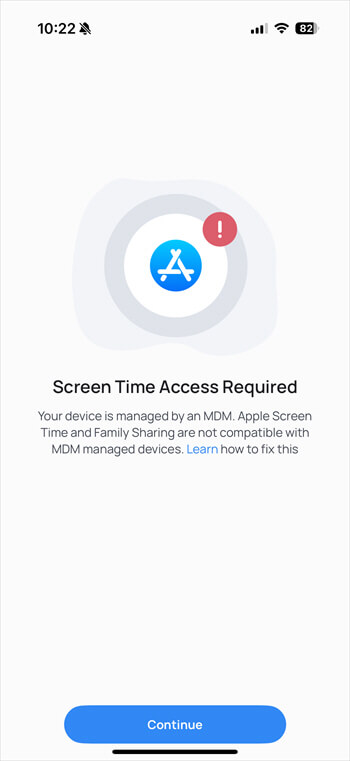
Don’t worry, just follow the instructions to fix it.
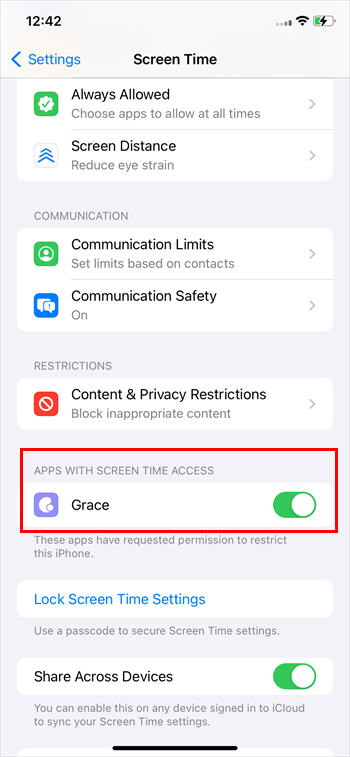
- Step 1. Delete the device management app from the device.
- Step 2. Manually delete the device management profiles. Open Settings > Screen Time. Look for "Apps With Screen Time Access" and turn it off.
Overall, Mobicip offers a guided and user-friendly setup, complete with video tutorials for some steps. Still, a few setup limitations can cause inconvenience.
Users’ feedback from Google Play:
No experience at all, I never could install it on a child's phone since the Android rights management is so deeply broken, even as a seasoned web developer, I had to give up. What a nightmare.
Installation has taken 10 minutes so far on both tablets, and the progress bars are barely moving. Not a good sign: problems before we've even started? I like the potential and the customization choices, but I may not get to see how it performs if it won't install on my kids' devices!
9. Apps and Ease of Use
Mobicip App and web are both User-friendly UI, with a wide variety of supported devices, making it a good choice to protect kids' online safety. It can work across platforms, and the customized screen time schedules feature, location tracking, web, and apps filter are excellent and amazing.
In the meantime, no child data or usage data is shared by Mobicip. According to their privacy, each service must process the personal information in strict accordance, which means you don’t have to worry about data safety when using.
However, with some limitations on installation, it can only monitor 2 social media, no SMS or call monitor, which can only work for parents who want mild supervision.
Users’ feedback from Google Play:
Alternatives to Mobicip Worth Considering
Why do we need Mobicip alternatives? Well, as you can see above, Mobicip may not fully meet the needs of parents who want comprehensive device control. While it excels in web filtering and online safety, it falls short in offering remote management features and real-time device control.
Imagine how terrifying it would be if parental control tools failed to detect that your child is spending hours chatting with strangers on Snapchat or WhatsApp, or even being lured away by them—only for you to realize the danger when your child goes missing!
This is where AirDroid Parental Control steps in. If you're looking for a tool that not only lets you monitor your child’s online social media activity but also alerts you when detect keywords in real time, AirDroid Parental Control could be the solution you're looking for.
Why AirDroid Parental Control stands out?
Remote operations: With AirDroid, you can remotely monitor your child’s device when fearing safety, view their surroundings through the camera, mirror their screen in real-time, and even listen through one-way audio.
Strong Social media monitoring: Monitors 14 plus popular social platforms for possible online dangers, and notifies you instantly, thus allowing you to take action very early.
Full device control: AirDroid integrates real-time location tracking, geofencing, SMS monitoring, inappropriate image detection, and so on.




AirDroid vs. Mobicip: Overview
| Features | AirDroid Parental Control | Mobicip |
|---|---|---|
| Google Play Rates | 4.6 | 3.2 |
| Social media monitor |  (14+ hot apps) |  (Only 2 apps ) |
| One-Way audio | |  |
| Remote camera | | |
| Screen mirroring | | |
| Sync notifications | | |
| Web/App Filter & Block | (Solid) | (Unstable) |
| Screen time management | | |
| Location | | |
Final Verdict
Both Mobicip and AirDroid Parental Control are outstanding tools in the parental control area. However, the decision ultimately depends on what you’re looking for in terms of functionality.
Mobicip is ideal for parents looking for basic web filtering and light device monitoring. It's a great choice if you want to protect your child from inappropriate content online and manage their screen time.
AirDroid Parental Control, on the other hand, is great for parents who need comprehensive device control, real-time tracking, and are more concerned about social media online safety. If you need more control over the child's activities and the opportunity to intervene instantly, AirDroid could be a more suitable choice for you.
FAQ















Leave a Reply.