How to Download Instagram Reels
Instagram Reels have taken over our feeds and some videos that entertain, inspire, and sometimes even teach us something new. But what if you find a Reel you really like and want to keep on your device? Maybe to rewatch offline, share with friends outside the app, or save it for later without worrying that it might disappear. That’s where Instagram Reels download options come in.
In this article, we’ll walk you through 4 ways to download Instagram Reels, whether they’re yours or someone else’s. We’ll cover built-in features, third-party tools, and tips to do it safely and legally.
Part 1. Can You Download Instagram Reel?
Yes, but it depends on whose Reel it is.
You can download your own Reels directly from your profile, no problem. But when it comes to Reels from other users, it’s not always possible. If the creator has turned off the “Allow Download” option, you won’t be able to save it through the app.
Also, keep in mind that downloading someone else’s content without permission could violate Instagram’s terms or copyright rules. If you’re planning to reuse or share it, it’s best to get the creator’s permission first.
Part 2. How to Save Instagram Reel Draft to Camera Roll Before Posting
Are you wondering how to save a Reel draft to the camera roll before posting it without a watermark? Well, you can, but keep in mind that if you used Instagram’s built-in music (from the app’s audio library), it won’t be included in the saved video. Only original audio or tracks you uploaded yourself will be saved.
With that sorted, here are the steps on how to save an Instagram Reel draft to camera roll:
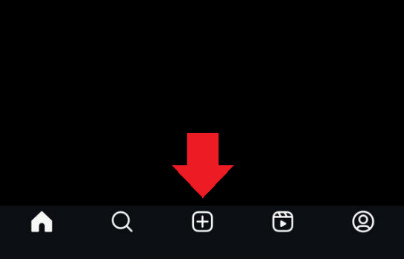
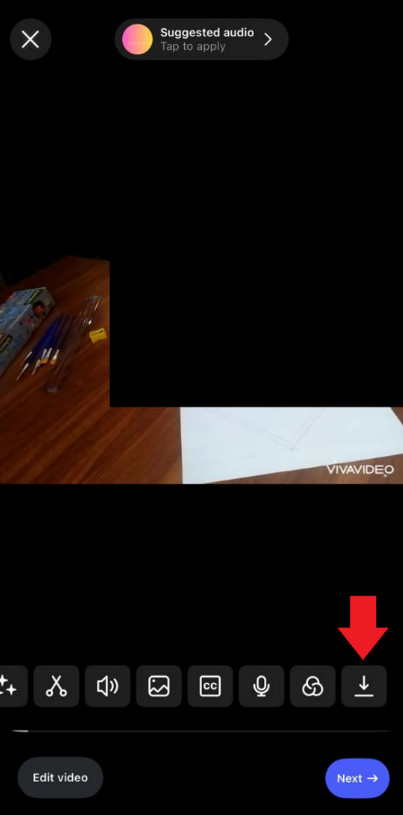
- Step 1. Open Instagram and tap on “+”.
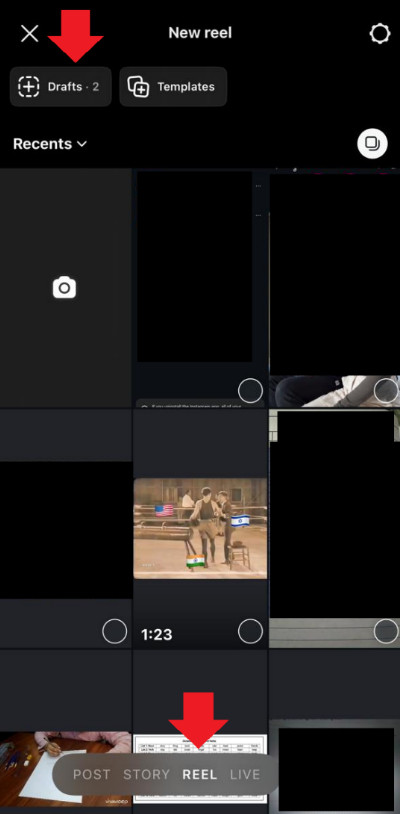
- Step 2. Tap on “Reel > Drafts.”
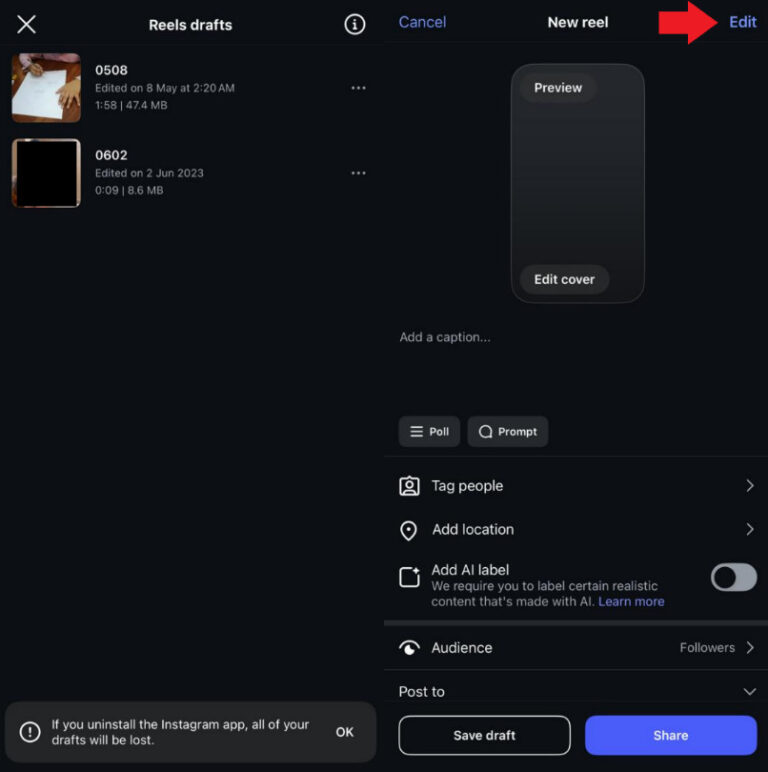
- Step 3. Select the Reel you want to save and tap “Edit."
- Step 4. Tap on the Reel, then swipe left on the menu bar at the bottom. You will see a “Save” icon at the end. Tap on it to save the Reel to your camera roll.
Part 3. How to Download Instagram Reel after Posting
If you've already posted your Reel and want to save it to your device, Instagram gives you a simple option to download it.
Here’s how it goes:
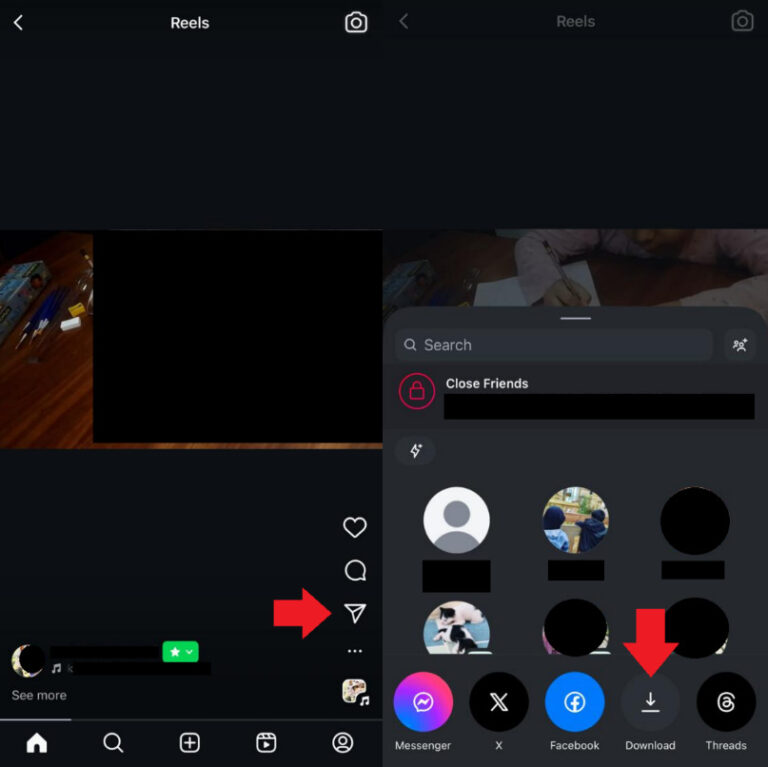
- Step 1. Open the Reel you want to download and tap on the “Share” icon, which is indicated by an airplane.
- Step 2. Tap on “Download” to save the video to your camera roll.
And that’s how to Instagram Reels video download. However, there are a few limitations to be aware of:
- If your Reel includes copyrighted audio (like music from Instagram’s library), the audio won’t be included in the downloaded file.
- Instagram adds a watermark to the downloaded Reel.
- These downloads are meant for personal use only. You can’t use them for commercial purposes or repost them as-is to other platforms without running into copyright or platform issues.
Part 4. Download Instagram Reels by Screen Recording
If you can’t download a Reel directly, screen recording is your next best option. It works on Android and iPhone and is simple to do.
For Android
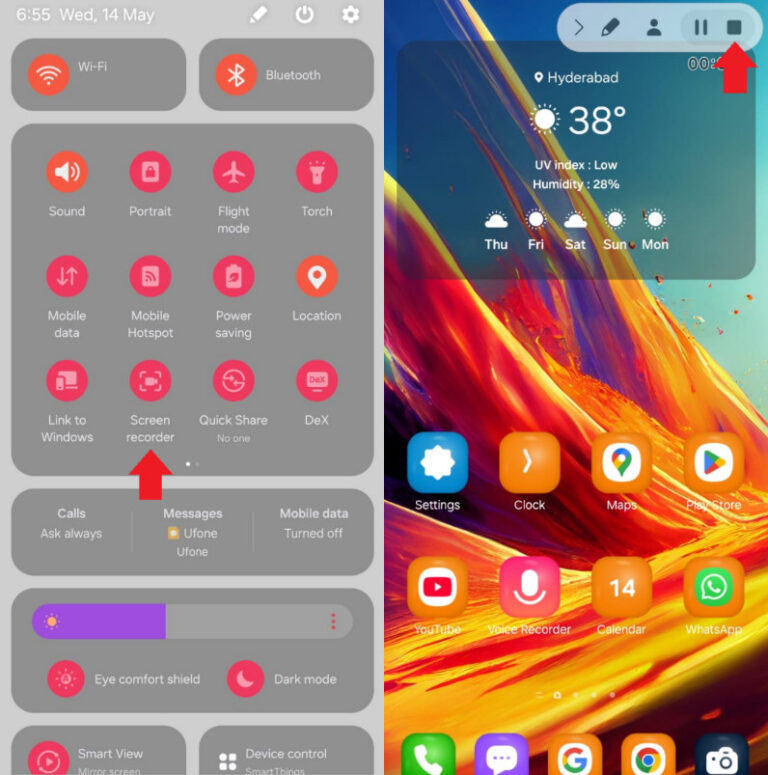
- Step 1. Swipe down on your Android’s screen to access the Quick Settings. Tap on “Screen Recorder” to activate it.
- Step 2. The Screen Recorder will begin recording your screen after a 3-second countdown. Now, launch Instagram and start watching the Reel you wish to save. Once you have fully recorded it, tap on the “Stop” option to stop the recording.
The Screen Recorder will begin recording your screen after a 3-second countdown. Now, launch Instagram and start watching the Reel you wish to save. Once you have fully recorded it, tap on the “Stop” option to stop the recording.
The screen recording of the Instagram Reel will be automatically saved to your phone’s gallery, and you can view it whenever you want or share it on other platforms.
For iPhone
- Step 1. Swipe down on your iPhone’s screen to open the Control Center. Tap the screen recorder icon, indicated by a dot inside a circle.
- Step 2. After a 3-second countdown, the screen recording will begin. Launch the Instagram app and open the reel you want to save.
- Step 3. Once you are done recording, tap on the red timer at the top of the screen and select “Stop” when you get a prompt to stop the screen recording.
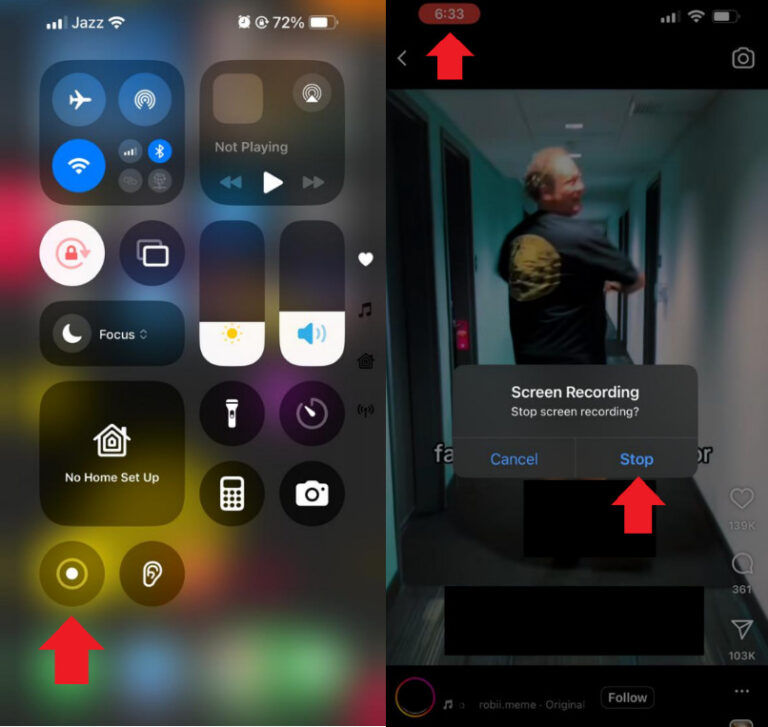
This will save the Reel’s screen recording in your iPhone’s gallery, and you can access it anytime.
Conclusion
Instagram Reels download is a piece of cake once you discover the different options available! Whether you're saving your own drafts, downloading videos after posting, using screen recording to save videos, or trying out a third-party tool, there’s a method that fits your needs perfectly.
Just a friendly reminder: if it's not your content, always be respectful of the creator’s rights and stick to Instagram’s guidelines.
With the right approach, downloading Instagram Reels can be easy, safe, and totally hassle-free. So go ahead and save what you love, but remember to do it the right way!











Leave a Reply.