From Device Alerts to AI-Driven Workflows: Modernizing MDM Automation
- Part 1: Why Traditional MDM Workflows Are No Longer Enough
- Part 2: How AI-Driven Alert Workflows Work in AirDroid Business
- Part 3: What You Can Detect and Act On (Operational Signals)
- Part 4: AI Agent Use Cases for Device Operations
- Part 5: From Rule-Based Automation to AI Agents (The Real Upgrade)
- Part 6: Best Practices: Building AI Device Workflows Safely
- Part 7: The Future: Autonomous Device Operations
- Part 8: Get Started: Build Your First AI-Driven Device Workflow
Managing hundreds or thousands of Android devices is no longer just "device management." It’s operations.
Traditional MDM automation can execute predefined workflows—restart a device, push a policy, send an email. But when devices are distributed across stores, vehicles, kiosks, and field teams, the real challenge isn’t execution. It’s incident response:
- What exactly happened?
- Which devices are impacted?
- Is this a one-off glitch or a recurring pattern?
- What’s the safest remediation path?
- When should we auto-fix vs. escalate to an engineer?
With AirDroid Business Alerts & Workflows combined with GoInsight.ai AI workflows, teams can move beyond static rule-based automation toward AI-driven device operations: context-aware remediation, incident summarization, and intelligent escalation—at scale.
Part 1: Why Traditional MDM Workflows Are No Longer Enough
Traditional MDM workflows are designed for "execute actions," not "run operations." At small scale, that’s fine. At large scale, it creates friction:
- Traditional MDM Automation ProblemWhat It Looks Like in Real Ops
- Static rulesThe same action runs for every alert—even when context differs
- One-step actions"Restart device" is triggered, but the real issue is app crash or storage pressure
- No incident narrativeYou get logs/emails but still need human analysis to understand the story
- No adaptive decision-makingIT must decide the next step manually (triage, retry, escalate)
- Still reactiveAlerts notify you, but the response still depends on someone being available
Traditional automation is rule-based. Modern operations require context-aware workflows.
AirDroid Business - Elevate Your Device Management with AirDroid Business
Transform your operations with AI-driven workflows. AirDroid Business offers intelligent device management for modern enterprises.
Part 2: How AI-Driven Alert Workflows Work in AirDroid Business
AirDroid Business provides device monitoring and alerting, plus automated actions. The AI upgrade happens when an alert becomes an event that can drive reasoning and multi-step handling.
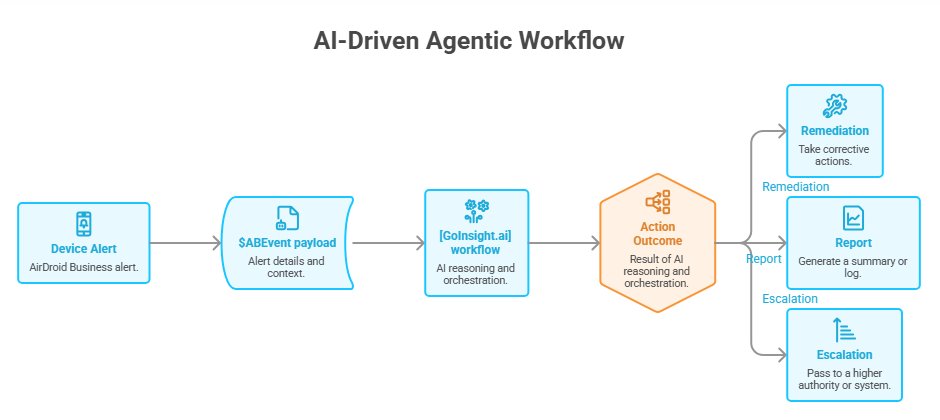
1The AI-driven flow (Agentic workflow)
Device Alert (AirDroid Business)
↓
$ABEvent payload (alert details + context)
↓
GoInsight.ai workflow (AI reasoning + orchestration)
↓
Remediation / Report / Escalation
2What is $ABEvent?
$ABEvent is the event data package generated when an AirDroid Business alert is triggered. In the AirDroid Business console, you can configure an alert action to:
Trigger one or more GoInsight.ai workflows automaticallyand each selected workflow should include the $ABEvent variable to receive the alert details.
This is the key difference between "automation that executes" and "operations that understand." Instead of treating every alert as a generic signal, the workflow starts with structured context.
Part 3: What You Can Detect and Act On (Operational Signals)
AirDroid Business alerts and monitoring can cover the operational realities that actually break frontline devices, such as:
- Online / Offline status
- Battery level, charging, battery temperature
- Storage space
- Network usage / traffic
- App running status / process monitoring
- Kiosk running status
- SIM events (e.g., SIM insertion/removal)
- External HDMI connection status (common for digital signage)
When alerts trigger, AirDroid Business can execute automated actions (examples include device reboot, switching configuration, sending notifications, moving groups, opening an app to foreground, clearing app data/cache, and more—depending on your setup). This is the "execution layer."
GoInsight.ai adds the "reasoning + summary + escalation layer."
Part 4: AI Agent Use Cases for Device Operations
This section is the "why it matters" part. The point isn't that AI can do something flashy. The point is that AI can reduce the time spent on manual triage and improve consistency in response.
1Use Case 1: AI-Powered Kiosk Recovery (POS / Signage / Dedicated Devices)
Scenario
A POS app (or signage player) crashes repeatedly. The device is still online, but the frontline screen is unusable.
Traditional ops
- A store calls support
- IT remotes in to check the screen
- Manual diagnosis: Is it the app? Is it storage? Is it kiosk exit?
- Manual actions: reopen app, clear cache, reboot, re-apply kiosk/policy
- Someone writes notes later (or not)
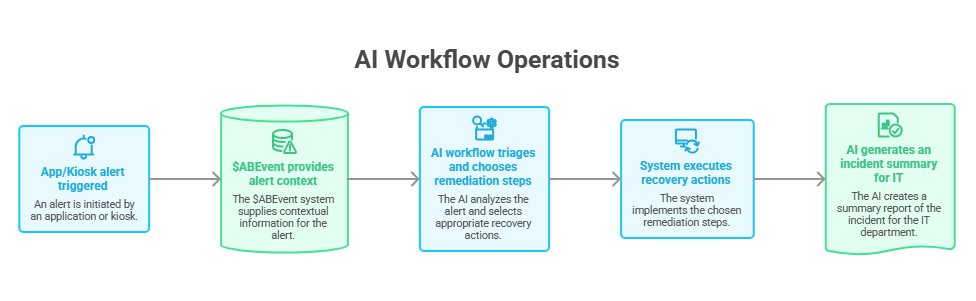
AI workflow ops
App/Kiosk alert triggered
↓
$ABEvent provides alert context
↓
AI workflow triages and chooses remediation steps
↓
System executes recovery actions
↓
AI generates an incident summary for IT
Example remediation decision tree (safe-first)
- 1.Attempt to bring the business app to foreground
- 2.If it re-occurs: clear app cache/data (guarded)
- 3.If still failing: reboot device
- 4.If repeated failures persist: escalate to IT with a concise timeline + recommended next steps
Before vs After
- MetricTraditional OpsAI Workflow Ops
- DetectionHuman reports itAlert detects it
- AnalysisManual investigationAI-assisted triage based on event context
- RecoveryManual multi-stepAutomated multi-step remediation
- ReportingManual notes/log huntingAI-generated incident summary
- ConsistencyDepends on engineerStandardized playbook
2Use Case 2: AI Incident Reporting (From Logs to Readable Narratives)
Most teams don’t need "more alerts." They need less time spent reading logs.
When an incident happens, AI workflows can generate a human-readable summary that helps teams answer "what happened" fast.
Example incident summary (pattern) Device was offline for 17 minutes. App crash alert occurred 3 times within 10 minutes. Automated remediation executed: reboot performed successfully. Device reconnected and kiosk resumed normal operation.. Next step: monitor for recurrence; if repeats within 24 hours, escalate to Tier 2 support. This is valuable for:
- Faster triage during support shifts
- Cleaner handoffs between teams
- Better post-incident reviews
- SLA reporting and customer communication
3Use Case 3: Intelligent Escalation (When to Auto-Fix vs. Escalate)
Blind automation can be dangerous. Smart operations require escalation logic.
AI-driven workflows can decide:
- Resolve automatically (low-risk, high-confidence incidents)
- Escalate to IT (repeated failures, critical devices, or unsafe actions)
- Create a ticket / notify a channel (based on severity and recurrence)
Example escalation policy
- First occurrence → attempt light remediation
- Repeated occurrence within a time window → escalate with a timeline and recommended action
- High-risk actions (e.g., data wipe / factory reset) → require human approval
Part 5: From Rule-Based Automation to AI Agents (The Real Upgrade) Think of the evolution like this:
- Traditional WorkflowAI Agent Workflow
- Static rulesContext-aware decision-making
- Single actionMulti-step reasoning + orchestration
- Email/log outputIncident timeline + readable summary
- Human must investigateAI-assisted triage reduces investigation time
- Mostly reactiveMoves toward self-healing operations with guardrails
This is how MDM automation becomes AI-driven device operations.
AirDroid Business - Streamline Operations with AI-Powered Solutions
Experience seamless incident management with AirDroid Business and GoInsight.ai. Reduce downtime and enhance efficiency.
1How APIs and AI Workflows Work Together (Integration Mindset)
As device operations mature, teams want incidents to flow into existing systems—ticketing, on-call, internal portals, dashboards. A practical pattern is: - AirDroid Business detects operational events - AI workflow reasons and standardizes response - Workflow updates external systems (e.g., ITSM / ticketing / chat ops) with the incident summary Example
If kiosk failures repeat 3 times in 2 hours:
- AI workflow creates a Jira ticket
- attaches an incident summary and timeline
- tags the device group owner
Part 6: Best Practices: Building AI Device Workflows Safely
AI workflows are powerful, but they must be governed like production systems.
- Best PracticeWhy It Matters
- Start with small workflowsReduce risk and prove ROI quickly
- Add retry thresholdsAvoid reboot loops and noisy automation
- Keep human approval for destructive actionsPrevent irreversible mistakes
- Use incident summaries for triageReduce alert fatigue and investigation time
- Monitor workflow outcomesPrevent “workflow drift” and hidden failures
1Guardrails matter
Self-healing operations are not "set and forget." They require:
- Approval mechanisms for high-impact actions
- Clear escalation policies
- Observability: what ran, what succeeded, what failed, and why
Part 7: The Future: Autonomous Device Operations
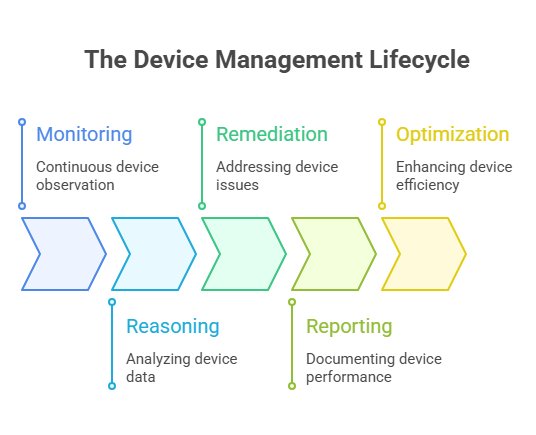
The direction is clear: device management is evolving into an operational lifecycle.
Monitoring
↓
Reasoning
↓
Remediation
↓
Reporting
↓
Optimization
Teams that adopt AI-driven workflows early can reduce downtime, shrink MTTR, and scale device operations without scaling headcount.
AirDroid Business - Modernize Your MDM with AirDroid Business
Upgrade to AI-driven device operations. Start your free trial today and see the difference in your device management strategy.
Part 8: Get Started: Build Your First AI-Driven Device Workflow
A practical starting point:
- Step 1.Choose one high-impact alert (e.g., kiosk/app failure, offline devices, storage pressure)
- Step 2.Attach a GoInsight.ai workflow trigger
- Step 3.Use $ABEvent inside the workflow to read alert details
- Step 4.Implement a safe-first remediation sequence
- Step 5.Add escalation + incident summary output
If you manage distributed Android devices (retail POS, digital signage, logistics tablets, field devices), this approach turns MDM automation into something more valuable: self-healing device operations.



Leave a Reply.