
- Why Web-Based Remote Control is IT’s Preferred Method
- Browser vs. App: How MDM Blends the Best of Both Worlds

- MDM Platforms: Enabling True Unattended Access via the Web Console
- Efficiency Gains and Cost Savings of Remote Web Control
- Real-World Impact: Web Remote Access Across Business Scenarios
- Quick Setup: Implementing Web Remote Access
Web-based remote control is a major relief for IT teams. It allows you to manage and access deployed Android devices directly from a browser with no apps, no installation, and essentially zero friction.
Even for smaller teams, it makes a meaningful difference.
Traditional remote tools already come with their own challenges, and then you’re expected to pile on more. You end up juggling software installs, user permissions, and compatibility issues that slow everything down. It’s even more painful when devices are scattered across retail locations, kiosks, or field-deployed teams.
A web-first remote access setup removes those bottlenecks. With the right mobile device management (MDM) system, you log in, fix what’s wrong, and move on, without touching the device or relying on someone on-site.
Speed, security, and ease are the entire point. And if your business isn’t using browser-based tools yet, you’re already behind.
1Why Web-Based Remote Control is IT’s Preferred Method
Web-based remote control means no downloads, installations, or permissions to chase down. IT can step in and troubleshoot any Android device right from Chrome, Safari, Edge, or other browsers.
Cross-platform management becomes effortless. Admins on Macs? No problem. PCs? Good to go. No need to roll out platform-specific tools for different operating systems.
It also tightens workflows. With fewer components to install and maintain, teams spend less money on overhead, less time on the many moving parts, and almost no training is required. You open a tab, and you're in.
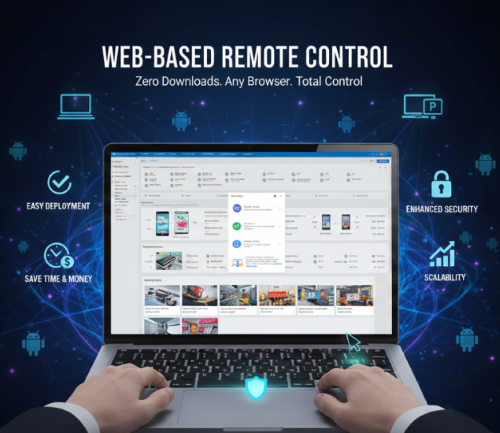
Security improves too. Fewer installations mean fewer vulnerabilities and a smaller attack surface. The browser becomes a controlled, centralized entry point where your existing policies stay in place.
For teams with hundred or thousands of devices to support, it's the smarter, more scalable way to run IT.
2Browser vs. App: How MDM Blends the Best of Both Worlds
Traditionally, teams had to choose between two approaches:
- Browser-based remote access is fast and flexible. Anyone can log in and start managing devices without needing to install software. It’s great for accessibility but sometimes limited in control depth, especially when the device needs full hands-free management.
- App-based remote access, on the other hand, provides deeper access to system-level functions, but it requires installation, maintenance, and sometimes, user involvement. That’s manageable for small teams, but for enterprises, it quickly becomes difficult to scale.
So where does MDM come in?
A mobile device management (MDM) platform like AirDroid Business uses a device-side agent for secure communication while also providing admins full remote control via a web console. That means:
- You get the control depth of an installed app.
- You manage everything from the browser.
- And you don’t rely on user input.
It bridges the gap, with no tradeoff between accessibility and control. Security stays tight, while management stays flexible.
For teams managing unattended devices, it delivers the best of both worlds.
3MDM Platforms: Enabling True Unattended Access via the Web Console
Unattended access is the gold standard.
It means IT teams can fully control and troubleshoot a device even if no one's around to tap "Allow." With AirDroid Business, this happens entirely through the web console.
Let’s look at exactly what makes this powerful for IT.
Remote Access from Anywhere, Anytime
Admins can access any device in the fleet from any browser. They might be at the office, at home, or traveling. As long as there’s an internet connection, they can work. That’s how distributed IT teams handle support across time zones without losing momentum.
Full Control, No User Input Required
Sessions start instantly, with real-time screen viewing that lets teams see exactly what the problem looks like. Touch simulation and keyboard controls let them fix apps, adjust settings, or restart processes on the spot. File transfer makes it easy to push patches or update configurations without waiting for a user to get involved.
Robust Role-Based Permissions
Large teams need structure, and role-based access lets organizations lock down who can view, manage, or control devices. Support interns, store managers, and senior engineers don’t share the same access level. Everyone sees only what they need, which helps reduce risk and keeps audits clean.
Secure Tunnel for Data
Security sits at the heart of remote access. Each session runs through encrypted channels to prevent any exposure of sensitive data. There are no exposed screenshots, no unprotected transfers, and no chances of interception during the session. It fits into strict compliance requirements and supports industries that need tight control.
Session Recording and Logs
Every session can be recorded, providing teams with valuable material for training, quality checks, troubleshooting reviews, and compliance documentation. Detailed logs track who accessed what device, at what time, and for what purpose. That level of visibility becomes essential as the device fleet grows.
Real-Time Device Monitoring
Admins can watch device performance indicators straight from the dashboard. Battery health, network status, data usage, and app performance are all displayed in real time. If a device is overheating or losing signal, teams can act before it drops offline.
Bulk Actions and Automated Policies
When hundreds of devices require the same update, managing them one at a time isn’t an option. Bulk actions push settings, files, and commands to entire groups at once. Automated policies trigger actions based on conditions, so if a device goes offline, joins a restricted network, or reaches a usage threshold, the console can take over automatically.
Configurable Alerts
Teams can set alerts to notify them when something goes wrong, and a frozen app, low storage, or repeated crashes will trigger notifications. Instead of searching for problems, problems come to the surface on their own.
These capabilities are not extras. They’re the foundation that lets enterprise IT teams support massive Android fleets without drowning in support tickets. With unattended access through the web console, the support process becomes smoother and faster, and the devices stay ready for whatever the business needs next.
4Efficiency Gains and Cost Savings of Remote Web Control
Web-based remote access doesn’t just save time, but also serious money.
- Reduced Physical Service Cost: There’s no need to send someone on-site to fix a device, which immediately reduces travel, labor, and downtime. When scaled across hundreds of endpoints, the savings add up significantly.
- Faster Remote Troubleshooting: Admins can access devices within seconds, diagnose issues, and resolve them before users even submit a ticket. Faster resolution means happier users and a lighter load on the support queue.
- Increased Device Uptime: When you’re not waiting for a technician or relying on someone in-store to describe the issue, devices get fixed faster. That means they’re online and working more often, directly boosting productivity and revenue.
The fewer steps it takes to resolve a problem, the better your team can scale. That’s what web access is all about.
5Real-World Impact: Web Remote Access Across Business Scenarios
No two teams are the same. But every business needs reliable devices. Here’s how web-based control supports common enterprise use cases.
Kiosks
Kiosks run on tight uptime windows. One software crash or unresponsive screen can ruin a customer’s experience. With browser-based remote access, IT can jump in, reset apps, update configs, or reboot the device in seconds, with no need to dispatch anyone to the physical location.
POS Terminals
Retail and hospitality rely on fast transactions. If a POS terminal freezes or glitches, sales stop. Using MDM-powered web control, support teams can log in immediately, resolve the issue, and get the line moving again.
Field Service
Field agents can’t always describe what’s wrong. With remote screen viewing, support personnel see exactly what’s happening and take action. Rather than juggle vague phone calls and screenshots, they’re able to provide immediate insight and direct fixes right from the browser.
Across all these scenarios, the common thread is time: less spent diagnosing, less spent waiting, and more spent keeping operations running smoothly.
6Quick Setup: Implementing Web Remote Access
Getting started doesn’t mean weeks of onboarding.
With AirDroid Business, you enjoy a plug-and-play system:
- Install the device-side agent on your Android fleet (can be pushed via batch deployment).
- Log in to the admin console from your browser and finish device enrollment.
- Start managing and controlling devices instantly.
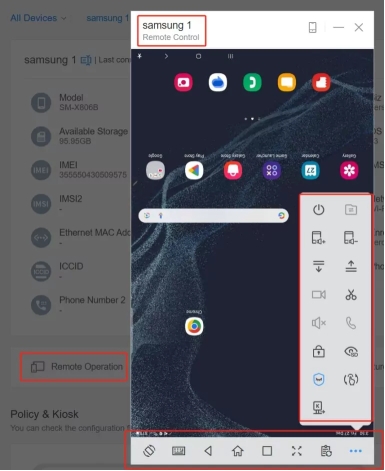
There are no desktop apps to install, and you don’t have to deal with complex firewall configurations or unnecessary technical headaches. The system is fast, secure, and designed to scale as your team and device fleet grow.
👉A complete guide to explore the web-based remote control process of AirDroid Business.
Ready to go browser-first?
Enterprise IT shouldn’t be stuck waiting on app installs, user permissions, or on-site visits. Web-based remote access is faster, safer, and built for scale.
If your business runs on Android devices, AirDroid Business makes remote support effortless, from the first click to full control.
Try AirDroid Business today and see how smooth remote device management can be.



Leave a Reply.