8 Certified Android EMM Providers & How-to
Android stays atop the global mobile operating system market for yet another year with a whopping share of 71.65 percent. This consistently high market share signifies that Android is the most relied-upon mobile operating system, not only for personal use but also for business and commercial use.
However, being the largest shareholder doesn’t make it the safest one as well. No matter what operating system you are using, an enterprise device management solution is the need of the hour. This is especially true for businesses and enterprises irrespective of their size.
This all-inclusive guide will help you understand what an Enterprise Mobility Management system is, why you need it, what are the best EMM providers and how you can get the best out of it for your business.
- Part1: What Is Android EMM?
- Part2: How does Android EMM Work?
- Part3: 8 Certified Android EMM Providers (Free & Paid)
- Part4: Factors to Consider When Selecting an EMM Provider
- Part5: How to Set up Android EMM For Your Business?
- Part6: Why do Businesses Apply Enterprise Mobility Management Android?
- Part7: FAQs
1What Is Android EMM?
The concept is brought by Android Enterprise - a platform that offers work-related matter from enterprise devices, service providers, apps, developer resources, and more.
Precisely, Android EMM (Enterprise Mobility Management) refers to the provider/solutions that help manage and secure devices used for work, including apps, files and data on them.
Scope of Devices Supported by EMM
Categories Based on Ownership
When it comes to categorizing the devices based on ownership, EMM can be used to manage all three major types of devices, i.e.
- Bring Your Own Device (BYOD)
- Corporate Owned, Personally Enabled (COPE) devices
- Corporate Owned, Business Only (COBO)
In short, taking a step ahead, EMM can be used for managing and securing not only the business-owned devices but also those owned by the employees.
Categories Based on Device Type
Similarly, when the devices are categorized according to their types, e.g. smartphones, tablets, etc, EMM can be deployed on virtually all sorts of devices using any operating system. For example:
- Smartphones, such as Google Pixel, BlackBerry, Nokia, LG, Sony, etc.
- Ruggedized devices, such as Zebra, Handheld NAUTIZ, Motorola, etc.
- Tablets, such as Lenovo, Samsung, Bluebird, etc.
- Custom Android devices
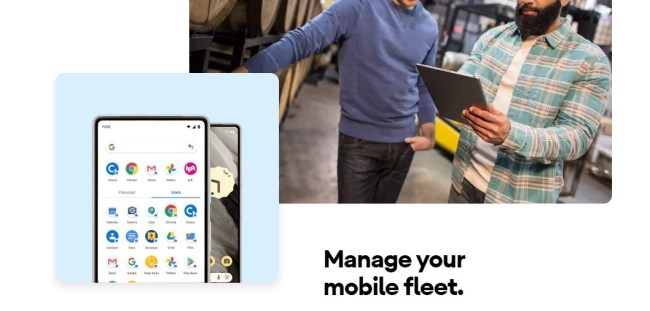
Source: android.com
2How does Android EMM Work?
The benefits of EMM are not just limited to securing the devices, rather it also helps manage them through a unified point of control in order to streamline the workflow.
Moreover, EMM allows managing and securing not just the devices, but also their contents (apps, connections, networks, and data).
This is made possible because EMM encompasses four major areas that can be a part of any mobility suite. It is a combination of these four components:
- Mobile Device Management (MDM)
- Mobile Application Management (MAM)
- Mobile Content Management (MCM)
- Identity and Access Management (IAM).
Let us have a detailed look at the definition of all these four elements of EMM along with their key features to understand the scope and working of EMM.
Key Features of Android EMM
| Component/Element | Definition | Key Features/Scope |
|---|---|---|
| MDM (Mobile Device Management) | The organization’s IT admin is allowed to monitor, manage, and secure the devices from its console through the agent app on the endpoint devices which enforces the admin’s policies on the device. |
|
| MAM (Mobile Application Management) | It allows setting policies that help manage and monitor specific apps rather than the device. |
|
| MCM (Mobile Content Management) | MCM allows the admin to decide which apps can be used for sharing specific data, restricting or allowing data sharing through specific apps. |
|
| Identity and Access Management | Allowing a more granular control, IAM helps the organization control who can access specific data, for how long, when, and how. |
|
How does Android EMM Secure Corporate Data?
The Android EMM, as explained above, is a combination of four elements. MAM, MDM, MCM, and IAM. All these four mobility suites are centered around the concept of protecting the device and its contents against unauthorized access and ensuring the security of the device and data.
This is done by providing the organization with comprehensive control. For example,
- Using Identity and Access Management, the organization can control who gets access to a device or to specific content. Organizations can grant or restrict permissions. This is done using features like Single Sign On and Multifactor Authentication.
- Similarly, Mobile Content Management helps the admin decide which apps can be used to share data and which ones are restricted, hence securing the company’s data against unauthorized sharing.
- EMM also allows the use of KIOSK mode to manage apps on a device. You can even go for a company-specific app on a device and the data will be shared using that app only.
- Device’s security is ensured by using measures like geofencing, device lock, and erasing data remotely if the device is lost or stolen.
Now that you know what Android EMM is all about, which are the best Android EMM solutions to help secure and manage devices for your business? Here are some.
38 Certified Android EMM Providers (Free & Paid)
1. AirDroid Business
One of the best Android EMM solutions in the market is the AirDroid Business, developed in 2011. It’s now rated 4.6 out of 5.0 on G2, a largest and most trusted business software review website.
With this user-friendly Android EMM tool, you can handle anything from deploying, managing, monitoring and supporting various Android devices.
AirDroid Business offers all-day monitoring to ensure that data center access is only available to authorized personnel. This can greatly improve the security of corporate info. Besides, it is compliant with GDPR and ISO 27001, and use use RSA keys and AES-256 session encryption for data protection.
| Specification | Description |
|---|---|
| Standout Features |
|
| Official Website | https://www.airdroid.com/business/ |
| Pricing | $12-33 per device/year, 14-day free trial. The free trial does not give access to all features. |
| Supported Deployment Method | Cloud, On-premises |
| Supported Android OS Version | Android 4.1 and later |
| Supported Endpoints | Mobile phone, tablet, rugged device, custom device, POS, Kiosk, smart TV, digital signage. |
| Pros |
|
| Cons | Although they do offer a free trial, it does not give access to all features, e.g., for advanced features like Kiosk and Policy, you will need to buy the full version. |
| Use Case | Endpoint management, mobile productivity, Identity driven security. |
| G2 Score | 4.8 out of 5 |
Why I Recommend It
One of the reasons why AirDroid Business stands out is its intuitive interface that provides clear, real-time monitoring of your entire device fleet. It simplifies remote management of passwords, policies, and security while offering unique features like the patented Black Screen Mode for invisible maintenance, all at a competitive price point.
2. Microsoft Intune
Microsoft Intune is an excellent cloud-based management option to protect and manage company-owned and employ-owned devices. It was first introduced in 2010 and is marked as a leading 2023 Unified Endpoint Management Tools by Gartner.
Microsoft Intune is a multi-endpoint EMM tool that supports mobile devices, desktops, and virtual endpoints. And Android OS is one of the supported systems, and others include iOS, macOS, and Windows.
| Specification | Description |
|---|---|
| Standout Features |
|
| Official Website | https://www.microsoft.com/en-us/security/business/endpoint-management/microsoft-intune |
| Pricing | $10.60 - 16.40 per user/month, 30-day free trial |
| Supported Deployment Method | Cloud-based, on-premises |
| Supported Android OS Version | Android 8.0 and later |
| Supported Endpoints | Phones, tablets, Android Open Source Project (AOSP) devices |
| Pros |
|
| Cons | Microsoft Intune is not very easy to deploy. |
| Use Case | Endpoint management, mobile productivity, Identity driven security. |
| G2 Score | 4.5 out of 5 |
Why I Recommend It
One of the reasons why Microsoft Intune is preferred over many other EMM solutions is that it gives you a clear, real-time view of a device’s monitor. It is simple and easy to use and allows you to remotely manage passwords, device settings, and connections for the fleet of devices.
3. ManageEngine Mobile Device Manager Plus
If you want your employees to work across multiple devices without compromising efficiency, productivity, and security, ManageEngine Mobile Device Manager Plus is one of the best EMM solutions you can use freely. It supports on-premises and cloud deployment types which gives more flexibility for COPE and BYOD.
This enterprise mobility solution was developed by Zoho Corp in the early 2000s. And it is one of the top UEM tools recognized by Gartner Magic Quadrant.
| Specification | Description |
|---|---|
| Standout Features |
|
| Official Website | https://www.manageengine.com/mobile-device-management/ |
| Pricing | $0 for 25 devices/year, $495-895 for 50 devices/year, 30-day free trial |
| Supported Deployment Method | Cloud, On-premises |
| Supported Android OS Version | Android 4.1 and above |
| Supported Endpoints | Phones, tablets, TVs, kiosks, rugged devices, IoT devices |
| Pros |
|
| Cons | It has comparatively limited compatibility with some device types. |
| Use Case | Mobile device management, app management, mobile device security, email management. |
| G2 Score | 4.5 out of 5 |
Why I Recommend It
If you are looking for in-depth application management and enhanced impeccable device security, nothing beats Manage Engine Mobile Device Manager Plus.
4. IBM Security Maas360 with Watson
IBM Security Maas360 with Watson, an efficient endpoint security solution for your business, is available for Apple OS, Android OS, Windows, and Kindle Fire devices. It’s worth to noted that Maas360 is an Android Enterprise Recommended EMM provider and validated by Google.
| Specification | Description |
|---|---|
| Standout Features |
|
| Official Website | https://www.ibm.com/products/maas360 |
| Pricing | $4 - 9 per device/month, 30-day free trial |
| Supported Deployment Method | Cloud |
| Supported Android OS Version | Android 2.2 to 12.x |
| Supported Endpoints | Phones, tablets, rugged devices |
| Pros |
|
| Cons |
|
| Use Case | Data analytics, device management, app management, endpoint management, threat management |
| G2 Score | 4.1 out of 5 |
Why I Recommend It
IBM Security MaaS360 with Watson specializes in data analytics and is a preferred solution for those looking for a more specific, advanced, and smart management system for enhanced control over endpoints.
5. VMware Workspace ONE
The next Android EMM solution on our list is VMware Workspace ONE. It aims at improving digital employee experience and is concordant with BYOD, COPE, and multi-user devices.
| Specification | Description |
|---|---|
| Standout Features |
|
| Official Website | https://www.omnissa.com/workspace-one-unified-endpoint-management/ |
| Pricing | $1.66 - 9.45 per device/month, 30-day free trial |
| Supported Deployment Method | Cloud, On-premises |
| Supported Android OS Version | Android 5.0 and later |
| Supported Endpoints | Phones, tablets, ruggedized devices |
| Pros | Cross-platform and integrated management capabilities of VMware Workspace One are its biggest strengths over other similar apps. |
| Cons | It has a complicated user interface design and users complain about its slow performance. |
| Use Case | Application management, multi-platform endpoint management. |
| G2 Score | 4.0 out of 5 |
Why I Recommend It
If you are looking specifically for a solution that focuses on enhancing cross-platform, integrated management, Workspace One is strongly recommended.
6. 42Gears Mobility Systems
42Gears Mobility Systems is a lightweight Android Enterprise EMM provider perfect for small to medium-sized businesses still trying to gain a foothold in the market. Up to date, it has over 18k users. 42Gears uses AWS to host web services and use SSL for data protection.
| Specification | Description |
|---|---|
| Standout Features |
|
| Official Website | https://www.42gears.com/ |
| Pricing | $3.99-7.99 per device/month, 30-day free trial |
| Supported Deployment Method | Cloud, On-premises |
| Supported Android OS Version | Android 5.0 or higher |
| Supported Endpoints | Phones, tablets, rugged devices |
| Pros | It is among the simplest solutions that provide ease-of-use because of its well-designed interface and seamless controls. |
| Cons | Low performance speed and delays are common problems reported by users. |
| Use Case | Unified Endpoint Management, remote monitoring. |
| G2 Score | 4.8 out of 5 |
Why I Recommend It
42Gears Mobility Systems is particularly recommended for SMEs. It offers an affordable pricing plan for small and medium-sized enterprises.
7. Knox Manage
Last but not least, there is Knox Manage, a cloud-based free Android Emm platform designed for Samsung devices only. It was released in 2018 by the Android OEM Samsung and was assessed as a lead vendor in 2023 IDC MarketScape UEM report.
| Specification | Description |
|---|---|
| Standout Features |
|
| Official Website | https://www.samsungknox.com/en/solutions/it-solutions/knox-manage |
| Pricing | $0 for Samsung devices, 90-day free trial for Knox license |
| Supported Deployment Method | Cloud |
| Supported Version | Knox 2.6 or higher |
| Supported Endpoints | Samsung smartphones and tablets. |
| Pros |
|
| Cons |
|
| Use Case | File transfer, remote management, app management, and geofencing. |
| Google Play Store Rating | 3.4 out of 5 |
Why I Recommend It
Knox Manage is known for its ability to offer enhanced security and easy app management capability. It is recommended if you want to fully secure your Samsung devices.
8. JumpCloud
JumpCloud is based on the unique feature of an open unified directory platform that helps securely and easily manage the devices.
| Specification | Description |
|---|---|
| Standout Features |
|
| Official Website | https://jumpcloud.com/ |
| Pricing | $9/month/user to $24/month/user. 30-day full access free trial. |
| Supported Deployment Method | Cloud-based, on-premises. |
| Supported Android OS Version | 5.1 and later |
| Supported Endpoints | Windows, Mac, Linux, and Android devices. |
| Pros |
|
| Cons | JumpCloud is relatively expensive and has limited features. |
| Use Case | Remote device management, identity management, device security. |
| G2 Score | 4.5 out of 5 |
Why I Recommend It
It is best suited for cross-platform management and for enhanced security. Moreover, an easy UI makes it a preferred choice.
4Factors to Consider When Selecting an EMM Provider
Every business has its own specific goals when it comes to Enterprise Mobility Management. While selecting an EMM solution for your company, make sure it is in line with your business’s goals. Keep in mind your limitations and preferences. Here are the factors you should consider to make a learned choice.
1Cost
While choosing an EMM solution for your business, thorough research must be done to make sure you get the best possible features for the most reasonable price. Do not fall for the overly advertised products and the features that you do not actually need. Striking a balance between a reasonable budget and the best value is the trick to get the best bargain.
Most of the vendors allow free access to their products for a limited time. Although these free trials in most cases do not give access to some premium features, these are enough to ascertain whether the solution is worth the cost.
2Supported Devices
Not all EMM solutions support all sorts of endpoint devices. Make sure your selected suite supports the type of devices you are using at your workplace. Consider going for the one that supports a broad range of devices so that if you plan to switch to include more types in the future, your EMM suite supports them. Moreover, don’t forget to check the OS version supported by the EMM suite.
3Supported Features
For some, cross-platform management might be the core required feature, while others might just need a program that offers enhanced security. Your goals define which EMM solution you should prefer. Hence, get an in-depth knowledge of the strengths of a particular EMM provider before selecting it.
4Security
Security is the foremost feature you should be concerned about while selecting an EMM plan. Ensure the plan offers features specifically targeted at securing your devices and data. For example, the features like geofencing, Kiosk, Identity and Access Management, password configuration, device lock, and data wipe in case of lost or stolen devices.
5Ease of Use
The user interface should be simple enough to allow easy navigation. Try free trials to make sure the EMM suite is not too complex to use and there is no learning curve.
5How to Set up Android EMM For Your Business?
Now that we have provided a quick breakdown of the various Android EMM providers, you can simply take your pick. Once you have picked your tool, it is time to set up the EMM tool for your business. Keep in mind that the setup and use procedures will vary depending on the Android EMM partners.
That said, here are the general steps to setup one:
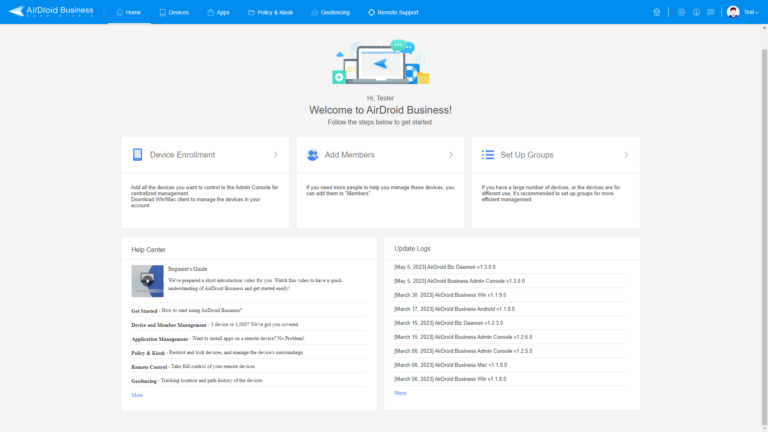
Step 1 : Log in to EMM Console
Open AirDroid Business and enter your account. Then enter the password, and click Sign In.
Step 2 : Enroll Android devices
Enroll the device via Android Enterprise Enrollment. Click on Devices > Device Enrollment > Android Enterprise Enrollment > Enrollment Guide.
Then, open the device camera and scan the QR code from Provisioning Templates. Click here to learn how to create.
Step 3 : Configure Device Settings and Apps
To configure device settings, go to Policy and create a config file. You can simply activate or turn off the corresponding buttons in the dashboard.
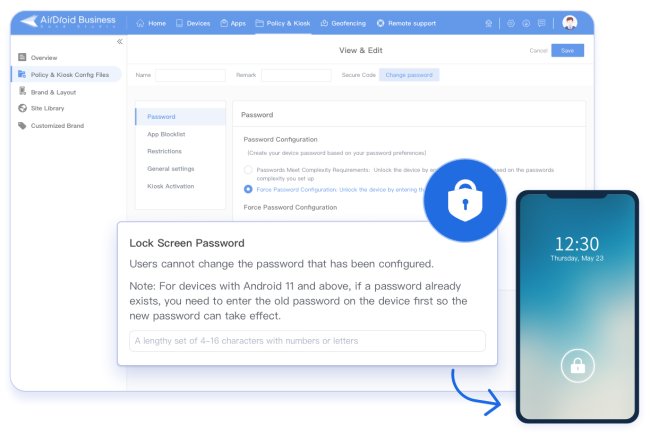
As for app configuration, you can open Apps > Apps Library > Managed Google Play Store. Click "+ Add App" to choose apps for work from Google.
After adding, tap the setting icon to complete the configuration. App Permission Management and App Update Management are available to control.
Step 4 : Invite Members and Divide into Groups
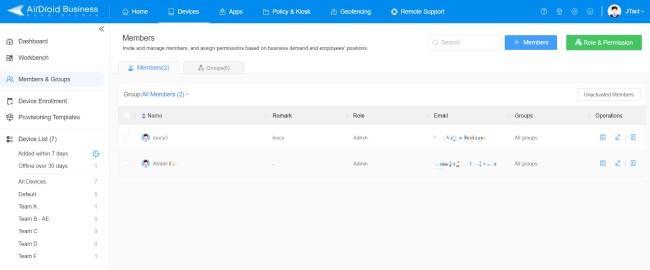
You can manually select your team members and send them an invite email. Then, you can assign different roles and permissions to your members. Now, you can manage devices with your team.
6Why do Businesses Apply Enterprise Mobility Management Android?
One of the main reasons businesses are increasingly adopting EMM solutions irrespective of their sizes is that they are concerned about the security of their devices and data. In an attempt to ensure workplace security and restrict unauthorized data, companies are adopting EMM solutions. Thanks to the stats that show a huge 58.2 % increase in phishing attacks in the year 2023, there is an ever increasing need for a comprehensive EMM plan at most of the workplaces.
Security is not the only reason for adopting EMM solutions world-wide. Many businesses are more interested in the enhanced productivity offered by EMM providers. The features like bulk file transfer, auto installing the required apps at the end point devices etc. Make it possible to enhance staff’s productivity by promptly providing them with the required resources.
You would be surprised to know that automation brought about by such EMM plans can help companies reduce costs by as much as 90%. This is a highly alluring benefit offered by EMM providers.
Conclusion
In short, EMM has revolutionized the way businesses operate around the globe. They offer multiple benefits including cost reduction, increased efficiency, and enhanced productivity. However, make sure you choose a plan that best suits your specific corporate needs so that you can get the best out of it.
FAQs
What is the difference between EMM and MDM?

Both are referred to company device management. However, EMM has a larger range than MDM, which includes the whole device (MDM), the apps (MAM), any data storage on it (MDM), and access control (MIM). And MDM is one of the components of EMM. It focuses on administrating and remote control devices. Click here to learn more.
What is Android Enterprise? Is it an MDM solution?
Android Enterprise is an initiative that contains a set of developer APIs, Android EMM devices, and the third-party EMM software listed in Android Enterprise Recommend.
Unfortunately, it is not an MDM solution but offers compatible open-source API to help develop what enterprises need.
What is Google Play EMM?
Google Play EMM refers to Managed Google Play, which is the app store brought by Android Enterprise and used by organizations. It works as a private enterprise app market with only approved apps for employees to install on their devices.
What are some Android EMM open source providers?
ManageEngine MDM Plus, Flyve MDM, Headwind MDM, and WSO2 IoT Server.


Try MDM Solution
Manage devices from a unified console

Leave a Reply.