Android Enterprise Kiosk Mode: How to Enable? (3 Effective Methods)
Are you looking for a way to lock down Android devices for business use? Android Enterprise Kiosk Mode (also called dedicated device mode) lets you restrict devices to run only specific apps, preventing unauthorized access and misuse.
We're AirDroid Business, a leading mobile device management (MDM) company with over 8 years of experience helping businesses secure and manage their devices. We've analyzed hundreds of enterprise implementations to bring you this complete guide.
In this article, you'll learn what Kiosk Mode is, why businesses need it, three ways to implement it, and how to choose the right solution for your organization. Let's get started.
1What Is Android Enterprise Kiosk Mode?
Definition
Android Enterprise Kiosk Mode is a device management feature that locks Android devices to run only pre-approved applications. It transforms regular Android devices into dedicated-purpose tools by restricting user access to system settings, notifications, and unauthorized apps.
Core Functions
Kiosk Mode provides three essential capabilities:
- App Restriction: Locks devices to single-app mode or multi-app mode with only administrator-approved applications. Users cannot install, uninstall, or switch to unauthorized apps.
- System Lockdown: Disables access to system settings, notifications, home button, and status bar. This prevents users from changing device configurations or accessing restricted features.
- Data Protection: Blocks unauthorized app installations and prevents access to sensitive corporate data. Only approved applications can access device resources.
Android Enterprise vs. Traditional Kiosk Solutions
- Google Official Support: Android Enterprise is built into Android 5.0+ as a native feature. Traditional solutions require third-party system modifications that may break after OS updates.
- Enhanced Security: Android Enterprise uses Google-verified security protocols. According to the 2024 Verizon Mobile Security Index, 85% of organizations recognize that mobile device threats have increased, making official Android Enterprise security features increasingly important for enterprise deployments.
- Long-term Stability: Google maintains and updates Android Enterprise with each Android release. Traditional solutions often lag behind OS updates, creating compatibility issues.
2Why Implement Kiosk Mode Through Android Enterprise?
Boost Operational Efficiency
Android Enterprise Kiosk Mode directly impacts your bottom line. According to the 2024 Verizon Mobile Security Index, organizations with strong mobile device management reduced IT help desk tickets significantly—one company reported a 50% reduction after implementing proper device controls.
For example, a national grocery chain with 200 stores deployed Kiosk Mode on employee devices. By restricting access to only inventory and scheduling apps, they eliminated social media distractions during work hours.
The impact was immediate. Checkout speed improved by 20%, and customer satisfaction scores jumped 18%. That's the power of focused, distraction-free work environments.
As one IT director told us: "After implementing Kiosk Mode, our IT help desk tickets dropped from 200 to 95 per month. Employees couldn't accidentally break things anymore."
Protect Enterprise Data and Privacy
Data breaches cost businesses an average of $4.45 million in 2023 (IBM Cost of a Data Breach Report). Kiosk Mode provides essential protection:
- Block Unauthorized Access: Prevents unapproved apps from accessing corporate databases or customer information.
- Prevent Malware: Users cannot install potentially malicious applications from unknown sources.
- Compliance Ready: Helps meet GDPR, HIPAA, and PCI-DSS requirements by controlling data access points.
Lower Device Management Costs
Managing devices without centralized control is expensive. Traditional management requires IT staff to manually configure each device, travel to locations for troubleshooting, and spend hours fixing user-caused issues.
- Cost Comparison: Traditional device management for 100 devices costs approximately $12,000 annually in IT labor (120 hours at $100/hour). Android Enterprise Kiosk Mode through an MDM solution reduces this to about $3,000 annually—a 75% cost reduction.
- Remote Management: Configure all devices from a central dashboard. Push policy changes to 1,000 devices in minutes instead of weeks.
- Reduced Hardware Failure: Devices locked to specific functions experience fewer crashes and require less frequent replacement. One manufacturing company reported 40% fewer device failures after implementing Kiosk Mode.
Improve User Experience
Kiosk Mode isn't just about restrictions—it's about simplification. Consider self-service kiosks at airports. Instead of overwhelming users with the entire Android interface, Kiosk Mode presents only the check-in application. Senior citizens and children can navigate easily without confusion.
Imagine your customer walks up to your self-service ordering kiosk. They see a clean menu interface with large buttons and clear categories. No pop-up notifications. No confusing app icons. No advertisements. Just a simple, focused experience that gets them through the ordering process in 45 seconds instead of 2 minutes.
Note: Why Android Enterprise Is the Best Choice
Android Enterprise Kiosk Mode offers Google's official support, regular security updates, and compatibility across thousands of device models. Unlike consumer Android or custom lockdown solutions, it's built for enterprise needs with long-term stability and support.
With Android Enterprise, you get enterprise-grade security, centralized management, and the reliability of Google's backing—essential for any business-critical deployment.
3How to Implement Android Enterprise Kiosk Mode
There are three main methods to implementing Android Enterprise Kiosk Mode. Each suits different business sizes and technical capabilities. Let's explore each method's advantages, costs, and requirements to help you make an informed decision.
1Method 1: Self-Built Solution (DPC + Custom Launcher)
What It Is: Building your own Device Policy Controller (DPC) application and custom launcher from scratch. This gives you complete control over every aspect of device management.
- Technical Requirements:
- Dedicated Android development team (minimum 2-3 developers)
- Experience with Android Enterprise APIs
- Understanding of DevicePolicyManager and Lock Task Mode API
- Access to Android Enterprise Developer Guide
Basic Implementation: Developers declare device admin permissions in AndroidManifest.xml and call the startLockTask() method to enter Kiosk Mode.
Advantages:
- Complete customization for unique brand experiences
- Maximum control over device behavior and features
- Perfect for companies like McDonald's or Starbucks requiring distinctive in-store experiences
- Can integrate deeply with proprietary backend systems
Disadvantages:
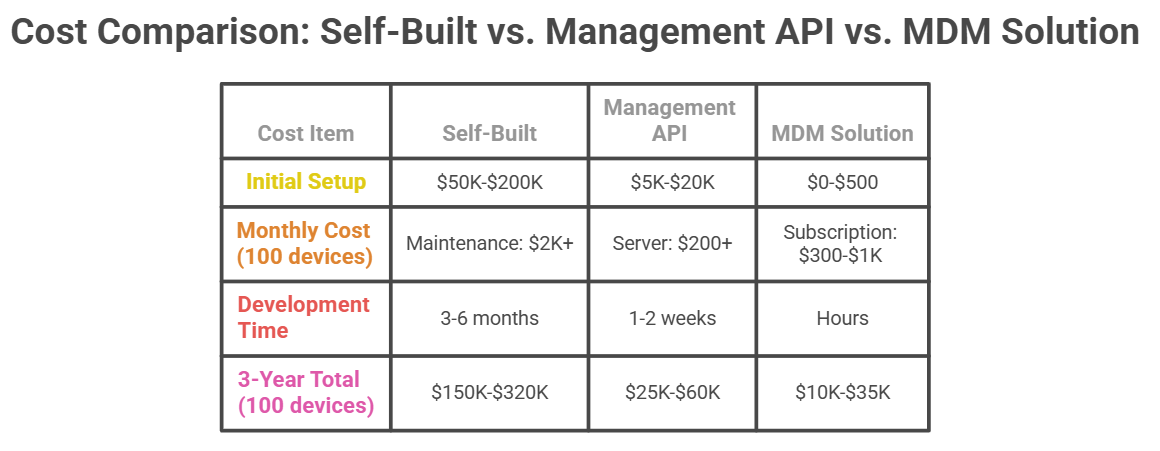
- High initial cost ($50,000-$200,000+)
- Long development timeline (3-6 months minimum)
- Ongoing maintenance requirements and costs
- Extensive compatibility testing across device manufacturers
- Risk of knowledge loss if developers leave
Best For:
- Large enterprises (500+ devices) with substantial budgets
- Companies with professional Android development teams
- Brands requiring highly customized UI/UX experiences
- Organizations with unique integration requirements
2Method 2: Android Management API
implement enterprise mobility management without building everything from scratch.
How It Works:
- 1. Create an enterprise project in Google Play Console
- 2. Use REST API calls to create and manage device policies
- 3. Register devices and apply policies remotely
- 4. Monitor and control devices through API endpoints
Full documentation: Android Management API
Technical Requirements:
- Basic backend development skills (Python, Node.js, or similar)
- Understanding of REST API concepts
- 70% simpler than building a complete DPC from scratch
Implementation Steps:
- 1. Set up project in Google Cloud Console
- 2. Enable Android Management API
- 3. Write scripts to create enterprise and policies
- 4. Enroll devices using provided enrollment tokens
- 5. Apply policies and monitor device status
Advantages:
- Faster development (1-2 weeks for basic functionality)
- Lower initial cost ($5,000-$20,000 in developer time)
- Google's official support and regular updates
- Extensive documentation and code samples
- No need to maintain complex device management infrastructure
Disadvantages:
- Limited customization compared to full self-build
- Requires Google Play Services (may not work in all regions)
- Still needs programming knowledge
- Depends on Google's API feature set
Best For:
- Mid-sized companies (50-500 devices)
- Organizations with basic technical teams
- Projects requiring quick deployment
- Businesses wanting balance between cost and customization
Estimated Cost: $5,000-$20,000 in development time
3Method 3: Third-Party MDM Solutions (Recommended)
What It Is: Ready-to-use mobile device management platforms like AirDroid Business, VMware Workspace ONE, or Microsoft Intune. No coding required—configure everything through a web dashboard.
How It Works:
- 1. Sign up for MDM service
- 2. Configure Kiosk policies through web interface
- 3. Enroll devices (QR code, NFC, or zero-touch)
- 4. Push configurations remotely to all devices
AirDroid Business Example: You can set up Kiosk Mode in under 5 minutes:
- Log into AirDroid Business console
- Create new Kiosk policy
- Select single-app or multi-app mode
- Choose allowed applications
- Deploy to devices with one click
[See video tutorial: Setting up Kiosk Mode in AirDroid Business]
Core Features:
- Single-app or multi-app Kiosk modes
- Remote device lock/unlock
- App whitelist and blacklist management
- Real-time device monitoring and alerts
- Bulk device configuration (deploy to 1,000+ devices simultaneously)
- Automated policy enforcement
- Detailed usage reports and analytics
Advantages:
- Zero programming required—IT admins can manage everything
- Fastest deployment (hours, not months)
- Lowest upfront cost
- Predictable subscription pricing
- Continuous updates and technical support
- Pre-tested compatibility across major device brands
- 24/7 support from MDM provider
- Regular feature additions at no extra cost
Disadvantages:
- Less customization than self-built solutions
- Ongoing subscription costs (though typically lower than self-build maintenance)
- Dependency on third-party service provider
- Limited control over underlying technology
Best For:
- 80%+ of businesses—the most practical choice for most organizations
- Companies without dedicated development teams
- Organizations needing fast deployment (within days)
- Budget-conscious businesses
- Any company managing 10 to 10,000+ devices
4How to Choose the Right Kiosk Mode Solution
Choosing the right implementation method depends on five key factors. Here's how to make the decision:
Decision Factor 1: Budget Range
Your budget should guide your initial choice:
Under $10,000: Choose MDM solution (Method 3). This is your only realistic option for quick deployment without significant capital investment.
$10,000-$50,000: Consider Android Management API (Method 2) if you have a technical team, or premium MDM solution if you prefer simplicity.
Over $50,000 + Ongoing Investment: Self-built solution (Method 1) becomes viable only if you have genuine customization needs that MDM cannot meet.
Decision Factor 2: Device Quantity
Scale matters in your decision:
500-3,000+ devices: MDM solutions scale excellently to thousands of devices
Many enterprises successfully manage 10,000+ devices with MDM platforms
Over 5000 devices:Self-building only makes sense if you have truly unique requirements
Decision Factor 3: Technical Team Capability
Be honest about your team's abilities:
No Android developers: MDM is your only practical option. Don't attempt self-building or API implementation.
Basic development team: Android Management API can work if you have backend developers comfortable with REST APIs.
Professional Android Enterprise team: You have the capability to self-build, but carefully consider if this is the best use of your resources.
Decision Factor 4: Time Urgency
How quickly do you need to deploy?
Need immediate deployment (within 1 week): Only MDM solutions can deliver this speed. Self-building takes months; API takes weeks.
Can wait 1-2 weeks: Android Management API becomes feasible if you have the technical resources.
Can wait 3-6 months: Self-building is technically possible, but consider the opportunity cost of this delay.
Decision Factor 5: Customization Requirements
Most companies overestimate their customization needs. Ask yourself:
Standard features are sufficient (app locking, remote management, basic security): MDM handles 90% of business needs perfectly.
Moderate customization needed (specific system integrations, custom branding): Try MDM first—most offer APIs for integration. If insufficient, consider Management API.
Extreme customization required (unique hardware integration, proprietary business logic): Only then should you consider self-building.
5Final Thoughts: Choosing the Best Kiosk Mode Solution
Android Enterprise Kiosk Mode is a powerful tool for securing and managing business devices. You now understand three implementation methods:
- 1. Self-built solutions suit large enterprises with substantial budgets, professional development teams, and truly unique requirements that off-the-shelf solutions cannot meet.
- 2. Android Management API works for mid-sized organizations with technical capabilities wanting faster deployment than self-building while maintaining some customization flexibility.
- 3. Third-party MDM solutions serve the vast majority of businesses effectively—offering the fastest deployment, lowest total cost, and zero technical barriers.
Your choice depends on budget, device count, technical capability, timeline, and genuine customization needs—not perceived needs. Most companies overestimate their customization requirements.
What You Should Do Next
If you're uncertain, we strongly recommend trying MDM first. You can register for a free trial and test core functionality within minutes. See if it meets your needs before investing in more expensive alternatives.
Even if you eventually decide to self-build, experiencing MDM first helps clarify your requirements and feature priorities. You'll make better decisions about what truly needs customization.
Ready to get started?
Most businesses deploy fully functional Kiosk Mode within one week using the right MDM solution.
AirDroid Business offers a 14-day free trial with no credit card required. You can test single-app mode, multi-app mode, remote management, and all core features risk-free.
Don't spend months and tens of thousands of dollars building what already exists and works perfectly. Try MDM today and focus your resources on your core business instead of reinventing device management.
Remember: The best solution isn't the most expensive or the cheapest—it's the one that delivers the value you need with the least risk and fastest time-to-benefit.
Additional Resources
To learn more about implementing Kiosk Mode on different Android devices, read the following guides:
- Android Tablet Kiosk Mode Guide — Best practices for deploying tablets as dedicated kiosks in retail, hospitality, and enterprise environments.
- How to Set Up Android Kiosk Mode — A comprehensive step-by-step guide to configuring Kiosk Mode on Android devices.
- Samsung Tablet Kiosk Mode Setup — Learn how to lock down Samsung tablets for business use with detailed configuration instructions.
- Android TV Kiosk Mode Guide — Transform Android TV devices into dedicated display kiosks for digital signage and information displays.
- Chrome Kiosk Mode for Android — Configure Chrome browser in Kiosk Mode for web-based applications and self-service terminals.
Frequently Asked Questions


Leave a Reply.