AI MDM for Small Businesses: Use Cases, Costs, and a Low-Risk Pilot
Small and midsize businesses often run IT operations with lean teams. One administrator may handle device deployment, routine monitoring, alerts, and remote support at the same time. As the device fleet grows, those recurring tasks can consume a large share of the workday. AI can organize device data, help prioritize incidents, run approved workflows, and verify results. It cannot replace basic device management or decide how much risk the business should accept.
In this article, AI MDM refers to any device management setup that adds AI capabilities to basic MDM. A vendor may build those capabilities into an existing feature, reserve them for a premium plan or add-on, or sell them as a separate product. Device count alone does not determine whether a business needs AI MDM. More useful questions are whether the underlying MDM data is reliable, whether rule-based automation still leaves too much manual work, and whether the expected gains can cover the full added cost of using AI.
This article gives SMBs a practical way to make that decision. It starts by separating the need for AI from the need for better basic MDM. It then looks at which tasks suit AI and whether the likely return justifies the full cost. For companies ready to test the idea, an Android Kiosk recovery example shows how to set a baseline, run a small pilot, and decide whether to expand it, refine it, or stop.
1Decide Whether You Need AI MDM
Basic MDM, rule-based automation, and AI MDM address different problems. They are not competing product categories. Each adds another layer of management capability.
- Basic MDM covers device enrollment, grouping, inventory, policy configuration, app management, Kiosk, monitoring, alerts, and remote support. It gives administrators a consistent way to view, configure, and manage devices.
- Rule-based automation performs fixed actions when preset conditions are met. For example, it can send a notification when a device has been offline for more than 30 minutes or raise an alert when storage falls below a threshold. It works best for repetitive tasks with clear triggers and fixed responses.
- AI MDM sits on top of reliable device data and established workflows. It can summarize event context, help set priorities, and coordinate investigation, response, verification, and documentation. It is better suited to work that requires several pieces of information and some judgment.
Basic MDM supplies the device data and controls. Rule-based automation handles deterministic tasks. AI can reduce the manual effort spent gathering information, weighing context, and coordinating the next steps.
Choose the next step based on the company's current situation:
| Current situation | Best next step | Why |
|---|---|---|
| Devices are not centrally enrolled, groups are disorganized, or status data is unreliable | Improve basic MDM | Rules and AI both depend on reliable device data |
| The trigger is clear and the response is fixed | Use rule-based automation | The task does not require AI judgment |
| Administrators repeatedly check several data points, but the decision logic is mostly fixed | Improve rules and workflows first | Remove routine manual steps before deciding whether AI adds value |
| Administrators must consider device purpose, location, business hours, and event history when setting priorities | Consider AI MDM | The task requires context from several sources |
| Incident handling spans investigation, response, verification, and documentation | Run an AI MDM pilot | AI may reduce repeated lookups, screen switching, and handoffs |
| The business cannot define success criteria, approval rules, or risk boundaries | Delay automated AI actions | The business has no reliable way to judge whether the result is acceptable |
AI MDM does not become relevant at a specific device count. A business should consider it when basic management is stable but existing rules still do not reduce the administrator's actual workload.
2Find the Work AI Can Reduce
A device incident typically involves detecting a problem, setting its priority, investigating the cause, responding, checking the result, and either documenting or escalating it. At each stage, compare the current process with where AI could help and what should stay under human control.
| Stage and main bottleneck | Current process without AI | What AI can do | Practical limit |
|---|---|---|---|
| 1 Detection Manual workload and business growth | An administrator checks the console, alert emails, or reports, then reviews devices one by one for online status, app health, network status, and Kiosk state. | Combine MDM and alert data, group duplicate events, and produce a short list of devices that need attention first. | AI can reduce inspection and sorting work, but it needs reliable data from basic MDM. It cannot compensate for unmanaged devices or missing data. |
| 2 Prioritization Downtime and business growth | An administrator reviews device purpose, location, business hours, and incident severity, then decides the order of response based on experience. | Recommend a response order based on business importance, incident duration, and the number of affected devices, with reasons for the recommendation. | AI can help set priorities, but the business must first decide which devices and services matter most. AI cannot decide how much disruption the company can tolerate. |
| 3 Investigation Manual workload, security, and compliance | An administrator moves between pages to review device data, alert history, app versions, and network status. Store staff may need to provide missing context. | Collect the relevant device data, recent events, and configuration changes in one investigation summary, with possible causes clearly labeled as hypotheses. | AI can cut the time spent searching for and gathering information, but it cannot see conditions that were never recorded. It should not present a possible cause as confirmed. |
| 4 Response Downtime, security, and compliance | An administrator notifies the owner, creates a ticket, contacts the store, or opens the console to run a remote action. | Start a preapproved workflow, such as sending a notification, creating a ticket, or running a low-risk recovery action. | AI can speed up the response, but only when the action has a clear scope and a result the system can verify. Data wipes, factory resets, and security policy changes should still require human approval. |
| 5 Verification Downtime and manual workload | An administrator refreshes device status, checks whether the app or Kiosk has recovered, or contacts store staff for confirmation. | Query status on a schedule, compare the result with the pre-incident state, and flag devices that have not recovered. | AI can reduce repeated status checks, but device data must show whether recovery succeeded. If only on-site staff can confirm it, AI can support the follow-up but should not close the incident on its own. |
| 6 Documentation or escalation Security, compliance, and business growth | An administrator compiles device details, investigation notes, actions taken, and results before updating a ticket or handing the case to another person. | Create an incident summary and pass unresolved cases to the responsible team with the available context attached. | AI can make documentation and handoffs faster, but an administrator still needs to review critical records, confirm ownership, and follow up on unresolved incidents. |
AI is most useful when administrators spend time checking devices manually, rebuilding context across systems, repeating status checks, or handing incidents between teams. If unreliable data, missing rules, or unclear ownership is the real problem, fix that first.
3Run a Low Risk Kiosk Recovery Pilot with AirDroid Business
This example uses the AirDroid Business Kiosk recovery workflow to compare labor, recovery time, and incremental cost before and after adding AI.
Assume one IT administrator manages 50 Android Kiosk devices across 10 locations. The business has already enrolled and grouped the devices, deployed Kiosk configurations, set up basic alerts, and confirmed that online status, app status, Kiosk status, and alert data are reliable. To limit risk, it starts with 10 representative devices. The team compares the same device group before and after adding AI, then decides whether to expand the workflow to the remaining 40 devices.
The pilot should answer four questions. How much administrator time does it save? Do devices recover faster? What new software and maintenance costs does it create? Does automation increase false positives or allow critical problems to go unnoticed? Use the same devices, observation period, and incident definition on both sides of the comparison.
Device Management Cost without AI MDM
Start by calculating the current cost of managing the devices. In this example, the business already uses basic MDM for 50 Kiosk devices, but an administrator still performs routine checks and handles incidents manually. The baseline includes both software licenses and labor.
1Software license cost
Record the annual cost of the MDM and Kiosk licenses already required for the current process.
Using the published AirDroid Business pricing as an example, the Standard plan costs $21 per device per year and the Kiosk add-on costs $8 per device per year. For 50 devices, the annual license cost is about $1,450.
This is the cost of the basic software before AI is enabled. It excludes any added software, model, implementation, or service costs tied to the AI capabilities.
2Basic MDM deployment and device configuration time
After buying the software, the administrator still needs time to deploy basic MDM and configure the devices. Most of this work happens during the initial rollout and when new devices are added.
- Enroll devices and assign them to the correct groups
- Set administrator permissions
- Configure Kiosk mode and app restrictions
- Test whether devices receive the configuration
- Resolve enrollment failures or configurations that do not apply correctly
3Routine inspections and incident response labor
Once the devices are in service, the administrator still needs to check Kiosk status and handle problems such as devices leaving Kiosk mode, going offline, or failing to receive a configuration.
Current manual Kiosk inspection and incident response workflow:
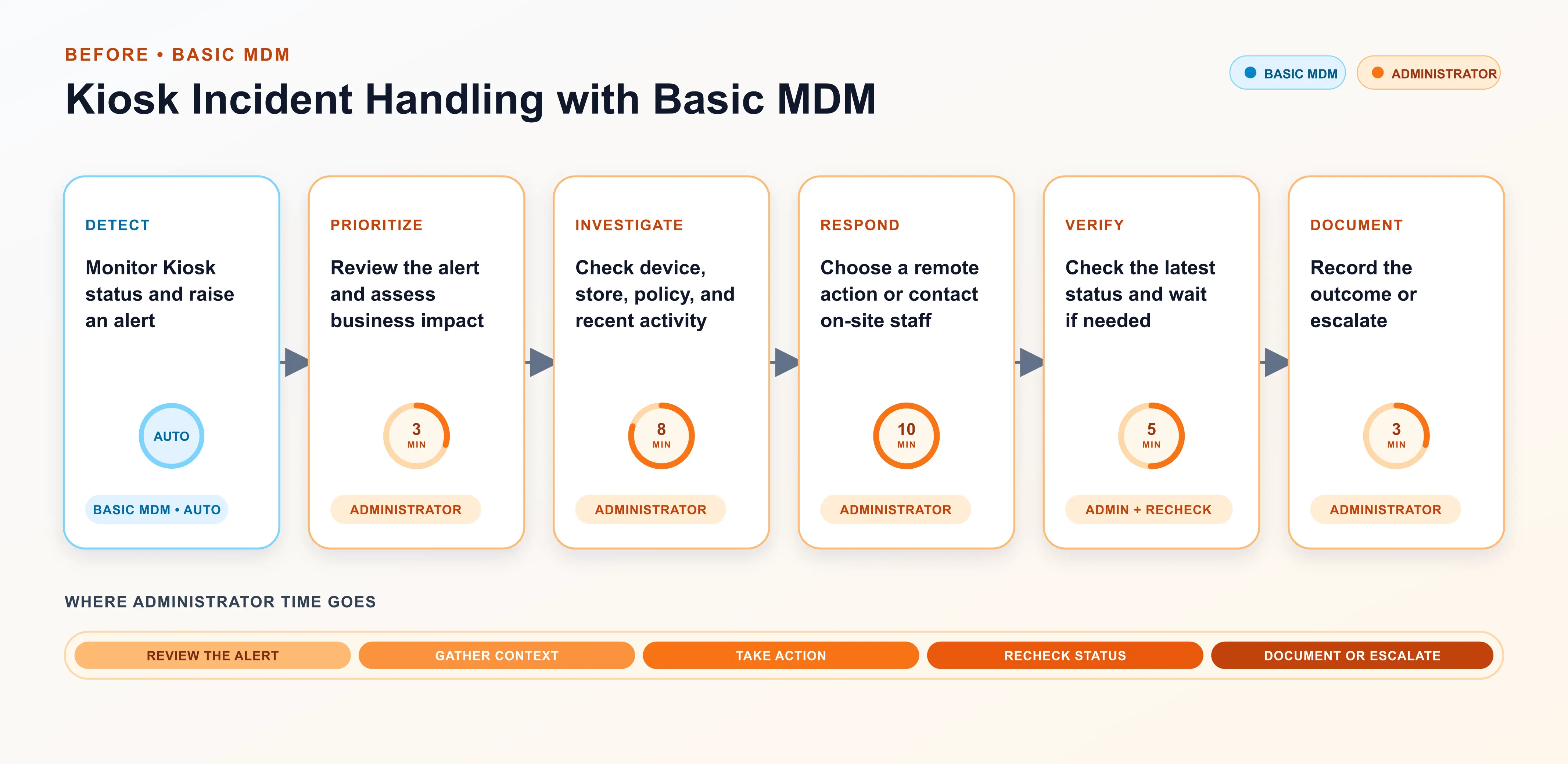
Track the following data for at least one week:
- Daily time spent inspecting the 10 pilot devices and reviewing alerts
- Total number of incidents during the observation period, broken down by type
- For each incident, the time from detection to confirmed recovery and the administrator's hands-on time for review, decisions, and actions
- Number of incidents that required store contact, an internal handoff, or on-site support, plus the labor and direct costs of on-site support
- Number of false positives and number of incidents first reported by a store or user rather than detected by existing monitoring
Suppose the administrator spends 45 minutes a day on routine inspections. At 22 workdays per month, inspections alone take about 16.5 hours a month, or 198 hours a year. Track troubleshooting, store communication, and on-site support separately because their frequency and duration vary.
The baseline now has two parts: the basic MDM and Kiosk license cost for all 50 devices, and the daily operating labor for the 10 pilot devices before AI is enabled. That labor baseline covers routine inspections, incident handling, internal handoffs, store communication, and on-site support, along with recovery times, false positives, and monitoring gaps.
Calculate labor costs using the company's fully loaded hourly rate, including wages, benefits, and other employment costs. This example uses the U.S. Bureau of Labor Statistics figure for network and computer systems administrators average hourly wage of $49.85.
For the next stage, use the same device group, the same incident definition, and an observation period of equal length. Record daily operating labor after AI is enabled, along with every added cost for software, services, models, configuration, testing, maintenance, and oversight.
Costs after Enabling AI Capabilities
1Record the cost of enabling AI capabilities
After enabling AI, record every added cost.
Vendors package and price AI in different ways. Some raise the price of an existing plan when AI is added to its features. Others charge for a premium plan or add-on, while some sell AI features, workflows, or standalone products separately. Use the vendor's quote and contract to determine the actual cost.
Confirm model costs separately. Some products include a model usage allowance, while others require a separate subscription or API allowance. Vendors may also charge by usage or for anything above the included limit.
- Additional software and service fees for AI, including any price increase to an existing plan
- Premium plan upgrades, add-ons, standalone AI features, workflow services, implementation, training, and technical support
- Model costs, including subscriptions, API calls, and overage fees
2Initial setup and testing time
AI vendors package and configure their products differently, so the business should track the time spent on initial setup and testing.
In this AirDroid Business example, AI is delivered through workflows. AirDroid Business can help customers build the workflow and provides templates that import with one click. The administrator provides the credentials or permissions needed to connect external platforms and confirms the devices, trigger conditions, notification recipients, and incident-handling rules.
For a Kiosk recovery workflow, the customer typically needs to:
- Prepare credentials for AirDroid Business, the ticketing system, and the messaging platform
- Confirm which devices and device groups the workflow will monitor
- Confirm when the workflow should attempt recovery, send a notification, or request human intervention
- Import the template or confirm the workflow configuration with the AirDroid Business team
- Use test devices to validate recovery actions, status queries, and notifications
- Adjust permissions, rules, and recipients based on the test results
These tasks still consume administrator time, so record the actual hours during the pilot. Templates and vendor support may reduce setup effort compared with designing the entire workflow in house.
Start the first test with one device or a small device group, then expand to the 10-device pilot. The AirDroid Business automated Kiosk recovery workflow is a useful reference. The example below assumes 30 hours for initial setup and testing. Replace that figure with the time recorded during the pilot.
3Track ongoing administrator time after enabling AI capabilities
Kiosk incident response workflow after adding AI MDM:
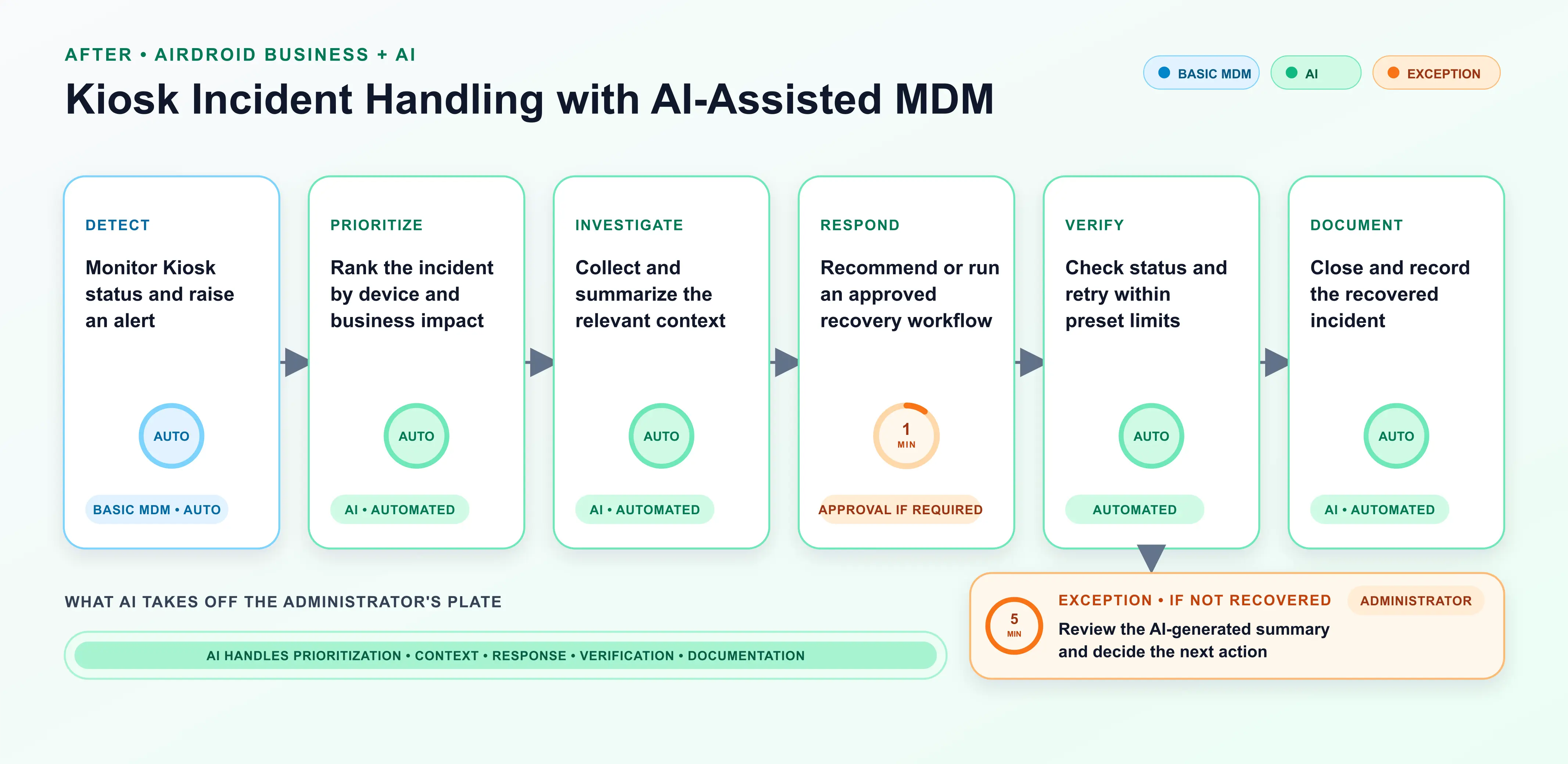
Once the AI workflow is in use, continue measuring results the same way as during the baseline period. For the same 10 pilot devices, record:
- Daily time spent reviewing device status and alerts, plus the total number and types of incidents during the observation period
- Incidents the AI handled from inspection through recovery, verification, and closure; incidents handed to an administrator; and failed workflow runs
- Time from detection to confirmed recovery, hands-on administrator time per incident, and incidents that required store contact or on-site support
- Labor and direct costs for on-site support, plus AI recovery attempts and successful recoveries
- AI false positives, incidents first reported by stores or users rather than the AI workflow, and monthly time spent maintaining connections, credentials, templates, and rules or reviewing failed runs
Track the administrator's hands-on time separately from the device's recovery time. Labor costs should include only the time spent reviewing information, making decisions, and taking action. Do not count the time AI spends waiting, repeating queries, or creating records as labor. That time still counts toward total recovery time until the device is working again.
After the pilot, the business should have:
- Added software and service fees for AI, including model usage
- Initial setup and testing time
- Monthly maintenance and oversight time
- Ongoing operating labor after AI is introduced, including time for human review, unresolved incident handling, internal handoffs, store communication, and on-site support
Compare Kiosk recovery workflow costs and workload before and after
Use the data from the two previous stages to compare daily operating labor and costs before and after AI is enabled. Keep the device group, observation period, and incident definition the same. Count only the costs and benefits that change because of AI. The result should show whether to expand, refine, or stop the pilot.
Calculate setup, testing, maintenance, and oversight labor by multiplying the recorded hours by the administrator's fully loaded hourly rate. Then calculate the first-year cost:
Annual quantifiable benefit = annual labor cost savings + lower device downtime costs + lower direct on-site support costs
First-year net benefit = annual quantifiable benefit - first-year incremental AI cost
In this example, the administrator spends 45 minutes a day on Kiosk inspections before AI is enabled. With AI, reviewing exceptions takes 15 minutes a day. That cuts monthly inspection and review time from 16.5 hours to 5.5 hours, saving about 132 hours a year. At $49.85 per hour, the annual labor saving is about $6,580.
Assume initial setup and testing take 30 hours, or about $1,496 in labor. Before counting savings from reduced downtime or on-site support, the combined cost of AI software and services, model usage, and annual maintenance and oversight must stay below about $5,084 for the first-year net benefit to remain positive.
Standard and Kiosk licenses are basic device management costs. If the business already pays for both, leave them out of the first-year incremental AI cost. If it does not, include the roughly $1,450 cost for 50 devices in the full project budget, but list it separately from the added AI costs. The same calculation works with the business's own device count, inspection time, administrator hourly rate, and vendor quote.
Use the Pilot to Expand, Refine or Stop
The pilot should measure whether AI removes administrator work and whether the savings from labor and reduced downtime cover the new expense. Based on the Kiosk results, the business has three options.
1Expand
Expand the workflow if the device data is reliable, administrator time spent on inspections and incidents has dropped significantly, AI has not caused more critical issues to be missed, and the actual quote still produces a positive net benefit. Roll it out from the 10 pilot devices to the remaining devices or other locations in stages. Do not add several new device management scenarios at once.
2Refine
If AI has reduced some work but still creates too many false positives, needs frequent administrator confirmation, recovers devices inconsistently, or takes too much time to maintain, keep the pilot at 10 devices. Adjust the alert thresholds, approval rules, recovery steps, and escalation logic, then test again with the same metrics and observation period.
3Stop
Stop the rollout when inspection and incident savings are small, ongoing supervision cancels out the benefit, or added AI costs still exceed the measurable return. Continue with basic MDM monitoring or rule-based automation instead.
This example does not use a universal 30% savings threshold. Instead, ask whether the labor and downtime savings from Kiosk inspections can consistently cover the added AI costs for the company's device fleet, team size, budget, and risk requirements.
4Conclusion
AI MDM makes sense for an SMB when it reduces real work in the company's own device environment. Start with reliable device data and a stable MDM setup. Then choose one frequent, low-risk workflow with an outcome the system can verify. Measure labor, recovery time, on-site support, and maintenance before and after the pilot.
Expand in stages only if savings from labor, on-site support, and downtime cover the full cost of enabling and using AI without causing more critical issues to be missed. Otherwise, keep refining the process or stay with basic MDM and rule-based automation.
AirDroid Business gives small and midsize businesses a practical path from reliable device management to AI-assisted operations. Teams can standardize enrollment, grouping, monitoring, alerts, Kiosk, and remote management with its device management solution for small businesses, then introduce AI workflows to reduce routine checks and speed up incident response. Start with 10 representative devices, measure labor, recovery time, and cost, and expand when the results justify it.
FAQs











Leave a Reply.