

AirDroid Cast
- Local & Remote Screen Casting(Your Game or Whole Screen)
- Android,iOS,Windows,Mac,TV Screen Mirroring
- Wireless & USB Connection
- Total Control Android & iOS beyond Your Finger
- Mirror Multiple Screen
For gamers who love the hybrid nature of Nintendo's console, the question often arises: can you play Nintendo Switch on TV to get the full big-screen experience?
The short answer is a resounding yes—provided you own the standard Nintendo Switch or the OLED model. Transitioning from the intimate handheld mode to the immersive TV mode (Console Mode) unlocks better visuals, improved ergonomics, and the joy of local multiplayer gaming.
In this comprehensive guide, we will explore exactly how to connect Nintendo Switch to TV, the technology behind it, and crucially, how to avoid the "bricking" risks associated with unsafe third-party accessories.
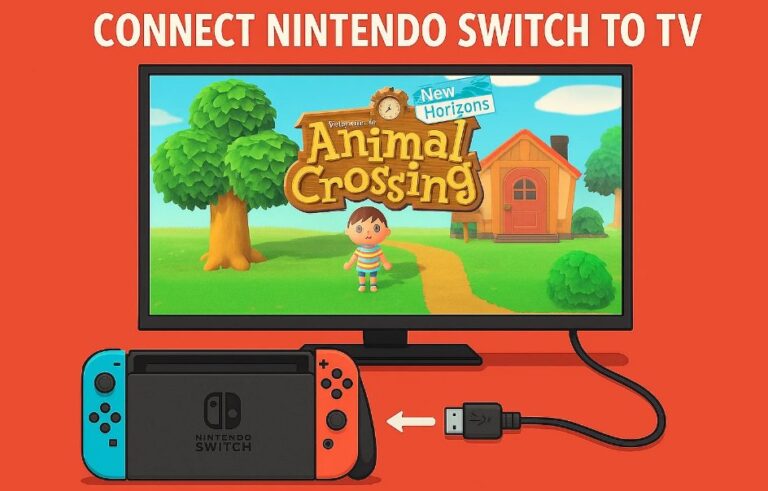
If you have just purchased a console, the safest and most reliable method to play Nintendo Switch on TV is using the official hardware included in the box. Nintendo has designed this ecosystem to be plug-and-play, ensuring that your battery and internal components remain safe.
To get started, ensure you have the official Nintendo Switch Dock, the original AC adapter, and an HDMI cable.
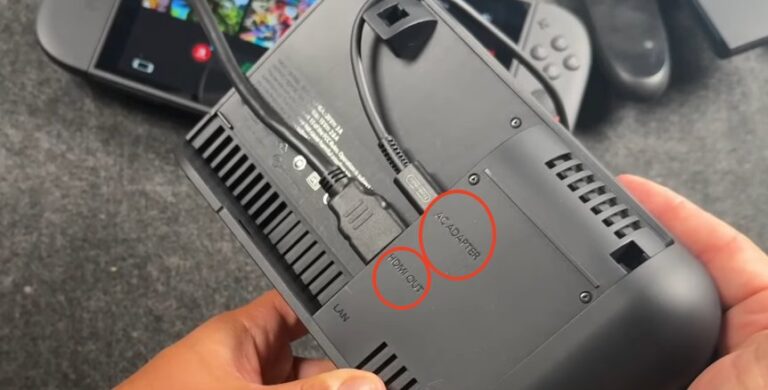

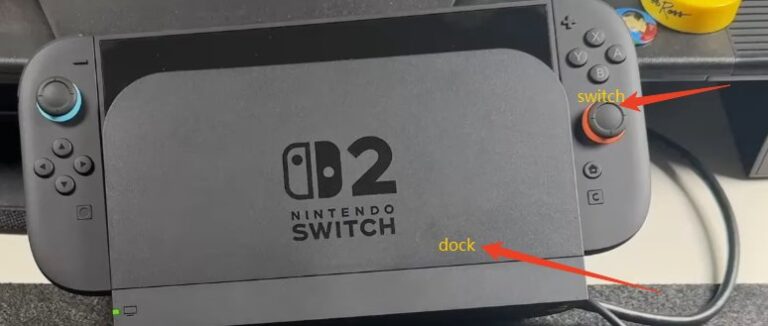

This YouTube Video provides more details, you can watch if need.
For users with the Nintendo Switch OLED model, the experience is slightly enhanced. The OLED Dock features a built-in LAN port (Ethernet), replacing the USB 3.0 port found inside the back cover of the original model.
If you play competitive games like Super Smash Bros. Ultimate or Splatoon 3, connecting via a wired LAN cable significantly reduces input lag and connection drops compared to Wi-Fi, providing a smoother competitive edge when you play Nintendo Switch on TV.
Many users wonder why a simple USB-C to HDMI adapter (like those used for laptops) often fails to work. To understand can you play Nintendo Switch on TV with generic adapters, we need to look at the underlying technology.
The Magic of USB-C Signal Conversion
The Nintendo Switch Dock is not just a piece of plastic; it contains a sophisticated circuit board. Its primary job is to handle USB-C signal conversion.
The Switch outputs a video signal via DisplayPort Alt Mode through its bottom USB-C port. The Dock's internal board captures this high-speed signal and actively converts it into standard HDMI format for your television. Simultaneously, it splits the data to manage the USB ports for your controllers or accessories.
The "Handshake": Power Delivery Protocols
Before the Switch agrees to output video, a strict "digital handshake" must occur. This is where many third-party solutions fail.
To activate TV mode, the Switch requires a specific power profile via the USB Power Delivery (USB-PD) protocol. The system must detect a charger capable of delivering 15V (Volts) high-voltage power. If the connected power source only provides standard 5V or 9V (common in phone chargers), the Switch will refuse to enter TV mode.
Furthermore, the system demands a power throughput of roughly 18W or higher to sustain high-performance graphics processing while charging the battery. If these specific voltage and amperage requirements aren't met during the handshake, the connection will simply fail.
When searching for can you play Nintendo Switch on TV without the official dock, you will find countless third-party adapters online. However, buyers must beware: using cheap, non-compliant docks can permanently damage or "brick" your console.
Why Does Bricking Happen?
The infamous "bricking" incidents, particularly following the 5.0.0 firmware update, were traced back to poor implementation of the USB-PD protocol in third-party docks.
Power Overload: The Switch's power management chips are sensitive. If a third-party dock's Power Management Integrated Circuit (PMIC) doesn't handle the 15V toggle correctly—or if it sends the wrong voltage at the wrong time—it can fry the USB-C controller chip inside the Switch.
Connector Issues: Some unlicensed docks lack the precise mechanical fit of the official version, leading to short circuits across the pins in the USB-C port.
While Nintendo doesn't actively block third-party accessories, their firmware updates often tweak how the system handles power protocols. If a third-party manufacturer hasn't updated their firmware to match, your console is at risk.
Does this mean you can never use a portable dock? Not necessarily. If you need to travel and want to play Nintendo Switch on TV in a hotel, you can choose high-quality third-party options by following these criteria:
1. Look for Trusted Brands with Firmware Support
Avoid generic, unbranded "10-in-1" hubs. Stick to reputable brands like Genki (e.g., Covert Dock) or JSAUX. These companies invest in reverse-engineering the official protocols correctly. Crucially, check if the manufacturer offers firmware updates for their dock. This is your insurance policy against future Nintendo system updates breaking compatibility.
Verify Power Specifications
Ensure the product explicitly supports the 15V/2.6A power profile. It should be designed specifically for the Switch, not just a generic MacBook hub.
Check Physical Design
Ensure the dock allows for proper airflow. The Switch heats up significantly in TV mode because the fan runs faster to cool the overclocked GPU. Avoid docks that cover the air intake vents on the back of the console.
A common source of confusion involves the handheld-only version of the console. Can you play Nintendo Switch Lite on TV?
The answer is No.
Unlike the standard and OLED models, the Nintendo Switch Lite lacks the necessary internal hardware. Specifically, it is missing the dedicated video processing chip required to output video through the USB-C port.
Hardware Limitation: This is not a software lock that can be "hacked" away. The physical silicon pathways for video output do not exist on the Lite's motherboard.
Avoid Scams: Any product claiming to connect a Switch Lite to a TV via USB-C is misleading. The only way to display a Lite on a screen is via clumsy external cameras or expensive, invasive hardware modifications (soldering required), which void your warranty immediately.
So, can you play Nintendo Switch on TV? Yes, it is a seamless process designed to transform your portable device into a powerful home console—as long as you are using the Standard or OLED model.
While the official Nintendo Dock remains the gold standard for safety and reliability, high-quality third-party options can offer portability for travelers, provided you research the brand and ensure they adhere to strict PD power protocols. Remember, the safety of your console relies on the quality of the power delivery; never risk your device with cheap, uncertified adapters.
Next Step: If you are planning to play competitive games on your TV, check your Dock setup today. If you have the original model, consider purchasing a USB-to-Ethernet adapter, or if you have the OLED model, plug in a LAN cable to instantly improve your connection stability.






Leave a Reply.