

Are you on the hunt for a tool that can remotely control Samsung phones? Or is your organization starting to deploy Galaxy units and tablets for your business fleet? Remote access is what you need.
For kiosks, tablets used as point-of-sale systems, or company phones, remote access is a must-have.
As part of an IT team, you need to be able to provide support, ensure security, and manage these devices efficiently.
However, Samsung remote access only goes so far, especially when it comes to handling multiple devices in a business setting. You’ve likely realized that, and that’s
In this guide, we’ll walk you through how Samsung’s native capabilities handle remote access. We’ll also go over where it falls short and how mobile device management (MDM) tools like AirDroid Business fill the gaps. If you're aiming for secure, hands-free, and scalable control over your Samsung fleet, this is the place to start.
ISamsung’s Built-In Remote Access: What It Offers (and What It Doesn’t) for Business
Samsung provides an official one-on-one customer support channel called Remote Service (or Remote Support). This feature is accessed directly through the Support section of the Samsung Members app, which is a comprehensive hub for diagnostics, community interaction, and user benefits.
a. Samsung Remote Service
Here’s how the Remote Service works: A user navigates to the Support section of the Samsung Members app (which may prompt the use of the companion Smart Tutor application), contacts a Samsung support representative, and grants the rep secure access to their device by providing a one-time PIN code.
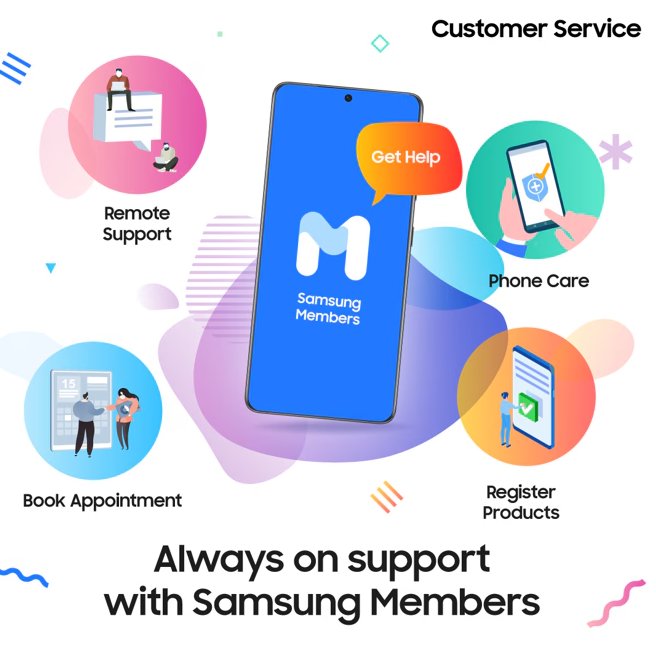
Once connected, the representative can view and control the device remotely to help with settings, troubleshoot bugs, or perform software updates.
This system is highly effective for individual consumer support. However, it is fundamentally unsuitable for enterprise-level device management, as the original text correctly highlights:
- Every session needs manual user acceptance. If your employee is off-site, not paying attention, or unable to unlock or reach the device, an IT team has no way to remotely intervene and begin a support session.
- There is no central management dashboard to administer devices in bulk, no way to lock a lost phone, nor to silently push updates or transfer files in the background without user interaction.
Samsung Remote Service is explicitly designed to help individual users, not IT teams manage a device fleet.
Limitations for Business Use:
- No unattended access (manual user permission is always required)
- No central control panel for fleet management
- Not built for bulk deployment, monitoring, or remote actions (like device locking or wiping)
b. Samsung Knox Remote Support
Samsung Knox takes things a step further. It’s a platform built with enterprise in mind, offering security, management, and remote support. Using Knox Manage or Knox Remote Support, businesses can provide remote troubleshooting for employee devices, like remote access samsung tablet.
Remote sessions happen over the air with better security, and some tasks, like viewing the screen or sending commands, can happen more smoothly compared to the standard Members app.
But here’s the catch: even Knox Remote Support has hurdles.
What’s good:
- Supports secure connections
- Built-in Samsung-level encryption
- Admins can view device status and perform some actions remotely
Where it still falls short:
- Sessions may still need approval or interaction from the user
- Complex enrollment and setup for larger teams
- Not designed for true unattended, 24/7 access
- Limited automation and proactive monitoring
- Not always ideal for large-scale, mixed-use environments
Knox is better, but still feels more reactive than proactive. For many businesses, it remains too limited, especially if you require full control over unattended devices, like controlling a Samsung phone remotely, or need to automate support across different time zones.
That’s why many IT teams and managed service providers turn to dedicated MDM platforms, such as AirDroid Business.
IIHow MDM Enhances Samsung Remote Access
MDM brings control, visibility, and flexibility to your Samsung deployment. Think of it as a remote control command center, with no approvals and no waiting required, just direct access when you need it.
Here’s how AirDroid Business takes Samsung remote access to the next level.
- Step 1.Integrate Samsung Devices with an MDM Platform
- Before you proceed, your Samsung devices must be enrolled in your AirDroid Business MDM dashboard. It supports several enrollment options, including Knox Mobile Enrollment, AE, Zero-touch, QR code and more.
Once enrolled, you get a live dashboard with real-time device status.
- Step 2.Implement Unattended Access for 24/7 Remote Control
- After device enrollment and granting related permissions. AirDroid Business allows IT admins to connect to any enrolled Samsung device at any time, without needing someone to tap “Accept” on the other side.
This offers major benefits for:- Field teams working odd hours
- Lost or stolen device scenarios
- Silent troubleshooting during work hours
- Kiosk or digital signage devices with no end-user present
Once unattended access is enabled, devices are always within reach. Your team can jump in, fix issues, push updates, or reboot remotely with no interruptions or downtime.
- Step 3.Master Remote Control Features via the MDM Dashboard
- With Samsung devices connected and unattended access live, your team can now access everything from a single control panel.
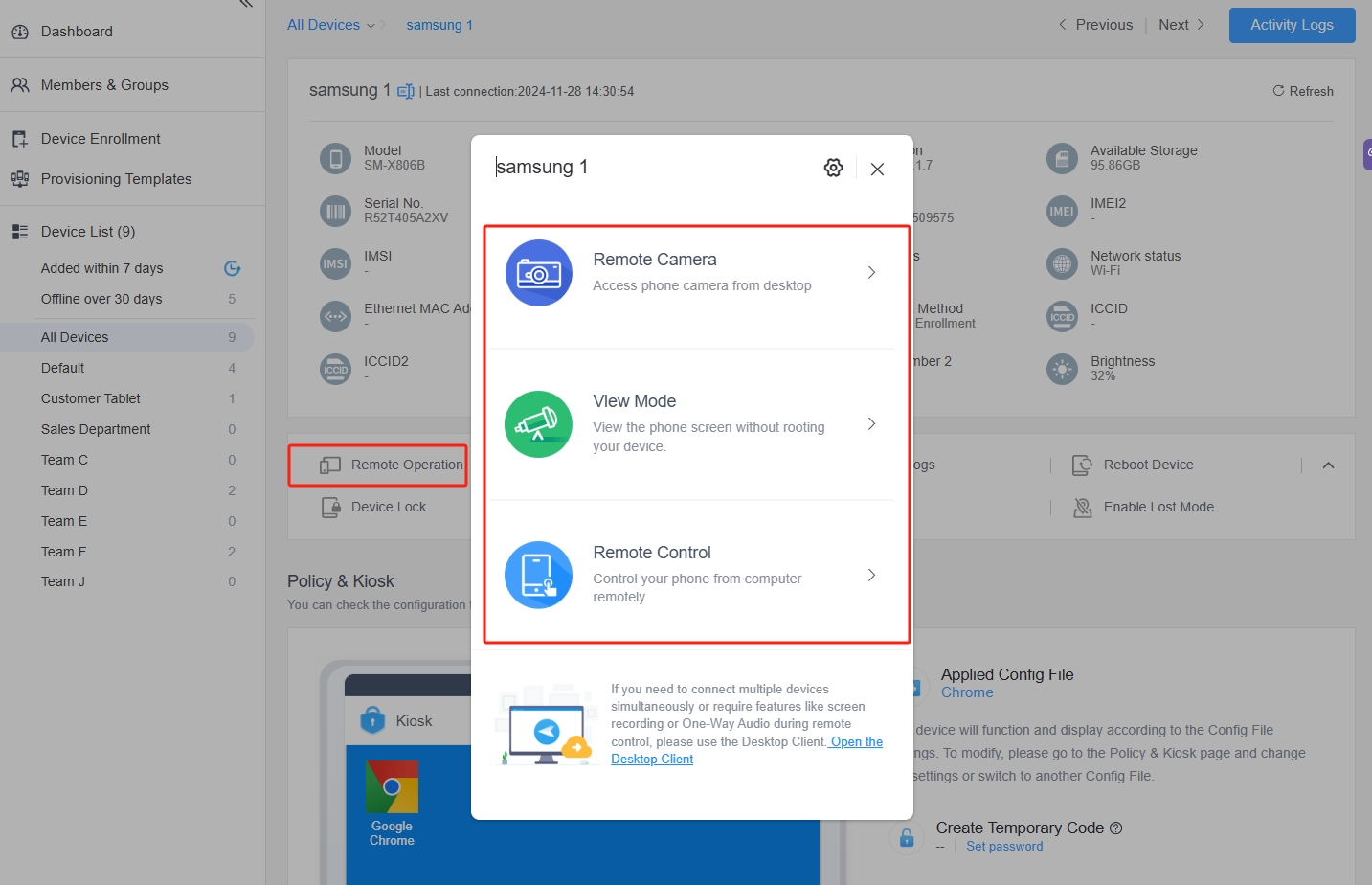

Here’s what you can do:
- Remote monitor: See device status, screen, battery, storage, and more.
- Screen control: View and interact with the device in real-time.
- File transfer: Send or pull files instantly from remote devices.
- Remote lock or wipe: Secure sensitive data if a device is lost or compromised.
- Reboot remotely: Restart frozen or unresponsive devices without touching them.
It’s like being there, without being there. For businesses managing frontline teams, warehouse scanners, or Android-based kiosks, or need to remote access a Samsung tablet, this is how you stay in control without chasing down devices.
IIIWhy MDM is the Ultimate Solution for Business Samsung Fleets
When you're running 50, 500, or even 5,000 Samsung devices, traditional tools can't keep up. You need centralized, intelligent, and secure control, and that’s where MDM is particularly useful.
a. Proactive Monitoring & Alerts: Beyond Simple Control
MDM platforms like AirDroid Business go beyond just remote accessing a Samsung Galaxy. You can set up automated alerts based on CPU load, battery status, location changes, or unusual activity.
If a device overheats, goes offline, or changes SIM cards, you know right away. This kind of monitoring is essential to maintain uptime and reduce risks across your fleet.
b. Ensure Security & Compliance for All Samsung Devices
Need to keep corporate data secure? AirDroid Business lets you push security policies, enforce password rules, limit app installations, and even restrict network access.
You can also set app whitelists or blacklists, schedule OS updates, and lock devices into kiosk mode.
That means your Samsung devices stay compliant, even in the hands of less tech-savvy users.
c. Efficiently Scale Remote Support for Any Samsung Deployment
Managing 10 devices is straightforward, whereas managing 500 is a far greater challenge.
MDM platforms are designed for scale. With role-based access, device grouping, and automation tools, you can support thousands of devices without growing your IT team.
Instead of chasing down devices one by one, your support team can respond faster, solve issues remotely, and reduce the need for on-site visits.
In turn, businesses cut costs and boost support efficiency, all while keeping control.
IVYour Next Steps for Advanced Samsung Remote Management
Samsung’s native tools work well for solo users. But for businesses that rely on Samsung devices every day, an MDM solution like AirDroid Business provides real control.
With unattended access, policy enforcement, remote screen sharing, and file transfers, everything can be seamlessly managed in one place.
Start your free trial of AirDroid Business today and see how simple remote Samsung device management can be.



Leave a Reply.