Device Management Features Explained: Stop Paying for Tools You'll Never Use
Are you looking for a complete guide to device management features?
I'm Maverick, and I've spent over 8 years helping IT teams deploy MDM solutions across industries ranging from retail to financial services. I've analyzed many device management implementations to understand what works, what doesn't, and what's just marketing fluff.
Here's the truth: Not all device management features are created equal. Some are absolute must-haves that'll save your IT team 20+ hours weekly. Others? Complete wastes of money that sound impressive but collect dust in your dashboard.
In this guide, you'll discover:
- Core features every MDM platform needs: The 6 essential capabilities that separate professional solutions from glorified app installers.
- Advanced features that actually matter: Kiosk mode, geofencing, and analytics that deliver measurable ROI.
- Industry-specific requirements: Which features your retail store, bank, or warehouse actually needs (spoiler: they're completely different).
- Top MDM software comparison: Real pricing, supported devices, and honest assessments of the leading platforms.
By the end of this guide, you'll know exactly which device management features your organization needs and which ones you can skip. No more paying for bloated software packages filled with features you'll never touch.
Ready to find the perfect MDM solution for your business? Let's dive in.
1What Are the Core Features of Device Management?
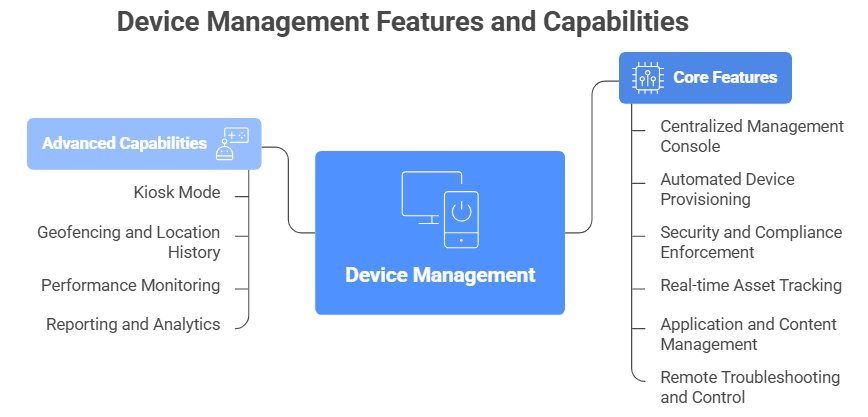
Device management platforms share several core features that make IT operations smoother and more secure. Here's what you need to know about each one.
1.1Centralized Management Console
A centralized management console is your command center for all devices. It's a single dashboard where you can view, control, and configure every device in your organization. Whether you're managing 10 devices or 10,000, you can view status, push settings, and troubleshoot issues without touching each device individually.
Without a central console, your IT team wastes hours jumping between tools and configuring devices one by one. With it? You can deploy settings to 50 devices in under 10 minutes instead of spending 25 hours doing it manually. That's a 96% time savings.
The best consoles show you everything at a glance, such as device status, battery levels, storage space, installed apps, and location. If your team needs a week of training just to navigate the interface, that's a red flag. You shouldn't need a PhD to manage your own devices.
1.2Automated Device Provisioning
Automated provisioning means your devices configure themselves the moment employees turn them on. No manual setup required.
Manual device setup wastes time and invites errors. Your IT team touches every device, installs apps individually, and configures settings one by one. It's exhausting.
With automated provisioning, you create one configuration profile and apply it to hundreds of devices automatically. When a new device connects to your network, it downloads everything—including company policies, apps, Wi-Fi credentials, and security settings. Employees simply sign in and start working.
Think about onboarding 50 new employees. Without automation, your IT team spends days on setup. With automated provisioning? Those 50 devices configure themselves while your team focuses on more important work (like finally fixing that printer that's been broken for three months).
1.3Security and Compliance Enforcement
This feature ensures every device meets your security standards automatically.
One unsecured device can compromise your entire network. That's not an exaggeration. Security enforcement prevents this by requiring protection on all managed devices before they can access your systems.
Here's how it works in real life. Let's say an employee leaves a laptop at a coffee shop (it happens more often than you'd think). IT receives an instant alert and can remotely wipe the device within minutes. Your company data stays safe, and you can breathe easy.
You can enforce these key security policies across all devices:
- Require strong passwords or biometric authentication
- Encrypt all stored data
- Block access to unauthorized apps or websites
- Automatically lock devices after periods of inactivity
1.4Real-time Asset Tracking
Asset tracking shows you exactly where every device is, in real time. Lost or 'forgotten' devices cost companies thousands every year. These costs add up fast, especially if you're managing hundreds of devices across multiple locations.
Asset tracking cuts those losses by up to 80%. The system alerts you immediately if a device goes offline for more than 24 hours. No more devices mysteriously disappearing into thin air (or into someone's home office permanently).
Here's a real example we see all the time: An employee reports a stolen laptop. IT checks the asset tracking system and discovers it's actually sitting at the employee's home. Problem solved in 30 seconds, no insurance claim needed.
The best part? Asset tracking typically pays for itself within the first year just from recovered devices alone.
1.5Application and Content Management
This feature locks kiosk devices to specific apps and controls what content they display.
Kiosk devices need tight control. Think retail displays, restaurant menus, or lobby check-in tablets. You don't want employees browsing social media or customers accessing settings. Application and content management keeps devices focused on their job.
Capabilities:
- Lock Devices to Single Apps: Run kiosk mode to prevent users from exiting your chosen app
- Push Required Apps Automatically: Deploy apps to all devices without manual installation
- Control Display Content: Schedule what content plays and when (like digital menu boards that switch from breakfast to lunch)
- Block Unauthorized Apps: Prevent employees from installing unapproved software
- Update Content Remotely: Change displayed information across all kiosks instantly
1.6Remote Troubleshooting and Control
Remote control lets IT access and fix devices from anywhere, without needing physical access. You don't need to ship devices back or walk employees through fixes over the phone. Just connect remotely and solve it yourself.
Common Use Cases:
- Fix software issues: Reinstall crashing apps in 5 minutes.
- Update settings: Push new Wi-Fi credentials to all devices remotely.
- Train employees: Screen-share to demonstrate new software features.
- Diagnose hardware: Check remotely if a device is slow due to a full hard drive.
2What Are the Advanced Capabilities of Modern Systems?
Modern MDM systems do way more than track devices. They automate IT workflows, strengthen security, and give you real-time insights into how your team uses their devices.
Instead of manually checking each device or fixing problems after they happen, you can set up automated rules that keep everything running smoothly. Here are the advanced features that make this possible:
Here are the advanced features that make modern MDM systems so powerful:
Kiosk Mode
Kiosk mode locks devices to specific apps, preventing users from accessing anything else. Think of it as putting your device on autopilot for one task only.
You'll see this everywhere: restaurant ordering tablets that only show the menu app, museum information kiosks that can't browse the internet, and warehouse inventory scanners locked to barcode software. Retail point-of-sale systems use kiosk mode to prevent cashiers from accidentally (or intentionally) opening other apps during transactions.
The biggest benefit? It prevents unauthorized app access and keeps employees laser-focused on their tasks. No more worrying about someone browsing social media on your customer-facing tablet.
Geofencing and Location History
Geofencing creates virtual boundaries around physical locations. When a device enters or exits these zones, the MDM system automatically triggers specific actions.
For example, your employees' phones can auto-enable Wi-Fi when they walk into the office building to save cellular data. You can also receive instant alerts if company devices leave authorized zones, which is super helpful for preventing theft or unauthorized use. Additionally, field teams become more accountable when you can verify that they actually visited client sites.
One important note: be transparent with employees about location tracking. Balance security needs with privacy trust by clearly communicating what you're monitoring and why.
Performance Monitoring
MDM systems track device health metrics in real time: battery life, storage usage, app crashes, and network connectivity. This isn't just data for data's sake.
IT teams can proactively fix issues before they disrupt productivity. If a device's battery degrades to 60% capacity, you'll know it's time for a replacement before an employee's phone dies during an important client call.
Here's a practical example: If 20 devices show low storage warnings, IT can remotely clear cache or uninstall unused apps across all of them in minutes. No need to collect devices or interrupt anyone's workday.
Reporting and Analytics
MDM platforms generate detailed reports on device usage, compliance status, security incidents, and app performance. You get a bird's-eye view of your entire mobile ecosystem.
The real benefit? Data-driven decisions for future device purchases, policy updates, or training needs. Analytics might reveal that 40% of employees never used a pre-installed app, saving your company thousands in licensing costs by removing it.
3Which Device Management Features Does Your Industry Need?
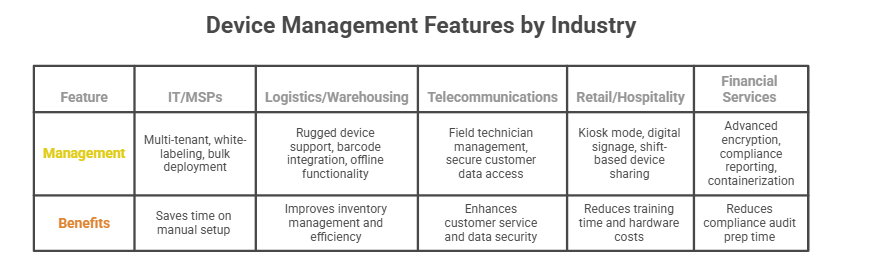
Different industries need different MDM features. A retail store managing tablets has completely different priorities than a bank protecting customer data. This section helps you identify which features matter most for your industry, so you don't pay for tools you'll never use.
IT and Managed Service Providers (MSPs)
Multi-Tenant Management, White-Labeling, and Bulk Deployment: MSPs need platforms that manage hundreds of client organizations from a single dashboard. Key features include automated client onboarding, white-labeling (your company's branding on the MDM interface), and bulk device deployment.
MSPs we've worked with save 10-15 hours weekly on manual setup tasks. An MSP managing 50 small business clients can deploy security policies to all 500 devices in under 30 minutes instead of configuring each individually.
You also need detailed reporting. Clients want ROI proof and compliance verification. Your MDM should generate reports showing security incidents, device health, and policy enforcement across all endpoints.
Logistics and Warehousing
Rugged Device Support, Barcode Integration, and Offline Functionality: Warehouse environments demand MDM supporting rugged tablets and scanners built to survive drops, dust, and extreme temperatures. Barcode scanner integration is essential for inventory management.
Offline functionality matters in warehouses with Wi-Fi dead zones. Devices must cache policies and continue working without constant internet connection.
Geofencing auto-clocks delivery drivers in at warehouses, eliminating manual time tracking errors.
Telecommunications
Field Technician Management and Secure Customer Data Access: Telecom companies deploy technicians to customer sites daily. Your MDM must support real-time location tracking and remote troubleshooting.
Security is critical. Technicians access sensitive customer data on-site, but that data shouldn't remain on devices afterward. Remote wipe capabilities protect information if a technician's tablet is stolen.
You'll also need robust app distribution for custom diagnostic tools and CRM apps pushed to field devices quickly.
Retail and Hospitality
Kiosk Mode, Digital Signage, and Shift-Based Device Sharing: Restaurants use kiosk mode to lock tablets to ordering apps, preventing servers from browsing social media during shifts. This reduces training time significantly.
Digital signage control lets retailers update promotional displays across multiple locations simultaneously. Your MDM should schedule content changes and monitor display functionality.
Device sharing saves retailers 40% on hardware costs. Shared tablets let multiple employees access during different shifts while MDM ensures each sees only their assigned apps and data.
Financial Services
Advanced Encryption, Compliance Reporting, and Containerization: Banks and investment firms face strict regulatory requirements. Your MDM must support advanced encryption, compliance reporting for SOC 2 and PCI-DSS, and detailed audit trails.
Containerization separates work data from personal data on employee devices. If compromised, only work data is wiped—not personal photos or contacts.
Audit trails log every access to customer financial data, required during compliance audits. Financial institutions reduce compliance audit prep from weeks to days using automated MDM reporting.
Remote wipe capabilities are critical. If an employee leaves or reports a stolen device, you can instantly erase corporate data without touching personal files.
4Which Device Management Software Should You Choose?
Knowing the fundamental functions of mobile device management system is a step towards making an informed choice from the plethora of software in the market. Otherwise, you may settle for software that’s costly, complex and has many features that you’ll barely use. During the selection, forget about a software’s popularity and go for what resonates with your needs. Find below the top-rated software based on customers’ feedback and IT experts:
Tools | Supported Devices | Pricing | User Interface and Usability Levels | Integration Capabilities | Technical Support and After-Sales Service |
|---|---|---|---|---|---|
 AirDroid Business | Android and window | 14 days free trial Basic$12 per device per year Standard price$21 per device per year Advanced Enterprise price$33 per device per year | Extremely simple and pleasant use | Yes | Yes |
| Scalefusion | Android/Windows/iOS/ macOS/Linux | Essentials$24/year/device Growth $42/year/device Business $60/year/device Enterprise$72/year/device No minimum order but billed annually | Simple but has a steep learning curve | Yes | Yes |
| Hexnode | Android/Windows/IOS FireOS/Vision OS/Mac | Pro$25.92/year/device Enterprise$38.88 /year/device Ultimate$56.16/year/device Ultracomputed on request Has per month and annual billing, a minimum of 15 devices | Extremely simple and pleasant use | Yes | Yes |
| ManageEngine | Windows/Android/MacOS/ iOS/IpadOS/Chrome OS | Computed on request | Plethora of features makes it fairly complex to use | Yes | Yes |
| Microsoft Intune | Android/Windows/iOS/ Linux/ChromeOS | Plan 1 $96/user/year Plan 2 $48/user/year, plus plan 1 pricing (add-on to plan 1) Suite $120/user/year, plus plan 1 pricing (add-on to plan 1) | Extremely simple and pleasant use | Yes | Yes |
1AirDroid Business
It's a leading MDM solution for Android and Windows devices that integrates all the core mobile device management features. It excels in features such as remote view, remote access, Kiosk, and remote managing of device groups. Unlike its competitors, Airdroid has a super easy and pleasant-to-use interface. Its competitive pricing and plans make it ideal for categories of people. Though it isn’t compatible with iOS devices, it possesses a robust ability for managing Android equipment and is thus excellent for Android devices.
2Scalefusion
Scalefusion is a famous MDM software for securing and managing endpoint security on Android, Windows, Linux, iOS, and macOS devices. Its ease of use, comprehensive MDM features, scalability, and flexibility make it ideal for managing single and group devices. Top of its features includes Kiosk mode for multi and single apps, whitelisting apps, blacklisting apps, and remote wiping ability. Though Scalefusion is fairly easy to use, it has a steep learning curve. Also, a more flexible billing plan could have made it much better.
3Hexnode
It's a versatile management software that’s compatible with Android, Windows, macOS, Apple TV, Android TV, Fire OS, and VisionOS devices. Hexnode makes it simple and secure to monitor, manage, and troubleshoot your mobile devices. That’s made possible by the core features such as Kiosk lockdown, geofencing, tracking, BYOD, and web filtering. Sadly, its minimum subscription plan is 15 devices.
4ManageEngine

ManageEngine is a device management system with over 60 IT enterprise tools to aid you in remote access, monitoring, and securing your devices. The MDM tool is compatible with Windows, Android, iOS, Chrome OS, tvOS, and iPodOS. Its practical functions include identity and access management, unified service management, unified endpoint management and security, IT operations management and observability, and security and information and event management. Sadly, it registers a fairly complex usability to some IT personnel.
5Microsoft Intune
Microsoft Intune is a cloud-anchored MDM solution provided by Microsoft for managing endpoint systems. Most companies using the Microsoft system prefer it for its seamless compatibility with Windows Autopilot, Microsoft 365, and AAD (Azure Active Directory). It stands out for cross-platform endpoint management, endpoint analytics, mobile app management, integrated endpoint security, and Microsoft configuration manager features. Note that Microsoft Intune has limited support for non-Microsoft endpoint devices.
5Conclusion
Thanks for reading our complete guide to device management features.
Here's what we covered: Device management platforms offer dozens of features, but only a handful truly matter for most businesses. Core capabilities like centralized management, automated provisioning, and security enforcement form the foundation. Advanced features like kiosk mode and geofencing add significant value for specific use cases. And industry-specific requirements determine which platform fits your unique needs.
So what should you do next?
If you're managing Android or Windows devices and want the most cost-effective solution with the easiest interface, we recommend starting with AirDroid Business. Our 14-day free trial lets you test every feature we discussed in this guide without spending a dollar.
Ready to simplify your device management? Start your free 14-day trial of AirDroid Business today. Our support team is standing by to help you get set up in under 30 minutes.
AirDroid Business - Most competitive and cost-effective device management solution for Android and Windows
AirDroid Business stands out for its easiest-use interface and most competitive price. It is well known for its remote control and access, kiosk, policy, and security features. It's considered one of the most worth-trying device management solutions in 2025.



Leave a Reply.