

With the growing pressure for a high-level remote access setup and hybrid work here to stay, employees need more reliable ways to access files remotely on corporate devices and servers.
Consumer tools were built for convenience, not control, so they often fall short in terms of security and compliance. In turn, you need more than Google Drive and good intentions. You need something built for security, visibility, centralized control, and scale.
Let’s break down how IT administrators can securely access files remotely at scale.
I. Why Consumer Remote Access Fails Business Security
Remote access sounds simple in theory: connect to the device, grab what you need, and disconnect. But when it comes to managing dozens or hundreds of endpoints, the cracks start to show. Here’s why typical tools fall short.
ABasic Consumer Methods (File Sharing/RDP)
Most people start with what they know, such as basic tools like Remote Desktop Protocol (RDP), email attachments, or cloud sync apps. They're quick to set up and work in a pinch, but they weren’t designed for IT governance.
The main issue is the lack of fine-grained access control. Anyone with the correct link or password can access sensitive files. There’s no audit trail, no user rules, and no way to track who accessed what and when. Once files are synced to personal devices, they leave the company’s secure environment, creating additional risk.
BVPN: Secure but Complex
VPNs are a step up. They encrypt your traffic and give you access to the corporate network from anywhere. But security at the network layer doesn’t equal security at the file level.
Even with a VPN, you can’t see what’s happening on the endpoint. Who’s accessing files? What are they copying? Did they just download a full client database onto their laptop? VPNs don’t answer these questions. They also require careful setup, firewall rules, device compatibility checks, and constant monitoring.
CThe Need for Centralized Control
Without centralized control, IT teams struggle to keep track of files. Documents can end up on personal laptops, scattered across email threads, or in forgotten synced folders.
For businesses in healthcare, finance, or any other regulated industry, unmanaged file access poses a significant risk. You need one place to manage everything. One dashboard and one system of truth. Consumer tools fall short here, which is where enterprise-grade solutions take over.
II. Enterprise-Grade Solutions for Accessing Files Remotely
Enterprise tools shift the focus from convenience to control. They’re not just about getting to files but about managing them, securing them, and maintaining visibility at all times.
ATraditional Solutions (FileCloud/SharePoint)
Platforms like SharePoint and FileCloud allow teams to collaborate on documents in real time. They’re useful for internal teams that need structured folders, version control, and document editing.
Yet, they still expect the user to be part of the workflow. In other words, someone has to upload the file, sync the right folder, or follow a process. IT can’t always intervene directly.
Need to pull logs from a device running in kiosk mode? Need to drop a patch file onto locked-down Android devices? These tools don’t help you there. They’re great for office work, not for device-level troubleshooting or real-world deployments.
BRemote Management Software – The IT Solution
Remote management platforms take a different approach. Rather than treating files as standalone documents, they treat devices as managed assets, giving IT teams control over where files reside and how they’re accessed.
With remote management software, IT teams can push or pull files directly from device storage, regardless of the device's location or who’s using it (or if anyone’s using it at all).
MDM (Mobile Device Management) delivers more than just remote access. It gives teams the ability to manage the entire device and access files from anywhere, from one place. MDM is the only solution category that combines file access, device control, and security together on one platform.
III. Remote File Management with MDM
MDM takes a centralized, role-based, policy-driven approach, and it works even when the user isn't involved.
Here’s what that looks like in action.
Unattended, Secure File Transfer and Management
Need to deploy a configuration file to 300 Android devices overnight? MDM handles it. Want to pull diagnostic logs from a device running in another country? No problem.
With unattended file transfer, IT teams can interact directly with the device’s internal storage. There’s no need for a user to be present, no app to open, and no file to manually send.
You can push APK files, PDFs, system logs, or custom JSON configs, all from the same browser dashboard. Files are encrypted in transit, and access is logged.
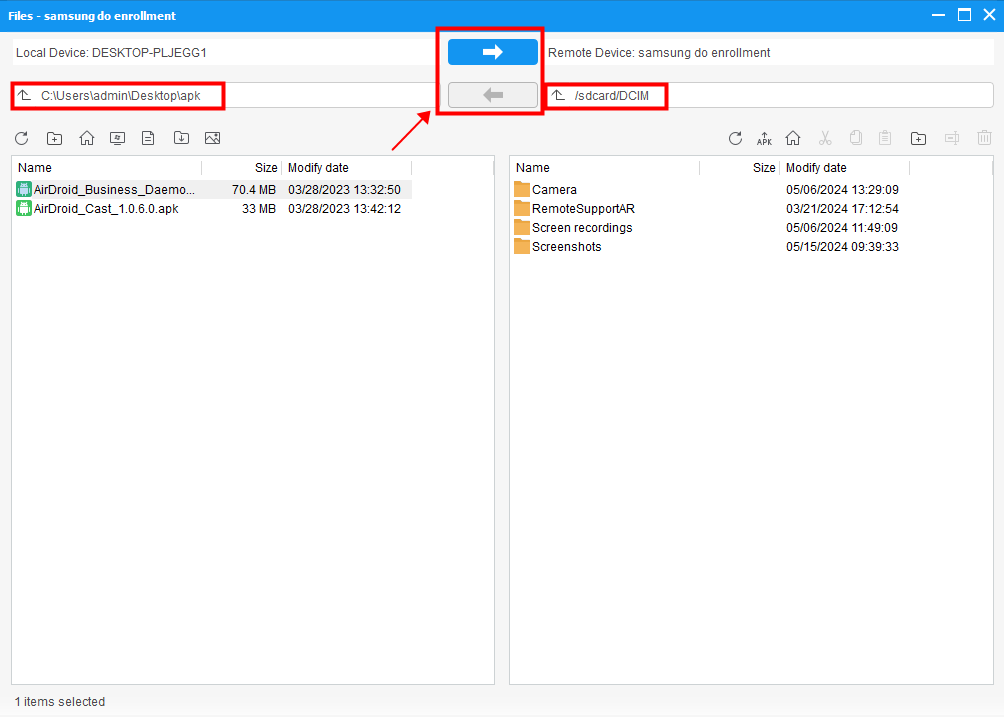
Remote access files on managed devices with AirDroid Business
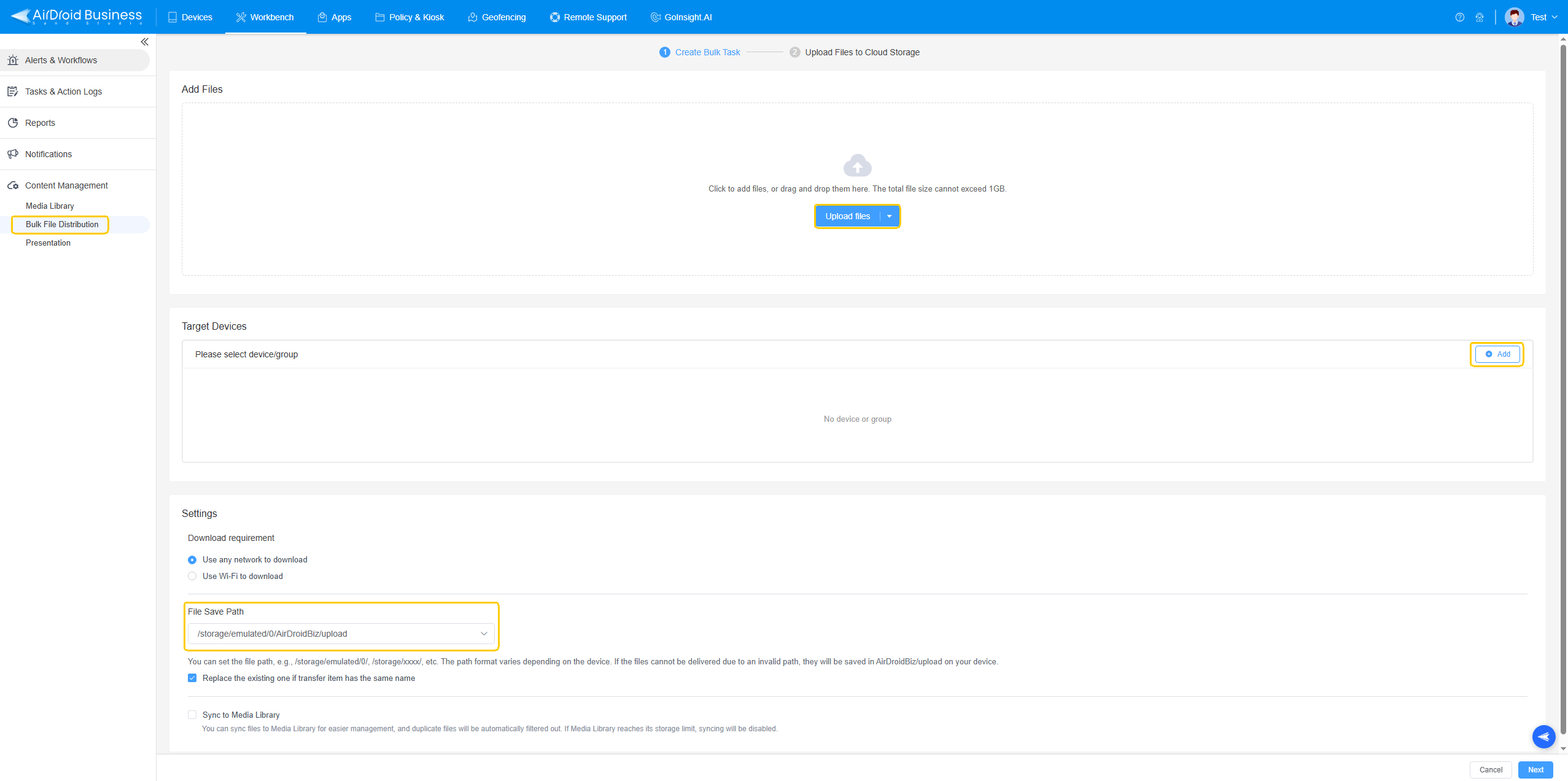
Bulk file distribution with AirDroid Business
Some real-world use cases:
- Pushing firmware updates to mobile terminals.
- Deploying digital signage content across dozens of locations.
- Retrieving usage logs from devices with remote file access running in kiosk mode.
- Syncing policy files or compliance documents to field devices.
Access like this transforms IT support, especially for remote, unattended, or user-restricted devices.
Granular Permissions and Centralized Access Control
When every action is managed from a single dashboard, you eliminate uncertainty. MDM platforms offer granular control over who can access which files, on which devices, and under what conditions.
When you need to give regional managers access to push training videos, but restrict developers to code-only deployments, role-based permissions make it simple to assign the right access to the right people.
Every file transfer is logged. Every access attempt is traceable. IT teams can audit file movements, set expiration rules, and revoke access instantly.
Imagine a retail chain that wants to update its promotional content on a weekly basis. Marketing uploads the files to the central dashboard, and only authorized staff in specific regions can push those files to the in-store tablets. Forget sharing links or using Dropbox. Everything is executed through a policy-controlled, centralized system. That’s how you achieve true control.
IV. Next-Generation Remote File Access is Centralized
For modern IT teams, to “access files remotely” goes beyond opening a folder from afar. It means secure delivery, real-time visibility, and absolute control, without relying on the end user.
MDM platforms offer what traditional tools can’t: true device-level access, enforced by security policies and centralized dashboards. Enterprises can then stay in control, stay compliant, and stay efficient.



Leave a Reply.